React-native-permissions: InValid RNPermission Camera on IOS
Bug
Invalid RNPermissions 'ios.permission.CAMERA'
should be one of: ()
Environment info
React Native Environment Info:
System:
OS: macOS High Sierra 10.13.6
CPU: (8) x64 Intel(R) Core(TM) i7-3635QM CPU @ 2.40GHz
Memory: 613.99 MB / 16.00 GB
Shell: 3.2.57 - /bin/bash
Binaries:
Node: 10.15.3 - /usr/local/bin/node
Yarn: 1.13.0 - /usr/local/bin/yarn
npm: 6.9.0 - /usr/local/bin/npm
SDKs:
iOS SDK:
Platforms: iOS 11.4, macOS 10.13, tvOS 11.4, watchOS 4.3
Android SDK:
API Levels: 14, 15, 16, 17, 18, 19, 20, 21, 22, 23, 24, 25, 26, 27, 28
Build Tools: 22.0.1, 23.0.1, 23.0.3, 25.0.2, 26.0.2, 26.0.3, 27.0.3, 28.0.0, 28.0.2, 28.0.3
System Images: android-18 | Google APIs Intel x86 Atom, android-23 | Google APIs Intel x86 Atom_64, android-27 | Google APIs Intel x86 Atom, android-27 | Google Play Intel x86 Atom, android-28 | Google Play Intel x86 Atom
IDEs:
Android Studio: 3.5 AI-191.8026.42.35.5791312
Xcode: 9.4/9F1027a - /usr/bin/xcodebuild
npmPackages:
react: 16.8.3 => 16.8.3
react-native: ^0.59.1 => 0.59.10
npmGlobalPackages:
create-react-native-app: 2.0.2
react-native-charts-wrapper: 0.5.1
react-native-cli: 2.0.1
react-native-gesture-handler: 1.1.0
react-native-git-upgrade: 0.2.7
React native info output:
Library version: Latest
The same thing is working fine on Android, but I am getting this issue on IOS only.
I tried "npx react-native-clean-project --remove-iOS-build --remove-iOS-pods" also
but nothing works.
Any help will be appreciated.
 al-shivani
All 25 comments
Hi @al-shivani, look at https://github.com/react-native-community/react-native-permissions/issues/344 and https://github.com/react-native-community/react-native-permissions/issues/343
 nicomontanari
on 16 Oct 2019
nicomontanari
on 16 Oct 2019
@al-shivani Publish your Podfile, please.
 zoontek
on 16 Oct 2019
zoontek
on 16 Oct 2019
platform :ios, '9.0'

use_frameworks!
target :'xyz' do

 # Your 'node_modules' directory is probably in the root of your project,
    # but if not, adjust the `:path` accordingly
    pod 'React', :path => '../../node_modules/react-native', :subspecs => [
      'Core',
      'CxxBridge', # Include this for RN >= 0.47
      'DevSupport', # Include this to enable In-App Devmenu if RN >= 0.43
      'RCTText',
      'RCTNetwork',
      'RCTImage',
      'RCTLinkingIOS',
      'RCTWebSocket', # Needed for debugging
      'RCTAnimation', # Needed for FlatList and animations running on native UI thread
      # Add any other subspecs you want to use in your project
    ]
    # Explicitly include Yoga if you are using RN >= 0.42.0
 pod 'yoga', :path => '../../node_modules/react-native/ReactCommon/yoga'
 pod 'RNSVG', :path => '../../node_modules/react-native-svg'
 pod 'RNVectorIcons', :path => '../../node_modules/react-native-vector-icons'
 pod 'RNVectorIcons', :path => '../../node_modules/react-native-vector-icons'
 pod 'RNI18n', :path => '../../node_modules/react-native-i18n'
 pod 'react-native-netinfo', :path => '../../node_modules/@react-native-community/netinfo'
 pod 'RNGestureHandler', :path => '../../node_modules/react-native-gesture-handler'
 pod 'react-native-webview', :path => '../../node_modules/react-native-webview'
 pod 'RNCAsyncStorage', :path => '../../node_modules/@react-native-community/async-storage'

  pod 'RNPermissions', :path => '../../node_modules/react-native-permissions'
  permissions_path = '../../node_modules/react-native-permissions/ios'
  pod 'Permission-Camera', :path => '../../node_modules/react-native-permissions/ios/Camera.podspec'


pod 'AFNetworking', '3.0.0'
pod 'FBSDKCoreKit' ,'4.37.0'
pod 'FBSDKShareKit','4.37.0'
pod 'FBSDKLoginKit','4.37.0'
pod 'Google/SignIn'
pod 'SVProgressHUD'
pod 'JSONModel','1.8.0'
pod 'SDWebImage'
pod 'AFOAuth2Manager', '~> 3.0'
pod 'JVFloatLabeledTextField'
pod 'PNChart'
pod 'Firebase/Core'
pod 'Firebase/Invites'
pod 'Firebase/Crash'
pod 'Firebase'
pod 'Firebase/Messaging'
pod 'Firebase/AdMob'
pod 'NUIParse'
pod ‘NUI’
pod 'GoogleAPIClientForREST/Drive'
pod 'GoogleIDFASupport'
pod 'GoogleAnalytics'
pod 'Fabric'
pod 'Crashlytics'
pod 'Branch', '0.23.5'

# Third party deps podspec link
 pod 'DoubleConversion', :podspec => '../../node_modules/react-native/third-party-podspecs/DoubleConversion.podspec'
 pod 'glog', :podspec => '../../node_modules/react-native/third-party-podspecs/glog.podspec'
 pod 'Folly', :podspec => '../../node_modules/react-native/third-party-podspecs/Folly.podspec'

end
This is due to use_frameworks! which works terribly with Cocoapods in RN. Only link core (RNPermissions pod) and try this workaround: https://github.com/react-native-community/react-native-permissions/issues/348#issuecomment-541423154
zoontek
on 16 Oct 2019
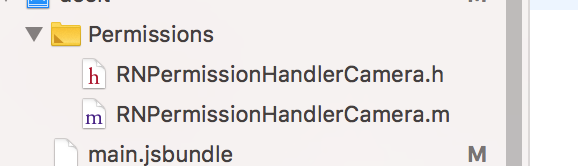
Hi @zoontek
I followed your comment but still getting the same issue.

al-shivani
on 16 Oct 2019
@al-shivani Then unlink the core too and drag and drop RNPermissions.m & RNPermissions.h in the same folder.
zoontek
on 16 Oct 2019
I was having this same issue on RN 0.61.2 with use_frameworks!. I was only using the motion permissions, so I added the 4 files to a Permissions folder:
RNPermissions.m
RNPermissions.h
RNPermissionHandlerMotion.m
RNPermissionHandlerMotion.h
and that fixed it
 dillonhafer
on 16 Oct 2019
dillonhafer
on 16 Oct 2019
@dillonhafer It's a workaround, I'll add it to the README until I find a way to resolve these headers when using use_frameworks! 😕
zoontek
on 16 Oct 2019
Hi @zoontek
This works like a charm, thank you so much for your time & efforts.
al-shivani
on 17 Oct 2019
After many days and countless build errors, this is finally working (RN 59)! If you've manually linked, remember to unlink that .a file in Build Phases -> Link Binary With Libraries or else you'll get
ld: 2 duplicate symbols for architecture x86_64
clang: error: linker command failed with exit code 1 (use -v to see invocation)
 computerjazz
on 4 Nov 2019
computerjazz
on 4 Nov 2019
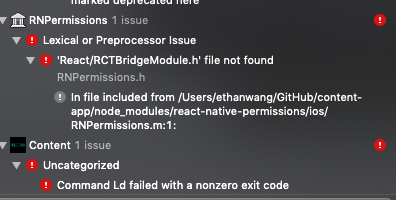
@zoontek does this workaround work for RN 0.61? I tried it but got this error:
 ethanyuwang
on 26 Nov 2019
ethanyuwang
on 26 Nov 2019
@al-shivani Then unlink the core too and drag and drop
RNPermissions.m&RNPermissions.hin the same folder.
Hi, may i ask what do you mean by "unlink the core too"? sorry newbie here.
 MariShielaFurio
on 26 Nov 2019
MariShielaFurio
on 26 Nov 2019
i fixed mine by
- removing : RNPermission in libraries also in Build Phase.
+ Adding : (your plug in) for me RNCalendarEvents in libraries
Note : don't add RNCalendarEvents.a in build phase.
i hope it helps.
MariShielaFurio
on 26 Nov 2019
I have run all these suggestions and I'm still getting this issue.
React Native 0.59
I'm using use_unimodules!, not use_frameworks!
 StevenHarlow
on 8 Dec 2019
StevenHarlow
on 8 Dec 2019
@StevenHarlow that's Expo, you might look to them for support.
I temporarily had unimodules integrated in to my app just now and I can say react-native-permissions still worked, so I'm not sure why it didn't work for you but it's a complicated integration.
Either way, it didn't break react-native-permissions so I don't think it's a problem with this module
 mikehardy
on 8 Dec 2019
mikehardy
on 8 Dec 2019
@computerjazz I have same issue with you. Which .a file did you unlink?
 emil-alexandrescu
on 30 Dec 2019
emil-alexandrescu
on 30 Dec 2019
I was having this same issue on
RN 0.61.2withuse_frameworks!. I was only using the motion permissions, so I added the 4 files to aPermissionsfolder:RNPermissions.m RNPermissions.h RNPermissionHandlerMotion.m RNPermissionHandlerMotion.hand that fixed it
Fixed for me using camera permission. Thank you
 Marcos1305
on 8 Jan 2020
Marcos1305
on 8 Jan 2020
Hello, I am facing the same issue but I'm not using cocoapods in my project, is it possible to fix without pods? Could someone help me please?
 pedromelo98
on 21 Jan 2020
pedromelo98
on 21 Jan 2020
@pedromelo98 I don't think avoiding pods is viable at this point as RN60+ is entirely pods based and has been out more than half a year - similar to AndroidX at some point one has to move as all new development (and troubleshooting) in modules like this is based on it. If it's not possible at all I'm not sure what to do except maybe try the last major version of this package (1.x)
mikehardy
on 21 Jan 2020
@pedromelo98 You can drag and drop files, like @dillonhafer said.
zoontek
on 21 Jan 2020
@zoontek @mikehardy thanks for the help guys, I will try to migrate to pods, it is an old project that was using rn 0.58 I think is better if I just upgrade everything.
pedromelo98
on 21 Jan 2020
If it's from back then you may not be aware of upgrade-helper -- https://react-native-community.github.io/upgrade-helper/ - I don't think there is anything I can say that will make the final jump from rn0.59.10 to rn0.60.0 easier, but using upgrade helper step by step does make things much easier than it would be. Good luck (and after 0.60 it's really easy, 60-61-62 were all small project changes in my opinion, but with good features)
mikehardy
on 21 Jan 2020
@mikehardy Thanks a lot! It will help me!
pedromelo98
on 21 Jan 2020
I was having this same issue on
RN 0.61.2withuse_frameworks!. I was only using the motion permissions, so I added the 4 files to aPermissionsfolder:RNPermissions.m RNPermissions.h RNPermissionHandlerMotion.m RNPermissionHandlerMotion.hand that fixed it
do you have the project structures of the permissions folder ?
 kukuandroid
on 14 Dec 2020
kukuandroid
on 14 Dec 2020
@pedromelo98 You can drag and drop files, like @dillonhafer said.
do you have the project structure of the permissions folder ?
kukuandroid
on 14 Dec 2020
Related issues
 bithavoc
·
22Comments
bithavoc
·
22Comments
 ppdbxdawj
·
18Comments
ppdbxdawj
·
18Comments
 algera
·
44Comments
algera
·
44Comments
 vvsevolodovich
·
24Comments
vvsevolodovich
·
24Comments
 WrathChaos
·
25Comments
WrathChaos
·
25Comments
Most helpful comment
@al-shivani Then unlink the core too and drag and drop
RNPermissions.m&RNPermissions.hin the same folder.