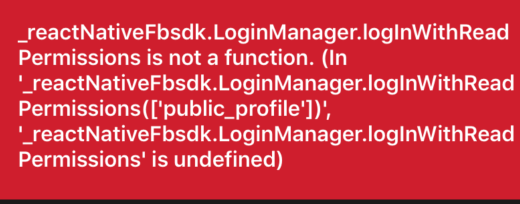
React-native-fbsdk: LoginManager.logInWithReadPermissions is not a function
 alikarani
All 57 comments
@aliasgharkarani downgrade your react-native-fbsdk to 0.8.0 from 0.10.0
yarn remove react-native-fbsdk
then
yarn add [email protected]
I believe you use yarn or use the npm equivalent.
 herlarb
on 19 Jun 2019
herlarb
on 19 Jun 2019
please try loginWithPermissions instead. the other two methods are deprecated (loginWithReadPermissions, loginWithPublishPermissions)
 redcancode
on 19 Jun 2019
redcancode
on 19 Jun 2019
@herlarb I tried downgrading now it doesn't give me any errors but the build continues to fail...
 ThiagoLovatine
on 19 Jun 2019
ThiagoLovatine
on 19 Jun 2019
@ThiagoLovatine if you downgrade react-native-fbsdk to below 0.10.0 you must downgrade the native FBSDK to 4.42.0 or below. i suggest staying with react-native-fbsdk 0.10.0 and solving all the issues there. anything below that version is too old 🙂
redcancode
on 19 Jun 2019
Ok im on 0.10.10 with FBSDK iOS 5.0.2, still the same, doesn't build, doesn't show any errors.
ThiagoLovatine
on 19 Jun 2019
@ThiagoLovatine if it doesn't build there should be an error. can you reopen your app in xcode, clean the build folder (Build / Clean build folder) and try building in xcode? errors should come up that way for sure
redcancode
on 19 Jun 2019
Sorry forgot to clean the cache, yes im using xcode.
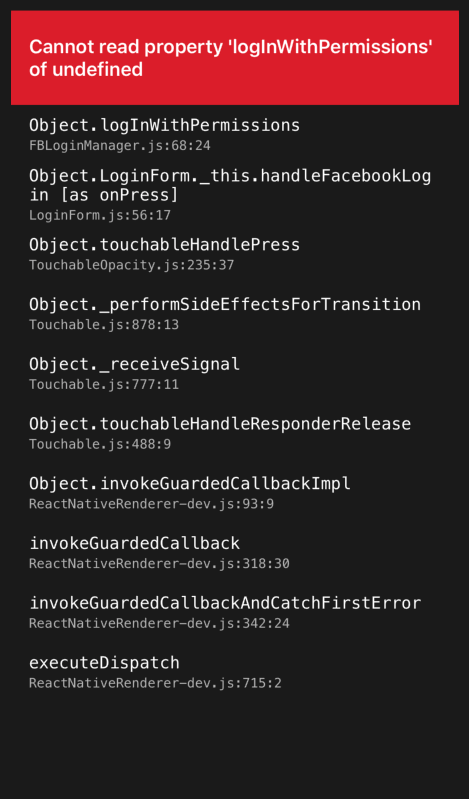
I can build now, no errors, but when I click on the login button I get this:
ThiagoLovatine
on 19 Jun 2019
@ThiagoLovatine that still looks like an incorrect native FBSDK version is being used. are you using pods or added this library as a project to your ios project?
redcancode
on 19 Jun 2019
I added the library as a project, I downloaded it here: https://github.com/facebook/facebook-objc-sdk/releases (5.0.2)
ThiagoLovatine
on 19 Jun 2019
@ThiagoLovatine that should be okay then. can you check this file in your project? node_modules/react-native-fbsdk/ios/RCTFBSDK/login/RCTFBSDKLoginManager.m. can you paste line 74 from that file?
redcancode
on 20 Jun 2019
I also deleted node_modules and installed it again with yarn.

console.log(LoginManager);

ThiagoLovatine
on 20 Jun 2019
@ThiagoLovatine that looks perfect. i believe your issue is different than this one. i assume you don't use pods and add every library as a project to your project and you don't have RCTFBSDK.xcodeproj added to your project.
if you look at your error message Cannot read property logInWithPermissions of undefined below that it says FBLoginManager.js:68:24 which means the error came from line 68 in that file. if you look at that line here https://github.com/facebook/react-native-fbsdk/blob/0.10.0-stable/js/FBLoginManager.js#L68 then you will see that LoginManager is undefined, which if you check on top the file see that it's the actual native module.
can you open a new issue about RCTFBSDK.xcodeproj not being added after react-native link? i will take a look at that later. so far i always installed it as a pod.
redcancode
on 20 Jun 2019
With cocoapods I got this:
error: Build input file cannot be found: '/Users/thiagolovatine/apps/FoodParkCarioca/node_modules/react-native-fbsdk/ios/RCTFBSDK/core/RCTFBSDKInitializer.m'
I deleted the reference from the project, and now I got this:

ThiagoLovatine
on 20 Jun 2019
for me logInWithPermissions is worked. thanks. notice the capital.
 4hZhQiBHl4jRsshhb2Yo
on 20 Jun 2019
4hZhQiBHl4jRsshhb2Yo
on 20 Jun 2019
I found the problem, I didn't see the code to add in AppDelegate.m:
import and the rest of the code after that:
https://developers.facebook.com/quickstarts/2069367446694544/?platform=ios
After adding this code it worked, with Pod and without Pods.
react-native-fbsdk version 0.10.0
FBSDK version 5.0.2
Thanks for the help!
ThiagoLovatine
on 20 Jun 2019

Still getting this.
alikarani
on 20 Jun 2019
@aliasgharkarani I think you have a typo in loginWithPermissions method, it should be logInWithPermissions.
 ausaquiVS
on 21 Jun 2019
ausaquiVS
on 21 Jun 2019
Down Gradding to 0.8.0 Fixed for me.
alikarani
on 24 Jun 2019
I was having the same issue, but on android, turns out that was a cache problem (weird). I just delete the dir ~/Library/Caches/typescript/3.5/node_modules/@types/react-native-fbsdk (path can diff a little) this solved the issue for me.
 neuberoliveira
on 24 Jun 2019
neuberoliveira
on 24 Jun 2019
I was having the same issue, but on android, turns out that was a cache problem (weird). I just delete the dir
~/Library/Caches/typescript/3.5/node_modules/@types/react-native-fbsdk(path can diff a little) this solved the issue for me.
Indeed, the types of react-native-fbsdk are not corresponding to the 0.10.0 version but only the 0.8.0.
 baudev
on 25 Jun 2019
baudev
on 25 Jun 2019
I have same problem :(
I use official doc but don't working
"react-native-fbsdk": "^0.10.1",
Pre-downloading: FBSDKCoreKit from https://github.com/facebook/facebook-objc-sdk.git
Pre-downloading: FBSDKLoginKit from https://github.com/facebook/facebook-objc-sdk.git
Pre-downloading: FBSDKShareKit from https://github.com/facebook/facebook-objc-sdk.git
Downloading dependencies
Installing FBSDKCoreKit (5.1.1)
Installing FBSDKLoginKit (5.1.1)
Installing FBSDKShareKit (5.1.1)
Please help
 jonathanmachado
on 26 Jun 2019
jonathanmachado
on 26 Jun 2019
Are you using pods @jonathanmachado ?
ausaquiVS
on 26 Jun 2019
yes but not working, I try to link libray librctFBSDK.a but broken build iOS, only iOS don't working
jonathanmachado
on 26 Jun 2019
what it is failing, installing pod dependencies?
ausaquiVS
on 26 Jun 2019
Nop I have same error after call LoginManager.logInWithReadPermissions in react native, Promise is rejected.
jonathanmachado
on 26 Jun 2019
logInWithReadPermissions is a method from react-native-fbsdk version 0.8.0, you should use instead logInWithPermissions since you have react-native-fbsdk version 0.10.0.
ausaquiVS
on 26 Jun 2019
By the way, You shouldn't link librctFBSDK.a if you are using react-native-fbsdk version 0.10.0 and FBSDK version 5.0.2. Unlink it, if you don't want a broken build.
ausaquiVS
on 26 Jun 2019
Sure I remove.
May be I have a problem vinculate sdk in AppDelegate.m?
`/**
- Copyright (c) Facebook, Inc. and its affiliates.
* - This source code is licensed under the MIT license found in the
- LICENSE file in the root directory of this source tree.
*/
import "AppDelegate.h"
import
import
import
import
import
import
@implementation AppDelegate
(BOOL)application:(UIApplication *)application didFinishLaunchingWithOptions:(NSDictionary *)launchOptions
{[[FBSDKApplicationDelegate sharedInstance] application:application
didFinishLaunchingWithOptions:launchOptions];RCTBridge *bridge = [[RCTBridge alloc] initWithDelegate:self launchOptions:launchOptions];
RCTRootView *rootView = [[RCTRootView alloc] initWithBridge:bridge
moduleName:@"EscuelaPlus"
initialProperties:nil];rootView.backgroundColor = [[UIColor alloc] initWithRed:1.0f green:1.0f blue:1.0f alpha:1];
self.window = [[UIWindow alloc] initWithFrame:[UIScreen mainScreen].bounds];
UIViewController *rootViewController = [UIViewController new];
rootViewController.view = rootView;
self.window.rootViewController = rootViewController;
[self.window makeKeyAndVisible];
return YES;
}(NSURL *)sourceURLForBridge:(RCTBridge *)bridge
{if DEBUG
return [[RCTBundleURLProvider sharedSettings] jsBundleURLForBundleRoot:@"index" fallbackResource:nil];
else
return [[NSBundle mainBundle] URLForResource:@"main" withExtension:@"jsbundle"];
endif
}
(BOOL)application:(UIApplication *)application openURL:(nonnull NSURL *)url options:(nonnull NSDictionary
*)options {
return [RNGoogleSignin application:application
openURL:url
sourceApplication:options[UIApplicationOpenURLOptionsSourceApplicationKey]
annotation:options[UIApplicationOpenURLOptionsAnnotationKey]];
}(void)applicationDidBecomeActive:(UIApplication *)application {
[FBSDKAppEvents activateApp];
}(BOOL)application:(UIApplication *)application openURL:(NSURL *)url sourceApplication:(NSString *)sourceApplication annotation:(id)annotation {
return [[FBSDKApplicationDelegate sharedInstance] application:application
openURL:url
sourceApplication:sourceApplication
annotation:annotation]|| [RNGoogleSignin application:application openURL:url sourceApplication:sourceApplication annotation:annotation]
|| [RCTLinkingManager application:application openURL:url sourceApplication:sourceApplication annotation:annotation]
|| [[FBSDKApplicationDelegate sharedInstance] application:application openURL:url sourceApplication:sourceApplication annotation:annotation];
}
@end
`
jonathanmachado
on 26 Jun 2019
My pod file
`
target 'TestApp' do
pod 'GoogleSignIn'
pod 'FBSDKCoreKit'
pod 'FBSDKLoginKit'
pod 'FBSDKShareKit'
pod 'FacebookSDK'
end
`
jonathanmachado
on 26 Jun 2019
mmm, what version did you get installed? because you are not specifying FBSDK version there
ausaquiVS
on 26 Jun 2019
Installing Bolts (1.9.0)
Installing FBSDKCoreKit (4.40.0)
Installing FBSDKLoginKit (4.40.0)
Installing FBSDKMarketingKit (4.38.0)
Installing FBSDKShareKit (4.40.0)
Installing FacebookSDK (4.38.0)
Installing GTMSessionFetcher (1.2.2)
Installing GoogleSignIn (4.4.0)
Installing GoogleToolboxForMac (2.2.1)
jonathanmachado
on 26 Jun 2019
You recommend one specific?
jonathanmachado
on 26 Jun 2019
It doesn't look ok, you are using an outdated version for react-native-fbsdk 0.10.0, use the one the library specifies in the react-native-fbsdk.podspec file in node_modules/react-native-fbsdk.
ausaquiVS
on 26 Jun 2019
Adding this line pod 'react-native-fbsdk', :path=> '{relative_path}/node_modules/react-native-fbsdk' to the Podfile
ausaquiVS
on 26 Jun 2019
Installing FBSDKCoreKit (5.0.2)
Installing FBSDKLoginKit (5.0.2)
Installing FBSDKShareKit (5.0.2)
Installing GTMSessionFetcher (1.2.2)
Installing GoogleSignIn (4.4.0)
Installing GoogleToolboxForMac (2.2.1)
Installing React (0.11.0)
With pod 'react-native-fbsdk', :path => '../node_modules/react-native-fbsdk'
jonathanmachado
on 26 Jun 2019
Ok, are you getting the build? Remember to use logInWithPermissions.
ausaquiVS
on 26 Jun 2019
Sorry my build failed
'React/RCTConvert.h' file not found in node_modules/react-native-fbsdk/ios/RCTFBSDK/login/RCTConvert+FBSDKLogin.m
jonathanmachado
on 26 Jun 2019
Do you have in ios/Libraries this file RCTFBSDK.xcodeproj added?
ausaquiVS
on 26 Jun 2019
Nice @ausaquiVS thanks you save my day.
My Pods file.
`
pod 'GoogleSignIn'
pod 'react-native-fbsdk', :path => '../node_modules/react-native-fbsdk'
rn_path = '../node_modules/react-native'
pod 'yoga', path: "#{rn_path}/ReactCommon/yoga"
pod 'React', path: rn_path, subspecs: [
'Core',
'CxxBridge',
'DevSupport',
'RCTActionSheet',
'RCTAnimation',
'RCTGeolocation',
'RCTImage',
'RCTLinkingIOS',
'RCTNetwork',
'RCTSettings',
'RCTText',
'RCTVibration',
'RCTWebSocket',
]
pod 'Folly', :podspec => "#{rn_path}/third-party-podspecs/Folly.podspec"
post_install do |installer|
installer.pods_project.targets.each do |target|
if target.name == "React"
target.remove_from_project
end
end
end
`
jonathanmachado
on 26 Jun 2019
@redcancode thanks, I resolve😄
 yazhengwang
on 28 Jun 2019
yazhengwang
on 28 Jun 2019
hi, im having the same issue, Cannot read property 'logInWithPermissions' of undefined i downloaded the sdk and drag in Frameworks, also tried to install using the POD. got an error .
also, following docs on https://developers.facebook.com/docs/ios/getting-started/.

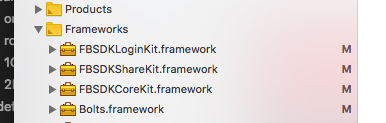
"react-native-fbsdk": "^0.10.1",
"react-native": "^0.59.8",
 Ethan0007
on 1 Jul 2019
Ethan0007
on 1 Jul 2019
@Ethan0007 you should make sure the verison of FBSDKCoreKit / FBSDKLoginKit
and FBSDKShareKit
yazhengwang
on 1 Jul 2019
@yazhengwang I'm using FacebookSDKs-iOS-4.40.0. what version should i use?
also when adding the configuration in AppDelegate.m it will display warning like this:

which specific installation guide should i follow?
I also tried https://github.com/facebook/facebook-objc-sdk/releases got same error.
Ethan0007
on 1 Jul 2019
@Ethan0007 i have updated 0.5.10, it's ok
yazhengwang
on 4 Jul 2019
Sir, can you please send me the exact guide on how can i do the configuration? Im still getting the same error even if i updated the version, i used manual and pod setup but no luck.
Thanks..
Ethan0007
on 4 Jul 2019
@Ethan0007
"react-native-fbsdk": "^0.10.1",
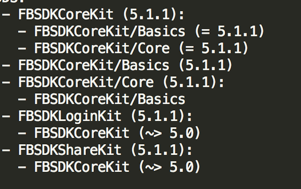
you can try it ,good luck
yazhengwang
on 5 Jul 2019
i used 5.2.1 and it works, thank you!
Ethan0007
on 5 Jul 2019
@aliasgharkarani I think you have a typo in
loginWithPermissionsmethod, it should belogInWithPermissions.
Thanks @ausaquiVS
 deepakgd
on 24 Jul 2019
deepakgd
on 24 Jul 2019
_reactNativeFbsdk.logInWithPermissions is not a function. (In '_reactNativeFbsdk.logInWithPermissions(['public_profile','email'])', '_reactNativeFbsdk.logInWithPermissions' is undefined)
Tried with LoginManager.logInWithPermissions
"react-native": "^0.59.5",
"react-native-fbsdk": "^0.10.1",

 NarendraSingh88
on 1 Aug 2019
NarendraSingh88
on 1 Aug 2019
Same issue for android in RN 0.60.4, what to do? Any suggestions?
 losheredos
on 13 Aug 2019
losheredos
on 13 Aug 2019
Same issue for android in RN 0.60.4, what to do? Any suggestions?
use logInWithPermissions
 blueromans
on 16 Aug 2019
blueromans
on 16 Aug 2019
Guys, im super frustrated.
i'm trying to implement Facebook login in my React-Native app but for some reason, it's throwing Cannot read property 'logInWithPermissions' of undefined.
I'm using React-Native 0.60.4.
I've downloaded FacebookSDK 5.3.0 (_Stable framework)
Attempted using Cocoapod but after some research, many people don't suggest using it because it messes up the project.
These are the steps I followed:
- Downloaded FacebookSDK 5.3.0 (current latest up to 08/15/19)
- Dropped the
FBSDKCoreKit.framework,FBSDKLoginKit.frameworkandFBSDKShareKit.frameworkinside a folder as~/Documents/FacebookSDK. - Also dropped those 3 framework files inside my project in XCode in the
/Frameworksfolder. - Just in case, I also added the path
~/Documents/FacebookSDKin the Framework Search Paths under Build Settings. - Made a Build on XCode, it's successful.
- I download react-native-fbsdk from my react-native project. It downloads version 1.0.1.
- I don't add
libRTCFBSDK.afile in theLink binary with Librariesbecause it throws an error saying theFBSDKShareKit.h isn't found.
This is what I do on my AuthView.js, I add this to a simple bound onPress event in a TouchableOpacity.
const FBSDK = require('react-native-fbsdk');
const {
  LoginManager,
} = FBSDK;

handleFacebookLogin() {
        LoginManager.logInWithPermissions(['public_profile', 'publish_actions']).then(
            (result) => {
                if (result.isCancelled) {
                    console.log('Login cancelled')
                } else {
                    console.log('Login success with permissions: ' + result.grantedPermissions.toString())
                }
            },
            (error) => {
                console.log('Login fail with error: ' + error)
            }
        )
    }
Now, I notice that inside Facebook's FBLoginManager.js this is the function being called
logInWithPermissions(permissions: Array<string>): Promise<LoginResult> {
    return LoginManager.logInWithPermissions(permissions);
  },
Whenever I hover LoginManager, it says it's undefined. Why would this be undefined? When it's literally a const on top of the file
const LoginManager = require('react-native').NativeModules.FBLoginManager;
Can anyone help me? I've been struggling for 4 days now. I already attempted installing it with cocoapods, no success. Then doing react-native link react-native-fbsdk no success... a lot of people suggested NOT using link but doing it manually.
What else could I try? Thanks.
 msqar
on 16 Aug 2019
msqar
on 16 Aug 2019
Also, if i DO add libRTCFBSDK.a to the Copy link to Libraries. I get the following error while building. (Also changed ~/Documents/FacebookSDK to $(HOME)/Documents/FacebookSDK on Framework Search Headers.
Showing Recent Messages
/Users/marian-mac/Documents/dev/MyApp/node_modules/react-native-fbsdk/ios/RCTFBSDK/login/RCTFBSDKLoginButtonManager.m:22:9: 'React/RCTComponentEvent.h' file not found
Ended up doing this https://github.com/facebook/react-native-fbsdk/issues/580#issuecomment-512356091 and worked!
msqar
on 16 Aug 2019
@4hZhQiBHl4jRsshhb2Yo worked for me thanks !
 Yurdaaaaa
on 19 Aug 2019
Yurdaaaaa
on 19 Aug 2019
Try this:
- Remove node_modules directory
- Npm install expo-facebook
- Import * as Facebook from 'expo-facebook';
- Use Facebook.logInWithReadPermissionsAsync(yourid,permissions)
 jekar6630
on 7 Oct 2019
jekar6630
on 7 Oct 2019
@aliasgharkarani I think you have a typo in
loginWithPermissionsmethod, it should belogInWithPermissions.
Thanks @ausaquiVS!
 prettydev
on 18 Feb 2020
prettydev
on 18 Feb 2020
Related issues
 vladotg
·
5Comments
vladotg
·
5Comments
 notlose
·
5Comments
notlose
·
5Comments
 justin808
·
3Comments
justin808
·
3Comments
 peymancyb
·
6Comments
peymancyb
·
6Comments
 fosteruk
·
4Comments
fosteruk
·
4Comments
Most helpful comment
for me
logInWithPermissionsis worked. thanks. notice the capital.