React-native-fbsdk: 'FBSDKShareKit/FBSDKShareKit.h' file not found
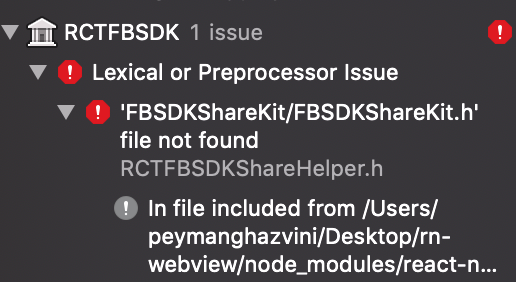
Trying to use facebook login, and getting 'FBSDKShareKit/FBSDKShareKit.h' file not found error for days, any suggestion on how to fix this issue?
i have looked all the issue but i did not find any solution
 peymancyb
All 6 comments
@peymancyb check this solution out https://github.com/facebook/react-native-fbsdk/issues/401#issuecomment-435312536
Which is
Try doing this in XCode (i have 10): go to RCTFBSDK.xcodeproj then build settings->framework search paths. And change ~/Documents/FacebookSDK to $(HOME)/Documents/FacebookSDK
It saved me a lot of time. Now it finally gets built.
 ckOfor
on 9 Feb 2019
ckOfor
on 9 Feb 2019
@ckOfor Thank you so much, I have tried all the solutions but I found the solution, I should change the path in Libraries>RCTFBSDK.xcodeproj and then on the Build settings searched for Framework Search path, and then change ~/Documents/FacebookSDK to $(HOME)/Documents/FacebookSDK
thank you so much again for the help
peymancyb
on 9 Feb 2019
Thanks, everyone, in the end, I solved the issue just dragging and dropping FacebookSDK into the Libraries>RCTFBSDK.xcodeproj --> on the Build settings searched for Framework Search path
TO AVOID type error is better to drag and drop the complete folder.
RCTFBSDK.xcodeproj
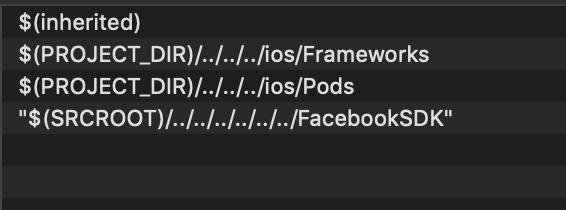
Global project
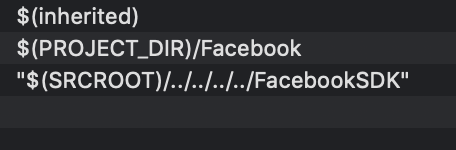
 cristianPerez
on 3 May 2019
cristianPerez
on 3 May 2019
Can we have this in the doc, under troubleshooting section?
 theredfoxfire
on 9 May 2019
theredfoxfire
on 9 May 2019
This is not something someone should manually do because every time u download project dependencies again it is broken again?
 rogerkerse
on 23 May 2019
rogerkerse
on 23 May 2019
Open the terminal.
Check that git is installed by running this command : git --version (otherwise follow this article to install it https://confluence.atlassian.com/crucible045/installing-and-upgrading-git-947848144.html).
Go the root folder of your Xcode generated project by running: cd + " Xcode project path".
Run this command : sudo gem install cocoapods.
Run this command : pod update.
Open again your Xcode project(from .workspace file) and build.
 GastonInfante
on 14 Feb 2020
GastonInfante
on 14 Feb 2020
Related issues
 ankitnb
·
4Comments
ankitnb
·
4Comments
 aurelienshz
·
4Comments
aurelienshz
·
4Comments
 emroot
·
5Comments
emroot
·
5Comments
 stevesaygoodbuycom
·
5Comments
stevesaygoodbuycom
·
5Comments
 pranny
·
6Comments
pranny
·
6Comments
Most helpful comment
@peymancyb check this solution out https://github.com/facebook/react-native-fbsdk/issues/401#issuecomment-435312536
Which is
Try doing this in XCode (i have 10): go to RCTFBSDK.xcodeproj then build settings->framework search paths. And change ~/Documents/FacebookSDK to $(HOME)/Documents/FacebookSDK
It saved me a lot of time. Now it finally gets built.