React-native-fbsdk: Install instructions for iOS need to be updated to match new Facebook SDK install process (Cocoapods)
The install instructions for iOS refer to an outdated Facebook SDK install process. Facebook has switched to using Cocoapods so some of the instructions and trouble shouting steps no longer make sense.
After following the install instructions I was able to build and run my react-native app but when attempting to use react-native-fbsdk I get an error which seems to indicate a problem with installation. The trouble shooting advice is not longer helpful since the Facebook SDK has now switched to using Cocoapods.
I have sought advice on Stackoverflow but no response from anyone there yet:
https://stackoverflow.com/questions/53444926/react-native-fbsdk-facebook-ios-sdk-undefined-is-not-an-object-evaluating
It would be great if someone could test the install process with the latest Facebook SDK release / install process to ensure it works and if not to update the install instructions. I would do this myself if I could but its beyond me right now.
 fosteruk
All 4 comments
Here is my install procedure. it's work.
1. Install react-native-fbsdk
react-native install react-native-fbsdk
2. Install SDK
Add following lines to ios/PodFile and execute pod install
    pod 'FBSDKLoginKit'
    pod 'FBSDKShareKit'
If no FBSDKShareKit will build failed with: fatal error: 'FBSDKShareKit/FBSDKShareKit.h' file not found
3. Set Info.plist
Add following lines to ios/Project Name/Info.plist (According to https://developers.facebook.com/docs/ios/getting-started/)
    <key>CFBundleURLTypes</key>
    <array>
        <dict>
            <key>CFBundleURLSchemes</key>
            <array>
                <string>fb369704160457623</string>
            </array>
        </dict>
    </array>
    <key>FacebookAppID</key>
    <string>Your facebook app id</string>
    <key>FacebookDisplayName</key>
    <string>Your app name</string>
    <key>LSApplicationQueriesSchemes</key>
    <array>
      <string>fbapi</string>
      <string>fb-messenger-share-api</string>
      <string>fbauth2</string>
      <string>fbshareextension</string>
    </array>
Replace FacebookAppID, FacebookDisplayName key values to you actually use.
4. Modify AppDelegate.m
According to https://developers.facebook.com/docs/ios/getting-started/.
//  AppDelegate.m
#import <FBSDKCoreKit/FBSDKCoreKit.h> // Add this line

- (BOOL)application:(UIApplication *)application
    didFinishLaunchingWithOptions:(NSDictionary *)launchOptions {

  [[FBSDKApplicationDelegate sharedInstance] application:application
    didFinishLaunchingWithOptions:launchOptions]; // Add this line
  // Add any custom logic here.
  return YES;
}

// Add following lines
- (BOOL)application:(UIApplication *)application
            openURL:(NSURL *)url
            options:(NSDictionary<UIApplicationOpenURLOptionsKey,id> *)options {

  BOOL handled = [[FBSDKApplicationDelegate sharedInstance] application:application
    openURL:url
    sourceApplication:options[UIApplicationOpenURLOptionsSourceApplicationKey]
    annotation:options[UIApplicationOpenURLOptionsAnnotationKey]
  ];
  // Add any custom logic here.
  return handled;
}
5. Modify App.js
- Import LoginManager at header.
- Add login() function to call LoginManger.logInWithReadPermissions().
- Add component
to at render().
App.js as following
/**
 * Sample React Native App
 * https://github.com/facebook/react-native
 *
 * @format
 * @flow
 */

import React, { Component } from 'react';
import { Platform, StyleSheet, Text, View, TouchableOpacity } from 'react-native';
import { LoginManager } from "react-native-fbsdk";

const instructions = Platform.select({
  ios: 'Press Cmd+R to reload,\n' + 'Cmd+D or shake for dev menu',
  android:
    'Double tap R on your keyboard to reload,\n' +
    'Shake or press menu button for dev menu',
});

type Props = {};
export default class App extends Component<Props> {
  login() {
    LoginManager.logInWithReadPermissions(["public_profile"]).then(
      function (result) {
        if (result.isCancelled) {
          console.log("Login cancelled");
        } else {
          console.log(
            "Login success with permissions: " +
            result.grantedPermissions.toString()
          );
        }
      },
      function (error) {
        console.log("Login fail with error: " + error);
      }
    );
  }
  render() {
    return (
      <View style={styles.container}>
        <Text style={styles.welcome}>Welcome to React Native!</Text>
        <Text style={styles.instructions}>To get started, edit App.js</Text>
        <Text style={styles.instructions}>{instructions}</Text>
        <TouchableOpacity onPress={this.login.bind(this)}>
          <Text>FBLogin</Text>
        </TouchableOpacity>
      </View>
    );
  }
}

const styles = StyleSheet.create({
  container: {
    flex: 1,
    justifyContent: 'center',
    alignItems: 'center',
    backgroundColor: '#F5FCFF',
  },
  welcome: {
    fontSize: 20,
    textAlign: 'center',
    margin: 10,
  },
  instructions: {
    textAlign: 'center',
    color: '#333333',
    marginBottom: 5,
  },
});
6. Run
react-native run-ios
7. My environment:
  React Native Environment Info:
    Binaries:
      Node: 11.2.0 - /usr/local/bin/node
      Yarn: 1.12.3 - /usr/local/bin/yarn
      npm: 6.4.1 - /usr/local/bin/npm
      Watchman: 4.9.0 - /usr/local/bin/watchman
    SDKs:
      iOS SDK:
        Platforms: iOS 12.1, macOS 10.14, tvOS 12.1, watchOS 5.1
      Android SDK:
        API Levels: 23, 24, 25, 26, 27, 28
        Build Tools: 23.0.1, 23.0.3, 24.0.1, 25.0.0, 26.0.1, 26.0.2, 26.0.3, 27.0.1, 27.0.3, 28.0.2, 28.0.3
        System Images: android-23 | Intel x86 Atom_64, android-23 | Google APIs Intel x86 Atom_64, android-28 | Google Play Intel x86 Atom
    IDEs:
      Android Studio: 3.2 AI-181.5540.7.32.5056338
      Xcode: 10.1/10B61 - /usr/bin/xcodebuild
    npmPackages:
      react: 16.6.1 => 16.6.1
      react-native: 0.57.7 => 0.57.7
    npmGlobalPackages:
      react-native-cli: 2.0.1
      react-native-git-upgrade: 0.2.7
      react-native-rename: 2.3.2
 cwlin0416
on 3 Dec 2018
cwlin0416
on 3 Dec 2018
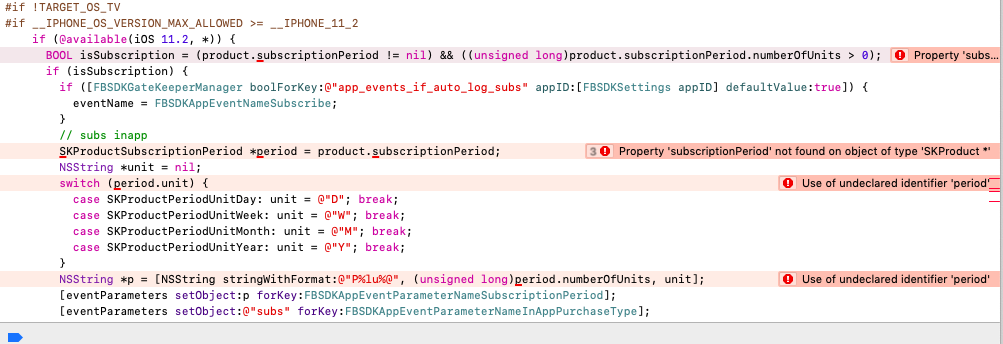
are you getting these errors?
 pratikadyalkar
on 10 Dec 2018
pratikadyalkar
on 10 Dec 2018
@cwlin0416 steps worked for me. "his steps..."
 deiver-romero
on 12 Jun 2019
deiver-romero
on 12 Jun 2019
I'm getting this error:
/Users/ethanwang/Github/animetool/app/node_modules/react-native-fbsdk/ios/RCTFBSDK/login/RCTFBSDKLoginButtonManager.m:49:72: Use of undeclared identifier 'FBSDKLoginBehaviorNative'; did you mean 'FBSDKLoginBehaviorBrowser'?
 ethanyuwang
on 3 Jul 2019
ethanyuwang
on 3 Jul 2019
Related issues
 nlindeke
·
5Comments
nlindeke
·
5Comments
 emroot
·
5Comments
emroot
·
5Comments
 sibelius
·
4Comments
sibelius
·
4Comments
 santilorenzo
·
3Comments
santilorenzo
·
3Comments
 akash-rajput
·
4Comments
akash-rajput
·
4Comments
Most helpful comment
Here is my install procedure. it's work.
1. Install react-native-fbsdk
react-native install react-native-fbsdk2. Install SDK
Add following lines to
ios/PodFileand executepod installIf no
FBSDKShareKitwill build failed with: fatal error: 'FBSDKShareKit/FBSDKShareKit.h' file not found3. Set Info.plist
Add following lines to ios/Project Name/Info.plist (According to https://developers.facebook.com/docs/ios/getting-started/)
Replace
FacebookAppID,FacebookDisplayNamekey values to you actually use.4. Modify AppDelegate.m
According to https://developers.facebook.com/docs/ios/getting-started/.
5. Modify App.js
App.js as following
6. Run
7. My environment: