React-native-fbsdk: FBSDKPackage in class FBSDKPackage cannot be applied to given types; CallbackManager not found
Environment
Environment:
OS: macOS Sierra 10.12.6
Node: 8.11.2
Yarn: 1.10.1
npm: 5.6.0
Watchman: 4.9.0
Xcode: Xcode 9.2 Build version 9C40b
Android Studio: 3.1 AI-173.4819257
Packages: (wanted => installed)
react: 16.3.1 => 16.3.1
react-native: 0.55.4 => 0.55.4
Description
Recently, while updating react-native-fbsdk from 0.7.0 to 0.8.0. When I try to build the app I've got the following error:
The pointed line, does not contains the code that is highlighting 😕
:app:compileReleaseJavaWithJavac/home/travis/build/repo/app/android/app/src/main/java/com/app/MainApplication.java:80: error: constructor FBSDKPackage in class FBSDKPackage cannot be applied to given types;
            new FBSDKPackage(),
            ^
  required: CallbackManager
  found: no arguments
  reason: actual and formal argument lists differ in length
However, I couldn't find any code that matches the error, on the MainApplication.java the new FBSDKPackage is called with the callback manager as stated in the docs:
private static CallbackManager mCallbackManager = CallbackManager.Factory.create();

  protected static CallbackManager getCallbackManager() {
    return mCallbackManager;
  }
  @Override
    protected List<ReactPackage> getPackages() {
      return Arrays.<ReactPackage>asList(
            new MainReactPackage(),
            new RNReactNativeHapticFeedbackPackage(),
            new LottiePackage(),
            new RNFirebasePackage(),
            new RNFirebaseAnalyticsPackage(),
            new RNFirebaseAuthPackage(),
            new RNFirebaseAdMobPackage(),
            new RNI18nPackage(),
            new FBSDKPackage(mCallbackManager),
            new GoogleAnalyticsBridgePackage(),
            new OrientationPackage(),
            new ReactAirshipPackage(),
            new RNDeviceInfo(),
            new SplashScreenReactPackage(),
            new VectorIconsPackage(),
            BugsnagReactNative.getPackage()
      );
    }
 carloscuesta
All 50 comments
The error appears when I use Gradle 3 instead of Gradle 2.
I've made two builds, with the same code, one using Gradle 2 and everything is ok. With Gradle 3 I've got the issue error.
carloscuesta
on 4 Dec 2018
You have to pass the mCallbackManager to new FBSDKPackage () as a parameter when creating the package.
new FBSDKPackage(mCallbackManager)
 ramosalx1504
on 19 Dec 2018
ramosalx1504
on 19 Dec 2018
I was already doing it @ramosalx1504 the issue comes when using gradle 3 instead of 2
carloscuesta
on 19 Dec 2018
Please is there a solution to this yet?
 jerryheir
on 15 Jan 2019
jerryheir
on 15 Jan 2019
in my case there was new FBSDKPackage(mCallbackManager) & new FBSDKPackage() in myApplication.java that was causing error . i removed new FBSDKPackage() and the error is gone.
 WilliamAnputra
on 17 Feb 2019
WilliamAnputra
on 17 Feb 2019
When you do react native link — FBSDK method with no param added in 'MainApplication.java'. Replacing it with FBSDKPackage(mCallbackManager) will fix it. Make sure you have not called method twice.
 introin
on 19 Feb 2019
introin
on 19 Feb 2019
I am also using gradle 3 and the changes mentioned for android environment in the below link made it work.
https://github.com/facebook/react-native-fbsdk#3-configure-native-projects
 dhiv-nitt
on 1 May 2019
dhiv-nitt
on 1 May 2019
When you do react native link — FBSDK method with no param added in 'MainApplication.java'. Replacing it with FBSDKPackage(mCallbackManager) will fix it. Make sure you have not called method twice.
and what if i did it twice ?
 akashkrshukla
on 16 Jun 2019
akashkrshukla
on 16 Jun 2019
I'm also seeing this error:
My MainApplication.java:
@Override
    protected List<ReactPackage> getPackages() {
      return Arrays.<ReactPackage>asList(
          new MainReactPackage(),
          new FBSDKPackage(mCallbackManager),
          new ImagePickerPackage()
      );
    }
However inside build/generated/rncli/src/main/java/com/facebook/react/PackageList.java I get:
public ArrayList<ReactPackage> getPackages() {
    return new ArrayList<>(Arrays.<ReactPackage>asList(
      new MainReactPackage(),
      new ReactNativeFirebaseAppPackage(),new ReactNativeFirebaseAuthPackage(),new FBSDKPackage(),new RNGestureHandlerPackage(),new ImagePickerPackage()
    ));
  }
Which results in the error when I try and build:
error: constructor FBSDKPackage in class FBSDKPackage cannot be applied to given types;
required: CallbackManager
found: no arguments
reason: actual and formal argument lists differ in length
I've searched my code and there's definitely no instances of new FBSDKPackage() anywhere except with the argument provided
 JeremyKirkham
on 22 Jun 2019
JeremyKirkham
on 22 Jun 2019
It looks like Callback is not required anymore :) https://github.com/facebook/react-native-fbsdk/commit/321923e800f03c41b9c0c2802ee6e529af4024e2
 jdnichollsc
on 1 Jul 2019
jdnichollsc
on 1 Jul 2019
@jdnichollsc I think they are planning to remove the need of CallbackManager in the upcoming version 1.0.0 as I can see the code inside the node_modules/react-native-fbsdk folder, the latest code is not reflected over there in the version 0.10.0
 ajaykumar97
on 5 Jul 2019
ajaykumar97
on 5 Jul 2019
Adding mCallbackManager lead to error:
MainApplication.java:36: error: cannot find symbol
            new FBSDKPackage(mCallbackManager),
                             ^
  symbol: variable mCallbackManager
1 error
"react-native-fbsdk": "^0.10.1"
 iLyxa3D
on 5 Jul 2019
iLyxa3D
on 5 Jul 2019
@iLyxa3D in 0.10.1 you should use old installation guide with extra hacks https://github.com/facebook/react-native-fbsdk/tree/82a6c9e6ef1db4633485e3793ab6a4c32bc84f63
 elatonsev
on 7 Jul 2019
elatonsev
on 7 Jul 2019
In case could help anyone I managed to fix the issue by upgrading Gradle to version 4. As I said at https://github.com/facebook/react-native-fbsdk/issues/429#issuecomment-444204008 can't use Gradle 3 😕
On your android/graddle/graddle-wrapper.properties update the distributionUrl to:
distributionUrl=https\://services.gradle.org/distributions/gradle-4.10.1-all.zip
You can see the installation steps from the branch 0.10.0-stable
ajaykumar97
on 8 Jul 2019
@elatonsev @ajaykumar97 i followed the steps on the installation and it's still throwing this one
PackageList.java:68: error: constructor FBSDKPackage in class FBSDKPackage cannot be applied to given types;
      new FBSDKPackage(),
      ^
 required: CallbackManager
 found: no arguments
 darsodango
on 11 Jul 2019
darsodango
on 11 Jul 2019
@darsodango Have you followed all the steps mentioned in https://github.com/facebook/react-native-fbsdk/tree/0.10.0-stable?
I mean, In MainApplication.java:
import com.facebook.CallbackManager;
import com.facebook.FacebookSdk;
import com.facebook.reactnative.androidsdk.FBSDKPackage;
import com.facebook.appevents.AppEventsLogger;
...

public class MainApplication extends Application implements ReactApplication {

  private static CallbackManager mCallbackManager = CallbackManager.Factory.create();

  protected static CallbackManager getCallbackManager() {
    return mCallbackManager;
  }
private final ReactNativeHost mReactNativeHost = new ReactNativeHost(this) {
    @Override
    public boolean getUseDeveloperSupport() {
      return BuildConfig.DEBUG;
    }

    @Override
    protected List<ReactPackage> getPackages() {
      return Arrays.<ReactPackage>asList(
          new MainReactPackage(),
          new FBSDKPackage(mCallbackManager)
      );
    }
};
    //...
@ajaykumar97 yes i followed those steps. btw, what is your react-native version? mine is 0.60.0
darsodango
on 11 Jul 2019
@darsodango Mine react-native version is 0.59.10. React-native 0.60.0 supports auto-linking rather than manual linking. So in my suggestion, either revert back to the react-native version 0.59.10 or wait for the react-native-fbsdk to publish a new version to support react-native new autolinking.
ajaykumar97
on 11 Jul 2019
There isn't loads of time to wait as the deadline to get apps upgraded to Android X (0.60.0) is August and I'm getting started now - any solutions besides reverting to 0.59.10 or waiting for a new react-native-fbsdk version?
@ajaykumar97
 dancherb
on 12 Jul 2019
dancherb
on 12 Jul 2019
@dancherb
If you're using 0.60.0, you can disable auto-linking by creating a react-native.config.js file in the root of your project. Then you can paste the following code:
module.exports = {
  dependencies: {
    'react-native-fbsdk': {
      platforms: {
        android: null,
        ios: null,
      }
    }
  }
};
 dpwilhelmsen
on 13 Jul 2019
dpwilhelmsen
on 13 Jul 2019
@dpwilhelmsen I tried your solution but could not successfully install react-native-fbsdk using react-native 0.60.3. Can you give some more details on the installation of react-native-fbsdk?
ajaykumar97
on 14 Jul 2019
@dancherb One solution could be just create a new project with react-native 0.59.10. Install all of your current dependencies in the newly created project and Copy your JS code into the new project.
ajaykumar97
on 14 Jul 2019
I ended up using the latest RC version, which doesn't require manual linking or the callback manager to be passed in, and all good
---- On Sun, 14 Jul 2019 15:31:41 +0200 [email protected] wrote ----
@dancherb One solution could be just create a new project with react-native 0.59.10. Install all of your current dependencies in the newly created project and Copy your JS code into the new project.
—
You are receiving this because you were mentioned.
Reply to this email directly, view it on GitHub, or mute the thread.
dancherb
on 14 Jul 2019
Is there any solution to get rid of PackageList.java error. I am stucking here for 1day. I dont want revert to 0.59.10 at all..
 Johncy1997
on 15 Jul 2019
Johncy1997
on 15 Jul 2019
i m using react-native version 0.59.10 and i m stuck in this error too ? what should i do ?
 anasgit95
on 15 Jul 2019
anasgit95
on 15 Jul 2019
As per his command
Johncy1997
on 15 Jul 2019
@darsodango pls uninstall react-native-fbsdk and install ''yarn add git+https://github.com/facebook/react-native-fbsdk.git". It worked for me
 vnanhtuan
on 22 Jul 2019
vnanhtuan
on 22 Jul 2019
fix for me @vnanhtuan so the npm of this lib is still outdated, right?
 ebnersilva
on 22 Jul 2019
ebnersilva
on 22 Jul 2019
Same issue here with RN0.6 with autolinking... (new project from scratch)
/src/main/java/com/facebook/react/PackageList.java:59: error: constructor FBSDKPackage in class FBSDKPackage cannot be applied to given types;
      new FBSDKPackage(),
      ^
  required: CallbackManager
  found: no arguments
  reason: actual and formal argument lists differ in length
1 error
 templar11
on 23 Jul 2019
templar11
on 23 Jul 2019
Hi Team,
Currently i am using react-native 0.60.0 version. I have followed below steps,
- react-native install react-native-fbsdk
- react-native link react-native-fbsdk
- react-native run-android
I am getting following error:
Task :app:compileDebugJavaWithJavac FAILED

Deprecated Gradle features were used in this build, making it incompatible with Gradle 6.0.
Use '--warning-mode all' to show the individual deprecation warnings.
See https://docs.gradle.org/5.4.1/userguide/command_line_interface.html#sec:command_line_warnings
74 actionable tasks: 34 executed, 40 up-to-date
Note: Some input files use or override a deprecated API.
Note: Recompile with -Xlint:deprecation for details.
Note: /home/krdsdeepak/Desktop/deepak/reactnative/knowledgeupdateapp/node_modules/react-native-camera/android/src/main/java/com/google/android/cameraview/Camera2.java uses unchecked or unsafe operations.
Note: Recompile with -Xlint:unchecked for details.
Note: Some input files use or override a deprecated API.
Note: Recompile with -Xlint:deprecation for details.
Note: /home/krdsdeepak/Desktop/deepak/reactnative/knowledgeupdateapp/node_modules/react-native-fbsdk/android/src/main/java/com/facebook/reactnative/androidsdk/Utility.java uses unchecked or unsafe operations.
Note: Recompile with -Xlint:unchecked for details.
Note: /home/krdsdeepak/Desktop/deepak/reactnative/knowledgeupdateapp/node_modules/react-native-gesture-handler/android/src/main/java/com/swmansion/gesturehandler/react/RNGestureHandlerButtonViewManager.java uses or overrides a deprecated API.
Note: Recompile with -Xlint:deprecation for details.
Note: Some input files use unchecked or unsafe operations.
Note: Recompile with -Xlint:unchecked for details.
Note: /home/krdsdeepak/Desktop/deepak/reactnative/knowledgeupdateapp/node_modules/react-native-webview/android/src/main/java/com/reactnativecommunity/webview/RNCWebViewManager.java uses or overrides a deprecated API.
Note: Recompile with -Xlint:deprecation for details.
Note: /home/krdsdeepak/Desktop/deepak/reactnative/knowledgeupdateapp/node_modules/react-native-webview/android/src/main/java/com/reactnativecommunity/webview/RNCWebViewManager.java uses unchecked or unsafe operations.
Note: Recompile with -Xlint:unchecked for details.
/home/krdsdeepak/Desktop/deepak/reactnative/knowledgeupdateapp/android/app/build/generated/rncli/src/main/java/com/facebook/react/PackageList.java:63: error: constructor FBSDKPackage in class FBSDKPackage cannot be applied to given types;
      new FBSDKPackage(),
      ^
  required: CallbackManager
  found: no arguments
  reason: actual and formal argument lists differ in length
1 error

FAILURE: Build failed with an exception.

* What went wrong:
Execution failed for task ':app:compileDebugJavaWithJavac'.
> Compilation failed; see the compiler error output for details.

* Try:
Run with --stacktrace option to get the stack trace. Run with --info or --debug option to get more log output. Run with --scan to get full insights.

* Get more help at https://help.gradle.org

BUILD FAILED in 11s

error Failed to install the app. Make sure you have the Android development environment set up: https://facebook.github.io/react-native/docs/getting-started.html#android-development-environment. Run CLI with --verbose flag for more details.
Error: Command failed: ./gradlew app:installDebug -PreactNativeDevServerPort=8081
Note: Some input files use or override a deprecated API.
Note: Recompile with -Xlint:deprecation for details.
Note: /home/krdsdeepak/Desktop/deepak/reactnative/knowledgeupdateapp/node_modules/react-native-camera/android/src/main/java/com/google/android/cameraview/Camera2.java uses unchecked or unsafe operations.
Note: Recompile with -Xlint:unchecked for details.
Note: Some input files use or override a deprecated API.
Note: Recompile with -Xlint:deprecation for details.
Note: /home/krdsdeepak/Desktop/deepak/reactnative/knowledgeupdateapp/node_modules/react-native-fbsdk/android/src/main/java/com/facebook/reactnative/androidsdk/Utility.java uses unchecked or unsafe operations.
Note: Recompile with -Xlint:unchecked for details.
Note: /home/krdsdeepak/Desktop/deepak/reactnative/knowledgeupdateapp/node_modules/react-native-gesture-handler/android/src/main/java/com/swmansion/gesturehandler/react/RNGestureHandlerButtonViewManager.java uses or overrides a deprecated API.
Note: Recompile with -Xlint:deprecation for details.
Note: Some input files use unchecked or unsafe operations.
Note: Recompile with -Xlint:unchecked for details.
Note: /home/krdsdeepak/Desktop/deepak/reactnative/knowledgeupdateapp/node_modules/react-native-webview/android/src/main/java/com/reactnativecommunity/webview/RNCWebViewManager.java uses or overrides a deprecated API.
Note: Recompile with -Xlint:deprecation for details.
Note: /home/krdsdeepak/Desktop/deepak/reactnative/knowledgeupdateapp/node_modules/react-native-webview/android/src/main/java/com/reactnativecommunity/webview/RNCWebViewManager.java uses unchecked or unsafe operations.
Note: Recompile with -Xlint:unchecked for details.
/home/krdsdeepak/Desktop/deepak/reactnative/knowledgeupdateapp/android/app/build/generated/rncli/src/main/java/com/facebook/react/PackageList.java:63: error: constructor FBSDKPackage in class FBSDKPackage cannot be applied to given types;
      new FBSDKPackage(),
      ^
  required: CallbackManager
  found: no arguments
  reason: actual and formal argument lists differ in length
1 error

FAILURE: Build failed with an exception.

* What went wrong:
Execution failed for task ':app:compileDebugJavaWithJavac'.
> Compilation failed; see the compiler error output for details.

* Try:
Run with --stacktrace option to get the stack trace. Run with --info or --debug option to get more log output. Run with --scan to get full insights.

* Get more help at https://help.gradle.org

BUILD FAILED in 11s

    at checkExecSyncError (child_process.js:616:11)
    at execFileSync (child_process.js:63
4:15)
    at runOnAllDevices (/home/krdsdeepak/Desktop/deepak/reactnative/knowledgeupdateapp/node_modules/@react-native-community/cli-platform-android/build/commands/runAndroid/runOnAllDevices.js:75:39)
    at buildAndRun (/home/krdsdeepak/Desktop/deepak/reactnative/knowledgeupdateapp/node_modules/@react-native-community/cli-platform-android/build/commands/runAndroid/index.js:137:41)
    at /home/krdsdeepak/Desktop/deepak/reactnative/knowledgeupdateapp/node_modules/@react-native-community/cli-platform-android/build/commands/runAndroid/index.js:103:12
    at processTicksAndRejections (internal/process/task_queues.js:89:5)
    at async Command.handleAction (/home/krdsdeepak/Desktop/deepak/reactnative/knowledgeupdateapp/node_modules/@react-native-community/cli/build/cliEntry.js:160:7)
My MainApplication.java looks differently not like above comment.
MainApplication.java
package com.knowledgeupdateapp;
import android.app.Application;
import com.facebook.react.PackageList;
import com.facebook.react.ReactApplication;
import com.facebook.reactnative.androidsdk.FBSDKPackage;
import org.reactnative.camera.RNCameraPackage;
import com.reactnativecommunity.webview.RNCWebViewPackage;
import com.reactnativecommunity.asyncstorage.AsyncStoragePackage;
import com.swmansion.gesturehandler.react.RNGestureHandlerPackage;
import com.oblador.vectoricons.VectorIconsPackage;
import com.facebook.react.ReactNativeHost;
import com.facebook.react.ReactPackage;
import com.facebook.soloader.SoLoader;
import java.util.List;
public class MainApplication extends Application implements ReactApplication {
private final ReactNativeHost mReactNativeHost = new ReactNativeHost(this) {
@Override
public boolean getUseDeveloperSupport() {
return BuildConfig.DEBUG;
}
@Override
protected List<ReactPackage> getPackages() {
  @SuppressWarnings("UnnecessaryLocalVariable")
  List<ReactPackage> packages = new PackageList(this).getPackages();
  // Packages that cannot be autolinked yet can be added manually here, for example:
  // packages.add(new MyReactNativePackage());
  return packages;
}

@Override
protected String getJSMainModuleName() {
  return "index";
}
};
@Override
public ReactNativeHost getReactNativeHost() {
return mReactNativeHost;
}
@Override
public void onCreate() {
super.onCreate();
SoLoader.init(this, /* native exopackage */ false);
}
}
```
It would be great if anyone help me to fix it
 deepakgd
on 24 Jul 2019
deepakgd
on 24 Jul 2019
in the root of you project create a file react-native.config.js then
module.exports = {
dependencies: {
'react-native-fbsdk': {
platforms: {
android: null,
ios: null,
}
}
}
};
finally run-android
 michelmouallem
on 24 Jul 2019
michelmouallem
on 24 Jul 2019
Thanks @michelmouallem
deepakgd
on 24 Jul 2019
@dancherb when you say "latest RC version", do you mean of react native or react-native-fbsdk ? And which version if the latest RC
 chrisflora
on 26 Jul 2019
chrisflora
on 26 Jul 2019
@chrisflora You can use "react-native-fbsdk": "^1.0.0-rc.4"
Here is mine package.json
{
"name": "FBLogin",
"version": "0.0.1",
"private": true,
"scripts": {
"start": "react-native start",
"test": "jest",
"lint": "eslint ."
},
"dependencies": {
"react": "16.8.6",
"react-native": "0.60.4",
"react-native-fbsdk": "^1.0.0-rc.4"
},
"devDependencies": {
"@babel/core": "7.5.5",
"@babel/runtime": "7.5.5",
"@react-native-community/eslint-config": "0.0.3",
"babel-jest": "24.8.0",
"eslint": "6.1.0",
"jest": "24.8.0",
"metro-react-native-babel-preset": "0.54.1",
"react-test-renderer": "16.8.6"
},
"jest": {
"preset": "react-native"
}
}
 SnehalAgrawal
on 27 Jul 2019
SnehalAgrawal
on 27 Jul 2019
thanks, @michelmouallem . It works
 thribhu
on 27 Jul 2019
thribhu
on 27 Jul 2019
@michelmouallem unfortunately didn't work with me and still gave me same error
 MayarAhmed
on 5 Aug 2019
MayarAhmed
on 5 Aug 2019
I have tried all these solutions and still facing same error . Can anybody help with that ?
MayarAhmed
on 6 Aug 2019
@michelmouallem unfortunately didn't work with me and still gave me same error
try to use the latest version of [email protected] or via "react-native-fbsdk": "git+https://github.com/facebook/react-native-fbsdk.git"
In MainActivity.java add
import android.content.Intent;
@Override
public void onActivityResult(int requestCode, int resultCode, Intent data) {
super.onActivityResult(requestCode, resultCode, data);
MainApplication.getCallbackManager().onActivityResult(requestCode, resultCode, data);
}
In Mainapplication.java add the line to getpackages
import com.facebook.CallbackManager;
import com.facebook.FacebookSdk;
import com.facebook.reactnative.androidsdk.FBSDKPackage;
import com.facebook.appevents.AppEventsLogger;
@Override
protected List
List
packages.add(new FBSDKPackage(mCallbackManager)); -------- this one
  return packages;
}
It should works
michelmouallem
on 6 Aug 2019
@michelmouallem this is my current Mainapplication.java getPackages() and still didn't work
@Override
protected List
return Arrays.
new MainReactPackage(),
new FBSDKPackage(mCallbackManager),
and I am using latest version of FBSDK
MayarAhmed
on 6 Aug 2019
@michelmouallem this is my current Mainapplication.java getPackages() and still didn't work
@override
protected List getPackages() {
return Arrays.asList(
new MainReactPackage(),
new FBSDKPackage(mCallbackManager),and I am using latest version of FBSDK
which version of reactnative are you using ?
your mainapplication.java should be as below
@Override
protected List
@SuppressWarnings("UnnecessaryLocalVariable")
List
packages.add(new FBSDKPackage(mCallbackManager));
return packages;
}
in case you are using an oldest version of react <0.6.0 so it is mandatory to add [email protected]
for react-native >0.6.0 it is mandatory to use FBSDK v5 in addition
logInWithReadPermissions and logInWithWritePermissions have been replaced with logInWithPermissions
readPermissions and writePermissions props have been replaced with permissions
AppInviteDialog was removed
LikeView was removed
michelmouallem
on 6 Aug 2019
@MayarAhmed Code shows you are using an old version of React Native( < 0.60). as the new version has a separate package list class. Can you please share the screenshot or the error logs so that we can look into it. I think the solution that @michelmouallem has provided is for the latest React Native (>0.60).
If you have no problem to update you React Native version (>0.60) then you can see React Native Facebook Integration Example using Facebook SDK
SnehalAgrawal
on 6 Aug 2019
Version i used:
"react-native": "0.59.8",
"react-native-fbsdk": "^0.8.0"
After that i migrated to AndroidX by,
npm install --save-dev jetifier
package.json:
scripts:{
...
"postinstall": "npx jetify",
}
Deleted nodemodules and installed again and run this command npx jetify. This error disappeared after that.
Johncy1997
on 6 Aug 2019
@michelmouallem SnehalAgrawal
Thanks it worked now it was a difference of versions :)
MayarAhmed
on 7 Aug 2019
@MayarAhmed Happy to know that. :)
For others who are using React Native version (>0.60) can see React Native Facebook Integration Example using Facebook SDK
SnehalAgrawal
on 7 Aug 2019
@michelmouallem hello, is there any progress on react native >= 0.60 ? Iam still getting the same callback error and i have tried everything above. Even the react-native.config.js which doenst solve the problem.
EDIT: I have found solution!! Using the stable version 1.0.1 I keep getting the same callback errors on build, BUT with 1.0.0-rc.4 it suddenly disappears.
 Yurdaaaaa
on 19 Aug 2019
Yurdaaaaa
on 19 Aug 2019
Versions:
"react-native": "0.60.4",
"react-native-fbsdk": "^0.10.1".
To overcome this problem, disable auto-linking for react-native-fbsdk package by editing react-native.config.js file like :
module.exports = {
dependencies: {
'react-native-fbsdk': {
platforms: {
android: null, // disable Android platform, other platforms will still autolink if provided
},
},
},
};
After that, It will use your declared instance with callback in MainApplication.java .
 Jeadonara
on 26 Oct 2019
Jeadonara
on 26 Oct 2019
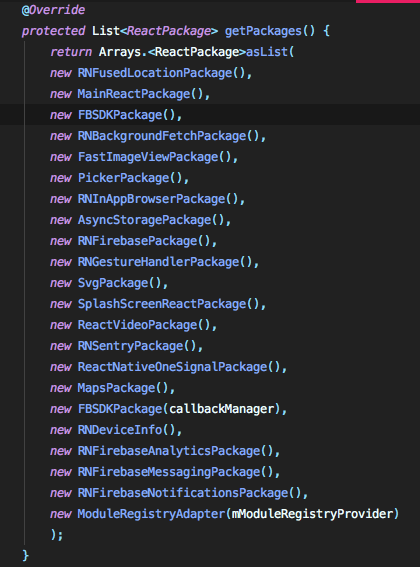
In my case, I added twice FBSDKPackage in getPackages and I just removed one
 allanzi
on 20 Nov 2019
allanzi
on 20 Nov 2019
ONLY beyond [email protected] that you no longer have to pass a CallbackManager to FBSDKPackage
see herealso, if your react-native version is <= 0.59.0, you have to use @1.0.0-rc.4
 sugaith
on 4 Feb 2020
sugaith
on 4 Feb 2020
For react-native version >=0.60.0, use react-native-fbsdk@ 1.0.2. It solved my problem of callbackManager.
 Ritesh-Ag
on 25 May 2020
Ritesh-Ag
on 25 May 2020
Related issues
 coryb08
·
4Comments
coryb08
·
4Comments
 fosteruk
·
4Comments
fosteruk
·
4Comments
 peymancyb
·
6Comments
peymancyb
·
6Comments
 pyeonjaesik
·
5Comments
pyeonjaesik
·
5Comments
 nlindeke
·
5Comments
nlindeke
·
5Comments
Most helpful comment
in my case there was new FBSDKPackage(mCallbackManager) & new FBSDKPackage() in myApplication.java that was causing error . i removed new FBSDKPackage() and the error is gone.