React-native-calendars: Agenda loading forever.
I created an <Agenda /> component with the code below, but the agenda show an spin loading forever. I created the project with create-react-native-app.
import React, { Component } from 'react';
import { connect } from 'react-redux';
import { Facebook, WebBrowser } from 'expo';
import { Linking } from 'react-native';
import { Card, CardSection, Button } from './common';
import { loginWithFacebook } from '../actions';
import { Agenda } from 'react-native-calendars';

@connect(null, { loginWithFacebook })
class LoginStudent extends Component {
  static navigationOptions = {
    title: 'Login Student',
  };

  render() {
    return (
      <Agenda
        items={{'2012-05-22': [{text: 'item 1 - any js object'}],
            '2012-05-23': [{text: 'item 2 - any js object'}],
            '2012-05-24': [],
            '2012-05-25': [{text: 'item 3 - any js object'}],
    }}
        loadItemsForMonth={(mongh) => {console.log('trigger items loading')}}
        onDayPress={(day)=>{console.log('day pressed')}}
                selected={'2012-05-16'}
        renderItem={item => <View />}
        renderDay={(day, item) => <View />}
        renderEmptyDate={() => <View />}
        rowHasChanged={(r1, r2) => (r1.text !== r2.text)}
        hideKnob={true}
        theme={{}}
        style={{}}
       />
    );
  }
}

export default LoginStudent;
 ercpereda
All 43 comments
Hi, that is because probably today is selected and there is no value for today in items map. If there is no item for the day it is being interpreted as still being loaded
 tautvilas
on 22 May 2017
tautvilas
on 22 May 2017
Is that the expected behavior or it should show an empty page of the agenda?
I just used the example in the README.md and expected it will work.
ercpereda
on 22 May 2017
@ercpereda Did you find a solution? I am having the same issue.
Thanks!
 twelvearrays
on 24 May 2017
twelvearrays
on 24 May 2017
@ercpereda the solution is to always have value provided in items map for selected day
tautvilas
on 24 May 2017
Ok Thanks!
twelvearrays
on 24 May 2017
@tautvilas I going to get my items map from an async call. I wish to show the spinner while the data is being loaded, but hide it when the results come even if the result does not have values for the selected day.
ercpereda
on 24 May 2017
I did suggest that every day should be rendered empty by default here, this way it would work straight out of the box without the need of any data to be passed into the component.
 craigcoles
on 26 May 2017
craigcoles
on 26 May 2017
That can be considered, but this would introduce breaking change for our current agenda usecases
tautvilas
on 26 May 2017
Perhaps it could be worthwhile having this as an option? That way you could satisfy both usecases.
craigcoles
on 26 May 2017
Yes, adding something like dayLoading={false} can be done, but by default it would be true. And maybe default can be changed to false in the future.
tautvilas
on 26 May 2017
I think that could be a good solution for avoiding breaking changes and support the async behavior of the calendar.
ercpereda
on 26 May 2017
i have problem that "loadItemsForMonth" function load twice, i've added empty value for empty days, but first time it loaded ok, then the second time it loading forever until i click day to load data again.
 binhluong2012
on 5 Jun 2017
binhluong2012
on 5 Jun 2017
@binhluong2012 please compare your solution to example demo and check if you can reproduce the problem in example too
tautvilas
on 6 Jun 2017
@tautvilas i've used the same agenda example code in this link https://github.com/wix/react-native-calendars/blob/master/example/src/screens/agenda.js , just remove "//" at row 55.
binhluong2012
on 7 Jun 2017
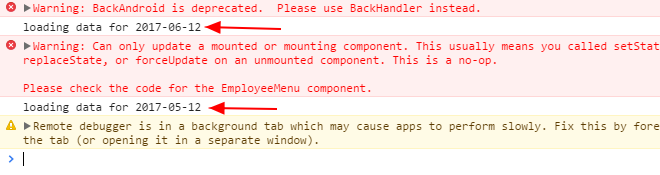
It's auto loading default date ( today), then it loading date from 1 month before. My code
loadItems (day) {
console.log('loading data for ' + day.dateString ) }
binhluong2012
on 12 Jun 2017
Hi, sorry, can you clarify the problem? Do I understand correctly that the problem is that load method is called twice on init? You expect it to be called just with today?
tautvilas
on 12 Jun 2017
@tautvilas
Yes. Now it loading twice on init then it showing spin loading forever.
binhluong2012
on 12 Jun 2017
Yep, but example does not show spin loading forever, right? Maybe when loading for 2017-05-12 is requested you only return items for 05 month. Each loading should re-create the items object with current items and newly loaded items so that it contains all data
tautvilas
on 12 Jun 2017
@tautvilas So I should pass items object that has empty array to all days of the year that dont have any items to agenda?! That is weird solutions o.O I think the loader should be controlled by coder and not by library
 henrikra
on 26 Jun 2017
henrikra
on 26 Jun 2017
You can track visible month changes and only provide items for visible months
tautvilas
on 26 Jun 2017
Example of this solution?
henrikra
on 26 Jun 2017
hi, plz check the example agenda https://github.com/wix/react-native-calendars/tree/master/example
tautvilas
on 26 Jun 2017
try this
onDayPress = (date) => {
    this.setState({
      date: new Date(date.year, date.month-1, date.day),
    });
  };

  onDayChange = (date) => {
    this.setState({
      date: new Date(date.year, date.month-1, date.day),
    });
  };

render() {
   const items = {
      [format(new Date(this.state.date), 'YYYY-MM-DD')]: [],
      ...otherItems,
    };

   return (
      <Agenda
          items={items}
          onDayPress={this.onDayPress}
          onDayChange={this.onDayChange}
        />
   )
}
 sibelius
on 28 Jun 2017
sibelius
on 28 Jun 2017
Hi, I also got caught on this.
We don't all have very long agendas to display, sometimes having a single initial list and no async loading is fine and having default = empty element would be better for me than spinner
 slorber
on 4 Jul 2017
slorber
on 4 Jul 2017
As a sort of middle ground if the minDate and maxDate properties that you can use on Calendar were available to Agenda then you would only need to provide 'empty' details for the dates between min and max that did not have sessions/meetings/etc. minDate and MaxDate would prevent the selection of dates before minDate and after MaxDate.......
 georgetroughton
on 19 Jul 2017
georgetroughton
on 19 Jul 2017
Has any progress been made on this?
 oliviachang29
on 2 Sep 2017
oliviachang29
on 2 Sep 2017
Not the most elegant, but you could call this function below onDayPress and/or before rendering.
Edit: Wrapped it in a promise.
 setEmptyKey(dayString) {
    if (!this.state.items.hasOwnProperty(dayString)) {
      this.state.items[dayString] = [];
      // The purpose of this is to remove empty array without affecting the ui
      new Promise((resolve, reject) => {
        setTimeout(() => {
          delete this.state.items[dayString];
          resolve();
        }, 1000);
      }).catch(error => {
        // log if needed.
        console.log(error);
      });
    }
  }
 bernzJ
on 5 Sep 2017
bernzJ
on 5 Sep 2017
@bernzJ The problem with this approach (deleting this.state.items[dayString] after 1 sec) is that when the user taps an empty date (say, Sept 5), then taps an empty date after that (Sept 6), the agenda scrolls upwards instead of downwards, which looks strange since you're advancing forward in time.
I've essentially done the same thing, but removed the deletion.
setEmptyKey(dayString) {
    if (!this.state.items[dayString]) {
      this.state.items[dayString] = [];
    }
  }
node_modules/react-native-calendars/src/agenda/reservation-list/index.js
in this file,
find activityindicator in render method and change this code. for example:
if (!this.props.reservations || !this.props.reservations[this.props.selectedDay.toString('yyyy-MM-dd')]) {
return (
}
 barismercan
on 7 Sep 2017
barismercan
on 7 Sep 2017
@oliviachang29 after observing some odd issues and reading a bit more about react-native component , I came up with this solution :
  setEmptyKey(dayString) {
    if (!this.state.items[dayString]) {
      let clone = Object.assign({}, this.state.items, { [dayString]: [] });
      this.setState({ items: clone });
      //this.state.items[dayString] = [];
    }
  }
I found out that editing directly state object can cause some very unexpected behaviors. The gist of it is explained here: https://facebook.github.io/react/docs/react-component.html#setstate
bernzJ
on 8 Sep 2017
@tautvilas I've seen your example in the repo, however am I right in saying you should never be setting your state using this.state.items = [] ? it should always be this.setState?
 maitham
on 15 Oct 2017
maitham
on 15 Oct 2017
@binhluong2012 I am also facing the issue....any update on it?
 nichesoftgh04
on 20 Nov 2017
nichesoftgh04
on 20 Nov 2017
I am also facing same issue. I get only selected dates in fetch response.I am getting spin loading on that date which is not persent in response.Can any body suggest me.
This is my code:
constructor(props) {
super(props);
this.state = {
date: new Date(),
items:{},
selectedMonth:''
};
}
componentWillMount() {
const currentDate = Moment(this.state.date, 'YYYY/MM/DD');
const month = currentDate.format('M');
const year = currentDate.format('YYYY');
this.getMonthYear(month,year);
}
render(){
return(
items={this.state.items}
loadItemsForMonth={this.loadItemsForMonth(this.state.date)}
renderItem={this.renderItem.bind(this)}
renderEmptyDate={() => {return (
rowHasChanged={this.rowHasChanged.bind(this)}
onDayPress={(date) => { this.getMonthYear(date.month,date.year); }}
/>
);
}
loadItemsForMonth(h){
fetch('*******', {
method: 'POST',
headers: {
'Accept': 'application/json',
'Content-Type': 'application/json',
},
body: JSON.stringify({
Email: "**",
Password: "**",
DeviceType:"Android"
}
)
})
.then((response) => response.json())
.then((res) => {
      const activity = res.data.activity;
      for (let i = 0; i < activity.length; i++) {
        const strTime = this.timeToString(activity[i].ActivityStartDate);
        if (!this.state.items[strTime]){
          this.state.items[strTime] = [];
        }
         this.state.items[strTime].push({
              name: activity[i].Subject
            });
      }
      })
      .done();
}
renderItem(item) {
return (
);
}
rowHasChanged(r1, r2) {
return r1.name !== r2.name;
}
renderEmptyDate() {
return (
);
}
timeToString(time) {
const date = new Date(time);
return date.toISOString().split('T')[0];
}
getMonthYear(M,Y) {
const month = M - 1;
const monthNames = ['January', 'February', 'March', 'April', 'May', 'June',
'July', 'August', 'September', 'October', 'November', 'December',
];
this.setState({selectedMonth: monthNames[month]+' '+Y, showMonth: true });
}
}
 nemat001
on 22 Nov 2017
nemat001
on 22 Nov 2017
I am also facing a similar issue. My observation is, whatever date I've set in selected field of Agenda, this component calls loadItemsForMonth method twice. In second iteration, it takes previous month than the selected date.
E.g. my selected date is 20 April 2018. In first iteration, it fetches the data for this date. in second iteration it takes 20 March 2018. Now as I don't have a data for this date, I see forever loading.
 mahesh-kedari
on 30 Mar 2018
mahesh-kedari
on 30 Mar 2018
having the same problem. loading twice, current and previous month. i already provided empty arrays for empty dates.
 serjoshua
on 3 May 2018
serjoshua
on 3 May 2018
The documentation is wrong, the prop should be renderEmptyData and NOT renderEmptyDate
 gopidon
on 23 Jun 2018
gopidon
on 23 Jun 2018
This is really so strange. I found so many issues regarding show spinner when no date is available for the provided date, but the owners are not doing anything to solve this problem. They just say it is a feature, just return empty array for that days... But what if we don't want show empty rows there?? Anyway now I will fork this package and will try to solve the problem. But really I am disappointed with this kind of management approach...
 DavitVosk
on 5 Jul 2018
DavitVosk
on 5 Jul 2018
@gopidon This is the correct answer here, just switched to renderEmptyData and fixed my issue
 itsallbr0ken
on 16 Oct 2018
itsallbr0ken
on 16 Oct 2018
This is really so strange. I found so many issues regarding show spinner when no date is available for the provided date, but the owners are not doing anything to solve this problem. They just say it is a feature, just return empty array for that days... But what if we don't want show empty rows there?? Anyway now I will fork this package and will try to solve the problem. But really I am disappointed with this kind of management approach...
@DavitVosk
Were you ever able to make a package?
 jmasaki24
on 13 Nov 2018
jmasaki24
on 13 Nov 2018
Thanks so much @sibelius, works very well for me your solutions!
 jhonatansaman
on 8 Apr 2019
jhonatansaman
on 8 Apr 2019
thanks, @gopidon, problem solved!
 YouwangDeng
on 30 Jul 2019
YouwangDeng
on 30 Jul 2019
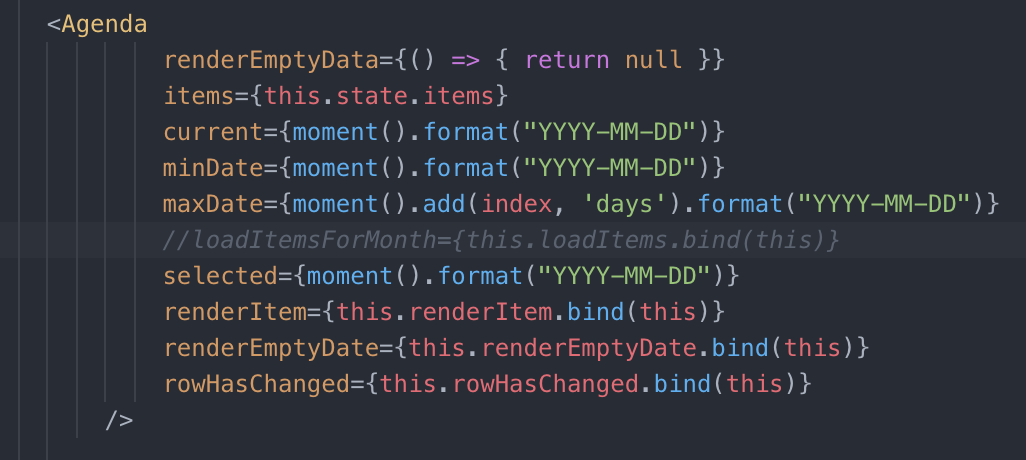
this props = renderEmptyData={() => { return null }}
resolved for me!
 lfoliveir4
on 20 Oct 2019
lfoliveir4
on 20 Oct 2019
this props = renderEmptyData={() => { return null }}
resolved for me!
Or simply:
renderEmptyData={() => null}
 uladzislau-stuk
on 31 Mar 2020
uladzislau-stuk
on 31 Mar 2020
Related issues
 idlework
·
4Comments
idlework
·
4Comments
 chapeljuice
·
3Comments
ercpereda
·
4Comments
chapeljuice
·
3Comments
ercpereda
·
4Comments
 MrAlekhin
·
4Comments
MrAlekhin
·
4Comments
 microwin168
·
4Comments
microwin168
·
4Comments
Most helpful comment
The documentation is wrong, the prop should be renderEmptyData and NOT renderEmptyDate