React-dates: isDayBlocked -rendering issue
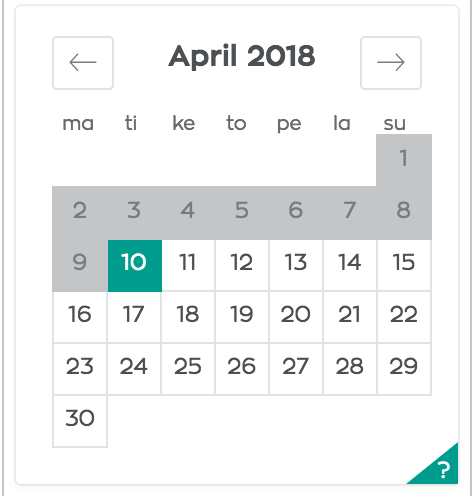

In this example April 9th seems greyed out. Either way user is still able to select the date and like other picture of console shows, isDayBlocked function returns false.
import's
import 'react-dates/initialize' // <---- put this at the very top of your js file

import ThemedStyleSheet from 'react-with-styles/lib/ThemedStyleSheet'
import aphroditeInterface from 'react-with-styles-interface-aphrodite'
import DefaultTheme from 'react-dates/lib/theme/DefaultTheme'

ThemedStyleSheet.registerInterface(aphroditeInterface)
ThemedStyleSheet.registerTheme({
  reactDates: {
    ...DefaultTheme.reactDates,
    color: {
      ...DefaultTheme.reactDates.color,
      backgroundColor: '#333',
    },
  },
})
 bumpah
All 2 comments
You only need the initialize endpoint if you’re not registering your own theme and interface; try removing that line?
 ljharb
on 9 Apr 2018
ljharb
on 9 Apr 2018
edit: Seemed to be issue with timezones. isDayBlocked -functions prop day -moment object gave datetime as 2018-04-09T00:00:00+03:00, and I compared it to UTC times. I believe result was that, expected time was then translated to be relatively yesterday. Works as expected!
Something like forcing moment object hours to always 12 works in this example.
bumpah
on 9 Apr 2018
👍2
Was this page helpful?
0 / 5 - 0 ratings
Related issues
 krissalvador27
·
3Comments
krissalvador27
·
3Comments
 jpollard-cs
·
3Comments
jpollard-cs
·
3Comments
 prztrz
·
3Comments
prztrz
·
3Comments
 swaritkohli
·
3Comments
swaritkohli
·
3Comments
 Jesus-Gonzalez
·
3Comments
Jesus-Gonzalez
·
3Comments
Most helpful comment
edit: Seemed to be issue with timezones.
isDayBlocked-functions propday-moment object gave datetime as 2018-04-09T00:00:00+03:00, and I compared it to UTC times. I believe result was that, expected time was then translated to be relatively yesterday. Works as expected!Something like forcing moment object hours to always 12 works in this example.