React-dates: Manually editing date input fields
I know there have been a few issues submitted about manually entering dates in to the input field, but it's not clear what the current status of that is.
I see that it's still possible to enter jibberish in to the input field, which the date picker just sees as null. However, even when a correct date format is entered, it doesn't reflect in the calendar.
Are there any plans on addressing these issues? My only current solution is to make SingleDayPicker readOnly, but users complain when the date is many years out.
 alburritos
All 16 comments
I also wonder if there is any chance to have an input mask ?
 mariepw
on 21 Aug 2017
mariepw
on 21 Aug 2017
Can you clarify what you mean by "input mask"?
 ljharb
on 22 Aug 2017
ljharb
on 22 Aug 2017
For example if format needed is : xx/xx/xxxx, display something like this when typing a date :
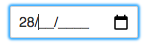
Also, this will prevent to enter something else then numbers..
mariepw
on 22 Aug 2017
That seems really tricky to do in an accessible way, and to be compatible with autofill, copy/paste, etc - separately, I always find it really frustrating and confusing when fields actively prevent input they consider to be bad :-/
ljharb
on 22 Aug 2017
You completely right it won't be easy to implement..
But, HTML5 <input type="date"> prevent anything else then numbers, that's why I was maybe thinking that it would be a good idea to consider prevent it too... (maybe I am wrong)
mariepw
on 22 Aug 2017
+1 on "users complain when the date is many years out". Try setting a birthdate starting from today, for an 18y/o you need to click prev month 216 times! Goes without saying it's brutally unacceptable by any standard.
Now, as an alternative to the input mask suggestion, there could be an option to make the year selectable from a dropdown. Just add a prop that when true, makes the calendar display a small arrow after the year and allows selecting from a range of some years (configurable preferably, but even a hardcoded +/- 10 years range is way better than how it is now).
 steodor
on 23 Aug 2017
steodor
on 23 Aug 2017
+1, to be honest, I don't understand why guys create such complicated library without the possibility to add custom validation and input masks. Also, without year selection.
 RastriginSergey
on 25 Aug 2017
RastriginSergey
on 25 Aug 2017
Year selection is a use case that we don't tend to have, but is indeed important - see #25.
Custom validation and input masks isn't necessarily a good UX pattern, and is hard to do right - it's not a basic or simple thing.
ljharb
on 26 Aug 2017
This is very important and a lot of the comments here expressed frustration. This component is very much a date "picker" and isn't keyboard friendly. If this is to be a serious component outside of travel websites then my suggestion would be to accept - . / and spaces as delimiters, default to dd mm yyyy (with prop to change this) and accept only numbers (to begin with). Don't use input masking in the first cut.
If validation is an issue then this should be a prop that, when true, shows a button to "apply".
Please add this feature :)
 M-Willett
on 10 Nov 2017
M-Willett
on 10 Nov 2017
My complaining is that changing year input doest not change the calendar, which is not "react" at all.
Going to use another date library.
 qk0106
on 10 Jan 2018
qk0106
on 10 Jan 2018
Any update on this issue? Entering new value doesn't update in caldendar, at least for SingleDatePicker, I'm using v17.1.1.
 NKBelousov
on 13 Aug 2018
NKBelousov
on 13 Aug 2018
@NKBelousov I don't think that this issue has been addressed, and I don't know when I will be able to do it myself. However, I do think all the infrastructure is in place to make the change, so I'd def accept a PR that changed this behavior.
https://github.com/airbnb/react-dates/pull/1106 may have some hints as to how to approach the problem as it does month/year updating. It may involve, more generally, updating the DayPicker's currentMonth state variable to reflect updates to initialVisibleMonth.
 majapw
on 13 Aug 2018
majapw
on 13 Aug 2018
Correct me if I'm wrong, but wouldn't this be solved if we simply had access to the inputRef for the actual input field? That way we could attach our own custom (HTML5) oninput and onchange listeners which could parse/format/validate the typed-in input and convert it to a moment object and set that as this.state.value. Then the calendar element itself would be updated just by virtue of the state: date={this.state.value}.
Or even better, include a built-in onInputChange for a handy change event linked to the text/keyboard input itself.
 vincerubinetti
on 17 Dec 2018
vincerubinetti
on 17 Dec 2018
I believe the react-date components have access to the onClose prop where you could reference a function to carry out validation
const validate = () => {
    //Example validation
    if(!this.state.date) {
        this.setState({ date: moment() })
    }
}

<SingleDatePicker
        date={this.state.date}
        onDateChange={date => this.setState({ date })}
        focused={this.state.focused}
        onFocusChange={({ focused }) => this.setState({ focused })}
        id="test"
        onClose={validate}
/>
 nuurspace
on 29 May 2019
nuurspace
on 29 May 2019
I just ran into this issue -- my solution looks like this
  const checkDate = (e: KeyboardEvent): void => {
    const evt = e.target as HTMLInputElement;
    if (evt && evt.value) {
      const val = evt.value as string;
      const possibleDate = moment(val, 'M/D/YYYY');
      const strings = val.split('/');
      if (possibleDate.toString() !== 'Invalid date' && strings[2] && strings[2].length === 4) {
        setDate(possibleDate);
        if (reporter) {
          reporter(possibleDate);
        }
      }
    }
  };

  useEffect((): (() => void) => {
    const datePicker = document.getElementById('date_input');

    if (datePicker) {
      datePicker.addEventListener('keyup', checkDate);
    }
    return (): void => {
      if (datePicker) {
        datePicker.removeEventListener('keyup', checkDate);
      }
    };
  });

  return (
    <Wrapper>
      {title && <StyledInputLabel>{title}</StyledInputLabel>}
      <SingleDatePicker
        id='date_input'
        date={date}
        focused={startFocus}
        onDateChange={onDateChange}
        onFocusChange={onStartFocusChange}
        monthFormat='MMMM YYYY'
        numberOfMonths={2}
        orientation='horizontal'
        placeholder={placeholder}
        regular={false}
      />
    </Wrapper>
  );
added a manual keyUp handler to check the input value... its not perfect, but it does work.
 MikeHannon
on 28 Feb 2020
MikeHannon
on 28 Feb 2020
Note: Since this library already uses moment.js, this doesn't seem as difficult as it sounds. moment.js already supports a fairly flexible/forgiving parser, including allowing for a list of possible formats (arranged in most to least likely, which probably changes based on i18n:
An example for the US:
const date = moment(<input>, ['YYYY-MM-DD', 'MM-DD-YYYY', 'DD MMM YYYY']);
 Eric24
on 20 Mar 2020
Eric24
on 20 Mar 2020
Related issues
 sag1v
·
3Comments
sag1v
·
3Comments
 aaronvanston
·
3Comments
aaronvanston
·
3Comments
 cemremengu
·
3Comments
cemremengu
·
3Comments
 Daniel15
·
3Comments
Daniel15
·
3Comments
 aishwarya-bote
·
3Comments
aishwarya-bote
·
3Comments
Most helpful comment
Correct me if I'm wrong, but wouldn't this be solved if we simply had access to the
inputReffor the actual input field? That way we could attach our own custom (HTML5)oninputandonchangelisteners which could parse/format/validate the typed-in input and convert it to amomentobject and set that asthis.state.value. Then the calendar element itself would be updated just by virtue of the state:date={this.state.value}.Or even better, include a built-in
onInputChangefor a handy change event linked to the text/keyboard input itself.