React-datepicker: Css Modules import not working
I am having some issues trying to get the styling to import correctly. Here's the code:
import` React, { Component, PropTypes } from 'react';
import DatePicker from 'react-datepicker';
import moment from 'moment';

import "react-datepicker/dist/react-datepicker-cssmodules.css";

export class DateInput extends Component {
  constructor(props) {
    super(props);
  }
  state = {
    startDate: moment(),
  }

  handleChange = (date) => {
    this.setState({
      startDate: date
    });
  }

  render() {
    return (
      <DatePicker
        selected={this.state.startDate}
        onChange={this.handleChange}
      />
    );
  }
}

export default DateInput;
I have tried both imports (regular and cssModule) and have tried requiring both. When they render it looks like
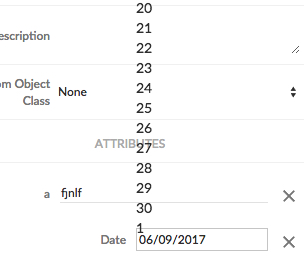
We are using CSS modules and reduxForm, and when I inspect the page the classes seem to be present but have no styling in them. And the numbers are selectable and the calendar works as expected outside of the styling issue.
Any and all help would be appreciated
 holzru
All 7 comments
@vamshikrishna144 & @narchunde solved mine by including react-datepicker/dist/react-datepicker-cssmodules.css in the webpack.config.js
holzru
on 13 Jun 2017
Solved by placing this in my index.jsx file.
require("react-datepicker/dist/react-datepicker-cssmodules.css");
 Francismb
on 13 Jun 2017
Francismb
on 13 Jun 2017
I think its not a good idea to load the css or scss file from the index. If we are using webpack. sass loader should do this. For me I just imported from scss file and it worked fine @import "~react-datepicker/dist/react-datepicker.css"; . This should do the trick.
 sislam6
on 15 Jan 2018
sislam6
on 15 Jan 2018
frazboyz - you saved my ass 👍
 yoavgecht
on 9 Apr 2018
yoavgecht
on 9 Apr 2018
@frazboyz thanks for this.
 grantglidewell
on 30 Jul 2018
grantglidewell
on 30 Jul 2018
[1] [require-hacker] Trying to load "react-datepicker.css" as a "*.js"
[1] [piping] can't execute file: /home/arun/gitlab/auquan_client/bin/server.js
[1] [piping] error given was: /home/arun/gitlab/auquan_client/node_modules/react-datepicker/dist/react-datepicker.css:1
[1] (function (exports, require, module, __filename, __dirname) { .tether-element-attached-top .datepicker__triangle, .tether-element-attached-bottom .datepicker__triangle {
[1]                                                               ^
[1]
[1] SyntaxError: Unexpected token .
[1]     at new Script (vm.js:74:7)
[1]     at createScript (vm.js:246:10)
[1]     at Object.runInThisContext (vm.js:298:10)
[1]     at Module._compile (internal/modules/cjs/loader.js:670:28)
[1]     at Module._extensions..js (internal/modules/cjs/loader.js:713:10)
[1]     at require.extensions.(anonymous function) (/home/arun/gitlab/auquan_client/node_modules/babel-register/lib/node.js:152:7)
[1]     at Object._module2.default._extensions.(anonymous function) [as .js] (/home/arun/gitlab/auquan_client/node_modules/require-hacker/babel-transpiled-modules/require hacker.js:260:68)
[1]     at Module.load (internal/modules/cjs/loader.js:612:32)
[1]     at tryModuleLoad (internal/modules/cjs/loader.js:551:12)
[1]     at Module._load (internal/modules/cjs/loader.js:543:3)
[1] [piping] further repeats of this error will be suppressed...
@holzru @sislam6 @frazboyz
I am still getting above error,
react version: "react": "0.14.8"
react-datepicker version: "react-datepicker": "^0.13.0"
what I tried:
- importing css file as per react-datepicker docs
- copied css file and add it in same directory then imported css file
- configured web pack configuration to load css
but still not worked for me.
help would be appreciated.
Thanks
 AKArunkumar
on 1 Mar 2019
AKArunkumar
on 1 Mar 2019
@AKArunkumar even i am also getting same error. if you found anything related to that. kindly share here. highly useful.
 SivaGanesh56
on 15 Jul 2020
SivaGanesh56
on 15 Jul 2020
Related issues
 gilbertKaradja
·
29Comments
gilbertKaradja
·
29Comments
 hiredgun
·
23Comments
hiredgun
·
23Comments
 plazma-prizma
·
18Comments
plazma-prizma
·
18Comments
 johhansantana
·
19Comments
johhansantana
·
19Comments
 JustFly1984
·
23Comments
JustFly1984
·
23Comments
Most helpful comment
Solved by placing this in my index.jsx file.
require("react-datepicker/dist/react-datepicker-cssmodules.css");