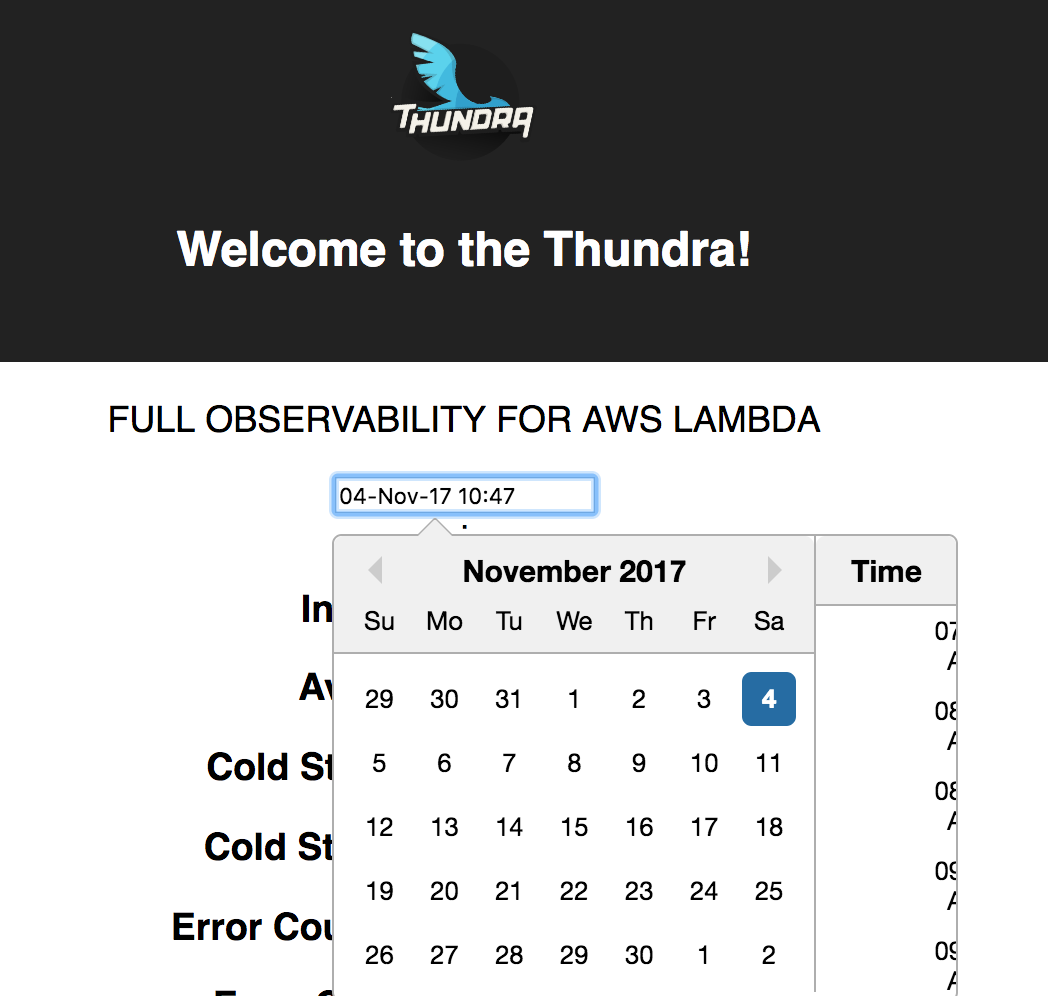
React-datepicker: TimeSelect is not being displayed properly
 plazma-prizma
All 18 comments
Experience the same problem, guys
 wheredyoufindthis
on 6 Nov 2017
wheredyoufindthis
on 6 Nov 2017
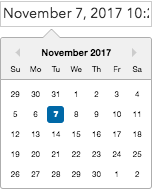
I am not even getting the time section.
 Rahulkr204
on 7 Nov 2017
Rahulkr204
on 7 Nov 2017
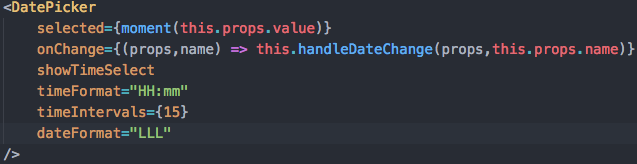
I got the same problem TimeSelect is not working. Even upgrade to the ver. 0.60.0
 matong1745
on 7 Nov 2017
matong1745
on 7 Nov 2017
It is temporary fix the issue:
-
1.
import 'react-datepicker/dist/react-datepicker.css';
- add some inline styles
.react-datepicker__time-container .react-datepicker__time .react-datepicker__time-box ul.react-datepicker__time-list {
padding-left: 0;
padding-right: 0;
}
 orx0r
on 8 Nov 2017
orx0r
on 8 Nov 2017
@orx0r Added your fix to my code, still struggling with problem. Can you share your code snippet of DatePicker component used ?
Rahulkr204
on 9 Nov 2017
Hi @Rahulkr204 sure. this works in my case
// imports
import 'react-datepicker/dist/react-datepicker.css';

...
// component
return (
    <div>
        <style>
          {`.react-datepicker__time-container .react-datepicker__time .react-datepicker__time-box ul.react-datepicker__time-list {
            padding-left: 0;
            padding-right: 0;
          }`}
        </style>
        <DatePicker
          dateFormat="YYYY-MM-DD HH:mm"
          showTimeSelect
          timeFormat="HH:mm"
          selected={Moment(this.state.date)}
          onChange={this.onChange}
        />
    </div>
);
Hi @orx0r
the same issue.
it's invalid the code that you show
 codepandy
on 10 Nov 2017
codepandy
on 10 Nov 2017
@orx0r works like a charm, thank you!!!
 vvbvargas
on 18 Nov 2017
vvbvargas
on 18 Nov 2017
@orx0r Thanks!!! Works great !! The code snippet really helped
 shrutic
on 21 Nov 2017
shrutic
on 21 Nov 2017
@orx0r Perfect!!
 oldmill1
on 29 Nov 2017
oldmill1
on 29 Nov 2017
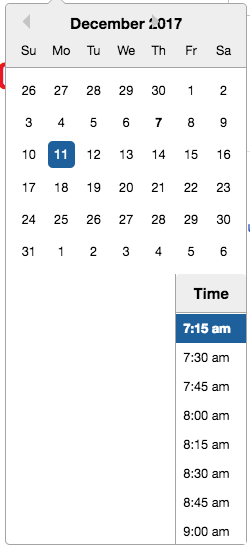
The temp fix helped on desktop, but mobile looks like this:
 bskinny129
on 8 Dec 2017
bskinny129
on 8 Dec 2017
@bskinny129 I did this to make it work on smaller screens (probably not very elegant, but it worked)
```css
.react-datepicker__time-container .react-datepicker__time .react-datepicker__time-box ul.react-datepicker__time-list {
padding-left: unset;
padding-right: unset;
width: 100px;
}
.react-datepicker__input-container {
width:100%;
}
.react-datepicker-wrapper {
width:100%;
}
.react-datepicker {
width: 314px;
}
 willm
on 11 Dec 2017
willm
on 11 Dec 2017
@willm Thank you, that really helped!
In case it helps anyone, here is my complete settings that I tried to optimize for mobile (doesn't pop up keyboard and is a little smaller to consistently fit on the screen):
```
.react-datepicker__time-container .react-datepicker__time .react-datepicker__time-box ul.react-datepicker__time-list {
padding-left: unset;
padding-right: unset;
width: 100px;
}
.react-datepicker__input-container, .react-datepicker-wrapper {
width:100%;
}
.react-datepicker {
width: 314px;
}
.react-datepicker .react-datepicker__day {
line-height: 1.4rem;
margin: .1rem 0.166rem;
}
.react-datepicker .react-datepicker__day-name {
line-height: 1rem;
}
offset: {
enabled: true,
offset: '0px, 12px'
},
preventOverflow: {
enabled: true,
escapeWithReference: false,
boundariesElement: 'viewport'
}
}}
shouldCloseOnSelect={false} selected={this.state.tempDate} onChange={this.datePickerChanged}
dateFormat="M/D/YY h:mm a" timeIntervals={15} timeFormat="h:mm a" showTimeSelect />
```
bskinny129
on 12 Dec 2017
@orx0r and all others guys
thanks all of you to save my days :)
for anyone who use styled-component solution
according @orx0r sol for ref
const FixDatePickerTimer = styled.span`
  & .react-datepicker__time-container .react-datepicker__time .react-datepicker__time-box ul.react-datepicker__time-list {
    padding-left: unset;
    padding-right: unset;
    width: 100px;
  }
  & .react-datepicker__input-container {
    width:100%;
  }
  & .react-datepicker-wrapper {
    width:100%;
  }
  & .react-datepicker {
    width: 314px;
  }
`;

.....
<FixDatePickerTimer>
  <DatePicker
    dateFormat="YYYY-MM-DD HH:mm"
    showTimeSelect
    timeFormat="HH:mm"
    selected={Moment(this.state.date)}
    onChange={this.onChange}
   />
</FixDatePickerTimer>
 flameddd
on 17 Mar 2018
flameddd
on 17 Mar 2018
@orx0r thank you! it work now
 hnineitpm
on 24 Sep 2018
hnineitpm
on 24 Sep 2018
@orx0r Thank you it worked for me
 Mohammad-Khalid23
on 14 May 2019
Mohammad-Khalid23
on 14 May 2019
Is there going to be a more permanent fix for this? Running react-datepicker v1.6 with React 15.6.
 dandua98
on 6 Aug 2019
dandua98
on 6 Aug 2019
This issue has been automatically marked as stale because it has not had recent activity. It will be closed if no further activity occurs. Thank you for your contributions.
![stale[bot] picture](https://avatars3.githubusercontent.com/in/1724?v=4&s=40) stale[bot]
on 2 Feb 2020
stale[bot]
on 2 Feb 2020
Related issues
 ashishlal91
·
21Comments
ashishlal91
·
21Comments
 yy8597
·
19Comments
yy8597
·
19Comments
 johhansantana
·
19Comments
johhansantana
·
19Comments
 nmaves
·
42Comments
nmaves
·
42Comments
 steinarb
·
26Comments
steinarb
·
26Comments
Most helpful comment
Hi @Rahulkr204 sure. this works in my case