React-datepicker: How to exclude time from the past (minTime), only if selected date is current date (minDate) ?
I found how to exclude dates from the past with minDate, I just pass minDate={moment()}
If I set minTime={moment().hours().minutes()} it will exclude this time from all the dates.
I need to limit user to set time in past of current day.
I look for examples on the website, but could not find proper example.
PS. I Appreciate all the work you do for the community!
 JustFly1984
All 23 comments
@martijnrusschen please have a look at this feature request!
 manishbhatt94
on 14 Dec 2017
manishbhatt94
on 14 Dec 2017
I am looking for this feature too.
I want to set the minTime to be 6 hours in the future.
I tried this minTime={moment().add(6, "hours")}, but it didn't seem to do what I was expecting.
 mathiasha
on 23 Mar 2018
mathiasha
on 23 Mar 2018
Have you tried passing minTime based on the selected date?
 aij
on 23 Mar 2018
aij
on 23 Mar 2018
I'm coming across this as well. Any ideas how to manipulate the value of the time if the user didn't select one? It doesn't seem to care what the 'minTime' is, it will always default to 12:00am.
 justinkahrs
on 30 Apr 2018
justinkahrs
on 30 Apr 2018
This seems like a bug at this moment. Per the documentation, one needs to set both minTime and maxTime. But doing so disables all the time fields.
const now = moment().tz('America/New_York')
...
        <DatePicker
          isClearable
          minDate={now}
          minTime={now.hours(now.hour()).minutes(now.minutes())}
          maxTime={now.hours(23).minutes(45)}
          onChange={handleChange}
          placeholderText="Click to select a date"
          selected={input.value ? moment(input.value, 'America/New_York') : null}
          todayButton="Today"
          showTimeSelect
          timeFormat="HH:mm"
          timeIntervals={15}
          dateFormat={format}
        />
Today's date

Tomorrow's date

 mrchief
on 6 Jul 2018
mrchief
on 6 Jul 2018
I would create a function that utilizes the excludeTimes parameter combined with your onChange event and/or selected parameter. If selected date === today's date then your excludeTimes will be an array of interval times you do not want displayed for this date. This function would have to run every time a date is selected on your onChange event and return null or and empty array when any other date other than the desired date is selected.
Note: This is untested but should in theory work. 😄
 michaelmcshinsky
on 19 Jul 2018
michaelmcshinsky
on 19 Jul 2018
+1 on this bug, same issue for me.
 GavinThomas1192
on 19 Jul 2018
GavinThomas1192
on 19 Jul 2018
I solved this issue by rounding the minTime and maxTime to the nearest timeIntervals slot.
I think @mrchief 's issue is that the now time is not one of the timeIntervals (example: if now = "8:43" it's not in the time intervals [8:45, 9:00])
Example:
// Rounds datepicker's time to the nearest 15 minute interval
round = (date, duration, method) => {
  duration = duration || moment.duration(15, 'minutes');
  method = method || 'floor';
  return moment(Math[method]((+date) / (+duration)) * (+duration));
}

render() {
  const startDate = this.state.startDate;
  const now = moment();

  const startDPConf = {
    minDate: now,
    showTimeSelect: true,
    timeFormat: "HH:mm",
    timeIntervals: 15,
    dateFormat: format
  }

  if (startDate.isSame(now, 'day')) {
    startDPConf.minTime = this.round(now, 15, 'ceil');
    startDPConf.maxTime = this.round(now.clone().endOf('day'));
  }

  <DatePicker {...startDPConf} />
}
 fabiosangregorio
on 13 Oct 2018
fabiosangregorio
on 13 Oct 2018
@fabiosangregorio The issue is that if you choose another date, the time is sticky. So if it's 1 pm, you can't see dates before 1 pm. Not only today but everyday.
Still a bug with no solutions on here
 charlesmarino
on 23 Oct 2018
charlesmarino
on 23 Oct 2018
@charlesmarino you can check if the selected date is the same of today, and if that is the case you can set the min/max time. I updated the previous comment with the code to do that.
fabiosangregorio
on 23 Oct 2018
@fabiosangregorio Hi! This is not worked for me ((
 Valerika
on 15 Feb 2019
Valerika
on 15 Feb 2019
@Valerika here's a quick demo of it https://codepen.io/fabiosang/pen/PVyMJd?editors=0011
fabiosangregorio
on 15 Feb 2019
@fabiosangregorio Thanks!!!!!!!!!!
Valerika
on 15 Feb 2019
@fabiosangregorio ((((

and no open DatePicker
Valerika
on 15 Feb 2019

Valerika
on 15 Feb 2019

state = {
startDate: moment()
}
Valerika
on 15 Feb 2019
@fabiosangregorio This is due to the version, I lowered the version to 1.4.1 and it works
Thanks!
Valerika
on 15 Feb 2019
Happy to announce that I sorted this out in #1718 🚀
Min Date

Max Date
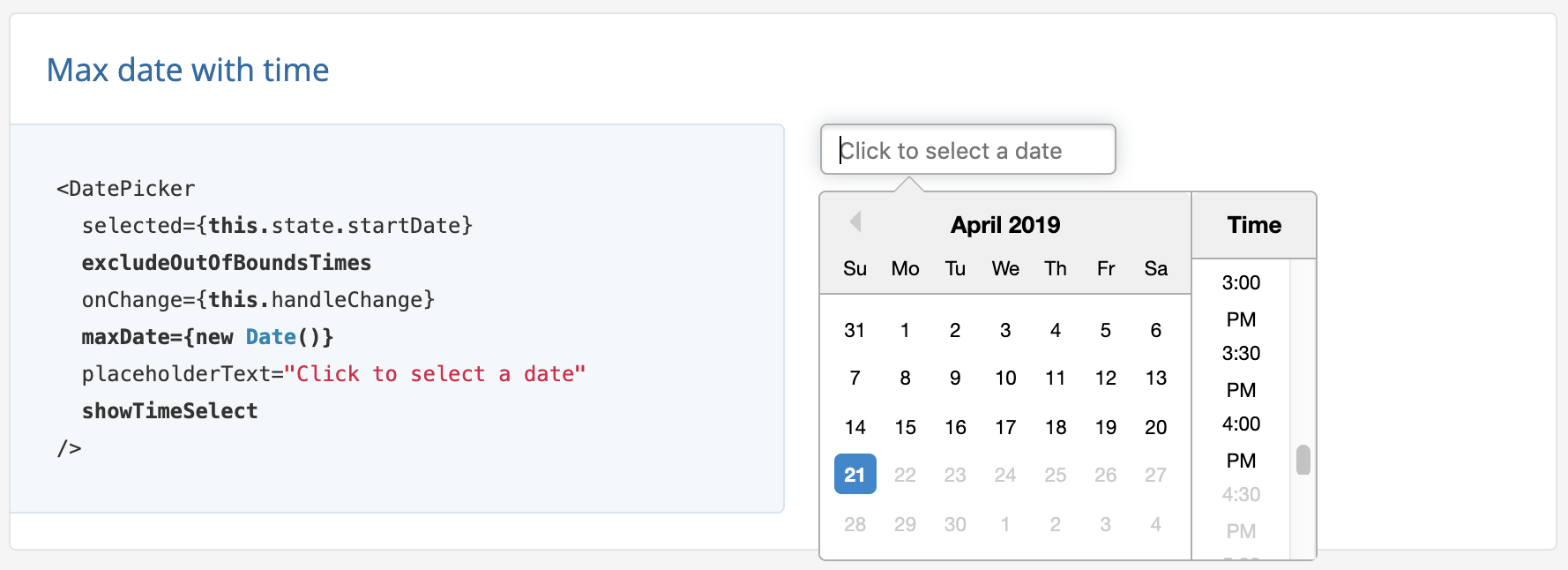
Read more details on the PR page.
 paulrberg
on 22 Apr 2019
paulrberg
on 22 Apr 2019
Hi guys, for @JustFly1984 's question, i just encountered , any solution?
 dlrandy
on 16 May 2019
dlrandy
on 16 May 2019
@dlrandy Me and my team has made custom React datepicker with better accessibility support, written in typescript, supporting all main features of react-datepicker, and I’m planning to make it as npm package this month. Does anybody want to join as maintainer? I already have pretty much successful npm project @react-google-maps/api, so I’m retry sure in success of new datepicker. You can see an implementation in production at https://www.drivefromto.com
JustFly1984
on 16 May 2019
You can get this working now without this PR.
This will exclude all times before now time, only future dates/times are selectable, requires moment js.
import moment from 'moment'
...

// set this in your state init call
this.state.minTime =  this.calculateMinTime(new Date()),


// add these two functions to your component
calculateMinTime = date => {
    let isToday = moment(date).isSame(moment(), 'day');
    if (isToday) {
        let nowAddOneHour = moment(new Date()).add({hours: 1}).toDate();
        return nowAddOneHour;
    }
    return moment().startOf('day').toDate(); // set to 12:00 am today
}

handleDateChange = date => {
    this.setState({
        closeDate: date,
        minTime: this.calculateMinTime(date),
    });
}

// DatePicker component in your render function.
<DatePicker
      onChange={this.handleDateChange}
      selected={this.state.closeDate}
      minDate={new Date()}
      minTime={this.state.minTime}
      maxTime={moment().endOf('day').toDate()} // set to 23:59 pm today
      timeIntervals={60}
      showTimeSelect
/>
enjoy :)
 farnell
on 18 May 2019
farnell
on 18 May 2019
This issue has been automatically marked as stale because it has not had recent activity. It will be closed if no further activity occurs. Thank you for your contributions.
![stale[bot] picture](https://avatars3.githubusercontent.com/in/1724?v=4&s=40) stale[bot]
on 14 Nov 2019
stale[bot]
on 14 Nov 2019
date-fns solution:
import { isSameDay, startOfToday, endOfDay } from 'date-fns'

...

calculateMinTime = date => isSameDay(date, new Date()) ? new Date() : startOfToday()

state = {
  selectedDate: null,
  minTime: this.calculateMinTime(new Date())
}

...

handleDateChange = date => {
  this.setState({
    selectedDate: date,
    minTime: this.calculateMinTime(date)
  })
}

...

<DatePicker
  onChange={this.handleDateChange}
  selected={this.state.selectedDate}
  minDate={new Date()}
  minTime={this.state.minTime}
  maxTime={endOfDay(new Date())}
  timeIntervals={15}
  showTimeSelect
/>
 trplfr
on 13 Jan 2020
trplfr
on 13 Jan 2020
Related issues
 gamesover
·
27Comments
gamesover
·
27Comments
 kaushikbarodiya
·
19Comments
kaushikbarodiya
·
19Comments
 YOO629
·
48Comments
YOO629
·
48Comments
 kesavan49
·
18Comments
kesavan49
·
18Comments
 plazma-prizma
·
18Comments
plazma-prizma
·
18Comments
Most helpful comment
Happy to announce that I sorted this out in #1718 🚀
Min Date
Max Date
Read more details on the PR page.