React-calendar-timeline: Styling issue at first load
Hello,
I'm testing the basic example and when i first load the page it gets like this:

After navigate to another page and navigate back to the page where the timeline is, it gets fixed by itself.

Thanks,
 rmncavaco
All 19 comments
This is very weird!
what was your environment?
 Ilaiwi
on 28 Aug 2018
Ilaiwi
on 28 Aug 2018
I'm using with Ant Design UI on top of a React + Redux .net core template
rmncavaco
on 28 Aug 2018
what os and browser are you using?
Ilaiwi
on 28 Aug 2018
@rmncavaco before we proceed, can you please provide a a repo or a codesandbox that you can share here that displays this bug? This issue could be an issue with the library or an issue with your code but it's impossible to know without actual code that we can play with.
This is why this project has issue templates (which you should have filled out) configured so that you as the issue creator can provide all pertinent information to us, the maintainers, so that we can address your issue as quick as possible.
 mcMickJuice
on 28 Aug 2018
mcMickJuice
on 28 Aug 2018
Windows 10 + Chrome Version 68
rmncavaco
on 28 Aug 2018
@mcMickJuice i will create a codesandbox asap and let you know.
rmncavaco
on 28 Aug 2018
I've made some code cleaning and apparently it went away....
Sorry about bothering you guys and thank you for you time.
rmncavaco
on 28 Aug 2018
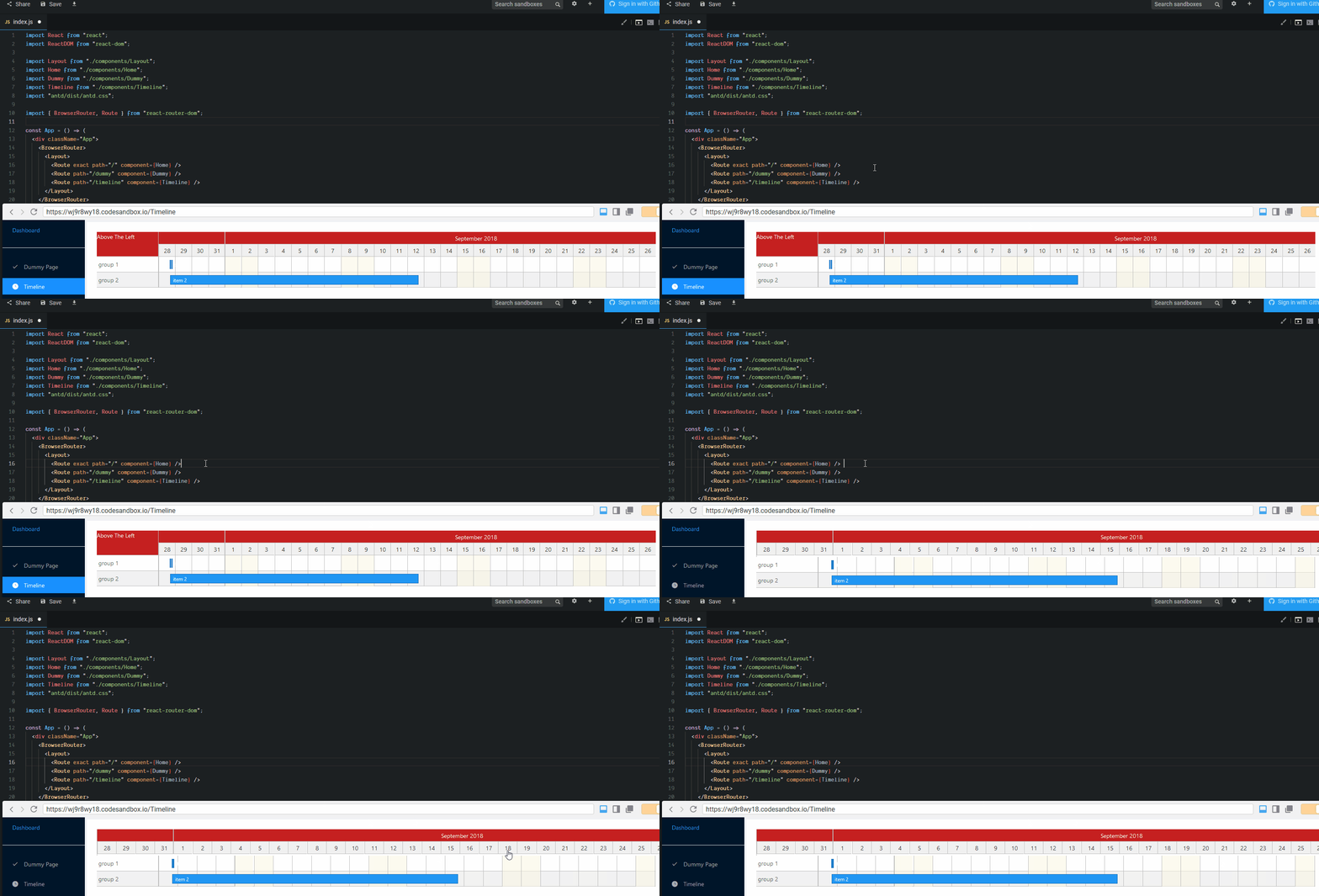
Ok, i was able to reproduce it again in codesandbox https://codesandbox.io/s/wj9r8wy18
Try the following:
Load the page and click on the timeline menu
Click anywhere in the code and hit the "space" bar.
Looks like that any update to the code when the timeline is been rendered causes the CSS to get messed up.
rmncavaco
on 28 Aug 2018
works fine for me
Ilaiwi
on 28 Aug 2018
I'm even able to reproduce it on Firefox
rmncavaco
on 28 Aug 2018
rmncavaco
on 28 Aug 2018
ok I was able to reproduce now. It is a bug of how we calculate the width of the calendar headers part. Will look into it.
Ilaiwi
on 28 Aug 2018
Hi, is there a workaround for this issue?
 mertcanyalhi
on 26 Dec 2018
mertcanyalhi
on 26 Dec 2018
I've resolved this issue by dispatching a resize event while rendering:
window.dispatchEvent(new Event('resize'));
mertcanyalhi
on 27 Dec 2018
@mertcanyalhi we have efforts to get Custom Headers into master soon. It will solve this issue once and for all.
Ilaiwi
on 27 Dec 2018
I'm having an issue which i think its also related to the calculation of the header width.
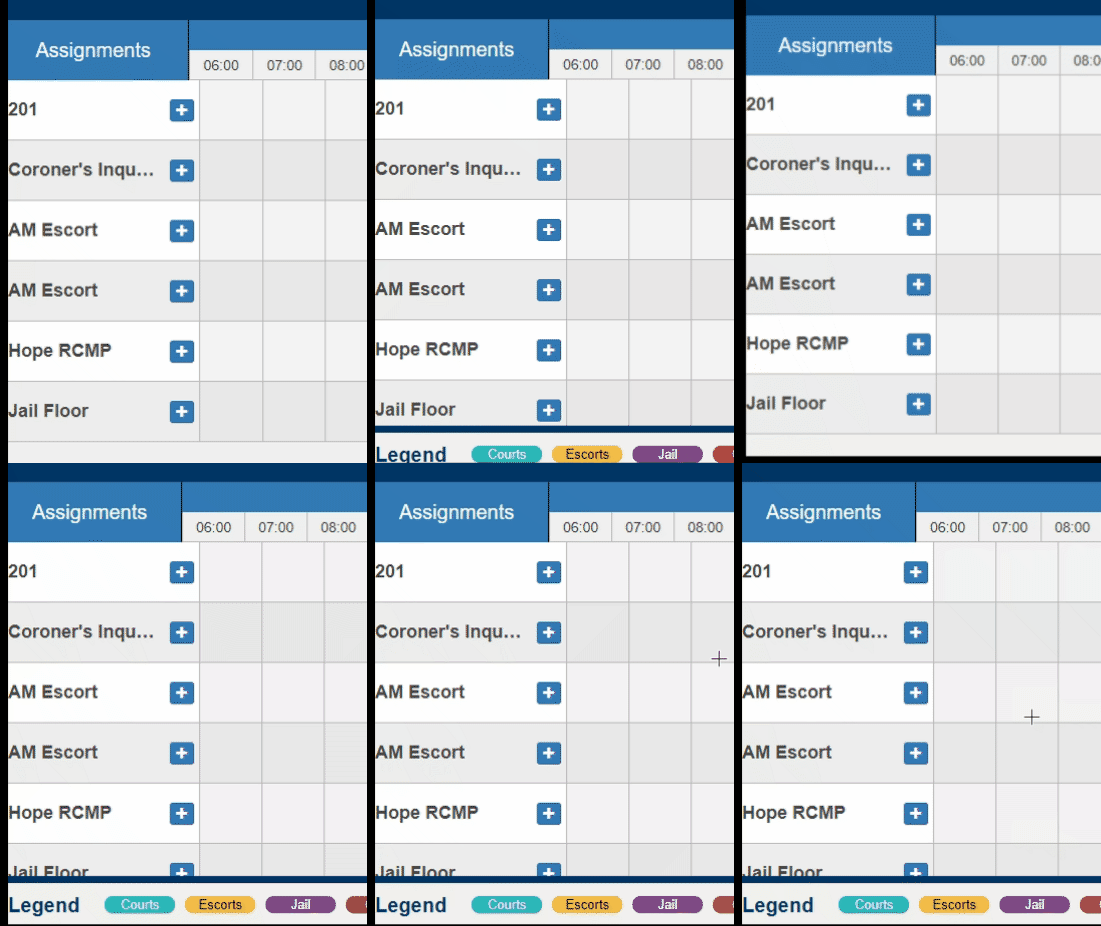
In the initial state the sidebar header is not property aligned,
after a page resize (or window.dispatchEvent(new Event('resize')); like @mertcanyalhi mentioned) it seems to get resolved.
Also, if I shrink the page to a point where the vertical scroll bar is displayed the header seems to get a wrong size again.
 TiagoGraf89
on 5 Jan 2019
TiagoGraf89
on 5 Jan 2019
@TiagoGraf89 this will be solved as well with Custom headers which is getting closer and closer to the end line.
could you please provide a codesandbox issue for future testing?
Ilaiwi
on 5 Jan 2019
I've resolved this issue by dispatching a resize event while rendering:
window.dispatchEvent(new Event('resize'));
Thanks for the temp solution!
 diw1
on 5 Mar 2019
diw1
on 5 Mar 2019
released in 0.25.0
Ilaiwi
on 16 Apr 2019
Related issues
 stahlmanDesign
·
4Comments
stahlmanDesign
·
4Comments
 x1mrdonut1x
·
5Comments
x1mrdonut1x
·
5Comments
 nirchernia
·
3Comments
nirchernia
·
3Comments
 forki
·
5Comments
forki
·
5Comments
 rosanzheng
·
3Comments
rosanzheng
·
3Comments
Most helpful comment
I've resolved this issue by dispatching a resize event while rendering:
window.dispatchEvent(new Event('resize'));