React-calendar-timeline: Using verticalLineClassNamesForTime property 'join' cannot be read in Columns.js
Hey there,
first of all thank you so much for providing this great library!
The bug / the problem I am encountering relates to the #364 feature.
Describe the bug
I have issues using the verticalLineClassNamesForTime property as it is shown in the documentation and in the demo example.
For data, I used the code provided in https://github.com/namespace-ee/react-calendar-timeline/blob/master/demo/app/demo-vertical-classes/index.js . Although the code compiled successfully, nothing was rendered.
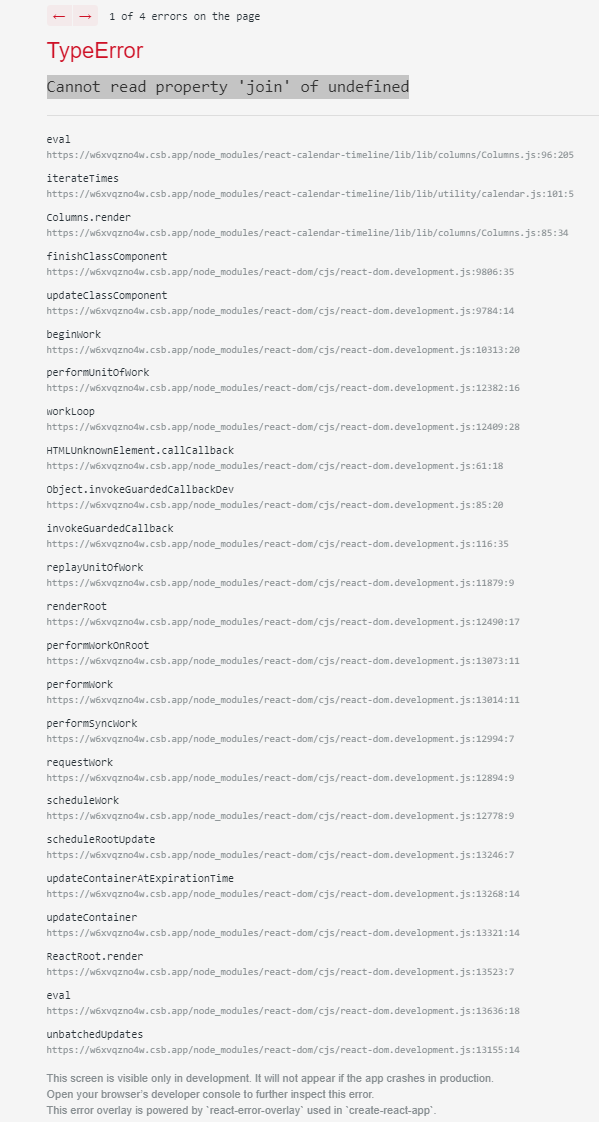
Therefore, I replaced the function verticalLineClassNamesForTime provided in the documentation (https://github.com/namespace-ee/react-calendar-timeline#verticallineclassnamesfortimestart-end) but by doing so, the code does not compile anymore due to a TypeError _"Cannot read property 'join' of undefined", error can be traced back to the Columns.js file._
To Reproduce
https://codesandbox.io/s/timeline-demo-error-verticallineclassnamesfortime-of8u9
Expected behavior
A clear and concise description of what you expected to happen.
Screenshots
Library Version
^0.27.0
Desktop (please complete the following information):
- OS: Windows
- Browser chrome
- Version 87.0.4280.88
Smartphone (please complete the following information):
N/A
Additional context
I have already tried to take a look into the code but I could not find any solutions for myself, so any help would be appreciated. Thanks in advance!
As @dkarnutsch and @mcMickJuice added this functionality, I would appreciate it if you could take a look at my problem. Thanks in advance!
 rosanzheng
All 3 comments
Hello!! First of all, thanks for replying to my issue, I really appreciate it.
Now, about your problem, I did some tests and found a solution for your problem (at least what i believe it is).
You just need to add another return for the case it isn't a holiday.
  verticalLineClassNamesForTime = (timeStart, timeEnd) => {
    const currentTimeStart = moment(timeStart);
    const currentTimeEnd = moment(timeEnd);


    for (let holiday of holidays) {
      if (
        holiday.isSame(currentTimeStart, "day") &&
        holiday.isSame(currentTimeEnd, "day")
      ) {
        return ['holiday']
      }
    }
    return []; // Here!!
  };
I hope this solves your problem. :D
 GuiPretto
on 9 Dec 2020
GuiPretto
on 9 Dec 2020
Hi again @rosanzheng,
I just saw your updated codesandbox project and I noticed that the class is rendered on where it should be, the problem is actually on the css file, for values like 'red', 'green', 'yellow' and more you don't need to type the " around it, just the word itself. Like the example below:
.holiday {
  background-color: "red"; /* Wrong */
  background-color: red;  /* Correct*/
}
It's the same logic for every other value when we are working with a css file.
The only case where we use " or ' is when we are using styles directly on the element (aka css inline).
GuiPretto
on 9 Dec 2020
Hey there,
Thank you so much for taking the time, I think I just got pretty mixed up with inline-styling and CSS-class styling syntax.
Anyway, I realized that I maybe just didn't look at my code properly, so thank you so much for taking the effort and the time in helping me out - it really means a lot!
Hope you'll have a great day and stay healthy!
rosanzheng
on 9 Dec 2020
Related issues
 stahlmanDesign
·
4Comments
stahlmanDesign
·
4Comments
 kevinmeyvaert
·
4Comments
kevinmeyvaert
·
4Comments
 DHerls
·
3Comments
DHerls
·
3Comments
 sabina4
·
4Comments
sabina4
·
4Comments
 forki
·
5Comments
forki
·
5Comments