React-admin: Disabled buttons in DeleteButtonWithConfirmation after not successful response from server.
What you were expecting:
Working buttons after not successful response from server: Confirm and Cancel
What happened instead:
Disabled buttons after not successful response from server:
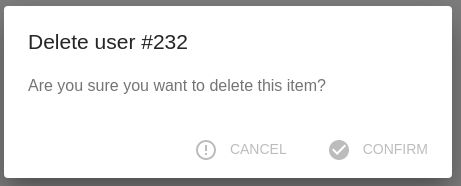
Steps to reproduce:
- Open entity overview (entity edit page (for example: EditUser));
- Click on
Deletebutton on Toolbar section; - Confirm deletion via clicking on the
Confirmbutton in the opened window; - Server returned
500 Internal Server Errorfor example; - Click on
Deletebutton on Toolbar section again; - Opened window has disabled buttons
CancelandConfirm.
Related code:
const UserEditToolbar = <Toolbar {...props} >
    <SaveButton label="Save" redirect="list" submitOnEnter={true} />
    <CancelButton basePath={props.basePath} />
    <DeleteWithConfirmButton {...props}/>
</Toolbar>;

const UserEdit = (props) => (
    <Edit {...props}>
        <TabbedForm toolbar={<UserEditToolbar />} >
            <FormTab label="User Information">
                ...
            </FormTab>
        </TabbedForm>
    </Edit>
);
Environment
- React-admin version: 16.8.6
- React version: 16.8.6
- Browser: Chrome(74.0.3729.131(64))
 TheElix
All 10 comments
This seems similar to #3244 : after failed request, the UI breaks.
Can you reproduce the issue on that CodeSandbox please?
This will help maintainers confirm and fix the issue.
 Kmaschta
on 23 Jul 2019
Kmaschta
on 23 Jul 2019
@Kmaschta Yes, sure. Give me some time for this...
TheElix
on 24 Jul 2019
Link to CodeSandbox.
So, I have replaced every buttons in PostEdit page and left only DeleteWithConfirmButton.
Steps to reproduce:
- Open post (click on it);
- Click on
Deletebutton on Toolbar section; - Confirm deletion via clicking on the
Confirmbutton in the opened window; - At this moment it's broken. You can try to re-open "Delete Confirmation window" but you will see only Disabled buttons.
TheElix
on 25 Jul 2019
Yep, reproduced. Thanks a lot!
The state change is done when the request succeed, but should be done also when the request fail.
It should be a quick fix.
Kmaschta
on 25 Jul 2019
The disabled is based on loading state which is set to be true before calling onConfirm (crudDelete). The function crudDelete, onSuccess refreshes the page and hence you don't have to care about loading state again but onFailure simply displays the notification and loading remains true and so as disabled. Is there any way to access its response so that loading state can be handled accordingly? @Kmaschta @fzaninotto
 Kunnu01
on 1 Aug 2019
Kunnu01
on 1 Aug 2019
This might not be as easy as I thought.
The <Confirm> component store the loading state, but doesn't have a way to unset it.
Kmaschta
on 2 Aug 2019
Can this be done if we add a callback on the failure of crudDelete like:
export interface CrudDeleteAction {
    readonly type: typeof CRUD_DELETE;
    readonly payload: RequestPayload;
    readonly meta: {
        resource: string;
        fetch: typeof DELETE;
        onSuccess: {
            notification: NotificationSideEffect;
            redirectTo: RedirectionSideEffect;
            refresh: RefreshSideEffect;
            basePath: string;
        };
        onFailure: {
            notification: NotificationSideEffect;
            callback: CallbackSideEffect;
        };
    };
}
and then passing the callback in Confirm making the loading state false?
@djhi @Kmaschta
Kunnu01
on 9 Aug 2019
I override the entire component and simply change the internal confirm state to false on handleConfirm.
Maybe is not the most flexible way, but you get the component working correctly.
// ...

class Confirm extends Component {
    state = { loading: false };

    handleConfirm = e => {
        e.stopPropagation();
        this.setState({ loading: true }); // <-- Just changing true to false here makes it work.
        this.props.onConfirm();
    };
 // ...
 WiXSL
on 3 Sep 2019
WiXSL
on 3 Sep 2019
In fact, the loading state should not be internal to the Confirm component, but handled outside, by the calling component. As it is a breaking change, we'll only be able to fix it in v3.
 fzaninotto
on 3 Sep 2019
fzaninotto
on 3 Sep 2019
Fixed by #3647
fzaninotto
on 4 Sep 2019
Related issues
 9747749366
·
3Comments
9747749366
·
3Comments
 kopax
·
3Comments
kopax
·
3Comments
 pixelscripter
·
3Comments
pixelscripter
·
3Comments
 mbj36
·
3Comments
mbj36
·
3Comments
 alukito
·
3Comments
alukito
·
3Comments
Most helpful comment
Fixed by #3647