React-admin: <RichTextInput> not working on IE11
What you were expecting:
On IE11, <RichTextInput /> should work as expected.
What happened instead:
<RichTextInput /> causes a “Something went wrong” error on IE11.

Steps to reproduce:
Visit https://marmelab.com/react-admin-demo/#/products/3/description (demo app) on IE11, with the credentials demo/demo
Other information:
IE11 throws an Unspecified Error, which is not very helpful…

Environment
- React-admin version:
^2.0.0 - Last version that did not exhibit the issue (if applicable): I don’t know yet
- React version:
~16.3.1 - Browser: IE11
- Stack trace (in case of a JS error): see above
bug
 phacks
All 3 comments
Did some digging on this issue, here’s what I found:
- The problem seems to reside in the
packages/ra-input-rich-text/src/styles.jsfile, specifically on the twocontent: '',lines; - Commenting them makes the component work again on IE11;
- The underlying problem _seems_ to be in the
css-vendorlibrary, specifically in thecssVendor.supportedValuemethod that breaks on IE11 withcontentand''as parameters. Currently trying to make sure that this is the root cause. Edit: confirmed! css-vendoris a dependency of@material-ui/core
phacks
on 18 Dec 2018
🎉1
OK, seems that the content: '' attribute is currently not working on Chrome either:
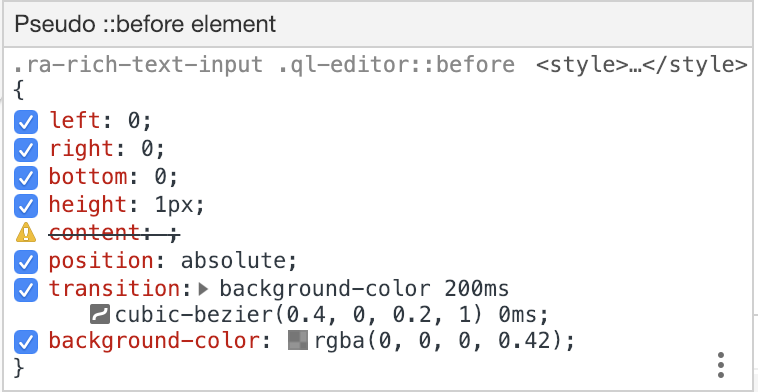
I’d suggest the following approach:
- I create a PR removing those two faulty (and unnecessary) lines in
react-admin, which would fix the problem as far as React Admin is concerned; - I’ll try and see upstream (MUI, css-vendor) if I can suggest a fix that would 1) take into account the
content: ''property and 2) not throw a breaking error on IE11 in that instance.
@Kmaschta what do you think?
phacks
on 18 Dec 2018
👍2
I created PR #2676, feel free to have a look at it/merge it 😊
phacks
on 18 Dec 2018
🎉1
Was this page helpful?
0 / 5 - 0 ratings
Related issues
 9747749366
·
3Comments
9747749366
·
3Comments
 samanmohamadi
·
3Comments
samanmohamadi
·
3Comments
 pixelscripter
·
3Comments
pixelscripter
·
3Comments
 Dragomir-Ivanov
·
3Comments
Dragomir-Ivanov
·
3Comments
 aserrallerios
·
3Comments
aserrallerios
·
3Comments
Most helpful comment
OK, seems that the
content: ''attribute is currently not working on Chrome either:I’d suggest the following approach:
react-admin, which would fix the problem as far as React Admin is concerned;content: ''property and 2) not throw a breaking error on IE11 in that instance.@Kmaschta what do you think?