React-360: Fix position of an object on a view
How can I fix the position of an element on the View. for example I have three buttons in a view and I want if the camera rotates, the position of this button does not change.
 sepehr1313
All 10 comments
@Sepehr-Aliakbary70 Can you explain what you're trying to do a little more? Are you looking for a billboarding effect?
 mattblackdev
on 1 Aug 2017
mattblackdev
on 1 Aug 2017
@mattblackdev No I want to create a menu for a tour and I want to fix the position of this menu.
Somthing like attached photo.
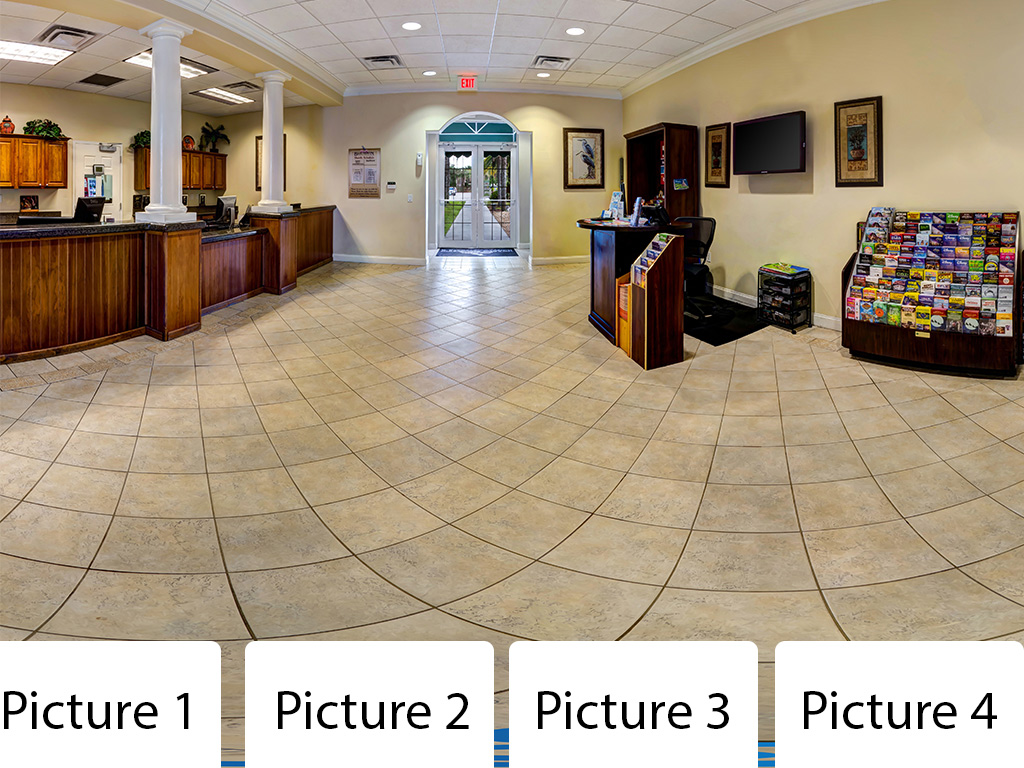
sepehr1313
on 3 Aug 2017
Similar problem here. What I want to achieve is to have a "Back to Menu" button visible to the user wherever they look around in the panorama. Tried to make the button follow the camera, but the effect was very laggy and it just didn't look good. The best option would be to make the button fixed within the page, just like the full-screen icon, but I am not sure if it is possible.
 alekszaf
on 18 Aug 2017
alekszaf
on 18 Aug 2017
@Sepehr-Aliakbary70
If you are targeting these menu buttons to be visible only to the non-VR/3D world, then you can add these to the index.html file of your project as standard HTML components on top of the canvas I say. If you want to fix something in the 3D world, you need to add those components to the camera object, which will make it move with the camera's rotation, but that also means that it becomes useless in VR mode, since you won't be able to perform any action on it. (Those buttons will keep on moving with the camera rotation so...).
Recently I worked on something similar and decided to go with a look down menu, whenever the user sees below a certain pitch value(say -30deg), show the menu, otherwise hide it. This will work in both the non-VR and Vr world alike.
 amitrajput1992
on 28 Aug 2017
amitrajput1992
on 28 Aug 2017
I see, you are after a head locked movement.
It's probably something we should add as a property on the Panels
FYI this can look a little odd, have you thought about only resetting the location at key points? This is a technique we've used in our internal appliations
 mikearmstrong001
on 10 Sep 2017
mikearmstrong001
on 10 Sep 2017
@Sepehr-Aliakbary70 To add another similar technique as @mikearmstrong001 mentions:
You can position the same menu at 4 locations, at 0, 90, 180, 270 degrees and open them when the user is looking down. That has some advantages:
- There won't be menus "flying around" in the VR space
- The user can still easily reach them whichever direction he or she is looking
- They will be in the same spot if he/she looks back up (closing the menu) and then down again (re-opening the menu).
Good luck!
 andelar
on 15 Sep 2017
andelar
on 15 Sep 2017
Maybe an event? if a user moves the camera you can capture the movement and know how many degrees the user moved the camera.
 hmontes
on 21 Sep 2017
hmontes
on 21 Sep 2017
This can now be handled by attaching your elements to a Location that is updated each frame, or by rotating a Flat Surface each frame
 andrewimm
on 8 May 2018
andrewimm
on 8 May 2018
@andrewimm While what you're saying makes perfect sense, how to do it doesn't seem to be clearly documented. I'm currently at a loss.
 mattferrin
on 25 Nov 2018
mattferrin
on 25 Nov 2018
@andrewimm Would you be able to show or reference existing documentation for updating location on each frame?
 brennansaul
on 13 May 2020
brennansaul
on 13 May 2020
Related issues
 meta-meta
·
3Comments
meta-meta
·
3Comments
 stu60610
·
4Comments
stu60610
·
4Comments
 ryanf12
·
3Comments
ryanf12
·
3Comments
 Wajdi-Mnasri
·
3Comments
Wajdi-Mnasri
·
3Comments
 copypasteearth
·
3Comments
copypasteearth
·
3Comments
Most helpful comment
@andrewimm While what you're saying makes perfect sense, how to do it doesn't seem to be clearly documented. I'm currently at a loss.