React-360: VrButtons on overlapping surfaces are unclickable
--- Delete everything above this line before submitting your issue ---
Description
Is this a Bug or a Feature Request?
Bug
For a Bug please explain below what you did, what you expected to happen, and what actually happens.
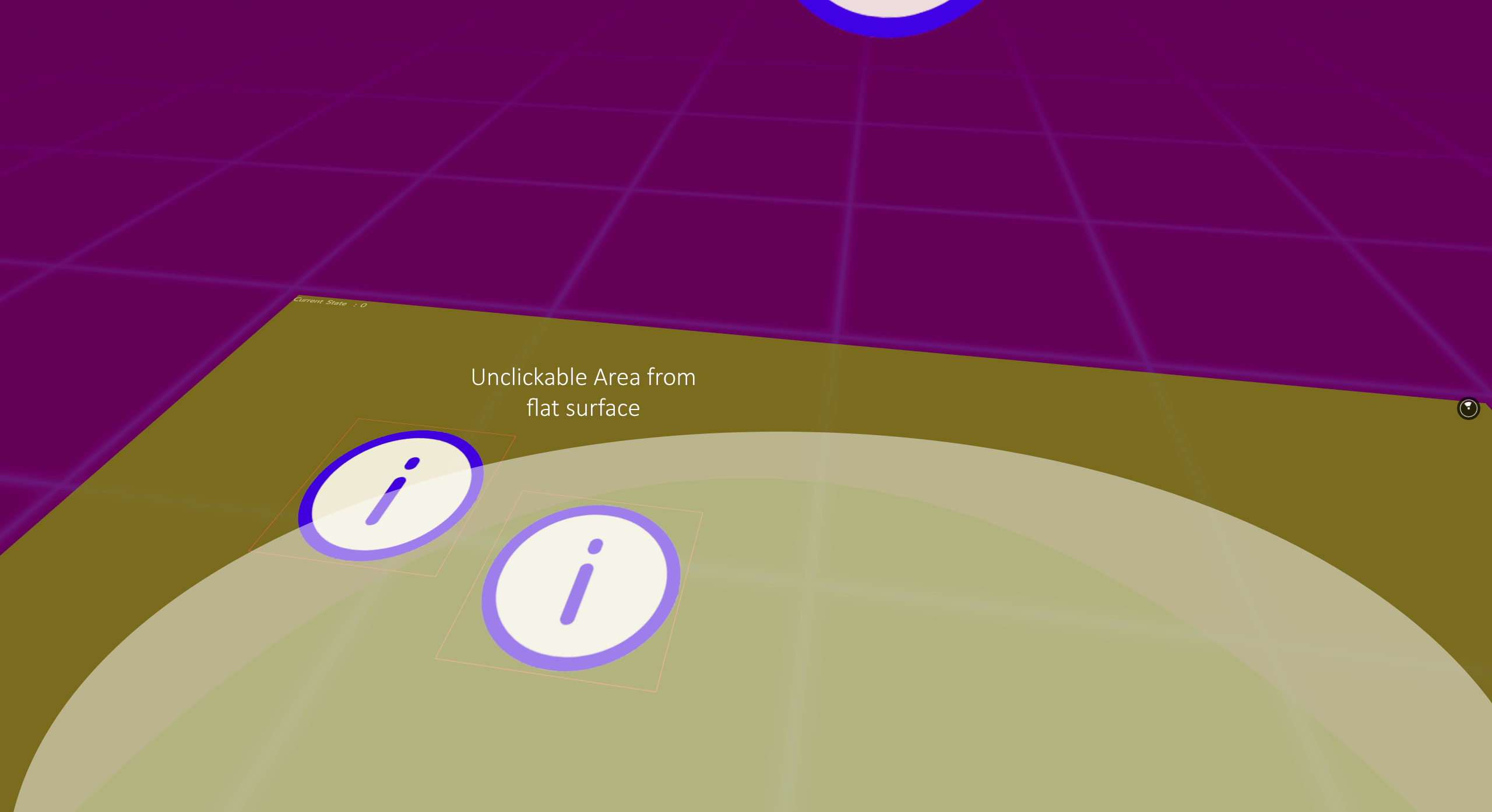
I have two surfaces, each with VrButtons. One is a cylinder and the other is a flat surface. They overlap slightly. Even though the flat surface appears later in the application, it isn't on 'top'. Appearancewise, it correctly displays on top, however, it is unclickable.
Expected behavior
I would expect the surface on top would be clickable.
Actual behavior
It is halfway clickable (see screenshot, the yellowish-brown area is unclickable).
Reproduction
List all the steps required to encounter the issue you're reporting. These steps should be clear and concise.
• Create a Cylinder and Flat surface with buttons on each. Set the angle of the flat surface so that it is on the floor.
const floorPanel = new Surface(2048, 2048, Surface.SurfaceShape.Flat);
floorPanel.setAngle(0,  -Math.PI / 2);
Put one on top of the other. The sides of the flat surface will be unclickable, even though it appears on top.
An example of your code that reliably reproduces the issue is ideal.
Solution
The ability to adjust z-index would be useful.
Otherwise, it would be useful to define pointer-events for
What needs to be done to address this issue? Ideally, provide a pull request with a fix.
Additional Information
- 'react-360' package version: [FILL THIS OUT: get this by running
npm list react-360] - 'react-360-web' package version: [FILL THIS OUT: get this by running
npm list react-360-web] - Operating System: [FILL THIS OUT: MacOS, Linux, or Windows?]
- Browser: [FILL THIS OUT: Oculus Browser, Chrome, Edge, Safari? Which version?]
- VR Device: [FILL THIS OUT: In or Out of VR? Headset? ]
 ryanf12
All 3 comments
Z-index shouldn't matter here, I think I have a better fix in the raycaster / hit-tester. Will test later today.
 andrewimm
on 18 May 2018
andrewimm
on 18 May 2018
Any update on this?
 mrb91002
on 4 Oct 2018
mrb91002
on 4 Oct 2018
Any update?
 yogiprsetya
on 17 Jun 2020
yogiprsetya
on 17 Jun 2020
Related issues
 baloo887
·
3Comments
baloo887
·
3Comments
 copypasteearth
·
3Comments
copypasteearth
·
3Comments
 lwd369
·
4Comments
lwd369
·
4Comments
 nikgraf
·
3Comments
nikgraf
·
3Comments
 nafiou
·
3Comments
nafiou
·
3Comments
Most helpful comment
Any update on this?