Rawtherapee: Branch White balance : auto - local - Cat02 adaptation
I push a change in branch autowblocal. For me now it's work well. I don't say there is no bug or dysfunctionement. To test :)
3 main features : a) 7 methods for "auto WB" ; b) one RT-spot for local WB; C) Chromatic adaptation Cat02 - derived from Ciecam02.
I have enabled by default "White Balance", because when disabled, bad functionnement especially CIECAM02
You have 7 methods "Auto White balance" (from University research on WB) - the first "Auto grey old", is the actual "auto WB"
All others methods are after demoisicing, you can or not apply a gamma sRGB (not for auto grey old).
I have not managed to make the "correlation color" method work correctly, the code is present, not activated ...
It is not more abnormal to have 7 methods, than 13 for demosaicing, or multiple micro-contrast versions...its depend of image, and recall WB is a mathematically indeterminate problem.
Depending on the user's choice, we can select if necessary a smaller number, to simplify
Cat02 adaptation is avaiable for "White balance " and "white balance local" and from my point of view should always be used.
Cat02, performs a chromatic adaptation, between the chosen temperature and 5000K. Settings 90% should satisfy the majority of cases.
If the absolute luminance conditions (scene or viewing) are very low, you can lower the value, if conversely they are very high you can increase the value up to 100.
For local WB, I think it is not necessary to have more than one control. This local WB allow to correct shadow, in a sunshine scene, or mixed illuminant (Sun and Tungstene)
You can choose, either an elipse or rectangle selection.
You have a slider transition...
jacques
 Desmis
All 140 comments
RawTherapee_autowblocal_5.3-471-g6e0263c2_WinVista_64.zip
uploaded at
https://keybase.pub/gaaned92/RTW64NightlyBuilds/
@Desmis
I did not yet tested the new autowblocal.
While building it, I noticed some warnings
In file included from Y:/RTSOURCE/rawtherapee/rtengine/improccoordinator.cc:19: :
Y:/RTSOURCE/rawtherapee/rtengine/improccoordinator.h: In constructor 'rtengine::ImProcCoordinator::ImProcCoordinator()':
Y:/RTSOURCE/rawtherapee/rtengine/improccoordinator.h:221:11: warning: 'rtengine::ImProcCoordinator::colourToningSatLimitOpacity' will be initialized after [-Wreorder]
     float colourToningSatLimitOpacity;
           ^~~~~~~~~~~~~~~~~~~~~~~~~~~
Y:/RTSOURCE/rawtherapee/rtengine/improccoordinator.h:144:12: warning:   'double rtengine::ImProcCoordinator::ptemp' [-Wreorder]
     double ptemp, pgreen;
            ^~~~~
Y:/RTSOURCE/rawtherapee/rtengine/improccoordinator.cc:40:1: warning:   when initialized here [-Wreorder]
 ImProcCoordinator::ImProcCoordinator()
 ^~~~~~~~~~~~~~~~~
[ 23%] Building CXX object rtengine/CMakeFiles/rtengine.dir/ipretinex.cc.obj
Y:/RTSOURCE/rawtherapee/rtengine/improccoordinator.cc: At global scope:
Y:/RTSOURCE/rawtherapee/rtengine/improccoordinator.cc:171:13: warning: 'void rtengine::calcLocalrgbParams(int, int, const rtengine::procparams::LocrgbParams&, rtengine::local_params&)' defined but not used [-Wunused-function]
 static void calcLocalrgbParams(int oW, int oH, const LocrgbParams& localwb, struct local_params& lp)
             ^~~~~~~~~~~~~~~~~~
In file included from Y:/RTSOURCE/rawtherapee/rtengine/improccoordinator.cc:29: :
Y:/RTSOURCE/rawtherapee/rtgui/md5helper.h:31:13: warning: 'std::__cxx11::string {anonymous}::getMD5(const Glib::ustring&)' defined but not used [-Wunused-function]
 std::string getMD5 (const Glib::ustring& fname)
             ^~~~~~
Y:/RTSOURCE/rawtherapee/rtengine/iplowb.cc: In member function 'void rtengine::ImProcFunctions::WB_Local(rtengine::ImageSource*, int, int, int, int, int, int, int, int, int, int, rtengine::Imagefloat*, rtengine::Imagefloat*, const rtengine::ColorTemp&, int, rtengine::Imagefloat*, const PreviewProps&, const rtengine::procparams::ToneCurveParams&, const rtengine::procparams::ColorManagementParams&, const rtengine::procparams::RAWParams&, const rtengine::procparams::LocrgbParams&, double&, double&)':
Y:/RTSOURCE/rawtherapee/rtengine/iplowb.cc:371:27: warning: unused variable 'MunsDebugInfo' [-Wunused-variable]
         MunsellDebugInfo* MunsDebugInfo = new MunsellDebugInfo();
                           ^~~~~~~~~~~~~
Y:/RTSOURCE/rawtherapee/rtengine/iplowb.cc:379:16: warning: unused variable 'av ' [-Wunused-variable]
         double ave = 0.;
                ^~~
Y:/RTSOURCE/rawtherapee/rtengine/iplowb.cc:380:13: warning: unused variable 'n' [-Wunused-variable]
         int n = 0;
             ^
Y:/RTSOURCE/rawtherapee/rtengine/iplowb.cc:381:15: warning: unused variable 'av' [-Wunused-variable]
         float av = 0;
               ^~
Y:/RTSOURCE/rawtherapee/rtengine/iplowb.cc:386:15: warning: unused variable 'dhue' [-Wunused-variable]
         float dhue = ared * lp.sens + bred; //delta hue lght chroma
               ^~~~
Y:/RTSOURCE/rawtherapee/rtengine/iplowb.cc: In member function 'void rtengine::ImProcFunctions::Whitebalance_Local(int, int, rtengine::Imagefloat*, const rtengine::local_params&, rtengine::Imagefloat*, rtengine::Imagefloat*, int, int)':
Y:/RTSOURCE/rawtherapee/rtengine/iplowb.cc:562:23: warning: unused variable 'kc ' [-Wunused-variable]
                 float kch = 1.f;
                       ^~~
Y:/RTSOURCE/rawtherapee/rtengine/iplowb.cc:563:23: warning: unused variable 'fach' [-Wunused-variable]
                 float fach = 1.f;
                       ^~~~


md5-3b80c82c5ec9728e8c0d3e7a8ceefddc


Y:/RTSOURCE/rawtherapee/rtengine/improcfun.cc: In member function 'void rtengine::ImProcFunctions::ciecam_02(rtengine::CieImage*, double, int, int, rtengine::LabImage*, const rtengine::procparams::ProcParams*, const rtengine::ColorAppearance&, const rtengine::ColorAppearance&, const rtengine::ColorAppearance&, LUTu&, LUTu&, LUTf&, LUTf&, float&, int, int, bool, double&, double&, int)':
Y:/RTSOURCE/rawtherapee/rtengine/improcfun.cc:1540:32: warning: 'c_' may be used uninitialized in this function [-Wmaybe-uninitialized]
             float Qredi = (4.0 / c_)  * (a_w + 4.0);
                           ~~~~~^~~~~
Y:/RTSOURCE/rawtherapee/rtengine/improcfun.cc:1540:46: warning: 'a_w' may be used uninitialized in this function [-Wmaybe-uninitialized]
             float Qredi = (4.0 / c_)  * (a_w + 4.0);
                                         ~~~~~^~~~~~
 gaaned92
on 10 Jan 2018
gaaned92
on 10 Jan 2018
A. Same warnings here using GCC-5.4.0.
B. The new automatic white balance method "Auto edge" seems to do a really good job, better than the current auto white balance!
C. I don't understand how CAT02 adaptation is supposed to work in the WB tool. When using the CIECAM02 tool, CAT02 Adaptation is auto-detected to 83, and the image looks fine. When I set it to 83 in the white balance tool, the tones can go extreme:
dev, CIECAM02 enabled with CAT02=83:

autowblocal, CIECAM02 enabled with CAT02=83, same WB temp and tint, WB CAT02Adapt=0:

- Same as 2 but CAT02Adapt=83:

D. Changing the "CAT02 Adaptation" slider probably shouldn't change the method combo to "Custom".
 Beep6581
on 10 Jan 2018
Beep6581
on 10 Jan 2018
Hi @Desmis, here are a few comments after having tried this (very quickly though):
I think we should discuss the three new features as separate issues; we might decide to integrate only some of them, or to integrate some earlier than others, and so on...
In particular, I think we should postpone the "local wb" issue until the pipeline has been refactored and we have a clearer plan for integrating locallab into dev
Regarding the fact that having many auto wb methods is not a problem, well I disagree :-) It is true that we have a lot of demosaic options, and I personally think that we should get rid of some of them that nobody uses anymore, but the situation is very different to auto wb, for the following reasons:
with demosaicing, you are limited to the options that are provided by RT, you can't have your "custom" demosaicing. With WB, the user is always free to move the sliders in whatever way she prefers.
with demosaicing, there are reasonably clear guidelines as to what methods to use in which conditions, and there are trade-off in performance/quality that are also well documented. With Auto wb, it's a totally "trial and error" thing for each individual image... or maybe you have some guidelines?
but, this is not to say that what you did is useless! On the contrary, I think it's very cool that you have been experimenting with this. I am simply suggesting that we do proper testing and then we stick with one method for Auto WB that gives the best results overall (or the more robust ones -- see below).
B. The new automatic white balance method "Auto edge" seems to do a really good job, better than the current auto white balance!
- This is not my experience, unfortunately. I just tested a couple of pictures, here's what I get with "auto edge":

For reference, here's a reasonable wb (set manually):

I don't understand how CAT02 adaptation is supposed to work in the WB tool.
- I also don't understand it, or at least I think there's some issue with "extreme" temperatures (well, not that extreme, but you get what I mean I hope). Here's the same as above, with CAT02 adaptation turned on (set to 90 as suggested):

 agriggio
on 11 Jan 2018
agriggio
on 11 Jan 2018
I just pushed a change that
- suppress warnings
- disables Cat02 when Ciecam02 is enabled
For the rest:
*I do not think we should wait for the work on "locallab". Indeed, a module "WB local + Cat02" seems to me sufficient in 99% of cases. It is as "Graduated filter" (even we can enhance this feature)
*You have in "locallab" a "warm-cool" module, that you can duplicated, perhaps it is not so good, but suffisant in most cases (as in Photoshop)
For memory "WB auto" and "WB local" are in a branch, even if it has been renamed (it was called "localrgb") for about 1 year. And with Hombre we have work together with "Robust WB" in 2013, but we gave up for various reasons (GUI, etc.).
Few tests have been done, which leads me to (re) open an issue, to have a debate.
The few comments have often been critical: why so many methods ?, what to test ? hence my remarks
Now some technical comments:
- for all the methods "WB auto", no code (or very little) is available, one finds on the University sites only the principle of the algorithms
- for each method, each site says its method (by comparison) is the best - with reference images
- the white balance is something of empirical, the one relating to the illuminant D (the best known) is really reliable between 4000K and 8000K (above ??)
- below these values we are in uncertainty, I used Planck's formula of black body radiation, which works well in photography beyond 2700K, up to 4000K
- below 2700K, it is ???: users want something, but science does not know (or bad) to answer.
- RT is one of the rare software to have Ciecam02, recently with the help of Elle Stone, we brought to Ciecam02, the notion of "symmetry". That's what I used for Cat02 "new"
- In symetric mode, I used the same values, for La (scene), La (Viewing), and for Yb (scene), Yb viewing, which explains the differences between slider cat02 and Ciecam if for example "La scene" is low.
- Indeed Cat02 is installed in RT since 2013, but reserved for unpublished uses
- Ciecam02, is always "experimental", and filled with malfunctions as soon as we are at the limits (gamut, temperature ...). I recently changed the limits to avoid crashes, but that does not hinder to have bad results.
Of course, you have to test, but be careful (see remarks above), there will be no miracles. We can found bugs (probably), GUI problems, etc.
Jacques
Desmis
on 11 Jan 2018
@agriggio
Alberto could you give me a link, with images "extreme temperature", as the one you used here :)
Thank you
Desmis
on 11 Jan 2018
@Desmis
Hi Jacques,
first, sorry if I sounded too negative -- that was not my intention! I was just expressing my opinion, probably without paying enough attention to the tone...
*I do not think we should wait for the work on "locallab". Indeed, a module "WB local + Cat02" seems to me sufficient in 99% of cases. It is as "Graduated filter" (even we can enhance this feature)
I think we should aim for a proper, generic solution that will allow to integrate local editing in a clean, efficient and maintainable manner. (Ideally, once we have that, also the graduated filter should become part of the general local adjustments, but this is getting OT here.) But that's just my opinion, of course. Again, this is not to dismiss what you have done, at all! I'm interested in hearing the rest of the crew anyway.
for all the methods "WB auto", no code (or very little) is available, one finds on the University sites only the principle of the algorithms
And this is (one of the reasons) why I think what you did was very nice. This work will be very useful for us to evaluate what is the method that works best for RT in the majority of cases, and then we can expose that to users.
That is, if the goal of RT is to produce a flexible, powerful and useable tool for RAW development. This is my personal goal at least, but I do understand that other people might have different views. If you see RT more as a tool for experimenting with various algorithms in a controlled environment, that's perfectly ok too! It's just not a direction I'm very interested in following (I do this as my daytime job, I don't want to do this also as my hobby :-), but that doesn't mean much...
below 2700K, it is ???: users want something, but science does not know (or bad) to answer.
Well, but that is a very important range for users -- or at least for me. I find that the WB computed by the camera is usually adequate unless we are in extreme conditions. Therefore, having an AutoWB tool that works well at the extreme ranges and only "ok" at more "normal" temperatures seems more useful to me than an algorithm that works excellently at normal temperatures but very poorly at the extremes.
In particular, if CAT02 adaptation doesn't work well at extreme ranges, perhaps it should be off by default. With the current value of 90, even if you set the WB to "Camera", you can see very different results from what the in-camera jpeg would produce (see the example above...).
agriggio
on 11 Jan 2018
@Desmis Jacques I will search for something that I can share later tonight. If I don't find anything, I will send you the above picture privately (but in that case please keep it for yourself :-)
agriggio
on 11 Jan 2018
@Desmis Jacques, you can try with these colour targets: https://filebin.net/5lbtz6cqnayo0e6w
Here, CAT02 adaptation gives a yellow cast similar to what is shown above (although less extreme)
agriggio
on 11 Jan 2018
@agriggio
Alberto, don't worry :)
I'll test Cat02 with your images and try to find "limits"
Thank you
Jacques
Desmis
on 11 Jan 2018
@agriggio
All these images are with a very low values of "La" about 3....
Normal values are about 400, 2000 or more !
If you try "Ciecam", you have the same problem, I will look how to do, to "bypass" this problematic , which can be very usefull in some cases (see the work of Elle Stone)
Desmis
on 11 Jan 2018
I push a change.
I think it solves the problem, for very very low values 'La' and temperature very low.
For intermediates values, I put empiricals values...to verify, but it is easy to chnage values.
I add an "autochecbutton", and I calculate "La", then with an algo different from the one used in CIecam, I adjusted Cat02.
Jacques
Desmis
on 12 Jan 2018
Is someone have a "submarine" photo (underwater).
I have lost the one I had on my computer.
For testing, at the other extermity of temperature >> 20000K
Thank you
Desmis
on 12 Jan 2018
Hi Jacques (@Desmis)
I push a change.
I think it solves the problem, for very very low values 'La' and temperature very low.
Thanks for the change, but it still gives me weird results:

I will take another picture in the same room later tonight (without the problematic subject :-) and send it to you.
agriggio
on 12 Jan 2018
have you enabled / disabled "White balance", because at 1, CAT02 is desabled :)
Desmis
on 12 Jan 2018
if I set it to 0, I get reasonable results. but at 1 it is still weird...
agriggio
on 12 Jan 2018
At 1, Cat02 is desabled, I am sure :)
Do you have CIecam enabled ?
But there is a bad functionnement of WB, not due to my changes
In refreshmap.cc events for WBenabled" is ALLNORAW, all events WB are with DEMOSAIC
Desmis
on 12 Jan 2018
I will make some changes, WBenable events, another in Whitebalnce (WBchanged())
And I also chnage cat02 1 to 0, but this has no effect...
But a question (if you know the response) , Why there is now a "button" to enabled / disabled WB, for what usage ?
Desmis
on 12 Jan 2018
@Desmis
Is someone have a "submarine" photo (underwater)?
I think I have one. Looking...
 heckflosse
on 12 Jan 2018
heckflosse
on 12 Jan 2018
heckflosse
on 12 Jan 2018
heckflosse
on 12 Jan 2018
@heckflosse
Thank you :)
I made a change to have good temp for cat02. I will look tomorrow
I think, there is a problem with management of events but where ?
Desmis
on 12 Jan 2018
@Desmis here's another image that you can use for your tests:
https://filebin.net/fzd9wdh5o7nn895h/DSC09464.ARW
agriggio
on 12 Jan 2018
@agriggio
Thank you :)
I look at the code, and now I am sure, the problem is not due to Cat02 (except the problem of very low values, which are now solved), but to the pipeline and / or whitebablance.cc and/ or events with WB.
I had incorporated cat02 in WB for the sake of ease and ergonomics. Even if he has nothing to do with the WB settings, he's just using it (getimage)
I will create a separate "menu" (with to day only One slider), and I think all these problematic will be solved.
but it will not be done in 5 minutes
:)
Desmis
on 13 Jan 2018
But a question (if you know the response) , Why there is now a "button" to enabled / disabled WB, for what usage ?
That was issue #3542
You can use this to set the white balance multipliers to 1 1 1 for raw image analysis. It could be of use to users of UniWB and cameras modified to capture IR/UV light.
Beep6581
on 13 Jan 2018
I push a change 46ad618
Now I think (to verify) that all runs normaly. I don't change algo Cat02, only GUI...
Perhaps, it needs to refine some values for limits...
Jacques
Desmis
on 13 Jan 2018
I commit a small change to take into account "enabled" for "Cat02" :)
Desmis
on 13 Jan 2018
The last change, with the last merge(s)
I add a slider with an "auto button" in "Cat02 adaptation", for adjust "green". It has the same functionnality than the one in "Ciecam viewing conditions". I name it "Y tint (vewing conditions)"
This functionnality does not exist in Ciecam, but with "symetric" mode, proposed by Ele Stone, it is quasi indispensable in some cases, where "rgb green chanel White balance" is very different from 1 (one).
But for this mode, 2 particularities:
1) we are in Rawprocess - before color management, no gamma,.. no profile...
2) the conversion needs Lab, and Green channel (tint), is not usable. Instead I used Y (from XYZ).
I made an empirical calaculation of the correction based on "delta temperature", "delta green RGB", Cat02.
I think it's works well in a majority of cases, principaly with "D illuminant" (in range 4000K - 8000K)
Jacques
Desmis
on 15 Jan 2018
I push a change. Now default values for "local WB" are those of General WB : temperature, tint (green) and equalizer
The values for "Cat02 adaptation level and Ytint" for "local WB", which are calculated with "local" value, are obviously the same (by default) are "Cat02 adaptation level and Ytint" for "general WB"
If you want to change an local area, you can unchecked, in fisrt;
a) temperature
b) and or "Cat02 adaptation level"
For more complex changes you can also, change "Tint (local)" and "Equalizer (local)"
In all cases if you change in local, "Temperature" and keep checked "Cat02 adaptation level local", this one and Ytint wil be adapted to new values. of course you can adjusted them.
There is no shape detection for "local wb" - too complex but I think possible, to do, with Raw datas.
Shape detection works fine only with Lab* values. Pending an edge-based form detection algorithm that I have temporarily abandoned, because of "uncertainties" about "Locallab"
I think as I already said that a single control "local WB raw" is really useful.
It must be reserved for complex cases, for example mixtures of illuminants - although of course we can use with "warm shadows".
For the vast majority of cases, the "warm cool" slider present in "Locallab" should be satisfactory.
It gives substantially the same results as similar tools in other software (Photoshop, etc.)
It uses the shape detection and can be duplicated.
For "Cat02 adaptation levels" (general), I think the systeme works normally now.
It works fine when "normal" conditions are used (as Ciecam02), ie a current illuminant and values of "La" and "Yb" not too extreme. Of course I take into account this cases, by reducing "cat02 levels".
But I think that we must not transform special cases in general cases.
Try on images as "london_bridge_moving_1.pef" (T=7922K) or "amsterdam_moving_boat_1.pef" (T=6112K), with default "WB Camera". You will see how CAT02 works.
Desmis
on 18 Jan 2018
Hi @Desmis,
I tried CAT02 adaptation a couple of days ago (before your latest changes) and it worked well. It gives a subtle but visible effect. Just to clarify though:
- this is supposed to produce more "accurate" colors, right?
- how does it relate to the CAT02 adaptation slider in CIECAM02? Is this supposed to replace the other one? Or are they working together? If so, how?
Thanks!
agriggio
on 19 Jan 2018
@agriggio
Thank you for testing :)
To your questions:
1)this is supposed to produce more "accurate" colors, right?
Yes of course, but not only. I think RT (and perhaps others software which I don't know the code), forgot after the WB to do this quasi indispensable "adaptation" (as are done naturely by ours eyes and brain).
2) Yes and no:
See the works and modifications to Ciecam02 some mounths ago with work of Elle Stone (thanks to him)
In fact, there is 2 mode for Ciecam02.
*Normal mode, as before where you principaly uses the sliders (J, C, Q, etc.) and the curves and when you want to adjust CAM to real conditions , for example if you project images on a big screen with a projector, in a dark room...
*Symetric mode, whose main purpose is chromatic adaptation, without touching the sliders / curves
To actived "symetric mode"
a) of course enabled CIECAM
b) select in WP model : Free temp + green + CAT02 + [output]
c) do not touched to Temperature and Tint, they ust be at 5000K and 1.0 (settings D50)
d) let Surround on : "Average"
e) put Scene absolute luminance to 400: to avoid calculation due to exposure, etc.
f) put Yb (mean luminance) to 18
e) do not touched to sliders or curves
f) put Viewing absolute luminance to 400
g) let Surround to "average"
h) put Yb to 18
i) set Temperature, to White Balance temperature
j) adjust Tint (in reality Y tint because we are in XYZ values), it must be empirical
Of course there will be differences between what I have just implemented with "CAT02 WB"
1) due to internal calculations of "La" and "Yb": original algo of Ciecam do not reach good values (your images) with T < 2700K and La very low). I have change these calculations for "CAT02 WB"
2) due to the position in the process:
- Ciecam02 is at the end of processs
- CAT02 WB, is in RAW mode just after WB.
Jacques
Desmis
on 19 Jan 2018
3 complements
1) in symetric mode, with settings above, "CAT02 adaptation scene" and "Cat02 adaptation viewing" are at 100. If you change one , you must change the 2 with same values
2) the algo used in "CAT 02 WB" is quasi the same as in Locallab "Warm cool", with a difference, It is the user in locallab which choice (whithout knowing he is doing that) the temperature "viewing conditions"
3) there will be some differences, between "Ciecam Symetric mode" and "CAT 02 WB" due to the place in process and more, no gamma, no profile, etc.
Desmis
on 19 Jan 2018
An other complement
1) if you enabled "Ciecam02", "Cat02 WB" and "Cat02 Local WB" are disabled. It supposed that user know what it does :)
Desmis
on 19 Jan 2018
Just a thought in light of recent changes, maybe these CAT02 sliders would better belong in the CIECAM02 tool in the Expert tab, in a new "White balance" sub-frame at the top of the CIECAM02 tool?

Beep6581
on 19 Jan 2018
@agriggio
I don't think so :)
For me, CAT02 WB must be always enabled...at least in 95% cases. It is not an expert mode...
Perhaps I must refine some algo in RW mode, but it is not crucial!
However, working with Ciecam in "normal" or "symetric" mode is expert mode.
Perhaps is it necessary to modify "Ciecam expert module" to include a choice "normal" or "symetric"
Jacques
Desmis
on 19 Jan 2018
@Desmis Jacques, fair enough, but this was DrSlony's (AKA @Beep6581) proposal, not mine :-)
agriggio
on 19 Jan 2018
@Beep6581 @agriggio
Oh sorry :)
Desmis
on 19 Jan 2018
No problem. Anyway, I'm :+1: for the CAT02 integration (I didn't read the code though), but I would prefer to wait for the pipeline refactoring for integrating the other changes (for the reasons I exlpained in my first comment).
What do the others think? Ping @heckflosse @Hombre57 @Floessie
agriggio
on 19 Jan 2018
I have two arguments for suggesting the above:
if you enabled "Ciecam02", "Cat02 WB" and "Cat02 Local WB" are disabled. It supposed that user know what it does :)
This is one of those funny tool conflicts RT has. Another example is how parts of the EPD Tone Mapping tool become disabled when using a completely different tool (this might be in the
newwaveletbranch). Such interaction is not user-friendly and should be avoided.Having CAT02 in the CIECAM02 tool would avoid this funny interaction - the mutual exclusion would be clearly confined within the same tool.
CIECAT02 is part of the CIECAM02 model.
Beep6581
on 19 Jan 2018
@Beep6581
All is in all :) eg Lab is in Lab, but also Lab is in Raw, in Retinex, Denoise...
If you put "Cat02 wb" in Ciecam, by default Cat02 will be desabled....for me this means that almost no one will use this feature
And if you enabled "Cat02 Wb", it will be necessary to disable all others Ciecam fonctionnality
Sure we can, by defaut have Ciecam enabled with "Cat02 WB enabled", and disabled all others functions.
But is it more intuitive ?
Other advices ?
Jacques
Desmis
on 19 Jan 2018
All is in all :) eg Lab is in Lab, but also Lab is in Raw, in Retinex, Denoise...
Yes, but that is not what I meant. Enabling Noise Reduction does not disable L*a*b* Adjustments, but enabling White Balance CAT02 will disable CIECAM02... if I understood the explanation correctly. And CIECAM02 includes CAT02, which is 'same same but different'... confusing?
And if you enabled "Cat02 Wb", it will be necessary to disable all others Ciecam fonctionnality
Please correct me if I'm wrong, but this is already the situation in the autowblocal branch, is it not? So if that is the case, then the user needs to see this in a clear way - a flip-flop switch - and what better way than to have this happen within the same tool?
Beep6581
on 19 Jan 2018
For me, I think realy it s not a good solution to put "Cat02 Wb" in Ciecam...
More, when you want to adjust, after changing WB, you must go to Ciecam
More, in RT "conflicts", when you enable Ciecam, you change EPD and some others tools. Are users knowing that ? Sure they will see the result...
Desmis
on 19 Jan 2018
Hi,
my two cents. First, I find these two statements a bit contradictory:
It supposed that user know what it does :)
More, in RT "conflicts", when you enable Ciecam, you change EPD and some others tools. Are users knowing that ? Sure they will see the result...
If we assume that users should know what they are using -- and I agree that this is ok -- then why do we need to disable the tools explicitly? The users will see that having both "CAT02 in WB" and "CAT02 in CIECAM02" leads to weird results, and since they know what they are doing, they will react accordingly (that is, turn off what they don't want). I find this much better (from the point of view of UI) than having some tools alter the state of some other tools, especially if they are not located next to each other.
Then, partially unrelated:
For me, CAT02 WB must be always enabled...at least in 95% cases. It is not an expert mode...
Perhaps I must refine some algo in RW mode, but it is not crucial!
If the recommendation is to have it always on, and the "automatic" mode works reasonably well, perhaps we can simplify this even further and only have a checkbox in the WB tool "enable automatic CAT02 adaptation"? Either you accept the auto computation, or you turn it off (and use the more advanced CIECAM02 controls for achieving similar things). How does this sound?
agriggio
on 19 Jan 2018
I tested the new wb methods a bit.
1) in my tests the auto edge method gives better results than the old auto method 👍
2) even auto edge can still go crazy, for example on http://www.rawtherapee.com/shared/test_images/tracteur.dng
heckflosse
on 19 Jan 2018
even auto edge can still go crazy
Unfortunately, in the majority of my tests auto edge produces a very visible green cast, like in the example you linked :-(
agriggio
on 19 Jan 2018
@agriggio
All is possible, for "automatic Cat", "yes", but also "no"...
In actual White Balance you have "auto-wb" and after multi correction possible :)
I can also, I think easy to do, when Ciecam is enabled, the 2 sliders "Cat02 adaptation level = 0" and Ytint =1.
@heckflosse
Thanks for testing :)
Actually the result with "tracteur.dng" is curious. I recall that an automatic WB is an indeterminate mathematical problem. All methods work pretty well when there is a good distribution of the 3 channels R, G, B
Desmis
on 19 Jan 2018
@agriggio
See also, the first reaction of DrSlony 9 days ago
Desmis
on 19 Jan 2018
@agriggio See also, the first reaction of DrSlony 9 days ago
Ah, ok. "Ubi maior, minor cessat". Understood...
agriggio
on 19 Jan 2018
All this to say that "Cat02 WB" is only one of all possible combinations in RT: emplacement, auto / manual
It is the same discussion than the other issue #4298 , and it is not easy to found the "good" compromize :)
Desmis
on 19 Jan 2018
it would be nice if we spoke in an old language (Latin), instead of English (I don't speak Latin) :)
Desmis
on 19 Jan 2018
I push a little change
When Ciecam is enabled :
a) cat02 = 0, Ytint=1
b) a label is display : Ciecam enabled
When Ciecam disabled
a) cat02 and Ytint = calculated values
b) a label is display : Ciecam disabled
:)
Desmis
on 19 Jan 2018
I still remember the first latin sentence I learned: Lucius est rusticus.
heckflosse
on 19 Jan 2018
I make a change in "preparation" Raw files for "Cat02 WB". I take into account "gain"
Desmis
on 20 Jan 2018
I just merge with dev, now whe have also "auto-matched Tone Curve" and "advanced tool"
Just to show the "quality" of Cat02 adaptation at this place
Open an image with a "target" as "Colorchecker", you have used for D50.
Move white balance for example to 7000K
if Cat02 is desabled the image become red-yellow, and the white and neutral grey are orange
if cat02 is enabled, the image look like that of D50, not the same of course, but the white and the neutral gray are quasi neutral
It is the purpose of such cat02, it simulate our eyes and brain...
And I think, this RT functionnality is rare : I don't found it for example in DxO...
I have update Rawpedia (in french)
Desmis
on 22 Jan 2018
@Desmis Jacques, do you think you could isolate the CAT02 part from the rest? I think this could go in 5.4, but for the rest we should wait... what do the others think? Ping @heckflosse @Beep6581 @Floessie @Hombre57
agriggio
on 22 Jan 2018
@agriggio
All is always faisable...even much work :)
For the record, this branch has been open for more than a year. It's easy to say today that such a tool works well and others do not work as well
At first (more than one year ago) I thought it was possible to:
1) use "localrgb" as locallab, by 2 requests that were made to me - local WB and local Exposure. It turned out that shape detection worked very badly with a lot of artifacts for exposure: ==> exposure in locallab
2) use auto WB in many local area : again, error on my part, the smaller the areas, the more random the results: ==> WB auto, to general ( we work on a part of WB with Hombre 4 years ago:))
3) use Cat02 with only the 2 functions : cat02 and InvCat02 (first work in 2012 2013). After many tries, bad or mixed results ==> search a solution with all ciecam
But code is mixed with all that.
Of course, I can all disabled...
Jacques
But before we start anything, I would like to be sure of what to do.
Desmis
on 22 Jan 2018
Jacques:
But before we start anything, I would like to be sure of what to do.
Absolutely! That's why I hope the others will express their opinions too. My opinion is that CAT02 seems nice and useful, and I'd like to have this for 5.4, if feasible. But the rest should wait until we have a clearer picture of how we will refactor the new pipeline and how locallab is going to be integrated.
I'm not asking you to do anything now, sorry if this was unclear :-)
agriggio
on 22 Jan 2018
I will realize from "dev" and not from "autowblocal", a new branch with only "Cat02".
A lot of work in perspective :)
Desmis
on 22 Jan 2018
A lot of work in perspective :)
@Desmis please don't do anything just because I asked! Let's wait for the others first. And then, I am willing to help with this.
agriggio
on 22 Jan 2018
I have begin, not because you asked :)
Desmis
on 22 Jan 2018
ok great! just a word of warning:
A lot of work in perspective :)
you know this can be all wasted work right? nobody except me has expressed an opinion, and my opinion is the least important one (given I was the last to join...). I just wanted to make this clear, and sorry if it was obvious :-)
agriggio
on 22 Jan 2018
It is clear for me :)
jacques
Desmis
on 22 Jan 2018
We have about 1 week left until a feature-freeze. We should be wary about adding features which are enabled by default and which it is very difficult to even establish whether they give correct results.
Beep6581
on 22 Jan 2018
@Desmis Jacques, I tested the new Cat02 white balance method and it works good in my tests. But the auto wb is (you know I always take care of performance) quite slow. I think we (or I) have to solve this before merging. As 5.4 is very close to release I think this should be done for after 5.4 release.
What do you think?
heckflosse
on 23 Jan 2018
@agriggio
I just push a commit in "cat02wb" branch.
It is the same Cat02WB as in "autowblocal"
@heckflosse
The problem for me, is not 5.4 or any other tag...4.2, 5.0, 6.0 etc., but what we do ?
For slow WB , there is one which obviously is slow or very slow : Robust WB. It's iterative, and If you try 100 settings different, it will take time :)
jacques
Desmis
on 23 Jan 2018
The general problem with this type of "algorithm" : Ciecam, White Balance - Cat02 - local WB is that they are not strictly logical, to speak in the language of the human sciences, we can say that it is not easy to make cognitive inferences.
One of the most disturbing is chromatic adaptation, which scientists have tried to model. Indeed how to explain that our eye is able to do what a machine can not do, adapt colors to the environment
Of course, adding contrast, brightness, saturation in a mathematically perfect world is very reassuring ... but completely wrong. This is what almost all software does (including RT), except those using Ciecam (very very rares)
The local WB is of the same type, what makes us say that it is not right? Our eyes, our brain. while the camera has been deceived. That's why I added this feature in "raw" mode, which I can not find in any other product (??). And from my point of view 1 correction is enough.
Of course we can discuss of GUI...But from memory it's been since 2012 that we talk
Jacques
Desmis
on 23 Jan 2018
Other thing, I am open to any proposal, provided that it is in a positive vision : activate or not by default the tool, add a slider to limit the gamut, etc. (for cat02)
Other propositions for "WB auto" (always false), but with Cat02 correction, WB local, etc.
Desmis
on 23 Jan 2018
@Desmis Jacques, I added some comments to your cat02wb branch, I hope it's ok...
agriggio
on 23 Jan 2018
Hello Alberto
I come back from a walk with my wife in the Esterel mountains
It is difficult to read, and to find where are your remarks :)
It is the first time, I see that !
The best solution, If I I dare this proposal, is that you make the proposed
changes
What do you think ?
Jacques
Desmis
on 23 Jan 2018
Jacques,
sorry, I thought it was better to use the github service for this kind of comments :-)
Anyway, if you look at the remarks through the github webpage instead of via email, things should be clearer (I hope). On any case:
The best solution, If I I dare this proposal, is that you make the proposed changes
Ok, I'll see what I can do. But I still need your help at least for a good name for gree and autogree in Cat02adapParams... what do they mean exactly? Can you suggest a more informative name?
agriggio
on 23 Jan 2018
@Desmis you can find the comments here (at the bottom):
https://github.com/Beep6581/RawTherapee/compare/cat02wb
You can see the comments inline by clicking on the commit hash in each of the comments:
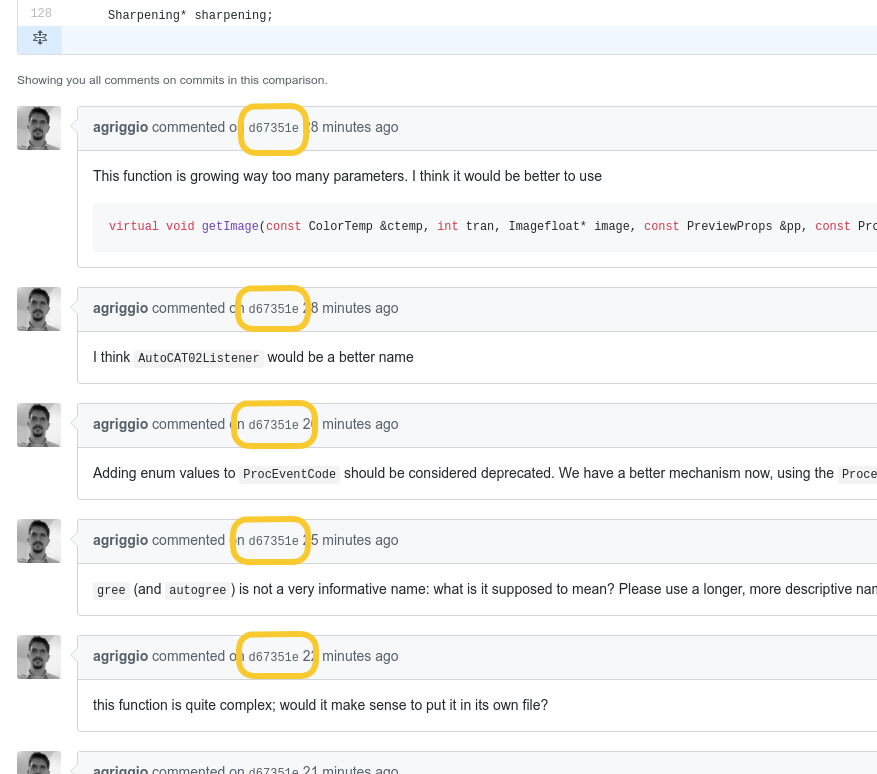
If anyone knows of a better way of viewing these comments, please let me know.
Beep6581
on 23 Jan 2018
But I still need your help at least for a good name for gree and autogree
Please make the same change in the language file, PP3 keys names, and procevents.h.
Furthermore, procevents.h already has CAT02 entries using the EvCAT* style, so the new entries should be consistent:
https://github.com/Beep6581/RawTherapee/blob/ae2231efb8b0529e74d6f1ccd6aad992273b11e9/rtengine/procevents.h#L203
I can help you with the renaming, but @Desmis please use full and consistent names in the future, e.g. don't call it "gree" and "deha" if its "green" and "dehaze"
Beep6581
on 23 Jan 2018
Alberto
I have tried the 2 ways, it is curious, but no problem
But now it rains comments :)
gree : it is the name perhaps not good for the green channel in XYZ. Why "gree" and not "Y" or "tint", because "Y" has I think no sens for the user, and it is not tint
autogree : to calaculate the value of the slider "gree"
Rq: when i read the code from others, I have many diificulties to understand the name of the varaibles, each have is logic :)
Desmis
on 23 Jan 2018
@Beep6581 procevents.h is dead (well, deprecated at least :-), but your point remains
agriggio
on 23 Jan 2018
@agriggio thanks, I will look at the new mechanism.
@Desmis as you know my C++ understanding is minimal, but I do often look into code when merging, documenting, checking for bugs or going through language keys, and, as a real example, sorting out the differences between "deh", "deha", "dehaz" etc, and possible capitalization variations of those, is very difficult.
Beep6581
on 23 Jan 2018
gree : it is the name perhaps not good for the green channel in XYZ. Why "gree" and not "Y" or "tint",
Well, I'd argue that greenChannelXYZ is better then...
because "Y" has I think no sens for the user, and it is not tint
why does the GUI show this then?
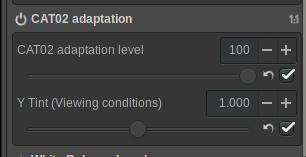
when i read the code from others, I have many diificulties to understand the name of the varaibles
Then please make sure that other people know, so we can all have a better understanding of the code :-)
agriggio
on 23 Jan 2018
It is why, I name it "Y tint", but in the same sens, in Ciecam for the same usage, I write "Tint"
And good question : what is color ? what is tint ?
But all that is to optimize the "informatic" part of Cat02. I don't contested at all, It is always better.
Recall : I am not at all an "informatic man", never I learned, otherwise in 1970, with a little Fortan lV and an IBM1130
But my question is always here, once we (or you) will have made that, for what usage ?
Jacques
Desmis
on 23 Jan 2018
For many people, there is confusion between terms, even in french
More the name in RGB (G = green), xYz (Y green) HSV, Lab, LCh, Munsell are different...
Hue <=> color <=> tint
Luminance <=> lightness <=> brightness
Saturation <=> chroma <=> chrominance <=> colorfullness
Desmis
on 23 Jan 2018
But all that is to optimize the "informatic" part of Cat02.
I'm not sure what you mean here, sorry. I am not asking you to optimize the algorithm, I'm just telling you that I don't think "gree" is a good name, because:
it's not even a word. Even if you used "green", though,
the GUI calls this "Y Tint", instead of "gree". So there's a mismatch already. And then you write:
"Y" has I think no sens for the user, and it is not tint
So then I wonder why the GUI, which is all 90% of the users will ever see, uses exactly "Y tint", which makes no sense and it is not it...
So, at this point I don't have any idea of what this "gree Y tint" is. Then you say that this is the green channel of XYZ. Good, now it makes more sense. So I think that using "greenChannelXYZ" could be a better name. What do you think about that? Note that I'm not asking you what is color, I'm not talking about philosophy or physics here, I'm just asking that you use a name that is easier to understand by other devs... and this has nothing to do with colour science, the fact that we are talking about colour is just a coincidence. My point is about trying to use descriptive and consistent names for variables, that might give a hint about their purpose. (And again, if you think that parts of the code that I wrote use names that make no sense or are hard to understand, then please let me know!)
Sorry if this sounds harsh, I mean this in the most constructive way possible.
I think your contributions in RT are remarkable, really, and I have deep respect for what you have done. I want to make this really clear.
But my question is always here, once we (or you) will have made that, for what usage ?
?? I think CAT02 could be nice to have. You, as the expert on colour, said that it is very nice to have, and I have no reason to think you are wrong. So, let's make sure that we can incorporate this in the "official" version of RT. Before that can happen, though, in my opinion (and I stress, this is just my opnion) the code should be cleaned up. Without the cleanups, I would vote against the merge. That's the goal of my comments here: try to help in improving the code, so that it can eventually get merged...
Best,
Alberto
agriggio
on 23 Jan 2018
Alberto
No problem at all. I appreciated your intervention and your remarks :)
The term optimization is probably not good (for you), but for me, the code is more readable...
The terms you proposed are good, but (recall) my remarks on color are not only "semantic"...there are really non sens. In RT as in others software "Tint" is often synonym with the channel "magenta green"...This leads to misunderstandings. But it is an other debat :)
Thank you again
Desmis
on 23 Jan 2018
Jacques, great then! I'll see what I can do with the code...
agriggio
on 23 Jan 2018
@Desmis Jacques
Robust WB. It's iterative, and If you try 100 settings different, it will take time :)
I will see what I can do.
heckflosse
on 23 Jan 2018
@heckflosse
Ingo
Thank you :)
Desmis
on 23 Jan 2018
@Desmis Jacques
This patch reduces processsing time for robustwb measured on my usual D800 file from ~3000 ms to ~500 ms
diff --git a/rtengine/rawimagesource.cc b/rtengine/rawimagesource.cc
index 3be6312a..717b1096 100644
--- a/rtengine/rawimagesource.cc
+++ b/rtengine/rawimagesource.cc
@@ -5828,28 +5828,20 @@ static void SdwWB(array2D<float> &redloc, array2D<float> &greenloc, array2D<floa

 static void RobustWB(array2D<float> &redloc, array2D<float> &greenloc, array2D<float> &blueloc, int bfw, int bfh, double &avg_rm, double &avg_gm, double &avg_bm)
 {
+    BENCHFUN
     // inspired by "Robust automatic WB algorithm using gray color points in Images"
     // Jy Huo, Yl Chang, J.Wang Xx Wei
     //  robust = true;
 //   printf("Robust WB\n");
-    array2D<float> Y0;
-    array2D<float> U0;
-    array2D<float> V0;
-
-    int bfwr = bfw / 4 + 1 ;//5 midle value to kept good result and reduce time
-    int bfhr = bfh / 4 + 1;
+    const int bfwr = bfw / 4 + 1 ;//5 midle value to kept good result and reduce time
+    const int bfhr = bfh / 4 + 1;

-    Y0(bfwr, bfhr);
-    U0(bfwr, bfhr);
-    V0(bfwr, bfhr);
+    array2D<float> rl(bfwr, bfhr);
+    array2D<float> gl(bfwr, bfhr);
+    array2D<float> bl(bfwr, bfhr);

-    float *Uba = nullptr;
-    float *Vba = nullptr;
-    Uba = new float [204];
-    Vba = new float [204];
-
-    array2D<float> FYUV;
-    FYUV(bfwr, bfhr);
+    float *Uba = new float [204];
+    float *Vba = new float [204];

     bool contin;
     float Th = 0.1321f; //Threshold 0.1321f  0.097f  0.2753f  if necessary
@@ -5869,48 +5861,46 @@ static void RobustWB(array2D<float> &redloc, array2D<float> &greenloc, array2D<f
     int realitera = 1;
     float mur;

-    do {//iterative WB
-        contin = false;

-        itera++;
+    // copy data to smaller arrays to reduce memory pressure in do-while loop
 #ifdef _OPENMP
-        #pragma omp parallel for schedule(dynamic,16)
+    #pragma omp parallel for
 #endif
-
-        for (int y = 0; y < bfh ; y += 4) {
-            for (int x = 0; x < bfw ; x += 4) {
-                int yy = y / 4;
-                int xx = x / 4 ;
-
-                //claculate YUV from RGB and wr, wg, wb
-                Y0[yy][xx] = 0.299f * wr * redloc[y][x] + 0.587f * wg * greenloc[y][x] + 0.114f * wb * blueloc[y][x];
-                U0[yy][xx] = -0.14713f * wr * redloc[y][x] - 0.28886f * wg * greenloc[y][x] + 0.436f * wb * blueloc[y][x];
-                V0[yy][xx] = 0.615f * wr * redloc[y][x] - 0.51498f * wg * greenloc[y][x] - 0.10001f * wb * blueloc[y][x];
-
-                if (Y0[yy][xx] == 0.f) {
-                    Y0[yy][xx] = ep;//avoid divide by zero
-                }
-
-                //FYUX fonction to dtect grey points
-                FYUV[yy][xx] = (fabs(U0[yy][xx]) + fabs(V0[yy][xx])) / Y0[yy][xx];
-
-
-            }
+    for (int y = 0; y < bfh ; y += 4) {
+        int yy = y / 4;
+        for (int x = 0; x < bfw ; x+= 4) {
+            int xx = x / 4;
+            rl[yy][xx] = redloc[y][x];
+            gl[yy][xx] = greenloc[y][x];
+            bl[yy][xx] = blueloc[y][x];
         }
+    }
+
+    do {//iterative WB
+        contin = false;

+        itera++;
         int Nf = 0;
 #ifdef _OPENMP
-        #pragma omp parallel for reduction(+:Ubarohm, Vbarohm, Nf)
+        #pragma omp parallel for reduction(+:Ubarohm, Vbarohm, Nf) schedule(dynamic,16)
 #endif

-        for (int y = 0; y < bfhr ; y++) {
-            for (int x = 0; x < bfwr ; x++) {
-                if (FYUV[y][x] < Th) {//grey values
+        for (int y = 0; y < bfhr ; ++y) {
+            for (int x = 0; x < bfwr ; ++x) {
+
+                //calculate YUV from RGB and wr, wg, wb
+                float Y0 = 0.299f * wr * rl[y][x] + 0.587f * wg * gl[y][x] + 0.114f * wb * bl[y][x];
+                float U0 = -0.14713f * wr * rl[y][x] - 0.28886f * wg * gl[y][x] + 0.436f * wb * bl[y][x];
+                float V0 = 0.615f * wr * rl[y][x] - 0.51498f * wg * gl[y][x] - 0.10001f * wb * bl[y][x];
+
+                //FYUX function to detect grey points
+                if (fabs(U0) + fabs(V0) < Th * Y0) {//grey values
                     Nf++;
-                    Ubarohm +=  U0[y][x];
-                    Vbarohm +=  V0[y][x];
+                    Ubarohm += U0;
+                    Vbarohm += V0;
                 }

+
             }
         }

@@ -6012,12 +6002,6 @@ static void RobustWB(array2D<float> &redloc, array2D<float> &greenloc, array2D<f
     avg_gm = 10000.* wg;
     avg_bm = 10000.* wb;

-    Y0(0, 0);
-    U0(0, 0);
-    V0(0, 0);
-    FYUV(0, 0);
-
-
 }

 static void SobelWB(array2D<float> &redsobel, array2D<float> &greensobel, array2D<float> &bluesobel, array2D<float> &redloc, array2D<float> &greenloc, array2D<float> &blueloc, int bfw, int bfh)
@heckflosse
Ingo
I just test...now it is a "Formula 1" :) (even a Forula1 is not very ecologique, but less than an heckflosse)
Thank you very much
Do you push this change, or you want I do it ?
Tomorrow, I will dismount "autowblocal" to remove "cat02" and make a new module
Desmis
on 23 Jan 2018
@Desmis Jacques, I will change a bit more and post a new patch (maybe already this evening). Then you can test again and after your new test I will push.
heckflosse
on 23 Jan 2018
OK , it will be tomorrow :)
Good night
Jacques
Desmis
on 23 Jan 2018
@agriggio
Well, I'd argue that
greenChannelXYZis better then...
And I'd even go further and argue that green_channel_xyz would be even better. 😉
No, seriously: We use smallCamelCase() for functions and methods (at least 90%), CapitalCamelCase for types and classes (~99% for classes, enums, structs, and typedefs vary), and underlined_variable_names. There are problems with shadowing as yet, I'm sure, but having small camel-case variable names will make that even worse.
I know this scheme is a bit Java-like (and not so much STL-like), but it's a good scheme when used consistently...
HTH,
Flössie
 Floessie
on 23 Jan 2018
Floessie
on 23 Jan 2018
@Desmis Jacques, here's a new patch (to replace the last one), which adds a speedup for SobelWB and cleans the code of RobustWb a bit more:
diff --git a/rtengine/rawimagesource.cc b/rtengine/rawimagesource.cc
index 3be6312a..b5110c4f 100644
--- a/rtengine/rawimagesource.cc
+++ b/rtengine/rawimagesource.cc
@@ -5638,6 +5638,7 @@ void RawImageSource::getRowStartEnd(int x, int &start, int &end)

 static void SdwWB(array2D<float> &redloc, array2D<float> &greenloc, array2D<float> &blueloc, int bfw, int bfh, double &avg_rm, double &avg_gm, double &avg_bm, int begx, int begy, int yEn,  int xEn,  int cx,  int cy)
 {
+    BENCHFUN
     //Standard deviation weighted Gary World - from Lan rt al.
     int partw, parth;
     int yh, xw;
@@ -5679,10 +5680,6 @@ static void SdwWB(array2D<float> &redloc, array2D<float> &greenloc, array2D<floa
     }

     //initialize to 0
-#ifdef _OPENMP
-    #pragma omp parallel for schedule(dynamic,16)
-#endif
-
     for (int k = 0; k < 12 ; k++) {
         MeanG[k] = 0.f;
         MeanR[k] = 0.f;
@@ -5828,89 +5825,72 @@ static void SdwWB(array2D<float> &redloc, array2D<float> &greenloc, array2D<floa

 static void RobustWB(array2D<float> &redloc, array2D<float> &greenloc, array2D<float> &blueloc, int bfw, int bfh, double &avg_rm, double &avg_gm, double &avg_bm)
 {
-    // inspired by "Robust automatic WB algorithm using gray color points in Images"
+    BENCHFUN
+    // inspired by "Robust automatic WB algorithm using grey colour points in Images"
     // Jy Huo, Yl Chang, J.Wang Xx Wei
     //  robust = true;
 //   printf("Robust WB\n");
-    array2D<float> Y0;
-    array2D<float> U0;
-    array2D<float> V0;
-
-    int bfwr = bfw / 4 + 1 ;//5 midle value to kept good result and reduce time
-    int bfhr = bfh / 4 + 1;
+    const int bfwr = bfw / 4 + 1 ;//5 middle value to keep good result and reduce time
+    const int bfhr = bfh / 4 + 1;

-    Y0(bfwr, bfhr);
-    U0(bfwr, bfhr);
-    V0(bfwr, bfhr);
+    array2D<float> rl(bfwr, bfhr);
+    array2D<float> gl(bfwr, bfhr);
+    array2D<float> bl(bfwr, bfhr);

-    float *Uba = nullptr;
-    float *Vba = nullptr;
-    Uba = new float [204];
-    Vba = new float [204];
+    // copy data to smaller arrays to reduce memory pressure in do-while loop
+#ifdef _OPENMP
+    #pragma omp parallel for
+#endif
+    for (int y = 0; y < bfh ; y += 4) {
+        int yy = y / 4;
+        for (int x = 0; x < bfw ; x+= 4) {
+            int xx = x / 4;
+            rl[yy][xx] = redloc[y][x];
+            gl[yy][xx] = greenloc[y][x];
+            bl[yy][xx] = blueloc[y][x];
+        }
+    }

-    array2D<float> FYUV;
-    FYUV(bfwr, bfhr);
+    float *Uba = new float [204];
+    float *Vba = new float [204];

-    bool contin;
-    float Th = 0.1321f; //Threshold 0.1321f  0.097f  0.2753f  if necessary
-    float Ubarohm = 0.f, Vbarohm = 0.f;
-    float ep = 0.1f;
+    constexpr float Th = 0.1321f; //Threshold 0.1321f  0.097f  0.2753f  if necessary
     //wr, wb, wg multipliers for each channel RGB
     float wr = 1.f;
     float wg = 1.f;
     float wb = 1.f;
-    float mu = 0.002f;//std variation
-    float mu2 = 0.0012f;//first reduce variation
-    float mu3 = 0.0007f;//second variation
-    float phi = 0.f;
+    constexpr float mu = 0.002f;//std variation
+    constexpr float mu2 = 0.0012f;//first reduce variation
+    constexpr float mu3 = 0.0007f;//second variation
     int itera = 0;
-    float epsil;
     int minim = 1;
     int realitera = 1;
-    float mur;

+    int Kx = 0;
     do {//iterative WB
-        contin = false;
-
+        float Ubarohm = 0.f, Vbarohm = 0.f;
         itera++;
+        int Nf = 0;
 #ifdef _OPENMP
-        #pragma omp parallel for schedule(dynamic,16)
+        #pragma omp parallel for reduction(+:Ubarohm, Vbarohm, Nf) schedule(dynamic,16)
 #endif

-        for (int y = 0; y < bfh ; y += 4) {
-            for (int x = 0; x < bfw ; x += 4) {
-                int yy = y / 4;
-                int xx = x / 4 ;
+        for (int y = 0; y < bfhr ; ++y) {
+            for (int x = 0; x < bfwr ; ++x) {

-                //claculate YUV from RGB and wr, wg, wb
-                Y0[yy][xx] = 0.299f * wr * redloc[y][x] + 0.587f * wg * greenloc[y][x] + 0.114f * wb * blueloc[y][x];
-                U0[yy][xx] = -0.14713f * wr * redloc[y][x] - 0.28886f * wg * greenloc[y][x] + 0.436f * wb * blueloc[y][x];
-                V0[yy][xx] = 0.615f * wr * redloc[y][x] - 0.51498f * wg * greenloc[y][x] - 0.10001f * wb * blueloc[y][x];
+                //calculate YUV from RGB and wr, wg, wb
+                float Y0 = 0.299f * wr * rl[y][x] + 0.587f * wg * gl[y][x] + 0.114f * wb * bl[y][x];
+                float U0 = -0.14713f * wr * rl[y][x] - 0.28886f * wg * gl[y][x] + 0.436f * wb * bl[y][x];
+                float V0 = 0.615f * wr * rl[y][x] - 0.51498f * wg * gl[y][x] - 0.10001f * wb * bl[y][x];

-                if (Y0[yy][xx] == 0.f) {
-                    Y0[yy][xx] = ep;//avoid divide by zero
-                }
-
-                //FYUX fonction to dtect grey points
-                FYUV[yy][xx] = (fabs(U0[yy][xx]) + fabs(V0[yy][xx])) / Y0[yy][xx];
-
-
-            }
-        }
-
-        int Nf = 0;
-#ifdef _OPENMP
-        #pragma omp parallel for reduction(+:Ubarohm, Vbarohm, Nf)
-#endif
-
-        for (int y = 0; y < bfhr ; y++) {
-            for (int x = 0; x < bfwr ; x++) {
-                if (FYUV[y][x] < Th) {//grey values
+                //FYUX function to detect grey points
+                if (fabs(U0) + fabs(V0) < Th * Y0) {//grey values
                     Nf++;
-                    Ubarohm +=  U0[y][x];
-                    Vbarohm +=  V0[y][x];
+                    Ubarohm += U0;
+                    Vbarohm += V0;
                 }

+
             }
         }

@@ -5933,13 +5913,14 @@ static void RobustWB(array2D<float> &redloc, array2D<float> &greenloc, array2D<f

         }

-        Vbarohm /= Nf;
+        Vbarohm /= Nf; // QUESTION INGO: why is this not done before the value is saved to Vba[itera]? Bug or intentional?
         //  printf ("Nf=%i max=%i  U=%f V=%f\n", Nf, bfh*bfw, Ubarohm, Vbarohm);
-        int Kx = 0;
-        float aa = 0.8f;//superior limit if epsil > aa increase variation
-        float bb = 0.15f;//inferior limit if epsil < bb exit
+        Kx = 0;
+        constexpr float aa = 0.8f;//superior limit if epsil > aa increase variation
+        constexpr float bb = 0.15f;//inferior limit if epsil < bb exit
         int ind = 1;

+        float phi = 0.f;
         if ((fabs(Ubarohm) > fabs(Vbarohm)) || (Ubarohm != 0.f && fabs(Ubarohm) == fabs(Vbarohm))) {
             phi = Ubarohm;
             ind = 1;
@@ -5951,59 +5932,38 @@ static void RobustWB(array2D<float> &redloc, array2D<float> &greenloc, array2D<f
             ind = 3;
         }

-        epsil = - phi;
-        int sign = 0;
-
-        if (epsil > 0.f) {
-            sign = 1;
-        } else if (epsil == 0.f) {
-            sign = 0;
-        } else if (epsil < 0.f) {
-            sign = -1;
-        }
+        int sign = SGN(-phi);

-        if (fabs(epsil) >= aa) {
+        if (fabs(phi) >= aa) {
             Kx = 2 * sign;
         }

-        if (fabs(epsil) < aa && fabs(epsil) >= bb) {
+        if (fabs(phi) < aa && fabs(phi) >= bb) {
             Kx = sign;
         }

-        if (fabs(epsil) >= 0.f && fabs(epsil) < bb) {
+        if (fabs(phi) < bb) {
             Kx = 0;
         }

         //
-        mur = mu;
+        float mur = mu;

         if (minim == 2) {
             mur = mu2;
-        }
-
-        if (minim == 3) {
+        } else if (minim == 3) {
             mur = mu3;
         }

         if (ind == 1) {
             wb += mur * Kx;
-        }
-
-        if (ind == 2) {
+        } else if (ind == 2) {
             wr += mur * Kx;
         }

-        if (Kx == 0 || itera > 200) {//stop iterations in normal case Kx =0, or if WB iteration do not converge
-            contin = true;
-        }
-
         //printf ("epsil=%f iter=%i wb=%f wr=%f U=%f V=%f mu=%f\n", fabs (epsil), itera, wb, wr, Ubarohm, Vbarohm, mur);
-        Ubarohm = 0.f;
-        Vbarohm = 0.f;
-
-
-    } while (contin == false);
-
+        } while (Kx != 0 && itera <= 200); //stop iterations in normal case Kx =0, or if WB iteration do not converge
+    std::cout << itera << std::endl;
     delete Uba;
     delete Vba;
 //    printf("epsil=%f iter=%i wb=%f wr=%f mu=%f\n", fabs(epsil), itera, wb, wr, mur);
@@ -6012,23 +5972,13 @@ static void RobustWB(array2D<float> &redloc, array2D<float> &greenloc, array2D<f
     avg_gm = 10000.* wg;
     avg_bm = 10000.* wb;

-    Y0(0, 0);
-    U0(0, 0);
-    V0(0, 0);
-    FYUV(0, 0);
-
-
 }

 static void SobelWB(array2D<float> &redsobel, array2D<float> &greensobel, array2D<float> &bluesobel, array2D<float> &redloc, array2D<float> &greenloc, array2D<float> &blueloc, int bfw, int bfh)
 {
+    BENCHFUN
     int GX[3][3];
     int GY[3][3];
-    float SUMR, SUMG, SUMB;
-
-    float sumXr, sumYr;
-    float sumXg, sumYg;
-    float sumXb, sumYb;

     //Sobel Horizontal
     GX[0][0] = 1;
@@ -6056,23 +6006,12 @@ static void SobelWB(array2D<float> &redsobel, array2D<float> &greensobel, array2

     //  if (edg) {
     {
+#ifdef _OPENMP
+        #pragma omp parallel for
+#endif
         for (int y = 0; y < bfh ; y++) {
             for (int x = 0; x < bfw ; x++) {
-                redsobel[y][x] = 0.f;
-                greensobel[y][x] = 0.f;
-                bluesobel[y][x] = 0.f;
-            }
-        }
-
-
-        for (int y = 0; y < bfh ; y++) {
-            for (int x = 0; x < bfw ; x++) {
-                sumXr    = 0.f;
-                sumYr    = 0.f;
-                sumXg    = 0.f;
-                sumYg    = 0.f;
-                sumXb    = 0.f;
-                sumYb    = 0.f;
+                float SUMR, SUMG, SUMB;

                 /*Image Boundaries*/
                 if (y == 0 || y == bfh - 1) {
@@ -6084,6 +6023,12 @@ static void SobelWB(array2D<float> &redsobel, array2D<float> &greensobel, array2
                     SUMG = 0.f;
                     SUMB = 0.f;
                 } else {
+                    float sumXr    = 0.f;
+                    float sumYr    = 0.f;
+                    float sumXg    = 0.f;
+                    float sumYg    = 0.f;
+                    float sumXb    = 0.f;
+                    float sumYb    = 0.f;
                     for (int i = -1; i < 2; i++) {
                         for (int j = -1; j < 2; j++) {
                             sumXr += GX[j + 1][i + 1] * redloc[y + i][x + j];
@@ -9065,6 +9010,9 @@ void RawImageSource::WBauto(array2D<float> &redloc, array2D<float> &greenloc, ar
     if (edg) {
         SobelWB(redsobel, greensobel, bluesobel, redloc, greenloc, blueloc, bfw, bfh);

+#ifdef _OPENMP
+        #pragma omp parallel for reduction(+:avg_r, avg_g, avg_b, rn, gn, bn)
+#endif
         for (int y = 0; y < bfh ; y++) {
             for (int x = 0; x < bfw ; x++) {
                 if (redsobel[y][x] < clipHigh && redsobel[y][x] > clipLow) {
@@ -9086,7 +9034,9 @@ void RawImageSource::WBauto(array2D<float> &redloc, array2D<float> &greenloc, ar
     }

     if (greyn) {
-
+#ifdef _OPENMP
+        #pragma omp parallel for reduction(+:avg_r, avg_g, avg_b, rn, gn, bn)
+#endif
         for (int y = 0; y < bfh ; y++) {
             for (int x = 0; x < bfw ; x++) {
                 if (redloc[y][x] < clipHigh && redloc[y][x] > clipLow) {
@Floessie please add that style info to the CONTRIBUTING.md file.
Beep6581
on 23 Jan 2018
@floessie good to hear! I hate camel case (except for class names), so the less the better :-)
agriggio
on 23 Jan 2018
@Floessie @agriggio Small camel-case is used for variable name for at least 80% of the code. I find this "encoding" compact and readable, but it's a matter of habits and taste here. Switch to underlined_variable_names if you want (as long as we can avoid trailing _), and you can even make it official, though I'll perhaps keep using smallCamelCase because it won't hurt in a code that mainly use it.
In the end, the variable has to be understandable (which is the absolute base when team working), with either "encoding".
 Hombre57
on 23 Jan 2018
Hombre57
on 23 Jan 2018
@Hombre57
In the end, the variable has to be understandable
That's the reason I always use i and j for loop indexes 😄
heckflosse
on 23 Jan 2018
@Beep6581 @Hombre57 I'll try to word it cautiously...
Floessie
on 24 Jan 2018
@heckflosse
Ingo
I test your patch, it works fine, and improved algoritm. Thank you very much.
I will wait you push this change before "clean" branch autowblocal by suppressing "cat02", and others improvment cleaning
@Beep6581
I proposed - but for me 5.4 is not the goal - when @agriggio Alberto terminated these modifications
1) I will change some features : a) for underwater; b) I will tested a "gamut limiter" (it's just an idea - to verify)
2) merge cat02 in dev, with cat02 disabled by default
3) after experiences and user reviews, switch to "enabled" mode if all goes well, within a few months
In terms of form and having an understanbale code @Hombre57 @Floessie , I totally agree. Of course my code is not virtuous, but I have a lot of difficulty reading (maybe because it derives from English) the code of others.
My failings have allowed an exchange that I find positive
Thank you to all of you :)
Desmis
on 24 Jan 2018
@Desmis Jacques, I hope I will be able to commit something later today
agriggio
on 24 Jan 2018
@agriggio
Alberto, no problem.
But as I have said above, for me it's a good way for leraning and capitalize new skills. Thank you again :)
Desmis
on 24 Jan 2018
@Desmis Jacques, I pushed my speedups.
heckflosse
on 24 Jan 2018
@heckflosse
Ingo
Thank you very much. Now, I will work on "autowblocal" to suppress Cat02
Jacques
Desmis
on 24 Jan 2018
@Desmis Jacques,
here's a speedup for SdwWB(). Feel free to test and push :)
diff --git a/rtengine/rawimagesource.cc b/rtengine/rawimagesource.cc
index f8758209..70f56d22 100644
--- a/rtengine/rawimagesource.cc
+++ b/rtengine/rawimagesource.cc
@@ -5693,31 +5693,41 @@ static void SdwWB(array2D<float> &redloc, array2D<float> &greenloc, array2D<floa
     }

 #ifdef _OPENMP
-//        #pragma omp parallel for //reduction(+:MeanG, MeanR, MeanB, nG, nR, nB )
+        #pragma omp parallel for schedule(dynamic) collapse(2)
 #endif
-
     for (int w = 0; w < xw ; w++) {
         for (int h = 0; h < yh ; h++) {
-            int i = w + h * xw;
-
+            float meanr = 0.f;
+            float meang = 0.f;
+            float meanb = 0.f;
+            int nr = 0;
+            int ng = 0;
+            int nb = 0;
             for (int y = (h) * parth; y < (h + 1) * parth; y++) {
                 for (int x = (w) * partw; x < (w + 1) * partw; x++) {
                     if (greenloc[y][x] > clipLow && greenloc[y][x] < clipHigh) {
-                        MeanG[i] += greenloc[y][x];
-                        nG[i]++;
+                        meang += greenloc[y][x];
+                        ng++;
                     }

                     if (redloc[y][x] > clipLow && redloc[y][x] < clipHigh) {
-                        MeanR[i] += redloc[y][x];
-                        nR[i]++;
+                        meanr += redloc[y][x];
+                        nr++;
                     }

                     if (blueloc[y][x] > clipLow && blueloc[y][x] < clipHigh) {
-                        MeanB[i] += blueloc[y][x];
-                        nB[i]++;
+                        meanb += blueloc[y][x];
+                        nb++;
                     }
                 }
             }
+            int i = w + h * xw;
+            MeanG[i] = meang;
+            MeanR[i] = meanr;
+            MeanB[i] = meanb;
+            nG[i] = ng;
+            nR[i] = nr;
+            nB[i] = nb;
         }
     }

@@ -5740,30 +5750,37 @@ static void SdwWB(array2D<float> &redloc, array2D<float> &greenloc, array2D<floa
     }

 #ifdef _OPENMP
-    //      #pragma omp parallel for // reduction(+:SigmaG, SigmaR, SigmaB)
+    #pragma omp parallel for schedule(dynamic) collapse(2)
 #endif

     for (int w = 0; w < xw ; w++) {
         for (int h = 0; h < yh ; h++) {
             int i = w + h * xw;
+            float sigmar = 0.f;
+            float sigmag = 0.f;
+            float sigmab = 0.f;

             for (int y = (h) * parth; y < (h + 1) * parth; y++) {
                 for (int x = (w) * partw; x < (w + 1) * partw; x++) {
                     if (greenloc[y][x] > clipLow && greenloc[y][x] < clipHigh) {
-                        SigmaG[i]  += SQR(MeanG[i] - greenloc[y][x]) ;
+                        sigmag += SQR(MeanG[i] - greenloc[y][x]) ;
                     }

                     if (redloc[y][x] > clipLow && redloc[y][x] < clipHigh) {

-                        SigmaR[i]  += SQR(MeanR[i] - redloc[y][x]);
+                        sigmar += SQR(MeanR[i] - redloc[y][x]);
                     }

                     if (blueloc[y][x] > clipLow && blueloc[y][x] < clipHigh) {

-                        SigmaB[i]  += SQR(MeanB[i] - blueloc[y][x]);
+                        sigmab += SQR(MeanB[i] - blueloc[y][x]);
                     }
                 }
             }
+
+            SigmaG[i] = sigmag;
+            SigmaR[i] = sigmar;
+            SigmaB[i] = sigmab;
         }
     }

@@ -6047,7 +6064,7 @@ static void SobelWB(array2D<float> &redsobel, array2D<float> &greensobel, array2

 void RawImageSource::ItcWB(array2D<float> &redloc, array2D<float> &greenloc, array2D<float> &blueloc, int bfw, int bfh, double &avg_rm, double &avg_gm, double &avg_bm, const ColorManagementParams &cmp)
 {
-
+BENCHFUN
     //  ColorManagementParams cmp;
     TMatrix wprof = ICCStore::getInstance()->workingSpaceMatrix("sRGB");
     TMatrix wiprof = ICCStore::getInstance()->workingSpaceInverseMatrix("sRGB");
@@ -8906,6 +8923,7 @@ void cat02_to_xyzfloatraw ( float & x, float & y, float & z, float r, float g, f

 void RawImageSource::WBauto(array2D<float> &redloc, array2D<float> &greenloc, array2D<float> &blueloc, int bfw, int bfh, double & avg_rm, double & avg_gm, double & avg_bm, const LocrgbParams & localr, const WBParams & wbpar, int begx, int begy, int yEn, int xEn, int cx, int cy, const ColorManagementParams &cmp)
 {
+    BENCHFUN
     //auto white balance
 //   printf ("AUtoWB OK\n");
     array2D<float> redsobel;
@heckflosse
Ingo
I just tested. works fine and quick. very good job :)
I push this change now
Thank you
Desmis
on 24 Jan 2018
@Desmis I merged dev into autowblocal, may I push?
Beep6581
on 24 Jan 2018
I am going to do it :)
Desmis
on 24 Jan 2018
@Beep6581
I compile to test and verify, then I push.
Thank you.
I will continu to improve "code" (readable...clarity...) :)
Desmis
on 24 Jan 2018
@Beep6581
Now I use Kdiif3 to merge, very good tool. thank you for advice :)
Desmis
on 24 Jan 2018
@Desmis Jacques, I just pushed my cleanups to the cat02wb branch. In the end, I decided to use the following parameter names, according to my understanding of the code:
cat02becomesamountautocat02becomesautoAmountgreebecomesluminanceScalingautogreebecomesautoLuminanceScaling
I've also moved the CAT02-related functions to their own compilation unit, in rtengine/cat02adaptation.[h|cc].
Please take a look and let me know if I messed up something.
Now, a question: could you please clarify the intended use case for the CAT02 adaptation? I have performed further tests on other images, and in general it seems to me that:
- the effect is very subtle, and
- it seems that the same can be obtained by just tweaking the WB temperature/tint sliders directly.
But I think I'm missing something :-) Can you please elaborate?
agriggio
on 24 Jan 2018
@Desmis I'm very happy to hear that you use KDiff3!
Thanks to this program, fixing the 305 unresolved conflicts took less than a minute.
Beep6581
on 24 Jan 2018
@agriggio
Alberto
Thank you very, very much...all seems to work fine ...:)
I will look at your work, in next time.
You have rename :
- "Cat 02 level" in "Amount", good
- "Y tint" in "Luminance scaling" - curious (for me), perhaps for others it is a good name..to test with users
For usage of Cat02, if you read french, I have update Rawpedia
http://rawpedia.rawtherapee.com/CIECAM02/fr#CAT02_adaptation_-_White_Balance
Make the test with 2 images
1) try "London_bridge_moving_1.pef", WB camera = 7922 tint = 1.159
Image looks "yellow - red", probably bad WB, but you don't know value. if you put T=5200K (near D50) this image look better. But never before I have idea to change this value.
I compare with Dx0, Phtotoshop, same result...Try auto WB ==> 8360, always yellow/red
If you enabled "Cat02" image seems normal...Blue as a sky, people in London are not from Japan (I have not against Japanese...)
2) use a test chart (Colorchecker), personnaly I have a Target 468 color, I have elaborated with a friend 7 years ago.
For this test chart calibrated for D50, you have an image.
Now, move Temperture to 7000K or 8000K, image becomes yellow/red. Of course you know you have done this mistake, but in this case Cat02 leeds to an "Appearance as D50" (CAT = Color Apperance)
This 2 example are "bad", because they supposed a mistake, but in all cases, when you are far from D50, Cat02 is quasi indispensable. You can read documentation on Ciecam (Rawpedia and Web)
When you calculated Lab values from RGB when you calibrated your camera, always after conversion, Cat02 (or Bradford depending on software - bradford is less performing) is applied. Otherwise all profiles are bad.
But if you use only photographies near D50, Cat02 is not used, or have no or little effect.
If you use with the photo you posted (near T=2200K and "La" very low), Cat02 is near 0 effect.
For me difficult to explain with my bad english
I hope these explanation, clarify a little :)
Jacques
Desmis
on 24 Jan 2018
But recall, what I say yesterday, Cat02 and Ciecam, is not for Ingeniors ;)
This way of approaching the problems,seems no logic...but our eyes, our brain is illogic.
When you enter in a shop, to buy a dress for your whife (??) lighting is often artificial, but people does not look blue, white are not pure white, it is metamerism. Camaera are completely deceived, but your eyes no...But it is better to go outside to see the real color in D50.
Cat02 try (it is not a brain) to do the same thing as our eyes....
Cat02 is usefull to reduce usage of credit cards :)
Desmis
on 24 Jan 2018
Hi Jacques:
"Y tint" in "Luminance scaling" - curious (for me), perhaps for others it is a good name..to test with users
Well, I did that according to my understanding of the code. As far as I understood, that parameter is used only here, and exactly for scaling the luminance (Y) channel...
but in all cases, when you are far from D50, Cat02 is quasi indispensable
What I find confusing is that the further away the wb is from D50, the less amount of CAT02 adaptation is applied, at least in "auto" mode. And if you try to increase the amount in manual mode, you get weird results...
But recall, what I say yesterday, Cat02 and Ciecam, is not for Ingeniors ;)
Thank goodness I'm a (computer) scientist, not an engineer! ;-)
agriggio
on 24 Jan 2018
@agriggio
I look at the code...
Now, all seems clear, specially the file "catO2adaptation.cc" which clarify all things and more readable, and more reusable.
For me, now it's an example to follow
Thank you again :)
Jacques
Desmis
on 24 Jan 2018
@agriggio
I guess you're reassured
Desmis
on 24 Jan 2018
@Desmis I'm not sure I understand what you mean... but if you ask me, I'll say 42 :wink:
agriggio
on 24 Jan 2018
@agriggio
It is me which change, the value of "amount".
Normally, Ciecam is build for "D illuminant", normally betwwen 4100K and 12000K. But very good in "norma usage" 4100K - 8000K (Sun and Shadow)
It works also well with T=2856K (tungsten)
The adaptation normaly depends of 2 factors
"La" (cd/m2) which varie from 0.001 to 20000. Currently and image with sun in summer "La" is about 2000..... 20000 perhaps Sun + snow
"Yb" is the real mean luminosity of the image. In general 18 is good
If "La" is superior to 350, Cat02 (internal to Ciecam) is at 100%, It was these settings I used first, and with your images (2200K, "La" very low about 2), Cieacm fails...
Desmis
on 24 Jan 2018
@agriggio
for me, this diagnosis (engineer) is a disaster...I am an (old) engineer...
But also, sociologist and consultant in human factors and change management
An now retired :)
Desmis
on 24 Jan 2018
Jacques, I was joking about engineers, if that wasn't clear :-)
Thanks for the explanation about CAT02 under "strange" conditions. I'm not sure I understand everything, but I will try to study!
agriggio
on 24 Jan 2018
@agriggio
Me also, I was joking... in my company, I was called the 5-legged sheep :)
Desmis
on 24 Jan 2018
I will do some changes for underwater ...then push :)
Desmis
on 24 Jan 2018
@Desmis Jacques, I cleaned the code of SdwWB() a bit more. Shall I post a patch or push after your next push?
heckflosse
on 24 Jan 2018
@heckflosse
Ingo
You can push
Thank you :)
Desmis
on 24 Jan 2018
I just make a change in "cat02wb" branch
a) by default cat02 is disabled
b) I suppress some warnings
c) I merge with dev
Desmis
on 24 Jan 2018
@Desmis Jacques, I pushed to autowblocal
heckflosse
on 24 Jan 2018
@heckflosse Ingo, thank you again
Desmis
on 24 Jan 2018
A comparison cat02 with and whithout
https://i.imgur.com/Le4yWni.jpg
I make this image with "WB local", with only actication of cat02
london_bridege_moving_1.pef
process : default
T = 7922K t=1.159
WB local - same settings as WB general
I just "cut" the image in 2 with the spot: right activated, Left disactivated
Jacques
Desmis
on 24 Jan 2018
Other manner to understand cat02
1) if you are sure your photo is in D50, but the WB is not properly adjusted (ex 7000K) then it will be better to set the WB at 5000K, Cat02 is useless, but cat02 will give an acceptable result if you don't modify WB
2) if you are sure that your photo is in D65 (or Tungsten), and that the WB is well adjusted then it is essential not to touch WB and let cat02 act
Desmis
on 24 Jan 2018
I just update Rawpedia (in french)
http://rawpedia.rawtherapee.com/CIECAM02/fr#CAT02_adaptation_-_White_Balance
I notably added a link to the different illuminants and the notion of CRI (Color Rendering Index)
Desmis
on 25 Jan 2018
I just terminated clean and "readabled" all code of autowblocal
- suppress all code from "old localrgb"
- replace "procevents" and "refreshmap" by mapevents (thanks to alberto), for all events "WB" and "WB local"
- rewrite functions, variables, listener to be more readabled
- etc.
Of course we can always make it better :)
Jacques
Desmis
on 27 Jan 2018
What is the difference between the autowblocal and cat02wb branches?
Beep6581
on 24 Nov 2018
@Beep6581
One year ago, these 2 branch where in the dame barnch !
Alberto ask me to separate...
Now, In autowblocal there is
- white balance auto (with new algo). I think it's necessary to keep "auto" actual because in some cases "Auto itc" fails (for example for Underwater)
- Local white balance with cat02 for local : I think if necessart we can drop this feature, because locallab has a similar concept.
In cat02wb, there is only "cat02" for any image after white balance, to compensate, perceptual rendering of our eyes and brain
Desmis
on 24 Nov 2018
Does autowblocal use CAT02 for anything?
Beep6581
on 24 Nov 2018
As I say above, yes.... for "local white balance", but the algo is slightly different to take into account "local"
jacques
Desmis
on 24 Nov 2018
I'm lost in a forest of branches.
@Desmis does branch newlocallab include autowblocal?
Branch cat02wb (#4650) seems more recent than autowblocal. Are changes from cat02wb incorporated into autowblocal or into newlocallab? Can we close some issues (this one?) and branches or clarify what they do and how to test them?
Beep6581
on 1 Apr 2019
@Beep6581
I just come back from Paris, with vacation with my grands-sons
For me all these branches are completely confused, since 1,5 years I was asked everything and its opposite
Initially there was only one branch that contained all...
Then we asked me to isolate "cat02wb", "to smplify" with the aim of merge quickly !!
Then I work on another algorithm for "autowb" , I name ItcwB, It was in last summer (september 2018 if I remember, algorithm was practically finished) and Ingo @heckflosse , says that he was going to improve the code and remove all the other WB that were less efficient (I think we must keep AutoWB actual for submarine photos)
Since this date, I have improve the algo, but I don't commit beacuse I wait...and I do not want to restart the debate that has bothered me
In Newlocallab there is not at all "Local WB"
But in newlocallab, there are part of code of cat0wb uses in "warm cool"
In summary I have been waiting for several months
jacques
Desmis
on 1 Apr 2019
@Desmis
and Ingo @heckflosse , says that he was going to improve the code
Jacques, in case I forget about an issue, which happens because there are a lot of open issues, please remind me...
heckflosse
on 1 Apr 2019
@heckflosse
No problem at all with you :)
More generally, I have been reproached for my "branches" which are too important, too complex, not sufficiently fragmented ... since I do not dare to intervene to ask for anything and so I wait ... age taught me patience
jacques
Desmis
on 1 Apr 2019
@Desmis thank you for clarifying that.
Since this date, I have improve the algo, but I don't commit
Please go ahead and commit the improvement (Ingo ok'd this in IRC), then we can test autowblocal to find, isolate and merge the best-performing algo for 5.7.
Beep6581
on 1 Apr 2019
@Beep6581
I just commit all my "summer 2018" changes to Itcwb
But I don't merge with dev
jacques
Desmis
on 1 Apr 2019
In cat02wb 5.5-299-g63d30a458:
/home/morgan/programs/code-rawtherapee/rtengine/stdimagesource.cc: In member function ‘virtual void rtengine::StdImageSource::getImage(const rtengine::ColorTemp&, int, rtengine::Imagefloat*, const PreviewProps&, const rtengine::procparams::ProcParams&)’:
/home/morgan/programs/code-rawtherapee/rtengine/stdimagesource.cc:197:28: warning: unused variable ‘hrp’ [-Wunused-variable]
     const ToneCurveParams &hrp = params.toneCurve;
                            ^~~
@Desmis
No problem at all with you :)
:smiley:
heckflosse
on 1 Apr 2019
@Beep6581
I push a commit
1) supress warning with Stdimagesource.cc
2) fixed bug in update GUI slider "amount"
:)
jacques
Desmis
on 2 Apr 2019
@Desmis Some minor Clang warnings:
In file included from /home/user/src/rawtherapee/rtgui/cat02adap.cc:19:
/home/user/src/rawtherapee/rtgui/cat02adap.h:34:9: warning: private field 'nextAmount' is not used [-Wunused-private-field]
    int nextAmount;
        ^
/home/user/src/rawtherapee/rtgui/cat02adap.h:35:10: warning: private field 'nextciecam' is not used [-Wunused-private-field]
    bool nextciecam;
         ^
/home/user/src/rawtherapee/rtgui/cat02adap.h:36:12: warning: private field 'nextLuminanceScaling' is not used [-Wunused-private-field]
    double nextLuminanceScaling;
           ^
3 warnings generated.
HTH,
Flössie
Floessie
on 2 Apr 2019
@Floessie
Thank you
Fixed in next commit :)
jacques
Desmis
on 2 Apr 2019
Related issues
Floessie
·
5Comments
heckflosse
·
4Comments
Beep6581
·
3Comments
 Thanatomanic
·
4Comments
Beep6581
·
4Comments
Thanatomanic
·
4Comments
Beep6581
·
4Comments
Most helpful comment
@heckflosse
Ingo
I test your patch, it works fine, and improved algoritm. Thank you very much.
I will wait you push this change before "clean" branch autowblocal by suppressing "cat02", and others improvment cleaning
@Beep6581
I proposed - but for me 5.4 is not the goal - when @agriggio Alberto terminated these modifications
1) I will change some features : a) for underwater; b) I will tested a "gamut limiter" (it's just an idea - to verify)
2) merge cat02 in dev, with cat02 disabled by default
3) after experiences and user reviews, switch to "enabled" mode if all goes well, within a few months
In terms of form and having an understanbale code @Hombre57 @Floessie , I totally agree. Of course my code is not virtuous, but I have a lot of difficulty reading (maybe because it derives from English) the code of others.
My failings have allowed an exchange that I find positive
Thank you to all of you :)