Raspiblitz: Issues with v1.6 RC2/RC3 (reportings)
- [X] test recovery when BTC-RPC-Explorer is on
 rootzoll
All 21 comments
Downloaded build_sdcard.sh v1.6
No download for lnd version v0.10.2-beta.rc4.
Version v0.10.2-beta downloads the requested files.
 adevoss
on 7 Jul 2020
adevoss
on 7 Jul 2020
The prompt after installing Thunderhub instructs the user to use port 3011, but it's actually on port 3010. 3011 returns a bad gateway error.
 Jestopher-BTC
on 10 Jul 2020
Jestopher-BTC
on 10 Jul 2020
The prompt after installing Thunderhub instructs the user to use port 3011, but it's actually on port 3010. 3011 returns a bad gateway error.
It should show a HTTPS link. Did you try 3011 with HTTPS? 3010 is the cleartext (HTTP) port.
 openoms
on 10 Jul 2020
openoms
on 10 Jul 2020
Trying Testnet:
- [x] wallet=wallet.dat needs to be specific: main.wallet=wallet.dat
- [x] LND autounlock leads to errors if the testnet wallet has a different password (needs to be disabled before switching to testnet)
openoms
on 10 Jul 2020
The prompt after installing Thunderhub instructs the user to use port 3011, but it's actually on port 3010. 3011 returns a bad gateway error.
It should show a HTTPS link. Did you try 3011 with HTTPS? 3010 is the cleartext (HTTP) port.
Ah, yes. That works as HTTPS. It gives me a bunch of warnings about an invalid certificate though.
Jestopher-BTC
on 10 Jul 2020
Ah, yes. That works as HTTPS. It gives me a bunch of warnings about an invalid certificate though.
the Thub info screen warns about needing to accept the self signed certificate, also shows you the fingerprint to compare. Welcome to the world of encryption (unapproved by a third a party).
Since both are kept available we could show the the link for the cleartext port too (+ the Hidden Service :) ). Would you think that would be a better experience?
openoms
on 10 Jul 2020
LNbits over TOR
/etc/tor/torrc
# Hidden Service for lnbits
HiddenServiceDir /mnt/hdd/tor/lnbits
HiddenServiceVersion 3
HiddenServicePort 80 127.0.0.1:5000
This should be
# Hidden Service for lnbits
HiddenServiceDir /mnt/hdd/tor/lnbits
HiddenServiceVersion 3
HiddenServicePort 80 127.0.0.1:5002
HiddenServicePort 443 127.0.0.1:5003
Right?
 frennkie
on 12 Jul 2020
frennkie
on 12 Jul 2020
This should be
# Hidden Service for lnbits
HiddenServiceDir /mnt/hdd/tor/lnbits
HiddenServiceVersion 3
HiddenServicePort 80 127.0.0.1:5002
HiddenServicePort 443 127.0.0.1:5003
@frennkie, yes that is the effect of:
/home/admin/config.scripts/internet.hiddenservice.sh lnbits 80 5002 443 5003
in the install script.
openoms
on 12 Jul 2020
I guess I was messing around with this.. 😉
frennkie
on 12 Jul 2020
Getting errors with macaroons on testnet.
$ lncli getinfo
[lncli] rpc error: code = Unknown desc = verification failed: signature mismatch after caveat verification
raspberrypi systemd[1]: Started LND Lightning Daemon.
1594667206 ERROR: [lncli] unable to read macaroon path (check the network setting!): open /home/bitcoin/.lnd/data/chain/bitcoin/testnet/admin.macaroon: no such file or directory
Permission or path issues I presume.
- [x] fix macaroons for testnet
openoms
on 13 Jul 2020
Would you not run it like this on a testnet node: lncli -n testnet getinfo
frennkie
on 13 Jul 2020
Would you not run it like this on a testnet node:
lncli -n testnet getinfo
Thanks, I was missing that. The main problem with the same errors I've been having with Balance of Satoshis, but reactivating Testnet did the trick. All works now.
openoms
on 13 Jul 2020
When re-installing rtl (#1285) I get this error
12686 silly lifecycle [email protected]~postinstall: Args: [ '-c', 'ngcc' ]
12687 silly lifecycle [email protected]~postinstall: Returned: code: 126  signal: null
12688 info lifecycle [email protected]~postinstall: Failed to exec postinstall script
There is a web interface
adevoss
on 14 Jul 2020
  File "/home/admin/config.scripts/internet.sshtunnel.py", line 191
    subprocess.call(sudo /home/admin/config.scripts/lnd.tlscert.sh refresh", shell=True)
PR: #1368
frennkie
on 20 Jul 2020
Problems with Bitcoin Index
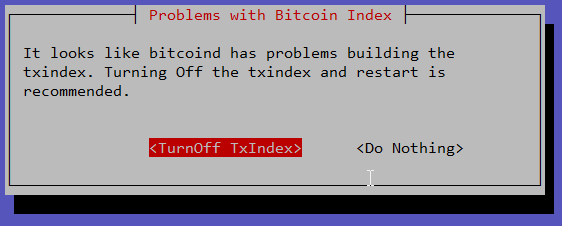
*****************************************
* The bitcoind service is not running.
*****************************************
If you just started some config/setup, this might be OK.

More Error Detail:
error code: -28 error message: Loading block index...

-> Use command 'repair' and then choose 'RESET-CHAIN' to try downloading new blockchain.
-> Use command 'debug' for more log output you can use for getting support.
-> Use command 'menu' to open main menu.
-> Have you tried to turn it off and on again? Use command 'restart'

Use CTRL+c to EXIT to Terminal`
What's going on here?
I have used <Do Nothing> and then CTRL+c twice now (separate systems) and everything (including the index appears to be fine.
frennkie
on 20 Jul 2020
Issue on LNbits install
1) tag is still outdated
2) Permission on temp tor dir
# Hidden Service for lnbits
HiddenServiceDir /mnt/hdd/tor/lnbits
HiddenServiceVersion 3
HiddenServicePort 80 127.0.0.1:5002
/home/admin/config.scripts/internet.hiddenservice.sh: line 80: /mnt/hdd/temp/tmp: Permission denied
HiddenServicePort 443 127.0.0.1:5003
After installing (on amd64 vm) I get:
* The LND service is not running.
/var/log/syslog:
sudo: /home/admin/config.scripts/blitz.subscriptions.ip2tor.py: command not found
...
dial tcp 127.0.0.1:9050: connect: connection refused
After reboot:
Use CTRL+c to EXIT to Terminal
bitcoin error: error code: -28
error message:
Loading block index...
Cursor at prompt
adevoss
on 21 Jul 2020
Problems with Bitcoin Index
*****************************************
* The bitcoind service is not running.
*****************************************
If you just started some config/setup, this might be OK.

More Error Detail:
error code: -28 error message: Loading block index...

-> Use command 'repair' and then choose 'RESET-CHAIN' to try downloading new blockchain.
-> Use command 'debug' for more log output you can use for getting support.
-> Use command 'menu' to open main menu.
-> Have you tried to turn it off and on again? Use command 'restart'

Use CTRL+c to EXIT to Terminal`
What's going on here?
I have used
<Do Nothing>and thenCTRL+ctwice now (separate systems) and everything (including the index appears to be fine.
This happened to me also. I decided to re-sync the blockchain. It is getting stuck under 1% with invalid blocks.
2020-07-30T09:18:26Z UpdateTip: new best=00000000000061e0951bb1802107743208cb709939fed622caffb1466e844786 height=123589 version=0x00000001 log2_work=62.415148 tx=497776 date='2011-05-13T06:10:52Z' progress=0.000903 cache=31.7MiB(244328txo)
2020-07-30T09:18:26Z UpdateTip: new best=00000000000058bb4ada68fa240c90e4348b06f35e9a2de0e695491b76c90d94 height=123590 version=0x00000001 log2_work=62.415306 tx=497798 date='2011-05-13T06:12:06Z' progress=0.000903 cache=31.7MiB(244359txo)
2020-07-30T09:18:26Z ERROR: ConnectBlock: Consensus::CheckTxInputs: 971a8b8bae55595809d0dd82a0d49ee76df1e1177975456889e8d19d3de54a3e, bad-txns-inputs-missingorspent, CheckTxInputs: inputs missing/spent
2020-07-30T09:18:26Z InvalidChainFound: invalid block=0000000000004bd05f245ceaf4a4d9d0e7b094cba9759ea9ca8ee1682c0495d0 height=123591 log2_work=62.415465 date=2011-05-13T06:17:35Z
2020-07-30T09:18:26Z InvalidChainFound: current best=00000000000058bb4ada68fa240c90e4348b06f35e9a2de0e695491b76c90d94 height=123590 log2_work=62.415306 date=2011-05-13T06:12:06Z
2020-07-30T09:18:26Z ERROR: ConnectTip: ConnectBlock 0000000000004bd05f245ceaf4a4d9d0e7b094cba9759ea9ca8ee1682c0495d0 failed, bad-txns-inputs-missingorspent, CheckTxInputs: inputs missing/spent
2020-07-30T09:18:26Z InvalidChainFound: invalid block=0000000000003e1fa8c174e703f86119c9dde981de8831659fc435d5772c8132 height=123622 log2_work=62.420373 date=2011-05-13T08:49:18Z
2020-07-30T09:18:26Z InvalidChainFound: current best=00000000000058bb4ada68fa240c90e4348b06f35e9a2de0e695491b76c90d94 height=123590 log2_work=62.415306 date=2011-05-13T06:12:06Z
2020-07-30T09:18:39Z New outbound peer connected: version: 70015, blocks=641448, peer=175 (full-relay)
 bitsam
on 30 Jul 2020
bitsam
on 30 Jul 2020
@bitsam there were some cases where "Probelems with Index" got detected if there were none. I tried to get rid of those. Will give it a try fpr the v1.6 relase ... if there is still a problem (not sure why you get invalid blocks on resync) please report on a seperate issue to we can put this into a bug fixing update like 1.6.1.
rootzoll
on 31 Jul 2020
Getting this on RC3
# testing password .. please wait
/home/admin/config.scripts/lnd.autounlock.sh: line 51: [: -gt: unary operator expected
# switching the Auto-Unlock ON
# storing password for root in /root/lnd.autounlock.pwd
lndmanage - although it should have been installed it's not working:
admin@raspberrypi:~ $ manage
-bash: cd: /home/admin/lndmanage: No such file or directory
-bash: venv/bin/activate: No such file or directory
NOTICE: Needs at least one active channel to run without error.
to exit (venv) enter ---> deactivate
-bash: lndmanage: command not found
Found this in the install log:
...
Provisioning lndmanage - run config script
# FAIL - LNDMANAGE already installed
Provisioning LND Port
...
Workaround is to run off and on again.
frennkie
on 3 Aug 2020
Related issues
 Lockejoe
·
50Comments
Lockejoe
·
50Comments
 goodc0re
·
44Comments
goodc0re
·
44Comments
 annaparker
·
64Comments
annaparker
·
64Comments
 Jos3xTv
·
52Comments
Jos3xTv
·
52Comments
 unic0der
·
54Comments
unic0der
·
54Comments