Raspiblitz: Issue with restored LND data. Authentication handshake failure.
Yesterday night i left my node running with 10/11 channels and working perfectly.
Today i woke up with a failure on blue screen. I couldn't catch up a pick of it, but i remember it was something about 8333 port.
Now i've restarted the rasppi and this is how it shows.

I firstly wrote all my passwords, no hits, and then sudo reboot but the command line responds
sulogin: cannot read /dev/tty1: Operation not permitted.
I checked the SD card and it seems to have no system files failure. I can't reach the node with SSH or RTL.
Just wonder if reflashing SD card will works or is something about HDD.
Any suggestion?
 Jos3xTv
All 52 comments
get access to your SD card somehow, perhaps via card reader on another computer.
Open the file /var/log/syslog and search for "Mounted /boot" then look for errors after any line showing that.
Also try grep error -i -A5 /var/log/syslog to look for errors
also how much free space is on your SD card?... df -h and ls -alS /var/log
 fluidvoice
on 18 Mar 2019
fluidvoice
on 18 Mar 2019
There is no /var/log/syslog on my SD. Showing its content.
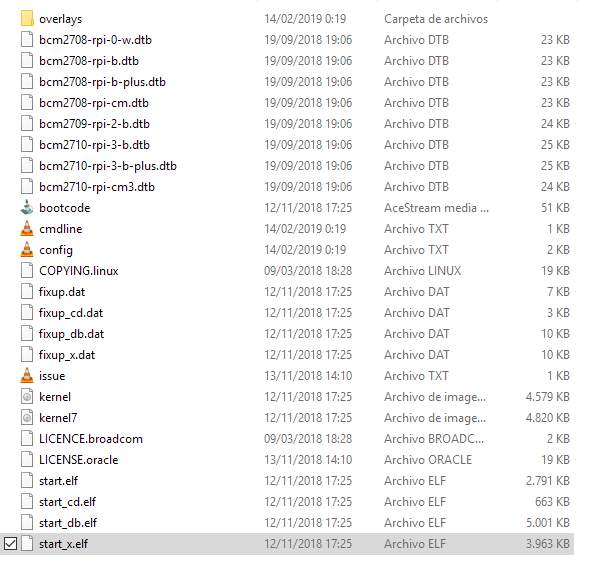
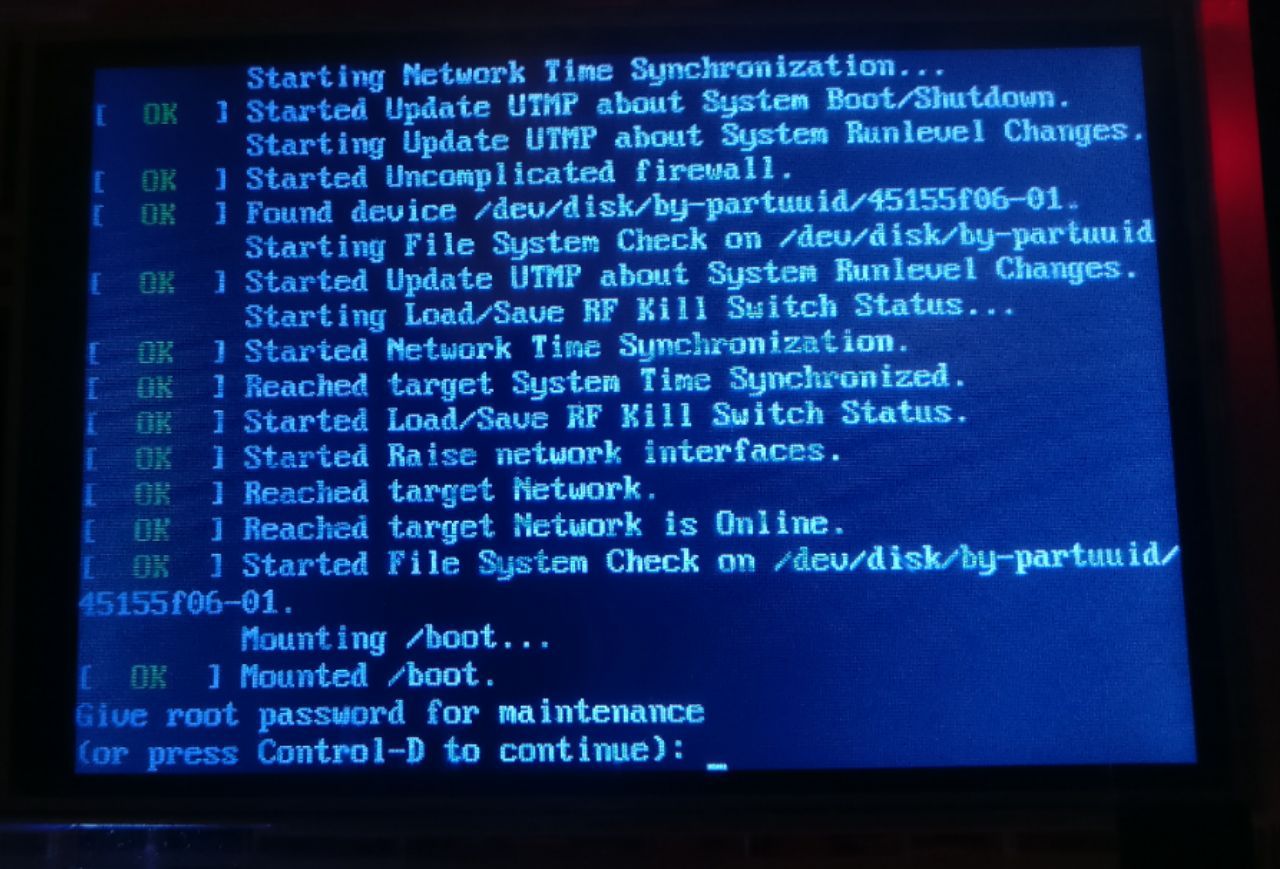
And there is no option to type any command. Just asking for
Give root password for maintenance
(or press Control-D to continue)
And when I type Control-D shows
sulogin: cannot read /dev/tty1: Operation not permitted.
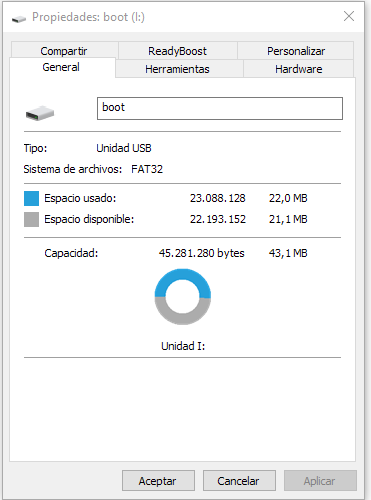
I only see that SD card is damage because when i check properties, says it has 43 Mbits when is 32Gb.
Jos3xTv
on 18 Mar 2019
That is the boot partition. You need to mount the rootfs partition which has the /var and other root directories. You are using Windows then you won't see the rootfs partition because it is formatted as Ext4 which Windows cannot see by default (it's a Linux file format).
fluidvoice
on 19 Mar 2019
It's possible your SD card got filled up with logs (this problem was recently fixed) or it got corrupted.
I would burn the SD card again with the latest code.
fluidvoice
on 19 Mar 2019
Thank you Brad.
This evening I have a slot to burn it. I'll give feedback.
Jos3xTv
on 19 Mar 2019
Finally on the road.
I could flash the SD card, but started over. Asking for a node name and A and B password. And then this.
RaspiBlitz
──────────────────────────────────────────────────────────────────────────────
         ┌──────────────────────────────────────────────────┐
         │ OK - RPC password changed                        │
         │                                                  │
         │ Now starting the Setup of your RaspiBlitz.       │
         ├──────────────────────────────────────────────────┤
         │                     <  OK  >                     │
         └──────────────────────────────────────────────────┘
HDD was already initialized/prepared
Now needs to be mounted
* Adding HDD to the System *
started from state(waitsetup)
OK - HDD found as sda
* Check HDD *
OK - HDD is formatted with ext4 and is named BLOCKCHAIN
Adding line to /etc/fstab ...
UUID=36149e24-2954-4e45-8042-cf2e1fdf456a /mnt/hdd ext4 noexec,defaults 0 2
OK - HDD is listed in /etc/fstab
* Mount HDD *
mount: mount /dev/sda1 on /mnt/hdd failed: Structure needs cleaning
FAIL - was not able to mount
admin@RaspiBlitz:~ $ df -Th
Filesystem Type Size Used Avail Use% Mounted on
/dev/root ext4 7.1G 2.8G 4.0G 41% /
devtmpfs devtmpfs 460M 0 460M 0% /dev
tmpfs tmpfs 464M 0 464M 0% /dev/shm
tmpfs tmpfs 464M 6.3M 458M 2% /run
tmpfs tmpfs 5.0M 4.0K 5.0M 1% /run/lock
tmpfs tmpfs 464M 0 464M 0% /sys/fs/cgroup
/dev/mmcblk0p1 vfat 44M 22M 22M 51% /boot
tmpfs tmpfs 93M 0 93M 0% /run/user/1000
tmpfs tmpfs 93M 0 93M 0% /run/user/1001
It seems the HDD is also affected. Is there any solution?
Jos3xTv
on 21 Mar 2019
try sudo e2fsck -y /dev/sda1 then reboot
fluidvoice
on 22 Mar 2019
I rebooted the Pi and we come back to the beginning.
I'll flash again the SD and i'll refresh post
Jos3xTv
on 22 Mar 2019
Ok, I could type sudo e2fsck -y /dev/sda1 and this is the result after reboot.
error: Could not connect to the server 127.0.0.1:8332
Make sure the bitcoind server is running and that you are connecting to the correct RPC port.
bitcoin still not running* RASPIBLITZ LOGS *
blitzversion: 1.1
chainnetwork: bitcoin / main
16:59:03 up 1 min, 2 users, load average: 0.09, 0.04, 0.01* CHAINNETWORK SYSTEMD STATUS *
Unit bitcoind.service could not be found.* LAST 5 ERROR LOGS *
-- No entries --* LAST 20 INFO LOGS *
2019-03-18T03:21:10Z socket recv error Connection reset by peer (104)
2019-03-18T03:26:19Z UpdateTip: new best=0000000000000000001825a345d6046180dacbf51f37b83315b0c1405399874a height=567581 version=0x20800000 log2_work=90.451622 tx=392648043 date='2019-03-18T03:25:36Z' progress=1.000000 cache=32.6MiB(272203txo) warning='36 of last 100 blocks have unexpected version'
2019-03-18T03:27:27Z socket recv error Connection reset by peer (104)
2019-03-18T03:31:04Z socket receive timeout: 1201s
2019-03-18T03:32:43Z socket recv error Connection reset by peer (104)
2019-03-18T03:33:46Z UpdateTip: new best=0000000000000000000f6e21dbc53c50e76609b03ddfeb74de8c85d26c481373 height=567582 version=0x20000000 log2_work=90.451644 tx=392650232 date='2019-03-18T03:33:27Z' progress=1.000000 cache=33.2MiB(278080txo) warning='36 of last 100 blocks have unexpected version'
2019-03-18T03:38:32Z UpdateTip: new best=0000000000000000000a8fe607f4a70ad74a41e998806b5d5ce73784c3d57eae height=567583 version=0x20000000 log2_work=90.451666 tx=392651726 date='2019-03-18T03:38:26Z' progress=1.000000 cache=33.5MiB(280902txo) warning='35 of last 100 blocks have unexpected version'
2019-03-18T03:41:23Z socket recv error Connection reset by peer (104)
2019-03-18T03:42:12Z UpdateTip: new best=00000000000000000016abc1d7b7347a1952e48a21d9213a8994c0b760296c6a height=567584 version=0x20000000 log2_work=90.451689 tx=392652314 date='2019-03-18T03:41:52Z' progress=1.000000 cache=33.6MiB(282112txo) warning='35 of last 100 blocks have unexpected version'
2019-03-18T03:42:40Z socket recv error Connection reset by peer (104)
2019-03-18T03:46:17Z socket recv error Connection reset by peer (104)
2019-03-18T03:48:46Z socket recv error Connection reset by peer (104)
2019-03-18T03:54:02Z socket send error Connection timed out (110)
2019-03-18T03:55:18Z socket send error Broken pipe (32)
2019-03-18T04:00:53Z socket recv error Connection reset by peer (104)
2019-03-18T04:06:17Z socket recv error Connection reset by peer (104)
2019-03-18T04:06:31Z UpdateTip: new best=00000000000000000028c959eb3f9ecd0b3594d89d23ea20df55076f5da9d5f8 height=567585 version=0x20c00000 log2_work=90.451711 tx=392654865 date='2019-03-18T04:06:00Z' progress=1.000000 cache=34.3MiB(288593txo) warning='36 of last 100 blocks have unexpected version'
2019-03-18T04:12:45Z socket recv error Connection reset by peer (104)
2019-03-18T04:14:57Z socket recv error Connection reset by peer (104)
2019-03-18T04:17:37Z socket recv error Connection reset by peer (104)* LND SYSTEMD STATUS *
Unit lnd.service could not be found.* LAST 5 LND ERROR LOGS *
-- No entries --* LAST 20 LND INFO LOGS
2019-03-18 04:19:03.510 [DBG] PEER: Received ChannelUpdate(chain_hash=000000000019d6689c085ae165831e934ff763ae46a2a6c172b3f1b60a8ce26f, short_chan_id=622923914723000321, mflags=00000001, cflags=00000000, update_time=2019-03-18 04:18:29 +0000 GMT) from 106.163.158.127:52352
2019-03-18 04:19:03.510 [DBG] PEER: Received ChannelUpdate(chain_hash=000000000019d6689c085ae165831e934ff763ae46a2a6c172b3f1b60a8ce26f, short_chan_id=622805167429320704, mflags=00000001, cflags=00000000, update_time=2019-03-18 04:18:29 +0000 GMT) from 106.163.158.127:52352
2019-03-18 04:19:03.512 [DBG] PEER: Received ChannelUpdate(chain_hash=000000000019d6689c085ae165831e934ff763ae46a2a6c172b3f1b60a8ce26f, short_chan_id=622960198687195136, mflags=00000001, cflags=00000000, update_time=2019-03-18 04:18:29 +0000 GMT) from 106.163.158.127:52352
2019-03-18 04:19:03.513 [DBG] PEER: Received ChannelUpdate(chain_hash=000000000019d6689c085ae165831e934ff763ae46a2a6c172b3f1b60a8ce26f, short_chan_id=607153619486965761, mflags=00000000, cflags=00000000, update_time=2019-03-18 04:18:20 +0000 GMT) from 106.163.158.127:52352
2019-03-18 04:19:03.513 [DBG] PEER: Received ChannelUpdate(chain_hash=000000000019d6689c085ae165831e934ff763ae46a2a6c172b3f1b60a8ce26f, short_chan_id=622602857338699776, mflags=00000001, cflags=00000010, update_time=2019-03-18 04:18:15 +0000 GMT) from 106.163.158.127:52352
2019-03-18 04:19:04.208 [DBG] PEER: Received ChannelUpdate(chain_hash=000000000019d6689c085ae165831e934ff763ae46a2a6c172b3f1b60a8ce26f, short_chan_id=621058043559936001, mflags=00000001, cflags=00000000, update_time=2019-03-18 04:17:48 +0000 GMT) from 119.3.87.66:52734
2019-03-18 04:19:04.209 [DBG] PEER: Received ChannelUpdate(chain_hash=000000000019d6689c085ae165831e934ff763ae46a2a6c172b3f1b60a8ce26f, short_chan_id=623971749317574656, mflags=00000001, cflags=00000000, update_time=2019-03-18 04:17:59 +0000 GMT) from 119.3.87.66:52734
2019-03-18 04:19:04.209 [DBG] PEER: Received ChannelUpdate(chain_hash=000000000019d6689c085ae165831e934ff763ae46a2a6c172b3f1b60a8ce26f, short_chan_id=619435164326625281, mflags=00000001, cflags=00000001, update_time=2019-03-18 04:18:55 +0000 GMT) from 119.3.87.66:52734
2019-03-18 04:19:04.210 [DBG] PEER: Received ChannelUpdate(chain_hash=000000000019d6689c085ae165831e934ff763ae46a2a6c172b3f1b60a8ce26f, short_chan_id=569771323650539520, mflags=00000001, cflags=00000011, update_time=2019-03-18 04:18:27 +0000 GMT) from 119.3.87.66:52734
2019-03-18 04:19:04.210 [DBG] PEER: Received ChannelUpdate(chain_hash=000000000019d6689c085ae165831e934ff763ae46a2a6c172b3f1b60a8ce26f, short_chan_id=623669383598571520, mflags=00000001, cflags=00000011, update_time=2019-03-18 04:18:01 +0000 GMT) from 119.3.87.66:52734
2019-03-18 04:19:04.593 [DBG] PEER: Received ChannelUpdate(chain_hash=000000000019d6689c085ae165831e934ff763ae46a2a6c172b3f1b60a8ce26f, short_chan_id=622960198687195136, mflags=00000001, cflags=00000000, update_time=2019-03-18 04:18:29 +0000 GMT) from 119.3.87.66:52734
2019-03-18 04:19:04.593 [DBG] PEER: Received ChannelUpdate(chain_hash=000000000019d6689c085ae165831e934ff763ae46a2a6c172b3f1b60a8ce26f, short_chan_id=622959099074576384, mflags=00000001, cflags=00000000, update_time=2019-03-18 04:18:29 +0000 GMT) from 119.3.87.66:52734
2019-03-18 04:19:04.594 [DBG] PEER: Received ChannelUpdate(chain_hash=000000000019d6689c085ae165831e934ff763ae46a2a6c172b3f1b60a8ce26f, short_chan_id=615746302915248128, mflags=00000000, cflags=00000010, update_time=2019-03-18 04:17:34 +0000 GMT) from 119.3.87.66:52734
2019-03-18 04:19:04.594 [DBG] PEER: Received ChannelUpdate(chain_hash=000000000019d6689c085ae165831e934ff763ae46a2a6c172b3f1b60a8ce26f, short_chan_id=615636351716753408, mflags=00000000, cflags=00000000, update_time=2019-03-18 04:17:34 +0000 GMT) from 119.3.87.66:52734
2019-03-18 04:19:04.595 [DBG] PEER: Received ChannelUpdate(chain_hash=000000000019d6689c085ae165831e934ff763ae46a2a6c172b3f1b60a8ce26f, short_chan_id=617258131317587968, mflags=00000001, cflags=00000000, update_time=2019-03-18 04:13:04 +0000 GMT) from 119.3.87.66:52734
2019-03-18 04:19:04.595 [DBG] PEER: Received ChannelUpdate(chain_hash=000000000019d6689c085ae165831e934ff763ae46a2a6c172b3f1b60a8ce26f, short_chan_id=614143214986657793, mflags=00000001, cflags=00000000, update_time=2019-03-18 04:17:06 +0000 GMT) from 119.3.87.66:52734
2019-03-18 04:19:04.595 [DBG] PEER: Received ChannelUpdate(chain_hash=000000000019d6689c085ae165831e934ff763ae46a2a6c172b3f1b60a8ce26f, short_chan_id=622854645556707328, mflags=00000001, cflags=00000000, update_time=2019-03-18 04:18:29 +0000 GMT) from 119.3.87.66:52734
2019-03-18 04:19:04.596 [DBG] PEER: Received ChannelUpdate(chain_hash=000000000019d6689c085ae165831e934ff763ae46a2a6c172b3f1b60a8ce26f, short_chan_id=617823280247799809, mflags=00000001, cflags=00000011, update_time=2019-03-18 04:16:41 +0000 GMT) from 119.3.87.66:52734
2019-03-18 04:19:04.596 [DBG] PEER: Received ChannelUpdate(chain_hash=000000000019d6689c085ae165831e934ff763ae46a2a6c172b3f1b60a8ce26f, short_chan_id=622923914723000321, mflags=00000001, cflags=00000000, update_time=2019-03-18 04:18:29 +0000 GMT) from 119.3.87.66:52734
2019-03-18 04:19:04.596 [DBG] PEER: Received ChannelUpdate(cha
LAST 20 RTL LOGS *
-- No entries --UNKOWN STATE - there is blockain data config, but blockchain service is not running
It seems that something went wrong during sync/download/copy of the blockchain.
Or something with the config is not correct.
Sometimes a reboot helps --> sudo shutdown -r now
admin@RaspiBlitz:~ $
Jos3xTv
on 22 Mar 2019
what is your output of running /home/admin/XXdebugLogs.sh ?
the log above looks like something else.
fluidvoice
on 23 Mar 2019
actually maybe that is the correct log. But it seems the bitcoind.service and lnd.service is not running. Run this and post the outputs:
sudo systemctl status bitcoind.service
sudo systemctl status lnd.service
sudo systemctl start bitcoind.service
sudo tail -n 500 /mnt/hdd/bitcoin/debug.log | nc termbin.com 9999
fluidvoice
on 23 Mar 2019
Thanks for you time Brad.
This is the output.
...
UNKOWN STATE - there is blockain data config, but blockchain service is not running
It seems that something went wrong during sync/download/copy of the blockchain.
Or something with the config is not correct.
Sometimes a reboot helps --> sudo shutdown -r now
admin@RaspiBlitz:~ $ sudo systemctl status bitcoind.service
Unit bitcoind.service could not be found.
admin@RaspiBlitz:~ $ sudo systemctl start bitcoind.service
Failed to start bitcoind.service: Unit bitcoind.service not found.
admin@RaspiBlitz:~ $ sudo tail -n 500 /mnt/hdd/bitcoin/debug.log | nc termbin.com 9999
https://termbin.com/ynbz
admin@RaspiBlitz:~ $
Jos3xTv
on 23 Mar 2019
It looks like you're still having problems with that HDD. You may want to try a different hard drive, or minimally I would...
- backup your LND data: https://github.com/rootzoll/raspiblitz/blob/9d741270dcfa123efd79c333c3f0b0cb77047ab2/FAQ.md#how-can-i-recover-my-coins-from-a-failing-raspiblitz
- then do a complete reinstall and after you get the fresh install running, restore your LND data as per those directions.
fluidvoice
on 24 Mar 2019
Hi Brad.
I started to back up my LND data.
admin@RaspiBlitz:~ $ scp -r [email protected]:/home/admin/lnd-rescue-*.tar.gz ./
[email protected]'s password:
lnd-rescue-8d18616bf65070a60f1fdb5782dcba30.t 100% 48MB 28.2MB/s 00:01
admin@RaspiBlitz:~ $
The script should give me a command to transfer the file but i don't know if it's transfer or not. I'm looking on my PC and no pick.
The created file is lnd-rescue-8d18616bf65070a60f1fdb5782dcba30.tar.gz in pi root. How can i transfer it? (tried to read it on windows with Ext2Fsd, but the system ask me to format de HDD)
Jos3xTv
on 24 Mar 2019
scp -r [email protected]:/home/admin/lnd-rescue-*.tar.gz ./
When you ran the backup script it should have displayed this direction....
"RUN THE FOLLOWING COMMAND ON YOUR LAPTOP IN NEW TERMINAL:"
scp -r [email protected]:/home/admin/lnd-rescue-*.tar.gz ./
It looks like you ran it on the Raspiblitz via SSH rather than on your Mac/Windows machine.
If done so, it will pull/download the backup (tar.gz) file from your Raspiblitz node into whatever folder you were in when you ran it.
Note: I've not done it but in Windows I think scp is included in the installed Putty app you are prob using for SSH. One of these should work:
scp -r [email protected]:/home/admin/lnd-rescue-*.tar.gz ./
pscp -r [email protected]:/home/admin/lnd-rescue-*.tar.gz ./
pscp -scp -r [email protected]:/home/admin/lnd-rescue-*.tar.gz ./
Let me know which works. Perhaps the script and/or doc's should be improved to make it more obvious how this should be done.
fluidvoice
on 24 Mar 2019
Finally using WinSCP could transfer the file.
So... i restart my Raspiblitz with new SD and HDD drives. Finally, after several issues solved with #450 and #466, i get my main screen.
I restored my LND data backup and everything went smooth till now.
When i unblock the LND goes to filtering screen and come back to Unblock LND screen and over and over again. I tried ./70initLND.sh command but didn't work.
Now trying /home/admin/XXdebugLogs.sh bafore and after LND unblocking, and this is the result:
admin@WOPR:~ $ /home/admin/XXdebugLogs.sh
* RASPIBLITZ LOGS *
blitzversion: 1.1
chainnetwork: bitcoin / main
13:23:01 up 1:14, 2 users, load average: 0.28, 0.36, 0.42
* CHAINNETWORK SYSTEMD STATUS *
â— bitcoind.service - Bitcoin daemon
Loaded: loaded (/etc/systemd/system/bitcoind.service; enabled; vendor preset: enabled)
Active: active (running) since Sat 2019-03-30 12:08:15 GMT; 1h 14min ago
Process: 795 ExecStart=/usr/local/bin/bitcoind -daemon -conf=/home/bitcoin/.bitcoin/bitcoin.conf -pid=/home/bitcoin/.bitcoin/bitcoind.pid (code=exited, status=0/SUCCESS)
Main PID: 813 (bitcoind)
CGroup: /system.slice/bitcoind.service
└─813 /usr/local/bin/bitcoind -daemon -conf=/home/bitcoin/.bitcoin/bitcoin.conf -pi…id
Mar 30 12:08:14 WOPR systemd[1]: bitcoind.service: Failed to read PID from file /home/bitc…gument
Mar 30 12:08:15 WOPR systemd[1]: Started Bitcoin daemon.
Hint: Some lines were ellipsized, use -l to show in full.
* LAST 5 ERROR LOGS *
-- Logs begin at Sat 2019-03-30 12:04:55 GMT, end at Sat 2019-03-30 13:23:01 GMT. --
Mar 30 12:08:14 WOPR systemd[1]: Starting Bitcoin daemon...
Mar 30 12:08:14 WOPR systemd[1]: bitcoind.service: Failed to read PID from file /home/bitcoin/.bitcoin/bitcoind.pid: Invalid argument
Mar 30 12:08:15 WOPR systemd[1]: Started Bitcoin daemon.
* LAST 20 INFO LOGS *
2019-03-30T12:35:40Z UpdateTip: new best=0000000000000000002133c9b10cc728ccacf6491c1b3df995371ef2dcc41ae2 height=569462 version=0x20000000 log2_work=90.49386 tx=396643678 date='2019-03-30T12:35:02Z' progress=1.000000 cache=7.4MiB(65376txo) warning='39 of last 100 blocks have unexpected version'
2019-03-30T12:36:41Z UpdateTip: new best=000000000000000000277a2596ee5e89bc600a2760e681985970f9325be3650d height=569463 version=0x20c00000 log2_work=90.493882 tx=396645976 date='2019-03-30T12:36:08Z' progress=1.000000 cache=8.0MiB(70915txo) warning='39 of last 100 blocks have unexpected version'
2019-03-30T12:39:42Z Pre-allocating up to position 0x900000 in rev01578.dat
2019-03-30T12:39:43Z UpdateTip: new best=00000000000000000011a08574c1acc15f09bdcafa49cefa473153e56b9c893f height=569464 version=0x20c00000 log2_work=90.493905 tx=396648412 date='2019-03-30T12:38:37Z' progress=1.000000 cache=8.6MiB(76495txo) warning='40 of last 100 blocks have unexpected version'
2019-03-30T12:46:55Z ThreadRPCServer incorrect password attempt from 127.0.0.1:48382
2019-03-30T12:49:46Z Pre-allocating up to position 0x5000000 in blk01578.dat
2019-03-30T12:49:50Z UpdateTip: new best=0000000000000000000f3f01e00538443bf8fa9ff4f1370b59109d5cafb68a18 height=569465 version=0x20000000 log2_work=90.493928 tx=396651151 date='2019-03-30T12:49:26Z' progress=1.000000 cache=9.2MiB(82144txo) warning='39 of last 100 blocks have unexpected version'
2019-03-30T12:49:59Z ThreadRPCServer incorrect password attempt from 127.0.0.1:48576
2019-03-30T12:54:21Z socket recv error Connection reset by peer (104)
2019-03-30T12:56:38Z socket recv error Connection reset by peer (104)
2019-03-30T12:56:45Z socket recv error Connection reset by peer (104)
2019-03-30T12:57:34Z socket recv error Connection reset by peer (104)
2019-03-30T12:58:05Z socket recv error Connection reset by peer (104)
2019-03-30T13:06:51Z socket recv error Connection reset by peer (104)
2019-03-30T13:10:02Z ThreadRPCServer incorrect password attempt from 127.0.0.1:49576
2019-03-30T13:10:16Z UpdateTip: new best=000000000000000000179b9ae77bb5148ff15198fcca48fa4d96c678d249ba40 height=569466 version=0x20000000 log2_work=90.493951 tx=396652358 date='2019-03-30T13:10:09Z' progress=1.000000 cache=10.4MiB(93879txo) warning='38 of last 100 blocks have unexpected version'
2019-03-30T13:14:09Z ThreadRPCServer incorrect password attempt from 127.0.0.1:49822
2019-03-30T13:15:29Z ThreadRPCServer incorrect password attempt from 127.0.0.1:49936
2019-03-30T13:19:23Z UpdateTip: new best=0000000000000000002aca8696f4e523b7ea93decc41461cdae43a3dab9e8747 height=569467 version=0x20000000 log2_work=90.493973 tx=396654722 date='2019-03-30T13:18:55Z' progress=1.000000 cache=11.2MiB(100541txo) warning='37 of last 100 blocks have unexpected version'
2019-03-30T13:22:50Z ThreadRPCServer incorrect password attempt from 127.0.0.1:50340
* LND SYSTEMD STATUS *
â— lnd.service - LND Lightning Daemon
Loaded: loaded (/etc/systemd/system/lnd.service; enabled; vendor preset: enabled)
Active: activating (auto-restart) (Result: exit-code) since Sat 2019-03-30 13:22:50 GMT; 11s ago
Process: 16135 ExecStart=/usr/local/bin/lnd --externalip=${publicIP} (code=exited, status=1/FAILURE)
Main PID: 16135 (code=exited, status=1/FAILURE)
Mar 30 13:22:50 WOPR systemd[1]: lnd.service: Unit entered failed state.
Mar 30 13:22:50 WOPR systemd[1]: lnd.service: Failed with result 'exit-code'.
* LAST 5 LND ERROR LOGS *
-- Logs begin at Sat 2019-03-30 12:04:55 GMT, end at Sat 2019-03-30 13:23:02 GMT. --
Mar 30 13:16:29 WOPR systemd[1]: Stopped LND Lightning Daemon.
Mar 30 13:16:29 WOPR systemd[1]: Started LND Lightning Daemon.
Mar 30 13:22:50 WOPR systemd[1]: lnd.service: Main process exited, code=exited, status=1/FAILURE
Mar 30 13:22:50 WOPR systemd[1]: lnd.service: Unit entered failed state.
Mar 30 13:22:50 WOPR systemd[1]: lnd.service: Failed with result 'exit-code'.
* LAST 20 LND INFO LOGS *
2019-03-30 13:11:02.935 [INF] LTND: Waiting for wallet encryption password. Use lncli create to create a wallet, lncli unlock to unlock an existing wallet, or lncli changepassword to change the password of an existing wallet and unlock it.
2019-03-30 13:14:09.487 [INF] LNWL: Opened wallet
2019-03-30 13:14:09.930 [INF] LTND: Primary chain is set to: bitcoin
2019-03-30 13:15:10.693 [INF] LTND: Version: 0.5.2-beta commit=v0.5.2-beta, build=production, logging=default
2019-03-30 13:15:10.693 [INF] LTND: Active chain: Bitcoin (network=mainnet)
2019-03-30 13:15:10.695 [INF] CHDB: Checking for schema update: latest_version=7, db_version=7
2019-03-30 13:15:10.700 [INF] RPCS: password RPC server listening on [::]:10009
2019-03-30 13:15:10.700 [INF] RPCS: password gRPC proxy started at [::]:8080
2019-03-30 13:15:10.700 [INF] LTND: Waiting for wallet encryption password. Use lncli create to create a wallet, lncli unlock to unlock an existing wallet, or lncli changepassword to change the password of an existing wallet and unlock it.
2019-03-30 13:15:28.709 [INF] LNWL: Opened wallet
2019-03-30 13:15:29.180 [INF] LTND: Primary chain is set to: bitcoin
2019-03-30 13:15:29.492 [INF] LTND: Shutdown complete2019-03-30 13:16:29.931 [INF] LTND: Version: 0.5.2-beta commit=v0.5.2-beta, build=production, logging=default
2019-03-30 13:16:29.931 [INF] LTND: Active chain: Bitcoin (network=mainnet)
2019-03-30 13:16:29.933 [INF] CHDB: Checking for schema update: latest_version=7, db_version=7
2019-03-30 13:16:29.937 [INF] RPCS: password RPC server listening on [::]:10009
2019-03-30 13:16:29.937 [INF] RPCS: password gRPC proxy started at [::]:8080
2019-03-30 13:16:29.937 [INF] LTND: Waiting for wallet encryption password. Use lncli create to create a wallet, lncli unlock to unlock an existing wallet, or lncli changepassword to change the password of an existing wallet and unlock it.
2019-03-30 13:22:50.138 [INF] LNWL: Opened wallet
2019-03-30 13:22:50.620 [INF] LTND: Primary chain is set to: bitcoin
2019-03-30 13:22:50.922 [INF] LTND: Shutdown complete
- RTL is OFF by config
admin@WOPR:~ $ /home/admin/XXdebugLogs.sh
* RASPIBLITZ LOGS *
blitzversion: 1.1
chainnetwork: bitcoin / main
13:23:37 up 1:15, 2 users, load average: 0.23, 0.33, 0.41
* CHAINNETWORK SYSTEMD STATUS *
â— bitcoind.service - Bitcoin daemon
Loaded: loaded (/etc/systemd/system/bitcoind.service; enabled; vendor preset: enabled)
Active: active (running) since Sat 2019-03-30 12:08:15 GMT; 1h 15min ago
Process: 795 ExecStart=/usr/local/bin/bitcoind -daemon -conf=/home/bitcoin/.bitcoin/bitcoin.conf -pid=/home/bitcoin/.bitcoin/bitcoind.pid (code=exited, status=0/SUCCESS)
Main PID: 813 (bitcoind)
CGroup: /system.slice/bitcoind.service
└─813 /usr/local/bin/bitcoind -daemon -conf=/home/bitcoin/.bitcoin/bitcoin.conf -pi…id
Mar 30 12:08:14 WOPR systemd[1]: bitcoind.service: Failed to read PID from file /home/bitc…gument
Mar 30 12:08:15 WOPR systemd[1]: Started Bitcoin daemon.
Hint: Some lines were ellipsized, use -l to show in full.
* LAST 5 ERROR LOGS *
-- Logs begin at Sat 2019-03-30 12:04:55 GMT, end at Sat 2019-03-30 13:23:37 GMT. --
Mar 30 12:08:14 WOPR systemd[1]: Starting Bitcoin daemon...
Mar 30 12:08:14 WOPR systemd[1]: bitcoind.service: Failed to read PID from file /home/bitcoin/.bitcoin/bitcoind.pid: Invalid argument
Mar 30 12:08:15 WOPR systemd[1]: Started Bitcoin daemon.
* LAST 20 INFO LOGS *
2019-03-30T12:35:40Z UpdateTip: new best=0000000000000000002133c9b10cc728ccacf6491c1b3df995371ef2dcc41ae2 height=569462 version=0x20000000 log2_work=90.49386 tx=396643678 date='2019-03-30T12:35:02Z' progress=1.000000 cache=7.4MiB(65376txo) warning='39 of last 100 blocks have unexpected version'
2019-03-30T12:36:41Z UpdateTip: new best=000000000000000000277a2596ee5e89bc600a2760e681985970f9325be3650d height=569463 version=0x20c00000 log2_work=90.493882 tx=396645976 date='2019-03-30T12:36:08Z' progress=1.000000 cache=8.0MiB(70915txo) warning='39 of last 100 blocks have unexpected version'
2019-03-30T12:39:42Z Pre-allocating up to position 0x900000 in rev01578.dat
2019-03-30T12:39:43Z UpdateTip: new best=00000000000000000011a08574c1acc15f09bdcafa49cefa473153e56b9c893f height=569464 version=0x20c00000 log2_work=90.493905 tx=396648412 date='2019-03-30T12:38:37Z' progress=1.000000 cache=8.6MiB(76495txo) warning='40 of last 100 blocks have unexpected version'
2019-03-30T12:46:55Z ThreadRPCServer incorrect password attempt from 127.0.0.1:48382
2019-03-30T12:49:46Z Pre-allocating up to position 0x5000000 in blk01578.dat
2019-03-30T12:49:50Z UpdateTip: new best=0000000000000000000f3f01e00538443bf8fa9ff4f1370b59109d5cafb68a18 height=569465 version=0x20000000 log2_work=90.493928 tx=396651151 date='2019-03-30T12:49:26Z' progress=1.000000 cache=9.2MiB(82144txo) warning='39 of last 100 blocks have unexpected version'
2019-03-30T12:49:59Z ThreadRPCServer incorrect password attempt from 127.0.0.1:48576
2019-03-30T12:54:21Z socket recv error Connection reset by peer (104)
2019-03-30T12:56:38Z socket recv error Connection reset by peer (104)
2019-03-30T12:56:45Z socket recv error Connection reset by peer (104)
2019-03-30T12:57:34Z socket recv error Connection reset by peer (104)
2019-03-30T12:58:05Z socket recv error Connection reset by peer (104)
2019-03-30T13:06:51Z socket recv error Connection reset by peer (104)
2019-03-30T13:10:02Z ThreadRPCServer incorrect password attempt from 127.0.0.1:49576
2019-03-30T13:10:16Z UpdateTip: new best=000000000000000000179b9ae77bb5148ff15198fcca48fa4d96c678d249ba40 height=569466 version=0x20000000 log2_work=90.493951 tx=396652358 date='2019-03-30T13:10:09Z' progress=1.000000 cache=10.4MiB(93879txo) warning='38 of last 100 blocks have unexpected version'
2019-03-30T13:14:09Z ThreadRPCServer incorrect password attempt from 127.0.0.1:49822
2019-03-30T13:15:29Z ThreadRPCServer incorrect password attempt from 127.0.0.1:49936
2019-03-30T13:19:23Z UpdateTip: new best=0000000000000000002aca8696f4e523b7ea93decc41461cdae43a3dab9e8747 height=569467 version=0x20000000 log2_work=90.493973 tx=396654722 date='2019-03-30T13:18:55Z' progress=1.000000 cache=11.2MiB(100541txo) warning='37 of last 100 blocks have unexpected version'
2019-03-30T13:22:50Z ThreadRPCServer incorrect password attempt from 127.0.0.1:50340
* LND SYSTEMD STATUS *
â— lnd.service - LND Lightning Daemon
Loaded: loaded (/etc/systemd/system/lnd.service; enabled; vendor preset: enabled)
Active: activating (auto-restart) (Result: exit-code) since Sat 2019-03-30 13:22:50 GMT; 47s ago
Process: 16135 ExecStart=/usr/local/bin/lnd --externalip=${publicIP} (code=exited, status=1/FAILURE)
Main PID: 16135 (code=exited, status=1/FAILURE)
Mar 30 13:22:50 WOPR systemd[1]: lnd.service: Unit entered failed state.
Mar 30 13:22:50 WOPR systemd[1]: lnd.service: Failed with result 'exit-code'.
* LAST 5 LND ERROR LOGS *
-- Logs begin at Sat 2019-03-30 12:04:55 GMT, end at Sat 2019-03-30 13:23:38 GMT. --
Mar 30 13:16:29 WOPR systemd[1]: Stopped LND Lightning Daemon.
Mar 30 13:16:29 WOPR systemd[1]: Started LND Lightning Daemon.
Mar 30 13:22:50 WOPR systemd[1]: lnd.service: Main process exited, code=exited, status=1/FAILURE
Mar 30 13:22:50 WOPR systemd[1]: lnd.service: Unit entered failed state.
Mar 30 13:22:50 WOPR systemd[1]: lnd.service: Failed with result 'exit-code'.
* LAST 20 LND INFO LOGS *
2019-03-30 13:11:02.935 [INF] LTND: Waiting for wallet encryption password. Use lncli create to create a wallet, lncli unlock to unlock an existing wallet, or lncli changepassword to change the password of an existing wallet and unlock it.
2019-03-30 13:14:09.487 [INF] LNWL: Opened wallet
2019-03-30 13:14:09.930 [INF] LTND: Primary chain is set to: bitcoin
2019-03-30 13:15:10.693 [INF] LTND: Version: 0.5.2-beta commit=v0.5.2-beta, build=production, logging=default
2019-03-30 13:15:10.693 [INF] LTND: Active chain: Bitcoin (network=mainnet)
2019-03-30 13:15:10.695 [INF] CHDB: Checking for schema update: latest_version=7, db_version=7
2019-03-30 13:15:10.700 [INF] RPCS: password RPC server listening on [::]:10009
2019-03-30 13:15:10.700 [INF] RPCS: password gRPC proxy started at [::]:8080
2019-03-30 13:15:10.700 [INF] LTND: Waiting for wallet encryption password. Use lncli create to create a wallet, lncli unlock to unlock an existing wallet, or lncli changepassword to change the password of an existing wallet and unlock it.
2019-03-30 13:15:28.709 [INF] LNWL: Opened wallet
2019-03-30 13:15:29.180 [INF] LTND: Primary chain is set to: bitcoin
2019-03-30 13:15:29.492 [INF] LTND: Shutdown complete2019-03-30 13:16:29.931 [INF] LTND: Version: 0.5.2-beta commit=v0.5.2-beta, build=production, logging=default
2019-03-30 13:16:29.931 [INF] LTND: Active chain: Bitcoin (network=mainnet)
2019-03-30 13:16:29.933 [INF] CHDB: Checking for schema update: latest_version=7, db_version=7
2019-03-30 13:16:29.937 [INF] RPCS: password RPC server listening on [::]:10009
2019-03-30 13:16:29.937 [INF] RPCS: password gRPC proxy started at [::]:8080
2019-03-30 13:16:29.937 [INF] LTND: Waiting for wallet encryption password. Use lncli create to create a wallet, lncli unlock to unlock an existing wallet, or lncli changepassword to change the password of an existing wallet and unlock it.
2019-03-30 13:22:50.138 [INF] LNWL: Opened wallet
2019-03-30 13:22:50.620 [INF] LTND: Primary chain is set to: bitcoin
2019-03-30 13:22:50.922 [INF] LTND: Shutdown complete
- RTL is OFF by config
admin@WOPR:~ $ /home/admin/XXdebugLogs.sh
* RASPIBLITZ LOGS *
blitzversion: 1.1
chainnetwork: bitcoin / main
13:23:50 up 1:15, 2 users, load average: 0.20, 0.32, 0.41
* CHAINNETWORK SYSTEMD STATUS *
â— bitcoind.service - Bitcoin daemon
Loaded: loaded (/etc/systemd/system/bitcoind.service; enabled; vendor preset: enabled)
Active: active (running) since Sat 2019-03-30 12:08:15 GMT; 1h 15min ago
Process: 795 ExecStart=/usr/local/bin/bitcoind -daemon -conf=/home/bitcoin/.bitcoin/bitcoin.conf -pid=/home/bitcoin/.bitcoin/bitcoind.pid (code=exited, status=0/SUCCESS)
Main PID: 813 (bitcoind)
CGroup: /system.slice/bitcoind.service
└─813 /usr/local/bin/bitcoind -daemon -conf=/home/bitcoin/.bitcoin/bitcoin.conf -pi…id
Mar 30 12:08:14 WOPR systemd[1]: bitcoind.service: Failed to read PID from file /home/bitc…gument
Mar 30 12:08:15 WOPR systemd[1]: Started Bitcoin daemon.
Hint: Some lines were ellipsized, use -l to show in full.
* LAST 5 ERROR LOGS *
-- Logs begin at Sat 2019-03-30 12:04:55 GMT, end at Sat 2019-03-30 13:23:51 GMT. --
Mar 30 12:08:14 WOPR systemd[1]: Starting Bitcoin daemon...
Mar 30 12:08:14 WOPR systemd[1]: bitcoind.service: Failed to read PID from file /home/bitcoin/.bitcoin/bitcoind.pid: Invalid argument
Mar 30 12:08:15 WOPR systemd[1]: Started Bitcoin daemon.
* LAST 20 INFO LOGS *
2019-03-30T12:35:40Z UpdateTip: new best=0000000000000000002133c9b10cc728ccacf6491c1b3df995371ef2dcc41ae2 height=569462 version=0x20000000 log2_work=90.49386 tx=396643678 date='2019-03-30T12:35:02Z' progress=1.000000 cache=7.4MiB(65376txo) warning='39 of last 100 blocks have unexpected version'
2019-03-30T12:36:41Z UpdateTip: new best=000000000000000000277a2596ee5e89bc600a2760e681985970f9325be3650d height=569463 version=0x20c00000 log2_work=90.493882 tx=396645976 date='2019-03-30T12:36:08Z' progress=1.000000 cache=8.0MiB(70915txo) warning='39 of last 100 blocks have unexpected version'
2019-03-30T12:39:42Z Pre-allocating up to position 0x900000 in rev01578.dat
2019-03-30T12:39:43Z UpdateTip: new best=00000000000000000011a08574c1acc15f09bdcafa49cefa473153e56b9c893f height=569464 version=0x20c00000 log2_work=90.493905 tx=396648412 date='2019-03-30T12:38:37Z' progress=1.000000 cache=8.6MiB(76495txo) warning='40 of last 100 blocks have unexpected version'
2019-03-30T12:46:55Z ThreadRPCServer incorrect password attempt from 127.0.0.1:48382
2019-03-30T12:49:46Z Pre-allocating up to position 0x5000000 in blk01578.dat
2019-03-30T12:49:50Z UpdateTip: new best=0000000000000000000f3f01e00538443bf8fa9ff4f1370b59109d5cafb68a18 height=569465 version=0x20000000 log2_work=90.493928 tx=396651151 date='2019-03-30T12:49:26Z' progress=1.000000 cache=9.2MiB(82144txo) warning='39 of last 100 blocks have unexpected version'
2019-03-30T12:49:59Z ThreadRPCServer incorrect password attempt from 127.0.0.1:48576
2019-03-30T12:54:21Z socket recv error Connection reset by peer (104)
2019-03-30T12:56:38Z socket recv error Connection reset by peer (104)
2019-03-30T12:56:45Z socket recv error Connection reset by peer (104)
2019-03-30T12:57:34Z socket recv error Connection reset by peer (104)
2019-03-30T12:58:05Z socket recv error Connection reset by peer (104)
2019-03-30T13:06:51Z socket recv error Connection reset by peer (104)
2019-03-30T13:10:02Z ThreadRPCServer incorrect password attempt from 127.0.0.1:49576
2019-03-30T13:10:16Z UpdateTip: new best=000000000000000000179b9ae77bb5148ff15198fcca48fa4d96c678d249ba40 height=569466 version=0x20000000 log2_work=90.493951 tx=396652358 date='2019-03-30T13:10:09Z' progress=1.000000 cache=10.4MiB(93879txo) warning='38 of last 100 blocks have unexpected version'
2019-03-30T13:14:09Z ThreadRPCServer incorrect password attempt from 127.0.0.1:49822
2019-03-30T13:15:29Z ThreadRPCServer incorrect password attempt from 127.0.0.1:49936
2019-03-30T13:19:23Z UpdateTip: new best=0000000000000000002aca8696f4e523b7ea93decc41461cdae43a3dab9e8747 height=569467 version=0x20000000 log2_work=90.493973 tx=396654722 date='2019-03-30T13:18:55Z' progress=1.000000 cache=11.2MiB(100541txo) warning='37 of last 100 blocks have unexpected version'
2019-03-30T13:22:50Z ThreadRPCServer incorrect password attempt from 127.0.0.1:50340
* LND SYSTEMD STATUS *
â— lnd.service - LND Lightning Daemon
Loaded: loaded (/etc/systemd/system/lnd.service; enabled; vendor preset: enabled)
Active: active (running) since Sat 2019-03-30 13:23:50 GMT; 186ms ago
Main PID: 21440 (lnd)
CGroup: /system.slice/lnd.service
└─21440 /usr/local/bin/lnd --externalip=88.6.110.175
Mar 30 13:23:50 WOPR systemd[1]: Started LND Lightning Daemon.
* LAST 5 LND ERROR LOGS *
-- Logs begin at Sat 2019-03-30 12:04:55 GMT, end at Sat 2019-03-30 13:23:51 GMT. --
Mar 30 13:22:50 WOPR systemd[1]: lnd.service: Unit entered failed state.
Mar 30 13:22:50 WOPR systemd[1]: lnd.service: Failed with result 'exit-code'.
Mar 30 13:23:50 WOPR systemd[1]: lnd.service: Service hold-off time over, scheduling restart.
Mar 30 13:23:50 WOPR systemd[1]: Stopped LND Lightning Daemon.
Mar 30 13:23:50 WOPR systemd[1]: Started LND Lightning Daemon.
* LAST 20 LND INFO LOGS *
2019-03-30 13:15:10.695 [INF] CHDB: Checking for schema update: latest_version=7, db_version=7
2019-03-30 13:15:10.700 [INF] RPCS: password RPC server listening on [::]:10009
2019-03-30 13:15:10.700 [INF] RPCS: password gRPC proxy started at [::]:8080
2019-03-30 13:15:10.700 [INF] LTND: Waiting for wallet encryption password. Use lncli create to create a wallet, lncli unlock to unlock an existing wallet, or lncli changepassword to change the password of an existing wallet and unlock it.
2019-03-30 13:15:28.709 [INF] LNWL: Opened wallet
2019-03-30 13:15:29.180 [INF] LTND: Primary chain is set to: bitcoin
2019-03-30 13:15:29.492 [INF] LTND: Shutdown complete2019-03-30 13:16:29.931 [INF] LTND: Version: 0.5.2-beta commit=v0.5.2-beta, build=production, logging=default
2019-03-30 13:16:29.931 [INF] LTND: Active chain: Bitcoin (network=mainnet)
2019-03-30 13:16:29.933 [INF] CHDB: Checking for schema update: latest_version=7, db_version=7
2019-03-30 13:16:29.937 [INF] RPCS: password RPC server listening on [::]:10009
2019-03-30 13:16:29.937 [INF] RPCS: password gRPC proxy started at [::]:8080
2019-03-30 13:16:29.937 [INF] LTND: Waiting for wallet encryption password. Use lncli create to create a wallet, lncli unlock to unlock an existing wallet, or lncli changepassword to change the password of an existing wallet and unlock it.
2019-03-30 13:22:50.138 [INF] LNWL: Opened wallet
2019-03-30 13:22:50.620 [INF] LTND: Primary chain is set to: bitcoin
2019-03-30 13:22:50.922 [INF] LTND: Shutdown complete2019-03-30 13:23:51.248 [INF] LTND: Version: 0.5.2-beta commit=v0.5.2-beta, build=production, logging=default
2019-03-30 13:23:51.248 [INF] LTND: Active chain: Bitcoin (network=mainnet)
2019-03-30 13:23:51.250 [INF] CHDB: Checking for schema update: latest_version=7, db_version=7
2019-03-30 13:23:51.255 [INF] RPCS: password gRPC proxy started at [::]:8080
2019-03-30 13:23:51.255 [INF] RPCS: password RPC server listening on [::]:10009
2019-03-30 13:23:51.255 [INF] LTND: Waiting for wallet encryption password. Use lncli create to create a wallet, lncli unlock to unlock an existing wallet, or lncli changepassword to change the password of an existing wallet and unlock it.
- RTL is OFF by config
This loop is neverend. ./70initLND.sh doesn't work. Any help pls?
Jos3xTv
on 30 Mar 2019
It looks like your bitcoind service got setup with a funky startup string. Notice the odd characters here.
I have no idea what caused this but it should be not so difficult to fix this.
CGroup: /system.slice/bitcoind.service
└─813 /usr/local/bin/bitcoind -daemon -conf=/home/bitcoin/.bitcoin/bitcoin.conf -pi…idMar 30 12:08:14 WOPR systemd[1]: bitcoind.service: Failed to read PID from file /home/bitc…gument
One test is to try starting up the bitcoind from the command line with:
sudo systemctl stop bitcoind.service
sudo -u bitcoin /usr/local/bin/bitcoind -daemon -conf=/home/bitcoin/.bitcoin/bitcoin.conf
sudo tail -f /mnt/hdd/bitcoin/debug.log
fluidvoice
on 30 Mar 2019
Btw, you have had so many different problems I wonder what could be causing them. What is the exact power supply you are using? And which external HDD and case/adapter? A poor power supply can cause all kinds of different problems including data corruption. To reduce the chance of problems it might be best to use the official RPi-3 2.5Amp power supply (part number T5875DV): https://www.newark.com/raspberry-pi/t5875dv/psu-raspberry-pi-5v-2-5a-multi/dp/77Y6535
But even this supply might not be enough depending on what external HDD you are using. Does that have a separate power supply or just connected to the Pi USB port? If so, maybe a powered USB hub would help - or change to a different HDD or case/adapter it's using.
fluidvoice
on 30 Mar 2019
Hi Brad.
I tried three code line you proposed in that order.
RaspiBlitz (WOPR) ───────────────────────────────────────────────────────────────── ┌──────────────── bitcoin / main ───────────────────┐ │ Lightning Filtering Blockchain │ │ Progress: ?/569512 │ │ Please wait - this can take some long time. │ │ Its OK to close terminal and ssh back in later. │ └───────────────────────────────────────────────────┘ admin@WOPR:~ $ sudo systemctl stop bitcoind.service
admin@WOPR:~ $ sudo -u bitcoin /usr/local/bin/bitcoind -daemon -conf=/home/bitcoin/.bitcoin/bitcoin.conf
Error: Cannot obtain a lock on data directory /mnt/hdd/bitcoin. Bitcoin Core is probably already running.
admin@WOPR:~ $ sudo systemctl stop bitcoind.service admin@WOPR:~ $ sudo -u bitcoin /usr/local/bin/bitcoind -daemon -conf=/home/bitcoin/.bitcoin/bitcoin.conf
Bitcoin server starting
admin@WOPR:~ $ sudo tail -f /mnt/hdd/bitcoin/debug.log
2019-03-30T21:56:49Z LoadBlockIndexDB: last block file info: CBlockFileInfo(blocks=105, size=125073913, heights=569408...569512, time=2019-03-30...2019-03-30)
2019-03-30T21:56:49Z Checking all blk files are present...
2019-03-30T21:56:50Z Opening LevelDB in /mnt/hdd/bitcoin/chainstate2019-03-30T21:56:50Z Opened LevelDB successfully
2019-03-30T21:56:50Z Using obfuscation key for /mnt/hdd/bitcoin/chainstate: eadc35e843c5834c
2019-03-30T21:56:51Z Loaded best chain: hashBestChain=0000000000000000001e3043cc0eebaf7a409656524b5afa558ed56397b17b42 height=569512 date=2019-03-30T21:51:59Z progress=0.999998
2019-03-30T21:56:51Z init message: Rewinding blocks...
2019-03-30T21:56:59Z init message: Verifying blocks...
2019-03-30T21:56:59Z Verifying last 6 blocks at level 3
2019-03-30T21:56:59Z [0%]...[16%]...[33%]...[50%]...[66%]...[83%]...[99%]...[DONE].
2019-03-30T21:57:18Z No coin database inconsistencies in last 6 blocks (16853 transactions)
2019-03-30T21:57:18Z block index 51322ms
2019-03-30T21:57:18Z Opening LevelDB in /mnt/hdd/bitcoin/indexes/txindex
2019-03-30T21:57:19Z Opened LevelDB successfully
2019-03-30T21:57:19Z Using obfuscation key for /mnt/hdd/bitcoin/indexes/txindex: 0000000000000000
2019-03-30T21:57:19Z Wallet disabled!
2019-03-30T21:57:19Z txindex thread start
2019-03-30T21:57:19Z Syncing txindex with block chain from height 569469
2019-03-30T21:57:19Z mapBlockIndex.size() = 569535
2019-03-30T21:57:19Z nBestHeight = 569512
2019-03-30T21:57:19Z Bound to [::]:8333
2019-03-30T21:57:19Z Bound to 0.0.0.0:8333
2019-03-30T21:57:19Z init message: Loading P2P addresses...
2019-03-30T21:57:19Z Leaving InitialBlockDownload (latching to false)
2019-03-30T21:57:19Z torcontrol thread start
2019-03-30T21:57:20Z Loaded 54333 addresses from peers.dat 1072ms
2019-03-30T21:57:20Z init message: Loading banlist...
2019-03-30T21:57:21Z init message: Starting network threads...
2019-03-30T21:57:21Z net thread start
2019-03-30T21:57:21Z init message: Done loading
2019-03-30T21:57:21Z opencon thread start
2019-03-30T21:57:21Z addcon thread start
2019-03-30T21:57:21Z dnsseed thread start
2019-03-30T21:57:21Z msghand thread start
2019-03-30T21:57:21Z New outbound peer connected: version: 70015, blocks=569512, peer=0
2019-03-30T21:57:22Z New outbound peer connected: version: 70015, blocks=569512, peer=1
2019-03-30T21:57:23Z New outbound peer connected: version: 70015, blocks=569512, peer=2
2019-03-30T21:57:26Z New outbound peer connected: version: 70015, blocks=569512, peer=3
************************ Unlock LND Wallet --> lncli --chain=bitcoin unlock
HELP: Enter your PASSWORD C You may wait some seconds until you get asked for password.
Input wallet password: admin@WOPR:~ $ sudo systemctl stop bitcoind.service admin@WOPR:~ $ sudo -u bitcoin /usr/local/bin/bitcoind -daemon -conf=/home/bitcoin/.bitcoin/bitcoin.conf
Error: Cannot obtain a lock on data directory /mnt/hdd/bitcoin. Bitcoin Core is probably already running.
admin@WOPR:~ $ sudo systemctl stop bitcoind.service admin@WOPR:~ $ sudo -u bitcoin /usr/local/bin/bitcoind -daemon -conf=/home/bitcoin/.bitcoin/bitcoin.conf
Error: Cannot obtain a lock on data directory /mnt/hdd/bitcoin. Bitcoin Core is probably already running. admin@WOPR:~ $ sudo tail -f /mnt/hdd/bitcoin/debug.log 2019-03-30T21:57:38Z New outbound peer connected: version: 70015, blocks=569512, peer=11
2019-03-30T21:57:38Z New outbound peer connected: version: 70015, blocks=569512, peer=12
2019-03-30T21:57:50Z Syncing txindex with block chain from height 569491
2019-03-30T21:57:50Z New outbound peer connected: version: 70015, blocks=569512, peer=13
2019-03-30T21:58:01Z socket recv error Connection reset by peer (104)
2019-03-30T21:58:24Z Syncing txindex with block chain from height 569512
2019-03-30T21:58:24Z txindex is enabled at height 569512
2019-03-30T21:58:24Z txindex thread exit
2019-03-30T22:01:49Z socket recv error Connection reset by peer (104)
2019-03-30T22:04:44Z ThreadRPCServer incorrect password attempt from 127.0.0.1:39122
And the loop continuous.
In the other hand, these are the hardware I use. All plug to a good power surge protection.
Aukru Micro USB 5V 3000mA... https://www.amazon.es/dp/B01566WOAG?ref=ppx_pop_mob_ap_sharean
Disk Extreme - Tarjeta de... https://www.amazon.es/dp/B06XWMQ81P?ref=ppx_pop_mob_ap_share
WD Red - Disco duro para dispositivos NAS portátiles de 1 TB (Intellipower, SATA a 6 Gb/s, 16 MB de caché, 2,5") https://www.amazon.es/dp/B00EHBES1U/ref=cm_sw_r_cp_apap_9znBaS7bqOy2
NALCAR Carcasa USB 3.0 para... https://www.amazon.es/dp/B01D9KX8KG?ref=ppx_pop_mob_ap_share
Jos3xTv
on 30 Mar 2019
Looks like bitcoind is starting OK when run from command line. Let's see what's up with it failing when run as a service (those strange characters in the log file). Run:
one line > sudo ls -al /etc/systemd/system/bitcoind.service && sudo cat /etc/systemd/system/bitcoind.service
one line > sudo ls -al /home/bitcoin/.bitcoin/bitcoind.pid && sudo cat /home/bitcoin/.bitcoin/bitcoind.pid
Btw, I'd be wary of that power supply. It might be OK. It might also be lacking. When your Pi is powered on do you ever see the red LED power light blinking or is it always solid-red (no blinking)? It should not blink.
fluidvoice
on 31 Mar 2019
@Jos3xTv please run this power supply test script: https://github.com/rootzoll/raspiblitz/issues/474#issuecomment-478347797
Basically, just run this all on one line:
wget https://raw.githubusercontent.com/openoms/raspiblitz/powertest/home.admin/XXpowertest.sh && sudo chmod +x XXpowertest.sh && ./XXpowertest.sh
fluidvoice
on 31 Mar 2019
The results of the commands...
Unlock LND Wallet --> lncli --chain=bitcoin unlock
HELP: Enter your PASSWORD C
You may wait some seconds until you get asked for password.
Input wallet password:
lnd successfully unlocked!
^Cadmin@WOPR:~ $ wget https://raw.githubusercontent.com/openoms/raspiblitz/powerst/home.admin/XXpowertest.sh && sudo chmod +x XXpowertest.sh && ./XXpowertest.sh
--2019-03-31 18:57:51-- https://raw.githubusercontent.com/openoms/raspiblitz/powertest/home.admin/XXpowertest.sh
Resolving raw.githubusercontent.com (raw.githubusercontent.com)... 151.101.132.133
Connecting to raw.githubusercontent.com (raw.githubusercontent.com)|151.101.132.133|:443... connected.
HTTP request sent, awaiting response... 200 OK
Length: 5378 (5.3K) [text/plain]
Saving to: ‘XXpowertest.sh’XXpowertest.sh 100%[===================>] 5.25K --.-KB/s in 0.001s
2019-03-31 18:57:51 (9.06 MB/s) - ‘XXpowertest.sh’ saved [5378/5378]
Reading package lists... Done
Building dependency tree
Reading state information... Done
The following additional packages will be installed:
libmariadbclient18 mysql-common
The following NEW packages will be installed:
libmariadbclient18 mysql-common sysbench
0 upgraded, 3 newly installed, 0 to remove and 22 not upgraded.
Need to get 776 kB of archives.
After this operation, 4,207 kB of additional disk space will be used.
Get:1 http://ftp.cica.es/mirrors/Linux/raspbian/raspbian stretch/main armhf mysql-common all 5.8+1.0.2 [5,608 B]
Get:2 http://ftp.cica.es/mirrors/Linux/raspbian/raspbian stretch/main armhf libmariadbclient18 armhf 10.1.37-0+deb9u1 [714 kB]
Get:3 http://ftp.cica.es/mirrors/Linux/raspbian/raspbian stretch/main armhf sysbench armhf 0.4.12-1.2 [55.8 kB]
Fetched 776 kB in 1s (461 kB/s)
Selecting previously unselected package mysql-common.
(Reading database ... 81501 files and directories currently installed.)
Preparing to unpack .../mysql-common_5.8+1.0.2_all.deb ...
Unpacking mysql-common (5.8+1.0.2) ...
Selecting previously unselected package libmariadbclient18:armhf.
Preparing to unpack .../libmariadbclient18_10.1.37-0+deb9u1_armhf.deb ...
Unpacking libmariadbclient18:armhf (10.1.37-0+deb9u1) ...
Selecting previously unselected package sysbench.
Preparing to unpack .../sysbench_0.4.12-1.2_armhf.deb ...
Unpacking sysbench (0.4.12-1.2) ...
Setting up mysql-common (5.8+1.0.2) ...
update-alternatives: using /etc/mysql/my.cnf.fallback to provide /etc/mysql/my.cnf (my.cnf) in auto mode
Setting up libmariadbclient18:armhf (10.1.37-0+deb9u1) ...
Processing triggers for libc-bin (2.24-11+deb9u4) ...
Processing triggers for man-db (2.7.6.1-2) ...
Setting up sysbench (0.4.12-1.2) ...
Starting sysbench to run for ~60 secsa
To stop simply press [ctrl]-[c]
48.3'C 1400 MHz 0000000000000000000 1.3438V
53.7'C 1400 MHz 0000000000000000000 1.3438V
55.8'C 1400 MHz 0000000000000000000 1.3438V
56.9'C 1400 MHz 0000000000000000000 1.3438V
58.0'C 1400 MHz 0000000000000000000 1.3438V
59.1'C 1400 MHz 0000000000000000000 1.3438V
59.1'C 1400 MHz 0000000000000000000 1.3438V
54.8'C 1400 MHz 0000000000000000000 1.2V
53.7'C 1400 MHz 0000000000000000000 1.3438V
53.2'C 1400 MHz 0000000000000000000 1.3438V
51.5'C 1400 MHz 0000000000000000000 1.3438V
51.5'C 1400 MHz 0000000000000000000 1.3438V
49.4'C 1400 MHz 0000000000000000000 1.3438V
49.4'C 600/ 600 MHz 1.3438V
48.9'C 1400/ 600 MHz 1.3438V
48.3'C 1400 MHz 0000000000000000000 1.3438V
48.3'C 1400/ 600 MHz 1.3438V
48.3'C 1400 MHz 0000000000000000000 1.3438V
48.9'C 1400 MHz 0000000000000000000 1.3438V
48.3'C 1400 MHz 0000000000000000000 1.3438V
49.4'C 1400 MHz 0000000000000000000 1.3438V
48.3'C 1400 MHz 0000000000000000000 1.3438V
48.9'C 1400/ 600 MHz 1.3438V
49.4'C 1400 MHz 0000000000000000000 1.3438V
49.9'C 1400 MHz 0000000000000000000 1.3438V
49.4'C 1400 MHz 0000000000000000000 1.3438V
49.4'C 1400 MHz 0000000000000000000 1.3438V
49.9'C 1400 MHz 0000000000000000000 1.3438V
48.3'C 1400 MHz 0000000000000000000 1.3438V
48.3'C 1400 MHz 0000000000000000000 1.3438V
48.9'C 1400/ 600 MHz 1.3438V
49.4'C 1400 MHz 0000000000000000000 1.3438V
49.4'C 1400 MHz 0000000000000000000 1.3438V
49.4'C 1400 MHz 0000000000000000000 1.3438V
49.4'C 1400 MHz 0000000000000000000 1.3438V
48.9'C 1400/ 600 MHz 1.3438V
49.4'C 600 MHz 0000000000000000000 1.2V
48.9'C 1400 MHz 0000000000000000000 1.3438V
49.4'C 1400 MHz 0000000000000000000 1.3438V
49.4'C 1400 MHz 0000000000000000000 1.3438V
49.4'C 1400 MHz 0000000000000000000 1.3438V
49.9'C 1400 MHz 0000000000000000000 1.3438V
48.9'C 1400 MHz 0000000000000000000 1.3438V
48.3'C 1400 MHz 0000000000000000000 1.3438V
51.0'C 1400 MHz 0000000000000000000 1.3438V
50.5'C 1400 MHz 0000000000000000000 1.3438V
50.5'C 1400 MHz 0000000000000000000 1.3438V
51.5'C 1400 MHz 0000000000000000000 1.3438V
49.4'C 1400 MHz 0000000000000000000 1.3438V
50.5'C 1400 MHz 0000000000000000000 1.3438V
50.5'C 1400 MHz 0000000000000000000 1.3438V
50.5'C 1400 MHz 0000000000000000000 1.3438V
50.5'C 1400 MHz 0000000000000000000 1.3438V
49.4'C 1400 MHz 0000000000000000000 1.3438V
48.3'C 1400 MHz 0000000000000000000 1.3438V
48.9'C 1400 MHz 0000000000000000000 1.3438V
48.9'C 1400 MHz 0000000000000000000 1.3438V
48.9'C 1400 MHz 0000000000000000000 1.3438V
48.3'C 1400 MHz 0000000000000000000 1.3438V
47.8'C 1400 MHz 0000000000000000000 1.3438V
47.8'C 1400 MHz 0000000000000000000 1.3438V
48.9'C 600 MHz 0000000000000000000 1.2V
47.8'C 1400 MHz 0000000000000000000 1.3438V
47.2'C 1400/ 600 MHz 1.3438V
47.8'C 1400 MHz 0000000000000000000 1.3438V
47.2'C 1400 MHz 0000000000000000000 1.3438V
47.8'C 1400 MHz 0000000000000000000 1.3438V
48.3'C 1400 MHz 0000000000000000000 1.3438V
48.3'C 1400 MHz 0000000000000000000 1.3438V
48.3'C 1400 MHz 0000000000000000000 1.3438V
49.4'C 1400 MHz 0000000000000000000 1.3438V
48.3'C 1400 MHz 0000000000000000000 1.3438V
49.4'C 1400 MHz 0000000000000000000 1.3438V
48.3'C 1400 MHz 0000000000000000000 1.3438V
48.3'C 1400 MHz 0000000000000000000 1.3438V
47.8'C 1400 MHz 0000000000000000000 1.3438V
47.8'C 1400 MHz 0000000000000000000 1.3438V
48.9'C 1400 MHz 0000000000000000000 1.3438V
48.3'C 1400 MHz 0000000000000000000 1.3438V
47.2'C 1400 MHz 0000000000000000000 1.3438V
48.3'C 1400 MHz 0000000000000000000 1.3438V
48.9'C 1400/ 600 MHz 1.3438V
48.3'C 1400 MHz 0000000000000000000 1.3438V
48.3'C 1400/ 600 MHz 1.3438V
48.3'C 1400 MHz 0000000000000000000 1.3438V
48.9'C 1400 MHz 0000000000000000000 1.3438V
47.8'C 1400 MHz 0000000000000000000 1.3438V
47.2'C 1400 MHz 0000000000000000000 1.3438V
47.2'C 1400 MHz 0000000000000000000 1.3438V
47.2'C 1400 MHz 0000000000000000000 1.3438V
48.3'C 1400 MHz 0000000000000000000 1.3438V
48.3'C 600/ 600 MHz 1.3438V
48.9'C 1400 MHz 0000000000000000000 1.3438V
48.3'C 1400 MHz 0000000000000000000 1.3438V
48.3'C 1400 MHz 0000000000000000000 1.3438V
48.3'C 1400 MHz 0000000000000000000 1.2V
47.8'C 1400 MHz 0000000000000000000 1.3438V
48.3'C 1400 MHz 0000000000000000000 1.3438V
48.3'C 1400 MHz 0000000000000000000 1.3438V
48.9'C 1400 MHz 0000000000000000000 1.3438V
48.3'C 1400 MHz 0000000000000000000 1.3438V
49.4'C 1400 MHz 0000000000000000000 1.3438V
49.4'C 1400 MHz 0000000000000000000 1.2V
49.4'C 1400 MHz 0000000000000000000 1.3438V
49.4'C 1400 MHz 0000000000000000000 1.3438V
49.4'C 1400 MHz 0000000000000000000 1.3438V
49.4'C 1400 MHz 0000000000000000000 1.3438V
49.4'C 1400 MHz 0000000000000000000 1.3438V
47.8'C 1400 MHz 0000000000000000000 1.3438V
48.3'C 1400 MHz 0000000000000000000 1.3438V
48.3'C 1400 MHz 0000000000000000000 1.3438V
49.4'C 1400 MHz 0000000000000000000 1.3438V
48.3'C 600/ 600 MHz 1.3438V
48.3'C 1400 MHz 0000000000000000000 1.3438V
49.9'C 1400 MHz 0000000000000000000 1.3438V
49.4'C 1400 MHz 0000000000000000000 1.3438V
47.8'C 600/ 600 MHz 1.3438V
46.7'C 1400 MHz 0000000000000000000 1.3438V
48.3'C 1400 MHz 0000000000000000000 1.3438V
49.4'C 1400 MHz 0000000000000000000 1.3438V
48.3'C 1400 MHz 0000000000000000000 1.3438V
48.9'C 600/ 600 MHz 1.3438V
47.8'C 1400 MHz 0000000000000000000 1.3438V
49.4'C 1400 MHz 0000000000000000000 1.3438V
49.4'C 1400 MHz 0000000000000000000 1.3438V
48.3'C 1400 MHz 0000000000000000000 1.3438V
48.3'C 600/ 600 MHz 1.3438V
48.3'C 1400 MHz 0000000000000000000 1.2V
48.3'C 1400 MHz 0000000000000000000 1.3438V
49.4'C 1400 MHz 0000000000000000000 1.3438V
48.3'C 1400 MHz 0000000000000000000 1.3438V
49.4'C 1400 MHz 0000000000000000000 1.3438V
48.3'C 1400 MHz 0000000000000000000 1.3438V
48.3'C 1400 MHz 0000000000000000000 1.3438V
48.9'C 1400 MHz 0000000000000000000 1.3438V
49.4'C 1400 MHz 0000000000000000000 1.3438V
49.4'C 1400 MHz 0000000000000000000 1.3438V
48.3'C 1400 MHz 0000000000000000000 1.3438V
48.3'C 1400 MHz 0000000000000000000 1.3438V
48.9'C 1400 MHz 0000000000000000000 1.3438V
48.3'C 1400 MHz 0000000000000000000 1.3438V
48.3'C 1400 MHz 0000000000000000000 1.3438V
48.9'C 1400 MHz 0000000000000000000 1.3438V
50.5'C 1400 MHz 0000000000000000000 1.3438V
49.4'C 1400 MHz 0000000000000000000 1.3438V
48.9'C 1400/ 600 MHz 1.3438V
47.8'C 1400/ 600 MHz 1.3438V
49.4'C 1400 MHz 0000000000000000000 1.3438V
49.4'C 1400/ 600 MHz 1.3438V
51.0'C 1400 MHz 0000000000000000000 1.3438V
49.4'C 1400 MHz 0000000000000000000 1.3438V
48.9'C 1400 MHz 0000000000000000000 1.3438V
48.3'C 1400 MHz 0000000000000000000 1.3438V
49.4'C 1400 MHz 0000000000000000000 1.3438V
48.9'C 1400 MHz 0000000000000000000 1.3438V
49.4'C 1400 MHz 0000000000000000000 1.3438V
48.9'C 1400 MHz 0000000000000000000 1.3438V
48.3'C 1400 MHz 0000000000000000000 1.3438V
49.4'C 1400 MHz 0000000000000000000 1.3438V
49.4'C 1400/ 600 MHz 1.3438V
48.3'C 1400 MHz 0000000000000000000 1.3438V
48.3'C 1400/ 600 MHz 1.3438V
47.8'C 1400 MHz 0000000000000000000 1.3438V
49.4'C 1400 MHz 0000000000000000000 1.3438V
47.8'C 1400 MHz 0000000000000000000 1.3438V
50.5'C 1400 MHz 0000000000000000000 1.3438V
48.9'C 600/ 600 MHz 1.3438V
48.9'C 1400 MHz 0000000000000000000 1.3438V
49.4'C 1400 MHz 0000000000000000000 1.3438V
50.5'C 1400 MHz 0000000000000000000 1.3438V
^C
admin@WOPR:~ $ sudo ls -al /etc/systemd/system/bitcoind.service && sudo cat /etc/systemd/system/bitcoind.service
-rwxr-xr-x 1 root root 559 Mar 28 07:16 /etc/systemd/system/bitcoind.serviceRaspiBlitz: systemd unit for bitcoind
[Unit]
Description=Bitcoin daemon
Wants=bootstrap.service
After=bootstrap.servicefor use with sendmail alert (coming soon)
OnFailure=systemd-sendmail@%n
[Service]
User=bitcoin
Group=bitcoin
Type=forking
PIDFile=/home/bitcoin/.bitcoin/bitcoind.pid
ExecStart=/usr/local/bin/bitcoind -daemon -conf=/home/bitcoin/.bitcoin/bitcoin.conf -pid=/home/bitcoin/.bitcoin/bitcoind.pid
KillMode=process
Restart=always
TimeoutSec=120
RestartSec=30
StandardOutput=null
StandardError=journal[Install]
WantedBy=multi-user.targetadmin@WOPR:~ $ sudo ls -al /home/bitcoin/.bitcoin/bitc/bitcoin/.bitcoin/bitcoind.pid
-rw------- 1 bitcoin bitcoin 4 Mar 31 10:29 /home/bitcoin/.bitcoin/bitcoind.pid
834
admin@WOPR:~ $ sudo shutdown -r
Shutdown scheduled for Sun 2019-03-31 19:15:43 BST, use 'shutdown -c' to cancel.
admin@WOPR:~ $
Reboot and loop again. The red light is always on. No blink at all. I tried
admin@WOPR:~ /home/admin/XXdebugLogs.sh
* RASPIBLITZ LOGS *
blitzversion: 1.1
chainnetwork: bitcoin / main
19:31:31 up 2 min, 2 users, load average: 1.52, 0.55, 0.20* CHAINNETWORK SYSTEMD STATUS *
â— bitcoind.service - Bitcoin daemon
Loaded: loaded (/etc/systemd/system/bitcoind.service; enabled; vendor preset: enabled)
Active: active (running) since Sun 2019-03-31 19:30:10 BST; 1min 21s ago
Process: 794 ExecStart=/usr/local/bin/bitcoind -daemon -conf=/home/bitcoin/.bitcoin/bitcoin.conf -pid=/home/bitcoin/.bitcoin/bitcoind.pid (code=exited, status=0/SUCCESS)
Main PID: 812 (bitcoind)
CGroup: /system.slice/bitcoind.service
└─812 /usr/local/bin/bitcoind -daemon -conf=/home/bitcoin/.bitcoin…idMar 31 19:30:09 WOPR systemd[1]: Starting Bitcoin daemon...
Mar 31 19:30:10 WOPR systemd[1]: Started Bitcoin daemon.* LAST 5 ERROR LOGS *
-- Logs begin at Sun 2019-03-31 19:29:08 BST, end at Sun 2019-03-31 19:31:32 BST. --
Mar 31 19:30:09 WOPR systemd[1]: Starting Bitcoin daemon...
Mar 31 19:30:10 WOPR systemd[1]: Started Bitcoin daemon.* LAST 20 INFO LOGS
2019-03-31T18:30:10Z Cache configuration:
2019-03-31T18:30:10Z * Using 2.0MiB for block index database
2019-03-31T18:30:10Z * Using 12.2MiB for transaction index database
2019-03-31T18:30:10Z * Using 8.0MiB for chain state database
2019-03-31T18:30:10Z * Using 77.8MiB for in-memory UTXO set (plus up to 47.7MiB of unused mempool space)
2019-03-31T18:30:10Z init message: Loading block index...
2019-03-31T18:30:10Z Opening LevelDB in /mnt/hdd/bitcoin/blocks/index
2019-03-31T18:30:10Z Opened LevelDB successfully
2019-03-31T18:30:10Z Using obfuscation key for /mnt/hdd/bitcoin/blocks/index: 0000000000000000
2019-03-31T18:30:44Z LoadBlockIndexDB: last block file = 1579
2019-03-31T18:30:44Z LoadBlockIndexDB: last block file info: CBlockFileInfo(blocks=113, size=131324248, heights=569519...569631, time=2019-03-30...2019-03-31)
2019-03-31T18:30:44Z Checking all blk files are present...
2019-03-31T18:30:45Z Opening LevelDB in /mnt/hdd/bitcoin/chainstate
2019-03-31T18:30:46Z Opened LevelDB successfully
2019-03-31T18:30:46Z Using obfuscation key for /mnt/hdd/bitcoin/chainstate: eadc35e843c5834c
2019-03-31T18:30:46Z Loaded best chain: hashBestChain=00000000000000000021b24e6627996f12ceb3f4e3422216cd189f195688d266 height=569631 date=2019-03-31T18:14:14Z progress=0.999994
2019-03-31T18:30:46Z init message: Rewinding blocks...
2019-03-31T18:30:54Z init message: Verifying blocks...
2019-03-31T18:30:54Z Verifying last 6 blocks at level 3
2019-03-31T18:30:54Z [0%]...
LND SYSTEMD STATUS *
â— lnd.service - LND Lightning Daemon
Loaded: loaded (/etc/systemd/system/lnd.service; enabled; vendor preset: enabled)
Active: active (running) since Sun 2019-03-31 19:30:10 BST; 1min 22s ago
Main PID: 813 (lnd)
CGroup: /system.slice/lnd.service
└─813 /usr/local/bin/lnd --externalip=88.6.110.175Mar 31 19:30:10 WOPR systemd[1]: Started LND Lightning Daemon.
* LAST 5 LND ERROR LOGS *
-- Logs begin at Sun 2019-03-31 19:29:08 BST, end at Sun 2019-03-31 19:31:32 BST. --
Mar 31 19:30:10 WOPR systemd[1]: Started LND Lightning Daemon.* LAST 20 LND INFO LOGS *
2019-03-31 19:21:51.669 [INF] LTND: Shutdown complete2019-03-31 19:22:52.091 [INF] LTND: Version: 0.5.2-beta commit=v0.5.2-beta, build=production, logging=default
2019-03-31 19:22:52.091 [INF] LTND: Active chain: Bitcoin (network=mainnet)
2019-03-31 19:22:52.092 [INF] CHDB: Checking for schema update: latest_version=7, db_version=7
2019-03-31 19:22:52.097 [INF] RPCS: password RPC server listening on [::]:10009
2019-03-31 19:22:52.097 [INF] RPCS: password gRPC proxy started at [::]:8080
2019-03-31 19:22:52.098 [INF] LTND: Waiting for wallet encryption password. Uselncli createto create a wallet,lncli unlockto unlock an existing wallet, orlncli changepasswordto change the password of an existing wallet and unlock it.
2019-03-31 19:23:43.799 [INF] LNWL: Opened wallet
2019-03-31 19:23:44.458 [INF] LTND: Primary chain is set to: bitcoin
2019-03-31 19:23:44.882 [INF] LTND: Shutdown complete2019-03-31 19:25:40.346 [INF] LTND: Version: 0.5.2-beta commit=v0.5.2-beta, build=production, logging=default
2019-03-31 19:25:40.346 [INF] LTND: Active chain: Bitcoin (network=mainnet)
2019-03-31 19:25:40.473 [INF] CHDB: Checking for schema update: latest_version=7, db_version=7
2019-03-31 19:25:40.527 [INF] RPCS: password RPC server listening on [::]:10009
2019-03-31 19:25:40.528 [INF] RPCS: password gRPC proxy started at [::]:8080
2019-03-31 19:25:40.529 [INF] LTND: Waiting for wallet encryption password. Uselncli createto create a wallet,lncli unlockto unlock an existing wallet, orlncli changepasswordto change the password of an existing wallet and unlock it.
2019-03-31 19:30:11.180 [INF] LTND: Version: 0.5.2-beta commit=v0.5.2-beta, build=production, logging=default
2019-03-31 19:30:11.181 [INF] LTND: Active chain: Bitcoin (network=mainnet)
2019-03-31 19:30:11.279 [INF] CHDB: Checking for schema update: latest_version=7, db_version=7
2019-03-31 19:30:11.328 [INF] RPCS: password gRPC proxy started at [::]:8080
2019-03-31 19:30:11.328 [INF] RPCS: password RPC server listening on [::]:10009
2019-03-31 19:30:11.329 [INF] LTND: Waiting for wallet encryption password. Uselncli createto create a wallet,lncli unlockto unlock an existing wallet, orlncli changepasswordto change the password of an existing wallet and unlock it.
- RTL is OFF by config
admin@WOPR:~ $
Again that weird characters.
Jos3xTv
on 31 Mar 2019
Weird characters indeed coming at you at at random. even here:
Saving to: ‘XXpowertest.sh’
XXpowertest.sh 100%[===================>] 5.25K --.-KB/s in 0.001s
2019-03-31 18:57:51 (9.06 MB/s) - ‘XXpowertest.sh’ saved [5378/5378]
This might be som fundamental fault with your Pi board. The memory or the processor is messing things up. I am sure specific tests exist, I try to look it up, but I am afraid you might end needing to change the Pi itself.
 openoms
on 31 Mar 2019
openoms
on 31 Mar 2019
For diagnostic purposes you could try this:
https://retroresolution.com/2015/11/28/overclocking-and-stability-testing-the-raspberry-pi-2-part-3-ram-check-with-memtester/
sudo apt-get install memtester
memtester 500m 4
It all comes OK on my Pi, let`s see if it can catch a problem.
openoms
on 31 Mar 2019
Not booting raspiblitz. Asking PWD for maintenance #442
And there is no option to type any command. Just asking for
Give root password for maintenance
(or press Control-D to continue)
And when I type Control-D shows
sulogin: cannot read /dev/tty1: Operation not permitted.I had exactly the same problem!
It started when I powered down my pi (normal via raspiblitz menu), waited till lights stopped blinking and HDD light was off. When I powered the pi up again I had exactly the same problem. Could also not make a connection via ssh so hooked up a keyboard to the pi so I could log in as root (on lcd)
Then run the following commands:
sudo umount /dev/sda2 ( corresponds to /mnt/hdd on my external HDD)
sudo fsck -y /dev/sda2
On the lcd screen there is some info about errors with inodes and that it is fixed now.
(Don't know exactly what is was saying anymore and did not write it down, sorry just a noob here...)
Reboot the pi and all seems to work again, so in my case it was some corruption on de external HDD?
Too bad it was not this easy for you and since the issue is still open I guess it's not solved. But because I started with exactly the same error thought I share my experience, sorry I could not help you more...
Hope you will get it fixed though!!
 istie
on 31 Mar 2019
istie
on 31 Mar 2019
@istie yes it seems you have sorted it out with repairing the filesystem with fsck.
Did you see any strange character appearing as well? If not the difference is probably that you had the issue with the hdd and @Jos3xTv has a problem corrupting the datastream somewhere.
@istie Can you run our powertest script as well to check if there is no power supply issue which could cause further corruption? Paste and run this in your terminal connected to the RaspiBlitz:
wget https://raw.githubusercontent.com/openoms/raspiblitz/powertest/home.admin/XXpowertest.sh && sudo chmod +x XXpowertest.sh && ./XXpowertest.sh
It runs for a minute, just copy the output here afterwards.
openoms
on 1 Apr 2019
memtester 500m 4
Loop 1/4:
Stuck Address : ok
Random Value : ok
Compare XOR : ok
Compare SUB : ok
Compare MUL : ok
Compare DIV : ok
Compare OR : ok
Compare AND : ok
Sequential Increment: ok
Solid Bits : ok
Block Sequential : ok
Checkerboard : ok
Bit Spread : ok
Bit Flip : ok
Walking Ones : ok
Walking Zeroes : ok
8-bit Writes : ok
16-bit Writes : okLoop 2/4:
Stuck Address : ok
Random Value : ok
Compare XOR : ok
Compare SUB : ok
Compare MUL : ok
Compare DIV : ok
Compare OR : ok
Compare AND : ok
Sequential Increment: ok
Solid Bits : ok
Block Sequential : ok
Checkerboard : ok
Bit Spread : ok
Bit Flip : ok
Walking Ones : ok
Walking Zeroes : ok
8-bit Writes : ok
16-bit Writes : okLoop 3/4:
Stuck Address : ok
Random Value : ok
Compare XOR : ok
Compare SUB : ok
Compare MUL : ok
Compare DIV : ok
Compare OR : ok
Compare AND : ok
Sequential Increment: ok
Solid Bits : ok
Block Sequential : ok
Checkerboard : ok
Bit Spread : ok
Bit Flip : ok
Walking Ones : ok
Walking Zeroes : ok
8-bit Writes : ok
16-bit Writes : okLoop 4/4:
Stuck Address : ok
Random Value : ok
Compare XOR : ok
Compare SUB : ok
Compare MUL : ok
Compare DIV : ok
Compare OR : ok
Compare AND : ok
Sequential Increment: ok
Solid Bits : ok
Block Sequential : ok
Checkerboard : ok
Bit Spread : ok
Bit Flip : ok
Walking Ones : ok
Walking Zeroes : ok
8-bit Writes : ok
16-bit Writes : okDone
Everything went ok. Thank you anyway.
Not booting raspiblitz. Asking PWD for maintenance #442
And there is no option to type any command. Just asking for
Give root password for maintenance
(or press Control-D to continue)
And when I type Control-D shows
sulogin: cannot read /dev/tty1: Operation not permitted.I had exactly the same problem!
It started when I powered down my pi (normal via raspiblitz menu), waited till lights stopped blinking and HDD light was off. When I powered the pi up again I had exactly the same problem. Could also not make a connection via ssh so hooked up a keyboard to the pi so I could log in as root (on lcd)
Then run the following commands:umount /dev/sda2 ( corresponds to /mnt/hdd on my external HDD)
fsck -y /dev/sda2On the lcd screen there is some info about errors with inodes and that it is fixed now.
(Don't know exactly what is was saying anymore and did not write it down, sorry just a noob here...)
Reboot the pi and all seems to work again, so in my case it was some corruption on de external HDD?Too bad it was not this easy for you and since the issue is still open I guess it's not solved. But because I started with exactly the same error thought I share my experience, sorry I could not help you more...
Hope you will get it fixed though!!
Nothing happen with your commands. Thank you too.
admin@WOPR:~ $ umount /dev/sda2
umount: /dev/sda2: No such file or directory
admin@WOPR:~ $ umount /dev/sda1
umount: /mnt/hdd: umount failed: Operation not permitted
Jos3xTv
on 1 Apr 2019
Nothing happen with your commands. Thank you too.
admin@WOPR:~ $ umount /dev/sda2
umount: /dev/sda2: No such file or directory
admin@WOPR:~ $ umount /dev/sda1
umount: /mnt/hdd: umount failed: Operation not permitted
A @Jos3xTv try the commands with sudo!
sudo umount /dev/sda1
sudo fsck -y /dev/sda1
openoms
on 1 Apr 2019
Unlock LND Wallet --> lncli --chain=bitcoin unlock
HELP: Enter your PASSWORD C
You may wait some seconds until you get asked for password.
Input wallet password:
lnd successfully unlocked!
please wait ... update to next screen can be slow
^C
admin@WOPR:~ $ sudo umount /dev/sda1
umount: /mnt/hdd: target is busy
(In some cases useful info about processes that
use the device is found by lsof(8) or fuser(1).)
admin@WOPR:~ $ sudo fsck -y /dev/sda1
fsck from util-linux 2.29.2
e2fsck 1.43.4 (31-Jan-2017)
/dev/sda1 is mounted.
e2fsck: Cannot continue, aborting.admin@WOPR:~ $ sudo umount /dev/sda1
umount: /mnt/hdd: target is busy
(In some cases useful info about processes that
use the device is found by lsof(8) or fuser(1).)
admin@WOPR:~ $
Jos3xTv
on 1 Apr 2019
umount: /mnt/hdd: target is busy
can try stopping the services and try again.
sudo systemctl stop bitcoind
sudo systemctl stop lnd
Unlock LND Wallet --> lncli --chain=bitcoin unlock ************************
HELP: Enter your PASSWORD C
You may wait some seconds until you get asked for password.
Input wallet password: admin@WOPR:~ $ sudo systemctl stop bitcoind
admin@WOPR:~ $ sudo systemctl stop lnd admin@WOPR:~ $ sudo umount /dev/sda1
umount: /mnt/hdd: target is busy
(In some cases useful info about processes that
use the device is found by lsof(8) or fuser(1).) admin@WOPR:~ $
😭
Jos3xTv
on 1 Apr 2019
BTW, I switch to an old Raspberry 2, and nothing different happened.
Jos3xTv
on 1 Apr 2019
Ok, so you have switched the board and still have the error. It must be your HDD then, I thought you have run fsck before, but clearly not successfully.
Proceed with:
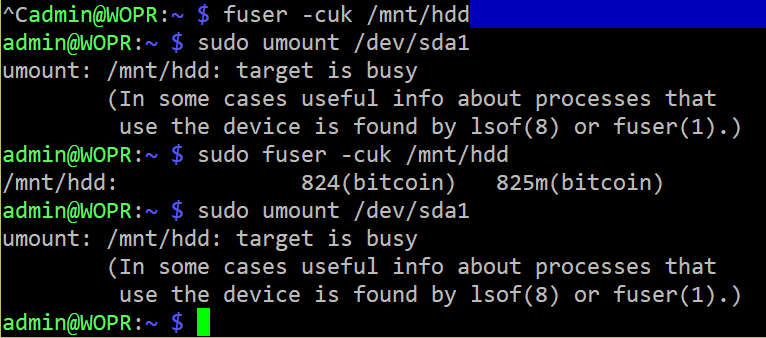
fuser -cuk /mnt/hdd
to kill all processess using the HDD and run again these:
sudo umount /dev/sda1
sudo fsck -y /dev/sda1
openoms
on 1 Apr 2019
Jos3xTv
on 1 Apr 2019
login as: admin
[email protected]'s password:
Linux WOPR 4.14.98-v7+ #1200 SMP Tue Feb 12 20:27:48 GMT 2019 armv7lThe programs included with the Debian GNU/Linux system are free software;
the exact distribution terms for each program are described in the
individual files in /usr/share/doc/*/copyright.Debian GNU/Linux comes with ABSOLUTELY NO WARRANTY, to the extent
permitted by applicable law.
Last login: Mon Apr 1 20:36:17 2019 from 192.168.1.198
Starting the main menu ...
loading config data
checking bitcoind - please wait ..
can take longer if device was off or first timebitcoin error: error code: -28
error message:
Verifying blocks...
RaspiBlitz 192.168.1.187 - Welcome───────────────────────────────────────────────────────────────────┐
│ Waiting for bitcoind to get ready. │
│ error code: -28 error message: Verifying blocks... │
│ CTRL+C => terminal │
│ │
└────────────────────────────────────────────────────────────────admin@WOPR:~ $ /home/admin/XXdebugLogs.sh
* RASPIBLITZ LOGS *
blitzversion: 1.1
chainnetwork: bitcoin / main
20:53:02 up 5 min, 2 users, load average: 2.85, 1.48, 0.62* CHAINNETWORK SYSTEMD STATUS *
â— bitcoind.service - Bitcoin daemon
Loaded: loaded (/etc/systemd/system/bitcoind.service; enabled; vendor preset: enabled)
Active: active (running) since Mon 2019-04-01 20:40:18 BST; 12min ago
Process: 753 ExecStart=/usr/local/bin/bitcoind -daemon -conf=/home/bitcoin/.bitcoin/bitcoin.conf -pid=/home/bitcoin/.bitcoin/bitcoind.pid (code=exited, status=0/SUCCESS)
Main PID: 772 (bitcoind)
CGroup: /system.slice/bitcoind.service
└─772 /usr/local/bin/bitcoind -daemon -conf=/home/bitcoin/.bitcoin/bitcoin.conf…idApr 01 20:40:18 WOPR systemd[1]: bitcoind.service: Failed to read PID from file /home/b…ument
Apr 01 20:40:18 WOPR systemd[1]: Started Bitcoin daemon.
Hint: Some lines were ellipsized, use -l to show in full.* LAST 5 ERROR LOGS *
-- Logs begin at Mon 2019-04-01 20:17:01 BST, end at Mon 2019-04-01 20:53:02 BST. --
Apr 01 20:40:17 WOPR systemd[1]: Starting Bitcoin daemon...
Apr 01 20:40:18 WOPR systemd[1]: bitcoind.service: Failed to read PID from file /home/bitcoin/.bitcoin/bitcoind.pid: Invalid argument
Apr 01 20:40:18 WOPR systemd[1]: Started Bitcoin daemon.* LAST 20 INFO LOGS *
2019-04-01T19:52:37Z mapBlockIndex.size() = 569784
2019-04-01T19:52:37Z nBestHeight = 569761
2019-04-01T19:52:37Z torcontrol thread start
2019-04-01T19:52:37Z Bound to [::]:8333
2019-04-01T19:52:37Z Bound to 0.0.0.0:8333
2019-04-01T19:52:37Z init message: Loading P2P addresses...
2019-04-01T19:52:37Z Leaving InitialBlockDownload (latching to false)
2019-04-01T19:52:38Z Loaded 58196 addresses from peers.dat 1324ms
2019-04-01T19:52:38Z init message: Loading banlist...
2019-04-01T19:52:38Z init message: Starting network threads...
2019-04-01T19:52:38Z net thread start
2019-04-01T19:52:38Z dnsseed thread start
2019-04-01T19:52:38Z addcon thread start
2019-04-01T19:52:38Z msghand thread start
2019-04-01T19:52:38Z opencon thread start
2019-04-01T19:52:38Z init message: Done loading
2019-04-01T19:52:39Z New outbound peer connected: version: 70015, blocks=569774, peer=0
2019-04-01T19:52:49Z Loading addresses from DNS seeds (could take a while)
2019-04-01T19:52:50Z 241 addresses found from DNS seeds
2019-04-01T19:52:50Z dnsseed thread exit* LND SYSTEMD STATUS *
â— lnd.service - LND Lightning Daemon
Loaded: loaded (/etc/systemd/system/lnd.service; enabled; vendor preset: enabled)
Active: active (running) since Mon 2019-04-01 20:40:18 BST; 12min ago
Main PID: 773 (lnd)
CGroup: /system.slice/lnd.service
└─773 /usr/local/bin/lnd --externalip=88.6.110.175Apr 01 20:40:18 WOPR systemd[1]: Started LND Lightning Daemon.
* LAST 5 LND ERROR LOGS *
-- Logs begin at Mon 2019-04-01 20:17:01 BST, end at Mon 2019-04-01 20:53:02 BST. --
Apr 01 20:40:18 WOPR systemd[1]: Started LND Lightning Daemon.* LAST 20 LND INFO LOGS *
2019-04-01 20:18:11.667 [INF] LTND: Version: 0.5.2-beta commit=v0.5.2-beta, build=production, logging=default
2019-04-01 20:18:11.667 [INF] LTND: Active chain: Bitcoin (network=mainnet)
2019-04-01 20:18:11.772 [INF] CHDB: Checking for schema update: latest_version=7, db_version=7
2019-04-01 20:18:11.877 [INF] RPCS: password RPC server listening on [::]:10009
2019-04-01 20:18:11.877 [INF] RPCS: password gRPC proxy started at [::]:8080
2019-04-01 20:18:11.878 [INF] LTND: Waiting for wallet encryption password. Uselncli createto create a wallet,lncli unlockto unlock an existing wallet, orlncli changepasswordto change the password of an existing wallet and unlock it.
2019-04-01 20:39:46.656 [INF] LTND: Version: 0.5.2-beta commit=v0.5.2-beta, build=production, logging=default
2019-04-01 20:39:46.656 [INF] LTND: Active chain: Bitcoin (network=mainnet)
2019-04-01 20:39:46.688 [INF] CHDB: Checking for schema update: latest_version=7, db_version=7
2019-04-01 20:39:46.706 [INF] RPCS: password gRPC proxy started at [::]:8080
2019-04-01 20:39:46.706 [INF] RPCS: password RPC server listening on [::]:10009
2019-04-01 20:39:46.715 [INF] LTND: Waiting for wallet encryption password. Uselncli createto create a wallet,lncli unlockto unlock an existing wallet, orlncli changepasswordto change the password of an existing wallet and unlock it.
2019-04-01 20:43:15.496 [INF] LNWL: Opened wallet
2019-04-01 20:43:16.488 [INF] LTND: Primary chain is set to: bitcoin
2019-04-01 20:43:17.062 [INF] LTND: Shutdown complete2019-04-01 20:40:19.600 [INF] LTND: Version: 0.5.2-beta commit=v0.5.2-beta, build=production, logging=default
2019-04-01 20:40:19.601 [INF] LTND: Active chain: Bitcoin (network=mainnet)
2019-04-01 20:40:19.745 [INF] CHDB: Checking for schema update: latest_version=7, db_version=7
2019-04-01 20:40:19.806 [INF] RPCS: password gRPC proxy started at [::]:8080
2019-04-01 20:40:19.806 [INF] RPCS: password RPC server listening on [::]:10009
2019-04-01 20:40:19.806 [INF] LTND: Waiting for wallet encryption password. Uselncli createto create a wallet,lncli unlockto unlock an existing wallet, orlncli changepasswordto change the password of an existing wallet and unlock it.
- RTL is OFF by config
admin@WOPR:~ $
Jos3xTv
on 1 Apr 2019
omg, these funny characters again!
can you try:
sudo umount -l /dev/sda1
or
sudo umount -f /dev/sda1
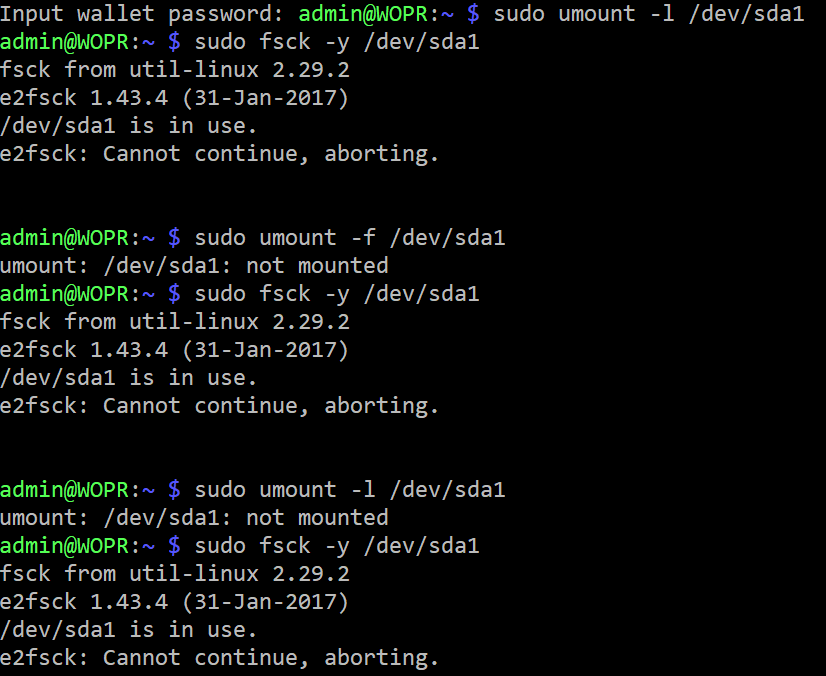
Jos3xTv
on 2 Apr 2019
I don`t see an easy fix here. Your system is corrupted and the easiest way would be to start over.
You have your LND directory backed up, right?
In that case you can format the disk on your Windows machine (untick the quick format option - and could do a surface test as well)
Once that cleared start over with the whole setup with a fresh SDcard.
When everything up and running again you can attempt to restore your old LND data as described here:
https://github.com/rootzoll/raspiblitz/blob/master/FAQ.md#1-recover-lnd-data
openoms
on 2 Apr 2019
Thank you all.
I must say i'm a bit tired of this. This would be the third time i do that @openoms
Anyway. I'll try again in these days. I'll feedback every step.
Jos3xTv
on 2 Apr 2019
Sure @Jos3xTv, if we would sell these it would have been an RMA for refund a long time ago 😉.
I am kind of sorry we can't do that 😔.
openoms
on 2 Apr 2019
@Jos3xTv it's not worth putting more time in with only software changes. Time to try a different hard drive, case, and power supply. New or not, your system is acting strange and it's looking more likely some kind of hardware problem.
fluidvoice
on 3 Apr 2019
First rock on the way.
With a new fresh SD, HDD and power supply.

Jos3xTv
on 4 Apr 2019
Finally, after these lines
sudo systemctl stop bitcoind.service
sudo -u bitcoin /usr/local/bin/bitcoind -daemon -conf=/home/bitcoin/.bitcoin/bitcoin.conf
sudo tail -f /mnt/hdd/bitcoin/debug.log
I get to this.
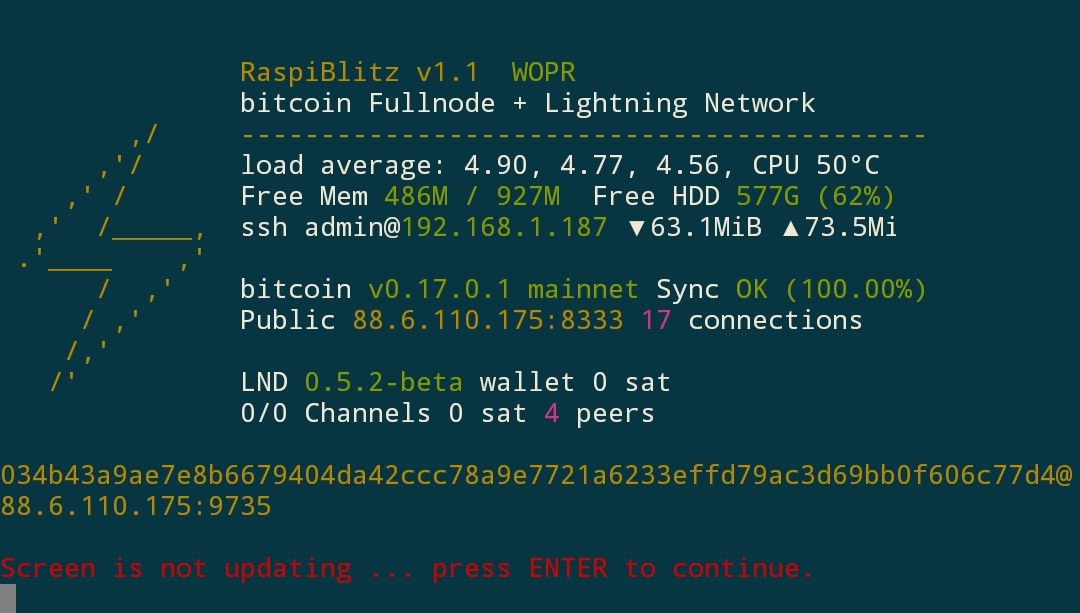
Time to restore my LND backup.
Jos3xTv
on 6 Apr 2019
IT'S ALIVE!!!!

But this is not finish yet. I have problems to connect to a peer.
Connect to A Lightning Node
COMMAND LINE:
lncli --chain=bitcoin --network=mainnet connect 022c27b7140c6a5a3d0e6dc0db3d92103e0bfad98809b461a8136e07295688f999@61.69.57.82:9735RESULT (might have to wait for timeout):
[lncli] rpc error: code = Unavailable desc = all SubConns are in TransientFailure, latest connection error: connection error: desc = "transport: authentication handshake failed: x509: certificate signed by unknown authority (possibly because of \"x509: ECDSA verification failure\" while trying to verify candidate authority certificate \"RaspiBlitz\")"!!!!!!!!!!!!!!!!!!!!!!!!!!!!!!
FAIL
!!!!!!!!!!!!!!!!!!!!!!!!!!!!!!
Its possible that LND daemon is not running, not configured correct or not connected to the lncli.Press ENTER to return to main menu.
Certificate problems??
EDIT:
After 8 hours online, node status screen shows...
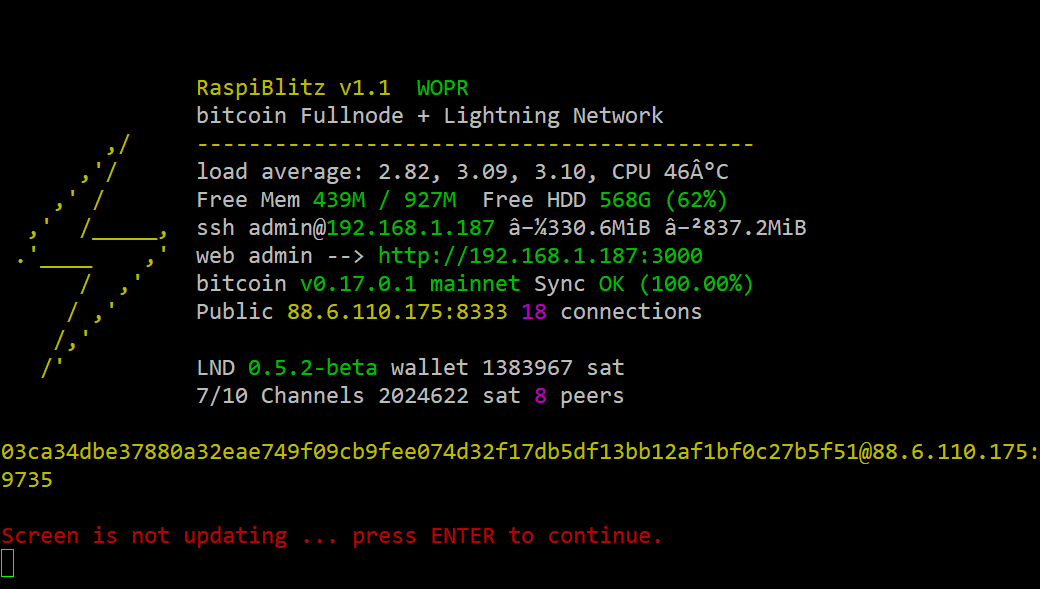
But authentication handshake failure goes on. I can't open channels, connect to a peer either, see my channels list or balance...
I checked out my node from web, but it seems no connection. RTL doesn't work either.
(https://1ml.com/node/03ca34dbe37880a32eae749f09cb9fee074d32f17db5df13bb12af1bf0c27b5f51)
I've been looking for an old issue about it, and i found this one.
https://github.com/rootzoll/raspiblitz/issues/251#issuecomment-452835796
Could work? I'm a little scary prompting commands i don't master.
Jos3xTv
on 7 Apr 2019
Try to reset your macaroons and tls.cert from the EXPORT menu.
openoms
on 7 Apr 2019
Perfect @openoms. I tipped you for a beer. @fluidvoice i'd love to invite you a beer too, but no tippin account. Send me an invoice and i'll hit it. Thank you guys.
I close totally the issue. I've learned a lot these 15 days with my node out. I'll look forward to improve my privacy too.
Jos3xTv
on 7 Apr 2019
i'd love to invite you a beer too, but no tippin account.
I added a link. Not sure exactly how it works though. Minimum channel to open with them is 0.01 bitcoin. Um, no. Still I wonder if tips somehow get routed to my address? Need to read their FAQ I gues ;-)
fluidvoice
on 10 Apr 2019
For what it's worth, I had the same issue/error. Some progress was made when I took the usb drive and plugged it into my laptop, then, from the laptop, ran sudo fsck /dev/sdb1(where sdb1 is replaced for your system). Then I plugged the usb hdd back into the raspiblitz. That at least allowed my raspiblitz to boot back up again.
Additionally, for the devs, this issue appeared for me only after I tried toggling some of the services (which caused a reboot). Not sure exactly what the trigger was though :-/
 philbertw4
on 13 Apr 2019
philbertw4
on 13 Apr 2019
i've just tipped you @fluidvoice
Check it out!
Jos3xTv
on 15 Apr 2019
i've just tipped you @fluidvoice
Check it out!
Got it. Thanks. My first tip ever ;-) I gotta figure out how to attach my Eclair Lightning (on Android) wallet to that Tippin.me account ... or if they require some other wallet to be used.
fluidvoice
on 15 Apr 2019
@fluidvoice tippin.me is a custodial service (for now). You just paste them an invoice from your RaspiBlitz (RTL, Zeus, Zap or any other connected lnd interface) or your Eclair (that is a separate stand-alone Lightning node) and if you have a channel open and sufficient incoming liquidity the satoshis will appear in your own wallet where the invoice was generated.
openoms
on 15 Apr 2019
Not booting raspiblitz. Asking PWD for maintenance #442
And there is no option to type any command. Just asking for
Give root password for maintenance
(or press Control-D to continue)
And when I type Control-D shows
sulogin: cannot read /dev/tty1: Operation not permitted.I had exactly the same problem!
It started when I powered down my pi (normal via raspiblitz menu), waited till lights stopped blinking and HDD light was off. When I powered the pi up again I had exactly the same problem. Could also not make a connection via ssh so hooked up a keyboard to the pi so I could log in as root (on lcd)
Then run the following commands:sudo umount /dev/sda2 ( corresponds to /mnt/hdd on my external HDD)
sudo fsck -y /dev/sda2On the lcd screen there is some info about errors with inodes and that it is fixed now.
(Don't know exactly what is was saying anymore and did not write it down, sorry just a noob here...)
Reboot the pi and all seems to work again, so in my case it was some corruption on de external HDD?Too bad it was not this easy for you and since the issue is still open I guess it's not solved. But because I started with exactly the same error thought I share my experience, sorry I could not help you more...
Hope you will get it fixed though!!
This solution remediated my issue encountering this error- except my external HDD is assigned to sda1. Thanks. Evidently, this can arise if the RaspBlitz is restarted without updating to the most recent release- keep your nodes updated to avoid this error, folks.
sudo umount /dev/sda1( corresponds to /mnt/hdd on my external HDD)sudo fsck -y /dev/sda1
If for whatever you reason you encounter any errors after running the second command (ie "unable to read itable block...") restart the RaspiBlitz and run the following command again sudo fsck -y /dev/sda1.
In the worst case scenario, you may need to delete the old blockchain data and reboot- I highly recommend downloading an updated copy of the blockchain from your local network (as every good Bitcoiner do:) and run the following syntax from the host computer containing the copy of the updated blockchain:
‘sudo rsync -avhW - -progress /media/alexanderjsingleton/SEAGATE/.#bitcoin
/chainstate media/alexanderjsingleton/SEAGATE/.bitcoin/blocks [email protected]:/mnt/hdd/bitcoin’
Hope that helps- thank you!
 alexanderjsingleton
on 21 Feb 2020
alexanderjsingleton
on 21 Feb 2020
Related issues
 pkclyoni
·
3Comments
fluidvoice
·
3Comments
pkclyoni
·
3Comments
fluidvoice
·
3Comments
 rootzoll
·
3Comments
rootzoll
·
4Comments
rootzoll
·
3Comments
rootzoll
·
4Comments
 Himbeergeld
·
3Comments
Himbeergeld
·
3Comments
Most helpful comment
Perfect @openoms. I tipped you for a beer. @fluidvoice i'd love to invite you a beer too, but no tippin account. Send me an invoice and i'll hit it. Thank you guys.
I close totally the issue. I've learned a lot these 15 days with my node out. I'll look forward to improve my privacy too.