Raspiblitz: i2c /dev entries driver
Hello all,
Hope someone can help me.
I tried to update my Raspiblitz from 1.3 to 1.4.
Now I got following Issue with the new image, while booting.
_i2c dev entries driver_
System stuck at this point.
I tried different sd cards, tried different images, downloads, nothing helped.
Any ideas how to solve it?
Also tried to google, but I couldn't find a solution, which fits for me. (I'm also not that familiar with linux, especially with kernel problems.)
Thanks in advance
 Lockejoe
All 50 comments
The "i2c dev entries driver" is your last message on the LCD, correct?
Can you still ssh in? There are some reports that the LCD is just freezing on boot, but the rest works. Also do you have the ShimFan? Ist it also not booting if you remove the shimfan?
 rootzoll
on 29 Feb 2020
rootzoll
on 29 Feb 2020
Hello,
Thanks for your answer.
Yes, this is my last message, but I do not have a LCD, I also do not have a ShimFan.
I only use with ssh.
After the update it wasn‘t possible to connect via ssh, neither with wifi nor with ethernet.
So I cecked with a „normal“ monitor to find out the root cause.
And it always stuck i2c /dev entries driver, as last message.
Lockejoe
on 1 Mar 2020
@Lockejoe simply need to unplug the monitor from the HDMI and boot without it. Login via ssh and follow the guide.
During the initial setup using the HDMI freezes the boot process. Later it will be possible to use. Look for HDMI in the issues to get the script helping you to change to that from the default GPIO LCD output.
 openoms
on 1 Mar 2020
openoms
on 1 Mar 2020
Hello @openoms
Thanks for your answer. Ok maybe my first explanation was not that good.
What I did:
- Updated my sd card (tried with different sd cards)
- started my rasperry pi (plugged in) - there was no display connected, only my hdd and ethernet (tried also wifi, because this was my privious setup)
- waited for ca. 10-15 min (and also trying with known ips to ssh...)
- checked my network to identify correct ip (if the old ip is still correct) - wondering, that I couldn‘t find an active one for the raspberry pi
- connected a monitor to identify the root cause why couldn‘t ssh the pi
Hope this helps
Lockejoe
on 2 Mar 2020
Hey @Lockejoe I just had this issue after powering off for a little while and turning back on. Got the same "i2c /dev entries driver" message at the end. I have my hdd in an external enclosure which I forgot to power off. Once I powered both off and back on (pi first), I immediately got to the main screen. I also didn't have ssh access while troubleshooting. Hope this helps
 ZukoTFL
on 6 Mar 2020
ZukoTFL
on 6 Mar 2020
Hello @ZukoTFL, Thanks for this hint, but unfortunately I do not have an external enclosure. Energy by plugging in USB (standard WD elements 1TB HDD) .
Lockejoe
on 13 Mar 2020
@Lockejoe I just had this issue while trying to set up a new node. Was starting the node with the HDMI plugged and using a fan, screen would hang up at "i2c /dev entries driver". I tried a few things similar to you, but hadn't tried SSH to view the node status. I figured what I was getting via HDMI was accurate, but it wasn't. I was able SSH into my node and continue setting up the node. I haven't tried to reboot w/o the HDMI to see it that resolves the display issue but currently my Pi seems to be working correctly.
Doesn't help much since you can't SSH in through, sorry. I would see if you can SSH or display the node in a different way (other than HDMI), to see if the Pi is actually getting hung up or if its just a display issue. You might also try downgrading the image back to v1.3 if that was working properly before.
Good Luck!
 csc0711
on 14 Mar 2020
csc0711
on 14 Mar 2020
Hello @csc0711 , Hello @rootzoll,
As a hint:
Today I did a downgrade and what shall I say, it's working like a sharme.
No issues with v1.3 for me.
Regards
Lockejoe
Lockejoe
on 15 Mar 2020
@Lockejoe interesting that a downgrade fixed the LCD problem. I will check again what changed from the last version on the LCD driver side.
rootzoll
on 16 Mar 2020
For the v1.5 RC1 I will set back the LCD driver to the commit of the v1.3 version. The only thing that changed since then is this - the version of the xserver-xorg-input-evdev
-- sudo dpkg -i -B ./xserver-xorg-input-evdev_1%3a2.10.5-1_armhf.deb 2> error_output.txt
++ sudo dpkg -i -B ./xserver-xorg-input-evdev_1%3a2.10.6-1+b1_armhf.deb 2> error_output.txt
@Lockejoe once the v1.5 RC1 is out - it would be great if you can test if this fixes the bug for you - thx
rootzoll
on 18 Mar 2020
Tested: the old LCD driver works also with the new LCD-with-integrated Fan.
rootzoll
on 20 Mar 2020
hi guys, same thing is happening for me.
my setup:
- no screen, just network access
- downloaded image around march 30
was working until a restart recently, wasn't showing up on network. everything looked fine (lights etc) so I plugged in a screen. boot hangs at i2c /dev entries driver
I've tried booting without the HDMI then plugging it in 10 min later (same result). Have also removed case fan and external HDD to isolate.
Any advice for how to resolve this?
Cheers,
Tom
 raspito
on 15 Jun 2020
raspito
on 15 Jun 2020
This error is a nasty one ... still not sure why this is happening to some people. Can you try to build an raspiblitz sd card yourself from a fresh raspnian image and see at which point you run in that error? See how to build: https://github.com/rootzoll/raspiblitz/blob/master/README.md#build-the-sd-card-image
rootzoll
on 15 Jun 2020
Hello @raspito,
Did you try with raspiblitz 1.5 already?
image from march should be an older version.
However, This issue only occurs in 1.4 for me.
Maybe you can solve this with 1.5 too.
Locke
Lockejoe
on 15 Jun 2020
Hi guys, will get back to you on this. Now having some hard disk errors, so will resolve that, re-flash to 1.5.1 then test.
raspito
on 17 Jun 2020
Hello guys, I am not sure if this bug is still being looked at, but I am also encountering the same issue with version 1.6.1; unplugging the SSD and/or HDMI cable makes no difference. Please advice if there is a workaround this. Thanks.
 chinedu0507
on 11 Nov 2020
chinedu0507
on 11 Nov 2020
@chinedu0507 whats your setup? We dont have a quick solution here - but this seems related to the LCD drivers. For v1.7 we will try to update to 64bit RasbianOS with updated LCD driver and maybe even see if we remove LCD drivers completly of no LCD connected. So I reopened this issue as a reminder to check on - but it will take some weeks before we will get to this.
rootzoll
on 11 Nov 2020
So my setup is as follows:
Rpi 4 (4GB RAM) with a
500GB NAND SSD
I do not have an LCD, but I figured that I could ssh into the Pi after getting my IP address. I do have a Pi case that has dual fans (don't think this is important). But that's all.
@chinedu0507 whats your setup? We dont have a quick solution here - but this seems related to the LCD drivers. For v1.7 we will try to update to 64bit RasbianOS with updated LCD driver and maybe even see if we remove LCD drivers completly of no LCD connected. So I reopened this issue as a reminder to check on - but it will take some weeks before we will get to this.
chinedu0507
on 12 Nov 2020
Same issue with my brand new Raspberry PI. Flashed with raspiblitz-v1.6.1-2020-10-20.img.gz
Using SABRENT SSD case and Samsung 1TB
Had MULTIPLE issues with the hard drive, and mutliple hangs at i2c /dev entries driver
Reflashing to same version didn't work
Troubleshoot the drive, which was not initializing -- it looks fine from other machines and I did badblock testing, fsck testing, smartctl etc all normal.
 strowheim
on 13 Nov 2020
strowheim
on 13 Nov 2020
Same issue. Raspberry Pi v4. Tried with v1.6.1, v1.6 and v1.4
Started happening after a power cut and a subsequent upgrade from v1.4 to v1.6.1
 sven3550
on 25 Nov 2020
sven3550
on 25 Nov 2020
Same issue. Raspberry Piv4 also. Is there a way to login to RPi4?
 takiseso
on 29 Nov 2020
takiseso
on 29 Nov 2020
@strowheim @sven3550 @takiseso please make sure you are using a compatible and tested USB-disk adapter with the RPi4. The best is to use model recommended in the shopping list or an X825 adapter board.
openoms
on 29 Nov 2020
@strowheim @sven3550 @takiseso please make sure you are using a compatible and tested USB-disk adapter with the RPi4. The best is to use model recommended in the shopping list or an X825 adapter board.
My setup was working with the same HDD (WD, WDBU6Y0020BBK-0B) since v1.1.
I run into the same problem even with no HDD connected
sven3550
on 30 Nov 2020
Same issue here on a new RPi4. I dont have a LCD.
Writing the raspiblitz image (raspiblitz-v1.6.1-2020-10-20) to SD card (on MacOS) with balenaEtcher resulted in "unable to mount fs on unknown-block(179 2)". Used two different and new SD cards to avoid SD card issue.
Writing the raspiblitz image with PI image results in "i2c dev entries driver"
I dont plug in the HDMI until a few minutes after starting the raspberry.
Hope this will be fixed in the next version :-/.
 ak1008
on 2 Dec 2020
ak1008
on 2 Dec 2020
v1.6.2 is out
openoms
on 2 Dec 2020
same "i2c dev entries driver" issue with 1.6.2
ak1008
on 2 Dec 2020
same "i2c dev entries driver" issue with 1.6.2
Same for me still
sven3550
on 2 Dec 2020
Can you try to boot without the disk attached and try to plug the disk in the USB2 (black) port?
This makes it slower, but tells if the problem is with the USB disk adapter.
openoms
on 3 Dec 2020
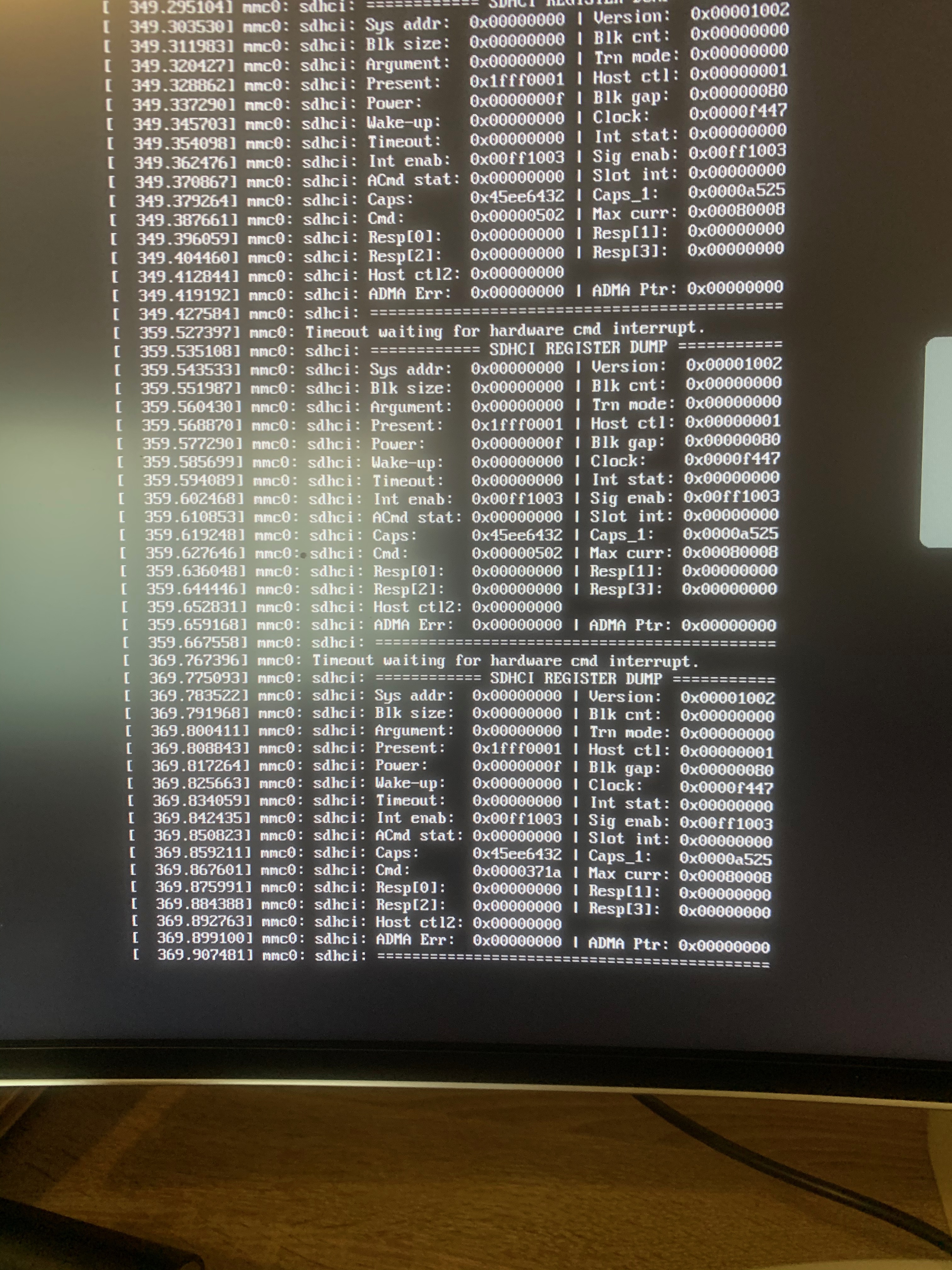
Booting via USB results in loop of the following "Timeout waiting for hardware cmd interrupt". "i2c dev entries driver" seems resolved, but not geeting an IP address and hence cannot login via SSH. Any idea?
ak1008
on 3 Dec 2020
ok, got this to work by just inserting the SC hard when timeout waiting shows up. Now getting to the login screen, but the admin/raspiblitz credentials dont work, neither does pi/raspberry. any ideas? :( Also ssh doesnt work and I dont get an IP address from the router.
ak1008
on 3 Dec 2020
First of all always try with a freshly flashed image in a new environment.
Also disconnect HDMI for boot and then ssh in, can activate the HDMI later with the shortcut:
hdmi
openoms
on 3 Dec 2020
what you mean buy
booting via USB
?
You are booting from the SDcard with disk attached to a USB3 (blue -default) port, USB2 to test or no disk attached at all.
openoms
on 3 Dec 2020
sorry, I totally have messed this up. I thought you wanted me to flash USB key and boot from USB drive.
So please forget about this one.
What I have done now is without any disk attached to USB drive:
1) With HDMI attached: Booted raspiblitz image from SD card slot without any disk attached and it results in "i2c dev entries driver" issue as before.
2) Without HDMI: as I cannot see anything, I'm relying that my router shows new device so I can SSH into device. Doesnt work, no new IP is assigned (and it's not he LAN cabel as this work fine with other device).
ak1008
on 3 Dec 2020
When you boot the same device it usually gets the same IP even with a new SDcard.
You might be able to ssh in from another device like Termux on a phone or MobaxTerm on windows.
The hostname which should appear on your router is raspberrypi.
openoms
on 3 Dec 2020
No IP is given a I cannot ping raspberrpy nor raspberrypi.local. Stuck on "i2c dev entries driver" i as said before.
ak1008
on 3 Dec 2020
You can try another SDcard or if that fails test a clean RaspberryOS image to make sure it is not a problem with the board itself.
openoms
on 5 Dec 2020
I'm having the same issue as ak1008 and tested like you suggested. I mounted a raspberryOS image into my SDcard and it booted up correctly. When I tested again a 1.6.2 image, it got stucked on "i2c dev entries driver" as before.
 Sknej
on 6 Dec 2020
Sknej
on 6 Dec 2020
After reading this: https://openest.io/en/2020/01/18/activate-raspberry-pi-4-i2c-bus/
I presume the issue can be solved by disabling the i2c device driver altogether.
The display driver activates it (unnecessarily imo): https://github.com/goodtft/LCD-show/blob/d9b3378f9360174157ee0217df5104f0d0514f54/LCD35-show#L20
(this is run when building the sdcard image)
Test solution:
Put the fresh v1.6.2 SDcard image in the desktop computer and edit:
the config.txt on the boot partition (the only one windows can read iirc) and comment out the line: dtparam=i2c_arm=on so it shall look like this with a # in front:
#dtparam=i2c_arm=on
Save and boot the RPi with the edited image. Hope this solves the problem.
openoms
on 6 Dec 2020
Same issue on 1.6.1, started happening after a power loss.
Don't have LCD screen, don't have HDMI connected, fan is disconnected. Only UGREEN usb 3.0 with 1TB evo 860 SSD inside. Had this setup working for a while since 1.3
Any idea how to recover my funds in the channels now? Got over 50 channels open, around 0.5 BTC. Obviously I wasn't ready for this and don't have lnd-rescue file. I've got LND seed written and channel.backup on my dropbox. Is it even possible to somehow boot and make migration files after "i2c dev entries driver" death screen?
 Achillian
on 7 Dec 2020
Achillian
on 7 Dec 2020
@Achillian how do you know it is this issue without any display attached?
Changing the SDcard would be the first step, at least try to reflash and use the current v1.6.2 image. You have got all necessary for an emergency (force close) restore, but the disk has all the channel states. It can be read by any linux including your Rpi and Tails/Ubuntu booted from USB on your desktop.
openoms
on 7 Dec 2020
@openoms after a few days of my node not responding to SSH and reboots, I ordered micro HDMI cable and connected it to a monitor to see what's going on.
Thing is I don't want to force close all the channels, I spent months building liquidity to be able to accept payments for my online store, and now if I use channel.backup file with the new SDcard image I will lose all the channels.
I am going to connect the disk to a ubuntu, what file am I looking for to restore my channels? Thanks.
Achillian
on 7 Dec 2020
@Achillian the lnd-rescue file only contains the lnd directory from.the disk. You can just copy that in place of a working setup to restore your old wallet.
There are:
wallet.db and channel.db containing the channel states, but just copy the whole directory.
You must make sure that you don't run an outdated copy of the channel.db.
openoms
on 7 Dec 2020
@openoms so I just set up a fresh 1.6.2 install with a new LND wallet/seed phrase and then replace lnd folder with my old lnd folder?
Achillian
on 7 Dec 2020
@Achillian yes, exactly. Same happens when you use the lnd-rescue...tar.gz file.
openoms
on 7 Dec 2020
After reading this: https://openest.io/en/2020/01/18/activate-raspberry-pi-4-i2c-bus/
I presume the issue can be solved by disabling the i2c device driver altogether.The display driver activates it (unnecessarily imo): https://github.com/goodtft/LCD-show/blob/d9b3378f9360174157ee0217df5104f0d0514f54/LCD35-show#L20
(this is run when building the sdcard image)Test solution:
Put the fresh v1.6.2 SDcard image in the desktop computer and edit:
the config.txt on the boot partition (the only one windows can read iirc) and comment out the line:dtparam=i2c_arm=onso it shall look like this with a#in front:
#dtparam=i2c_arm=onSave and boot the RPi with the edited image. Hope this solves the problem.
Even doing that, the screen stills freezes at the i2c /dev entries driver.
Sknej
on 7 Dec 2020
@Sknej that is strange.
You could try building the raspiblitz sd-card manually or could test this work-in-progress image : https://github.com/rootzoll/raspiblitz/pull/1833#issuecomment-737295779
built on a different base (the 64bit RaspberryOS) and cleaner config.txt settings.
openoms
on 8 Dec 2020
I was able to fix the issue and recover all the channels intact.
What I've done:
- Made a new SDcard image with 1.6.2
- Before inserting it into Rpi, opened
config.txtand commented out this line "#dtparam=i2c_arm=on" as suggested by @openoms to disable i2c_arm - Connected my SSD which was untouched (with all the data on it)
- Started the setup process normally, selected "Setup Bitcoin and Lightning (DEFAULT)"
- It asked me to make new Password A
After that it compiled everything on SD card and just started syncing from the last block.
All the channels and all the funds are there as if nothing even happened.
Hopefully this helps someone else.
Achillian
on 8 Dec 2020
I am having the same issue as @Sknej. My Pi refuses to boot even when using a freshly made SDcard with 1.6.2 with #dtparam=i2c_arm=on" commented out in config.txt prior to first boot.
I was able to get the PI to boot again by using the RaspberryOS 64 bit build linked by @openoms but now I can't get joinmarket to work. Everything was working fine (Electrum personal server, joinmarket, etc) until I had a power outage and then the pi would refuse to boot past the i2c error.
If I attempt to run the joinimarket scripts directly I get the following
(jmvenv) joinmarket@raspberrypi:~/joinmarket-clientserver/scripts $ python wallet-tool.py generate
Traceback (most recent call last):
  File "wallet-tool.py", line 2, in <module>
    from jmbase import jmprint
ModuleNotFoundError: No module named 'jmbase'`
When doing an upgrade from the joininbox GUI it eventually errors out with :
Collecting argon2_cffi
  Using cached argon2-cffi-20.1.0.tar.gz (1.8 MB)
  Installing build dependencies ... done
  Getting requirements to build wheel ... done
    Preparing wheel metadata ... error
    ERROR: Command errored out with exit status 1:
     command: /home/joinmarket/joinmarket-clientserver/jmvenv/bin/python3 /home/joinmarket/joinmarket-clientserver/jmvenv/lib/python3.7/site-packages/pip/_vendor/pep517/_in_process.py prepare_metadata_for_build_wheel /tmp/tmp8srhwdxn
         cwd: /tmp/pip-install-c_eheh2h/argon2-cffi_85e11ef64f8849e0b13b4eae8365a6b3
    Complete output (34 lines):
    Traceback (most recent call last):
      File "/home/joinmarket/joinmarket-clientserver/jmvenv/lib/python3.7/site-packages/pip/_vendor/pep517/_in_process.py", line 280, in <module>
        main()
      File "/home/joinmarket/joinmarket-clientserver/jmvenv/lib/python3.7/site-packages/pip/_vendor/pep517/_in_process.py", line 263, in main
        json_out['return_val'] = hook(**hook_input['kwargs'])
      File "/home/joinmarket/joinmarket-clientserver/jmvenv/lib/python3.7/site-packages/pip/_vendor/pep517/_in_process.py", line 133, in prepare_metadata_for_build_wheel
        return hook(metadata_directory, config_settings)
      File "/usr/lib/python3/dist-packages/setuptools/build_meta.py", line 140, in prepare_metadata_for_build_wheel
        self.run_setup()
      File "/usr/lib/python3/dist-packages/setuptools/build_meta.py", line 126, in run_setup
        exec(compile(code, __file__, 'exec'), locals())
      File "setup.py", line 387, in <module>
        **keywords_with_side_effects(sys.argv)
      File "/usr/lib/python3/dist-packages/setuptools/__init__.py", line 145, in setup
        return distutils.core.setup(**attrs)
      File "/usr/lib/python3.7/distutils/core.py", line 108, in setup
        _setup_distribution = dist = klass(attrs)
      File "/usr/lib/python3/dist-packages/setuptools/dist.py", line 447, in __init__
        k: v for k, v in attrs.items()
      File "/usr/lib/python3.7/distutils/dist.py", line 292, in __init__
        self.finalize_options()
      File "/usr/lib/python3/dist-packages/setuptools/dist.py", line 739, in finalize_options
        ep.load()(self, ep.name, value)
      File "/tmp/pip-build-env-xjx22cwu/overlay/lib/python3.7/site-packages/cffi/setuptools_ext.py", line 219, in cffi_modules
        add_cffi_module(dist, cffi_module)
      File "/tmp/pip-build-env-xjx22cwu/overlay/lib/python3.7/site-packages/cffi/setuptools_ext.py", line 49, in add_cffi_module
        execfile(build_file_name, mod_vars)
      File "/tmp/pip-build-env-xjx22cwu/overlay/lib/python3.7/site-packages/cffi/setuptools_ext.py", line 25, in execfile
        exec(code, glob, glob)
      File "src/argon2/_ffi_build.py", line 28, in <module>
        ffi = FFI()
      File "/tmp/pip-build-env-xjx22cwu/overlay/lib/python3.7/site-packages/cffi/api.py", line 56, in __init__
        backend.__version__, backend.__file__))
    Exception: Version mismatch: this is the 'cffi' package version 1.14.4, located in '/tmp/pip-build-env-xjx22cwu/overlay/lib/python3.7/site-packages/cffi/api.py'.  When we import the top-level '_cffi_backend' extension module, we get version 1.12.2, located in '/usr/lib/python3/dist-packages/_cffi_backend.cpython-37m-aarch64-linux-gnu.so'.  The two versions should be equal; check your installation.
    ----------------------------------------
ERROR: Command errored out with exit status 1: /home/joinmarket/joinmarket-clientserver/jmvenv/bin/python3 /home/joinmarket/joinmarket-clientserver/jmvenv/lib/python3.7/site-packages/pip/_vendor/pep517/_in_process.py prepare_metadata_for_build_wheel /tmp/tmp8srhwdxn Check the logs for full command output.
Joinmarket was not installed. Exiting.
# installed JoinMarket v0.8.0
 Zestforlife808
on 8 Dec 2020
Zestforlife808
on 8 Dec 2020
@Zestforlife808 Something went wrong during the joinmarket installation, try to reinstall it from the SERVICES menu.
If it continues to be an problem open a new issue as this is not anymore related to the I2C error.
openoms
on 8 Dec 2020
We will give it a with a clean uped config.txt with the move to 64-bit for the v1.7 as @openoms described - lets keep fingers crossed.
rootzoll
on 15 Dec 2020
Related issues
openoms
·
4Comments
 frennkie
·
5Comments
frennkie
·
5Comments
 tiero
·
4Comments
tiero
·
4Comments
 shawnyeager
·
3Comments
rootzoll
·
4Comments
shawnyeager
·
3Comments
rootzoll
·
4Comments