Raspiblitz: [v1.2] LND error: unable to start server: edge not found
Left running over night, LND was stuck - apparently lnd.service was failing with:
**
lnd.service: Service hold-off time over, scheduling restart.
**
I wanted to record the debug info before attempting to reboot. Note: I don't remember what state it was in when I went to sleep so...
What was seen:
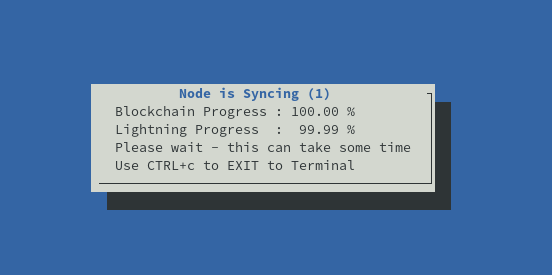
output of /var/log/syslog (showing lnd.service errors) as well as XXdebugLogs output is here: https://termbin.com/q1z4
The syslog had multiple of these:
May 1 07:27:17 thunda systemd[1]: lnd.service: Service hold-off time over, scheduling restart.
May 1 07:40:50 thunda systemd[1]: lnd.service: Service hold-off time over, scheduling restart.
May 1 07:50:13 thunda systemd[1]: lnd.service: Service hold-off time over, scheduling restart.
May 1 07:52:52 thunda systemd[1]: lnd.service: Service hold-off time over, scheduling restart.
May 1 08:18:51 thunda systemd[1]: lnd.service: Service hold-off time over, scheduling restart.
May 1 08:22:16 thunda systemd[1]: lnd.service: Service hold-off time over, scheduling restart.
May 1 09:18:15 thunda systemd[1]: lnd.service: Service hold-off time over, scheduling restart.
May 1 09:19:55 thunda systemd[1]: lnd.service: Service hold-off time over, scheduling restart.
May 1 15:40:35 thunda systemd[1]: lnd.service: Service hold-off time over, scheduling restart.
* LAST 30 LND INFO LOGS *
sudo tail -n 30 /mnt/hdd/lnd/logs/bitcoin/mainnet/lnd.log
2019-05-01 17:21:42.487 [INF] LTND: Waiting for chain backend to finish sync, start_height=574108
2019-05-01 17:21:42.748 [INF] LNWL: Started rescan from block 00000000000000000008348a1693fee3d34cfba741cfc3f4671a48ef21b137f3 (height 574096) for 140 addresses
2019-05-01 17:21:42.753 [INF] LNWL: Starting rescan from block 00000000000000000008348a1693fee3d34cfba741cfc3f4671a48ef21b137f3
2019-05-01 17:22:07.285 [INF] LNWL: Rescan finished at 574096 (00000000000000000008348a1693fee3d34cfba741cfc3f4671a48ef21b137f3)
2019-05-01 17:22:07.286 [INF] LNWL: Catching up block hashes to height 574096, this might take a while
2019-05-01 17:22:07.287 [INF] LNWL: Done catching up block hashes
2019-05-01 17:22:07.287 [INF] LNWL: Finished rescan for 140 addresses (synced to block 00000000000000000008348a1693fee3d34cfba741cfc3f4671a48ef21b137f3, height 574096)
2019-05-01 17:22:07.849 [INF] LTND: Chain backend is fully synced (end_height=574108)!
2019-05-01 17:22:07.962 [INF] NTFN: New block epoch subscription
2019-05-01 17:22:07.962 [INF] HSWC: Starting HTLC Switch
2019-05-01 17:22:07.963 [INF] NTFN: New block epoch subscription
2019-05-01 17:22:07.973 [INF] NTFN: New block epoch subscription
2019-05-01 17:22:08.054 [INF] NTFN: New block epoch subscription
2019-05-01 17:22:08.155 [INF] DISC: Authenticated Gossiper is starting
2019-05-01 17:22:08.155 [INF] BRAR: Starting contract observer, watching for breaches.
2019-05-01 17:22:08.156 [INF] NTFN: New block epoch subscription
2019-05-01 17:22:08.159 [INF] CRTR: FilteredChainView starting
2019-05-01 17:22:13.739 [ERR] SRVR: unable to start server: edge not found
2019-05-01 17:22:13.739 [INF] RPCS: Stopping RPC Server
2019-05-01 17:22:13.739 [INF] RPCS: Stopping SignRPC Sub-RPC Server
2019-05-01 17:22:13.739 [INF] RPCS: Stopping ChainRPC Sub-RPC Server
2019-05-01 17:22:13.739 [INF] RPCS: Stopping InvoicesRPC Sub-RPC Server
2019-05-01 17:22:13.739 [INF] RPCS: Stopping WalletKitRPC Sub-RPC Server
2019-05-01 17:22:13.741 [INF] LTND: Shutdown complete
 fluidvoice
All 21 comments
Rebooted, SSH in, unlocked wallet... opened up same Lightning 99% screen.
Ctrl-c to cmd line.
/home/admin/XXdebugLogs.sh | nc termbin.com 9999
https://termbin.com/ya0h
shows same lnd.service error:
May 01 17:43:10 thunda systemd[1]: lnd.service: Service hold-off time over, scheduling restart.
and also in lnd.log:
2019-05-01 17:42:10.171 [ERR] SRVR: unable to start server: edge not found
so the root problem I think is this "edge not found" error causing the eventual restart
will try to start LND with debug level logging n see if more info can be had.
fluidvoice
on 1 May 2019
debug level lnd logs are here: https://termbin.com/h7ia
passed on to LND issue: https://github.com/lightningnetwork/lnd/issues/3025#issuecomment-488384703
fluidvoice
on 1 May 2019
I had a similar issue that was solved by executing the main menu script ./00mainMenu.sh then under SERVICES disable all services, reboot. Then re-enable all the Services you had ON again.
 pxsocs
on 3 May 2019
pxsocs
on 3 May 2019
I had a similar issue that was solved by executing the main menu script
./00mainMenu.shthen under SERVICES disable all services, reboot. Then re-enable all the Services you had ON again.
Thanks. I might try that, but first might help the LND dev's figure out what is causing this.
It could be because of using TOR as it was working before I added that, but not sure.
Will see what happens when I turn it off.
fluidvoice
on 3 May 2019
Turned off TOR but problem persists. XXdebugLogs:
https://termbin.com/39rw
Full LND log:
https://termbin.com/ol2z
fluidvoice
on 3 May 2019
per this LND issue: I rebuilt the beta-rc1 lnd but "edge not found" error persists. Applying a lnd patch from a dev to get more debug output:
https://github.com/lightningnetwork/lnd/issues/3025#issuecomment-489821258
fluidvoice
on 7 May 2019
I had a similar issue that was solved by executing the main menu script
./00mainMenu.shthen under SERVICES disable all services, reboot. Then re-enable all the Services you had ON again.Thanks. I might try that, but first might help the LND dev's figure out what is causing this.
It could be because of using TOR as it was working before I added that, but not sure.
Will see what happens when I turn it off.
I had torrent up and running since v1.0 and I had no problem until now
 nsollazzo
on 7 May 2019
nsollazzo
on 7 May 2019
I had a similar issue that was solved by executing the main menu script
./00mainMenu.shthen under SERVICES disable all services, reboot. Then re-enable all the Services you had ON again.Thanks. I might try that, but first might help the LND dev's figure out what is causing this.
It could be because of using TOR as it was working before I added that, but not sure.
Will see what happens when I turn it off.I had torrent up and running since v1.0 and I had no problem until now
The dev said it's most likely a database corruption error: https://github.com/lightningnetwork/lnd/issues/3025#issuecomment-489970392
We could try to verify or refute this claim by installing an old version of Raspiblitz or running Lightning using this DB on a Linux/Windows node.
fluidvoice
on 7 May 2019
I had a similar issue that was solved by executing the main menu script
./00mainMenu.shthen under SERVICES disable all services, reboot. Then re-enable all the Services you had ON again.Thanks. I might try that, but first might help the LND dev's figure out what is causing this.
It could be because of using TOR as it was working before I added that, but not sure.
Will see what happens when I turn it off.I had torrent up and running since v1.0 and I had no problem until now
The dev said it's most likely a database corruption error: lightningnetwork/lnd#3025 (comment)
We could try to verify or refute this claim by installing an old version of Raspiblitz or running Lightning using this DB on a Linux/Windows node.
i think I'll a docker-compose with bitcoin and lnd ASAP on linux and plug in the hdd as you suggested to see if anything change
nsollazzo
on 8 May 2019
I had a similar issue that was solved by executing the main menu script
./00mainMenu.shthen under SERVICES disable all services, reboot. Then re-enable all the Services you had ON again.
Had the same issue here. Disabled the Auto Unlock and Autopilot and rebooted. Then I could enable them again and everything worked again.
 Smiggel
on 11 May 2019
Smiggel
on 11 May 2019
I had a similar issue that was solved by executing the main menu script
./00mainMenu.shthen under SERVICES disable all services, reboot. Then re-enable all the Services you had ON again.Had the same issue here. Disabled the Auto Unlock and Autopilot and rebooted. Then I could enable them again and everything worked again.
Interesting. Thanks for reporting that info! Just to clarify, what exactly do you mean by "similar issue"?
fluidvoice
on 13 May 2019
@fluidvoice To fix the "edge not found" - have you tried deleting the /mnt/hdd/lnd/data/graph and let LND rebuild it? I think that should be safe, because all wallet/channel data is in another directory.
EDIT: NO STOP - channel.db is that directory.
 rootzoll
on 13 May 2019
rootzoll
on 13 May 2019
I had a similar issue that was solved by executing the main menu script
./00mainMenu.shthen under SERVICES disable all services, reboot. Then re-enable all the Services you had ON again.Had the same issue here. Disabled the Auto Unlock and Autopilot and rebooted. Then I could enable them again and everything worked again.
Interesting. Thanks for reporting that info! Just to clarify, what exactly do you mean by "similar issue"?
My LND being stuck at 99.9% for hours. It did not continue.
Smiggel
on 13 May 2019
I had dns, auto-unlock and RTL on white this issue.
Then disabled auto unlock and it worked again after a restart.
 lebowski36
on 13 May 2019
lebowski36
on 13 May 2019
My LND being stuck at 99.9% for hours. It did not continue.
OK thanks for clarifying. But if you didnt' have the "edge not found" error in your logs it's not the same.
LND can be "stuck" for many different reasons.
fluidvoice
on 14 May 2019
I had dns, auto-unlock and RTL on white this issue.
Then disabled auto unlock and it worked again after a restart.
With what issue? LND not progressing? Did you logs show "edge not found" error?
fluidvoice
on 14 May 2019
My LND being stuck at 99.9% for hours. It did not continue.
OK thanks for clarifying. But if you didnt' have the "edge not found" error in your logs it's not the same.
LND can be "stuck" for many different reasons.
Hmmm ok. I will keep the logs next time. Did not have a look at them.
Smiggel
on 14 May 2019
More nodes with "edge not found" error:
=> https://github.com/rootzoll/raspiblitz/issues/602#issuecomment-493267217
=> https://github.com/rootzoll/raspiblitz/issues/605#issue-444409333
=> https://github.com/rootzoll/raspiblitz/issues/595#issuecomment-491975371
=> https://github.com/rootzoll/raspiblitz/issues/595#issuecomment-491685965
=> https://github.com/rootzoll/raspiblitz/issues/595#issue-442969727
fluidvoice
on 19 May 2019
There is a potential fix in upcoming LND v0.7.0 but it only avoids the problem for working nodes, it does not cure the problem for nodes already with the database corruption:
https://github.com/lightningnetwork/lnd/issues/3025#issuecomment-497458753
We've found a potential deadlock when polling GetInfo that could cause the daemon to not shut down cleanly, which would explain why users are experiencing this database issue.
The deadlock would cause lnd not to shut down completely, so if the process gets force killed then it's possible to run into database corruption. The fix is now in master and will be included in the upcoming v0.7.0 release, so it should prevent nodes with this fix from running into this issue. For any other nodes without this fix that continue to run into this issue, there's not much we can do other than the recommended recovery process.
With that said, I'll go ahead and close this for now. Once v0.7.0 is out and most Raspiblitz nodes have upgraded, we can re-examine any further reports if the issue seems to persist.
fluidvoice
on 1 Jun 2019
For progress on this -> check #638
rootzoll
on 18 Jun 2019
Should be fixed with the (many) LND updates.
 frennkie
on 8 Aug 2020
frennkie
on 8 Aug 2020
Related issues
 amcitaly
·
43Comments
rootzoll
·
60Comments
rootzoll
·
44Comments
amcitaly
·
43Comments
rootzoll
·
60Comments
rootzoll
·
44Comments
 Lockejoe
·
50Comments
Lockejoe
·
50Comments
 RestartingAdmin
·
72Comments
RestartingAdmin
·
72Comments
Most helpful comment
Had the same issue here. Disabled the Auto Unlock and Autopilot and rebooted. Then I could enable them again and everything worked again.