Hi guys, after more than one month of good work my raspiblitz in this days give me this issue, do someone have an idea? I have tried to expand the memory from the sudo raspi-config but it give me an errore, like i can't modify it.
Thank you
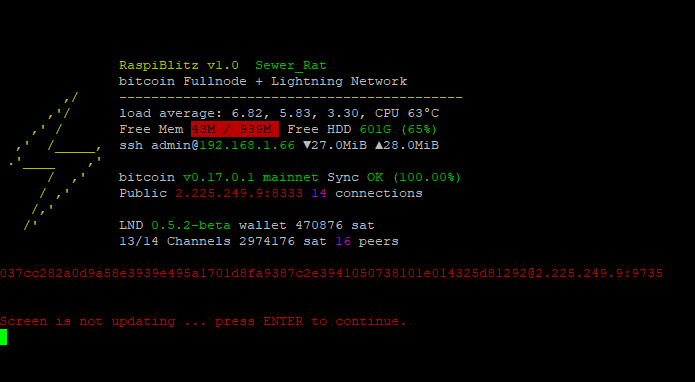
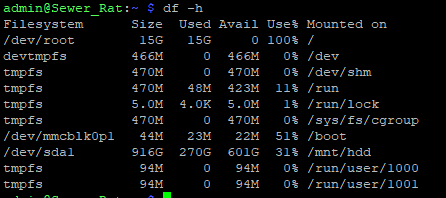
Anyway, after some restart and reopen port now is back in the game...
sorry for the time
 amcitaly
All 43 comments
check #418 & #394 , but we are talking here about logs, they are getting filled too quickly because they are not rotating properly. Many users are experiencing this issues and its already on the milestones for the v1.1
 CommanderPoe
on 12 Mar 2019
CommanderPoe
on 12 Mar 2019
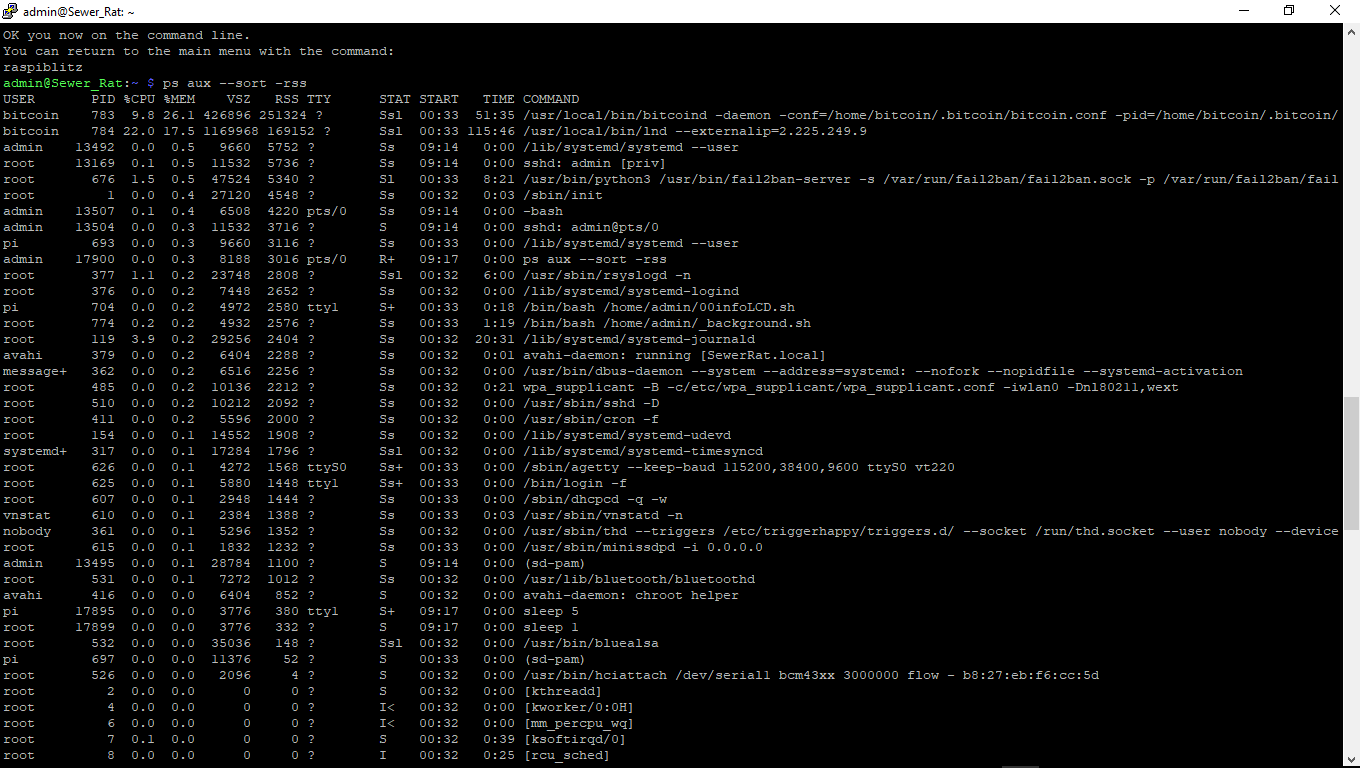
If you think you have excessive memory usage here's one way you can check it. Run the shell command ps aux --sort -rss. Memory usage is listed under the RSS column in order of most used. In my example below it shows the top memory user is bitcoind at 203132 bytes. Keep in mind a memory problem might not be just one process using the most RAM but could be a bunch of small processes sucking up the resources - if less likely.
admin@THUNDA:~ $ ps aux --sort -rss
USER PID %CPU %MEM VSZ RSS TTY STAT START TIME COMMAND
bitcoin 896 38.4 21.3 367880 203132 ? Ssl 08:46 11:36 /usr/local/bin/bitcoind -daemon -conf=/
root 477 99.1 2.4 27008 22840 ? R 08:46 30:17 /usr/sbin/mosquitto -c /etc/mosquitto/m
root 759 0.4 1.0 47628 9848 ? Sl 08:46 0:07 /usr/bin/python3 /usr/bin/fail2ban-serv
bitcoin 897 0.1 1.0 945704 9812 ? Ssl 08:46 0:02 /usr/local/bin/lnd --externalip=179.125
root 111 1.4 0.8 29176 8352 ? Ss 08:46 0:25 /lib/systemd/systemd-journald
root 1 1.6 0.5 27176 5576 ? Ss 08:46 0:29 /sbin/init
admin 2042 0.0 0.5 9656 5100 ? Ss 08:48 0:00 /lib/systemd/systemd --user
pi 776 0.0 0.5 9656 5036 ? Ss 08:46 0:00 /lib/systemd/systemd --user
debian-+ 617 0.0 0.5 42924 4924 ? Ssl 08:46 0:01 /usr/bin/transmission-daemon -f --log-e
systemd+ 358 0.0 0.4 17280 4008 ? Ssl 08:46 0:00 /lib/systemd/systemd-timesyncd
admin 2057 0.0 0.4 6972 3980 pts/0 Ss 08:48 0:00 -bash
root 416 0.1 0.4 7380 3908 ? Ss 08:46 0:03 /lib/systemd/systemd-logind
root 1970 0.0 0.3 11532 3364 ? Ss 08:48 0:00 sshd: admin [priv]
admin 23394 0.0 0.3 8296 3020 pts/0 R+ 09:17 0:00 ps aux --sort -rss
 fluidvoice
on 12 Mar 2019
fluidvoice
on 12 Mar 2019
Yes me too quiete the same, thank you very much for your suggestion I will read the previous answer regarding the topic and close this issue
amcitaly
on 13 Mar 2019
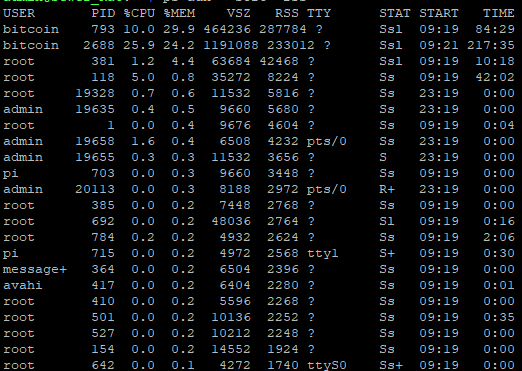
You have two very large bitcoin processes instead of one. btw, why did you cut off the right side of the image with the command startup string?
fluidvoice
on 13 Mar 2019
Sorry I thought it was useless, now I am trying the #418 suggest to debuglevel=info and it seem is going well
amcitaly
on 13 Mar 2019
Sorry I thought it was useless, now I am trying the #418 suggest to debuglevel=info and it seem is going well
Great. I'm curious now what does your /var/log directory look like?...
sudo ls -alS /var/log
fluidvoice
on 13 Mar 2019
Sorry I thought it was useless, now I am trying the #418 suggest to debuglevel=info and it seem is going well
Great. I'm curious now what does your /var/log directory look like?...
sudo ls -alS /var/log
Gonna give it a try again tonite to the debuglevel=info
Before doing that do u recommend cleaning the daemon logs and the syslogs beforehand?
CommanderPoe
on 13 Mar 2019
No, I think nothing is changed
sudo ls -alS /var/log

amcitaly
on 14 Mar 2019
This memory problem seems related to the filled up logs - I had a similar mem-problem on my test machine. Cleaned the logs rebooted and it was Ok again.
I have done the following measures to fix this issue for the v1.1 release ... is that enough?
LND logging level is set to
infoAdded config to
/etc/init.d/rsyslog:
/var/log/daemon.log
{
        rotate 4
        size=100M
        missingok
        notifempty
        compress
        delaycompress
        sharedscripts
        postrotate
                invoke-rc.d rsyslog rotate > /dev/null
        endscript
}

3. If on boot log dir is detected to be >1GB it all gets emergency deleted:
`sudo rm -r /var/log/*`
So v1.1 will reduce the log load, will keep daemon.log small and has a safe guard on boot to flush the logs if they get out of control again. Please let me know if you see more things to do on this.
This is now in testing and will be released as a new image end of week for everybody to easy update.
 rootzoll
on 14 Mar 2019
rootzoll
on 14 Mar 2019
Thank you very much Rootzoll >3
amcitaly
on 14 Mar 2019
This memory problem seems related to the filled up logs - I had a similar mem-problem on my test machine. Cleaned the logs rebooted and it was Ok again.
I have done the following measures to fix this issue for the v1.1 release ... is that enough?
- LND logging level is set to
info- Added config to
/etc/init.d/rsyslog:/var/log/daemon.log { rotate 4 size=100M missingok notifempty compress delaycompress sharedscripts postrotate invoke-rc.d rsyslog rotate > /dev/null endscript } 3. If on boot log dir is detected to be >1GB it all gets emergency deleted: `sudo rm -r /var/log/*`So v1.1 will reduce the log load, will keep daemon.log small and has a safe guard on boot to flush the logs if they get out of control again. Please let me know if you see more things to do on this.
This is now in testing and will be released as a new image end of week for everybody to easy update.
I prolly will change my debuglevel from debug to info eventually but so far only with the logrotate script I have seen how my /var/log has been reduced steadily from 6.5GB to 4.0GB
CommanderPoe
on 15 Mar 2019
OK the logs seem so far under control and my test machines stay most of the time at a good 400MB+ "free memory" limit. So everybody having problem with this I recommend the update to the v1.1 (will release image today/tomorrow). Thanks for repoerting. Closing this issue.
rootzoll
on 17 Mar 2019
Hello, I think I have the same problem but what do you mean by:
"LND logging level is set to info" ?
I added your other script too /etc/init.d/rsyslog. I freed some memory but I came home now and the pi had crashed.
(I'm on 4.14.79-v7+)
 belgacoin
on 9 Apr 2019
belgacoin
on 9 Apr 2019
Hello, I think I have the same problem but what do you mean by:
"LND logging level is set to info" ?
I added your other script too /etc/init.d/rsyslog. I freed some memory but I came home now and the pi had crashed.
(I'm on 4.14.79-v7+)
Please add more details about "Pi had crashed". Error messages? screen pictures, etc.
Did it just lock up at some point w/no error messages?
Less logging debuglevel=info or more logging debuglevel=debug in the /mnt/hdd/lnd/lnd.conf file
fluidvoice
on 9 Apr 2019
Well, yesterday I noticed the mem field was in red, just like OP. I checked out this thread and edited /etc/init.d/rsyslog with the script (hope that wasn't wrong?).
Today, I saw that my Pi had rebooted and was waiting for a login and password.
Meanwhile I rebooted again, LND node is catching up the chain.
Edit: Lightning Filtering Blockchain │
│ Progress: ?/570905
belgacoin
on 9 Apr 2019
Well, yesterday I noticed the mem field was in red, just like OP. I checked out this thread and edited /etc/init.d/rsyslog with the script (hope that wasn't wrong?).
Today, I saw that my Pi had rebooted and was waiting for a login and password.
Meanwhile I rebooted again, LND node is catching up the chain.
Edit: Lightning Filtering Blockchain │
│ Progress: ?/570905
You should not need to edit that script if you are running Raspiblitz v1.1 (and you should be):
https://github.com/rootzoll/raspiblitz/blob/master/FAQ.md#how-to-update-my-raspiblitz-after-version-098
fluidvoice
on 9 Apr 2019
Well for me is the same, in fact is not change and the problem persist as in v 1.0. It always became red after few days. I bought the 32 sd Samsung Endurance, but no results.
amcitaly
on 9 Apr 2019
Well for me is the same, in fact is not change and the problem persist as in v 1.0. It always became red after few days. I bought the 32 sd Samsung Endurance, but no results
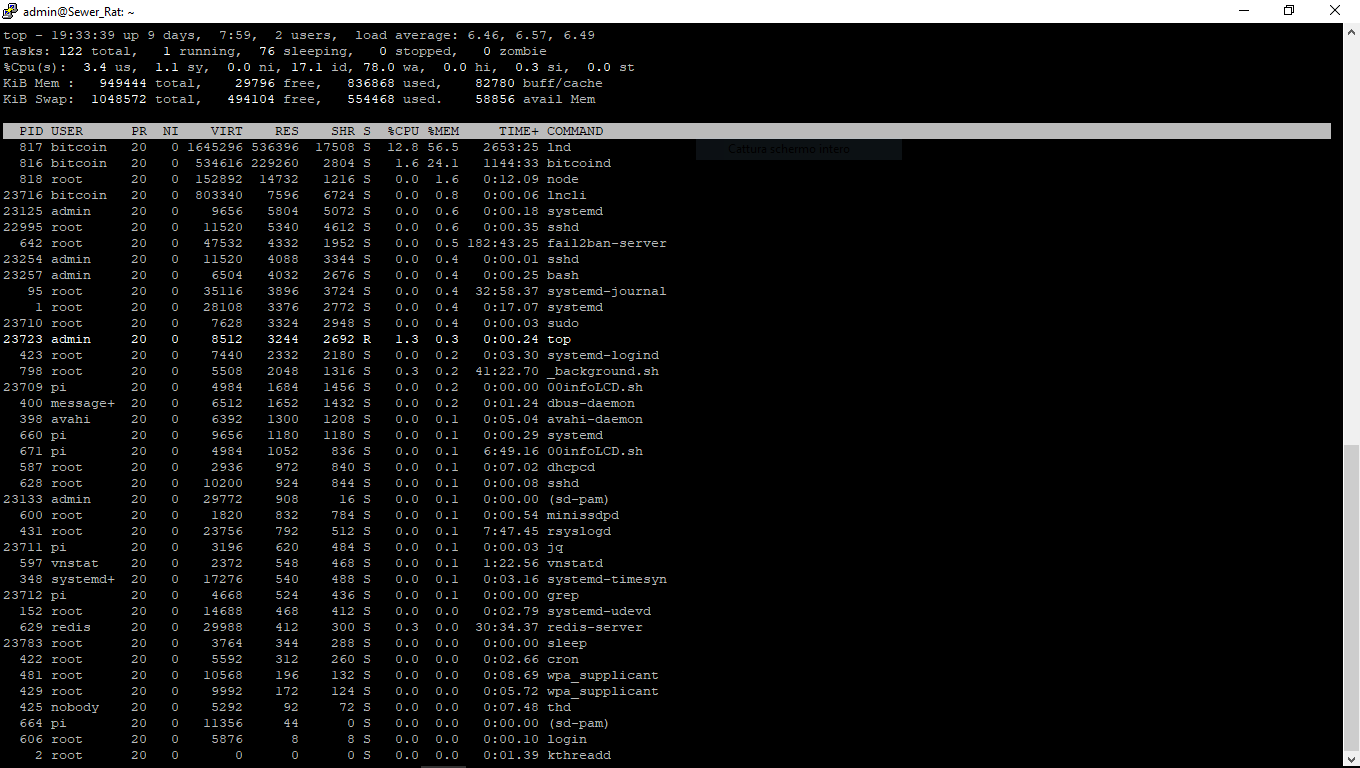
SSH into your node, then run on the command line:
top -o %MEM
And take a screenshot of what is displayed and post it here.
fluidvoice
on 9 Apr 2019
amcitaly
on 9 Apr 2019
How many channels, connections, do you have open? And how long does it run before crashing or showing a problem? Perhaps LND has a memory issue? I see another RPi user saw similar in Feb.: https://github.com/lightningnetwork/lnd/issues/1036#issuecomment-466605954
I saw in OP more than one month and around 15 channels and peers.
fluidvoice
on 9 Apr 2019
As LND I have 16 channels, the number is alwasy stable, the BTC pass from 8 to 20 to maximum 39. After 39 it always have problem, crash or restart. I really don't know, thank you for the link. Then now the node is quiete dead, on bitnodes show "uptime" 17% always decresing. My feeling is that the first days if you run a new sd card it work well, then with time tend to have more and more problem, maybe is this mem issue, in fatc in the first days it was always a good 400mb free, and there was no problem
amcitaly
on 9 Apr 2019
I mean when you reburn a new image, for some days it work well
amcitaly
on 9 Apr 2019
As LND I have 16 channels, the number is alwasy stable, the BTC pass from 8 to 20 to maximum 39. After 39 it always have problem, crash or restart. I really don't know, thank you for the link. Then now the node is quiete dead, on bitnodes show "uptime" 17% always decresing. My feeling is that the first days if you run a new sd card it work well, then with time tend to have more and more problem, maybe is this mem issue, in fatc in the first days it was always a good 400mb free, and there was no problem
What is the contents of your file /mnt/hdd/lnd/lnd.conf ?
I take it you changed autopilot.maxchannels= because the default is 5.
So you might be (I'm not sure yet) exceeding the capabilities of a Rpi board w/1GB RAM.
fluidvoice
on 9 Apr 2019
maybe the limit is around 14? Seems around 15 or 16 people run out of memory after a long time? It's possible. @rootzoll do you know anything about memory usage per number of channels for LND?
fluidvoice
on 9 Apr 2019
How many channels, connections, do you have open? And how long does it run before crashing or showing a problem? Perhaps LND has a memory issue? I see another RPi user saw similar in Feb.: lightningnetwork/lnd#1036 (comment)
I saw in OP more than one month and around 15 channels and peers.
I had 6 channels.
Still shows "Lightning Filtering Blockchain │
│ Progress: ?/570905"
belgacoin
on 9 Apr 2019
How many channels, connections, do you have open? And how long does it run before crashing or showing a problem? Perhaps LND has a memory issue? I see another RPi user saw similar in Feb.: lightningnetwork/lnd#1036 (comment)
I saw in OP more than one month and around 15 channels and peers.I had 6 channels.
Still shows "Lightning Filtering Blockchain │
│ Progress: ?/570905"
it's normal. you have to wait for sync to finish. are you running v1.1?
fluidvoice
on 9 Apr 2019
okay, meanwhile, I will undo the edit in /etc/init.d/rsyslog (as I'm running 1.1). Thanks.
belgacoin
on 9 Apr 2019
Ah well to know fluidvoice, I didn't think about this, so when the node is back I will close some channel and I will bring the number to 10 or less. Maybe it help for the memory
by the way, your node is working 24 hours non-stop?
amcitaly
on 9 Apr 2019
okay, meanwhile, I will undo the edit in /etc/init.d/rsyslog (as I'm running 1.1). Thanks.
careful. You might make things worse.
fluidvoice
on 9 Apr 2019
Ah well to know fluidvoice, I didn't think about this, so when the node is back I will close some channel and I will bring the number to 10 or less. Maybe it help for the memory
by the way, your node is working 24 hours non-stop?
Not at the moment. I'm working on other things and waiting for my blockchain re-sync on my notebook.
fluidvoice
on 9 Apr 2019
okay, meanwhile, I will undo the edit in /etc/init.d/rsyslog (as I'm running 1.1). Thanks.
careful. You might make things worse.
Really? So it's better I leave it like that? I'll see when the filtering is done then.
belgacoin
on 9 Apr 2019
Understood, me too I will reopen my node on the PC to watch something, The I want to resync the raspi with the Torrent download of the blockchain, because I did it with FTP but maybe also this is not the best way, in fact now is not more possible, Thank you
amcitaly
on 9 Apr 2019
okay, meanwhile, I will undo the edit in /etc/init.d/rsyslog (as I'm running 1.1). Thanks.
careful. You might make things worse.
Really? So it's better I leave it like that? I'll see when the filtering is done then.
if it looks like this, it's OK:
After you edit it I think you have to restart it with the command sudo service rsyslog restart
/var/log/daemon.log
{
rotate 4
size=100M
missingok
notifempty
compress
delaycompress
sharedscripts
postrotate
invoke-rc.d rsyslog rotate > /dev/null
endscript
}
fluidvoice
on 9 Apr 2019
Understood, me too I will reopen my node on the PC to watch something, The I want to resync the raspi with the Torrent download of the blockchain, because I did it with FTP but maybe also this is not the best way, in fact now is not more possible, Thank you
Did you change autopilot.maxchannels in your lnd.conf file or not? what is this set to on your node?
fluidvoice
on 9 Apr 2019
okay, meanwhile, I will undo the edit in /etc/init.d/rsyslog (as I'm running 1.1). Thanks.
careful. You might make things worse.
Really? So it's better I leave it like that? I'll see when the filtering is done then.
if it looks like this, it's OK:
After you edit it I think you have to restart it with the commandsudo service rsyslog restart/var/log/daemon.log
{
rotate 4
size=100M
missingok
notifempty
compress
delaycompress
sharedscripts
postrotate
invoke-rc.d rsyslog rotate > /dev/null
endscript
}
Yes, that the script I added at the end of rsyslog. I just didn't restarted it.
belgacoin
on 9 Apr 2019
Understood, me too I will reopen my node on the PC to watch something, The I want to resync the raspi with the Torrent download of the blockchain, because I did it with FTP but maybe also this is not the best way, in fact now is not more possible, Thank you
Did you change
autopilot.maxchannelsin your lnd.conf file or not? what is this set to on your node?
Eh I would like to look but now is block on filtering blockchain, I don't remember now, what should be the best options? I think I didn't because I don't know how to do, I just put on the autopilot if I well remember
amcitaly
on 9 Apr 2019
what should be the best options?
I don't know. I only know the default is 5. When you SSH in, you can hit Ctrl-z to put display in the background and then cat /mnt/hdd/lnd/lnd.conf then you can run fg to bring back the display to the foreground.
fluidvoice
on 9 Apr 2019
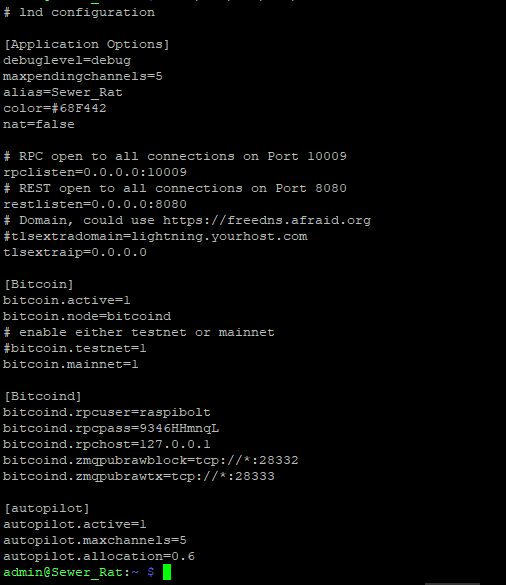
amcitaly
on 9 Apr 2019
Interesting. Makes me wonder what autopilot.maxchannels= is for because it's certainly not limiting the channels to 5
fluidvoice
on 9 Apr 2019
Well in fact I have tried to add manually as many channels as possible because I want to see my node of ACINQ going all world for vanity. But with my modest fund 16 was the maximun. Now that i see this autopilot set at 5, maybe we shouldn't force the node to add more channels... I will try to reburn the image and restart without add any channels, you think?
amcitaly
on 9 Apr 2019
@amcitaly it's prob not too risky but you might want to change your bitcoind rpc password now that you put that picture on the internet. Sorry, I didn't think about remind you to not show this part. Anyway it's only around $25 on this node right? ;-)
fluidvoice
on 9 Apr 2019
I have 3,000,000 sat, in fact I put 130 euro on it. No worry I will change, thank for the advise, anyway to use it I think you should be on the same network? or not?
amcitaly
on 9 Apr 2019
@fluidvoice , thank you for your advice! You solved my problem. I have cash out, closed all the channels and in fact the memory it never go under 300, and now my node is up from 1 day and 4 hours ago, that never happen in recent times. I prefer to keep the node like this withou LND for now, then I will try to put on the autopilot and add few channels. Great. I have change the password.
amcitaly
on 13 Apr 2019
Related issues
 syracusebitcoin
·
3Comments
syracusebitcoin
·
3Comments
 frennkie
·
5Comments
frennkie
·
5Comments
 philbertw4
·
5Comments
philbertw4
·
5Comments
 cedricwalter
·
5Comments
cedricwalter
·
5Comments
 openoms
·
3Comments
openoms
·
3Comments
Most helpful comment
This memory problem seems related to the filled up logs - I had a similar mem-problem on my test machine. Cleaned the logs rebooted and it was Ok again.
I have done the following measures to fix this issue for the v1.1 release ... is that enough?
LND logging level is set to
infoAdded config to
/etc/init.d/rsyslog:So v1.1 will reduce the log load, will keep daemon.log small and has a safe guard on boot to flush the logs if they get out of control again. Please let me know if you see more things to do on this.
This is now in testing and will be released as a new image end of week for everybody to easy update.