Describe the bug
Don’t open on macOS Catalina GM
PS: I tried to allow "undefined developers”, but is not that
To Reproduce
Steps to reproduce the behavior:
- Go to ‘Applications'
- Click on ‘Radarr'
- See error
Expected behavior
Open :)
Screenshots
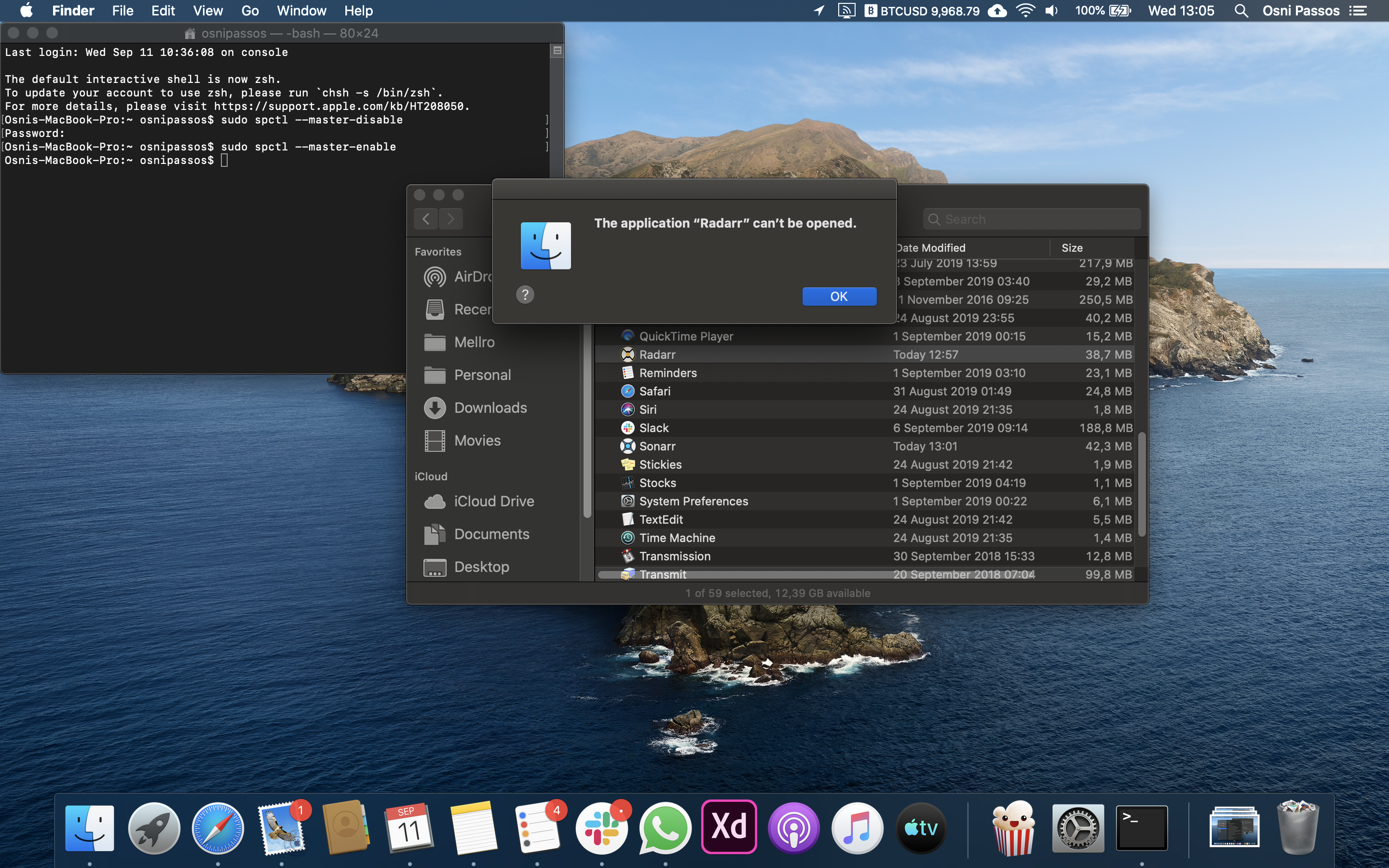
Desktop (please complete the following information):
- OS: macOS Catalina
- Mono Version: -
- Browser and Version -
- Version [e.g. 22]
Debug Logs
-
 osnipassos
All 16 comments
Issue-Label Bot is automatically applying the label bug to this issue, with a confidence of 0.73. Please mark this comment with :thumbsup: or :thumbsdown: to give our bot feedback!
Links: app homepage, dashboard and code for this bot.
![issue-label-bot[bot] picture](https://avatars2.githubusercontent.com/in/27079?v=4&s=40) issue-label-bot[bot]
on 11 Sep 2019
issue-label-bot[bot]
on 11 Sep 2019
You need to right click then click open
 galli-leo
on 12 Sep 2019
galli-leo
on 12 Sep 2019
You need to right click then click open
I tried but didn’t work.
osnipassos
on 12 Sep 2019
It's because radarr is a 32 bit app and macOS Catalina only run 64 bit app
 MozkaTeacher
on 6 Oct 2019
MozkaTeacher
on 6 Oct 2019
Radarr is a .NET app, so that might mean your Mono needs to be 64bit?
 fryfrog
on 7 Oct 2019
fryfrog
on 7 Oct 2019
@osnipassos Sorry for the late reply, but did you try extracting the zip file with the built in Archive Utility?
galli-leo
on 7 Oct 2019
@MozkaTeacher Radarr definitely works on Catalina, so that’s not the reason why.
galli-leo
on 7 Oct 2019
@osnipassos Sorry for the late reply, but did you try extracting the zip file with the built in Archive Utility?
I download the Radarr.develop.0.2.0.1358.osx-app.zip, unzip, put into applications folder and didn't work.
I have a clean install of Catalina right now and the same problem continues.
I've tried with Sonnar app and the same problem occurs. I think this help you.
osnipassos
on 9 Oct 2019
I ran into the same issue, but running it from the command line (or as a launch agent) works, but there's still the issue with not being able to move files without granting sh full disk access.
 gabemunro
on 17 Oct 2019
gabemunro
on 17 Oct 2019
So has this been solved yet?
 matthewtroup1983
on 29 Nov 2019
matthewtroup1983
on 29 Nov 2019
@osnipassos I had the same problem, it seems that the "Archive Utility" was the problem when extracting. I extracted with "The Unarchiver" and now it opens correctly.
Note: I'm currently on Catalina 10.15 (19A583)
 schinsue
on 19 Jan 2020
schinsue
on 19 Jan 2020
chmod +x /Users/USERNAME/Downloads/Radarr.app/Contents/MacOS/Radarr should fix that error
 SageBrushes
on 24 Jan 2020
SageBrushes
on 24 Jan 2020
@osnipassos I had the same problem, it seems that the "Archive Utility" was the problem when extracting. I extracted with "The Unarchiver" and now it opens correctly.
Note: I'm currently on Catalina 10.15 (19A583)
Thanks. Works like charm with your tip.
osnipassos
on 17 Feb 2020
@osnipassos I had the same problem, it seems that the "Archive Utility" was the problem when extracting. I extracted with "The Unarchiver" and now it opens correctly.
Note: I'm currently on Catalina 10.15 (19A583)
I just bought a new Mac and I have been working on this issue for a few hours now.
Thanks, this was my issue.
Really appreciate it.
 darthdooty
on 18 Jul 2020
darthdooty
on 18 Jul 2020
Sonarr fixed this properly. Is Radarr going to implement the same fix? The chmod command recommended in here is a bad practice from a security perspective. https://github.com/Radarr/Radarr/issues/4753
 houdini3009
on 6 Aug 2020
houdini3009
on 6 Aug 2020
It's fixed in v3.
 ta264
on 6 Aug 2020
ta264
on 6 Aug 2020
Related issues
 ghost
·
40Comments
ghost
·
40Comments
 savaloi
·
56Comments
savaloi
·
56Comments
 dawtmaytrikx
·
47Comments
dawtmaytrikx
·
47Comments
 aptalca
·
40Comments
aptalca
·
40Comments
 kmlucy
·
220Comments
kmlucy
·
220Comments