Expected behaviour
Installing qownnotes for the first time.
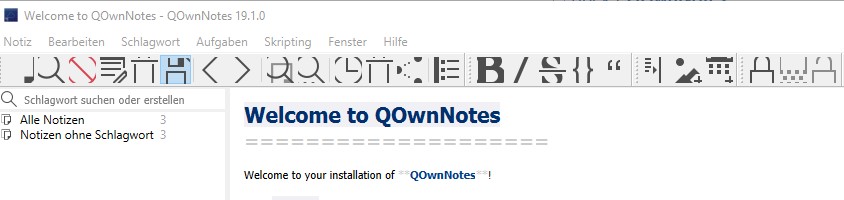
Actual behaviour
The icon size is to big at the toolbar. After the installation the icon toolbar size is 24 and the list and tree item hight is 15px. I changed these two settings, but it never looked perfect. Also i clear app data under general settings.
Sorry for my bad english :)
Output from the debug section in the settings dialog
General Info
Current Date: Mo Jan 7 21:21:28 2019
Version: 19.1.0
Build date: Jan 1 2019
Build number: 4048
Platform: windows
Operating System: Windows 10 (10.0)
Build architecture: i386
Current architecture: x86_64
Release: AppVeyor
Qt Version (build): 5.11.2
Qt Version (runtime): 5.11.2
Portable mode: no
Settings path / key: \HKEY_CURRENT_USER\Software\PBE\QOwnNotes
Application database path: C:\Users\Timo\AppData\Roaming\PBE\QOwnNotes\QOwnNotes.sqlite
Application arguments: C:\QOwnNotes\QOwnNotes.exe
Qt Debug: 0
Locale (system): de_DE
Locale (interface): en
Icon theme: breeze-qownnotes
Notes in current note folder: 3
Enabled scripts: 0
Server Info
serverUrl: empty
appIsValid: no
notesPathExists: empty
connectionErrorMessage: empty
Note folders
currentNoteFolderId: 1
Note folder Standard
id: 1
isCurrent: yes
activeTagId: 0
localPath: C:\Users\Timo\Nextcloud\Notes
remotePath: Notes
isShowSubfolders: no
isUseGit: no
activeNoteSubFolder name: empty
database file: C:\Users\Timo\Nextcloud\Notes\notes.sqlite
Enabled scripts
Settings
ActiveNoteHistoryItem (NoteHistoryItem): <binary data>
Debug/fakeOldVersionNumber (QString): false
Debug/fileLogging (QString): false
Editor/CurrentSchemaKey (QString): EditorColorSchema-6033d61b-cb96-46d5-a3a8-20d5172017eb
Editor/autoBracketClosing (QString): true
Editor/autoBracketRemoval (QString): true
Editor/editorWidthInDFMOnly (QString): true
Editor/highlightCurrentLine (QString): true
Editor/vimMode (QString): false
LastUpdateCheck (QDateTime): 2019-01-07T21:17:53.620
MainWindow/geometry (QByteArray): <binary data>
MainWindow/mainToolBar.iconSize (int): 24
MainWindow/menuBarGeometry (QByteArray): <binary data>
MainWindow/noteTextEdit.code.font (QString): Courier New,9,-1,2,50,0,0,0,0,0
MainWindow/noteTextEdit.font (QString): MS Shell Dlg 2,8.25,-1,5,50,0,0,0,0,0
MainWindow/noteTextView.code.font (QString): Courier New,9,-1,2,50,0,0,0,0,0
MainWindow/noteTextView.font (QString): MS Shell Dlg 2,8.25,-1,5,50,0,0,0,0,0
MainWindow/noteTextView.rtl (QString): false
MainWindow/showNotesFromAllNoteSubFolders (QString): true
NoteHistory-1 (QVariantList): <variant list with 1 item(s)>
NoteHistoryCurrentIndex-1 (int): 0
PiwikClientId (QString): <hidden>
SearchEngineId (int): 2
SettingsDialog/geometry (QByteArray): <binary data>
SettingsDialog/mainSplitterState (QByteArray): <binary data>
ShowSystemTray (QString): false
StartHidden (QString): false
WelcomeDialog/geometry (QByteArray): <binary data>
acceptAllExternalModifications (QString): false
allowDifferentNoteFileName (QString): false
allowNoteEditing (QString): true
allowOnlyOneAppInstance (QString): true
appMetrics/disableAppHeartbeat (QString): false
appMetrics/disableTracking (QString): false
appMetrics/notificationShown (QString): true
automaticNoteFolderDatabaseClosing (QString): false
closeTodoListAfterSave (QString): false
cryptoKey (qlonglong): <hidden>
currentNoteFolderId (int): 1
currentWorkspace (QString): initial
cursorWidth (int): 1
customNoteFileExtensionList (QStringList): empty
darkMode (QString): false
darkModeColors (QString): false
darkModeTrayIcon (QString): false
defaultNoteFileExtension (QString): md
disableAutomaticUpdateDialog (QString): false
disableSavedSearchesAutoCompletion (QString): false
dockWasInitializedOnce (QString): true
externalEditorPath (QString): empty
fullyHighlightedBlockquotes (QString): false
gitCommitInterval (int): 30
gitExecutablePath (QString): empty
gitLogCommand (QString): empty
ignoreAllExternalModifications (QString): false
ignoreAllExternalNoteFolderChanges (QString): false
ignoreNoteSubFolders (QString): ^\.
imageScaleDown (QString): false
imageScaleDownMaximumHeight (int): 1024
imageScaleDownMaximumWidth (int): 1024
initialLayoutIdentifier (QString): minimal
insertTimeFormat (QString): empty
interfaceFontSize (int): 11
interfaceLanguage (QString): en
internalIconTheme (QString): false
itemHeight (int): 15
localTrash/autoCleanupDays (int): 30
localTrash/autoCleanupEnabled (QString): true
localTrash/supportEnabled (QString): true
markdownHighlightingEnabled (QString): true
navigationPanelHideSearch (QString): false
networking/ignoreSSLErrors (QString): true
networking/proxyType (int): 2
newNoteAskHeadline (QString): false
noteEditIsCentralWidget (QString): true
noteListPreview (QString): false
noteSaveIntervalTime (int): 10
noteSubfoldersPanelDisplayAsFullTree (QString): true
noteSubfoldersPanelHideSearch (QString): false
noteSubfoldersPanelOrder (int): 0
noteSubfoldersPanelShowFullPath (QString): false
noteSubfoldersPanelShowNotesRecursively (QString): false
noteSubfoldersPanelShowRootFolderName (QString): true
noteSubfoldersPanelSort (int): 0
notesPanelOrder (int): 0
notesPanelSort (int): 1
notesPath (QString): C:/Users/Timo/Nextcloud/Notes
notifyAllExternalModifications (QString): false
overrideInterfaceFontSize (QString): false
ownCloud/password (QString): <hidden>
ownCloud/serverUrl (QString): empty
ownCloud/supportEnabled (QString): false
ownCloud/todoCalendarBackend (int): 3
ownCloud/todoCalendarCalDAVPassword (QString): <hidden>
ownCloud/todoCalendarCalDAVServerUrl (QString): empty
ownCloud/todoCalendarCalDAVUsername (QString): empty
ownCloud/todoCalendarDisplayNameList (QStringList): empty
ownCloud/todoCalendarEnabledList (QStringList): empty
ownCloud/todoCalendarEnabledUrlList (QStringList): empty
ownCloud/todoCalendarUrlList (QStringList): empty
ownCloud/userName (QString): empty
ownCloudInfo/appIsValid (QString): false
ownCloudInfo/connectionErrorMessage (QString): empty
ownCloudInfo/notesPathExistsText (QString): empty
ownCloudInfo/serverVersion (QString): empty
restoreCursorPosition (QString): true
showMenuBar (QString): true
showStatusBar (QString): true
taggingShowNotesRecursively (QString): false
tagsPanelHideSearch (QString): false
tagsPanelOrder (int): 0
tagsPanelSort (int): 0
toolbar/1/items (QStringList): action_New_note, action_Find_note, action_Remove_note, action_Open_note_in_external_editor, actionShow_local_trash, actionAllow_note_editing, , action_Back_in_note_history, action_Forward_in_note_history, , action_Find_text_in_note, actionReplace_in_current_note, , actionShow_versions, actionShow_trash, actionShare_note, , actionOpen_List
toolbar/1/name (QString): mainToolBar
toolbar/1/title (QString): Hauptsymbolleiste
toolbar/2/items (QStringList): actionFormat_text_bold, actionFormat_text_italic, actionStrike_out_text, actionInsert_code_block, actionInsert_block_quote
toolbar/2/name (QString): formattingToolbar
toolbar/2/title (QString): Formatierungs-Werkzeugleiste
toolbar/3/items (QStringList): actionInsert_Link_to_note, actionInsert_image, actionInsert_current_time
toolbar/3/name (QString): insertingToolbar
toolbar/3/title (QString): Einfügen-Werkzeugleiste
toolbar/4/items (QStringList): action_Encrypt_note, actionEdit_encrypted_note, actionDecrypt_note
toolbar/4/name (QString): encryptionToolbar
toolbar/4/title (QString): Werkzeugleiste Verschlüsselung
toolbar/5/items (QStringList): actionWorkspaceComboBox, actionStore_as_new_workspace, actionRemove_current_workspace, actionRename_current_workspace, actionSwitch_to_previous_workspace, actionUnlock_panels, , actionToggle_distraction_free_mode, action_Increase_note_text_size, action_Decrease_note_text_size, action_Reset_note_text_size
toolbar/5/name (QString): windowToolbar
toolbar/5/title (QString): Fenster-Werkzeugleiste
toolbar/6/items (QStringList): action_Quit
toolbar/6/name (QString): quitToolbar
toolbar/6/title (QString): Beenden - Symbolleiste
toolbar/size (int): 6
useUNIXNewline (QString): false
webSocketServerService/port (int): 22222
workspace-initial/name (QString): Minimal
workspace-initial/noteSubFolderDockWidgetVisible (QString): true
workspace-initial/windowState (QByteArray): <binary data>
workspaces (QStringList): initial
 Algha1503
All 14 comments
Thank you for your concern, but there is nothing I know of I can do about it. For 99% of all installations everything is just fine. But for some people there are troubles, that mainly depend on interface settings of the operating system and how Qt deals with them.
If you want to play around with some parameters, see: https://doc.qt.io/qt-5/highdpi.html
 pbek
on 7 Jan 2019
pbek
on 7 Jan 2019
But I never saw too big toolbar icons by default. I wonder what display(s) you are using and what your interface settings in Windows you have.
pbek
on 8 Jan 2019
Yesterday I could still narrow down the problem. I have 2 configurations. One config with two PC-Monitor (24 & 25 inches). In the second config (there is the problem), my TV is also on. The TV becomes the signal over HDMI Output Grafic Card --> Receiver --> TV
Algha1503
on 8 Jan 2019
Oh I love dpi adaption hell. :laughing:
pbek
on 8 Jan 2019
Yesterday I checked on Windows 10 with a 4k TV and didn't have any of these troubles regardless of zoom-level I used in the Windows 10 Settings. I also tried a new installation of QOwnNotes.
pbek
on 27 Jan 2019
I found the following reason for the oversize symbols: When you switch in Win10 display scaling up to 150% the Symbols / Icons grow ...
 kap-gallo
on 20 Feb 2019
kap-gallo
on 20 Feb 2019
Thank you. But you turn the toolbar symbols down in QOwnNotes, can you?
pbek
on 20 Feb 2019
Same problem here.
I found the following reason for the oversize symbols: When you switch in Win10 display scaling up to 150% the Symbols / Icons grow ...
I am using a small high resolution notebook screen so I decided to scale it up in the Windows 10 settings to 150 % to use it together with an additional, external monitor.
Thank you. But you turn the toolbar symbols down in QOwnNotes, can you?
No, I don't know how to change the size of the toolbar symbols.
 mhellmeier
on 27 Oct 2019
mhellmeier
on 27 Oct 2019
No, I don't know how to change the size of the toolbar symbols.
search for icon in the Settings ;)
pbek
on 28 Oct 2019
search for
iconin the Settings ;)
Thanks!
I tried to reduce the icon size to 16, it's better, but it doesn't look great anyway:

It looks like the border-icon-proportion isn't great.
Perhaps Windows leaves the border size as it but tries to resize the icons without resizing the border!?
mhellmeier
on 28 Oct 2019
same problem macbook + external monitor (3440x1440).
when on the macbook screen, looks great, but on external monitor looks exactly like the icon in issue description.
set Toolbar icon size to 8, it looks acceptable on external monitor, a bit too small on macbook.
 dyno
on 19 Dec 2019
dyno
on 19 Dec 2019
For anyone having this problem on Windows (like me), there is an easy solution:
change the propreties of the qownnotes.exe. Change the compatibility mode to "Windows 8", and the toolbar will look good.
 jenny787
on 20 Jun 2020
jenny787
on 20 Jun 2020
Nice, thank you! I wonder what's different in the compatibility mode.
pbek
on 21 Jun 2020
It has something to do with high-dpi features on later windows OS. It is not scaling the way you are intending it to. So my guess is windows 8 mode doesn't have any high-dpi features, so it just displays the default way without scaling.
jenny787
on 21 Jun 2020
Related issues
 eimajenthat
·
3Comments
pbek
·
7Comments
eimajenthat
·
3Comments
pbek
·
7Comments
 tveyben
·
6Comments
tveyben
·
6Comments
 OlivierHobbes
·
5Comments
OlivierHobbes
·
5Comments
 schiessle
·
5Comments
schiessle
·
5Comments