 praxiq
All 246 comments
Thank you for your suggestion. I already have spell checking on my todo list. So far I had hunspell on the radar, I will take a look at qtspell as well, thanks for link! The challenge is to make it work on all platforms...
 pbek
on 30 Mar 2016
pbek
on 30 Mar 2016
Hi, pbek.
Excuse my ignorance, but couldn't you app just use the system's spell checker? AFAIK most apps don't use their own spelling corrector, right? Even Dolphin corrects your spelling when introducing folder and file names, but it doesn't implement a special backend, just calls the desktop to do the checks, no?
I ask this because I'm a bit tired of all those hunspell, aspell, ispell, LanguageTool, whatever. Why not simply respect what the user's desktop is using instead confusing us? Besides, this way, if I introduce a new word in, say, Kmail, I'd have it available for QOwnNotes and any other app that uses KDE's spell corrector; having several checkers doesn't imply a different dictionary for each?
 eemantsal
on 14 Apr 2016
eemantsal
on 14 Apr 2016
Dolphin and KMail are KDE apps, QOwnNotes is a Qt app and can't build upon the KDE libraries for spell checking in text edit boxes... But there are solutions for Qt, they are just not easy peasy to integrate, keeping compatibility with all OSes...
pbek
on 14 Apr 2016
As the maintainer of Sonnet I can highly recommend it. :-)
It only depends on qtbase, and supports multiple spell checking backends (e. g. a native one on OS X, not yet one for Windows, unfortunately) and automatic language detection.
The API should be pretty straightforward: http://api.kde.org/frameworks-api/frameworks5-apidocs/sonnet/html/index.html
 sandsmark
on 16 May 2016
sandsmark
on 16 May 2016
Thank you very much, @sandsmark for letting me know!
Without having it tested yet... it's looking great! What's the minimum Qt requirement? Higher than Qt 5.3?
What would it take to get Windows support (wouldn't it be great to have KDE apps on Windows? 😄 ) like https://github.com/manisandro/qtspell?
It also supports automated language detection, based on a combination of different algorithms.
Does it by any chances also support detection and checking for different languages in the same text edit?
pbek
on 16 May 2016
What's the minimum Qt requirement? Higher than Qt 5.3?
Seems like minimum required version now is set at 5.4, but I think it should work with 5.3 just by changing the minimum version here: https://github.com/KDE/sonnet/blob/master/CMakeLists.txt#L18
The increase to requiring 5.4 seems to be just a "global" change for all Frameworks.
What would it take to get Windows support (wouldn't it be great to have KDE apps on Windows? :smile: ) like https://github.com/manisandro/qtspell?
It already supports Windows, but then it requires you to use a third party library like for example Aspell or Hunspell (which is used by LibreOffice, OpenOffice.org, Mozilla Firefox 3 & Thunderbird, Google Chrome, Mac OS X, InDesign, Opera). Nick Shaforostoff has already done some nice work to improve the functionality on Windows, however, so it should be pretty nice to use: https://github.com/KDE/sonnet/commit/4a61bc24836aeff42bc53284d890bd41b1700376
What I meant was that I want to eventually support using the "native" spell checking facilities on Windows without having to rely on an extra library, like we do for OS X: https://github.com/KDE/sonnet/commit/97a172f3312b59215764542f4d373ee538b4071b
Does it by any chances also support detection and checking for different languages in the same text edit?
Yes, it supports using several languages in the same text edit, it only assumes one language per sentence in the text. If you disable the automatic language detection however, there's only one language per text edit (it doesn't support changing the language manually for individual parts of text).
sandsmark
on 16 May 2016
Btw, the .pro files (https://github.com/KDE/sonnet/blob/master/src/core/sonnet-core.pro, https://github.com/KDE/sonnet/blob/master/src/plugins/hunspell/hunspell.pro and https://github.com/KDE/sonnet/blob/master/src/ui/sonnet-ui.pro) don't have a minimum Qt version set, so it is probably easier to use qmake for building with 5.3.
sandsmark
on 16 May 2016
Thank you for your explanations!
I only kept the minimum requirement of Qt 5.3 for Debian 8. How are you guys handling that?
I would love to drop it too to maybe some day be able to integrate QtWebEngine for the preview. The QTextEdit has too many rendering bugs... But QtWebEngine needs QML, Quick, OpenGL and at least Qt 5.4. That's a bit of a bummer... (and has still no printing support)
pbek
on 16 May 2016
The explanation of the Qt version requirements are described here: https://community.kde.org/Frameworks/Policies#Frameworks_Qt_requirements
But I just test compiled Sonnet with qmake on debian stable, and it builds fine (just missed enabling c++11 support for sonnet-core, which I just committed a fix for: https://github.com/KDE/sonnet/commit/9671ba9ea8e9b3fb320e49003636a326ec064541).
sandsmark
on 16 May 2016
For instance, once Qt 5.6 was released, the minimum required Qt version changed from Qt 5.3 to Qt 5.4, i.e. the three supported Qt versions became 5.4, 5.5 and 5.6
And the rest of KDE... how is Debian 8 handled there?
pbek
on 16 May 2016
I don't know, tbh.
sandsmark
on 16 May 2016
Thank you anyway, I will evaluate Sonnet in the future, it sounds very promising for QOwnNotes!
pbek
on 16 May 2016
@sandsmark, do you know of a KDE and a Qt (non-KDE) app that is using Sonnet with automatic language detection, so I can see it in action (and in source code)?
pbek
on 17 May 2016
Quassel is the first thing that comes to mind: https://github.com/quassel/quassel/commit/8cece06596c290d69c1f32b7221c796437f5fabb
sandsmark
on 17 May 2016
Kate (the editor) also uses it.
sandsmark
on 17 May 2016
thank you, also any non-KDE apps?
pbek
on 17 May 2016
And does Sonnet require KDE, @sandsmark? I see some KDE references in the CMakeLists.txt file..
Do you have any idea to also make it work on qmake?
pbek
on 18 May 2016
No KDE dependencies (Quassel is a "pure" Qt application, with optional KDE integration), and you can use qmake as well if you don't want to use cmake. See https://github.com/KDE/sonnet/blob/master/src/plugins/hunspell/hunspell.pro https://github.com/KDE/sonnet/blob/master/src/core/sonnet-core.pro and https://github.com/KDE/sonnet/blob/master/src/ui/sonnet-ui.pro
sandsmark
on 21 May 2016
Nice, I need both cmake and qmake, because I use CLion (cmake) and Qt Creator (qmake) ;) The build systems are using qmake as well.
pbek
on 21 May 2016
When you install it it installs .pri files as well, if you want to use it like a normal Qt library (put «QT += SonnetCore SonnetUi» in your own .pro file).
Otherwise you can just use the .pro files I linked above to link it in statically.
sandsmark
on 24 May 2016
Thank you for your hint, I will try that out.
pbek
on 24 May 2016
@sandsmark, http://api.kde.org/frameworks-api/frameworks5-apidocs/sonnet/html/index.html currently returns a 404 error message
pbek
on 25 May 2016
Sorry, someone is apparently doing some restructuring: http://api.kde.org/frameworks-api/frameworks5-apidocs/frameworks/sonnet/html/index.html
sandsmark
on 25 May 2016
Ah, thank you.
3 times api and 3 times framework, someone made sure those keywords are covered! :)
pbek
on 25 May 2016
@sandsmark I would so love to integrate Sonnet into QOwnNotes, but I don't even get Sonnet to build on my Ubuntu (Neon) development machine...
Is there a way to create a amalgamation build of Sonnet, so I only end up with a large c++ and header file to include?
Like we have for botan:
https://botan.randombit.net/manual/building.html#the-amalgamation-build
https://github.com/pbek/QOwnNotes/tree/develop/src/libraries/botan
That would help me tremendously...
And I guess I would need the same for Aspell or Hunspell, to make it run on Linux and Windows, don't I?
pbek
on 4 Jun 2016
What error do you get when trying to build?
As for amalgation, I've never tried it for anything, but I guess it should be possible, by just catting together files.
sandsmark
on 4 Jun 2016
So far I managed to build the Sonnet core and ui with your .pro files.
My intention is to place Sonnet in the library folder:
and then to get Sonnet into the project files:
- https://github.com/pbek/QOwnNotes/blob/develop/src/QOwnNotes.pro
- https://github.com/pbek/QOwnNotes/blob/develop/src/CMakeLists.txt
I need to be able to build QOwnNotes under Linux with cmake and on Linux / OS X / Windows with qmake.
So I included this in QOwnNotes.pro:
SOURCES += libraries/sonnet/src/core/loader.cpp \
           libraries/sonnet/src/core/client.cpp \
           libraries/sonnet/src/core/spellerplugin.cpp \
           libraries/sonnet/src/core/speller.cpp \
           libraries/sonnet/src/core/settings.cpp \
           libraries/sonnet/src/core/backgroundchecker.cpp \
           libraries/sonnet/src/core/guesslanguage.cpp \
           libraries/sonnet/src/core/textbreaks.cpp \
           libraries/sonnet/src/core/tokenizer.cpp \
           libraries/sonnet/src/core/languagefilter.cpp \
           libraries/sonnet/src/ui/highlighter.cpp

HEADERS += libraries/sonnet/src/core/client_p.h \
           libraries/sonnet/src/core/loader_p.h \
           libraries/sonnet/src/ui/highlighter.h

unix:system("touch sonnetcore_export.h")
win32:system("type nul > sonnetcore_export.h")
I get this error message when I compile:
In file included from ../src/libraries/sonnet/src/core/loader.cpp:21:0:
../src/libraries/sonnet/src/core/loader_p.h:43:32: error: expected initializer before ':' token
 class SONNETCORE_EXPORT Loader : public QObject
                                ^
../src/libraries/sonnet/src/core/loader_p.h:45:20: error: expected '}' before end of line
../src/libraries/sonnet/src/core/loader_p.h:45:20: error: expected declaration before end of line
Makefile:1670: recipe for target 'loader.o' failed
I found out that I missed the DEFINES:
DEFINES += SONNETUI_EXPORT=""
DEFINES += SONNETCORE_EXPORT=""
DEFINES += INSTALLATION_PLUGIN_PATH=""
DEFINES += SONNET_STATIC
But now I have a naming clash with src/libraries/sonnet/src/ui/highlighter.cpp and src/libraries/qmarkdowntextedit/highlighter.cpp.
If I comment it out I get:
loader.o: In function `Sonnet::Loader::loadPlugin(QString const&)':
/home/omega/Code/_internal/QOwnNotes/build-QOwnNotes-Desktop-Debug/../src/libraries/sonnet/src/core/loader.cpp:305: undefined reference to `HunspellClient::HunspellClient(QObject*)'
Makefile:461: recipe for target 'QOwnNotes' failed
backgroundchecker.o: In function `BackgroundCheckerPrivate::checkNext()':
/home/omega/Code/_internal/QOwnNotes/build-QOwnNotes-Desktop-Debug/../src/libraries/sonnet/src/core/backgroundchecker.cpp:50: undefined reference to `BackgroundCheckerPrivate::misspelling(QString const&, int)'
/home/omega/Code/_internal/QOwnNotes/build-QOwnNotes-Desktop-Debug/../src/libraries/sonnet/src/core/backgroundchecker.cpp:70: undefined reference to `BackgroundCheckerPrivate::done()'
backgroundchecker.o: In function `Sonnet::BackgroundChecker::BackgroundChecker(QObject*)':
/home/omega/Code/_internal/QOwnNotes/build-QOwnNotes-Desktop-Debug/../src/libraries/sonnet/src/core/backgroundchecker.cpp:75: undefined reference to `vtable for Sonnet::BackgroundChecker'
backgroundchecker.o: In function `Sonnet::BackgroundChecker::BackgroundChecker(Sonnet::Speller const&, QObject*)':
/home/omega/Code/_internal/QOwnNotes/build-QOwnNotes-Desktop-Debug/../src/libraries/sonnet/src/core/backgroundchecker.cpp:85: undefined reference to `vtable for Sonnet::BackgroundChecker'
/home/omega/Code/_internal/QOwnNotes/build-QOwnNotes-Desktop-Debug/../src/libraries/sonnet/src/core/backgroundchecker.cpp:89: undefined reference to `Sonnet::BackgroundChecker::misspelling(QString const&, int)'
/home/omega/Code/_internal/QOwnNotes/build-QOwnNotes-Desktop-Debug/../src/libraries/sonnet/src/core/backgroundchecker.cpp:89: undefined reference to `BackgroundCheckerPrivate::misspelling(QString const&, int)'
/home/omega/Code/_internal/QOwnNotes/build-QOwnNotes-Desktop-Debug/../src/libraries/sonnet/src/core/backgroundchecker.cpp:91: undefined reference to `BackgroundCheckerPrivate::done()'
backgroundchecker.o: In function `Sonnet::BackgroundChecker::~BackgroundChecker()':
/home/omega/Code/_internal/QOwnNotes/build-QOwnNotes-Desktop-Debug/../src/libraries/sonnet/src/core/backgroundchecker.cpp:94: undefined reference to `vtable for Sonnet::BackgroundChecker'
backgroundchecker.o: In function `Sonnet::BackgroundChecker::slotEngineDone()':
/home/omega/Code/_internal/QOwnNotes/build-QOwnNotes-Desktop-Debug/../src/libraries/sonnet/src/core/backgroundchecker.cpp:171: undefined reference to `Sonnet::BackgroundChecker::done()'
backgroundchecker.o: In function `BackgroundCheckerPrivate::BackgroundCheckerPrivate()':
/home/omega/Code/_internal/QOwnNotes/build-QOwnNotes-Desktop-Debug/../src/libraries/sonnet/src/core/backgroundchecker_p.h:36: undefined reference to `vtable for BackgroundCheckerPrivate'
backgroundchecker.o: In function `QMetaObject::Connection QObject::connect<void (BackgroundCheckerPrivate::*)(QString const&, int), void (Sonnet::BackgroundChecker::*)(QString const&, int)>(QtPrivate::FunctionPointer<void (BackgroundCheckerPrivate::*)(QString const&, int)>::Object const*, void (BackgroundCheckerPrivate::*)(QString const&, int), QtPrivate::FunctionPointer<void (Sonnet::BackgroundChecker::*)(QString const&, int)>::Object const*, void (Sonnet::BackgroundChecker::*)(QString const&, int), Qt::ConnectionType)':
/usr/include/x86_64-linux-gnu/qt5/QtCore/qobject.h:239: undefined reference to `BackgroundCheckerPrivate::staticMetaObject'
backgroundchecker.o: In function `QMetaObject::Connection QObject::connect<void (BackgroundCheckerPrivate::*)(), void (Sonnet::BackgroundChecker::*)()>(QtPrivate::FunctionPointer<void (BackgroundCheckerPrivate::*)()>::Object const*, void (BackgroundCheckerPrivate::*)(), QtPrivate::FunctionPointer<void (Sonnet::BackgroundChecker::*)()>::Object const*, void (Sonnet::BackgroundChecker::*)(), Qt::ConnectionType)':
/usr/include/x86_64-linux-gnu/qt5/QtCore/qobject.h:239: undefined reference to `BackgroundCheckerPrivate::staticMetaObject'
@sandsmark, do you have any suggestions?
pbek
on 5 Jun 2016
Sorry for not coming back to you earlier, but why is it a problem that files in different folders have the same name?
Do you have this code in a branch I can try?
sandsmark
on 8 Jul 2016
Thank you for helping, I will see that I can get a branch together.
pbek
on 9 Jul 2016
@sandsmark, I renamed my highlighter files and created a branch for you to test. Sonnet is included as git submodule.
https://github.com/pbek/QOwnNotes/tree/feature/sonnet
Don't forget to do a git submodule update --init.
These instructions should still work (beside the branch):
http://www.qownnotes.org/installation#building
Thanks a lot for your help!
pbek
on 10 Jul 2016
@sandsmark, did you already have time for taking a look at the branch?
pbek
on 25 Jul 2016
I'm also interested in this feature. If you would make a build instruction for dummies or an Arch pkg I could test it too. I'm not into building yet.
 Maboroshy
on 26 Jul 2016
Maboroshy
on 26 Jul 2016
I too want to see spell check; however, until then it seems like a work-around would be to open in external editor (in my case Xed), spell check and save. However, when I do that the changes don't show in QOwnNotes even if I go to another note and come back. I suspect it will work if I close QON and reopen, but that is not a good solution. Something like detecting changes (the way Xed, Sublime, etc) do and asking to reload, or Ctrl-x Ctrl-v in Emacs maybe
 vcg3rd
on 6 May 2017
vcg3rd
on 6 May 2017
QOwnNotes detects external file changes if your system permits it (has enough open file handlers left) and you didn't run that off in the settings. You can press Ctrl + Shift + R to manually reload the note folder.
pbek
on 7 May 2017
Maybe Hunspell is more easy way to use spellcheck with Qt application?
 QuAzI
on 12 Jun 2017
QuAzI
on 12 Jun 2017
Why do you think so, @QuAzI?
pbek
on 12 Jun 2017
I use it in one simple project and it was very simple as I remember. Please check https://wiki.qt.io/Spell-Checking-with-Hunspell
One trouble: to search good *.dic files for different languages.
QuAzI
on 12 Jun 2017
Thank you, I already had this link on my list. On Linux Sonnet uses hunspell as backend (as far as I remember), but on macOS and Windows it uses the native spell checkers, which is great. It needs to work with both qmake and cmake and work on all platforms...
pbek
on 13 Jun 2017
Please add spell checking, it's a major showstopper for me.
 borghal
on 10 Oct 2017
borghal
on 10 Oct 2017
I'd love too, but so far I had no success integrating a solution that works on all platforms.
pbek
on 10 Oct 2017
Thank you for the effort!
borghal
on 10 Oct 2017
First of all, I want to thank you for this wonderful program. I searched program for easy creating and organising my notes like nvALT that could work on Linux and Windows. There was some candidates, but they had some serious drawbacks. QOwnNotes have all the strong points of other similar software and have minor drawbacks.
Apart one serious defect - spellchecker.
Spellcheck is the most needed feature in QOwnNotes for me and, I think, for those of us who use it as a part of text creation workflow (in my case - creation of humanities texts in Zettelkasten method). It is needed more than any other planned feature.
I haven't knowledge in programming, but I know some qt programs, that is working in all major OS and have spellcheck, like TexWorks https://github.com/TeXworks/texworks or TexStudio https://www.texstudio.org/ Maybe they can inspire how to add spellcheck to this wonderful program?
 maras
on 11 Nov 2017
maras
on 11 Nov 2017
Thank you for your kind words. The current problem is to get the library work on all platforms with all build systems on qmake and cmake, which didn't work out so far...
pbek
on 11 Nov 2017
I wanted to suggest SpellChecking too, but since it's already on your ToDo list, I'll just have to say I really really liked your note editor and I hope it grows. It's incredible.
 BlackCanopus
on 2 Dec 2017
BlackCanopus
on 2 Dec 2017
Thank you for your kind words. My magic wand that developers usually use to conjure new features out of thin air is currently broken. 😿
pbek
on 2 Dec 2017
spell checking seems easy to me :
have a list of words (dictionary)
compare text with list entries - mark when there is no match (add grammar)
suggest the closest similar string to items in list
I am quite resistent to writing errorfree scripts but may be I can learn that some day . . .
 Fabijenna
on 28 Jan 2018
Fabijenna
on 28 Jan 2018
How long can it take to learn the tools to create it?
Fabijenna
on 28 May 2018
Spell checking isn't that easy any more... There are different libraries on different platforms that are hard to integrate. And the language should also be detected automatically...
pbek
on 28 May 2018
Would there be need for an own language detector?
Fabijenna
on 30 May 2018
Well, maybe instead local language detector could be more simple solution - user should select language of notes (for all and possibility to change for every note individually).
On Monday, May 28, 2018 10:28 PM, Patrizio Bekerle <[email protected]> wrote:
Spell checking isn't that easy any more... There are different libraries on different platforms that are hard to integrate. And the language should also be detected automatically...—
You are receiving this because you commented.
Reply to this email directly, view it on GitHub, or mute the thread.
maras
on 30 May 2018
Hi @pbek you have tagged this Feature Request (which seems to be 'by popular demand') as Help Wanted. Is there somewhere that you describe the nature of the help you want?
Do you have a list of the _candidate_ spell check helpers you have considered, the absolute _minimum_ feature requirements, and what was the _showstopper_ for each of them? That way perhaps other people can contribute with advice or suggestions to try and drive this feature into existence.
Thanks for this useful project.
 artmg
on 29 Jul 2018
artmg
on 29 Jul 2018
It would be great to get the Sonnet library to work. 😁
pbek
on 29 Jul 2018
The challenge here is to get it working on Linux/Windows/macOS with qmake and cmake and then later to get it integrated in the build process of all build systems on all distributions / operating systems...
pbek
on 30 Jul 2018
I understand that it must have been frustrating to not get the Sonnet wrapper working, but have you tried any others.
Hunspell is used by major foss projects like LibreOffice and Scribus, as well as more niche (but cross platform) editors like Oxygen, Ghostwriter, Tea, Left, CuteMarkEd, Abricotine, Texmaker and quite a number of those use Qt so you should be able to find examples of how people have cracked their qmake issues.
I understand it would mean depending on the hunspell libraries even if there is a pre-existing spell checker for that OS. However is that not a small price to pay, if it means your all your users can check spelling in all OSes?
artmg
on 30 Jul 2018
Hunspell was already on my list I looked at. As far I remember Sonnet was better because it can also detect languages in the text automatically... I can't find that in Hunspell...
pbek
on 30 Jul 2018
It's up to you as the lead dev whether you choose something better and put in the effort to make it work, or choose something not as good but that might be easier to implement. Good luck with the project.
artmg
on 30 Jul 2018
Every library of such magnitude with a lot of dependencies will be a hell to integrate.
pbek
on 30 Jul 2018
detect languages in the text automatically... I can't find that in Hunspell...
Just take a current locale via QLocale::system().name() and use it. Like browsers do it for Accept-Language header. As example you have en_US - now you can use English dictionary with US culture, or main English dictionary for all (without specific culture translation).
QuAzI
on 30 Jul 2018
Sonnet detects the language of the text, not just the language of the system.
pbek
on 30 Jul 2018
In most cases using of current language is enough. As example Firefox use just one in time (even for users which use English + native or more). So, you have working examples for Sonnet?
QuAzI
on 30 Jul 2018
In most cases using of current language is enough.
Well, at least I use different languages even in one sentence... :)
So, you have working examples for Sonnet?
No, I never got https://github.com/pbek/QOwnNotes/tree/feature/sonnet running
pbek
on 30 Jul 2018
Hey guys, is there any progress? I love the app, and the only concern is that after entering my notes, I have to copy/paste them into another app (word processor, email client, basic text editor, etc.) just to check if there are no spelling mistakes. Not a big problem, but... :)
 toxpal
on 11 May 2019
toxpal
on 11 May 2019
Sorry, no progress here.
pbek
on 12 May 2019
@sandsmark I made Sonnet work with QOwnNotes on KDE Neon (Ubuntu, libkf5sonnet-dev installed). I saw that when loading the decorator with Sonnet::SpellCheckDecorator *decorator = new Sonnet::SpellCheckDecorator(this); it throws out the QOwnNotesMarkdownHighlighter. Is there a way to get both highlighters working at the same time?
pbek
on 2 Oct 2019
There's two solutions to this Issue:
- Easy way: Keep the spellchecker switched off until you want it. When it's turned on, it disables the markdown highlighter and after doing the spellchecking stuff we can turn it back off and the highlighting is enabled.
- Hard way. Don't use the Sonnet UI. Only Use Sonnet Core and add spellcheck highlighting capability to our existing highlighter.
ps: Easy way is just for the joke.
 Waqar144
on 21 Oct 2019
Waqar144
on 21 Oct 2019
- Hard way. Don't use the Sonnet UI. Only Use Sonnet Core and add spellcheck highlighting capability to our existing highlighter.
Anyways, so after reading sonnet code and our own, i have managed to include spellchecking to the existing highlighter.
Nothing exciting yet. Still have to integrate it in the UI and build a context menu for it. And no multi language support as well, for now.
And I think, like botan, we'll probably have to embed Sonnet into QON.
Waqar144
on 21 Oct 2019
Anyways, so after reading sonnet code and our own, i have managed to include spellchecking to the existing highlighter.
That are great news! Well done!
Nothing exciting yet. Still have to integrate it in the UI and build a context menu for it. And no multi language support as well, for now.
Ok, for now :)
And I think, like botan, we'll probably have to embed Sonnet into QON.
I'd prefer that over an external dependency.
pbek
on 21 Oct 2019
I'd prefer that over an external dependency.
Having troubles embedding it. It's not playing well with qmake.
The default build system being used by Sonnet is CMake with ECM which does some magic that qmake can't and so the build fails. And there's a lot of stuff that i need to do manually to get it working. My lack of CMake knowledge makes things even more slow :slightly_frowning_face:
Waqar144
on 23 Oct 2019
My deep knowledge of both qmake and cmake is limited. :grimacing:
pbek
on 23 Oct 2019
Well, I am trying. So, lets see how far I can go.
Here's the thing.
There are three dirs in sonnet. We need these two:
If you compile /core using the .pro file directly, it will easily compile into a static lib. This, however, is not very useful because sonnet-core needs plugins to do its magic. So when you embed it properly, removing the Target and Template in the .pro file it simply fails complaining about missing hunspell plugin. Then you include all of the missing hunspell stuff from the /plugins. Now when you compile, the hunspell plugin complains about missing hunspell library. Having included that, we get new errors, about some configure-hunspell.h file, which i have yet to figure out ...
Implementing the spellcheck highlighter is the easy part though.
Waqar144
on 23 Oct 2019
Yeah hunspell, that's the next dependency... :(
pbek
on 23 Oct 2019
Having included that, we get new errors, about some
configure-hunspell.hfile, which i have yet to figure out ...
Got past that.
Now stuck at:
QString userDic = QDir::home().filePath(QLatin1String(".hunspell_") % lang);
/hunspelldict.cpp:63: error: invalid operands to binary expression ('QLatin1String' and 'const QString')
Waqar144
on 23 Oct 2019
well i got it to build.
hunspell only, for now.... phew
Waqar144
on 23 Oct 2019
Waqar, I'm sorry I cannot offer you any technical help, but it looks like you are learning fast and making great progress! I'm sure there are plenty of other avid QOwnNotes users like me who are so happy you are working on this. Thank you for all your effort, and good luck!
artmg
on 23 Oct 2019
Waqar, I'm sorry I cannot offer you any technical help, but it looks like you are learning fast and making great progress! I'm sure there are plenty of other avid QOwnNotes users like me who are so happy you are working on this. Thank you for all your effort, and good luck!
Thank you so much :)
Perhaps you will be able to help with testing once the builds start coming out? :grin: Maybe you have windows or Mac? :thinking:
hunspell only, for now.... phew
Mac OS backend(nsspellchecker) also added now
Hopefully, I will be able to implement the suggestions context menu today and then create a PR to test cross platform builds. :rocket:
@pbek which branch should i push into? feature/sonnet? or develop? :thinking:
Current state:
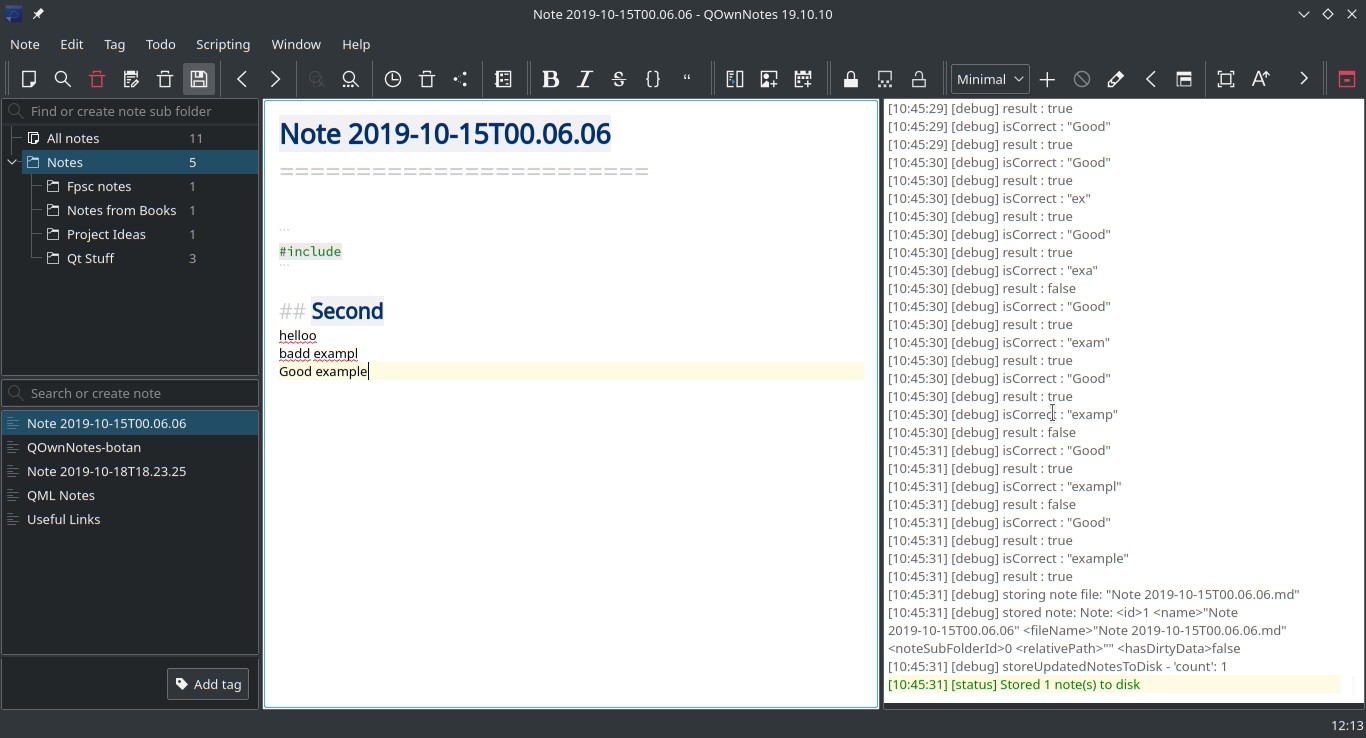
Waqar144
on 24 Oct 2019
Wow, this looks awesome! I wonder if it will build on all Linux distributions, Windows and macOS. :smile_cat:
I created a branch feature/sonnet-2019 for you.
pbek
on 24 Oct 2019
Let's find out.
I am creating the PR.
Waqar144
on 24 Oct 2019
And the builds all failed. :eyes:
https://travis-ci.org/pbek/QOwnNotes/builds/602182134?utm_source=github_status&utm_medium=notification
https://ci.appveyor.com/project/pbek/qownnotes/builds/28342237
pbek
on 24 Oct 2019
yes, That was quick.
../../src/libraries/sonnet/src/core/speller.h:36:25: error: variable ‘Sonnet::SONNETCORE_EXPORT Sonnet::Speller’ has initializer but incomplete type

 class SONNETCORE_EXPORT Speller
It's not recognizing SONNETCORE_EXPORT as a #define
It's building fine on my PC...
Sonnet_Export stuff removed. Another build started
Waqar144
on 24 Oct 2019
Linux build passed, mac will too in a while, small fix needed.
Windows I will have to look into a little more.
Waqar144
on 24 Oct 2019
Thank you so much :)
Perhaps you will be able to help with testing once the builds start coming out? 😁 Maybe you have windows or Mac? 🤔
I'm afraid I don't have a license for a windows VM at the moment, but I mainly use Mac for now.
Please point me to the build once ready.
artmg
on 24 Oct 2019
The macOS version doesn't seem to build yet.
https://travis-ci.org/pbek/QOwnNotes/jobs/602261037?utm_medium=notification&utm_source=github_status
pbek
on 24 Oct 2019
I'm afraid I don't have a license for a windows VM at the moment, but I mainly use Mac for now.
Please point me to the build once ready.
The macOS version doesn't seem to build yet.
Hopefully I will be able to fix the Mac build soon. It's almost there.
Windows has some crazy problems though.
Could not find qmake spec 'g++'.
Error processing project file: QOwnNotes.pro
@pbek the Mac build just went through!
Can you test it? To check if it's doing the spell checking? 😁
And maybe take out the artifacts so that @artmg can give it a go as well
Waqar144
on 24 Oct 2019
I just built it on Linux and macOS.
Linux qmake
Builds and shows the red underlines for words not in the dictionary. Great job! :tada:
Debug log:
Debug:  HunspellClient::HunspellClient
Debug:  SpellerPlugin *HunspellClient::createSpeller(const QString &language) ; "de_AT"
Debug: Loading dictionary for "de_AT" from "/usr/share/hunspell"
Debug: Load a user dictionary "/home/omega/.hunspell_de_AT"
Debug: Created  0x55b0385cc3b0
Debug: Using the "Hunspell" plugin for language "de_AT"
Linux cmake
Doesn't build. Lots of Warning: undefined reference to messages like:
QOwnNotes/src/helpers/qownnotesmarkdownhighlighter.cpp:147: Warning: undefined reference to»Sonnet::Speller::isMisspelled(QString const&) const«
collect2: error: ld returned 1 exit status
macOS qmake
Builds, but no red underlines are showing up.
At runtime I get some warnings:
Warning: No language dictionaries for the language: "de_AT" (../src/libraries/sonnet/src/core/loader.cpp:102, Sonnet::SpellerPlugin *Sonnet::Loader::createSpeller(const QString &, const QString &) const)
Warning: No language dictionaries for the language: "de_AT" (../src/libraries/sonnet/src/core/loader.cpp:102, Sonnet::SpellerPlugin *Sonnet::Loader::createSpeller(const QString &, const QString &) const)
Warning: No language dictionaries for the language: "de_AT" (../src/libraries/sonnet/src/core/loader.cpp:102, Sonnet::SpellerPlugin *Sonnet::Loader::createSpeller(const QString &, const QString &) const)
And maybe take out the artifacts so that @artmg can give it a go as well
I'm sorry, they are only stored for the development branch.
pbek
on 24 Oct 2019
Linux cmake
Doesn't build. Lots of
Warning: undefined reference tomessages like:
It isn't configured for CMake yet, so no surprises there. That's gonna be another journey lol
macOS qmake
Builds, but no red underlines are showing up.
At runtime I get some warnings:
`
Warning: No language dictionaries for the language: "de_AT" (../src/libraries/sonnet/src/core/loader.cpp:102, Sonnet::SpellerPlugin *Sonnet::Loader::createSpeller(const QString &, const QString &) const)
Warning: No language dictionaries for the language: "de_AT" (../src/libraries/sonnet/src/core/loader.cpp:102, Sonnet::SpellerPlugin *Sonnet::Loader::createSpeller(const QString &, const QString &) const)
Warning: No language dictionaries for the language: "de_AT" (../src/libraries/sonnet/src/core/loader.cpp:102, Sonnet::SpellerPlugin *Sonnet::Loader::createSpeller(const QString &, const QString &) const)
The warnings are because dictionaries aren't found.
The parser is only parsing English alphabets for now. That means no Umlauts and stuff. I will get to that part later once we have built successfully on all platforms.
Try checking with English language. It should work provided the dictionaries are installed.
Waqar144
on 24 Oct 2019
Also.
I think Windows 64 bit:
https://ci.appveyor.com/project/pbek/qownnotes/builds/28354396/job/dlf8bg42klic4u8r
this is not working for some reason.
It just says:
Could not find qmake spec 'g++'.
Error processing project file: QOwnNotes.pro
Any ideas?
Edit: The windows built went through!! :rocket: :fireworks:
Waqar144
on 24 Oct 2019
Any ideas?
yes, was some random AppVeyor error
>
Edit: The windows built went through!! rocket fireworks
wow! will test it now
pbek
on 24 Oct 2019
Windows build by AppVeyor
https://ci.appveyor.com/project/pbek/qownnotes/builds/28359913/job/v83jq1k4mcjfseqt/artifacts
It runs, but there are no red underlines. No warning or debug messages.
pbek
on 24 Oct 2019
Windows build by AppVeyor
https://ci.appveyor.com/project/pbek/qownnotes/builds/28359913/job/v83jq1k4mcjfseqt/artifacts
It runs, but there are no red underlines. No warning or debug messages.
Does it say anything like Hunspell loaded or dictionary missing?🤔
Waqar144
on 24 Oct 2019
Does it say anything like Hunspell loaded or dictionary missing?🤔
Strangely not anything about hunspell or sonnet.
pbek
on 25 Oct 2019
Try checking with English language.
QOwnNotes is switched to English, but my system language isn't is there any way to "force" using English.
It should work provided the dictionaries are installed.
How can they be installed on macOS?
Crash on exit on macOS
When exiting QOwnNotes there is a crash on macOS.
Edit: I fixed the crash.
Thread 0 Crashed:: Dispatch queue: com.apple.main-thread
0   org.qt-project.QtCore           0x00000001084b759a QObject::property(char const*) const + 26
1   pbe.QOwnNotes                   0x000000010610ef87 MainWindow::instance() + 39 (mainwindow.cpp:925)
2   pbe.QOwnNotes                   0x000000010630dd37 LogWidget::logMessageOutput(QtMsgType, QMessageLogContext const&, QString const&) + 679 (logwidget.cpp:355)
3   org.qt-project.QtCore           0x00000001082b8feb qt_message_print(QtMsgType, QMessageLogContext const&, QString const&) + 187
4   org.qt-project.QtCore           0x00000001082b8f0d qt_message_output(QtMsgType, QMessageLogContext const&, QString const&) + 13
5   org.qt-project.QtCore           0x00000001083b8491 QDebug::~QDebug() + 97
6   pbe.QOwnNotes                   0x00000001064c9bff Sonnet::Loader::~Loader() + 271 (loader.cpp:85)
7   pbe.QOwnNotes                   0x00000001064c9da5 Sonnet::Loader::~Loader() + 21 (loader.cpp:89)
8   pbe.QOwnNotes                   0x00000001064c9dc9 Sonnet::Loader::~Loader() + 25 (loader.cpp:84)
9   pbe.QOwnNotes                   0x00000001064cc49e Sonnet::(anonymous namespace)::Q_QGS_s_loader::innerFunction()::Cleanup::~Cleanup() + 46
10  pbe.QOwnNotes                   0x00000001064cc335 Sonnet::(anonymous namespace)::Q_QGS_s_loader::innerFunction()::Cleanup::~Cleanup() + 21 (loader.cpp:64)
11  libsystem_c.dylib               0x00007fff5b2223cf __cxa_finalize_ranges + 319
12  libsystem_c.dylib               0x00007fff5b2226b3 exit + 55
13  libdyld.dylib                   0x00007fff5b17c3dc start + 8
Try checking with English language.
QOwnNotes is switched to English, but my system language isn't is there any way to "force" using English.
I mean the parsing is only done for english words.
How can they be installed on macOS?
On mac the backend is not hunspell but the native spellchecker. So native dictionaries that come with mac. (If spell checking is working in other native mac applications, it should work here)
Edit: I fixed the crash.
Great!
I enabled some more Debug options. It will log all, "Available langs", "backends", "Available dicts"
Waqar144
on 25 Oct 2019
On mac the backend is not hunspell but the native spellchecker. So native dictionaries that come with mac. (If spell checking is working in other native mac applications, it should work here)
I switched the macOS system language to English, still no red underlines, but these warnings:
Warning: No language dictionaries for the language: "en_AT" (../src/libraries/sonnet/src/core/loader.cpp:102, Sonnet::SpellerPlugin *Sonnet::Loader::createSpeller(const QString &, const QString &) const)
Warning: No language dictionaries for the language: "en_AT" (../src/libraries/sonnet/src/core/loader.cpp:102, Sonnet::SpellerPlugin *Sonnet::Loader::createSpeller(const QString &, const QString &) const)
Warning: No language dictionaries for the language: "en_AT" (../src/libraries/sonnet/src/core/loader.cpp:102, Sonnet::SpellerPlugin *Sonnet::Loader::createSpeller(const QString &, const QString &) const)
On mac the backend is not hunspell but the native spellchecker. So native dictionaries that come with mac. (If spell checking is working in other native mac applications, it should work here)
I switched the macOS system language to
English, still no red underlines, but these warnings:
Everything seems to be working.
But maybe the NSSpellchecker has some problems :/
Can you check if there are any dictionaries installed at: ~/Library/Spelling or System/Library/Spelling?
More can be found here:
German
https://cgit.freedesktop.org/libreoffice/dictionaries/tree/de
English
https://cgit.freedesktop.org/libreoffice/dictionaries/tree/en
Waqar144
on 25 Oct 2019
Got my hands on a windows laptop and immediately tested the latest build from AppVeyor:
Here's what it's looking like:

There was no debug info so unfortunately i can't say exactly why it's marking all the correct words as misspelled BUT I think it's because it's unable to match the words to the correct dictionary and hence everything was marked wrong.
Waqar144
on 25 Oct 2019
There was no debug info
you can turn on a log file in the Debug-options Settings
My Windows System is turned to English (US), but I can see no red lines with the latest build from https://ci.appveyor.com/project/pbek/qownnotes/builds/28375855/job/p2q38ce322ypmbg0/artifacts
There are tons of:
[Okt 25 13:54:34] [debug]: [Sonnet]Available Langs:  ()
[Okt 25 13:54:34] [debug]: [Sonnet]Available Backend:  ("Hunspell")
[Okt 25 13:54:34] [debug]: [Sonnet]Available Dicts:  QMap()
[Okt 25 13:54:34] [debug]: [Sonnet]Available Lang names:  ()
[Okt 25 13:54:34] [debug]: [Sonnet]Available Langs:  ()
[Okt 25 13:54:34] [debug]: [Sonnet]Available Backend:  ("Hunspell")
[Okt 25 13:54:34] [debug]: [Sonnet]Available Dicts:  QMap()
[Okt 25 13:54:34] [debug]: [Sonnet]Available Lang names:  ()
and once a
[Okt 25 13:55:19] [warning]: No language dictionaries for the language: "de_AT"
When setting QON to English the message didn't appear again, but still no red lines.
pbek
on 25 Oct 2019
As you can see there are no dictionaries.
Can you please create a 'dicts' folder in QON folder and put some dictionaries inside it, and then try?
Waqar144
on 25 Oct 2019
Yes, after I downloaded some dictionaries I got
[14:06:57] [debug] [Sonnet]Available Langs: ("de_AT_frami", "en_GB", "en_US")
[14:06:57] [debug] [Sonnet]Available Backend: ("Hunspell")
[14:06:57] [debug] [Sonnet]Available Dicts: QMap(("American English (United States)", "en_US")("British English (United Kingdom)", "en_GB")("Österreichisches Deutsch (Österreich)", "de_AT_frami"))
[14:06:57] [debug] [Sonnet]Available Lang names: ("Österreichisches Deutsch (Österreich)", "British English (United Kingdom)", "American English (United States)")
but still no red lines
pbek
on 25 Oct 2019
One thing worth mentioning is that viewing notes with several pages now takes several seconds, before highlighting was done instantly.
pbek
on 25 Oct 2019
Maybe it's confusing American / British English? 🤔 I doubt it though
Waqar144
on 25 Oct 2019
One thing worth mentioning is that viewing notes with several pages now takes several seconds, before highlighting was done instantly.
I will look into this, I think it's cause it's checking every word again and again for misspelling
Waqar144
on 25 Oct 2019
Are there any red lines appearing in the Mac build now?
Waqar144
on 25 Oct 2019
Also highlighting of markdown seems to be broken in some places.
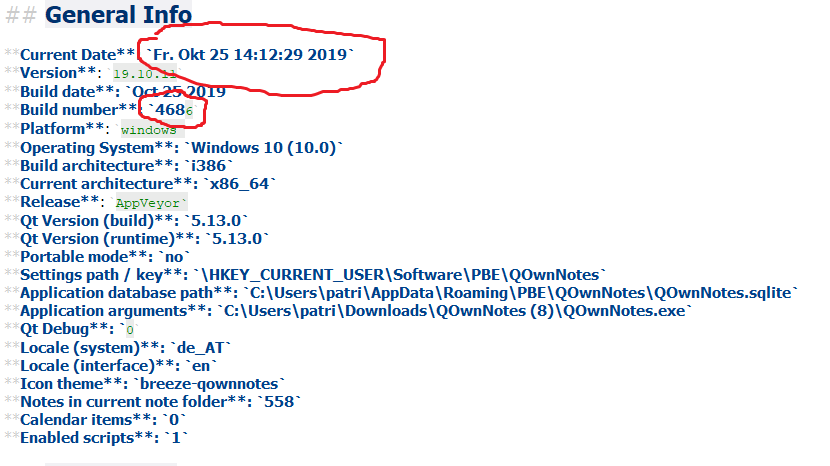
pbek
on 25 Oct 2019
Also highlighting of markdown seems to be broken in many places.
![image]
I will look into it. It's because of the spell check parsing i am sure.
Once we get past all the build/spell checker detection issues I am going to work on a proper parser so that we don't face such issues.
Waqar144
on 25 Oct 2019
Update:
Retried the windows build with dictionaries from the above mentioned link and it's working beautifully!
Only mac remains now!
Waqar144
on 25 Oct 2019
Just finished implementing the parser. It's now detecting multiple languages within the same textedit!
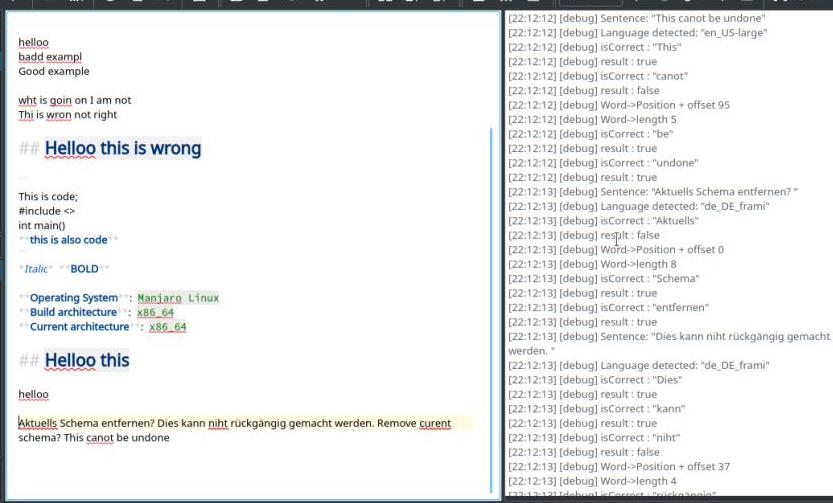
Highlighting is broken in some places so, i will be fixing that next.
Update: Fixed code highlighting, I think.
Waqar144
on 25 Oct 2019
macOS
Under macOS (built myself) I now see some red underlines (but they don't make a lot of sense to me yet). I didn't have to add dictionaries to ~/Library/Spelling. /System/Library/Spellingdid not exist.
I get log messages like:
Warning: No language dictionaries for the language: "en_AT" (../src/libraries/sonnet/src/core/loader.cpp:102, Sonnet::SpellerPlugin *Sonnet::Loader::createSpeller(const QString &, const QString &) const)
Debug: Unhandled script 132
Debug: Unhandled script 133
Debug: Unhandled script 134
Debug: Unhandled script 135
Debug: Unhandled script 136
Debug: Unhandled script 137
Debug: Unhandled script 138
Debug: Unhandled script 139
Debug: Unhandled script 140
Debug: Unhandled script 141
Warning: Unable to handle language from dictionary "ko" "ko_KR" (../src/libraries/sonnet/src/core/guesslanguage.cpp:564, Sonnet::GuessLanguagePrivate::GuessLanguagePrivate())
Warning: No language dictionaries for the language: "en_AT" (../src/libraries/sonnet/src/core/loader.cpp:102, Sonnet::SpellerPlugin *Sonnet::Loader::createSpeller(const QString &, const QString &) const)
Debug: [Sonnet]Available Langs:  ("da", "de", "en", "en_AU", "en_CA", "en_GB", "en_IN", "en_JP", "en_SG", "es", "fi", "fr", "it", "ko", "nb", "nl", "pl", "pt_BR", "pt_PT", "ru", "sv", "tr")
Debug: [Sonnet]Available Backend:  ("NSSpellChecker")
Debug: [Sonnet]Available Dicts:  QMap(("American English (United States)", "en_JP")("Australian English (Australia)", "en_AU")("British English (United Kingdom)", "en_GB")("Canadian English (Canada)", "en_CA")("Deutsch (Deutschland)", "de")("English (India)", "en_IN")("English (Singapore)", "en_SG")("Nederlands (Nederland)", "nl")("Türkçe (Türkiye)", "tr")("dansk (Danmark)", "da")("español de España (España)", "es")("français (France)", "fr")("italiano (Italia)", "it")("norsk bokmål (Norge)", "nb")("polski (Polska)", "pl")("português (Brasil)", "pt_BR")("português europeu (Portugal)", "pt_PT")("suomi (Suomi)", "fi")("svenska (Sverige)", "sv")("русский (Россия)", "ru")("한국어 (대한민국)", "ko"))
Debug: [Sonnet]Available Lang names:  ("dansk (Danmark)", "Deutsch (Deutschland)", "American English (United States)", "Australian English (Australia)", "Canadian English (Canada)", "British English (United Kingdom)", "English (India)", "American English (United States)", "English (Singapore)", "español de España (España)", "suomi (Suomi)", "français (France)", "italiano (Italia)", "한국어 (대한민국)", "norsk bokmål (Norge)", "Nederlands (Nederland)", "polski (Polska)", "português (Brasil)", "português europeu (Portugal)", "русский (Россия)", "svenska (Sverige)", "Türkçe (Türkiye)")
Warning: No language dictionaries for the language: "en_AT" (../src/libraries/sonnet/src/core/loader.cpp:102, Sonnet::SpellerPlugin *Sonnet::Loader::createSpeller(const QString &, const QString &) const)
Warning: No language dictionaries for the language: "en_AT" (../src/libraries/sonnet/src/core/loader.cpp:102, Sonnet::SpellerPlugin *Sonnet::Loader::createSpeller(const QString &, const QString &) const)
and
Debug: Loading trigrams from "/Users/omega/Code/QOwnNotes/build-QOwnNotes-Desktop_Qt_5_13_0_clang_64bit-Debug/QOwnNotes.app/Contents/MacOS/trigrams.map"
Warning: Sonnet: Unable to load trigram models from file "/Users/omega/Code/QOwnNotes/build-QOwnNotes-Desktop_Qt_5_13_0_clang_64bit-Debug/QOwnNotes.app/Contents/MacOS/trigrams.map" (../src/libraries/sonnet/src/core/guesslanguage.cpp:663, void Sonnet::GuessLanguagePrivate::loadModels())
Debug: Loading trigrams from "/Users/omega/Code/QOwnNotes/build-QOwnNotes-Desktop_Qt_5_13_0_clang_64bit-Debug/QOwnNotes.app/Contents/MacOS/trigrams.map"
Warning: Sonnet: Unable to load trigram models from file "/Users/omega/Code/QOwnNotes/build-QOwnNotes-Desktop_Qt_5_13_0_clang_64bit-Debug/QOwnNotes.app/Contents/MacOS/trigrams.map" (../src/libraries/sonnet/src/core/guesslanguage.cpp:663, void Sonnet::GuessLanguagePrivate::loadModels())
The red lines are wrong because the trimap file wasn't found. Sonnet uses this file to guess the language.
The file is located here:
https://github.com/pbek/QOwnNotes/blob/feature/sonnet-2019/src/libraries/sonnet/src/core/trigrams.map
In Sonnet-core.pri, there is a small function that copies this file to the build dir.
So on my Linux pc, it goes to /build-QOwnNotes-Desktop-Debug
And then in
https://github.com/pbek/QOwnNotes/blob/5a36767ff59cd628fc9f568c7d727954bb9cf576/src/libraries/sonnet/src/core/guesslanguage.cpp#L657-L658
I load this file from the app directory(wherever the executable is)
And apparently on mac, build dir and app dir are different things I guess so it failed to load the file. Any suggestions? :thinking:
For now, if you just copy the file over to
/Users/omega/Code/QOwnNotes/build-QOwnNotes-Desktop_Qt_5_13_0_clang_64bit-Debug/QOwnNotes.app/Contents/MacOS/
It should work
Oh and btw, the suggestion menu implementation is complete as well. It's working quite nicely
Waqar144
on 26 Oct 2019
In Sonnet-core.pri, there is a small function that copies this file to the build dir.
So on my Linux pc, it goes to /build-QOwnNotes-Desktop-Debug
I guess usually one would use a resource file to bundle files, like I do it for the note files that are put into the initial note folder.
https://github.com/pbek/QOwnNotes/blob/8ecd594a618c57d3f871e7c8cfebd5c2999fac3c/src/demonotes.qrc
pbek
on 27 Oct 2019
For now, if you just copy the file over to
Did that, worked great! Detected a German note.
Only got this warning this time:
08:05:40] [warning] Missing trigrams for languages: QSet("en_CA", "en_IN", "en_SG", "en_GB", "en_AU")
I'm not sure why the copy code didn't work for macOS.
pbek
on 27 Oct 2019
I guess usually one would use a resource file to bundle files, like I do it for the note files that are put into the initial note folder.
https://github.com/pbek/QOwnNotes/blob/8ecd594a618c57d3f871e7c8cfebd5c2999fac3c/src/demonotes.qrc
Eeeh.. Not sure why I didn't do that in the first place :thinking: :monkey:
Did that, worked great! Detected a German note.
Only got this warning this time:08:05:40] [warning] Missing trigrams for languages: QSet("en_CA", "en_IN", "en_SG", "en_GB", "en_AU")That's great!!
Unfortunately trigrams for these languages aren't yet available in Sonnet. But they are all English language so it would work nonetheless, I think.
I'm not sure why the copy code didn't work for macOS.
Maybe $$OUT_PWD and QApplicationDir are different in MacOS
Anyways, removed it and moved trigrams.map to resources
Waqar144
on 27 Oct 2019
I'm really impressed by the the current state of the spellchecker! I just tested under Manjaro.
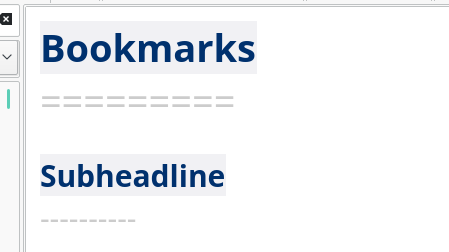
Only one thing I saw was that headline highlighting seems to be a bit wonky.
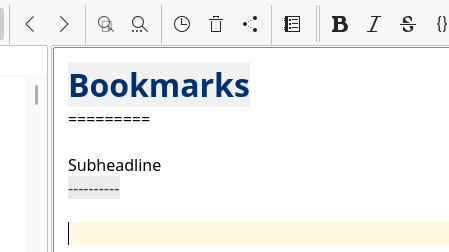
should look more like:
pbek
on 27 Oct 2019
I'm really impressed by the the current state of the spellchecker! I just tested under Manjaro.
Ah! Thanks. :raised_hands:
Language options were particularly important. AutoDetect on big documents is going to be slow, but if a language is chosen by the user things will be relatively faster.
PS: This is all being done on Manjaro the great, on my side :wink:
Only one thing I saw was that headline highlighting seems to be a bit wonky.
Fixed.
Tried to find other highlighting issues but everything seems good to me. If you find any more do let me know.
Once we have ironed out all these things, I plan on
- starting to remove all the unnecessary stuff from the Sonnet library
- and perhaps make Hunspell library a git submodule? We don't want such a huge amount of code sitting in our tree.
Waqar144
on 28 Oct 2019
starting to remove all the unnecessary stuff from the Sonnet library
sounds great
and perhaps make Hunspell library a git submodule? We don't want such a huge amount of code sitting in our tree.
surely a good idea
btw. we also need cmake support (I didn't check if it already works)
pbek
on 28 Oct 2019
btw. we also need cmake support (I didn't check if it already works)
Yes, that one's gonna be a pain.
Lets try and finish this all today!
Waqar144
on 28 Oct 2019
Strange, on macOS I currently get a lot of Warning: No language dictionaries for the language: "en_AT" (../src/libraries/sonnet/src/core/loader.cpp:102, Sonnet::SpellerPlugin *Sonnet::Loader::createSpeller(const QString &, const QString &) const) and Debug: [Sonnet]Spellchercher invalid! and no spell checking lines.
If I switch the spell checking to a distinct language the spellchecker works.
pbek
on 28 Oct 2019
Strange, on macOS I currently get a lot of
Warning: No language dictionaries for the language: "en_AT" (../src/libraries/sonnet/src/core/loader.cpp:102, Sonnet::SpellerPlugin *Sonnet::Loader::createSpeller(const QString &, const QString &) const)andDebug: [Sonnet]Spellchercher invalid!and no spell checking lines.If I switch the spell checking to a distinct language the spellchecker works.
Was it working before the last pull request? (Previously it was just auto detect)
Waqar144
on 28 Oct 2019
Was it working before the last pull request? (Previously it was just auto detect)
I'm not sure...
But I found out that if you don't have the setting checkSpelling yet it shows that you aren't using spell checking in the main menu, but the spell checker is activated in the note edit. I fixed that now.
pbek
on 28 Oct 2019
And it seems you need to restart the application if you change the language of the spellchecker, otherwise the spell checking isn't changed.
pbek
on 28 Oct 2019
Warning: No language dictionaries for the language: "en_AT"
Can you open Menu->Edit->Languages and check if there's an English (Austrian) option?
Waqar144
on 28 Oct 2019
And it seems you need to restart the application if you change the language of the spellchecker, otherwise the spell checking isn't changed.
Really?... On mac or linux?
I just tried it again to confirm, spellcheck highlighting changes immediately on language change.
If it's Mac, maybe this is happening because of NSSpellChecker? On Linux and windows the backend is different i.e., hunspell
Waqar144
on 28 Oct 2019
Can you open Menu->Edit->Languages and check if there's an English (Austrian) option?
No such language there.
Really?... On mac or linux?
I just tried it again to confirm, spellcheck highlighting changes immediately on language change.
Yesterday I tried Linux.
With the latest pull request on macOS (built now) it often seems to work instantly. But not always. Seems to be different on every restart. But most of the time "Automatic" works just fine.
pbek
on 29 Oct 2019
No such language there.
Yes, that's what I was wondering too. It shouldn't have been there for sonnet. Seems like for some reason it was the default language.
Yesterday I tried Linux.
Is it working good on linux?
With the latest pull request on macOS (built now) it often seems to work instantly. But not always. Seems to be different on every restart. But most of the time "Automatic" works just fine.
That's good news.
Does it still say Sonnet: Spellchecker invalid in debug?
Automatic is a good option, but it's going to effect the performance a lot more than choosing a specific language.
Waqar144
on 29 Oct 2019
Is it working good on linux?
Good enough for a first release. Will need to use it daily to see how it feels.
Does it still say Sonnet: Spellchecker invalid in debug?
Will need to check when I've access to my MacBook again.
cmake support
Great! I'll test it when I have access to my main development rig.
pbek
on 29 Oct 2019
I wanted to write some installation description for the spellchecker.
- under Linux you need to install the Hunspell dictionaries for your language
- under Windows you need to copy Hunspell dictionaries for your language to a folder
dictsin your QOwnNotes application folder
- you can download dictionaries from LibreOffice dictionaries
- under macOS the native spellchecker will be used
Is this information correct? You you know a better source for downloading dictionaries for Windows? I couldn't find any...
pbek
on 29 Oct 2019
I wanted to write some installation description for the spellchecker.
* under **Linux** you need to install the Hunspell dictionaries for your language
* under **Windows** you need to copy Hunspell dictionaries for your language to a folder `dicts` in your QOwnNotes application folder
- also in
C:\Users\[username]\dicts
  * you can download dictionaries from [LibreOffice dictionaries](https://github.com/LibreOffice/dictionaries)

* under **macOS** the native spellchecker will be used
- You can install more dictionaries from LibreOffice dictionaries and copy them to
~Library/Spelling. If the directory doesn't exist, create it.
Is this information correct? You you know a better source for downloading dictionaries for Windows? I couldn't find any...
Dictionary files are same for all platforms *.dic / *.aff
So the same link can be used for all platforms.
- Note: Dictionary files are
*.dicor*.afffiles
Additional places to get more dictionaries:
Ready for release :rocket: :rocket: :fireworks: :champagne: lol
Waqar144
on 29 Oct 2019
OpenOffice Dictionaries
only has extensions for OpenOffice, I don't know how to extract the dictionary files
LibreOffice Dictionaries
only has extensions for LibreOffice, I don't know how to extract the dictionary files
Libreoffice freedesktop dictionaries repo
https://github.com/LibreOffice/dictionaries seems to be the mirror, so I used the github repo because it looks nicer
pbek
on 29 Oct 2019
New text:
- under Linux you need to install the Hunspell dictionaries for your language
- under Windows you need to copy Hunspell dictionaries for your language to a folder
dictsin your QOwnNotes application folder or inC:\Users\[username]\dicts
- you can download dictionaries from LibreOffice dictionaries
under macOS the native spellchecker will be used
- you can download more dictionaries from LibreOffice dictionaries and copy them to
~/Library/Spelling, if the directory doesn't exist you need to create it
- you can download more dictionaries from LibreOffice dictionaries and copy them to
dictionary files are
*.dicor*.afffiles
pbek
on 29 Oct 2019
OpenOffice Dictionaries
only has extensions for OpenOffice, I don't know how to extract the dictionary files
oh, yes. They are just zip files so you can decompress them and get the dic file. I just tried it, it's a bit complicated and the average user won't be able to do this on their own. Better skip these links
And this is same as the github repo
So, all seems good.
Will the user be able to find dictionaries using language code for e.g en?
Waqar144
on 29 Oct 2019
Will the user be able to find dictionaries using language code for e.g en?
I almost doubt that, but I don't know if we want to start bundling dictionaries...
pbek
on 29 Oct 2019
Will the user be able to find dictionaries using language code for e.g en?
I almost doubt that, but I don't know if we want to start bundling dictionaries...
We can just make a table of Language | Language Code. Using that they will be able to find dictionaries easily.
Or just make a list with direct links to raw dictionary files for each language. Cause even if you open the file, you still need to click "Raw File" and then Click "Save Page as.."
Waqar144
on 29 Oct 2019
We can just make a table of Language | Language Code. Using that they will be able to find dictionaries easily.
That's a great idea, I guess http://docs.qownnotes.org/ could be a place for that.
You could create a spellchecking.rst file in https://github.com/pbek/QOwnNotes/tree/feature/sonnet-2019/doc.
pbek
on 29 Oct 2019
cmake support
Didn't detect spellings for me under KDE Neon, but I don't care now a lot as long as it builds. Good job on that!
pbek
on 29 Oct 2019
Let's release it and see how it goes! :tada:
19.10.12
- there now is a spellchecker integrated into QOwnNotes
(for #125, a big thank you to @Waqar144)
- Sonnet with Hunspell is used for spellchecking
- under Linux you need to install the Hunspell dictionaries for your language
- under Windows you need to copy Hunspell dictionaries for your language
to a folderdictsin your QOwnNotes application folder or inC:\Users\[username]\dicts
- you can download dictionaries from LibreOffice dictionaries
- under macOS the native spellchecker will be used
- you can download more dictionaries from LibreOffice dictionaries
and copy them to~/Library/Spelling, if the directory doesn't exist
you need to create it
- you can download more dictionaries from LibreOffice dictionaries
- dictionary files are
*.dicor*.afffiles, visit
QOwnNotes Spellchecking
for more information
pbek
on 29 Oct 2019
There now is a new release, could you please test it and report if it works for you?
pbek
on 29 Oct 2019
https://build.opensuse.org/package/show/home:pbek:QOwnNotes/desktop will be thrilling. :smile:
pbek
on 29 Oct 2019
And it has begun, builds on https://build.opensuse.org/package/show/home:pbek:QOwnNotes/desktop are already failing. :disappointed:
pbek
on 29 Oct 2019
Qt <= 5.3 on those systems I guess.
Easy to fix.
I will send in the patch soon.
Github not working properly due to some big internet issue. 💁♂️
On Tue, Oct 29, 2019, 10:54 PM Patrizio Bekerle notifications@github.com
wrote:
And it has begun, builds on
https://build.opensuse.org/package/show/home:pbek:QOwnNotes/desktop are
already failing. 😞—
You are receiving this because you were mentioned.
Reply to this email directly, view it on GitHub
https://github.com/pbek/QOwnNotes/issues/125?email_source=notifications&email_token=AB2W5GEPV7AOLEJAFVS6RVDQRB2FFA5CNFSM4B7NMCD2YY3PNVWWK3TUL52HS4DFVREXG43VMVBW63LNMVXHJKTDN5WW2ZLOORPWSZGOECRPPKQ#issuecomment-547551146,
or unsubscribe
https://github.com/notifications/unsubscribe-auth/AB2W5GFICYTA3ZSUD3POP33QRB2FFANCNFSM4B7NMCDQ
.
Waqar144
on 29 Oct 2019
Works a treat for me with zero configuration on Ubuntu 19.10 with the Unity 7.5 desktop - thanks :D
 sbrl
on 29 Oct 2019
sbrl
on 29 Oct 2019
After a fresh install via ppa:pbek/qownnotes and quick test drive, it
works on KDE neon User Edition 5.17 x86_6 (Ubuntu 18.04 LTS core)
Kernel: 5.0.0-32-generic.
If needed I can apt purge and test the Snap and Flatpak, but not until
tomorrow.
On 10/29/19 1:17 PM, Patrizio Bekerle wrote:
>
Let's release it and see how it goes! 🎉
19.10.12
- there now is a spellchecker integrated into QOwnNotes
(for #125 https://github.com/pbek/QOwnNotes/issues/125, a big
thank you to @Waqar144 https://github.com/Waqar144)
o Sonnet https://github.com/KDE/sonnet with Hunspell
https://hunspell.github.io/ is used for spellchecking
o under Linux you need to install the Hunspell dictionaries
for your language
o under Windows you need to copy Hunspell dictionaries for
your language
to a folder |dicts| in your QOwnNotes application folder or in
|C:\Users[username]dicts|
+ you can download dictionaries from LibreOffice
dictionaries https://github.com/LibreOffice/dictionaries
o under macOS the native spellchecker will be used
+ you can download more dictionaries from LibreOffice
dictionaries https://github.com/LibreOffice/dictionaries
and copy them to |~/Library/Spelling|, if the directory
doesn't exist
you need to create it
o dictionary files are |.dic| or |.aff| files, visit
QOwnNotes Spellchecking
http://docs.qownnotes.org/en/develop/spellchecking.html
for more information—
You are receiving this because you commented.
Reply to this email directly, view it on GitHub
https://github.com/pbek/QOwnNotes/issues/125?email_source=notifications&email_token=AAYUPGHWBB2G6J2YNNK5WYLQRBV3HA5CNFSM4B7NMCD2YY3PNVWWK3TUL52HS4DFVREXG43VMVBW63LNMVXHJKTDN5WW2ZLOORPWSZGOECRLNZQ#issuecomment-547534566,
or unsubscribe
https://github.com/notifications/unsubscribe-auth/AAYUPGBMVPUO4NIE4FLR3N3QRBV3HANCNFSM4B7NMCDQ.
vcg3rd
on 29 Oct 2019
It is working like a charm after update in Manjaro linux (OQwnnotes repository) with automatic language recognition and defined language.Absence of spellchecker was the most annoying problem in QOwnnotes usage and now it is gone.
Thank you, Waqar and Patrizio so much!!!
maras
on 29 Oct 2019
cmake support
Didn't detect spellings for me under KDE Neon, but I don't care now a lot as long as it builds. Good job on that!
It should,🤔
I will take a look it again
And it has begun, builds on https://build.opensuse.org/package/show/home:pbek:QOwnNotes/desktop are already failing. 😞
Fixed now hopefully.
@sbrl @vcg3rd @maras
Thank you everyone for testing and giving feedback!
Waqar144
on 30 Oct 2019
Great work by @Waqar144! Thank you everybody.
On macOS switching to my QOwnNotes Todo note (643 lines) still takes about 10sec with automatic spellchecking turned on (only a bit faster if I set it to a distinct language).
[06:32:17] [debug] on_noteTreeWidget_currentItemChanged
[06:32:17] [debug] setCurrentNote - 'note': Note: <id>1 <name>"QOwnNotes Todo" <fileName>"QOwnNotes Todo.md" <noteSubFolderId>0 <relativePath>"" <hasDirtyData>false - 'updateNoteText': true - 'updateSelectedNote': false
[06:32:17] [debug] Unable to identify string with dictionaries: "\t- <https://download.tuxfamily.org/qownnotes/src/qownnotes-18.03.1.1.tar.xz>"
[06:32:17] [debug] Unable to identify string with dictionaries: "\t\t- <https://download.tuxfamily.org/qownnotes/src>"
[06:32:17] [debug] Unable to identify string with dictionaries: "\t- <http://downloads.sourceforge.net/project/qownnotes/src/qownnotes-18.02.5.tar.xz>"
[06:32:17] [debug] No scores for "- Snap"
[06:32:17] [debug] Unable to identify string with dictionaries: "\t\t- <https://git.launchpad.net/~pbek/qownnotes-snap/tree/snapcraft.yaml>"
[06:32:19] [debug] Unable to identify string with dictionaries: ">"
[06:32:19] [debug] Unable to identify string with dictionaries: "- <https://github.com/pbek/QOwnNotes/issues/1328>"
[06:32:19] [debug] Unable to identify string with dictionaries: "- <https://github.com/pbek/QOwnNotes/issues/125>"
[06:32:19] [debug] Unable to identify string with dictionaries: "- <https://github.com/pbek/QOwnNotes/issues/790>"
[06:32:19] [debug] Unable to identify string with dictionaries: "\t- <https://github.com/pbek/QOwnNotes/issues/303>"
[06:32:20] [debug] Unable to identify string with dictionaries: "- <https://github.com/pbek/QOwnNotes/issues/1308#issuecomment-545576307>"
[06:32:20] [debug] Unable to identify string with dictionaries: "- <https://github.com/pbek/QOwnNotes/issues/1306>"
[06:32:20] [debug] Unable to identify string with dictionaries: "- <https://github.com/pbek/QOwnNotes/issues/672>"
[06:32:20] [debug] Unable to identify string with dictionaries: "- <https://github.com/pbek/QOwnNotes/issues/1256>"
[06:32:20] [debug] Unable to identify string with dictionaries: "- <https://github.com/pbek/QOwnNotes/issues/1269>"
[06:32:20] [debug] Unable to identify string with dictionaries: "- <https://github.com/pbek/QOwnNotes/issues/1261>"
[06:32:20] [debug] Unable to identify string with dictionaries: "- <http://docs.qownnotes.org/en/develop/scripting/README.html#storing-and-loading-persistent-variables>"
[06:32:21] [debug] Unable to identify string with dictionaries: "- <https://github.com/pbek/QOwnNotes/wiki>"
[06:32:21] [debug] Unable to identify string with dictionaries: "- <https://github.com/pbek/QOwnNotes/issues/783#issuecomment-362835924>"
[06:32:21] [debug] Unable to identify string with dictionaries: "- <https://github.com/telegramdesktop/tdesktop/blob/dev/snap/snapcraft.yaml>"
[06:32:21] [debug] Unable to identify string with dictionaries: "- <https://github.com/pbek/QOwnNotes/issues/1231>"
[06:32:21] [debug] No scores for "- Qt5"
[06:32:22] [debug] Unable to identify string with dictionaries: "2., "
[06:32:22] [debug] Unable to identify string with dictionaries: "\t- <https://stackoverflow.com/questions/8596688/add-a-keyboard-shortcut-to-firefox-extension>"
[06:32:22] [debug] No scores for "hl=de>"
[06:32:22] [debug] Unable to identify string with dictionaries: "- <https://github.com/pbek/QOwnNotes/issues/1129>"
[06:32:22] [debug] Unable to identify string with dictionaries: "- <https://build.opensuse.org/package/binaries/home:pbek:QOwnNotes/desktop/Raspbian_9.0>"
[06:32:22] [debug] Unable to identify string with dictionaries: "- <https://github.com/pbek/QOwnNotes/issues/1120>"
[06:32:23] [debug] Unable to identify string with dictionaries: "- <https://developer.chrome.com/extensions/samples>"
[06:32:23] [debug] Unable to identify string with dictionaries: "- <https://stackoverflow.com/questions/34170032/how-to-get-selected-text-in-chrome-extension-development>"
[06:32:23] [debug] Unable to identify string with dictionaries: "\t- bitrix"
[06:32:23] [debug] Unable to identify string with dictionaries: "\t- <https://ci.appveyor.com/project/pbek/qownnotes/builds/21331622/job/y1l1h8ac9bj7sd9p>"
[06:32:23] [debug] No scores for "\t\t- [(QTBUG-"
[06:32:23] [debug] Unable to identify string with dictionaries: "43614)"
[06:32:24] [debug] Unable to identify string with dictionaries: "- <https://github.com/pbek/QOwnNotes/issues/1136>"
[06:32:24] [debug] Unable to identify string with dictionaries: "- <https://github.com/pbek/QOwnNotes/blob/6b69322de45c38cdfd0ff7d4d260689b9f25af3f/src/dialogs/linkdialog.cpp#L197-L216>"
[06:32:24] [debug] Unable to identify string with dictionaries: "- <https://github.com/pbek/QOwnNotes/issues/327>"
[06:32:24] [debug] Unable to identify string with dictionaries: "https://stackoverflow.com/questions/20293838/qml-list-all-object-members-properties-in-console#22851226"
[06:32:24] [debug] Unable to identify string with dictionaries: "## on_actionImport_notes_from_text_files_triggered"
[06:32:24] [debug] Unable to identify string with dictionaries: "- <https://github.com/pbek/QOwnNotes/issues/1021>"
[06:32:24] [debug] Unable to identify string with dictionaries: "- <https://github.com/pbek/QOwnNotes/pull/1016>"
[06:32:24] [debug] Unable to identify string with dictionaries: "- <https://github.com/pbek/QOwnNotes/blob/develop/icons/other/QOwnNotes.svg>"
[06:32:24] [debug] Unable to identify string with dictionaries: "- <http://doc.qt.io/qt-5/qurl.html#fromLocalFile>"
[06:32:24] [debug] Unable to identify string with dictionaries: "- <https://github.com/pbek/QOwnNotes/issues/994>"
[06:32:25] [debug] Unable to identify string with dictionaries: "- <https://github.com/appveyor/ci/issues/2502>"
[06:32:25] [debug] Unable to identify string with dictionaries: "`"
[06:32:25] [debug] Unable to identify string with dictionaries: "- <https://github.com/pbek/QOwnNotes/issues/929>"
[06:32:25] [debug] Unable to identify string with dictionaries: "- <https://github.com/pbek/QOwnNotes/issues/674#issuecomment-370593032>"
[06:32:25] [debug] Unable to identify string with dictionaries: "- <https://github.com/pbek/QOwnNotes/issues/824#issuecomment-355751999>"
[06:32:26] [debug] No scores for "- Qt 5.9.2"
[06:32:26] [debug] Unable to identify string with dictionaries: "- <https://github.com/pbek/QOwnNotes/issues/783>"
[06:32:26] [debug] Unable to identify string with dictionaries: "- <https://github.com/pbek/QOwnNotes/blob/develop/src/html/about.html>"
[06:32:26] [debug] Unable to identify string with dictionaries: "- <https://github.com/pbek/QOwnNotes/issues/530>"
[06:32:26] [debug] Unable to identify string with dictionaries: "- <https://github.com/keeweb/keeweb-site>"
[06:32:26] [debug] Unable to identify string with dictionaries: "- <https://github.com/pbek/QOwnNotes/issues/125>"
[06:32:26] [debug] Unable to identify string with dictionaries: "- <http://wereturtle.github.io/ghostwriter/>"
[06:32:26] [debug] Unable to identify string with dictionaries: "- <https://github.com/wereturtle/ghostwriter/tree/master/src/spelling>"
[06:32:26] [debug] Unable to identify string with dictionaries: "- <http://wiki.qt.io/Spell-Checking-with-Hunspell>"
[06:32:26] [debug] Unable to identify string with dictionaries: "- <http://hunspell.sourceforge.net/>"
[06:32:26] [debug] Unable to identify string with dictionaries: "\t- <https://github.com/cloose/CuteMarkEd>"
[06:32:26] [debug] Unable to identify string with dictionaries: "\t- <http://wiki.qt.io/Spell-Checking-with-Hunspell>"
[06:32:27] [debug] Unable to identify string with dictionaries: "\t- <https://github.com/manisandro/gImageReader/search?"
[06:32:27] [debug] Unable to identify string with dictionaries: "- <https://github.com/pbek/QOwnNotes/issues/125#issuecomment-219415418>"
[06:32:27] [debug] Unable to identify string with dictionaries: "\t- <https://github.com/quassel/quassel/commit/8cece06596c290d69c1f32b7221c796437f5fabb>"
[06:32:27] [debug] Unable to identify string with dictionaries: "\t- <https://github.com/KDE/sonnet/blob/master/src/plugins/hunspell/hunspell.pro>"
[06:32:27] [debug] Unable to identify string with dictionaries: "\t- <https://github.com/KDE/sonnet/blob/master/src/core/sonnet-core.pro>"
[06:32:27] [debug] Unable to identify string with dictionaries: "\t- <https://github.com/KDE/sonnet/blob/master/src/ui/sonnet-ui.pro>"
[06:32:27] [debug] Unable to identify string with dictionaries: "`"
Great work by @Waqar144! Thank you everybody.
On macOS switching to my QOwnNotes Todo note (643 lines) still takes about 10sec with automatic spellchecking turned on (only a bit faster if I set it to a distinct language).
Yes, it's definitely slow. Using release build it is taking about 1.5 seconds to load a 1000 line note.
Any suggestions or ideas to optimize this are most welcome.
Meanwhile I am going to try and optimize the existing code.
Waqar144
on 30 Oct 2019
On Linux it is very fast. It seems only to be a macOS issue.
pbek
on 30 Oct 2019
On Linux it is very fast. It seems only to be a macOS issue.
maybe clang is not so good after all :rofl:
Waqar144
on 30 Oct 2019
I tried using Backgroundchecker(in sonnet lib) to speed it up but it doesn't work with that and there are too many problems with it.
Waqar144
on 30 Oct 2019
I've just tried the snap on Ubuntu 19.04. Output on the command line says it cannot find any dictionaries for en-gb language, even though hunspell-en-gb is installed via apt. I suspect this is a snap restriction stopping the qownnotes snap from accessing things outside of the snap or anything it's not connected to.
 tonyarnold99
on 30 Oct 2019
tonyarnold99
on 30 Oct 2019
@pbek
After checking through everything, I suspect the problem lies in NSSpellChecker. That's the only difference between linux / mac.
A 1000 line note takes about 900ms~ to load on my Linux laptop having an i5 4th gen processor with 8GB ram. (Func: setPlainText())
- Spellcheck highlighting takes about 100ms~ at most initially(when it has to load the dictionary). (Tried using threads as well as
QtConcurrent::run, couldn't see any performance benefits)
If it is slow on mac, NSSpellChecker can be the only thing that's slowing it down. But could you check and confirm? (Using QElapsedTimer to measure the time taken to check spelling in the highlightBlock() function in QOwnNotesMarkdownHighlighter)
Waqar144
on 30 Oct 2019
(Using QElapsedTimer to measure the time taken to check spelling in the highlightBlock() function in QOwnNotesMarkdownHighlighter)
Did that now, 650 times between 0 and 150ms, that will amount to the 10sec.
pbek
on 30 Oct 2019
I've just tried the snap on Ubuntu 19.04.
@tonyarnold99 which channel did you use? I just saw that all the snap builds failed yesterday on https://code.launchpad.net/~pbek/+snap/qownnotes
Did you use the edge channel from https://build.snapcraft.io/user/pbek/QOwnNotes ?
pbek
on 30 Oct 2019
19.10.13
- fixed spellchecking for notes with certain types of code blocks
(for #125, thank you @Waqar144) - attempted to fix building the application on Qt <= 5.5
(for #125, thank you @Waqar144)
There now is a new release.
Let's see how it works out on https://build.opensuse.org/package/show/home:pbek:QOwnNotes/desktop and https://code.launchpad.net/~pbek/+snap/qownnotes...
pbek
on 30 Oct 2019
https://code.launchpad.net/~pbek/+snap/qownnotes builds now, great job, @Waqar144!
On https://build.opensuse.org/package/show/home:pbek:QOwnNotes/desktop I already see a failed https://build.opensuse.org/package/live_build_log/home:pbek:QOwnNotes/desktop/Debian_8.0/i586
pbek
on 30 Oct 2019
Did that now, 650 times between 0 and 150ms, that will amount to the 10sec.
Just for the highlightspellChecking() function? That's a lot of time.
Is it the same if a specific language is used?
Waqar144
on 30 Oct 2019
Just for the highlightspellChecking() function?
Yes, it's called for every block.
Is it the same if a specific language is used?
Only a bit faster.
pbek
on 30 Oct 2019
Yes, it's called for every block.
Yes, but it shouldn't be 150ms for every call. Seems like its loading the dictionary from the disk on every call instead of using LanguageCache or maybe it's something else.
Is it the same if a specific language is used?
Only a bit faster.
On linux it takes almost 1/3 of the Auto Detect
Waqar144
on 30 Oct 2019
Patrizio,
On Wed, 2019-10-30 at 10:51 -0700, Patrizio Bekerle wrote:
I've just tried the snap on Ubuntu 19.04.
@tonyarnold99https://github.com/tonyarnold99 which channel did you use? I just saw that all the snap builds failed yesterday on https://code.launchpad.net/~pbek/+snap/qownnotes
Did you use the edge channel from https://build.snapcraft.io/user/pbek/QOwnNotes ?
Yes, I used the edge channel. I did 'snap refresh qownnotes --edge'. It al worked except for spelling. I'll try the new release.
Regards,
Tony.
--
Tony Arnold MBCS, CITP | Senior IT Security Analyst | Directorate of IT Services | G64, Kilburn Building | The University of Manchester | Manchester M13 9PL | T: +44 161 275 6093 | M: +44 773 330 0039
tonyarnold99
on 30 Oct 2019
Just tried the 19.10.13 snap from stable on Ubuntu 19.10. I'm getting the same messages about no language dictionaries.
I found this link which perhaps may provide a clue?
https://snapcraft.io/install/hunspell-dictionaries/ubuntu
Note, I tried installing the hunspell-dictionaries snap but it didn't fix the problem. Maybe the qownnotes snap needs to provide a means to connect to it?
Regards,
Tony.
On Wed, 2019-10-30 at 10:51 -0700, Patrizio Bekerle wrote:
I've just tried the snap on Ubuntu 19.04.
@tonyarnold99https://github.com/tonyarnold99 which channel did you use? I just saw that all the snap builds failed yesterday on https://code.launchpad.net/~pbek/+snap/qownnotes
Did you use the edge channel from https://build.snapcraft.io/user/pbek/QOwnNotes ?
—
You are receiving this because you were mentioned.
Reply to this email directly, view it on GitHubhttps://github.com/pbek/QOwnNotes/issues/125?email_source=notifications&email_token=AHPGKYAFANY5Z3WZC4NWPDLQRHCS5A5CNFSM4B7NMCD2YY3PNVWWK3TUL52HS4DFVREXG43VMVBW63LNMVXHJKTDN5WW2ZLOORPWSZGOECVFJFQ#issuecomment-548033686, or unsubscribehttps://github.com/notifications/unsubscribe-auth/AHPGKYE6O3T3DDBZCXABX53QRHCS5ANCNFSM4B7NMCDQ.
--
Tony Arnold MBCS, CITP | Senior IT Security Analyst | Directorate of IT Services | G64, Kilburn Building | The University of Manchester | Manchester M13 9PL | T: +44 161 275 6093 | M: +44 773 330 0039
tonyarnold99
on 30 Oct 2019
@tonyarnold99, maybe you have to connect the hunspell snap yourself, like in https://snapcraft.io/docs/t/the-hunspell-dictionaries-content-snaps/7160
pbek
on 31 Oct 2019
I added more paths for dictionaries. Once the snap build goes through, Can you try putting the dictionaries in ~/.local/share/hunspell/. That should work since snap already has access to the home directory
Waqar144
on 31 Oct 2019
Great, I will add that info to the docs!
pbek
on 31 Oct 2019
Hi Patrizio,
On Wed, 2019-10-30 at 22:04 -0700, Patrizio Bekerle wrote:
@tonyarnold99, maybe you have to connect the hunspell snap yourself,
like in
https://snapcraft.io/docs/t/the-hunspell-dictionaries-content-snaps/7160I get the following when trying to connect:
$ snap connect qownnotes:hunspell-dictionaries-plug hunspell-dictionaries:hunspell-dictionaries-1-3-1604
error: snap "qownnotes" has no plug named "hunspell-dictionaries-plug"
I think the qownnotes snap will need a plug defining so it can connect
to the hunspell dictionaries as described in the 'How to Use' section
of the page you cited. Viz.,
plugs:
hunspell-dictionaries-plug:
content: hunspell-dictionaries-1-3-1604
interface: content
target: $SNAP/usr/share/hunspell
default-provider: hunspell-dictionaries
Regards,
Tony.
Tony Arnold MBCS, CITP | Senior IT Security Analyst | Directorate of IT Services | Desk 51, Office 2, Kilburn Building | The University of Manchester | Manchester M13 9PL | T: +44 161 275 6093 | M: +44 773 330 0039
tonyarnold99
on 31 Oct 2019
I think the qownnotes snap will need a plug defining so it can connect to the hunspell dictionaries
I'll try that
pbek
on 31 Oct 2019
Yes, I used the edge channel. I did 'snap refresh qownnotes --edge'.
btw. using the Edge channel is generally not a very good idea, because it is built from the develop branch, you may get things "too early"... I haven't seen anyone yet that wanted more releases of QOwnNotes... There already were 14 releases this month! :rofl:
pbek
on 31 Oct 2019
I tested spellchecking in windows recently. There were two minor problems. 1. Encoding of the dictionary files was wrong after downloading, so QOwnNotes didn't corrected nothing or corrected all words. I corrected encoding of files with Notepad++ but this can be a problem for some languages too (my language is Lithuanian). 2. After restarting there were no spellcheck red underlines and they appeared only after I changed languages from automatic to Lithuanian. After changing back to automatic spellcheck is working.
Thank you for your work and this wonderful program.
maras
on 31 Oct 2019
Thank you, all the kudos for the spellchecker goes to @Waqar144!
- Encoding of the dictionary files was wrong after downloading, so QOwnNotes didn't corrected nothing or corrected all words.
What happens if you directly right-click on the View raw button/link and click Save as to save the file?
pbek
on 31 Oct 2019
Then encoding is good. But, strange, after repeating initial procedure "save as" of opened raw page encoding is good too. I don't know, what is was and why it saves correctly now :). Sorry for the noise.
On Thursday, October 31, 2019, 1:44:33 PM GMT+2, Patrizio Bekerle <[email protected]> wrote:
Thank you, all the kudos for the spellchecker goes to @Waqar144!
- Encoding of the dictionary files was wrong after downloading, so QOwnNotes didn't corrected nothing or corrected all words.
What happens if you directly right-click on the View raw button/link and click Save as to save the file?
—
You are receiving this because you were mentioned.
Reply to this email directly, view it on GitHub, or unsubscribe.
maras
on 31 Oct 2019
I tested spellchecking in windows recently. There were two minor problems. 1. Encoding of the dictionary files was wrong after downloading, so QOwnNotes didn't corrected nothing or corrected all words. I corrected encoding of files with Notepad++ but this can be a problem for some languages too (my language is Lithuanian). 2. After restarting there were no spellcheck red underlines and they appeared only after I changed languages from automatic to Lithuanian. After changing back to automatic spellcheck is working. Thank you for your work and this wonderful program.
Can you give the link to the dictionary you used?
P.S: Use autodection only if you have multiple languages in your note. It will be better performance wise
Waqar144
on 31 Oct 2019
Then encoding is good. But, strange, after repeating initial procedure "save as" of opened raw page encoding is good too. I don't know, what is was and why it saves correctly now :). Sorry for the noise.
Great! Glad that you got it working!
Waqar144
on 31 Oct 2019
P.S: Use autodection only if you have multiple languages in your note. It will be better performance wise
Yes, I know. I wrote that only because new user can be confused that after installing spellchecker it isn't working and user should change from autodetect to language. And I think that it would be good to see such warning about auto and performance in wiki.
maras
on 31 Oct 2019
Then encoding is good. But, strange, after repeating initial procedure "save as" of opened raw page encoding is good too. I don't know, what is was and why it saves correctly now :). Sorry for the noise.
I guess the browser made up some encoding.
pbek
on 31 Oct 2019
I guess the browser made up some encoding.
Yes, I can't see Lithuanian characters as ąčęėį properly. But after downloading now encoding is correct and previously wasn't.
maras
on 31 Oct 2019
I'll update the documentation to:
- Right-click on the Raw button or View raw link and click Save Link As.. to download the dictionary to your computer
pbek
on 31 Oct 2019
19.11.0
- attempted to fix building the application on Qt 5.3, add more dictionary paths
for Linux and skipping highlighting and spell checking if a text block is empty
or just has spaces (for #125, thank you @Waqar144)
- if you need to add additional language files on Linux you can do so in
~/.local/share/hunspell
- if you need to add additional language files on Linux you can do so in
- attempted to add hunspell dictionaries to the Snap build of the application
- check Hunspell Dictionaries Content Snaps on how to connect the plug
pbek
on 31 Oct 2019
attempted to add hunspell dictionaries to the Snap build of the application
Let's see if https://build.snapcraft.io/user/pbek/QOwnNotes runs through
pbek
on 31 Oct 2019
And it failed. It seems noone is using that plug says https://github.com/search?utf8=%E2%9C%93&q=hunspell-dictionaries-plug+filename%3Asnapcraft.yaml&type=Code&ref=advsearch&l=&l=
pbek
on 31 Oct 2019
And it failed. It seems noone is using that plug says https://github.com/search?utf8=%E2%9C%93&q=hunspell-dictionaries-plug+filename%3Asnapcraft.yaml&type=Code&ref=advsearch&l=&l=
It won't work directly. Is there a way to simply give access to a specific directory? Using that we can give access to /usr/share/hunspell.
But in any case, ~/.local/share/hunspell should work with snaps
Waqar144
on 31 Oct 2019
Is there a way to simply give access to a specific directory?
no, not to my knowledge
But in any case, ~/.local/share/hunspell should work with snaps
we'll roll with that if I'm not able to fix the snapcraft config :)
pbek
on 31 Oct 2019
Maybe
would work, but it wouldn't provide custom dictionaries, so we'll stay with ~/.local/share/hunspell
pbek
on 31 Oct 2019
Waqar,
On Thu, 2019-10-31 at 08:31 -0700, Waqar Ahmed wrote:
And it failed. It seems noone is using that plug says
https://github.com/search?utf8=%E2%9C%93&q=hunspell-dictionaries-plug+filename%3Asnapcraft.yaml&type=Code&ref=advsearch&l=&l=It won't work directly. Is there a way to simply give access to a
specific directory? Using that we can give access to
/usr/share/hunspell.But in any case, ~/.local/share/hunspell should work with snaps
I'll try that when the version becomes available.
The problem with it is keeping it updated. It's a manual process every
time the dictionaries get updated. Hence I would prefer the snap
solution that Patrizio is working on. Obviously if this cannot be made
to work, then your solution would be an alternative.
Regards,Tony.
[
{
"@context": "http://schema.org",
"@type": "EmailMessage",
"potentialAction": {
"@type": "ViewAction",
"target": "
https://github.com/pbek/QOwnNotes/issues/125?email_source=notifications\u0026email_token=AHPGKYEZRHJU5VTPU2PB7PDQRL26RA5CNFSM4B7NMCD2YY3PNVWWK3TUL52HS4DFVREXG43VMVBW63LNMVXHJKTDN5WW2ZLOORPWSZGOECYGUGA#issuecomment-548432408
",
"url": "
https://github.com/pbek/QOwnNotes/issues/125?email_source=notifications\u0026email_token=AHPGKYEZRHJU5VTPU2PB7PDQRL26RA5CNFSM4B7NMCD2YY3PNVWWK3TUL52HS4DFVREXG43VMVBW63LNMVXHJKTDN5WW2ZLOORPWSZGOECYGUGA#issuecomment-548432408
",
"name": "View Issue"
},
"description": "View this Issue on GitHub",
"publisher": {
"@type": "Organization",
"name": "GitHub",
"url": "https://github.com"
}
}> ]
Tony Arnold MBCS, CITP | Senior IT Security Analyst | Directorate of IT Services | Desk 51, Office 2, Kilburn Building | The University of Manchester | Manchester M13 9PL | T: +44 161 275 6093 | M: +44 773 330 0039
tonyarnold99
on 31 Oct 2019
Just doing some more testing now, and it appears that QOwnNotes is spell-checking in en_US, when I've got my system language set to en_GB and the hunspell-en-gb package installed. Bug?
sbrl
on 31 Oct 2019
Just doing some more testing now, and it appears that QOwnNotes is spell-checking in en_US, when I've got my system language set to en_GB and the
hunspell-en-gbpackage installed. Bug?
@sbrl
With Auto detect?
With auto detection it would be pretty difficult for it to differentiate between the two. It just considers them as 'en'. I will look into this a little more though.
Waqar144
on 31 Oct 2019
Is there a way to simply give access to a specific directory?
no, not to my knowledge
VS code snap is able to access full file system no?
Waqar144
on 31 Oct 2019
VS code snap is able to access full file system no?
Then they were granted a "classic" (=no) confinement.
pbek
on 31 Oct 2019
There now is the new 19.11.0 release building...
pbek
on 31 Oct 2019
How about we just provide a simple script that runs and copies or symlinks dicts to ~./local from /usr
Waqar144
on 31 Oct 2019
That would be a way...
pbek
on 31 Oct 2019
@Waqar144: How do I tell if it's in auto-detect mode? I thought it would go on the value of the LANG environment variable?
sbrl
on 31 Oct 2019
@sbrl
Just open Menu → Edit → Languages and then choose your desired language or Auto Detect if you want it to detect language automatically(best to use it with multiple languages in the same note)
Waqar144
on 31 Oct 2019
Thanks @Waqar144! Didn't notice that. I went into the settings, but couldn't find it.
sbrl
on 31 Oct 2019
@Waqar144, @pbek Thanks a lot for amazing work on spell checker! Do you think we can do something to fix an issue with ~10 seconds of waiting for spell check to complete on +1000 lines of notes on macOS?
_(I'm on macOS, and disabled spell checker as otherwise I'll need to wait for 10-15 seconds every time I switch between notes)_
 Airgunster
on 31 Oct 2019
Airgunster
on 31 Oct 2019
@Waqar144, @pbek Thanks a lot for amazing work on spell checker! Do you think we can do something to fix an issue with ~10 seconds of waiting for spell check to complete on +1000 lines of notes on macOS?
_(I'm on macOS, and disabled spell checker as otherwise I'll need to wait for 10-15 seconds every time I switch between notes)_
Have you tried the latest release yet? It might be a bit better performance wise.
Something can be done for sure but the main problem is that I don't have a mac. I took a look at the code we are using for spellchecking in Mac and there are some problems but I am not completely sure about them and to be sure, I need a Mac. Frankly speaking I have never used Mac and don't have access to it.
A solution could be to implement the Mac Spellchecker separately if all else fails and if we want native spellchecker support on Mac. We can then leverage the NSSpellchecker API completely and directly instead of mixing Sonnet & NSS. For this, an Obj-C++ dev is required and of course a Mac.
Finally, we can just switch to Hunspell on Mac. That way we'll have same code everywhere that runs on all kind of Macs, linuxes and windowses with similar performance and without problems.
P.S: If any windows user is here, please tell me if the new update with spellchecker is working good on windows?
Anyways, I am going to test spellchecking with threads later today and if the performance is better, I will push the code here.
Waqar144
on 1 Nov 2019
Have you tried the latest release yet? It might be a bit better performance wise.
650 lines complex Todo note on macOS takes about 13 sec with automatic spell checking, but <3sec if I set the language to US English! That's a big improvement! 🎉
P.S: If any windows user is here, please tell me if the new update with spellchecker is working good on windows?
Didn't test a lot, but I remember no troubles. Will check more.
btw. great new photo @Waqar144 😸
pbek
on 1 Nov 2019
Have you tried the latest release yet? It might be a bit better performance wise.
650 lines complex Todo note on macOS takes about 13 sec with automatic spell checking, but <3sec if I set the language to US English! That's a big improvement! tada
Wow that's good to know!
P.S: If any windows user is here, please tell me if the new update with spellchecker is working good on windows?
Didn't test a lot, but I remember no troubles. Will check more.
I am fairly positive about it. lol
btw. great new photo @Waqar144 smile_cat
Haha thanks. Updated the first time in 5 years :rofl:
Btw, no one has noticed yet but the spellcheck highlighting is completely broken on Markdown highlighted text. Apparently highlightMarkdown function overwrites all the spellcheck highlighting. I moved the function down in a previous commit because it was breaking the === and --- headlines/subheadlines.
If i move the highlightSpellChecking function after the highlightMarkdown function` everything is highlighted correctly except the headlines and subheadlines. Two solutions:
- rehighlight them in spellcheck function
- Maybe something can be done in the markdownhighlighter.cpp so that it doesn't break.
I still don't know the exact cause of why it's breaking the === highlighting. It's supposed to justreturnif it finds anything like that and not touch the existing highlighting.
Waqar144
on 1 Nov 2019
Haha thanks. Updated the first time in 5 years rofl
:grin:
Btw, no one has noticed yet but the spellcheck highlighting is completely broken on Markdown highlighted text.
Do you have an example? I've only seen breaking code blocks, maybe because you are skipping highlighting on empty lines...
pbek
on 1 Nov 2019
Ah, you mean the spellcheck highlighting. Yes, that is also gone in code blocks. I just meant the code block highlighting, for example in the note https://github.com/pbek/QOwnNotes/blob/develop/src/demonotes/Markdown%20Cheatsheet.md
pbek
on 1 Nov 2019
Ah, you mean the spellcheck highlighting. Yes, that is also gone in code blocks. I just meant the code block highlighting, for example in the note https://github.com/pbek/QOwnNotes/blob/develop/src/demonotes/Markdown%20Cheatsheet.md
Spellcheck highlighting disappears in all places that have markdown highlighting e.g., headings, bold, italics, inline code, everything.
If you move the function down to end of the highlightBlock function, everything seems good but the headlines.
Waqar144
on 1 Nov 2019
Fixed the code blocks in https://github.com/pbek/QOwnNotes/commit/29cad0063780eb9575259138ded352887bef1f11.
19.11.1
- fixed highlighting of code blocks with empty lines
pbek
on 1 Nov 2019
If you move the function down to end of the highlightBlock function, everything seems good but the headlines.
did that, if I type in a code block then the code block will lose its code block block highlighting on every 2nd character I type :laughing:
pbek
on 1 Nov 2019
If you move the function down to end of the highlightBlock function, everything seems good but the headlines.
did that, if I type in a code block then the code block will lose its code block block highlighting on every 2nd character I type 😆
What all types of text, other than code blocks, can have empty lines and have them formatted? 🤔
Waqar144
on 1 Nov 2019
What all types of text, other than code blocks, can have empty lines and have them formatted? thinking
I guess frontmatter blocks could... and html comments
pbek
on 1 Nov 2019
Fixed the code blocks in 29cad00.
19.11.1
* fixed highlighting of code blocks with empty lines
How is the performance after this?
Waqar144
on 1 Nov 2019
What all types of text, other than code blocks, can have empty lines and have them formatted? thinking
I guess frontmatter blocks could... and html comments
The point of that, as you already might have known, is to reduce the number of calls to highlighting functions. Right now(in my understanding), we run all kinds of highlighting functions on every text block and in the case of codeblocks, comments and frontmatter, these are run even if the text block was empty.
We need to find a way to reduce so many function calls. Perhaps by filtering some of them and then calling the relevant highlighting function on it.
Waqar144
on 1 Nov 2019
We need to find a way to reduce so many function calls. Perhaps by filtering some of them and then calling the relevant highlighting function on it.
Sure, that makes sense.
pbek
on 1 Nov 2019
We need to find a way to reduce so many function calls. Perhaps by filtering some of them and then calling the relevant highlighting function on it.
Sure, that makes sense.
Maybe include a return value in the highlighting functions, so that we know that this function did the actual highlighting and we can stop and return;
I measured the performance.
A textedit with no highlighting enabled takes 4ms to load a 1000 line note. With highlighting enabled, 600-800 ms.
Waqar144
on 1 Nov 2019
Maybe include a return value in the highlighting functions, so that we know that this function did the actual highlighting and we can stop and return;
sounds great, but currently the highlighter relies on the fact that later highlighting can overwrite previous highlighting... so the order would need to be rearranged too, which may cause all kind of regressions :grimacing:
pbek
on 1 Nov 2019
Currently I also have the issue if I type
headline
===
the headline doesn't get highlighted as headline if spellchecking is activated
pbek
on 1 Nov 2019
the headline doesn't get highlighted as headline if spellchecking is activated
seems like
https://github.com/pbek/QOwnNotes/blob/2ba40ff71a406c9fbd955caec83798a8222ef154/src/helpers/qownnotesmarkdownhighlighter.cpp#L269 is causing it, is there a reason for overwriting the block state, @Waqar144?
pbek
on 1 Nov 2019
I'll disable the line for now. Seems to work fine without it. :cat:
pbek
on 1 Nov 2019
I'll disable the line for now. Seems to work fine without it. cat
I swear I disabled that before and it was the same so I just left it in there.
Waqar144
on 1 Nov 2019
I swear I disabled that before and it was the same so I just left it in there.
:grin:
pbek
on 1 Nov 2019
19.11.1
- fixed highlighting of code blocks with empty lines
- fixed highlighting of two-line headlines when typing them in
pbek
on 1 Nov 2019
19.11.1
* fixed highlighting of code blocks with empty lines

* fixed highlighting of two-line headlines when typing them in
There's still the original issue left. I will send in the pr
Waqar144
on 1 Nov 2019
Meanwhile release 19.11.1 is building... :grin:
pbek
on 1 Nov 2019
Are you aware of this issue? :thinking:
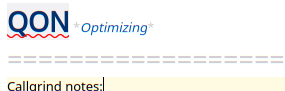
Waqar144
on 1 Nov 2019
Are you aware of this issue? thinking
yes, if you see a way around it, please do :grin:
pbek
on 1 Nov 2019
On Thu, 2019-10-31 at 08:31 -0700, Waqar Ahmed wrote:
And it failed. It seems noone is using that plug says
https://github.com/search?utf8=%E2%9C%93&q=hunspell-dictionaries-plug+filename%3Asnapcraft.yaml&type=Code&ref=advsearch&l=&l=It won't work directly. Is there a way to simply give access to a
specific directory? Using that we can give access to
/usr/share/hunspell.
But in any case, ~/.local/share/hunspell should work with snaps
Tried this with release 19.11.0, but still not working. The snap still
cannot find any dictionaries.
Regards,
Tony.
Tony Arnold MBCS, CITP | Senior IT Security Analyst | Directorate of IT Services | G64, Kilburn Building | The University of Manchester | Manchester M13 9PL | T: +44 161 275 6093 | M: +44 773 330 0039
tonyarnold99
on 1 Nov 2019
Tried this with release 19.11.0, but still not working. The snap still
cannot find any dictionaries.
@Waqar144, maybe the ~ doesn't get resolved? Plus snaps also have their own home-directory. I usually do a path.remove(QRegularExpression(R"(snap\/qownnotes\/\w\d+\/)")); to cut out the snap part of a path
@tonyarnold99, can you please open a different feature request to make spellchecking work in snaps
pbek
on 1 Nov 2019
19.11.2
- spellchecking is now enabled in formatted markdown (for #125, thank you @Waqar144)
pbek
on 1 Nov 2019
...and building
pbek
on 1 Nov 2019
Are you aware of this issue? thinking
yes, if you see a way around it, please do grin
Looking into. Seems like it's not so simple lol.
Waqar144
on 1 Nov 2019
Tried this with release 19.11.0, but still not working. The snap still cannot find any dictionaries. Regards, Tony
Are you copying both .dic and .aff files or just one of them? For dictionary detection both files are required.
Waqar144
on 1 Nov 2019
On Fri, 2019-11-01 at 05:18 -0700, Waqar Ahmed wrote:
Tried this with release 19.11.0, but still not working. The snap still cannot find any dictionaries. Regards, Tony
Are you copying both .dic and .aff files or just one of them? For dictionary detection both files are required.
Both.
I've opened a new issue/feature request for this. #1348
Tony.
Tony Arnold MBCS, CITP | Senior IT Security Analyst | Directorate of IT Services | G64, Kilburn Building | The University of Manchester | Manchester M13 9PL | T: +44 161 275 6093 | M: +44 773 330 0039
tonyarnold99
on 1 Nov 2019
Tried this with release 19.11.0, but still not working. The snap still
cannot find any dictionaries.@Waqar144, maybe the
~doesn't get resolved? Plus snaps also have their own home-directory. I usually do apath.remove(QRegularExpression(R"(snap\/qownnotes\/\w\d+\/)"));to cut out the snap part of a path@tonyarnold99, can you please open a different feature request to make spellchecking work in snaps
I used QDir:homePath() now, to make the string instead of using ~.
Waqar144
on 1 Nov 2019
I used QDir:homePath() now, to make the string instead of using ~.
The snap part has to be removed from the path, see: https://github.com/pbek/QOwnNotes/issues/1348#issuecomment-548773591
pbek
on 1 Nov 2019
Just found out that the default text edit context menu is broken. You can't select a lot of things and then right click to copy/cut or do something with selected text.
Fix coming
Waqar144
on 4 Nov 2019
Much kudos indeed to you @Waqar144 - sorry I missed the testing opportunity being away this week, but you have done a great job.
Re performance on Mac at 19.11.3 even with language Autodetect I only get any noticeable delay with my largest Notes (20-30k). But it's still sub-second, and it's dramatically reduced by choosing a specific language.
I don't know if there is an option to load a note first and then re-render it with spelling afterwards, to increase perceived performance? However we might find performance is only an issue in outlying cases, and users do have the option of turning spelling off when navigating such massive notes.
Very well done guys for finally having brought this valuable feature to the rich QOwnNotes editor
artmg
on 4 Nov 2019
Much kudos indeed to you @Waqar144 - sorry I missed the testing opportunity being away this week, but you have done a great job.
It's still in progress, mostly done though, so you are in time :laughing:
Re performance on Mac at 19.11.3 even with language Autodetect I only get any noticeable delay with my largest Notes (20-30k). But it's still sub-second, and it's dramatically reduced by choosing a specific language.
Wow! That's great.
I don't know if there is an option to load a note first and then re-render it with spelling afterwards, to increase perceived performance? However we might find performance is only an issue in outlying cases, and users do have the option of turning spelling off when navigating such massive notes.
It is possible, but i fear it would decrease the speed because re-rendering means that we restart from zero, highlight everything, including spellchecking, again. Disabling spell checking does that exactly, you rehighlight everything with spellchecking off, though it's fast so not really noticeable.
Very well done guys for finally having brought this valuable feature to the rich QOwnNotes editor
Thanks for the support. Means a lot! :heart:
Btw, I notice that you are English, QON could really use your help in fixing the grammatical errors(in the program) or the README! :grin: I am sure @pbek would also appreciate that
Waqar144
on 4 Nov 2019
Is there a way to _disable_ spell checking? I'm writing text with a lot of technical terms and ~ 70 % is underlined in an alarming way (i.e. red), which is very distracting.
 tobac
on 4 Nov 2019
tobac
on 4 Nov 2019
Is there a way to _disable_ spell checking? I'm writing text with a lot of technical terms and ~ 70 % is underlined in an alarming way (i.e. red), which is very distracting.
Yes!
Just go to menu, open Edit -> Check Spelling(uncheck/check)
Waqar144
on 4 Nov 2019
Indeed. I tried to find it in settings. Thanks for the quick help.
tobac
on 4 Nov 2019
I'm closing this now. Just open a new issue if anything seems amiss.
pbek
on 5 Nov 2019
Just wanted to say thanks and let you know that spell checking + language detection works great.
toxpal
on 6 Nov 2019
Great, thank you! :grin:
pbek
on 6 Nov 2019
Test out the new:
19.11.8
- there now is a new menu entry
Manage dictionariesin the Edit menu to download
and remove spellchecker dictionaries (for #1378)
- if you are missing a dictionary to download please look for it at
LibreOffice dictionaries and edit
the dictionary manager dialog - visit QOwnNotes Spellchecking
for more information
- if you are missing a dictionary to download please look for it at
- personal dictionary will now be stored in the portable data path when using QOwnNotes
in portable mode (for #1378, thank you @Waqar144)
pbek
on 8 Nov 2019
There now is a new release, could you please test it and report if it works for you?
pbek
on 8 Nov 2019
I downloaded one dictionary. It is working for me. Thank you!
On Friday, November 8, 2019, 4:34:05 PM GMT+2, Patrizio Bekerle <[email protected]> wrote:
There now is a new release, could you please test it and report if it works for you?
—
You are receiving this because you were mentioned.
Reply to this email directly, view it on GitHub, or unsubscribe.
maras
on 8 Nov 2019
Great, thank you for testing!
pbek
on 8 Nov 2019
When I open Manage Dictionaries, it only displays 3 languages to download - Danish, English, and German. Under "Downloaded Dictionaries" tab there is no single entry, but somehow spell checking in multiple languages work well for me.
toxpal
on 9 Nov 2019
When I open Manage Dictionaries, it only displays 3 languages to download - Danish, English, and German. Under "Downloaded Dictionaries" tab there is no single entry, but somehow spell checking in multiple languages work well for me.
It only shows the "Downloaded Dictionaries". You possibly have installed other dictionaries somewhere else globally (see http://docs.qownnotes.org/en/develop/spellchecking.html). The main menu item "Edit / Languages" shows them all...
pbek
on 9 Nov 2019
When I open Manage Dictionaries, it only displays 3 languages to download - Danish, English, and German. Under "Downloaded Dictionaries" tab there is no single entry, but somehow spell checking in multiple languages work well for me.
If you are on Linux, you don't need to go to Dictionary manager. It's mostly for the windows + mac users + maybe snap ones too?
Use the package manager instead.
Waqar144
on 9 Nov 2019
Yes, I'm on Manjaro. Thanks for the detailed explanation.
toxpal
on 9 Nov 2019
Related issues
 eimajenthat
·
3Comments
eimajenthat
·
3Comments
 alexanderino
·
7Comments
alexanderino
·
7Comments
 anmsh
·
7Comments
anmsh
·
7Comments
 sanderboom
·
5Comments
sanderboom
·
5Comments
 tveyben
·
6Comments
tveyben
·
6Comments
Most helpful comment
Anyways, so after reading sonnet code and our own, i have managed to include spellchecking to the existing highlighter.
Nothing exciting yet. Still have to integrate it in the UI and build a context menu for it. And no multi language support as well, for now.
And I think, like botan, we'll probably have to embed Sonnet into QON.