Pywinauto: ListViewWrapper from uia_controls does not work with WinForms DataGridView
Hi.
So, i've checked documentation and found something that named "uia_controls". And as far as i see it's not working.
Functionality that i was looking for is to get items from table.
link to repo consist from python_script and sources of C# program.
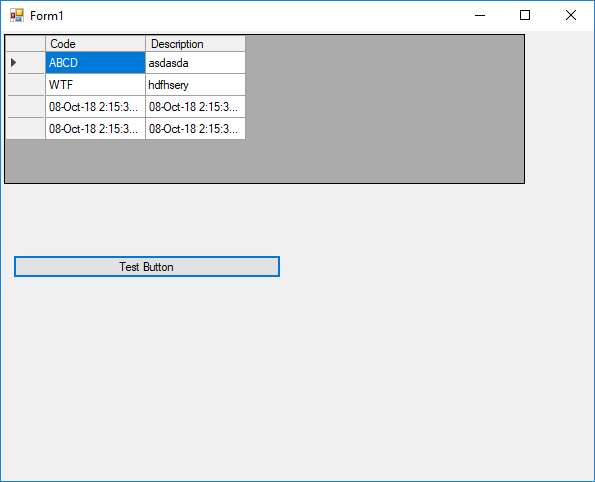
Is "uia_controls" going to be supported, or am i making something wrong?
 van9konst
All 17 comments
Hi @van9konst it's wrong usage of wrappers. In the most cases direct usage of wrappers is not necessary, since they can be created by pywinauto for you automatically. This is described in the Getting Started Guide. See section "Window Specification". You have to read the whole core concept before surfing the rest of the docs. It will save your time.
What you're trying to do is creating wrappers directly and passing WindowSpecification objects into wrapper constructor. But the wrapper accepts another type of objects that you don't have to know of (it's internal class UiaElementInfo).
 vasily-v-ryabov
on 8 Oct 2018
vasily-v-ryabov
on 8 Oct 2018
Hi @vasily-v-ryabov . I've already checked documentation. There reason why i've tried "uia_controls" is
- "CodeCompletion" works on that "uia_controls" wrappers in my IDE. It's not working on standard wrapper.
- "uia_controls" exists in documentation, but not documented
- I saw issues that was created earlier in similar topic, and i've assumed that it used to work.
So my main problem is to get items from table. And as far as i know this is the most common (standard) control in WPF (_DataGridView_).
Can you help me with it?
van9konst
on 9 Oct 2018
- Code completion should work for wrappers, it doesn't work for window specification. It requires calling
.wrapper_object()explicitly for now. - Documentation is under fixing in PR #578. Sorry. Working page: https://pywinauto-fork.readthedocs.io/en/docs_fixes/code/pywinauto.controls.uia_controls.html
Maybe unit tests for DataGridView would be helpful as well: test_uiawrapper.py#L830.
vasily-v-ryabov
on 9 Oct 2018
I've updated my repo with example. https://github.com/van9konst/temp_example_pywinauto.git
As far as i see i have standard (for WPF) control and it's not captured by current version pywinauto.

and one more thing. _.texts()_ used to return real value (values) or just a name of control that already selected?

van9konst
on 9 Oct 2018
What does it mean in terms of the code? I mean "it's not captured by pywinauto" - what is actual behavior and expected one?
Looking at the screenshot, I can see this code should return <uia_controls.ListViewWrapper ...> and it's correct wrapper (we have the same wrapper class for 2 control types):
vx.Form1.child_window(auto_id="dataGridView1").wrapper_object()
i'm saying that i'm getting errors when making
# Assume that this is a gridView
vx.Form1.child_window(auto_id="dataGridView1").get_column()
vx.Form1.child_window(auto_id="dataGridView1").wrapper_object().get_column()
vx.Form1.child_window(auto_id="dataGridView1")[1].get_column()
vx.Form1.child_window(auto_id="dataGridView1").wrapper_object()[1].get_column()
{AttributeError}Neither GUI element (wrapper) nor wrapper method 'get_column' were found (typo?)
# Assume that this is a Table
vx.Form1.child_window(auto_id="dataGridView1").get_item(0, 0)
{AttributeError}Neither GUI element (wrapper) nor wrapper method 'get_item' were found (typo?)
van9konst
on 10 Oct 2018
OK, what is printed by this code?
print(vx.Form1.child_window(auto_id="dataGridView1").wrapper_object())
It's important to know which type of wrapper was created for this control.
vasily-v-ryabov
on 12 Oct 2018
Here is output
uiawrapper.UIAWrapper - 'DataGridView', Table
van9konst
on 15 Oct 2018
It means this was not detected as a grid. This is strange because control_type is Table. Maybe there is some not implemented part of the code. Marking as a bug.
vasily-v-ryabov
on 17 Oct 2018
Currently you may try this workaround (please let me know if it works):
from pywinauto.controls.uia_controls import ListViewWrapper
table_info = vx.Form1.child_window(auto_id="dataGridView1").wrapper_object().element_info
grid = ListViewWrapper(table_info)
# then work with "grid" variable as a normal ListViewWrapper...
As far as i see this workaround not works. I've tried your code and as you see on screenshot it wont return an actual column.
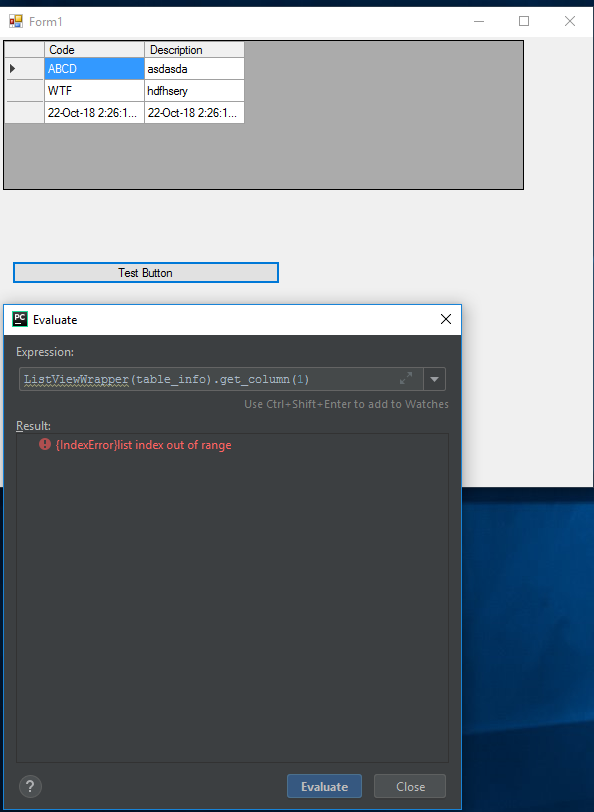
van9konst
on 22 Oct 2018
Temporary workaround for you
for row in wvx.window(auto_id="dataGridView1").children(control_type="Custom"):
    for item in row.children(control_type="DataItem"):
        print item.iface_value.CurrentValue
 drinkertea
on 28 Oct 2018
drinkertea
on 28 Oct 2018
thanks. it works.
van9konst
on 2 Nov 2018
Merged to master in PR #588. Will be included into 0.6.6: https://github.com/pywinauto/pywinauto/milestone/14
vasily-v-ryabov
on 25 Nov 2018
use item.legacy_properties() will return dist,the value in it
 yongcong1415
on 28 Feb 2019
yongcong1415
on 28 Feb 2019
I can not get DataGridView data, can somebody help me?
python code:
table.wait("exists enabled visible ready")
print(table.print_control_identifiers())
table_wrap = table.wrapper_object()
print("-"*100)
print(table_wrap)
output:
Control Identifiers:

WindowsForms10.Window.8.app.0.6ab532_r6_ad1 - ''    (L207, T315, R2559, B1004)
['WindowsForms10.Window.8.app.0.6ab532_r6_ad1']
child_window(auto_id="dg1", control_type="System.Windows.Forms.DataGridView")
   |
   | WindowsForms10.SCROLLBAR.app.0.6ab532_r6_ad1 - ''    (L207, T987, R2542, B1004)
   | ['WindowsForms10.SCROLLBAR.app.0.6ab532_r6_ad1', 'WindowsForms10.SCROLLBAR.app.0.6ab532_r6_ad10', 'WindowsForms10.SCROLLBAR.app.0.6ab532_r6_ad11']
   |
   | WindowsForms10.SCROLLBAR.app.0.6ab532_r6_ad1 - ''    (L2542, T315, R2559, B987)
   | ['WindowsForms10.SCROLLBAR.app.0.6ab532_r6_ad12']
None
----------------------------------------------------------------------------------------------------
hwndwrapper.HwndWrapper - '', WindowsForms10.Window.8.app.0.6ab532_r6_ad1
Inspect screenshot:
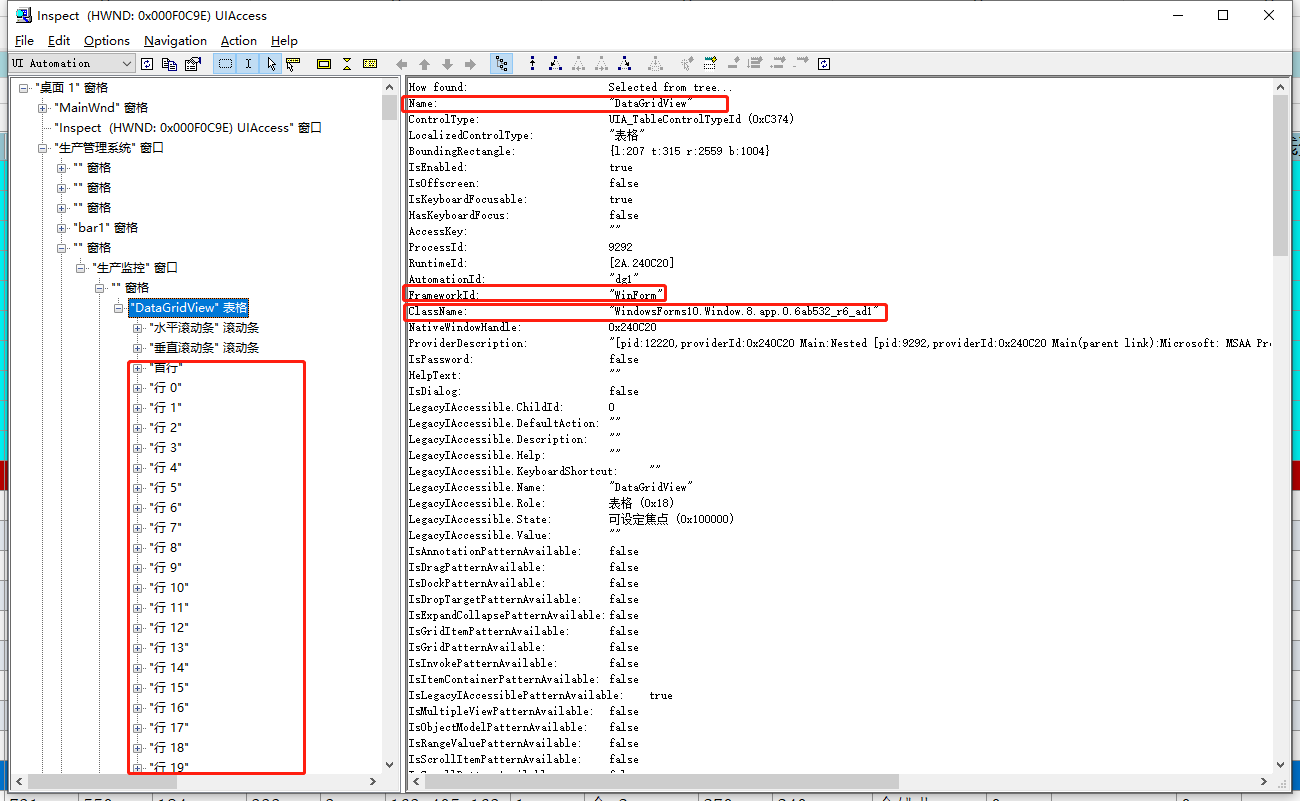
Any suggestion is appreciated
 RealLau
on 11 Sep 2020
RealLau
on 11 Sep 2020
Hi @RealLau which backend is used? I mean how do you create Application() object? There are "win32" and "uia" backends that both work for WinForms apps. But "uia" backend is a little bit better for such controls like DataGridView.
vasily-v-ryabov
on 12 Sep 2020
Related issues
 rajarameshmamidi
·
38Comments
rajarameshmamidi
·
38Comments
 smitagodbole
·
13Comments
smitagodbole
·
13Comments
 Enteleform
·
19Comments
Enteleform
·
19Comments
 mtkennerly
·
14Comments
mtkennerly
·
14Comments
 Nonisiuniis
·
25Comments
Nonisiuniis
·
25Comments
Most helpful comment
Temporary workaround for you