Pywinauto: find_elements found nothing (remotely from Ansible, using WinRM)
Hi,
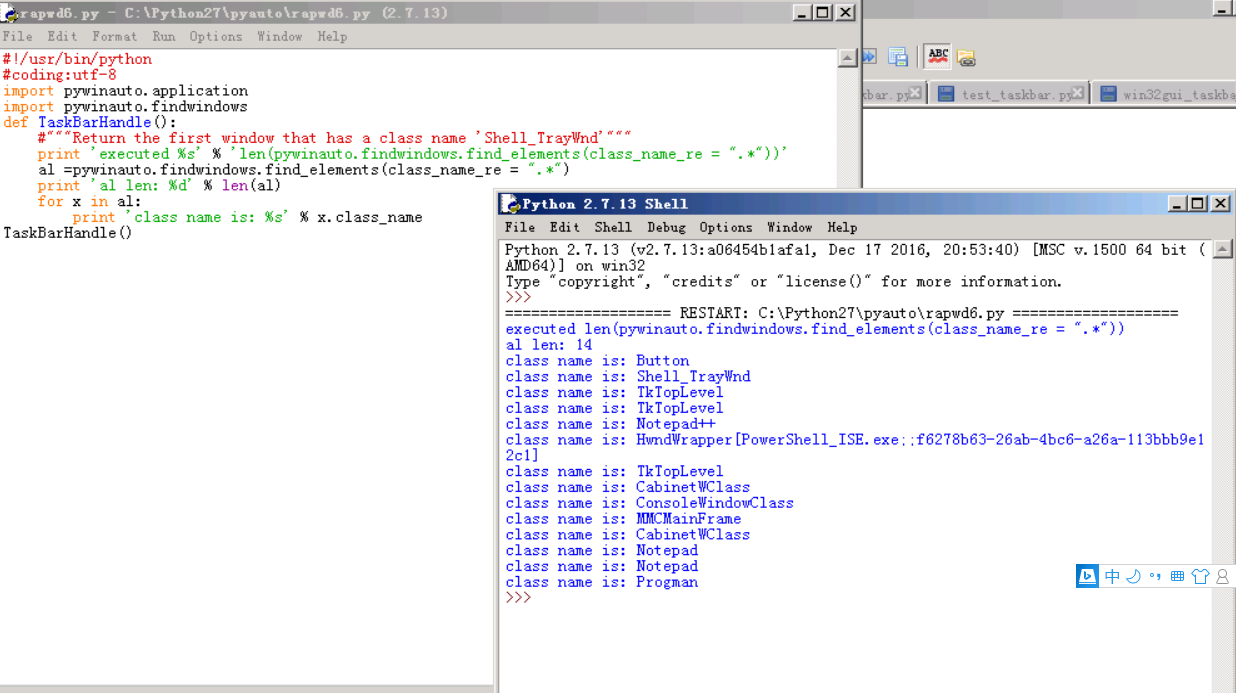
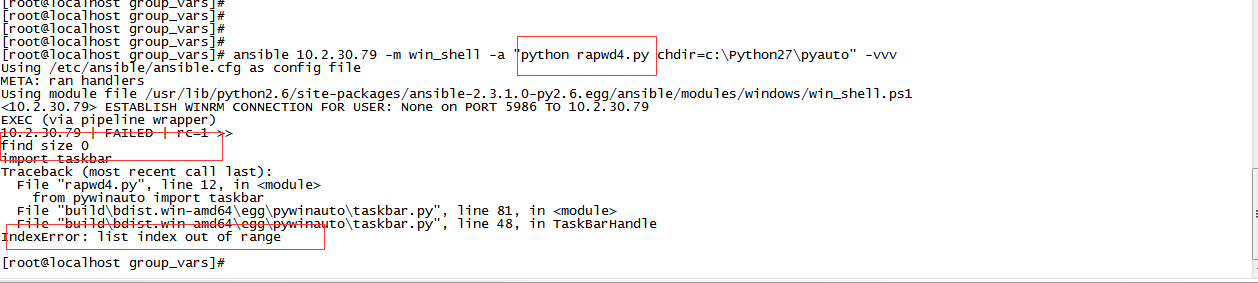
The above code runs well in local environment,it will return the elements.But when it be called from remote(ansible),it would return nothing.So the 46 line in taksbar.py will throw "indexerror....".
The attachments have the code detail and error info.Would you pls help? Thanks !
environment:pywinauto 0.6+, python 2.7.13
os: 2008 r2 sp1
ran well in local:
found nothing when ran by ansible:
 yangliang003
All 18 comments
I'm afraid Ansible runs the script through SSH.
GUI is not accessible by SSH (protocol restriction).
It can be done using Jenkins slave on Windows test machine. But Jenkins slave must run in the active GUI session. If you use RDP, you can't use methods .click_input(), .type_keys(...) and derived ones. Or you have to keep RDP always open and not minimized (can be in non-full-screen mode so that you can switch to another window on local machine). But it's better to setup VNC server on test machine (I used TightVNC at my previous job), so disconnected VNC will keep an active GUI context because it's not a virtual desktop. If you see black screen in VNC client on local machine, you might need to install video drivers on remote test machine where VNC server is installed.
It's pretty hard for the first time. I'm thinking to write a brief tutorial with the screenshots.
 vasily-v-ryabov
on 21 Aug 2017
vasily-v-ryabov
on 21 Aug 2017
If Jenkins slave runs as a service, it will not be able to access GUI as well (OS Windows restriction).
vasily-v-ryabov
on 21 Aug 2017
Sorry, I see it's WinRM, not SSH.
Need to investigate if it's possible through WinRM or not.
vasily-v-ryabov
on 21 Aug 2017
@vasily-v-ryabov Yes, it's through WinRM.Thanks
yangliang003
on 23 Aug 2017
I see Windows Remore Management (WS-Management) is running as a service under "Network Services" account. It has no UI access obviously.
vasily-v-ryabov
on 23 Aug 2017
More deep investigation may help to make it possible. The link to discussion:
https://serverfault.com/questions/690852/use-powershell-to-start-a-gui-program-on-a-remote-machine
But not sure it's easy to port into Ansible.
vasily-v-ryabov
on 23 Aug 2017
@vasily-v-ryabov Thanks a lot .Yes ,as the link you post,I had tried to use the psexec to do this(Ansible has the win_psexec module),and it works.Maybe it's simplest way.
yangliang003
on 23 Aug 2017
@yangliang003 that's great! Can you post an example of ansible command for that? I will add it to the new docs page later.
vasily-v-ryabov
on 23 Aug 2017
@vasily-v-ryabov No problem.Thank you for giving me the directives which saves me lots of time
1, test1.yml
---
- name: test ra module
  hosts: *****
  tasks:
    - name: run auto
      win_psexec:
        command: python pywinauto_example.py
        executable: C:\Windows\PSTools\psexec.exe
        interactive: yes
        username: admin
        password: ******
        hostnames: ******
2,run : ansible-playbook test1.yml
And I found that new a schedules tasks works too,in ansible just one command(the rapwd was the task I created in the remote windows):
ansible * -m raw -a 'schtasks /run /tn rapwd'
yangliang003
on 23 Aug 2017
Thanks! You mean rapwd is a name of the task in Windows Task Scheduler (which is available in Computer Management app: System Tools -> Task Scheduler -> Task Scheduler Library), am I right?
vasily-v-ryabov
on 23 Aug 2017
@vasily-v-ryabov Yes,you are right(The task never runs itself,because I set it's run time as an passed time,so it only runs by ansible call).
The command to create scheduled task "rapwd":
Schtasks /Create /tn rapwd /tr c:\Python27\rapwd.bat /sc ONCE /st hh:mi:ss /sd yyyy/mm/dd
and the "rapwd.bat" just runs the pywinauto code.
yangliang003
on 24 Aug 2017
@yangliang003 thank you!
And what about methods .click_input() and .type_keys(...)? Are they working with this approach?
vasily-v-ryabov
on 24 Aug 2017
@vasily-v-ryabov yes, both work well
yangliang003
on 24 Aug 2017
One more useful guide from SmartBear: https://support.smartbear.com/testcomplete/docs/testing-with/running/via-rdp/keeping-computer-unlocked.html
vasily-v-ryabov
on 16 Sep 2018
Remote Execution Guide draft is here: #589.
vasily-v-ryabov
on 4 Nov 2018
The guide seems finished for now. Closing the issue.
https://pywinauto.readthedocs.io/en/latest/remote_execution.html
vasily-v-ryabov
on 12 May 2019
There is other way that you can control gui application on remote Desktop with pywinauto. You can use rpyc or Remote Python Call. that is a python library for rpc(remote procedure call)
https://rpyc.readthedocs.io/en/latest/
your remote computer is as server and your host is as client in rpyc.
first you you need to run rpyc_classic.py in remote computer after connect to it and use pywinauto library. for example i use rpyc for start microsip on remote computer with pywinauto.
ip of remote computer is 192.168.222.222.
import rpyc
ip = "192.168.222.222"
conn = rpyc.classic.connect(ip)
conn.execute("from pywinauto import Application")
conn.execute(r"Application().start(r'C:\Program Files (x86)\MicroSIP\microsip.exe')")
 greenmns
on 28 Sep 2020
greenmns
on 28 Sep 2020
@greenmns thanks! This is interesting, but it doesn't differ so much from copying Python script and starting it on a remote PC. The only advantage of rpyc is a dynamic and Pythonic interaction between local and remote hosts. We can think about adding this way to the Remote Execution Guide. Also a pull request is welcome.
Some users tell me about their requirement to keep remote host clean (no Python installed, copying files to remote host is also prohibited). But I think such restrictions can't be circumvented.
vasily-v-ryabov
on 28 Sep 2020
Related issues
 lanzorg
·
16Comments
lanzorg
·
16Comments
 rajarameshmamidi
·
38Comments
rajarameshmamidi
·
14Comments
rajarameshmamidi
·
38Comments
rajarameshmamidi
·
14Comments
 jjbright
·
15Comments
jjbright
·
15Comments
 MagazinnikIvan
·
14Comments
MagazinnikIvan
·
14Comments
Most helpful comment
@vasily-v-ryabov No problem.Thank you for giving me the directives which saves me lots of time
1, test1.yml
2,run : ansible-playbook test1.yml
And I found that new a schedules tasks works too,in ansible just one command(the rapwd was the task I created in the remote windows):
ansible * -m raw -a 'schtasks /run /tn rapwd'