Python-language-server: print, others flagged as "Undefined variable" (requests being handled before initialization is complete?)
Environment data
- Language Server version: 0.4.71.0
- OS and version: Microsoft Windows [Version 10.0.18362.418]
- Python version (& distribution if applicable, e.g. Anaconda): Python 3.5.1 (v3.5.1:37a07cee5969, Dec 6 2015, 01:54:25) [MSC v.1900 64 bit (AMD64)] on win32
Expected behaviour
print should NOT be flagged as "Undefined variable"
Actual behaviour
print is flagged as "Undefined variable"
Logs
N/A
Code Snippet / Additional lnformation

Python 3.5.1 (v3.5.1:37a07cee5969, Dec 6 2015, 01:54:25) [MSC v.1900 64 bit (AMD64)] on win32
 JoeCodeswell
All 55 comments
Could you please provide the logs asked for in the template? I'd like to see the caching level you are using.
 jakebailey
on 16 Oct 2019
jakebailey
on 16 Oct 2019
Hi Jake. Thanks for the response. I think you want me to follow:
So I did Python › Analysis: Log Level
Defines type of log messages language server writes into the output window.
Trace
And Here's Output.Python:
```
User belongs to experiment group 'AlwaysDisplayTestExplorer - control'
User belongs to experiment group 'ShowPlayIcon - start'
User belongs to experiment group 'ShowExtensionSurveyPrompt - control'
User belongs to experiment group 'AA_testing - experiment'
> conda --version
> pyenv root
> python3.7 -c "import sys;print(sys.executable)"
> python3.6 -c "import sys;print(sys.executable)"
> python3 -c "import sys;print(sys.executable)"
> python2 -c "import sys;print(sys.executable)"
> python -c "import sys;print(sys.executable)"
> py -3.7 -c "import sys;print(sys.executable)"
> py -3.6 -c "import sys;print(sys.executable)"
> py -3 -c "import sys;print(sys.executable)"
> py -2 -c "import sys;print(sys.executable)"
> python -c "import sys;print(sys.executable)"
> conda info --json
Starting Microsoft Python language server.
> C:\Python27\python.exe c:\Users\joeco\.vscode\extensions\ms-python.python-2019.10.41019\pythonFiles\interpreterInfo.py
> C:\Python27\python.exe c:\Users\joeco\.vscode\extensions\ms-python.python-2019.10.41019\pythonFiles\interpreterInfo.py
> C:\cygwin64\bin\python2.7.exe c:\Users\joeco\.vscode\extensions\ms-python.python-2019.10.41019\pythonFiles\interpreterInfo.py
> C:\cygwin64\bin\python2.7.exe c:\Users\joeco\.vscode\extensions\ms-python.python-2019.10.41019\pythonFiles\interpreterInfo.py
> C:\Program Files (x86)\LilyPond\usr\bin\python.exe c:\Users\joeco\.vscode\extensions\ms-python.python-2019.10.41019\pythonFiles\interpreterInfo.py
> C:\Program Files (x86)\LilyPond\usr\bin\python.exe c:\Users\joeco\.vscode\extensions\ms-python.python-2019.10.41019\pythonFiles\interpreterInfo.py
> C:\Program Files (x86)\LilyPond\usr\bin\python2.4.exe c:\Users\joeco\.vscode\extensions\ms-python.python-2019.10.41019\pythonFiles\interpreterInfo.py
> C:\Program Files (x86)\LilyPond\usr\bin\python2.4.exe c:\Users\joeco\.vscode\extensions\ms-python.python-2019.10.41019\pythonFiles\interpreterInfo.py
> C:\Python27\python.exe c:\Users\joeco\.vscode\extensions\ms-python.python-2019.10.41019\pythonFiles\interpreterInfo.py
> C:\Python27\python.exe c:\Users\joeco\.vscode\extensions\ms-python.python-2019.10.41019\pythonFiles\interpreterInfo.py
> C:\Python27\python.exe c:\Users\joeco\.vscode\extensions\ms-python.python-2019.10.41019\pythonFiles\interpreterInfo.py
> C:\Python27\python.exe c:\Users\joeco\.vscode\extensions\ms-python.python-2019.10.41019\pythonFiles\interpreterInfo.py
> conda info --json
> conda --version
```
I hope this is what you wanted.
Thanks again, Jake.
Love and peace,
Joe
JoeCodeswell
on 16 Oct 2019
I just did a second run of my program just to be sure. Here's Output.python again.
    User belongs to experiment group 'AlwaysDisplayTestExplorer - control'
    User belongs to experiment group 'ShowPlayIcon - start'
    User belongs to experiment group 'ShowExtensionSurveyPrompt - control'
    User belongs to experiment group 'AA_testing - experiment'
    > conda --version
    > pyenv root
    > python3.7 -c "import sys;print(sys.executable)"
    > python3.6 -c "import sys;print(sys.executable)"
    > python3 -c "import sys;print(sys.executable)"
    > python2 -c "import sys;print(sys.executable)"
    > python -c "import sys;print(sys.executable)"
    > py -3.7 -c "import sys;print(sys.executable)"
    > py -3.6 -c "import sys;print(sys.executable)"
    > py -3 -c "import sys;print(sys.executable)"
    > py -2 -c "import sys;print(sys.executable)"
    > python -c "import sys;print(sys.executable)"
    > conda info --json
    Starting Microsoft Python language server.
    > C:\Python27\python.exe c:\Users\joeco\.vscode\extensions\ms-python.python-2019.10.41019\pythonFiles\interpreterInfo.py
    > C:\Python27\python.exe c:\Users\joeco\.vscode\extensions\ms-python.python-2019.10.41019\pythonFiles\interpreterInfo.py
    > C:\cygwin64\bin\python2.7.exe c:\Users\joeco\.vscode\extensions\ms-python.python-2019.10.41019\pythonFiles\interpreterInfo.py
    > C:\cygwin64\bin\python2.7.exe c:\Users\joeco\.vscode\extensions\ms-python.python-2019.10.41019\pythonFiles\interpreterInfo.py
    > C:\Program Files (x86)\LilyPond\usr\bin\python.exe c:\Users\joeco\.vscode\extensions\ms-python.python-2019.10.41019\pythonFiles\interpreterInfo.py
    > C:\Program Files (x86)\LilyPond\usr\bin\python.exe c:\Users\joeco\.vscode\extensions\ms-python.python-2019.10.41019\pythonFiles\interpreterInfo.py
    > C:\Program Files (x86)\LilyPond\usr\bin\python2.4.exe c:\Users\joeco\.vscode\extensions\ms-python.python-2019.10.41019\pythonFiles\interpreterInfo.py
    > C:\Program Files (x86)\LilyPond\usr\bin\python2.4.exe c:\Users\joeco\.vscode\extensions\ms-python.python-2019.10.41019\pythonFiles\interpreterInfo.py
    > C:\Python27\python.exe c:\Users\joeco\.vscode\extensions\ms-python.python-2019.10.41019\pythonFiles\interpreterInfo.py
    > C:\Python27\python.exe c:\Users\joeco\.vscode\extensions\ms-python.python-2019.10.41019\pythonFiles\interpreterInfo.py
    > C:\Python27\python.exe c:\Users\joeco\.vscode\extensions\ms-python.python-2019.10.41019\pythonFiles\interpreterInfo.py
    > C:\Python27\python.exe c:\Users\joeco\.vscode\extensions\ms-python.python-2019.10.41019\pythonFiles\interpreterInfo.py
    > conda info --json
    > conda --version
I see, you don't have trace logging enabled and I think you're in the wrong output tab. Add "python.analysis.logLevel": "Trace" to your settings and reload, and your logs should be more verbose. You can find them in the "Python Language Server" part of the output panel (in the dropdown). See: https://github.com/microsoft/python-language-server/blob/master/TROUBLESHOOTING.md#filing-an-issue
jakebailey
on 16 Oct 2019
Hi Jake. Thanks for your patience. I just
- set "python.analysis.logLevel": "Trace" in File>>Preferences>>Settings.
- restarted vscode which NOW comes up with Update 1.39.2!
- checked settings & still "python.analysis.logLevel" == Trace
I reopened the "offending" program == test_jsonschema.py & NOW print IS NOT FLAGGED as Undefined variable!
How time flies when you're having fun!
I just ran test_jsonschema.py
Now i open OUTPUT & select THE SECOND Python Language Server entry in the dropdown. N.B. the first had no output in the window.
Here is what the OUTPUT window says:
I am attaching the output as vscodePyLangServerLog.txt
JoeCodeswell
on 16 Oct 2019
Caching is disabled in those logs, so that's interesting.
Reloading fixing it doesn't surprise me, as the analysis will have been rerun.
jakebailey
on 17 Oct 2019
I am having a similar issue with inbuilt functions and types such as ValueError and float. I tried changing the settings as described above to Trace and this made the Undefined Variable error go away.
 sdpenguin
on 21 Oct 2019
sdpenguin
on 21 Oct 2019
Changing the logging setting wouldn't have any effect. If you reloaded the editor when you changed the setting, the reload is what would have likely fixed it.
jakebailey
on 21 Oct 2019
I'm having the same problem of "print" being marked as an undefined variable.
Trace output attached.
trace-logs.txt
 pcolmer
on 22 Oct 2019
pcolmer
on 22 Oct 2019
I can confirm this problem. I am having it for all built-ins (dict, len, print, list, ...) ?

python.analysis.cachingLevel is set to None to fix #1601 .
 kuelumbus
on 22 Oct 2019
kuelumbus
on 22 Oct 2019
To be clear, after disabling caching, did you restart the language server? I don't know if we currently handle the case of going from caching to no caching within the same run (the other way would work, though be less efficient).
jakebailey
on 22 Oct 2019
Thanks. I did restart. Also, I find [Info - 9:35:07 AM] Analysis caching mode: None. in the log file.
BTW, analyzing in background is now very slow. It takes hours to finish and afterward, I am having the Undefined variable ... problem.
kuelumbus
on 23 Oct 2019
I'm having the same problem, but reloading resolves it. For now I have to reload every hour or so.
 Eerovil
on 24 Oct 2019
Eerovil
on 24 Oct 2019
This issue appears to affect many basic Python objects, like str. Attaching screenshot.

 markedwards
on 25 Oct 2019
markedwards
on 25 Oct 2019
Essentially this appears to be happening to anything that's declared in the global scope; things like print, str, and len, aren't "keywords" per se, but actual variables that exist in the scope and can be reassigned like any other variable, so we declare them in every module before analyzing. That's what appears to either not happen, or get lost along the way.
Working on #1601 and #1414 may preclude this, since they affect the analysis order.
jakebailey
on 25 Oct 2019
IMO what might be happening is that general analysis begins when builtins analysis hasn't been done yet. We call await GetAnalysisAsync and if somehow other session starts all builtin things will be undefined.
 MikhailArkhipov
on 25 Oct 2019
MikhailArkhipov
on 25 Oct 2019
Another reason is if somehow scraped/generated builtins stub is not written correctly. One way to try is to delete all cache. Path is output in the Output window like
Analysis cache path: C:\Users\[USER]\AppData\Local\Microsoft\Python Language Server
Analysis cache path: /home/[USER]/.cache/Microsoft/Python Language Server
And/or look if pyi files under various SHA hash-looking folders are actually non-zero and have meaningful data.
Perhaps like this
- create simple file with
printsomething - delete cache
- reload window
Cache now should contain one stubs folder with a single subfolder with python.pyi file for builtins.
MikhailArkhipov
on 25 Oct 2019
_"Now i open OUTPUT & select THE SECOND Python Language Server entry in the dropdown. N.B. the first had no output in the window."_
@JoeCodeswell - do you happen to have multi-root workspace. That is the only case when there are multiple LS instances.
MikhailArkhipov
on 25 Oct 2019
Don't we define print ourselves, rather than using the scraped code? Similarly for the others.
jakebailey
on 25 Oct 2019
I was able to simulate the error by not having builtins analysis running.
No, there is no specialization for print apart from future specialization but that's Python 2
        private void SpecializeFuture(FromImportStatement node) {
            if (Interpreter.LanguageVersion.Is3x()) {
                return;
            }
However, we do specialize say, abs or open so if builtins content was empty they would still be recognized. isinstance is specialized however.
MikhailArkhipov
on 25 Oct 2019
From #1601 - looks like builtins got analyzed pretty late.

MikhailArkhipov
on 25 Oct 2019
Very weird. There's no reason for this to be happening since the builtin analysis should be blocking on initalization...
jakebailey
on 25 Oct 2019
Well, there were other issues similar to this when initialization didn't seem to block... Maybe same thing?
MikhailArkhipov
on 28 Oct 2019
1741: (builtins are getting reanalyzed)
Analysis of lib2to3.pgen2.grammar (Stub) on depth 11 completed in 21.82 ms.
Analysis of six.moves.urllib.parse (Stub) on depth 12 completed in 21.93 ms.
Analysis of lib2to3.pgen2.tokenize (Stub) on depth 10 completed in 21.88 ms.
Analysis of builtins (Builtins) on depth 0 completed in 265.83 ms.
...
Analysis of six.moves.tkinter_tkfiledialog (Stub) on depth 11 completed in 0.15 ms.
Analysis of scipy.linalg._flapack (Compiled) on depth 8 completed for library in 206.29 ms.
Analysis of builtins (Builtins) on depth 0 completed in 322.39 ms.
But there is no squiggle on builtins.
MikhailArkhipov
on 3 Nov 2019
More evidence of requests being handled before the initial startup:
   at Microsoft.Python.LanguageServer.Implementation.Server.HierarchicalDocumentSymbol(DocumentSymbolParams params, CancellationToken cancellationToken) in E:\A\_work\8\s\src\LanguageServer\Impl\Implementation\Server.Symbols.cs:line 37
   at Microsoft.Python.LanguageServer.Implementation.LanguageServer.DocumentSymbol(JToken token, CancellationToken cancellationToken) in E:\A\_work\8\s\src\LanguageServer\Impl\LanguageServer.cs:line 214
This is still happening. The only thing that can be null at line 37 is the _indexManager which is assigned in Initialized. Need to catch this and figure out under what condition our prioritizer is failing.
If https://github.com/microsoft/language-server-protocol/issues/567#issuecomment-455989545 ever happens, we could not do the two-step init process when possible, but our current code should be working.
jakebailey
on 5 Nov 2019
Some time ago I wrote some extra tests for prioritizer, but they appeared to pass...
https://github.com/MikhailArkhipov/python-language-server/blob/prioTests/src/LanguageServer/Test/PrioritizerTests.cs
MikhailArkhipov
on 5 Nov 2019
One thing I found is that ResetAnalyzer causes builtins to be re-analyzed. Specifically, RemoveKeys calls Update(key, value, isRoot, incomingKeys, index) on remaining keys which causes builtins to change version and that yields analysis.
MikhailArkhipov
on 5 Nov 2019
I've made a change and pushed it to beta/daily, which may be able to remedy this issue. I'd appreciate those with the issue to test it out by switching up to beta. https://github.com/microsoft/python-language-server/wiki/Versioning-and-download-channels
jakebailey
on 6 Nov 2019
it would help to add a dropdown menu for python.analysis.downloadChannel setting choices, because I don't see a button to easily get to the settings to add it manually?
 michaelaye
on 6 Nov 2019
michaelaye
on 6 Nov 2019
We don't expose this setting publicly since it's really only intended for testing on request like this. You can add it manually in your settings JSON directly.
jakebailey
on 6 Nov 2019
adding things manually to the settings JSON must also be special, because I open the settings dialog and see nowhere a way to get to the JSON file?
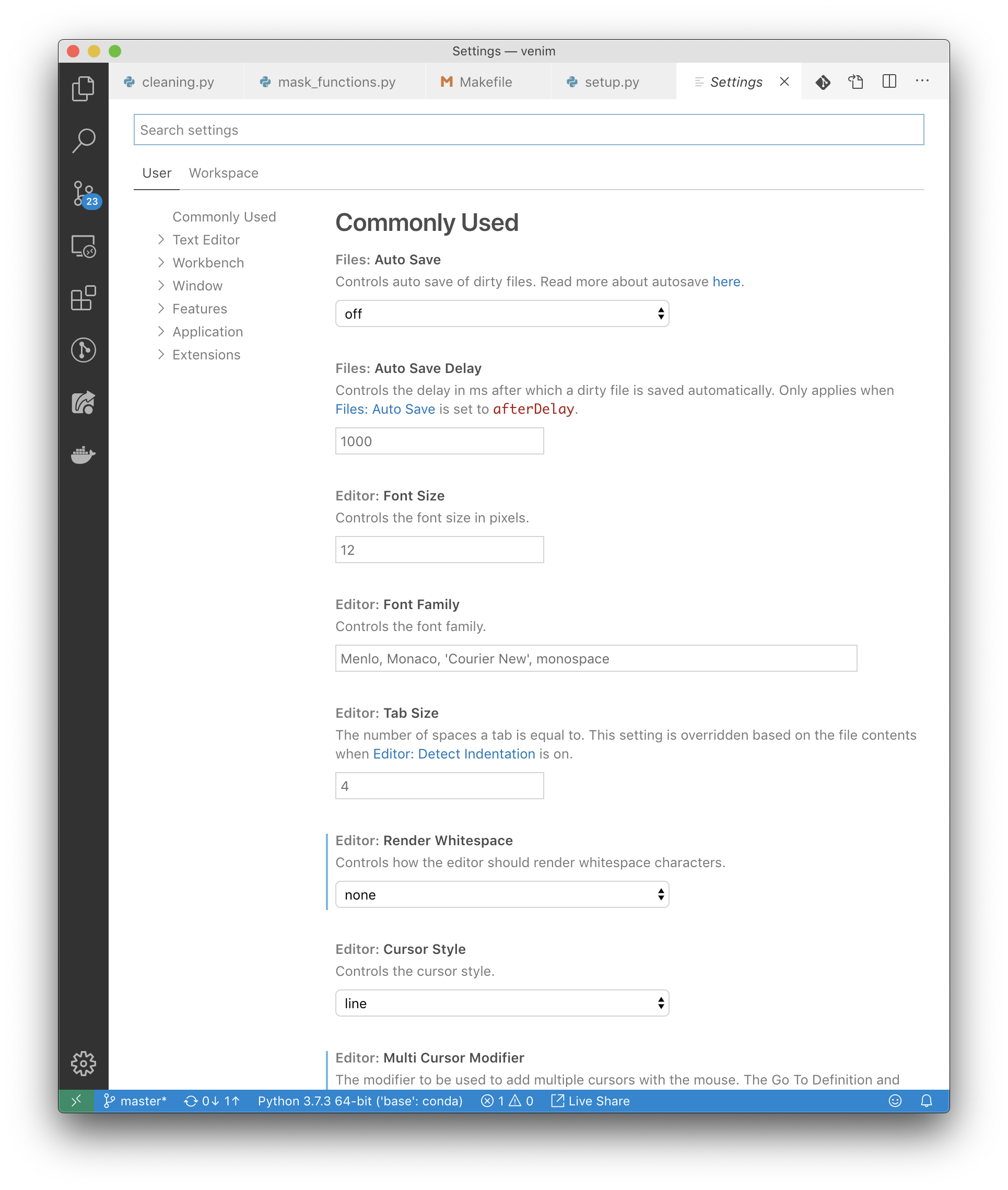
michaelaye
on 6 Nov 2019
Using the command palette, select "Open Settings (JSON)", and you'll see a big JSON object you can add settings to.
jakebailey
on 6 Nov 2019
An NRE stack trace that shows a condition where initialization hasn't finished, but EmptyAnalysis is still being constructed:
   at Microsoft.Python.Analysis.Analyzer.PythonInterpreter.GetBuiltinType(BuiltinTypeId id) in E:\A\_work\1\s\src\Analysis\Ast\Impl\Analyzer\PythonInterpreter.cs:line 144
   at Microsoft.Python.Analysis.Values.GlobalScope.DeclareBuiltinVariables() in E:\A\_work\1\s\src\Analysis\Ast\Impl\Values\GlobalScope.cs:line 41
   at Microsoft.Python.Analysis.Values.GlobalScope..ctor(IPythonModule module, PythonAst ast) in E:\A\_work\1\s\src\Analysis\Ast\Impl\Values\GlobalScope.cs:line 29
   at Microsoft.Python.Analysis.Analyzer.Evaluation.ExpressionEval..ctor(IServiceContainer services, IPythonModule module, PythonAst ast) in E:\A\_work\1\s\src\Analysis\Ast\Impl\Analyzer\Evaluation\ExpressionEval.cs:line 45
   at Microsoft.Python.Analysis.Analyzer.EmptyAnalysis..ctor(IServiceContainer services, IDocument document) in E:\A\_work\1\s\src\Analysis\Ast\Impl\Analyzer\EmptyAnalysis.cs:line 33
   at Microsoft.Python.Analysis.Modules.PythonModule..ctor(String name, ModuleType moduleType, IServiceContainer services) in E:\A\_wor
DeclareBuiltinVariables can be skipped for builtins module IMO. My guess this is creation of the builtins module during interpreter initialization.
MikhailArkhipov
on 8 Nov 2019
I've tried adding python.analysis.downloadChannel to my JSON settings file but it becomes "greyed out" and hovering over it reports "Unknown Configuration Setting".
I am using Code Insiders with WSL remote against Ubuntu 18.04.
Is there a different place to set the download channel when remoting against WSL?
pcolmer
on 8 Nov 2019
Is there a different place to set the download channel when remoting against WSL?
I've found ~/.vscode/settings.json in my WSL distro and added the line to that file. I've restarted VS Code Insiders but the Python Language Server is still 0.4.71.0.
pcolmer
on 8 Nov 2019
You can access setting is VS Code, there is a button to open JSON. Greying out is normal, it is not a public setting.

MikhailArkhipov
on 8 Nov 2019
@MikhailArkhipov well, I've added the required line to my settings and restarted VS Code and it is not downloading a newer version of the Language Server, so I'm not sure what I can do in order to help @jakebailey with testing his fix ... unless it isn't supposed to be the beta channel?
pcolmer
on 8 Nov 2019
Which version is supposed to be in beta, 0.4.99.0? B/c i still get funky warnings like undefined variable "self" in the __init__ method of a class where I clearly haveself` as first parameter.
michaelaye
on 8 Nov 2019
@pcolmer You may need to force an update by removing the old version. The extension may not be checking for an update as often as you need. You can find some instructions on how to find the folder here: https://github.com/microsoft/vscode-python/issues/3977
@michaelaye That doesn't sound like the same issue. Maybe #1573, but that issue is old and I think actually related to #1601.
jakebailey
on 8 Nov 2019
Thanks to @z4ce's help in #1776, I think some of this may be improved in 0.4.109+, which I've now pushed to beta. I'd appreciate it if you could retest with that version to see if things work properly. If not, trace logs would be immensely helpful.
jakebailey
on 13 Nov 2019
No improvement for me. Builtins are still undefined and analyzing in background gets stuck. It seems that this only happens in big projects. I have no problems in smaller (less number of files) project.


kuelumbus
on 14 Nov 2019
Another possible reason is that cached generated stub for builtins is empty or damaged. pyi. This is unrelated to caching None since that setting controls caching of analysis rather than stubs generated from the compiled modules. @kuelumbus - try deleting everything in /home/chris/.cache/Microsoft/Python Language Server.
However, I still see
Analysis of builtins (Builtins) on depth 0 completed in 365.12 ms.
way at the end. This is the root, IMO.
MikhailArkhipov
on 14 Nov 2019
No change. I removed the cache and restarted Code. Right after the restart, the builtins were correctly flagged showing their correct doc strings. A cup of coffee later, the builtins are again flagged as undefined variable.
kuelumbus
on 14 Nov 2019
Could you try daily channel with 0.4.121? https://github.com/microsoft/python-language-server/wiki/Versioning-and-download-channels
MikhailArkhipov
on 16 Nov 2019
Version 0.4.121 fixed it for me. However, I almost never see the doc string because it's constantly analyzing.
kuelumbus
on 17 Nov 2019
Now it's stuck in a reload loop. Note:
[Info  - 3:59:15 PM] Workspace root: /home/chris/data/ml/Net
[Info  - 3:59:15 PM] GetCurrentSearchPaths /usr/bin/python3.7
[Info  - 3:59:15 PM] Interpreter search paths:
[Info  - 3:59:15 PM]     /usr/lib/python3.7
[Info  - 3:59:15 PM]     /usr/lib/python3.7/lib-dynload
[Info  - 3:59:15 PM]     /home/chris/autocomplete
[Info  - 3:59:15 PM]     /home/chris/.local/lib/python3.7/site-packages
[Info  - 3:59:15 PM]     /data/chris/ml/Net
[Info  - 3:59:15 PM]     /usr/local/lib/python3.7/dist-packages
[Info  - 3:59:15 PM]     /usr/lib/python3/dist-packages
Somehow your workspace is a symlink to somewhere completely different outside of the workspace? What kind of setup do you have in your pythonpath? This seems very unusual.
Try setting "python.analysis.watchSearchPaths": false to disable file watching.
jakebailey
on 17 Nov 2019
There are no symlinks in the workspace but /home/chris/data is a link to /data/chris. The workspace is accessible by /home/chris/data/ml/Net and /data/chris/ml/Net. Could this be the issue?
kuelumbus
on 17 Nov 2019
Try setting
"python.analysis.watchSearchPaths": falseto disable file watching.
resolved it. But also changing the workspace root to the direct path.
Thanks for your help.
[Info  - 8:12:55 PM] Workspace root: /data/chris/ml/Net
[Info  - 8:12:55 PM] GetCurrentSearchPaths /usr/bin/python3.7
[Info  - 8:12:56 PM] Interpreter search paths:
[Info  - 8:12:56 PM]     /usr/lib/python3.7
[Info  - 8:12:56 PM]     /usr/lib/python3.7/lib-dynload
[Info  - 8:12:56 PM]     /home/chris/autocomplete
[Info  - 8:12:56 PM]     /home/chris/.local/lib/python3.7/site-packages
[Info  - 8:12:56 PM]     /usr/local/lib/python3.7/dist-packages
[Info  - 8:12:56 PM]     /usr/lib/python3/dist-packages
OK, since reload is a different issue, I am going to close this one which is about builtins. Feel free to open new issue on reloads.
https://github.com/microsoft/python-language-server/pull/1798
MikhailArkhipov
on 17 Nov 2019
as the symptom is that builtins are wrongly flagged as not defined, i don't see why this issue is being closed. the problem is still there, isn't it? That the underlying reason maybe (i don't know i'm not the developer) has nothing to do with built-ins isn't really the user's problem.
michaelaye
on 17 Nov 2019
The builtins were being flagged as undefined as they hadn't been properly created, meaning users of the builtin wouldn't see that they exist and then show messages.
Indefinite reloads may or may not cause that issue (usually not, just infinite analysis), and IMO are not necessarily related. The infinite reload observed above was described as "the docstrings don't show up", not "things are shown as undefined"; if the analysis never completes it won't show linting messages. If it completes with bad state, then you'll get wrong messages, which is what the original issue described and should be fixed with the merged PR.
jakebailey
on 17 Nov 2019
I can see that you mentioned self being marked as undefined; That sounds like another issue we would want a reproducer for. self is not a part of the builtins code (which is what is fixed), but something different.
If your issue persists, then we'd appreciate a new issue to take a look. (We prefer new issues that we can triage and merge, rather than lumping similar symptoms together in a single never-closed issue.)
jakebailey
on 17 Nov 2019
self issue is probably https://github.com/microsoft/python-language-server/issues/1573
MikhailArkhipov
on 18 Nov 2019
 juniorsaldanha
Related issues
 astrowonk
·
39Comments
astrowonk
·
39Comments
 DonJayamanne
·
29Comments
DonJayamanne
·
50Comments
DonJayamanne
·
29Comments
DonJayamanne
·
50Comments
 mikebz
·
32Comments
mikebz
·
32Comments
 MichalPospech
·
33Comments
MichalPospech
·
33Comments
Most helpful comment
I'm having the same problem, but reloading resolves it. For now I have to reload every hour or so.