Python-language-server: "Code Analysis in progress" forever (never starts?)
Python Language Server 0.2.87.0 (freshly deleted and reinstalled)
Python Extension version 2019.5.18678
VS Code 1.35.0
Linux RHEL 7
Code analysis never seems to properly finish? I have turned logging to Trace. The server starts, the Outline is created for whatever code is opened, but floating over any definition the float over text is just "Code Analysis in Progress" without end.
The only thing of note in the Python Ouput log just says Analysis of <whatever.whatever>(Library) Queued with no additional messages at any time no matter how long I wait. Go To Definition ability never loads.
The status bar, which used to show the (large but eventually decreasing to zero) number of files being analyzed, etc., now never says anything about analysis status. I feel like a few weeks ago it would show thousands/hundreds of files being analyzed, the number would gradually decrease, and then stop after a minute or two.
This no-definition-analysis behavior happens regardless of my "python.analysis.openFilesOnly" setting.
If I switch to Jedi, it quickly analyzes sufficiently to find definitions, so the issue goes away with Jedi. But, then I run into the Gitlens/Jedi outline symbols error, and have to turn off Gitlens. Any ideas?
 astrowonk
All 39 comments
After stopping/starting vscode multiple times, it finally analyzed the files.
Edit: all files are not analyzed :(
 bcroq
on 7 Jun 2019
bcroq
on 7 Jun 2019
I'm getting the same behaviour -- no analysis happening:
Microsoft Python Language Server version 0.2.96.0
VS Code 1.35.0
Python Extension Version: 2019.5.18875
Ubuntu 19.04
Switching back to Jedi for now so I can keep working :disappointed:
 SmileyChris
on 12 Jun 2019
SmileyChris
on 12 Jun 2019
Same here, with a trace log I am seeing:
Starting Microsoft Python language server.
[Info  - 9:29:33 AM] Analysis cache path: /home/florian/.cache/Microsoft/Python Language Server
##########Linting Output - flake8##########
[Info  - 9:29:33 AM] GetCurrentSearchPaths /home/florian/sources/ara/.venv/bin/python
[Info  - 9:29:33 AM] Python search paths:
[Info  - 9:29:33 AM]     /usr/lib/python3.7
[Info  - 9:29:33 AM]     /usr/lib/python3.7/lib-dynload
[Info  - 9:29:33 AM]     /home/florian/sources/ara/.venv/lib/python3.7/site-packages
[Info  - 9:29:33 AM]     /home/florian/sources/ara
[Info  - 9:29:33 AM] Configuration search paths:
[Info  - 9:29:35 AM] Microsoft Python Language Server version 0.2.96.0
[Info  - 9:29:35 AM] Initializing for /home/florian/sources/ara/.venv/bin/python
Opening document file:///home/florian/sources/ara/ara/api/serializers.py
Analysis of ara.api.serializers(Library) queued
Opening document file:///home/florian/sources/ara/ara/api/models.py
Analysis of ara.api.models(Library) queued
##########Linting Output - flake8##########
Opening document file:///home/florian/sources/ara/ara/api/auth.py
Analysis of ara.api.auth(Library) queued
##########Linting Output - flake8##########
Analysis is only queued.
Microsoft Python Language Server version 0.2.96.0
VS Code 1.35.1
Python Extension Version: 2019.5.18875
Debian unstable
 apollo13
on 14 Jun 2019
apollo13
on 14 Jun 2019
I think it should be noted that hovering over a symbol only returns "Code analysis is in progress" (I googled this and the only result was the source code).

 kbakk
on 17 Jun 2019
kbakk
on 17 Jun 2019
Seeing similar output. Could there be something with installed packages (another user in the issue referenced above mentioned seeing this in Conda – https://github.com/microsoft/vscode-docs/issues/2741#issuecomment-501416916):
this happens only when the selected interpreter is the one provided by conda
Here's what I've got installed in my environment (created through Poetry):
pip list
poetry run pip list
Package            Version
------------------ --------
appdirs            1.4.3
aspy.yaml          1.3.0
astroid            2.2.5
atomicwrites       1.3.0
attrs              19.1.0
black              19.3b0
blinker            1.4
certifi            2019.3.9
cfgv               2.0.0
chardet            3.0.4
Click              7.0
entrypoints        0.3
flake8             3.7.7
Flask              1.0.3
gunicorn           19.9.0
identify           1.4.3
idna               2.8
importlib-metadata 0.17
isort              4.3.20
itsdangerous       1.1.0
Jinja2             2.10.1
json-logging       0.0.11
jsonschema         3.0.1
lazy-object-proxy  1.4.1
maestro-python     0.1.5
MarkupSafe         1.1.1
mccabe             0.6.1
more-itertools     7.0.0
nodeenv            1.3.3
pendulum           2.0.4
pip                19.0.3
pluggy             0.12.0
pre-commit         1.16.1
py                 1.8.0
pycodestyle        2.5.0
pyflakes           2.1.1
pylint             2.3.1
pyrsistent         0.15.2
pytest             3.10.1
pytest-mock        1.10.4
python-dateutil    2.8.0
pytzdata           2019.1
PyYAML             5.1
requests           2.22.0
responses          0.10.6
sentry-sdk         0.7.14
setuptools         40.8.0
six                1.12.0
toml               0.10.0
typed-ast          1.3.5
urllib3            1.25.3
virtualenv         16.6.0
Werkzeug           0.15.4
wrapt              1.11.1
xmltodict          0.12.0
zipp               0.5.1
I think it should be noted that hovering over a symbol only returns "Code analysis is in progress" (I googled this and the only result was the source code).
Yep -this was the behavior that prompted me to open the issue!
astrowonk
on 17 Jun 2019
If there's a repo that reproduces this, that'd be great. A copy of a trace log which shows the analysis stopping could be useful, too. https://github.com/microsoft/python-language-server/blob/master/TROUBLESHOOTING.md#filing-an-issue
 jakebailey
on 17 Jun 2019
jakebailey
on 17 Jun 2019
@jakebailey I sadly cannot provide the repo to reproduce, but the logs I posted in https://github.com/microsoft/python-language-server/issues/1175#issuecomment-502002175 are all the logs I get with trace enabled :/ I do not think it ever starts at all.
apollo13
on 17 Jun 2019
Ah, my bad, I missed the trace lines in that output (distracted by the pylint text).
jakebailey
on 17 Jun 2019
Not sure if it is of any help, but this is a backtrace of the language server:
#0  futex_wait_cancelable (private=0, expected=0, futex_word=0x13a2fd4) at ../sysdeps/unix/sysv/linux/futex-internal.h:88
#1  __pthread_cond_wait_common (abstime=0x0, mutex=0x13a2f80, cond=0x13a2fa8) at pthread_cond_wait.c:502
#2  __pthread_cond_wait (cond=0x13a2fa8, mutex=0x13a2f80) at pthread_cond_wait.c:655
#3  0x00007f32d5602c12 in CorUnix::CPalSynchronizationManager::ThreadNativeWait(CorUnix::_ThreadNativeWaitData*, unsigned int, CorUnix::ThreadWakeupReason*, unsigned int*) ()
   from /home/florian/.vscode/extensions/ms-python.python-2019.5.18875/languageServer.0.2.96/libcoreclr.so
#4  0x00007f32d56027f4 in CorUnix::CPalSynchronizationManager::BlockThread(CorUnix::CPalThread*, unsigned int, bool, bool, CorUnix::ThreadWakeupReason*, unsigned int*) ()
   from /home/florian/.vscode/extensions/ms-python.python-2019.5.18875/languageServer.0.2.96/libcoreclr.so
#5  0x00007f32d56071c4 in CorUnix::InternalWaitForMultipleObjectsEx(CorUnix::CPalThread*, unsigned int, void* const*, int, unsigned int, int, int) ()
   from /home/florian/.vscode/extensions/ms-python.python-2019.5.18875/languageServer.0.2.96/libcoreclr.so
#6  0x00007f32d5607541 in WaitForMultipleObjectsEx () from /home/florian/.vscode/extensions/ms-python.python-2019.5.18875/languageServer.0.2.96/libcoreclr.so
#7  0x00007f32d5269d61 in Thread::DoAppropriateWaitWorker(int, void**, int, unsigned int, WaitMode) ()
   from /home/florian/.vscode/extensions/ms-python.python-2019.5.18875/languageServer.0.2.96/libcoreclr.so
#8  0x00007f32d5264ba0 in Thread::DoAppropriateWait(int, void**, int, unsigned int, WaitMode, PendingSync*) ()
   from /home/florian/.vscode/extensions/ms-python.python-2019.5.18875/languageServer.0.2.96/libcoreclr.so
#9  0x00007f32d52b6980 in WaitHandleNative::CorWaitOneNative(SafeHandle*, int, bool, bool) () from /home/florian/.vscode/extensions/ms-python.python-2019.5.18875/languageServer.0.2.96/libcoreclr.so
According to strace it never leaves this wait.
apollo13
on 17 Jun 2019
Unfortunately that doesn't help too much due to the CLR stuff (the LS is in C# so it runs within the CLR), other than knowing that there's some deadlock. Getting a real trace of where it's stopped would be something we'd do in VS, but that's of course not as simple to emulate on Linux (probably doable with vsdbg but I haven't used it).
One thing to try is the daily build to see if it's gone away in a few fixes since 0.2.96, by setting:
"python.analysis.downloadChannel": "daily"
Unfortunately that doesn't help too much due to the CLR stuff (the LS is in C# so it runs within the CLR), other than knowing that there's some deadlock. Getting a real trace of where it's stopped would be something we'd do in VS, but that's of course not as simple to emulate on Linux (probably doable with
vsdbgbut I haven't used it).One thing to try is the daily build to see if it's gone away in a few fixes since 0.2.96, by setting:
"python.analysis.downloadChannel": "daily"
The daily download is not helping me, just tried it.
Happy to try vsdbg to get you a better trace, if someone can point me to some example
astrowonk
on 17 Jun 2019
@jakebailey Got you a reproducer: https://github.com/apollo13/vscode-bug -- Please follow the instructions in README.md. If anyone else could confirm that this sequence also generates a hanging analysis…
apollo13
on 17 Jun 2019
Note: For me analysis starts working once I do not run pip install -e . in the above example repo.
apollo13
on 17 Jun 2019
Thanks, I can reproduce it and have a fix. This is related to #1209, as well as https://github.com/microsoft/python-language-server/issues/537#issuecomment-502806667.
jakebailey
on 17 Jun 2019
Oh interesting, re #537, I am using .pth files too...
astrowonk
on 17 Jun 2019
If you're using any sort of editable installs/setup.py develop, definitely (even if someone doesn't know it).
We use the interpreter to get info about what is library code and what isn't. pth files make things more complicated because the interpreter will report that a given path is something it has. Setting extraPaths as in https://github.com/microsoft/python-language-server/blob/master/TROUBLESHOOTING.md#unresolved-import-warnings will then let you specify which roots are yours. In this case, the workspace root should _always_ be treated as user code. Installing the workspace root wasn't a case that I had found/considered in #1169 (as nobody had presented such a situation until now).
jakebailey
on 17 Jun 2019
hmm, I don't think I have used an editable install? I just needed to add several directories to my python path to aide in unit test discovery, and .pth files seemed easier than adding things to an environmental variable. Most of my packages are from conda.
But my structure is like:
my_code->
    folder1
    folder2
    folder3
and I have made my_code what I open as a folder in my workspace, and folder1, etc. are all added to my path with .pth files in my personal site-packages dir. Is that not what I should be doing? Will that stop working with your PR?
astrowonk
on 17 Jun 2019
It won't stop working, but as per https://github.com/microsoft/python-language-server/blob/master/TROUBLESHOOTING.md#unresolved-import-warnings if you're not going to be importing things relative to your open workspace (i.e. if you have folder1/a/b and are importing a.b and not folder1.a.b), then you're going to need to do something like this for now:
"python.autoComplete.extraPaths": [
    "./folder1",
    "./folder2",
    "./folder3"
]
And the LS will then treat those as places where code can be imported from. If you post your trace logs from your project (specifically the beginning part that prints the paths), then I give a more complete answer.
jakebailey
on 17 Jun 2019
Coming up with a better solution that isn't purely configuration is something on my list (which I will file an issue for), but at the moment adding a configuration item to tell the LS how your project is laid out is how we can handle these more complicated projects. Most users don't encounter this, since they're not using pth files, editable installs, interesting folder structures, etc.
jakebailey
on 17 Jun 2019
A build with the fix is in progress and will be available in daily within the hour. I think this will be fixed then (and eventually when we push to stable for everyone), but I'll be happy to open this back up if it ends up not working in your specific scenario.
jakebailey
on 17 Jun 2019
To be clear, I expect the hang to go away (even if imports don't work as per the troublehsooting docs), because there won't be some odd library root that's the entire workspace screwing up the dependency graph. We build a big graph for resolving imports and producing the analysis ordering (that can handle multiple roots and all of the different import flavors in python), and my expectation is that mis-classifying the workspace root broke other, only partially related things.
jakebailey
on 17 Jun 2019
Thanks. FWIW, just setting python.autoComplete.extraPaths right now for me eliminated the endless analysis on floating-over a function name that prompted me to open the issue. But I will also test once the daily build is pushed.
UPDATE - Hmm, not quite, I had a workspace with multiple folders and the issue only resolved when I made a new workspace that only had the single root my_code as I laid out above.
astrowonk
on 17 Jun 2019
v0.3.13 and above contain my PR, if you could test and see.
jakebailey
on 17 Jun 2019
I have 0.3.15. My workspace interpreter path no longer has the workspace path. However it wasn't moved to the user search path and the package in the root of my workspace is still not resolvable.
[Info - 4:56:51 PM] GetCurrentSearchPaths /Users/{user}/.pyenv/versions/3.7.2/bin/python
[Info - 4:56:51 PM] Interpreter search paths:
[Info - 4:56:51 PM] /private/var/folders/9q/mshp41rj5419tdv0ftt4bz380000gn/T/wbsqjziz.hqp
[Info - 4:56:51 PM] /Users/{user}/.pyenv/versions/3.7.2/lib/python3.7
[Info - 4:56:51 PM] /Users/{user}/.pyenv/versions/3.7.2/lib/python3.7/lib-dynload
[Info - 4:56:51 PM] /Users/{user}/.local/lib/python3.7/site-packages
[Info - 4:56:51 PM] /Users/{user}/.pyenv/versions/3.7.2/lib/python3.7/site-packages
[Info - 4:56:51 PM] User search paths:
[Info - 4:56:51 PM] /Users/{user}/Documents/Code/pymod_stress_test/lib
[Info - 4:56:51 PM] /Users/{user}/Documents/Code/pymod_stress_test/mod_tests
[Info - 4:56:52 PM] Microsoft Python Language Server version 0.3.15.0
 jaredcm
on 17 Jun 2019
jaredcm
on 17 Jun 2019
Hmm, the fix wasn't supposed to move it down; the workspace root is _always_ a search path even if it's not shown. Is the hang gone? Is it an import that goes unresolved, or something else? Do you have an example or updated repro? (Since I know you reported #537)
jakebailey
on 17 Jun 2019
I am also on
Microsoft Python Language Server version 0.3.15.0
now and it works fine again. Thanks!
apollo13
on 17 Jun 2019
Ok, that's fair. The hang has been gone since I moved the ./lib and ./mod_tests to the extraPaths setting.
I found the issue. The package I wanted to resolve was mod_tests which is in my extraPaths. When I removed it from my extraPaths it became resolvable again. It seems that you have to decide whether to have a directory as an extraPath or a resolvable package. Sorry for the mix-up, in python both are allowable.
jaredcm
on 17 Jun 2019
Interesting, I figured we'd allow both. Do you mean you had something like:
    + a
        + b
            + __init__.py
And added mod_tests to extraPaths to do import a.b, but also want import mod_tests.a.b to work?
jakebailey
on 17 Jun 2019
That is exactly what I was looking for. I wanted to keep general utility functions in mod_tests and also have the ability to import sub_tests directly as sort of plugins.
jaredcm
on 17 Jun 2019
Hmm, I still have an issue. My workspace is like this:
```my_code->
folder1
folder2
folder3
with all folder1 -> folder3 added to my python path with .pth files for each. I also added all of them to the extra paths settings. They all show up as part of "user search paths" in the python log.

I also added to my workspace another folder, let's call it "astrowonk_code" which has other python files I want to be able to import from jupyter (thus why it has .pth file pointing to it)
my_code->
folder1
folder2
folder3
astrowonk_code/stuff.py
```
Nothing in astrowonk_code is getting analyzed. the path shows up in "interpreter paths" but the outlines aren't getting created nor are any float over definitions working.
But astrowonk_code does get partially analyzed if I put it also in extra_paths (though the python log still shows it only under "interpreter search paths.") except it still shows "Analysis in progress.." over every definition tool tip. eventually there is just nothing when floating over functions. (The outline sometimes gets made? seems inconsistent.)
So most of my code the analysis is working properly, but not all. Looks like I'm on 0.3.15.0 of the LS.
(also the endless analysis still happens if I don't add folder1-3 into extrapaths. If autocomplete.extrapaths is unset, Code Analysis in Progress lasts forever, even if all the paths I would add to extrapaths show up in "interpreter search paths"
if I add astrowonk_code to the extrapaths then it still only appears in interpreter paths, but folder1-3 now appear in both. ¯_(ツ)_/¯
astrowonk
on 18 Jun 2019
We only consider code within the workspace to be user code. Everything specified in extraPaths is split into what is and isn't in the workspace, then placed accordingly. My impression was that my_code was your workspace, so astrowonk_code is outside of it.
If it's library code, then many features will not operate within the module, though the outline should always appear (symbol collection is separate).
As for the hang, it's a bit difficult for me to make any judgement without seeing the trace log output, specifically the path list. The issue I had fixed was that the whole workspace was being marked as "interpreter", so I'd need another example that I can run that would have the hang.
jakebailey
on 18 Jun 2019
@jakebailey I am on macOS, running
- VS code Version 1.35.1 (1.35.1)
- Microsoft Python Language Server version 0.2.96.0
I am using a virtual environment, with a Mac Ports interpreter. I keep experiencing the same problem, and a perpetual "Code Analysis in Progress..." What's the right information to report to be helpful?
I looked for .pth files (which I did not know of previously) and realized that some packages in my virtual environment use some:
/Users/jlumbroso/.local//share/virtualenvs/codePost-api-python-_uTOs40F/lib/python3.7/site-packages/pytest-cov.pth
/Users/jlumbroso/.local//share/virtualenvs/codePost-api-python-_uTOs40F/lib/python3.7/site-packages/easy-install.pth
Maybe this is expected, but I guess I am surprised that this affects the server entirely, even on examples that seem wholly unrelated, such as:
# VS code Version 1.35.1 (1.35.1)
# Microsoft Python Language Server version 0.2.96.0
class Person(object):
    def say(self, msg:str):
        print(msg)

def f() -> Person:
    return Person()

a = f()
b = Person()

# Neither a. nor b. provide "say" as an option.
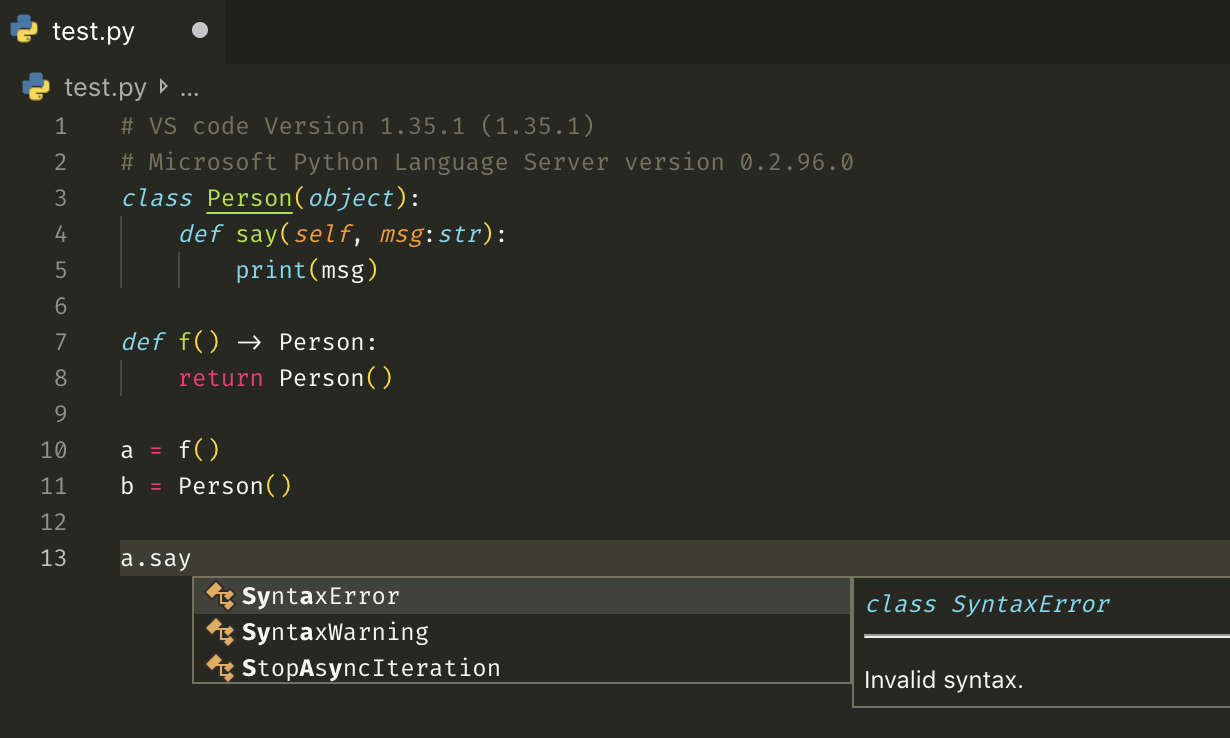
I have tried to reproduce the conditions of this problem without success. Here is what I did:
- I setup a blank environment with the same Pipfile (including the
mypack = {path = ".",editable = true}line). - I created the venv with pipenv, and used it as target interpret.
- I created a bogus
mypackpackage with an empty__init__.pyfile. - I created the
example.pyfile above. This time the code analysis worked.
I am not sure, besides the actual content of the code in mypack what is missing from the above protocol compared to my original context.
By the way, I followed the instructions here to reinstall the most recent version and got the same above reinstalled, making me wonder if I should use the beta version:
Starting Microsoft Python language server.
Downloading https://pvsc.azureedge.net/python-language-server-stable/Python-Language-Server-osx-x64.0.2.96.nupkg
The Pipfile I was considering today was:
[[source]]
name = "pypi"
url = "https://pypi.org/simple"
verify_ssl = true

[dev-packages]
pytest = ">=4.4"
pytest-cov = ">=2.6"
coveralls = "*"
tox = "*"
PyYAML = "*"
pylint = "*"
pytest-subtests = "*"

[packages]
requests = "*"
PyYAML = "*"
urllib3 = "*"
currentPack = {path = ".",editable = true}

[requires]
python_version = "3.7"
Any help much appreciated!!
 jlumbroso
on 21 Jun 2019
jlumbroso
on 21 Jun 2019
I am trying the beta channel, and it seems to address the current problem I was reporting.
jlumbroso
on 21 Jun 2019
I am still facing this issue on 3.8.5
 QuantumStatic
on 5 Sep 2020
QuantumStatic
on 5 Sep 2020
@QuantumStatic Same, actually, although I love VS Code, I ended up just switching to PyCharm for all Python-only projects, which seems (for now) to have a more reliable, consistent Python intelligent support in my experience: https://www.jetbrains.com/pycharm/
jlumbroso
on 5 Sep 2020
@jlumbroso There is much customisations available but, if they don't fix it I'll have to shift 😔. I did start a new issue hoping it to get some traction.
QuantumStatic
on 6 Sep 2020
We are not as actively maintaining this project as we have previously; you're advised to try out Pylance, which we are actively developing: https://marketplace.visualstudio.com/items?itemName=ms-python.vscode-pylance microsoft/python-language-server#2096
jakebailey
on 14 Sep 2020
Yes I downloaded Pylance I really liked it. There are some syntax highlighting issues but nonetheless, it's great.
QuantumStatic
on 22 Sep 2020
Related issues
 DonJayamanne
·
29Comments
DonJayamanne
·
29Comments
 MikhailArkhipov
·
46Comments
MikhailArkhipov
·
46Comments
 xobs
·
66Comments
xobs
·
66Comments
 MichalPospech
·
33Comments
MichalPospech
·
33Comments
 gramster
·
100Comments
gramster
·
100Comments
Most helpful comment
I think it should be noted that hovering over a symbol only returns "Code analysis is in progress" (I googled this and the only result was the source code).