Pysimplegui: [ Bug] Element.expand() faulty
Type of Issues (Enhancement, Error, Bug, Question)
Bug: When window is resized, fields do not expand correctly. You should use pack(expand=1) on the parent frame ONLY when fill=BOTH. Corrected code below.
Operating System
Windows 10
Python version
3.72
PySimpleGUI Port and Version
tkinter, 4.12
Your Experience Levels In Months or Years
3 yrs Python programming experience
50 yrs Programming experience overall, yes I am very old
yes, I Have used another Python GUI Framework (tkinter, Qt, etc) previously (yes/no is fine)?
You have completed these steps:
- [ ] Read instructions on how to file an Issue
- [ ] Searched through main docs http://www.PySimpleGUI.org for your problem
- [ ] Searched through the readme for your specific port if not PySimpleGUI (Qt, WX, Remi)
- [ ] Looked for Demo Programs that are similar to your goal http://www.PySimpleGUI.com
- [ ] Note that there are also Demo Programs under each port on GitHub
- [ ] Run your program outside of your debugger (from a command line)
- [ ] Searched through Issues (open and closed) to see if already reported
Code or partial code causing the problem
Corrected version of Element.expand():
`
def expand(self, expand_x=False, expand_y=False):
"""
Causes the Element to expand to fill available space in the X and Y directions. Can specify which or both directions
    :param expand_x: (Bool) If True Element will expand in the Horizontal directions
    :param expand_y:  (Bool) If True Element will expand in the Vertical directions
    """
    xpand = False
    if expand_x and expand_y:
        fill = tk.BOTH
        xpand = True
    elif expand_x:
        fill = tk.X
    elif expand_y:
        fill = tk.Y
    else:
        return

    self.Widget.pack(expand=True, fill=fill)
    self.ParentRowFrame.pack(expand=xpand, fill=fill)
`
Testing:
`import PySimpleGUI as sg
layout = [
[sg.Text('Red',background_color='red', key='r'), sg.Text('Yellow', background_color='yellow',key='y')],
[sg.Text('Green',background_color='green', key='g')],
[sg.Text('Blue',background_color='blue', key='b')]
]
window = sg.Window('Just testing',layout,size=(200,200),
margins=(0, 0), element_padding=(0, 0),
resizable=True, finalize=True)
window['y'].expand(expand_x=True)
window['g'].expand(expand_x=True, expand_y=True)
window['b'].expand(expand_x=True)
while True:
event, values = window.read()
if not event: break
`
 HrkInTheWild
All 7 comments
Or maybe you should just avoid on the parent frame pack(expand=1,fill='x'). Vertical expansion looks funny but does not break anything else. Horizontal does.
HrkInTheWild
on 15 Dec 2019
Can you post a couple of screenshots showing where you're seeing problems? Something that shows what breaks and when would be helpful.
What you see in terms of the architecture and APIs is an evolution of PySimpleGUI. It started out being a window that wasn't resizable. It was only in the past few months that resizing with expanding elements was possible.
The row frame is required to make the layouts. It contains all of the widgets that are on a single row. If it doesn't expand / fill then neither do the widgets inside of it.
 PySimpleGUI
on 15 Dec 2019
PySimpleGUI
on 15 Dec 2019
Sure. This is "before":
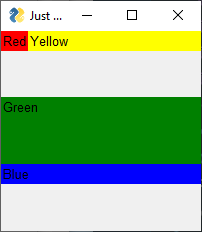
... and this is "after":

... and this the proposed change:
def expand(self, expand_x=False, expand_y=False):
"""
Causes the Element to expand to fill available space in the X and Y directions. Can specify which or both directions
:param expand_x: (Bool) If True Element will expand in the Horizontal directions
:param expand_y: (Bool) If True Element will expand in the Vertical directions
"""
xpand = False
if expand_x and expand_y:
fill = tk.BOTH
xpand=True
elif expand_x:
fill = tk.X
elif expand_y:
fill = tk.Y
else:
return
self.Widget.pack(expand=True, fill=fill)
self.ParentRowFrame.pack(expand=xpand, fill=fill)
... and this is my test program:
import PySimpleGUI as sg
layout = [
[sg.Text('Red',background_color='red', key='r'),
sg.Text('Yellow', background_color='yellow',key='y')],
[sg.Text('Green',background_color='green', key='g')],
[sg.Text('Blue',background_color='blue', key='b')]
]
window = sg.Window('Just testing',layout,size=(200,200),
margins=(0, 0), element_padding=(0, 0),
resizable=True, finalize=True)
window['y'].expand(expand_x=True)
window['g'].expand(expand_x=True, expand_y=True)
window['b'].expand(expand_x=True)
while True:
event, values = window.read()
if not event: break
Yes I understand the principle. But a frame (row) does not need to and should not "expand" in order to just x-fill. Expand means "use ALL available space". Tkinter documentation is a bit vague on this point, and the pack geometry manager is quirky. I would use grid.
HrkInTheWild
on 15 Dec 2019
Hmmm... I need a third parameter perhaps that indicates if the element should in addition to expanding, fill. My assumption was that if someone is asking for an expand, they also would like fill to occur.
Grid is not an option.
PySimpleGUI
on 15 Dec 2019
I've added a third parameter to control the row expansion.
    def expand(self, expand_x=False, expand_y=False, expand_row=True):
        """
        Causes the Element to expand to fill available space in the X and Y directions.  Can specify which or both directions

        :param expand_x: (Bool) If True Element will expand in the Horizontal directions
        :param expand_y:  (Bool) If True Element will expand in the Vertical directions
        :param expand_row:  (Bool) If True the row containing the element will also expand. Without this your element is "trapped" within the row
        """
        if expand_x and expand_y:
            fill = tk.BOTH
        elif expand_x:
            fill = tk.X
        elif expand_y:
            fill = tk.Y
        else:
            return

        self.Widget.pack(expand=True, fill=fill)
        self.ParentRowFrame.pack(expand=expand_row, fill=fill)
While still not ideal, it provides the most potential options for the developer. The default is True so that existing applications are not negatively impacted. Of course anyone is capable of accessing any of these Widgets directly should this not be enough options. There are / will be some limitations encountered using PySimpleGUI. It's a balance between simplicity and capabilities.
PySimpleGUI
on 15 Dec 2019
Now you must modify all elements with expand_x or expand_y but not both by adding expand_row=False. If not thus modified, existing applications are not negatively impacted, but they work just as badly as before.
HrkInTheWild
on 15 Dec 2019
@HrkInTheWild you've got the option to replace the method with your own by either forking the code or simply replacing that one method. I'm trying to provide a solution that works for the existing install base as well as newcomers. It's the best that I can offer at this point. If PySimpleGUI isn't for you, it isn't for you.
PySimpleGUI
on 15 Dec 2019
Related issues
 OndoyManing
·
4Comments
OndoyManing
·
4Comments
 ncotrb
·
4Comments
ncotrb
·
4Comments
 mozesa
·
4Comments
mozesa
·
4Comments
 xuguojun168
·
3Comments
xuguojun168
·
3Comments
 flowerbug
·
4Comments
flowerbug
·
4Comments
Most helpful comment
I've added a third parameter to control the row expansion.
While still not ideal, it provides the most potential options for the developer. The default is True so that existing applications are not negatively impacted. Of course anyone is capable of accessing any of these Widgets directly should this not be enough options. There are / will be some limitations encountered using PySimpleGUI. It's a balance between simplicity and capabilities.