Pysimplegui: Custom Icon also for FileBrowse / FileSaveAs etc. window
Type of Issues (Enhancement, Error, Bug, Question)
Question
Operating System
Windows 10
Python version
3.7.3
PySimpleGUI Port and Version
PySimpleGUI-TK 4.0.0
Code or partial code causing the problem
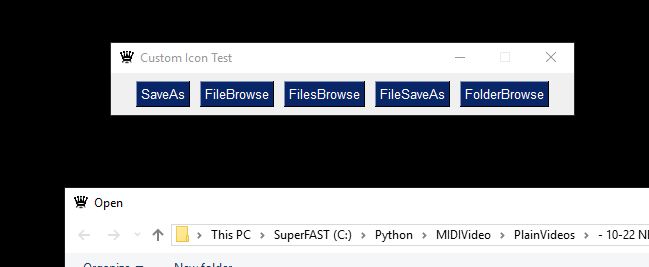
Hello Mike, I have the following question. I have successfully given the main window its own icon, but when I use the file open window / folder open window etc., the standard feather icon of TK is displayed. Is there a workaround / parameter for this? =)
import PySimpleGUI as sg

layout = [[sg.SaveAs("SaveAs"),
           sg.FileBrowse("FileBrowse"),
           sg.FilesBrowse("FilesBrowse"),
           sg.FileSaveAs("FileSaveAs"),
           sg.FolderBrowse("FolderBrowse")]]

window = sg.Window("Custom Icon Test", layout, icon="star.ico")

while True:
    event, values = window.Read()
    if event == None:
        break

window.Close()

Kind regards, Nico
 ncotrb
All 4 comments
Yea, that don't seem right now does it.
 MikeTheWatchGuy
on 15 Jul 2019
MikeTheWatchGuy
on 15 Jul 2019
Fixed.
Get a new PySimpleGUI.py file from the GitHub and place into your application's folder. I tested it using your test harness. I really appreciate you coding that up. Very helpful and we got to a quicker fix as a result.
MikeTheWatchGuy
on 15 Jul 2019
Yeeeeah.... Great! Thank You very much! This saves me a lot of resource hacking, which is certainly not intended.
I am sure that you have not only made me happy, but also many others with this bug fix =)
ncotrb
on 16 Jul 2019
Released to PyPI as release 4.1 so you can delete any local copies and use the new pip installed version
 PySimpleGUI
on 5 Aug 2019
PySimpleGUI
on 5 Aug 2019
Related issues
MikeTheWatchGuy
·
5Comments
 flowerbug
·
4Comments
flowerbug
·
4Comments
 scmanjarrez
·
5Comments
scmanjarrez
·
5Comments
 yogesh-aggarwal
·
3Comments
yogesh-aggarwal
·
3Comments
 mozesa
·
5Comments
mozesa
·
5Comments