After instalation, program doesn't respond.
No errors or any warning shows up.

Bug Report
Expected behavior:
Actual behavior:
Detailed steps to reproduce:
Fits involved in EFT format (Edit > To Clipboard > EFT):
Release or development git branch? Please note the release version or commit hash:
Operating system and version (eg: Windows 10, OS X 10.9, OS X 10.11, Ubuntu 16.10):
Other relevant information:
 qJackDodgersp
All 46 comments
Open <user folder>\.pyfa\ and upload the latest log file somewhere, e.g. https://gist.github.com/
 DarkFenX
on 18 Apr 2020
DarkFenX
on 18 Apr 2020
wich file is the log:
qJackDodgersp
on 18 Apr 2020
Files named like pyfa-2020-04-18.log
DarkFenX
on 19 Apr 2020
not a single file with that extension on directory.
qJackDodgersp
on 19 Apr 2020
I also tried some late versions with the same issue.
qJackDodgersp
on 19 Apr 2020
Identical problem here. Previous versions also do not launch.
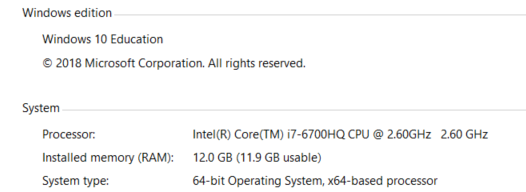
 biomath
on 21 Apr 2020
biomath
on 21 Apr 2020
What about https://github.com/pyfa-org/Pyfa/releases/tag/v2.16.0, does it work for you?
DarkFenX
on 21 Apr 2020
What about https://github.com/pyfa-org/Pyfa/releases/tag/v2.16.0, does it work for you?
I have the same problem ... with the proposed version of January / 2020 it works normally, however, with the current version not yet.
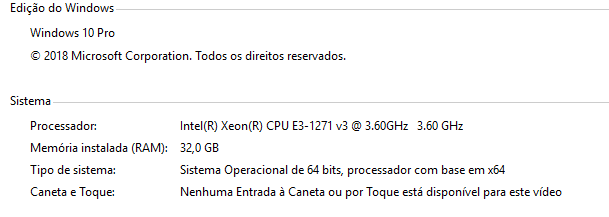
 Ceraci
on 21 Apr 2020
Ceraci
on 21 Apr 2020
1) Try running app from the console (open command line, cd <pyfa folder>, pyfa.exe) and see if it prints anything
2) What are your regional settings? "Locale/language for non-unicode programs" and "format" settings specifically.
3) Can you try versions after v2.16.0 one-by-one and find the oldest one which doesn't start? Bear in mind several versions triggered anti-virus warnings, but you can ignore them (refer to #2125 for more info).
DarkFenX
on 21 Apr 2020
- Try running app from the console (open command line,
cd <pyfa folder>,pyfa.exe) and see if it prints anything
Answer: Does not inform anything
- What are your regional settings? "Locale/language for non-unicode programs" and "format" settings specifically.
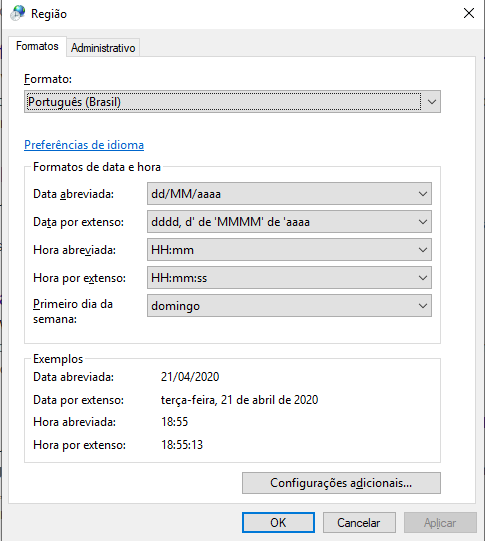
- Can you try versions after v2.16.0 one-by-one and find the oldest one which doesn't start? Bear in mind several versions triggered anti-virus warnings, but you can ignore them (refer to #2125 for more info).
Answer: From that version none worked ... all had similar problems of not opening the application. I even disabled windows defender and I don't use another anti virus ... however, it still doesn't work ...
Ceraci
on 22 Apr 2020
I will try to find out which exactly library upgrade caused that, and if it depends on the Format setting (if it does, most likely it is wxpython).
Try changing format setting to US english and see if it helps.
I will try debugging it myself, but first i need some spare time and access to windows machine, so no promises it happens until end of the following week.
DarkFenX
on 23 Apr 2020
I will try to find out which exactly library upgrade caused that, and if it depends on the Format setting (if it does, most likely it is wxpython).
Try changing format setting to US english and see if it helps.
I will try debugging it myself, but first i need some spare time and access to windows machine, so no promises it happens until end of the following week.
With the change of the regional configurations the most current version worked ... now let's see what it can be so that we can use the local version ... but thanks in advance for your attention!!!
Ceraci
on 24 Apr 2020
With the change of the regional configurations the most current version worked
Could you say changing which setting exactly has helped you? "Format" or something else?
DarkFenX
on 24 Apr 2020
With the change of the regional configurations the most current version worked
Could you say changing which setting exactly has helped you? "Format" or something else?
Only with the change of format ... I restarted and it was working as usual ...
Ceraci
on 24 Apr 2020
Okay, then most likely it is the wxpython issue i was talking about, and I am afraid there won't be a way to fix it without breaking anything. The options I have right now:
- python 3.7 + wxpython 4.0.6 - current version, it turned out to have the issue we're discussing here
- python 3.7 + wxpython 4.0.7post2 - binary builds of wxpython for 3.7 are not provided and the wxpython does not compile on our build system
- python 3.8 + wxpython 4.0.7post2 - is/was riddled with issues. It had multiple issues related to the "Format" setting:
- #2128 / https://github.com/wxWidgets/Phoenix/issues/1008 - interface is mirrored if any RTL format is specified. Can be fixed by resetting locale (to ignore Format setting) or rolling back to 3.7 + 4.0.6
- #2134 / #2136 / https://github.com/wxWidgets/Phoenix/issues/1515 - on certain locales (including reset locale), pyfa crashed when loading. It turned out because wxpython failed to load images with "resolution" metadata embedded to images on these locales. So the fix was removal of the resolution data from pyfa images. But it turns out that images embedded into wxpython are also affected, and they led to pyfa crash when the character editor is opened (because character editor and quite many other areas use the embedded images).
So, python 3.8 + wxpython 4.0.7post2 + reset locale is a no-go (crashes), without reset locale you get RTL interface on some locales and crashes on another locales, and with 3.7 + 4.0.6 you have this issue. I am cornered and either way I choose, I will have one issue or another.
I think that correct course of action is to poke wxpython devs so that they fix images in their repo and make another bug fix release, which I will be able to use with locale reset, which - theoretically - should resolve all linked issues.
And for you as a user, workaround would be to change the format setting until we have this issue resolved.
DarkFenX
on 24 Apr 2020
@Ceraci please try setting locale back to the setting which used to break pyfa and try one of those builds: https://ci.appveyor.com/project/pyfa-org/pyfa/builds/32409127/artifacts see if pyfa launches and if character editor opens without a crash.
In this build I am resetting locale on python 3.7 + wxpython 4.0.6, so maybe it will help.
DarkFenX
on 24 Apr 2020
@Ceraci please try setting locale back to the setting which used to break pyfa and try one of those builds: https://ci.appveyor.com/project/pyfa-org/pyfa/builds/32409127/artifacts see if pyfa launches and if character editor opens without a crash.
In this build I am resetting locale on python 3.7 + wxpython 4.0.6, so maybe it will help.
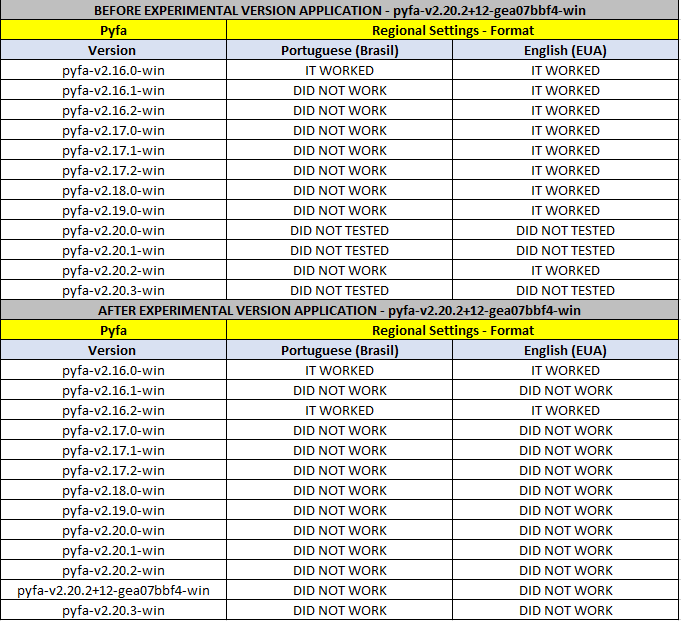
Something strange happened ... after applying this experimental version, both the Portuguese (Brazil) and English (USA) formats stopped working ... then I decided to validate some versions to see the behavior ... below the table comparative:
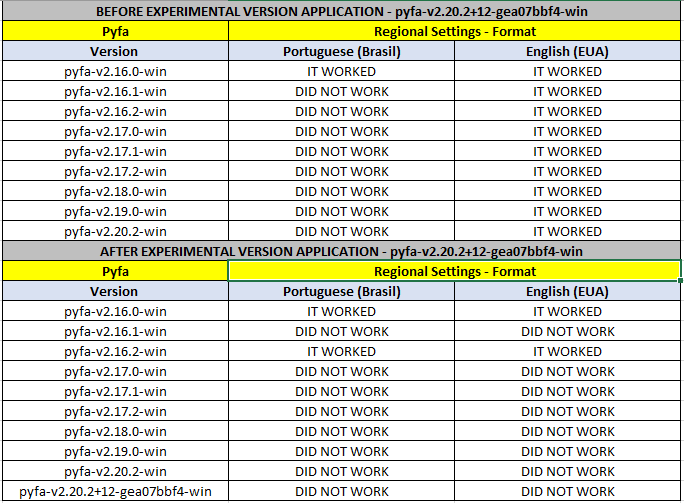
Ceraci
on 24 Apr 2020
Okay. I will try to drill down what's exactly the issue with portuguese/brasil later and will revert the workaround I implemented. Meanwhile, use release version with non-portuguese format.
DarkFenX
on 24 Apr 2020
Okay. I will try to drill down what's exactly the issue with portuguese/brasil later and will revert the workaround I implemented. Meanwhile, use release version with non-portuguese format.
I tried what was requested, however, it did not work with the current version 2.20.3, follows the updated chart of tests performed:
Ceraci
on 25 Apr 2020
wait, I might misinterpreted those tables. Does release version (v2.20.3 for example) not launch for you after you launched that experimental version? If yes, it doesn't make much sense...
DarkFenX
on 25 Apr 2020
wait, I might misinterpreted those tables. Does release version (v2.20.3 for example) not launch for you after you launched that experimental version? If yes, it doesn't make much sense...
Let me detail all the phases of what happened from yesterday:
1) We had managed to make the pyfa-v2.20.2-win version work by changing the regional / format settings to English (USA);
2) Then, as you were asked to install the version pyfa-v2.20.2 + 12-gea07bbf4-win and return the regional settings / format Portuguese (Brazil);
3) After making the change to the pyfa-v2.20.2 + 12-gea07bbf4-win version, the application stopped working in the two regional / format configurations, it can be seen in my first table informed yesterday earlier;
4) After the release of the pyfa-v2.20.3-win version, I tested again on the two formats of regional configurations, however, without success either;
5) I redid the process step by step, starting from the pyfa-v2.16.0-win version as observed in the second table, presenting the results reported there;
I am also unable to reach a consensus on what may have been changed in the experimental version pyfa-v2.20.2 + 12-gea07bbf4-win which came to stop working what had previously worked at least with the English (US) regional settings. I hope I can help you to clarify this situation with the explanations above.
Ceraci
on 25 Apr 2020
I've noticed something interesting.
When I boot up my computer, I clicked on Pyfa like a madman, and it seems to briefly pop up the program window. Then, it closes itself after a little while.
Anyone could try?
Portuguese BR here.
qJackDodgersp
on 25 Apr 2020
I've noticed something interesting.
When I boot up my computer, I clicked on Pyfa like a madman, and it seems to briefly pop up the program window. Then, it closes itself after a little while.
Anyone could try?Portuguese BR here.
I did what was asked, however, he even tried to load it, however, he did not get to open the application.
Therefore, I did another test that crossed my mind that was to start windows 10 in safe mode:
1) Windows key + R
2) msconfig
3) System initialization
4) Startup options
5) I have checked Safe Boot / Minimal
6) Restarted the system
The system started in safe mode without loading all services, only the minimum for operation. Open the application in its pyfa-v2.20.3-win version installed with the regional settings / Portuguese (Brazil) format and the application opened normally.
Faced with a system without loading any driver the application worked normal, I couldn't test it all, considering that there was no internet connection to load the pilot and other things.
But apparently there is something that starting at startup that is causing the application not to run properly.
I remain willing to do other tests if necessary.
Ceraci
on 25 Apr 2020
I am also unable to reach a consensus on what may have been changed in the experimental version pyfa-v2.20.2 + 12-gea07bbf4-win which came to stop working what had previously worked at least with the English (US) regional settings.
Me neither. The only relevant change in linked build is ea07bbf4f9eb7cf2a2752944618974a6aa57ebc3 which resets app's locale. It should leave no persistent effects (which remain across different builds). Maybe it affected some system setting somehow, i do not know. Try moving <user>\.pyfa\ somewhere and launch any build which worked previously.
I am yet to try how pyfa works with your format setting, once I get to it I will post here.
@qJackDodgersp trying to load pyfa on system startup probably allows system to draw pyfa frame before it gets to process the event which makes pyfa crash (since the system is busy with loading various resources).
DarkFenX
on 26 Apr 2020
Me neither. The only relevant change in linked build is ea07bbf which resets app's locale. It should leave no persistent effects (which remain across different builds). Maybe it affected some system setting somehow, i do not know. Try moving
<user>\.pyfa\somewhere and launch any build which worked previously.I am yet to try how pyfa works with your format setting, once I get to it I will post here.
After moving the
Just to note that the Portuguese (Brazil) format did not work.
I am available for further tests.
Thank's for your help at all times requested.
Ceraci
on 26 Apr 2020
The fix above did not work for me.
A potentially relevant detail is I also have Portuguese (Brazil) as an alternate keyboard and my Region Settings were set to "Match windows display settings" (my display has always been English (US)). Switching it to English (US) does not help.
biomath
on 26 Apr 2020
The fix above did not work for me.
A potentially relevant detail is I also have Portuguese (Brazil) as an alternate keyboard and my Region Settings were set to "Match windows display settings" (my display has always been English (US)). Switching it to English (US) does not help.
Ok ... I will do a step by step below the actions I performed here on my operating system to try to help you, follow the sequence and see if the application will work for you:
1) Uninstall the version of pyfa that is installed on the PC;
2) Remove the < user > \ .pyfa\ folder and place it in another folder;
3) Enter the Regional Settings >> Format and change to English (USA);
4) Restart the computer;
5) Install the pyfa-v2.16.0-win version;
6) Check if the pyfa will open;
7) If step 6 worked, install the pyfa-v2.20.3-win version;
8) Check if pyfa will open.
For my format in question, which is Portuguese (Brazil) it doesn't work, however, my goal is to have the application working to be able to subsidize my gameplay with EVE, and as in the English (USA) format it doesn't hinder me at all in my PC, then the provisional solution made is satisfactory.
Remembering that the configuration of the keyboard layout does not change the situation above, I did these tests too, and there was no explicit change.
I hope I can help you.
Ceraci
on 26 Apr 2020
Thank you for trying to help. I followed your troubleshooting, but unfortunately only v2.16 worked.
biomath
on 1 May 2020
pyfa-v2.16.0-win opens, new one doesn't.
qJackDodgersp
on 2 May 2020
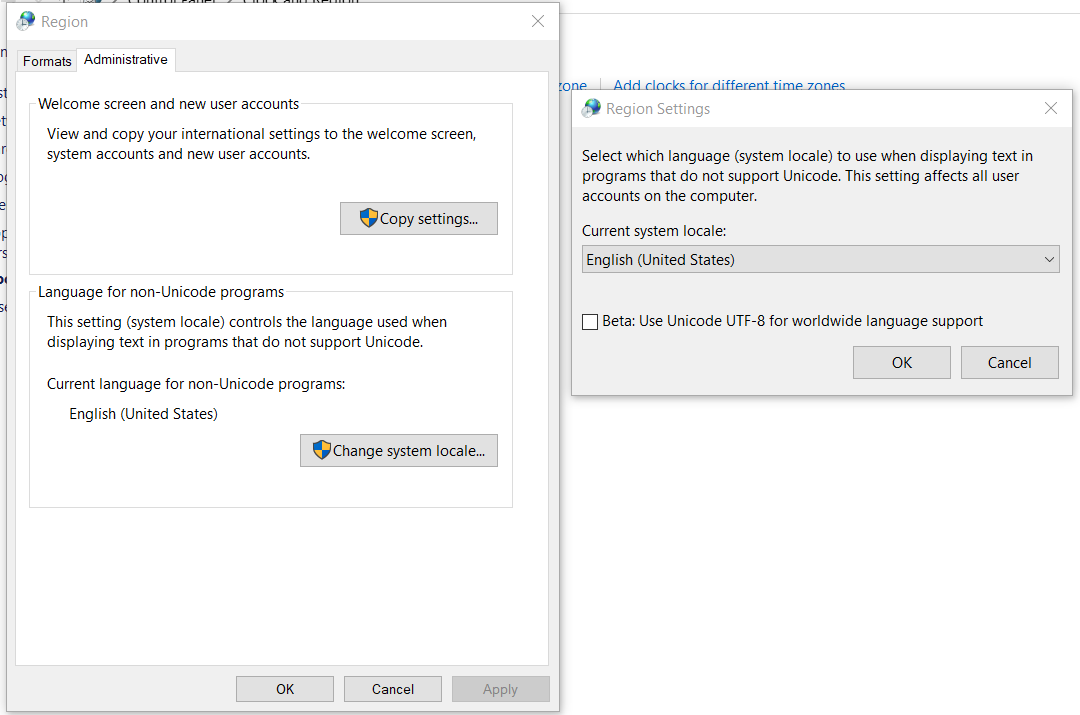
Well, I've set Format to Portuguese (Brazil) and cannot reproduce the issue on windows 10 with pyfa-v2.20.3-win.exe. Are there any extra settings which can affect that? For example Regional Settings > Administrative > Language for non-unicode programs, what do you have in there?
And for all the people who experience this issue - could you try getting logs, like mentioned in this comment? https://github.com/pyfa-org/Pyfa/issues/2174#issuecomment-615781297
As it stands now - I am unable to help you with this issue if I cannot reproduce it myself, and if I have no data to work with. Reverting to 2.16.0-alike builds is a no-go due to a number of issues (pyinstaller 3.3 vulnerabilities, anti-virus false positives etc).
DarkFenX
on 4 May 2020
Hi,
That's unfortunate, but thanks for trying to help. Below is a screenshot of my settings for non-unicode program languages. As for the logs, in my case, attempting to run pyfa 2.20.3 does not generate a .pyfa folder and logs under Users/.../.pyfa
Let me know if you have any other suggestions on how I could generate more data on this issue.
biomath
on 4 May 2020
US english in "non-unicode programs" should not affect how pyfa works, even if there were some bugs.
Idk what else could affect it. One random guess: what kind of anti-virus software do you guys run?
DarkFenX
on 4 May 2020
I use windows defender ... without many restrictions ...
Ceraci
on 5 May 2020
Norton
qJackDodgersp
on 5 May 2020
Well, I've set
FormattoPortuguese (Brazil)and cannot reproduce the issue on windows 10 withpyfa-v2.20.3-win.exe. Are there any extra settings which can affect that? For example Regional Settings > Administrative > Language for non-unicode programs, what do you have in there?And for all the people who experience this issue - could you try getting logs, like mentioned in this comment? #2174 (comment)
As it stands now - I am unable to help you with this issue if I cannot reproduce it myself, and if I have no data to work with. Reverting to 2.16.0-alike builds is a no-go due to a number of issues (pyinstaller 3.3 vulnerabilities, anti-virus false positives etc).
Found them.
https://gist.github.com/qJackDodgersp/7cc9df735e9dce6497fc852ad8370ed4
qJackDodgersp
on 5 May 2020
Windows defender. Turning off real-time protection before trying to start pyfa does not solve the problem
biomath
on 10 May 2020
Same issue here, also Portuguese (Brazil). Since v16.3, I cant update Pyfa. I would like to be able too, there are a lot of big changes in EVE since then.
 alange1978
on 15 May 2020
alange1978
on 15 May 2020
Do you guys have Portuguese windows interface as well, or just "Format" field?
Or, I can change question to be more general: what Portuguese-specific you might have in your OS?
DarkFenX
on 21 May 2020
Full OS, Native Brazilian here.
qJackDodgersp
on 21 May 2020
All Portuguese (Brazil); OS, interface, format, keybord.
@qJackDodgersp Can you add Kurgo Iason ingame for us to talk and try the workaround you did to make Pyfa to work? I've tryed to reproduce your steps, but failed.
alange1978
on 21 May 2020
Do you guys have Portuguese windows interface as well, or just "Format" field?
Or, I can change question to be more general: what Portuguese-specific you might have in your OS?
My OS is full EN-US (laptop bought in US too). Only keyboard had PORT-BR option installed but not really used.
biomath
on 28 May 2020
I was trying to run it, and closing different processes on Task Manager. I~ve noticed that sometimes the Pyfa Icon shows up but closes as soon as it lands on the task manager.
Insta Lock and Insta Kill on it,.
qJackDodgersp
on 1 Jun 2020
SOLVED
Brazilian users. The WARSAW Banking Security Software doesn't let PYFA open.
I opened task manager and clicked Pyfa like I was paid for it. Noticed that WARSAW software spiked in CPU demand.
Deleted it and Pyfa is working like a charm.
But you'll have to use your phone to make your banking transactions.
You're welcome. Cheers.
qJackDodgersp
on 4 Jun 2020
SOLVED
Brazilian users. The WARSAW Banking Security Software doesn't let PYFA open.
I opened task manager and clicked Pyfa like I was paid for it. Noticed that WARSAW software spiked in CPU demand.
Deleted it and Pyfa is working like a charm.
But you'll have to use your phone to make your banking transactions.You're welcome. Cheers.
You solved this mystery, sir. Congrats and thank you!
biomath
on 5 Jun 2020
SOLVED
Brazilian users. The WARSAW Banking Security Software doesn't let PYFA open.
I opened task manager and clicked Pyfa like I was paid for it. Noticed that WARSAW software spiked in CPU demand.
Deleted it and Pyfa is working like a charm.
But you'll have to use your phone to make your banking transactions.
You're welcome. Cheers.You solved this mystery, sir. Congrats and thank you!
Send the ISK to Jack Dodgers please.
LOL
qJackDodgersp
on 5 Jun 2020
I am really glad you have sorted this out. Good job.
DarkFenX
on 6 Jun 2020
Related issues
 ErikKalkoken
·
5Comments
ErikKalkoken
·
5Comments
 BessieBusybody
·
3Comments
BessieBusybody
·
3Comments
 sup3rb
·
3Comments
sup3rb
·
3Comments
 UsernameByCommittee
·
9Comments
UsernameByCommittee
·
9Comments
 hotleadsingerguy
·
8Comments
hotleadsingerguy
·
8Comments
Most helpful comment
SOLVED
Brazilian users. The WARSAW Banking Security Software doesn't let PYFA open.
I opened task manager and clicked Pyfa like I was paid for it. Noticed that WARSAW software spiked in CPU demand.
Deleted it and Pyfa is working like a charm.
But you'll have to use your phone to make your banking transactions.
You're welcome. Cheers.