Bug Report
After .exe installation or .zip decompress, double clicking the pyfa.exe or using the shortcut provided with the installation the pyfa.exe pops up momentarily on the taskmanager and vanishes without any message.
Expected behavior:
The program to run.
Actual behavior:
Program instantly closes without any screen or any error. Not even the .pyfa folder actually exist and I created it manually but nothing happened either.
Detailed steps to reproduce:
Install it and try to run, nothing shows up.
Fits involved in EFT format (Edit > To Clipboard > EFT):
None
Release or development git branch? Please note the release version or commit hash:
2.18.1
Operating system and version (eg: Windows 10, OS X 10.9, OS X 10.11, Ubuntu 16.10):
Windows 10
Other relevant information:
Can't find anything related to the crash, nothing on windows event viewer, nothng on .pyfa folder. Does not know if there is any requirements to run the program itself other than the .exe installation file.
 eliasmarobin
All 13 comments
The same problem. The program even isn't appearing on the taskbar. The only Windows "beep" and nothing else.
 navexor
on 18 Mar 2020
navexor
on 18 Mar 2020
Unsure what could cause it tbh.
1) Try opening command prompt, executing cd <pyfa folder> and running pyfa.exe in there, then see if anything gets printed out.
2) Tell me if your system is 32 bit or 64 bit
3) In legacy control panel, open regional settings. There you should have "Format" selection with huge drop-down list. Tell me what's your current setting
4) Find out last version which worked for you. Is it 2.18.0 or something older?
 DarkFenX
on 6 Apr 2020
DarkFenX
on 6 Apr 2020
- Nothing in the console. Just beep.
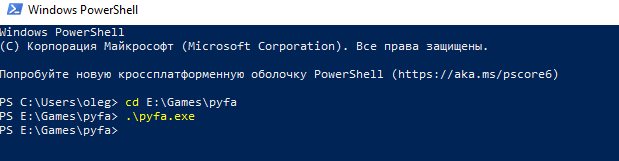
- 64 bit
- Not sure if it helps, I have Russian version
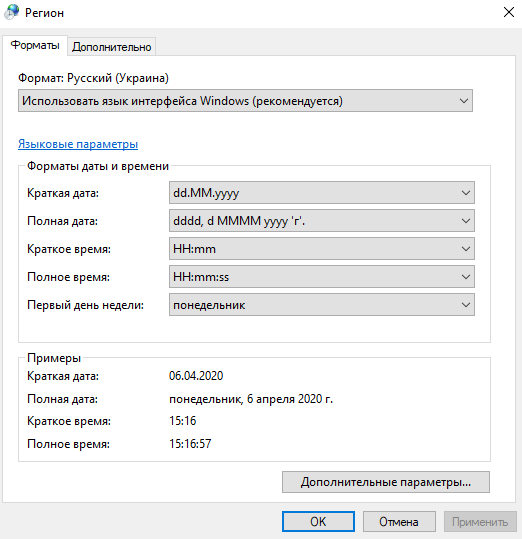
- version: v2.18.1
navexor
on 6 Apr 2020
- Try setting English (US) temporarily and see if it helps. There were bunch of fixes and workarounds related to this fields. So it might help, who knows.
- Please re-read the question. Last version which worked for you, not the broken one.
DarkFenX
on 6 Apr 2020
- Setting English didn't help
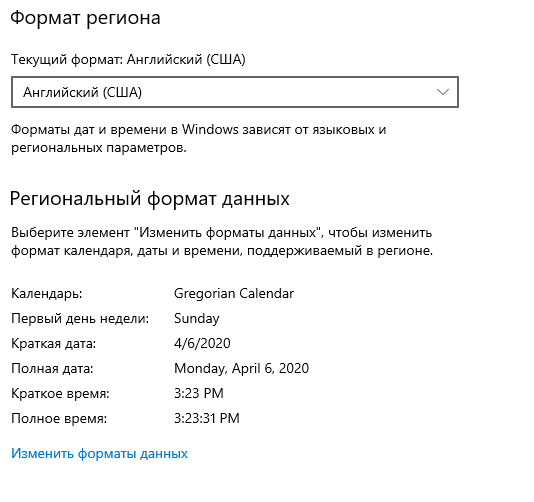
- It was a long time ago when I last used the pyfa. 2-3 years ago maybe. But OK, I'll try older versions later one by one.
navexor
on 6 Apr 2020
Okay, so format stuff is unrelated. Do you have any anti-virus monitors by any chance? Could you try disabling them and seeing if it helps?
Do you have DEP (data execution prevention) enabled (also unsure if it is related, but this setting affected functionality of several programs for me in the past)?
DarkFenX
on 6 Apr 2020
No. Only clear Win 10 64bit with built-in standard antivirus. No known DEP enabled. I even don't know what is that.
navexor
on 7 Apr 2020
Right-click on dowloaded exe or zip -> properties -> then select "unblock" option.
Example pic:
https://winaero.com/blog/wp-content/uploads/2015/10/Windows-10-unblock-a-file.png
Now you can install/extract without issue i hope.
 hozayn
on 25 May 2020
hozayn
on 25 May 2020
@hozayn Thank you! pyfa is finally working.
navexor
on 25 May 2020
Wow, this is new, installer has never been completely blocked before, only warning has been shown...
DarkFenX
on 25 May 2020
I'm having the same problem as described above.
Tried all solutions, inclusive the DEP and checking if the exe is blocked. Nothing worked so far.
I've tried standalone and installation, no error or log files, nothing in events viewer, no .pyfa folder in my user profile.
Not sure what else to do try now.
Edit: went back a few versions, crash starts on v2.17.0.
The one before that works fine.
 marcos-alfredo
on 11 Jun 2020
marcos-alfredo
on 11 Jun 2020
Marcos, are you Brazilian?
 qJackDodgersp
on 12 Jun 2020
qJackDodgersp
on 12 Jun 2020
I am, yeah.
I looked over your profile and found your bug report.
Freaking Warsaw!
The process name was core.exe for me. I did notice it yesterday but thought nothing of it.
When I went to uninstall it they asked for a captcha!
Never seen that before.
It's working now with the latest release, thanks for the help man!
Valeu!
marcos-alfredo
on 12 Jun 2020
Related issues
 sup3rb
·
3Comments
sup3rb
·
3Comments
 Dawnkeeper
·
5Comments
Dawnkeeper
·
5Comments
 leonbur
·
10Comments
leonbur
·
10Comments
 BessieBusybody
·
3Comments
BessieBusybody
·
3Comments
 ErikKalkoken
·
5Comments
ErikKalkoken
·
5Comments