Pwa-studio: [bug]: sw.js:5 Uncaught ReferenceError: window is not defined
Describe the bug
when I run project then i face this type of error, error is window is not defined.
To reproduce
Steps to reproduce the behavior:
- Clone the project
- Yarn install
- docker/run-docker
- then See error
Expected behavior
Help solve this error
Screenshots

Additional context
-
Possible solutions
-
Please complete the following device information:
- Device [e.g. iPhone6, PC, Mac, Pixel3]:-
- OS [e.g. iOS8.1, Windows 10]:ubuntu 19.04
- Browser [e.g. Chrome, Safari]:Chrome
- Browser Version [e.g. 22]:Version 79.0.3945.88 (Official Build) (64-bit)
- Magento Version:2.3
- PWA Studio Version: 2.3
- NPM version
npm -v:5.8.0 - Node Version
node -v:10.15.2
Please let us know what packages this bug is in regards to:
- [x]
venia-concept - [ ]
venia-ui - [ ]
pwa-buildpack - [ ]
peregrine - [ ]
pwa-devdocs - [ ]
upward-js - [ ]
upward-spec - [x]
create-pwa
 pankajvc
All 9 comments
Flagged for prioritization during backlog grooming
 awilcoxa
on 21 Jan 2020
awilcoxa
on 21 Jan 2020
I tried but could not reproduce this issue.
- checkout
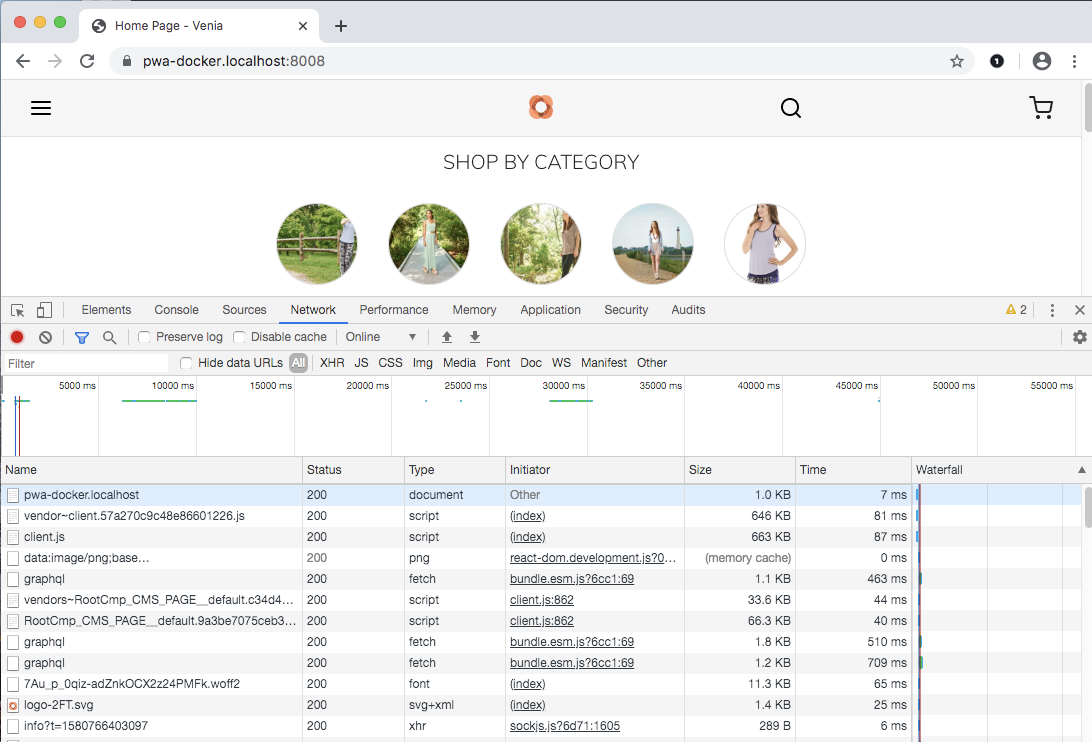
developbranch. yarn installbash docker/run-docker- Open dev tools and navigate to Home, Category, Product - No Console errors.
My 8080 port is already in use, so ran on 8008. ( docker/.env.docker.dev > DEV_SERVER_PORT )
 dpatil-magento
on 3 Feb 2020
dpatil-magento
on 3 Feb 2020
@pankajvc are you still experiencing this issue? I'll close based on Dev's last comment but feel free to re-open with additional repro details if you're still seeing this.
awilcoxa
on 6 Feb 2020
@awilcoxa , @dpatil-magento Thanks for the support. I have fixed this issue.
pankajvc
on 7 Feb 2020
@pankajvc How did you fix this issue ? I have the same issue ? @dpatil-magento what about master branch ? Because on develop this is ok, but on the master branch I got the same things what @pankajvc shows.
 mercs600
on 10 Jun 2020
mercs600
on 10 Jun 2020
@pankajvc How did you fix this issue ? I have the same issue ? @dpatil-magento what about master branch ? Because on develop this is ok, but on the master branch I got the same things what @pankajvc shows.
Please go to this path in your project pwa-studio/packages/venia-concept/webpack.config.js then compare your file this code `const {
configureWebpack,
graphQL: { getMediaURL, getUnionAndInterfaceTypes }
} = require('@magento/pwa-buildpack');
const { DefinePlugin } = require('webpack');
const HTMLWebpackPlugin = require('html-webpack-plugin');
module.exports = async env => {
const mediaUrl = await getMediaURL();
global.MAGENTO_MEDIA_BACKEND_URL = mediaUrl;

const unionAndInterfaceTypes = await getUnionAndInterfaceTypes();

const { clientConfig, serviceWorkerConfig } = await configureWebpack({
    context: __dirname,
    vendor: [
        '@apollo/react-hooks',
        'apollo-cache-inmemory',
        'apollo-cache-persist',
        'apollo-client',
        'apollo-link-context',
        'apollo-link-http',
        'informed',
        'react',
        'react-dom',
        'react-feather',
        'react-redux',
        'react-router-dom',
        'redux',
        'redux-actions',
        'redux-thunk'
    ],
    special: {
        'react-feather': {
            esModules: true
        },
        '@magento/peregrine': {
            esModules: true,
            cssModules: true
        },
        '@magento/venia-ui': {
            cssModules: true,
            esModules: true,
            graphqlQueries: true,
            rootComponents: true,
            upward: true
        }
    },
    env
});

/**
 * configureWebpack() returns a regular Webpack configuration object.
 * You can customize the build by mutating the object here, as in
 * this example. Since it's a regular Webpack configuration, the object
 * supports the `module.noParse` option in Webpack, documented here:
 * https://webpack.js.org/configuration/module/#modulenoparse
 */
clientConfig.module.noParse = [/braintree\-web\-drop\-in/];
clientConfig.plugins = [
    ...clientConfig.plugins,
    new DefinePlugin({
        /**
         * Make sure to add the same constants to
         * the globals object in jest.config.js.
         */
        UNION_AND_INTERFACE_TYPES: JSON.stringify(unionAndInterfaceTypes),
        STORE_NAME: JSON.stringify('ShopAppy')
    }),
    new HTMLWebpackPlugin({
        filename: 'index.html',
        template: './template.html',
        minify: {
            collapseWhitespace: true,
            removeComments: true
        }
    })
];
serviceWorkerConfig.output = {
    globalObject: 'this'
};

return [clientConfig, serviceWorkerConfig];
};`
pankajvc
on 10 Jun 2020
@pankajvc How did you fix this issue ? I have the same issue ? @dpatil-magento what about master branch ? Because on develop this is ok, but on the master branch I got the same things what @pankajvc shows.
serviceWorkerConfig.output = {
globalObject: 'this'
};
please add this code in the file
pankajvc
on 10 Jun 2020
@pankajvc I will check it, do you use monorepo with all packages or do you use pwa studio by npm packages ? Master or develop ?
mercs600
on 10 Jun 2020
@pankajvc I will check it, do you use monorepo with all packages or do you use pwa studio by npm packages ? Master or develop ?
I'm using PWA studio by NPM packages form to master
pankajvc
on 10 Jun 2020
Related issues
 dambrogia
·
7Comments
dambrogia
·
7Comments
 dereklew
·
5Comments
dereklew
·
5Comments
 larsroettig
·
5Comments
larsroettig
·
5Comments
 subhajyotiint
·
3Comments
subhajyotiint
·
3Comments
 zetlen
·
4Comments
zetlen
·
4Comments