Overview
A while back we closed ticket #1159 and now we display a message when a product is out of stock.
Ideally we'd still like to show the PDP with all the product's details instead of showing this message or popping up a toast containing this message.
Unfortunately an out-of-stock product's details aren't returned by GraphQL so we opened a ticket on their board (MC-17048).
It turns out that there is a setting in the Magento 2 Admin panel that GraphQL uses to determine whether or not to return an out-of-stock product's details.
It can be found at:
Stores > Configuration > Catalog > Inventory > Stock Options > Display Out of Stock Products
If we set this to true ("Yes" in the Admin Panel), our GraphQL query will return product details even when a product is out of stock.
This would allow us to populate the PDP with the product's details instead of showing an error message.
This would also necessitate an accompanying change to both the query and the logic for knowing whether or not a product was out of stock, detailed below.
Action Items
- Change the
Stores > Configuration > Catalog > Inventory > Stock Options > Display Out of Stock Productssetting to "Yes" in order to receive product details for out of stock products. - Update getProductDetail.graphql to query for
stock_statuson each item in items. - Update the product view's logic to use the value of
stock_status(IN_STOCKorOUT_OF_STOCK) instead of the existence ofproductto know when a product is out of stock. (Note: after step 1,productshould always be truthy). - Update the PDP UI / UX to indicate when the product is out of stock (disable the "Add to Cart" button, show a message, etc.).
Testing Scenarios
Product is In Stock
M2 Admin Navigation: Catalog > Products > (Search)
M2 Admin Settings:
Quantity: 100
Stock Status: In Stock
Product is Out of Stock
M2 Admin Navigation: Catalog > Products > (Search)
M2 Admin Settings:
Quantity: 0
Stock Status: Out of Stock
Product is Out of Stock but Show Details
M2 Admin Navigation: Catalog > Products > (Search)
M2 Admin Settings:
Quantity: 0
Stock Status: Out of Stock
M2 Admin Navigation: Stores > Configuration > Catalog > Inventory > Stock Options
M2 Admin Settings:
Display Out of Stock Products: Yes
 supernova-at
All 11 comments
Hi @soumya-ashok I added the needs-ux label for help with:
Update the PDP UI / UX to indicate when the product is out of stock (disable the "Add to Cart" button, show a message, etc.).
Long story short we now have the data we need to show the full PDP even for products that are out of stock. We just need to discuss how the UI/UX should differ for these products.
supernova-at
on 23 Jul 2019
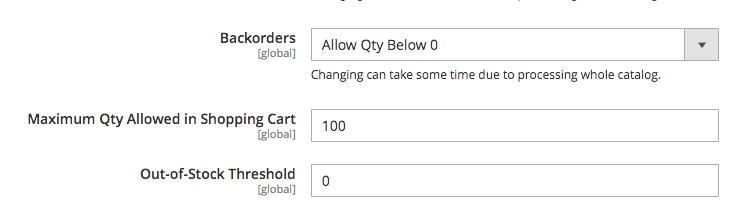
There is also a setting to allow stock to go negative, ie to backorder items. Plus the stock level for something to go out of the stock is also configurable.
 fooman
on 24 Jul 2019
fooman
on 24 Jul 2019
@fooman How would you typically surface quantities below 0 on the product listing for the shopper? Would they be "waitlisted" or listed as "unavailable" with the option to notify when it becomes available, or would the shopper be able to add it to cart with the understanding that it could only be fulfilled past a certain restock date?
 soumya-ashok
on 25 Jul 2019
soumya-ashok
on 25 Jul 2019
@supernova-at
We would also need to show "out of stock" status on a category listing, and here is one way we could do that
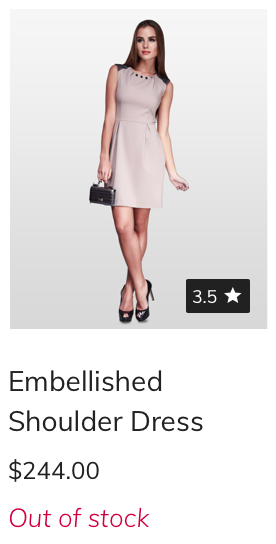
On the PDP, it could be a combination of elements like in the mockup below -

Need feedback on the approach.
soumya-ashok
on 25 Jul 2019
@soumya-ashok — Some cases:
For B2C, I've used a combination of:
- out of stock (red) (cannot be purchased)
- available on backorder (green) (can be purchased)
- backordered (gray) (with "notify me")
For B2B, some extra cases:
- The concept of "non-stock items" where the merchant never has inventory, but effectively drop-ships or just-in-time orders the item from the supplier/manufacturer. These are presented as "available (green)" alongside "in stock (green)" when the item is physically stocked.
- When inventory needs to be shown for specific physical retail locations, ("in stock" means "at StoreA") and ("available" means at "somewhere other than StoreA") when StoreA is the selected location.
- True "out of stock" (red) or "discontinued" (red) means we're keeping the product active to provide access to its information (documents, part lists, warranty, etc) but it cannot be purchased anymore. Typically those items are not shown in the catalog, but if searched for exactly by product number can be found for reference purposes.
The first two B2B cases could be over 50% of the total products in the catalog, so we effectively eliminated the (red) out of stock / unavailable status from a UX point of view. It just looks bad sitewide with hundreds of (red) products when everything is deliverable but not stocked physically.
 brendanfalkowski
on 25 Jul 2019
brendanfalkowski
on 25 Jul 2019
Magento currently has these options

but it doesn't do much in terms of informing the customer out of the box on the PDP or catalog pages.
I know some maintain a custom product attribute that shows expected delivery timeframes (in warehouse - delivered in 1-2 days, on backorder - delivered in 3 weeks) but this is probably beyond the scope of this task. I just wanted to cross-reference the existing Magento core settings so these can be taken into consideration for work going on here.
fooman
on 25 Jul 2019
@brendanfalkowski - Thanks for all the detailed information as always. The only case we have accounted for B2C now is similar to the third one you described where it is possible to add the item to a wishlist, but not purchase at this time. Would you recommend the path of "notify me" and collect the customer's email rather than "Add to wishlist"
In case 2, When available on backorder, does the customer typically go through the same regular purchase journey where they add to cart and confirm, or do they "make a request" and are prompted for payment when the item is restocked?
For case 1, is this a situation where the item will never be restocked as opposed to 3, where it will be?
soumya-ashok
on 25 Jul 2019
@fooman Thank you for sharing the information.
For the options shown in the dropdown, these are my assumptions
No backorder - Same as case 1 in Brendan's comment
Allow qty below 0 - Same as case 2 in Brendan's comment
Allow qty below 0 and notify customer - Same as case 3 in Brendan's comment
Would this be correct?
soumya-ashok
on 25 Jul 2019
Would you recommend the path of "notify me" and collect the customer's email rather than "Add to wishlist"
I wouldn't consider "add to wishlist" related to "add to cart" with respect to inventory status. Whether an item is saleable or not, I can't think of a reason that it shouldn't be saveable on a wishlist. So "notify me" is just an extra option.
In case 2, When available on backorder, does the customer typically go through the same regular purchase journey where they add to cart and confirm, or do they "make a request" and are prompted for payment when the item is restocked?
It's been a while since I dealt with this, but I think most businesses will authorize the charge, but not capture the payment until the item is able to ship. I don't think Magento is setup to order without an authorization unless a custom payment type has been integrated to allow that.
For case 1, is this a situation where the item will never be restocked as opposed to 3, where it will be?
It depends. If a store has 100 shirts and they all sell, they may/not be able/want to restock. That depends more on their supplier/business goals than how they treat the stock status. Some stores will hide items that are out of stock automatically, and others won't hide them on purpose.
brendanfalkowski
on 25 Jul 2019
@soumya-ashok yes the summary by @brendanfalkowski more than covers it.
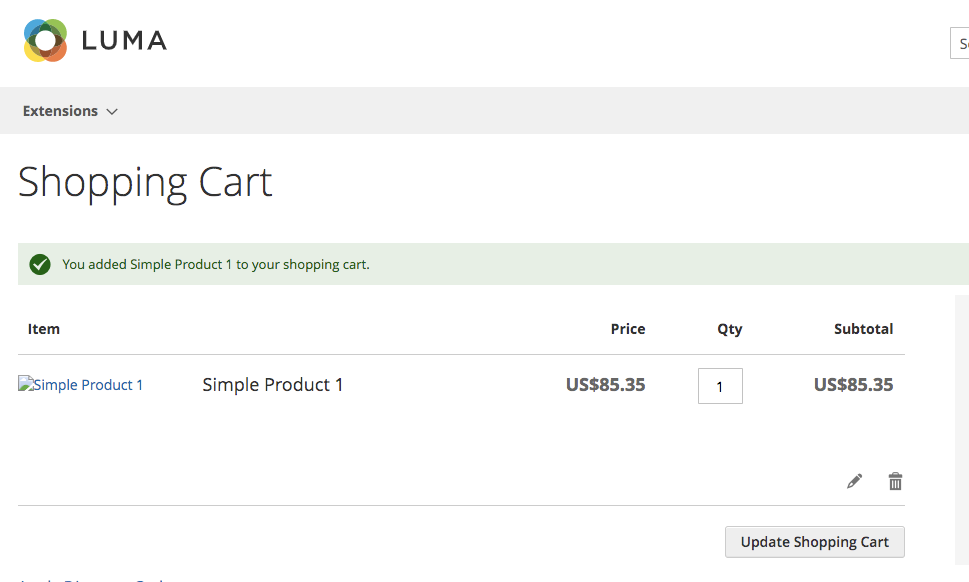
Just to clarify what Magento currently does. With "Allow qty below 0 and notify customer" Magento will display the below "We don't have...." on the cart page after the product has been added:

with "Allow qty below 0" the customer would not be aware that the item is on backorder as it looks the same as if it was in stock:
fooman
on 25 Jul 2019
@brendanfalkowski and @fooman - Thank you for your comments, the screenshots are very helpful!
I will discuss with @supernova-at on how we would like to handle these cases and provide an update.
soumya-ashok
on 27 Jul 2019
Related issues
supernova-at
·
3Comments
 senthil134
·
7Comments
senthil134
·
7Comments
 Jordaneisenburger
·
3Comments
Jordaneisenburger
·
3Comments
 larsroettig
·
5Comments
larsroettig
·
5Comments
 zetlen
·
4Comments
zetlen
·
4Comments
Most helpful comment
Magento currently has these options

but it doesn't do much in terms of informing the customer out of the box on the PDP or catalog pages.
I know some maintain a custom product attribute that shows expected delivery timeframes (in warehouse - delivered in 1-2 days, on backorder - delivered in 3 weeks) but this is probably beyond the scope of this task. I just wanted to cross-reference the existing Magento core settings so these can be taken into consideration for work going on here.