Pure: Command is added twice to promt after hitting tab
When I do the following:
❯ cd ~/P
and hit tab the result I get is this:
❯ cdcd ~/P
Pictures/  Projects@  Public/
It's also not possible to remove the first cd when using the backspace to clear the command.
it happens with every command that has multiple options when using tab completion.
 megawubs
All 30 comments
What's your zsh version and can you reproduce this with a minimal zshrc? If so, could you provide the zshrc that reproduces the issue?
 mafredri
on 10 Nov 2016
mafredri
on 10 Nov 2016
❯ zsh --version
zsh 5.0.8 (x86_64-apple-darwin15.0)
❯ cacat ~/.zshrc
source /Users/me/Projects/Github/antigen.zsh

# Load the oh-my-zsh's library.
antigen use oh-my-zsh

# Bundles from the default repo (robbyrussell's oh-my-zsh).
antigen bundle mafredri/zsh-async
antigen bundle sindresorhus/pure

# Tell antigen that you're done.
antigen apply

export PATH="./bin:/usr/local/bin:/usr/bin:/bin:/usr/sbin:/sbin:/opt/X11/bin:$HOME/bin"

PATH="$PATH:$HOME/.composer/vendor/bin"
export XDEBUG_CONFIG="idekey=PHPSTORM"
export PHP_IDE_CONFIG="serverName=local"

source ~/.aliases
~/.aliases is just a long list of alias commands
megawubs
on 10 Nov 2016
Thanks, did you try without oh-my-zsh?
mafredri
on 10 Nov 2016
no, will try that now
megawubs
on 10 Nov 2016
When using bash or sh, it doesn't happen
megawubs
on 10 Nov 2016
Does it also happen without pure? Bash and sh won't be relevant to this issue (there's no pure for them) so you don't need to compare those.
Honestly I'm not sure what it could be, it seems like it's something unique to your environment. I was betting on some oh-my-zsh configuration (which is why I wondered if you tried without it). There's also the fact that oh-my-zsh has a theme named pure which can conflict if you try to activate it from oh-my-zsh.
I can't reproduce this issue (then again I'm not using oh-my-zsh).
I would recommend you upgrade your zsh though (e.g. through Homebrew), just in case (also, 5.2 has a lot of improvements over 5.0.8).
mafredri
on 10 Nov 2016
As soon as i turn pure of in my ~/.zshrc the problem is gone. I've updated both oh-my-zsh and zsh
Could it be antigen?
megawubs
on 10 Nov 2016
The issue gets worse as soon as I start a tmux session, tmux becomes unusable with pure :(
megawubs
on 16 Nov 2016
I've tried your exact setup, antigen with your .zshrc and cannot reproduce this issue.
So just to confirm, you're running the latest versions of pure and zsh-async? And your zsh --version is now 5.2?
If so, the only thing remaining as an unknown is your terminal program (e.g. is it Terminal, iTerm?) and ~/.aliases file.
mafredri
on 16 Nov 2016
Yes, pure and zsh-async are both at the latest version (commit). In fact I just forked pure and added my fork as a remote to the installed version to do some debugging of my own. It turns out that Hyper (the missing pice of your puzzle) doens't like the ❯ character. In my current pure.zsh file, all code is commented out, except the last line setting the PROMT variable. See the screenshot. When I change the character, the behavior is gone. (tmux is still a mess, but I think it's not related to pure)

seems to be a Hyper related issue, as the it works fine on other both iTerm als Terminal
megawubs
on 16 Nov 2016
Glad you found the issue. You could try changing the font in Hyper and see if that helps. I have tested Hyper myself and I do not experience this problem (tested on 0.8.1 and 0.8.3). Even with a clean hyper configuration I cannot reproduce.
Either way, closing this since it doesn't seem to be a pure issue. But feel free to post a fix, if you find one, so it can help others with a similar issue.
mafredri
on 16 Nov 2016
I'm also having this issue with everything updated. No custom settings or any plugins on Hyper. No custom font.
It's pretty annoying I can't seem to find why it does it. It doesn't happen in Terminal with same setup ✌️
 henrikdahl
on 12 Jan 2017
henrikdahl
on 12 Jan 2017
@henrikdahl does it happen if you set PROMPT='> '? Not sure there's anything we can do here, seems like a Hyper issue. You could also try changing fonts.
mafredri
on 12 Jan 2017
@mafredri doesn't seem to be related to the font, tried 4 different fonts and the default one.
It appears to be directly related to the prompt symbol. Tried changing it to for example #and that fixes it. Tried a couple of similar unicode characters and they all had the same issue.
I think the one you guys picked is perfect however so I'd love to see it work ✌️
henrikdahl
on 12 Jan 2017
Works fine with >

With ❯

henrikdahl
on 12 Jan 2017
How about PROMPT='❯ '? Pure symbol, but with no colors. What version of macOS do you have? And what does your .zshrc look like? Do you use a framework, e.g. oh-my-zsh, etc?
mafredri
on 12 Jan 2017
Still issue with just PROMPT='❯ ' sadly.
macOS 10.12.2
export PATH=/usr/local/bin:/usr/bin:/bin:/usr/local/sbin:/usr/sbin:/sbin

source $(brew --prefix)/share/antigen/antigen.zsh

antigen bundle mafredri/zsh-async
antigen bundle sindresorhus/pure

antigen apply
Can't reproduce, sorry :-(.
Are you using Hyper 1.1.0?
mafredri
on 12 Jan 2017
Yeah 1.1.0. Np, I know how hard it is to debug from issues ✌️
If you get any ideas please let me know
Btw. Unlike the title of this issue suggest, I have to press tab until the new line with options comes for cd to bug. Did you try it like that?
henrikdahl
on 12 Jan 2017
One last though, have you tried closing hyper and wiping .hyper.js and .hyper_plugins, starting from scratch?
mafredri
on 12 Jan 2017
I'm fairly certain its a part of my setup. I've purchased the 2016 rMBP and cycled through 3 (2 returns) with Hyper and Pure, fresh install each time and they all had the same issue. Additionally my friend who I helped setup his Hyper + Pure also has the same issue.
It might just be a Hyper bug? It's still odd that you can't reproduce it.
henrikdahl
on 12 Jan 2017
Hmm, very weird indeed. Have you tried updating zsh through homebrew? You should have 5.2 on the system, but 5.3.1 is available.
mafredri
on 12 Jan 2017

Which version are you running? I'll update ✌️
henrikdahl
on 12 Jan 2017
Well I'm running 5.3.1-dev-0 (HEAD-4fb4ce1) but it's pretty close to 5.3.1.
mafredri
on 12 Jan 2017
Still same issue 😓
henrikdahl
on 12 Jan 2017
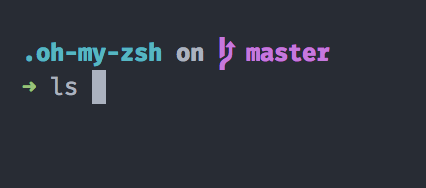
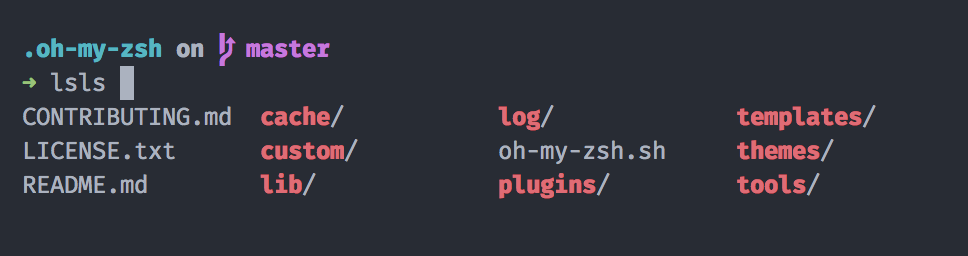
 jeroen-meijer
on 21 Apr 2018
jeroen-meijer
on 21 Apr 2018
@0916174 this is not the issue tracker for the spaceship theme, you should report your issue there or at oh-my-zsh.
mafredri
on 21 Apr 2018
Oh, sorry about that. It was quite late, so I wasn’t paying attention properly.
jeroen-meijer
on 21 Apr 2018
I faced the same issue.
I had the following in my .zshrc
export LANG=en_US.UTF-8
export LC_CTYPE=en_US.UTF-8
When I added export LC_CTYPE=en_US.UTF-8, the issue went away.
 moonstruckmoth
on 3 May 2018
moonstruckmoth
on 3 May 2018
Experiencing the same issue using macOS Catalina 10.15.4. As mentioned before, changing the LC_CTYPE to UTF-8 or just changing the Prompt Symbol to anything else, seems to work. So I'm assuming it's something around this specific character.
 amitz
on 1 Apr 2020
amitz
on 1 Apr 2020
Related issues
 rawaludin
·
3Comments
rawaludin
·
3Comments
 parro-it
·
10Comments
parro-it
·
10Comments
 lezuber
·
11Comments
lezuber
·
11Comments
 erusev
·
4Comments
erusev
·
4Comments
 tyrollins
·
4Comments
tyrollins
·
4Comments
Most helpful comment
I faced the same issue.
I had the following in my .zshrc
export LANG=en_US.UTF-8
export LC_CTYPE=en_US.UTF-8
When I added export LC_CTYPE=en_US.UTF-8, the issue went away.