Pure: Additional arrow on prompt using iTerm2 with shell integration installed
General information
- Pure version: 1.5.2
- ZSH version: 5.3.1 (x86_64-apple-darwin16.6.0)
- Terminal program & version: iTerm2 3.1.beta.5
- Operating system: macOS Sierra 10.12.5
- ZSH framework: oh-my-zsh
I have:
- [X] Tested with another terminal program and can reproduce the issue:
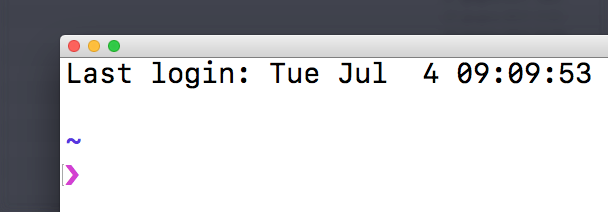
Using macOS system Terminal I get a different char:
- [X] Followed the Integration instructions for my framework
Problem description
It seems there is a conflict between pure and iTerm2 shell integration. When you enable S.I.
an extraneous char appear at the start of the prompt:

Disabling shell integratyion of iTerm3, the char disappear.
Reproduction steps
- Install pure.
- Click on menu: iTerm2 -> install shell integration
My .zshrc:
autoload -U promptinit; promptinit
prompt pure
test -e "${HOME}/.iterm2_shell_integration.zsh" && source "${HOME}/.iterm2_shell_integration.zsh"
 parro-it
All 10 comments
I can't reproduce this issue with either 1.5.2 or master, but I'm not using oh-my-zsh either. This leads me to believe that a oh-my-zsh plugin / widget is interfering. Can you reproduce without oh-my-zsh?
What's the output of typeset -p PROMPT?
Using macOS system Terminal I get a different char
No, that's a Terminal feature (View -> Show marks). But weird that you don't have the issue in Terminal.
 mafredri
on 4 Jul 2017
mafredri
on 4 Jul 2017
No, that's a Terminal feature (View -> Show marks). But weird that you don't have the issue in Terminal.
Yes, really strange. I guess iTerm2 shell integrations alter the prompt, but that would affect other terminals too...
parro-it
on 4 Jul 2017
~/Desktop/projects/
❯ typeset -p PROMPT
typeset PROMPT='
%}%F{blue}%~%f
%}%(12V.%F{242}%12v%f .)%(?.%F{magenta}.%F{red})${PURE_PROMPT_SYMBOL:-❯}%f '

~/Desktop/projects/
❯
Can you reproduce without oh-my-zsh
Yes, I just have to load iTerm2 integrations and pure...
parro-it
on 4 Jul 2017
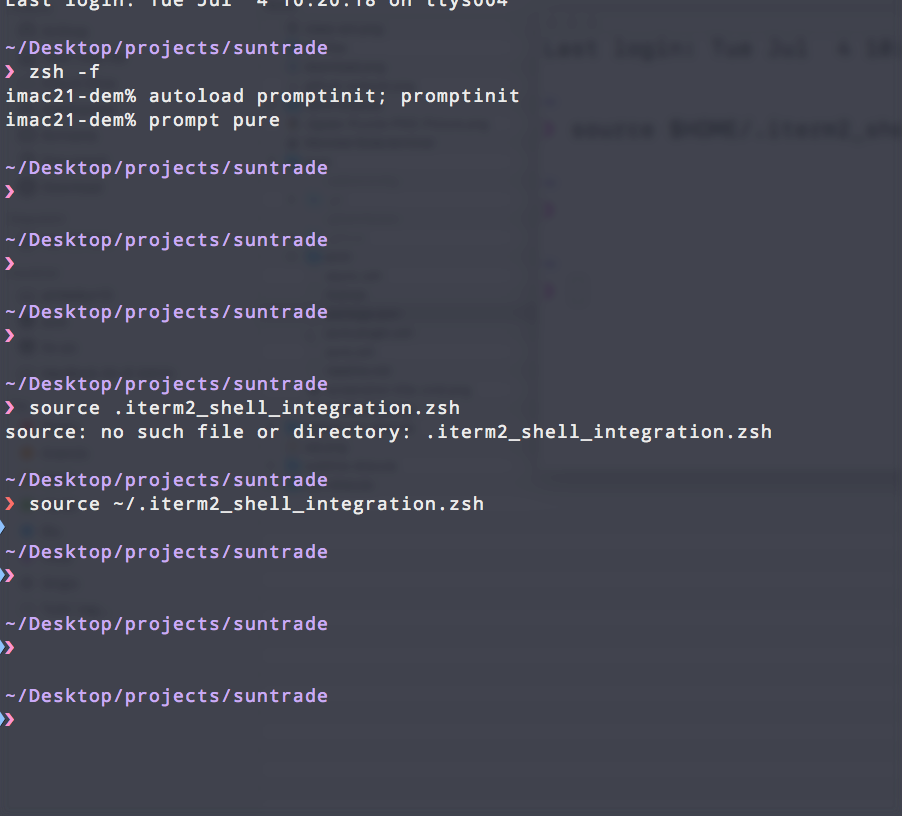
Can you reproduce without your zshrc? You can test it by doing the following:
❯ zsh -f
% autoload promptinit; promptinit
% prompt pure

~
❯ source .iterm2_shell_integration.zsh

~
❯
(Note: you might have to edit your fpath so that zsh can find Pure, although, probably not if you installed it into the default location.)
mafredri
on 4 Jul 2017
Yes:
parro-it
on 4 Jul 2017
Hmm, running out of ideas, do you have the latest version of the integration?
curl -L https://iterm2.com/shell_integration/zsh > ~/.iterm2_shell_integration.zsh
Hmm, running out of ideas, do you have the latest version of the integration?
Tryed, but no luck 😢
I was able to workaround the issue by editing .iterm2_shell_integration.zsh and commenting
iterm2_prompt_mark function body:
iterm2_prompt_mark() {
#   printf "\033]133;A\007"
}
That function seems to be printing the char before the prompt...
Maybe pure could overwrite the function with an empty one?
Anyway, I'm fine with my workaround... if you don't find a solution, a note in readme could be useful...
parro-it
on 4 Jul 2017
On closer inspection I see that you're actually seeing a feature of iTerm, same as Terminal, the triangle was so close to the edge of the screenshot at first that I did not notice. I thought it was a second prompt character.
You want to go into iTerm preferences and untick the indicators: Profiles > Terminal > Show mark indicators.
I was able to workaround the issue by editing .iterm2_shell_integration.zsh and commenting
iterm2_prompt_mark function body:
I don't think you want to do that, this is actually what allows you to jump between prompts (in history).
mafredri
on 4 Jul 2017
Thank you a lot @mafredri, iTerm option work like a charm!
parro-it
on 4 Jul 2017
Related issues
 sudo-nice
·
6Comments
sudo-nice
·
6Comments
 ianchesal
·
3Comments
ianchesal
·
3Comments
 victorronnow
·
7Comments
victorronnow
·
7Comments
 ELLIOTTCABLE
·
11Comments
ELLIOTTCABLE
·
11Comments
 Rawnly
·
9Comments
Rawnly
·
9Comments
Most helpful comment
On closer inspection I see that you're actually seeing a feature of iTerm, same as Terminal, the triangle was so close to the edge of the screenshot at first that I did not notice. I thought it was a second prompt character.
You want to go into iTerm preferences and untick the indicators:
Profiles > Terminal > Show mark indicators.I don't think you want to do that, this is actually what allows you to jump between prompts (in history).