Prusaslicer: Layer Shifts on MK2.5s
Version
Version 2.2.0+win64
Operating system type + version
Windows 10 Pro v1909
3D printer brand / version + firmware version (if known)
Prusa MK2.5s
Firmware 3.9.0
Behavior
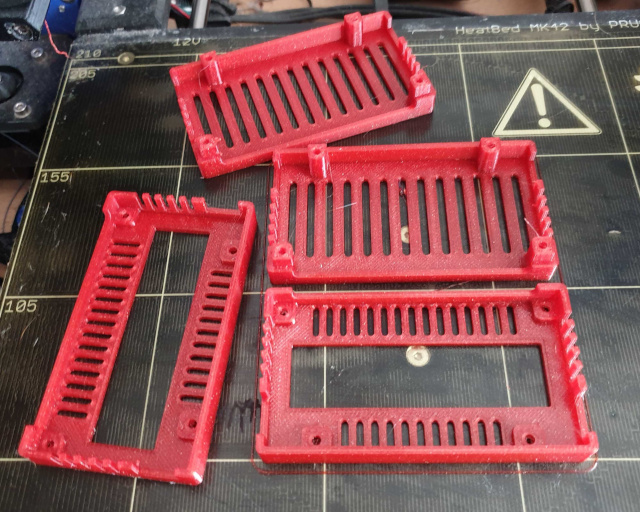
When printing with the Generic PETG profile on PrusaSlicer 2.2.0 on my MK2.5s, I get X and Y layer shifts on every print that I run (using 0.15mm OPTIMAL stock profile). I have repeated this issue on both low power and auto power settings with a wide variety of STL files. When I print the same files using the Prusa PET setting in Slic3r Prusa Edition (v1.4.4, if I recall correctly), I have no issues with layer shifting. All profiles are stock, and a cursory overview of the print speeds and machine limits appear to be identical between these scenarios (the only major difference is that E axis jerk limit is significantly higher in PrusaSlicer 2.2.0, but I don't see how this affects layer shifts).
Debugging Steps Taken:
- All grub screws re-tightened, belts properly tensioned.
- Linear bearings all replaced on Y axis, other bearings all moving freely.
- X, Y rails generously lubricated.
- Multiple STLs attempted with and without supports.
I've printed ~6 prints with PrusaSlicer v2.2.0 and they have all layer shifted and failed (2-4 layer shifts within a ~3 hour print). The same models sliced and printed with Slic3r Prusa Edition v1.4.4 worked properly.
Project File (.3MF) where problem occurs
The following file is an AMF file that was renamed as a .zip file to get github to accept it:
bottom_shell.zip
 CoolNamesAllTaken
All 11 comments
Can you try to print it with previous 3.8.1 firmware? There is most likely difference in z-hop values (0.6mm vs 0.2mm currently used for PETG through filament overrides), but it shouldn't cause any issues, especially on simple model like this.
 rtyr
on 30 Jun 2020
rtyr
on 30 Jun 2020
I first encountered this layer shift error on the 3.8.1 firmware, and tried to fix it by upgrading to 3.9.0 but it did not help. It appears to affect the prints on both 3.8.1 and 3.9.0.
CoolNamesAllTaken
on 30 Jun 2020
I checked the gcode generated from your AMF with MK2.5S/GenericPETG/0.15mm OPTIMAL profiles and I don't see any issue.
I printed that gcode twice without any problems on my MK2S using silent mode (low current). I don't think that your issue is caused by PrusaSlicer, the output from PS seems ok. Also, I am not aware of any similar reports from other customers with MK2.5.
There is no big difference between silent mode and auto mode with this particular model since the current in auto mode is based on Z height.
rtyr
on 30 Jun 2020
I just re-sliced the AMF file and was able to repeat the layer shift issue again. This issue seems 100% correlated with the slicer that I use--perhaps there are some settings for the MK2.5s specifically that were different in the default config? If you send me an MK2.5 gcode file, would I be able to run it fine on my MK2.5s?
CoolNamesAllTaken
on 30 Jun 2020
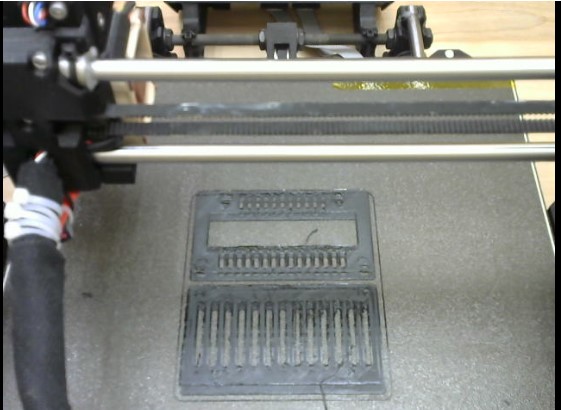
It looks like the nozzle is hitting some PETG buildup. Your first layer may be too low. Your results with older slicer may be better because of higher z-lift value (nozzle is lifted higher before travel). But IMO main issue there is probably too low first layer (live Z), which results in overextruded/rough first layers.
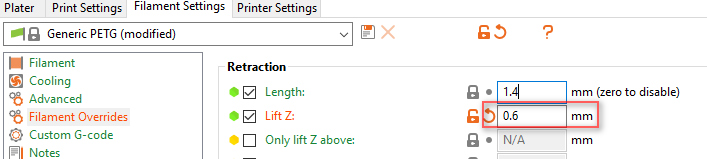
You can try to increase z-hop (z-lift) in filament overrides to "old" 0.6mm value (which was used in old SlicerPE). There is no difference between MK2.5/MK2.5S profiles.
rtyr
on 30 Jun 2020
Thank you! I will try re-adjusting live Z to see if that helps.
CoolNamesAllTaken
on 1 Jul 2020
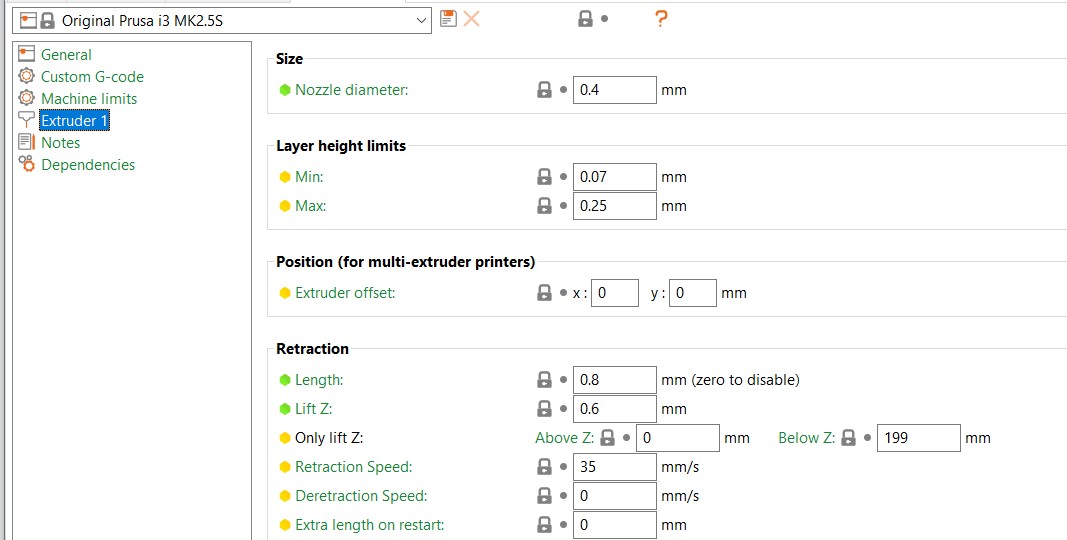
It looks like my Lift Z value was already at 0.6mm with PrusaSlicer 2.2.0. Perhaps something else may be affecting the print? I don't think my first layer looked all that bad, and I generally don't get too much PETG buildup / blobbing.
CoolNamesAllTaken
on 2 Jul 2020
0.6 is global value, 0.2 is PETG value. You must set it in filament settings (filament overrides), not printer settings. See my previous screenshot.
rtyr
on 2 Jul 2020
Can we close this issue?
rtyr
on 7 Jul 2020
Just bumped Live Z up a bit and running a test right now to see if that fixes it. Will update shortly!
CoolNamesAllTaken
on 7 Jul 2020
I was unable to get things to play nice by increasing the live Z, but
disabling the filament override for Z hop value (and thus allowing the
global Z hop of 0.6mm to take precedent) worked great! Thanks for your help.
On Tue, Jul 7, 2020 at 11:46 AM rtyr notifications@github.com wrote:
Can we close this issue?
—
You are receiving this because you authored the thread.
Reply to this email directly, view it on GitHub
https://github.com/prusa3d/PrusaSlicer/issues/4456#issuecomment-655052884,
or unsubscribe
https://github.com/notifications/unsubscribe-auth/ACFEZIOAIGYBSEJXK47NDNTR2NUQZANCNFSM4OLTLFSQ
.
CoolNamesAllTaken
on 8 Jul 2020
Related issues
 m-Th
·
141Comments
m-Th
·
141Comments
 ruedli
·
31Comments
ruedli
·
31Comments
 dahuafschmied
·
39Comments
dahuafschmied
·
39Comments
 tobymurray
·
35Comments
tobymurray
·
35Comments
 skohls
·
75Comments
skohls
·
75Comments
Most helpful comment
Can we close this issue?