Prusaslicer: Filament settings not showing up after importing my CR-X profile from 2.1.1
Version
Version 2.2.0-alpha4+win64
Operating system type + version
Windows 10 Pro 1909
3D printer brand / version
Creality CR-X
Behavior
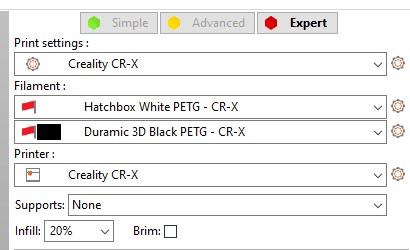
After importing custom settings from version 2.1.1, with custom printer/filament/printing profile, it looks like the custom printer/printing profile are marked as incompatible ANY filament profile, including the custom ones, that are set to be compatible with all printers.
Note:
- Right after importing the profile, the default filaments shows up, but selecting a different profile, or switching back and forth with a different printer make them disappear:
 fearedspark
All 6 comments
Could you reproduce the issue? Could you make snapshots of your configuration directory when you perform your upgrade step by step?
 bubnikv
on 18 Feb 2020
bubnikv
on 18 Feb 2020
I have found the reason, why your filaments are disappearing. Your filaments are derived from prusa3d system "PET" profiles. There is a breaking change in PrusaSlicer 2.2.0, where a profile derived from a vendor system profile is considered to be part of this vendor's space, therefore it is hidden if a printer profile of another vendor or a vendor-less printer profile is activated.
To fix your situation, just remove the "inherits" fields from your config bundle before importing them into PrusaSlicer.
bubnikv
on 18 Feb 2020
Oh, got it.
Removed the inheritance and now it shows up.
When I created the profile out of the Prusament PETG, I didn't realized it saved what filament it derived from.
Thank you
fearedspark
on 18 Feb 2020
Does that mean that if someone was to create a filament profile out of the system ones they would have the same issues?
It seems to me that in that case the inheritance shouldn't happen by default, otherwise might confuse more people, but maybe that's just me?
fearedspark
on 18 Feb 2020
Ok, found out that there is another issue thread that mentioned a fix for this already, closing this issue.
Link to the solution that will be implemented in the next alpha version: https://github.com/prusa3d/PrusaSlicer/issues/3347#issuecomment-577794062
fearedspark
on 18 Feb 2020
Does that mean that if someone was to create a filament profile out of the system ones they would have the same issues?
It seems to me that in that case the inheritance shouldn't happen by default, otherwise might confuse more people, but maybe that's just me?
It is confusing. We need to communicate it somehow and possibly allow to change the "inherits" link from the UI.
bubnikv
on 18 Feb 2020
Related issues
 TimothyGold
·
4Comments
TimothyGold
·
4Comments
 jon-cpu
·
3Comments
jon-cpu
·
3Comments
 frakman1
·
4Comments
frakman1
·
4Comments
 DROBORD
·
3Comments
DROBORD
·
3Comments
 rackley096794
·
3Comments
rackley096794
·
3Comments
Most helpful comment
It is confusing. We need to communicate it somehow and possibly allow to change the "inherits" link from the UI.