Prusaslicer: Empty layers detected, the output would not be printable
Version
_2.1.0 alpha1 win64_
_201908091120_
Windows 10
MK3
Behavior
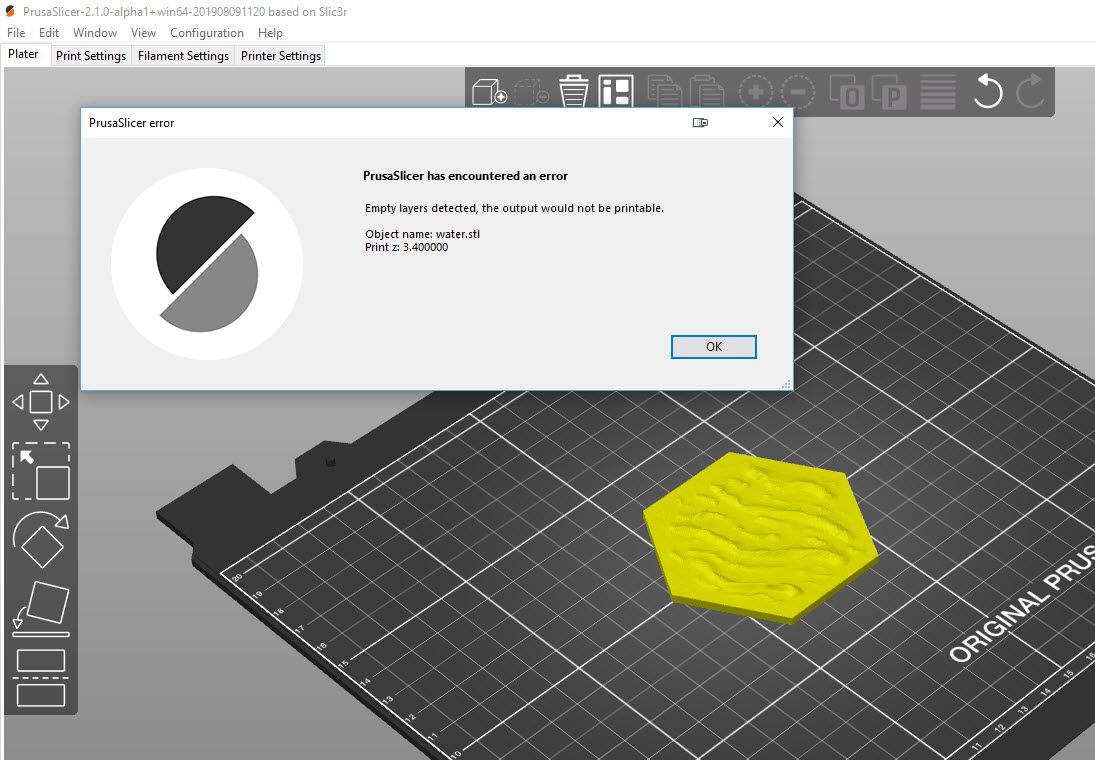
When slicing atttached water.stl at 0.2mm layer height, it complains that layer z=3.4 is empty.
With layer height 0.15 there is no problem.
With the 2.0.0 released version, there is no problem
_Is this a new feature request?_
No, bug report.
Project File (.3MF) where problem occurs
 ruedli
All 26 comments
With the 2.0.0 released version, there is no problem
There is. It is just not reported:
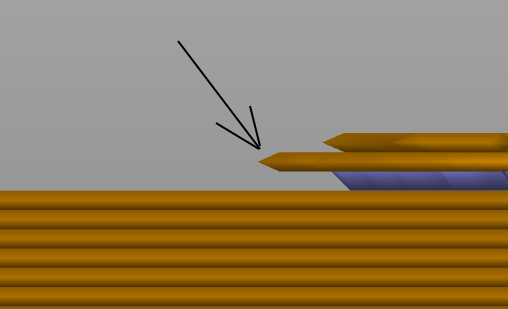
The perimeters on that layer are printed in air.
Slicing core apparently missed a layer for some reason, I have no clue why. We tried fixing your model in NetFabb but it didn't solve the issue. We'll look into it.
Setting layer height to anything but 0.2 solves it, this could be some mishandled special case, such as a triangle vertex being hit exactly by the slicing plane.
 lukasmatena
on 19 Aug 2019
lukasmatena
on 19 Aug 2019
Same error type of my issue #2752. In my case it is attributable to a negative value of Z contact distance in the Support tab.
 liftbag
on 19 Aug 2019
liftbag
on 19 Aug 2019
This is from a bad mesh. The model itself is missing a "layer".
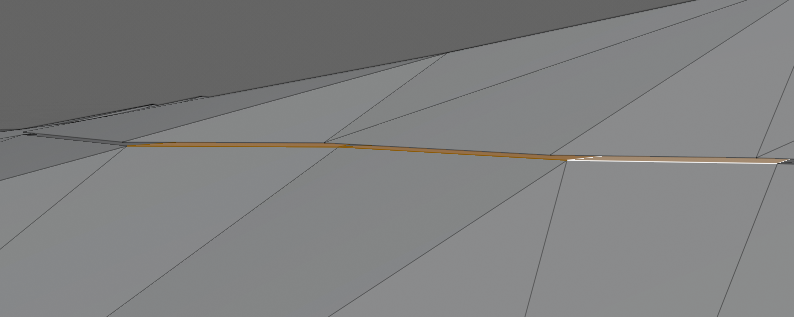
You can also see it in PrusaSlicer:

 Jebtrix
on 19 Aug 2019
Jebtrix
on 19 Aug 2019
Those islands are not one mesh either. If you separate to objects you can see easier:
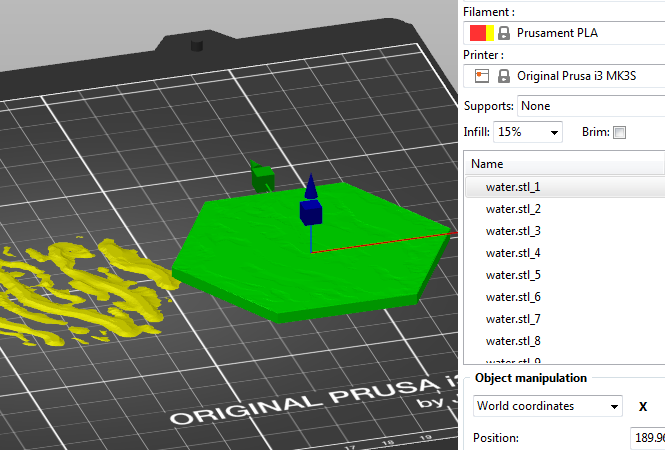
Jebtrix
on 19 Aug 2019
Easiest fix is to separate to parts, shift select everything but the base mesh part and do a -0.2mm on Z.
Jebtrix
on 19 Aug 2019
@ruedli As demonstrated by @Jebtrix (thanks), your model is composed of many parts with gaps in between. I doubt PrusaSlicer could detect and repair something like that, it cannot just merge distinct parts together (you usually don't want that).
Would you agree to close the issue?
lukasmatena
on 9 Oct 2019
Fully agree, if the error is in the data, the program should not solve it,
or it might result in undesired behaviour should you want for specific data
a correct handling. Ok was confused by the fact that the perl
implementation did not behave like this, but that might be the result of
different layer calculations and rounding.
Go ahead and close it!
(Like a lot the new features of PrusaSlicer, like range height modifiers
for the MMU2)
Op wo 9 okt. 2019 08:31 schreef lukasmatena notifications@github.com:
@ruedli https://github.com/ruedli As demonstrated by @Jebtrix
https://github.com/Jebtrix (thanks), your model is composed of many
parts with gaps in between. I doubt PrusaSlicer could detect and repair
something like that, it cannot just merge distinct parts together (you
usually don't want that).Would you agree to close the issue?
—
You are receiving this because you were mentioned.
Reply to this email directly, view it on GitHub
https://github.com/prusa3d/PrusaSlicer/issues/2778?email_source=notifications&email_token=ABGGYOHAUFZCH773DEGPRM3QNV3EXA5CNFSM4IMTMUSKYY3PNVWWK3TUL52HS4DFVREXG43VMVBW63LNMVXHJKTDN5WW2ZLOORPWSZGOEAWZBXA#issuecomment-539857116,
or mute the thread
https://github.com/notifications/unsubscribe-auth/ABGGYOA52QKBLVKYILZPKZ3QNV3EXANCNFSM4IMTMUSA
.
ruedli
on 9 Oct 2019
Ok, closing.
lukasmatena
on 9 Oct 2019
I disagree about closing this. The problem shows up in a lot of STL files on Thingiverse, and it's not always obvious how to fix them.
Couldn't the slicer simply shift everything above the gap downwards?
 smurfix
on 4 Dec 2019
smurfix
on 4 Dec 2019
I believe if the model is wrong, any the fix should be towards making the
model correct in the first place. Shifting and combining layers above the
gap might be the right thing to do, but this should be decided by the user
in a "repair" of the STL action.
This would then be a "new feature". I see that best done in a program
specialized in manipulating stl's. Not so much the slicer.
Opinions?
Op wo 4 dec. 2019 om 11:25 schreef Matthias Urlichs <
[email protected]>:
I disagree about closing this. The problem shows up in a lot of STL
files on Thingiverse, and it's not always obvious how to fix them.Couldn't the slicer simply shift everything above the gap downwards?
—
You are receiving this because you were mentioned.
Reply to this email directly, view it on GitHub
https://github.com/prusa3d/PrusaSlicer/issues/2778?email_source=notifications&email_token=ABGGYOEVR23HQBGGNOB47CTQW6ASZA5CNFSM4IMTMUSKYY3PNVWWK3TUL52HS4DFVREXG43VMVBW63LNMVXHJKTDN5WW2ZLOORPWSZGOEF4PONQ#issuecomment-561575734,
or unsubscribe
https://github.com/notifications/unsubscribe-auth/ABGGYOARJ5FF4LX6CZ57BFLQW6ASZANCNFSM4IMTMUSA
.
--
Ruud Rademaker
prefered mail: ruud.[email protected]
ruedli
on 4 Dec 2019
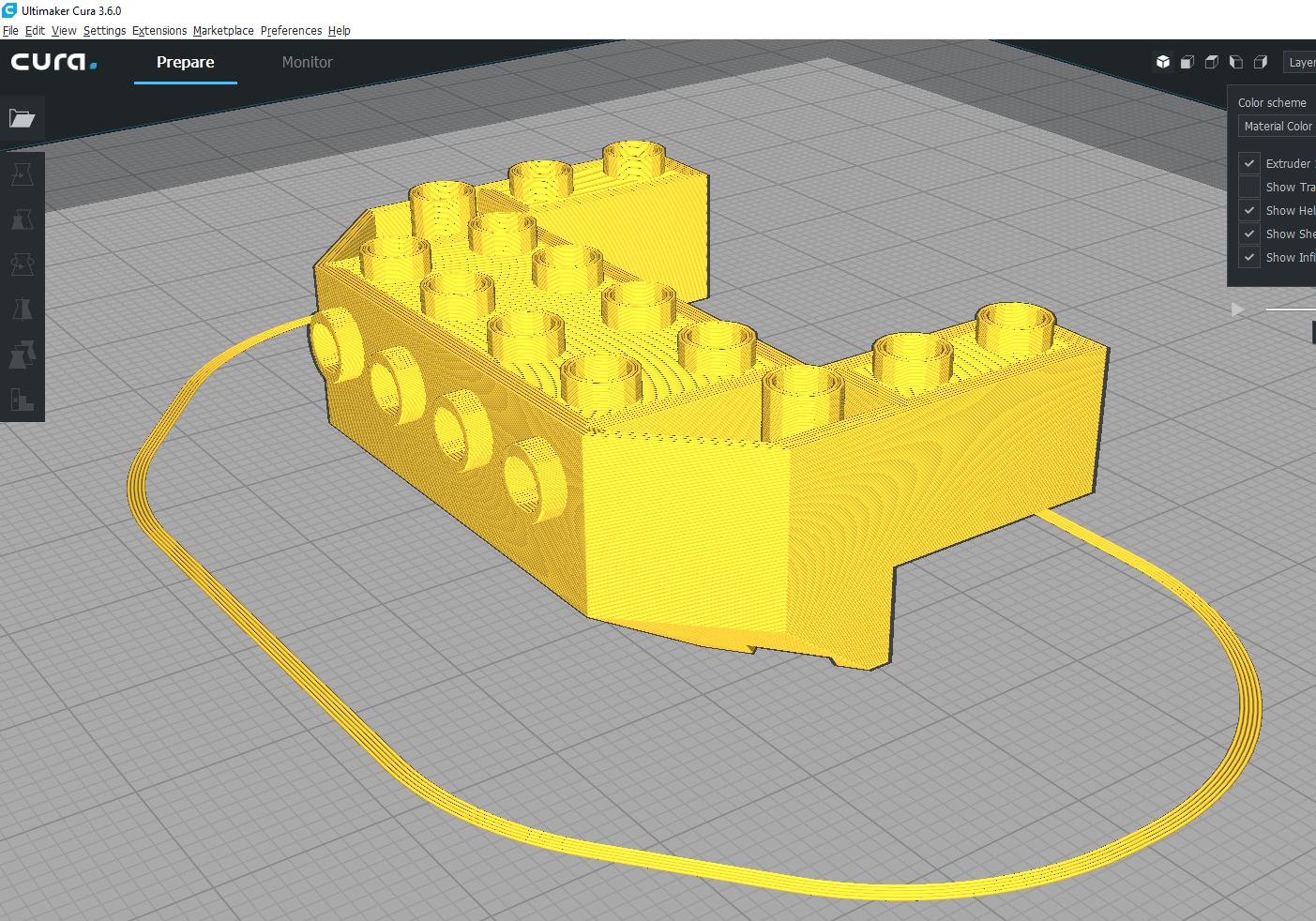
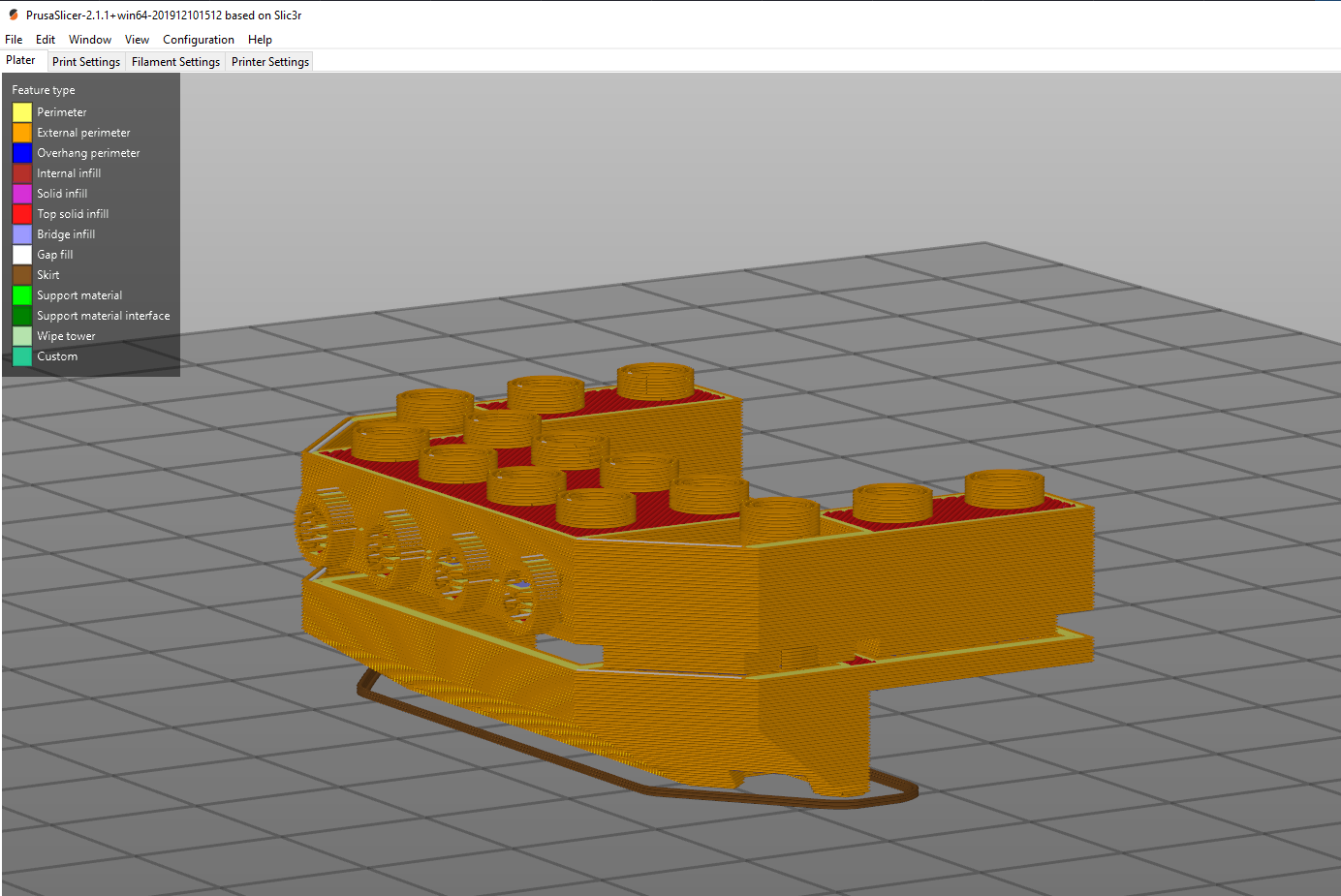
I agree. Yes there are issues with models, but very often it will slice fine in Cura, but not slice correctly in PrusaSlicer. Why would this be the case. Here's screenshots and the STL.
Cura v3.6.0
PrusaSlicer v2.1.1
 dorfman2
on 22 Dec 2019
dorfman2
on 22 Dec 2019
@dorfman2 There are also cases where PrusaSlicer is ok and Cura is not. If the user fails to provide a valid model, slicer cannot guarantee to process it "correctly". Both applications use different algorithms to make sense of such faulty models, that's why the results are not the same.
We will likely improve the model repair function in PrusaSlicer 2.3. Until then, Netfabb should repair it for you.
lukasmatena
on 22 Dec 2019
@lukasmatena Thanks for response and explanation. I was pulling my hair out a bit (since I get better prints with PrusaSlicer).
dorfman2
on 22 Dec 2019
this error also occurs with this model https://cults3d.com/en/3d-model/game/dragon-chess-dragon-horse-the-knight in Prusa slicer but not in Cura
 pjratl
on 30 Dec 2019
pjratl
on 30 Dec 2019
@pjratl While in the plater view, try right clicking (control click on mac) the object and clicking "Fix through Netfabb." That is what @lukasmatena was referring to above that solved my issue.
edit: Added Mac shortcut.
dorfman2
on 2 Jan 2020
Yes there are issues with models, but very often it will slice fine in Cura, but not slice correctly in PrusaSlicer.
Sometimes it is vice versa.
We are collecting these models, we are marking these issues with a "model import" tag. One day we will return to this issue, try to find a common pattern on those files that are currently not processed correctly and we will try to improve the slicing algorithm to handle these cases. The problem is, that fixing the algorithm for one class of model errors may break the algorithm for another class of errors. That's why it takes a considerable time to improve and retest the algorithm.
 bubnikv
on 2 Jan 2020
bubnikv
on 2 Jan 2020
I did try model repair it did not fix the problem
this isssue in this model is the very top I sharp point ....
pjratl
on 2 Jan 2020
I did try model repair it did not fix the problem
this isssue in this model is the very top I sharp point ....
I've had the same issue, too. I worked around it by adjusting the layer height for the most top layer (made it thicker). Still for the most top layer there should be an exception.
 ForsakenNGS
on 12 Jan 2020
ForsakenNGS
on 12 Jan 2020
Under Print Settings -> Layers and Perimeters, you can try to disable "Detect Thin Walls". In some instances this can make the object printable, and give an output similar to Cura.
 cfelicio
on 4 Mar 2020
cfelicio
on 4 Mar 2020
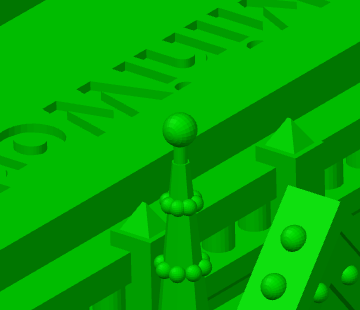
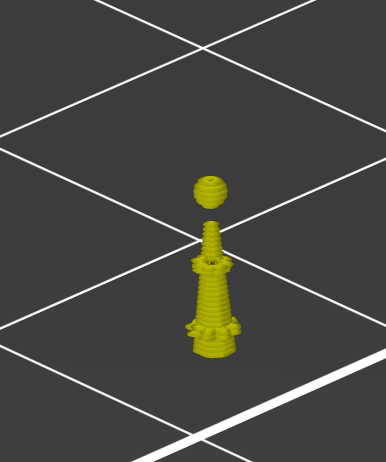
My "slicing fail" example comes from the popular Notre Dame model. The top of the spires get skinny enough that they disappear before printing the 'ball' at the top. This model is 100x120mm, so it's not like I'm trying to print it super-tiny or anything.
 tedder
on 1 Apr 2020
tedder
on 1 Apr 2020
@tedder My Workaround for now has been to use a free trial at https://makeprintable.com/ . You can get a 30 day free trial (credit card required, but you can cancel without paying).
dorfman2
on 1 Apr 2020
Here is another example, generated from the included OpenSCAD source, if they are of any interest or use...
Tesla Model 3 screw-on wheel centercaps.zip
 fiveangle
on 3 May 2020
fiveangle
on 3 May 2020
I had a similar problem.
PROBLEM:
In Cura it had no problems, but the print didn't look as good as on Prusaslicer. On the other hand prusaslicer did miss partially some layers.
SOLUTION:
I exported the Part as 3MF istead of STL and that fixed it!
Maybe it helps to reduce the polygon size too.
 RFgermany
on 28 Jun 2020
RFgermany
on 28 Jun 2020
The empty layer error will be turned into a warning in PrusaSlicer 2.3.0, so that the users can continue exporting the gcode when they see it is a minor problem (such as the Notre Dame from @tedder and similar).
lukasmatena
on 23 Jul 2020
All we really need is the ability to either:
- turn the error checking off for this error, or
- ignore the error.
The problem I have is that I'm trying to print a model with deliberate empty layers:
0.08_vertical_clearance_test.zip
The model IS printable, because I have already printed it using Snapmaker Luban. What I want to do is use the variable layer height feature in Prusaslicer to speed up the print instead of printing the whole thing at 0.08mm (Luban is very basic and does not have variable layer height). Obviously this is a test model. The model I want to print using vertical clearances is much bigger and will take days to print at 0.08mm layer height.
Prusaslicer will not allow the gcode to be saved because there is an error. I want to tell it to ignore the error and export the gcode anyway.
 ozzyman
on 31 Oct 2020
lukasmatena
on 31 Oct 2020
ozzyman
on 31 Oct 2020
lukasmatena
on 31 Oct 2020
Related issues
 tkircher
·
3Comments
tkircher
·
3Comments
 ManuGithubSteam
·
4Comments
ManuGithubSteam
·
4Comments
 Foxtrek64
·
4Comments
Foxtrek64
·
4Comments
 TimothyGold
·
4Comments
TimothyGold
·
4Comments
 karek314
·
4Comments
karek314
·
4Comments
Most helpful comment
The empty layer error will be turned into a warning in PrusaSlicer 2.3.0, so that the users can continue exporting the gcode when they see it is a minor problem (such as the Notre Dame from @tedder and similar).