1.42.0 b2
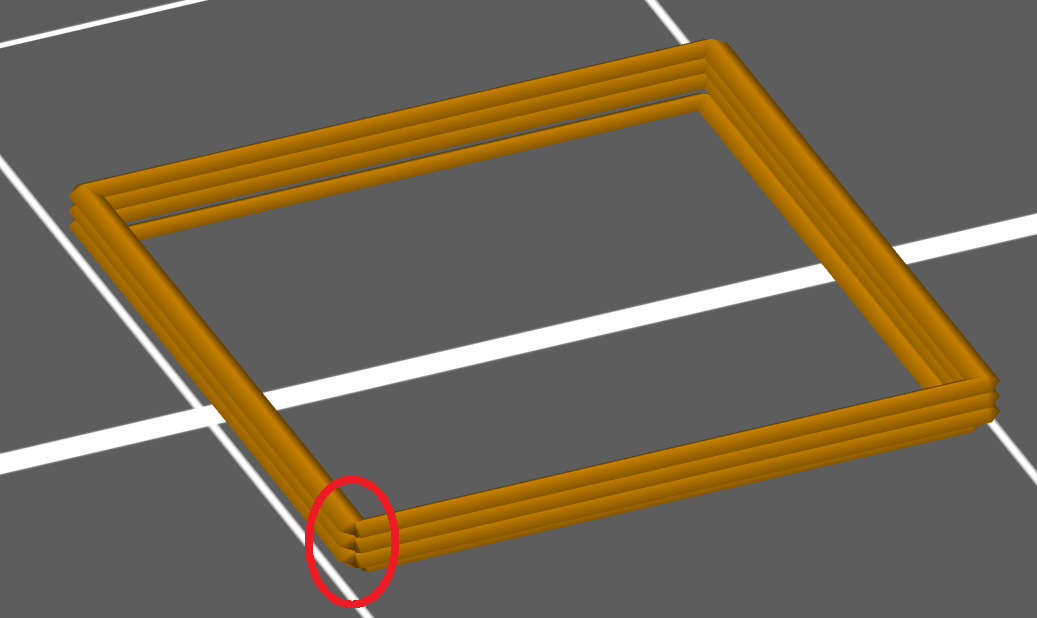
Aligned seams are great but when they appear just above each other it can cause gaps. Typically, simple models have some similar sharp corners. So the algorithm could find the sharpest corner and then all the others that have angle up to e.g. 10% bigger. From this set it would pick one randomly.
For example this square has 4 sharp corners but only one is used for seams. With the improved algorithm it would use all the 4 corners.
 espr14
All 13 comments
So, they wont be aligned........
 guestisp
on 24 Apr 2019
guestisp
on 24 Apr 2019
Yes. In fact there should be some changes:
To be renamed:
- nearest -> nearest hidden
- aligned -> aligned hidden
To stay;
- random (random position, non-overhang if possible)
New ones:
- random hidden (proposed one)
- nearest (nearest position, non-overhang if possible), great for drafts
- aligned (does not make much sense)
espr14
on 24 Apr 2019
Same issue here with this retraction test: https://www.thingiverse.com/thing:909901
When the tower is small (more or less, after Z 13 or 14), the seam is placed every time in the same corner, making a very rough and bumpy surface
guestisp
on 30 Apr 2019
A "random hidden" seam option would be great. The "hiding" algorithm is quite powerful and useful.
But I strongly think that "Nearest" and "Aligned" in general are very undescriptive. Unless you study the original Slic3r manual (find it here), you wouldn't think that they would try to hide anything. So ironically, the fact that PrusaSlicer is hiding seams, is very hidden.
My proposal is not to introduce more seam options, but to introduce a checkbox "Try to Hide Seams".
Nearest + "Try to Hide Seams" disabled: Just put them wherever it's nearest
Nearest + TtHS enabled: Find hidden spaces, but within those, put them wherever it's nearest
Random + TtHS disabled: True random
Random + TtHS enabled: Find hidden spaces, but within those, distribute them randomly
etc.
 haarp
on 21 Jul 2019
haarp
on 21 Jul 2019
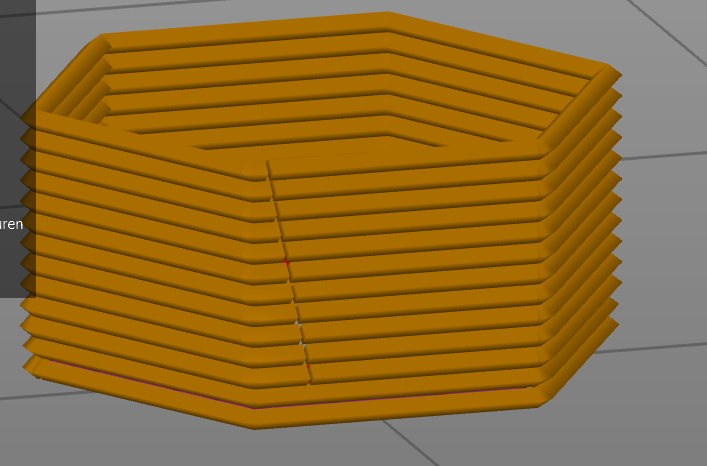
honestly I don't see how this seam on this single perimeter part is "random"
it seems to be just shifted some degrees. that way I don't get the robust structure I was hoping for
 Felix-fh
on 19 May 2020
Felix-fh
on 19 May 2020
I was thinking about this, could the modifier blocks be used to specify an area where retraction can take place? Could use a shape to specify an area where seams can be, say at the rear of the model where it wouldn't be seen. Because it would be an area the existing, nearest, aligned and random can still be used, just only in the area specified by the modifier block.
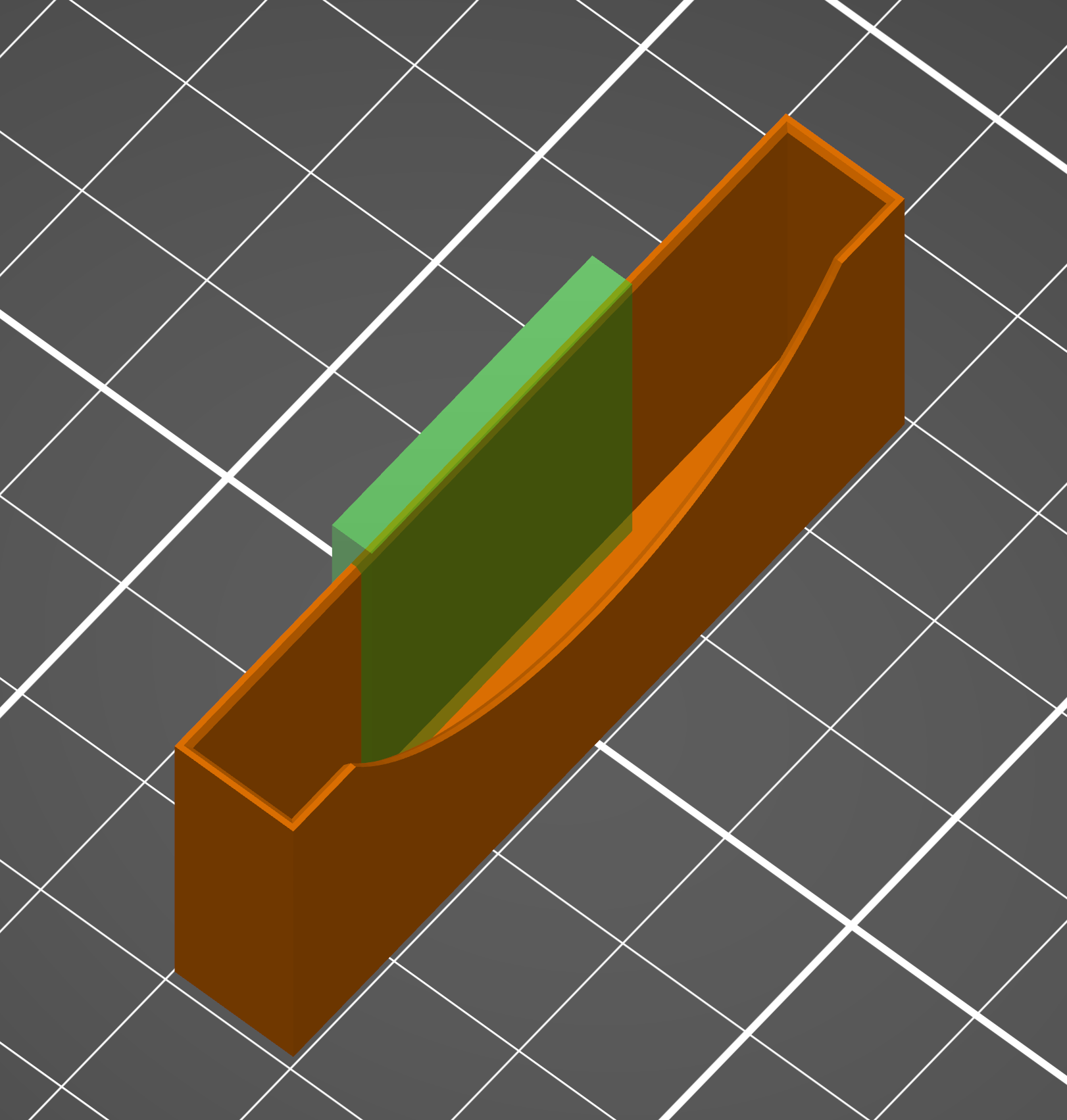
So in the above example I really need the front of the piece to be clear of marks as it is printed with transparent filament (it is a Gameboy Adavance Cartridge sleeve if anyone is curious!). By using the modifier block the seam would only appear in the green area. Aligned could be at one of the edges of the block, nearest would be the nearest point within the block and random anywhere in the block.
-edit- added example
 smartroad
on 15 Sep 2020
smartroad
on 15 Sep 2020
In your case just set the seam location to rear and position the model so that the back of it where you want the seam is at the rear of the bed.
 neophyl
on 15 Sep 2020
neophyl
on 15 Sep 2020
In your case just set the seam location to rear and position the model so that the back of it where you want the seam is at the rear of the bed.
I am just using my example as a, well, an example lol. To be honest my suggestion would be more ideal with the "random" option as it prevents a seam which could be a weaker point but still allows control over where the blobs might appear. The rear option still creates a seam.
smartroad
on 15 Sep 2020
Every option creates a seam, its just where to put it. Hiding it in corners is usually the best option if there are corners available.
neophyl
on 15 Sep 2020
Random doesn't create a seam, which I believe is the point of it. The downside is it is truly random all over the piece which can lead to odd markings over the whole surface.
smartroad
on 15 Sep 2020
I think we have a problem with the definitions we are using being different. To me a seam is a seam, regardless of if its all in a line, hidden in the corners or spread over the entire object in different positions. Its still a seam, just not all in one spot. My definition is the start end of a layer where the perimeters meet is the seam.
Thats away from the original feature request anyway. Has anyone else used the new seam placement tool in the last version of Super Slicer ? Its a bit rough around the edges but it allows you to place one or more sphere modifiers and the seam for each layer is placed as close as it can be to the nearest seam modifier object. That would 'seem' to do roughly what you suggest with the modifier mesh albeit implemented in a different fashion. As Super Slicer is a fork of Prusa Slicer then if its possible in one it should be possible in the other :)
neophyl
on 15 Sep 2020
@smartroad @neophyl
We are currently working on custom seam enforcers/blockers for PrusaSlicer 2.3. It will allow to paint enforcing and blocking areas on your model, similarly to what you have just described. So in @smartroad 's example, he would just paint the front by a blocker to exclude that area from potential seam locations (or he could paint enforcer at the back as he suggested to get similar outcome).
While we are at it, we should also fix the not exactly random seam that @Felix-fh posted. This is not in master yet.
 lukasmatena
on 15 Sep 2020
lukasmatena
on 15 Sep 2020
While we are at it, we should also fix the not exactly random seam that @Felix-fh posted. This is not in master yet.
This should be fixed in PrusaSlicer 2.3.0-alpha1. Closing.
 bubnikv
on 17 Oct 2020
bubnikv
on 17 Oct 2020
Related issues
 frakman1
·
4Comments
frakman1
·
4Comments
 Bubolz
·
3Comments
Bubolz
·
3Comments
 devilhunter84
·
4Comments
devilhunter84
·
4Comments
 sebastianha
·
4Comments
sebastianha
·
4Comments
 Foxtrek64
·
4Comments
Foxtrek64
·
4Comments
Most helpful comment
@smartroad @neophyl
We are currently working on custom seam enforcers/blockers for PrusaSlicer 2.3. It will allow to paint enforcing and blocking areas on your model, similarly to what you have just described. So in @smartroad 's example, he would just paint the front by a blocker to exclude that area from potential seam locations (or he could paint enforcer at the back as he suggested to get similar outcome).
While we are at it, we should also fix the not exactly random seam that @Felix-fh posted. This is not in
masteryet.