Prusaslicer: UI: Right sidebar in plater uses an unintuitive order
Version
_Version of Slic3r Prusa Edition used goes here_
version_1.42.0-beta1-185-g1af71bb19
_Use About->About Slic3r for release versions_
_For -dev versions, use git describe --tag or get the hash value for the version you downloaded or git rev-parse HEAD_
Operating system type + version
_What OS are you using, and state any version #s_
Windows 10
_In case of 3D rendering issues, please attach the content of menu Help -> System Info dialog_
Behavior
- _Describe the problem_
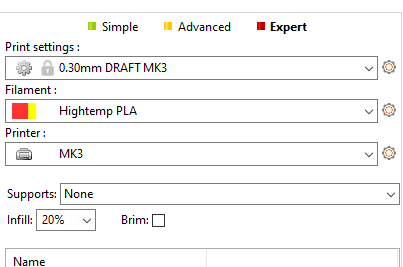
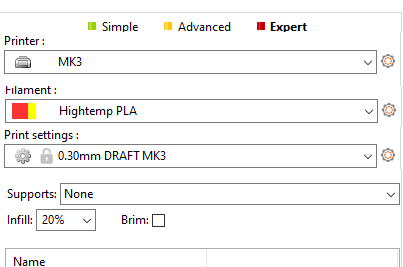
Trials with some new users learning how to run the machines at my school indicate that the users first click on "print settings", then realize they have the wrong printer, so they have to click out of that dropdown and go to the printer dropdown, select the right printer, then go back to the print settings. The reason why this confuses users is because the current ordering forces them to navigate from bottom to top since the printer dropdown is at the bottom, but influences the choices in the Print Settings dropdown above it.
How it currently is:
How it should be rearranged:
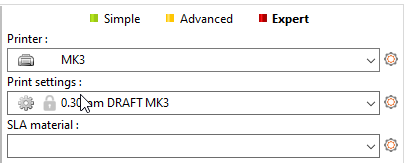
I actually had a stab at trying to fix this by simply shuffling the lines around in the Sidebar::Sidebar constructor, but unfortunately there is some sort of code which initializes the dropdowns and is dependent on their order. Unfortunately, this happened when I tried that:
I don't have enough C++ experience nor experience with the project to really figure out why this is order dependent or to change it, so I'm filing this issue.
 lf-
lf-
All 12 comments
Totally agree
 guestisp
on 6 Apr 2019
guestisp
on 6 Apr 2019
Yep, I already submitted the same issue a while ago (#910).
 stelgenhof
on 6 Apr 2019
stelgenhof
on 6 Apr 2019
And if that change is made, perhaps the ordering should be revered at the top of the screen as well, with Printer on the left, and Print Settings on the right. Of course, that is going to really confuse existing users.

 JohnOCFII
on 6 Apr 2019
JohnOCFII
on 6 Apr 2019
Maybe. This case is less obvious since the frequency with which one might need to adjust printer settings is far less than print settings (which is nearly every time).
lf-
on 6 Apr 2019
Maybe. This case is less obvious since the frequency with which one might need to adjust printer settings is far less than print settings (which is nearly every time).
True. I don't know if there are UI standard regarding left --> right equating to top --> bottom (at least for Western languages).
Also, and maybe I'm not a typical case, but I use Slic3r for many different types of printers, and so am changing the Printer Settings nearly as often as I'm changing the Print Settings.
JohnOCFII
on 6 Apr 2019
The stuff in the printer settings is mostly stuff like max layer heights and retraction and OctoPrint.
I only have two printer profiles for my one printer, one for flex and one for normal since it's sort of set and forget. Given sufficient use of presets, you might be able to cut down most of the changes in that tab.
lf-
on 6 Apr 2019
And also https://github.com/prusa3d/Slic3r/issues/2079 and
https://github.com/prusa3d/Prusa-Firmware/issues/1170
These are a matter of taste issues.
On Sat, Apr 6, 2019 at 5:09 PM lf notifications@github.com wrote:
The stuff in the printer settings is mostly stuff like max layer heights
and retraction and OctoPrint.I only have two printer profiles for my one printer, one for flex and one
for normal since it's sort of set and forget. Given sufficient use of
presets, you might be able to cut down most of the changes in that tab.—
You are receiving this because you are subscribed to this thread.
Reply to this email directly, view it on GitHub
https://github.com/prusa3d/Slic3r/issues/2079#issuecomment-480511532,
or mute the thread
https://github.com/notifications/unsubscribe-auth/AFj5I61SIr9M6CFM447PgqGDFP4Nt_w6ks5veLiagaJpZM4cgEFK
.
 bubnikv
on 8 Apr 2019
bubnikv
on 8 Apr 2019
The stuff mentioned in the comments is indeed a matter of taste, but the fact that the interface goes from bottom to top is objectively in need of improvement and unintuitive.
This paragraph describes the flow of choosing which printer and profile is required:
unnecessary friction.
works, and start anew. This is distracting and adds
their initial mental model of how the software
process the label on the dropdown, backtrack from
It means that the user is forced to read and
(in case you can't read it, the lines are in reverse order, where the top ones require reading the bottom ones first)
This type of user interface issue is like having someone walk into the room and try to engage you in conversation about something unrelated while you're programming. The context of what you're trying to accomplish is lost.
lf-
on 8 Apr 2019
The stuff mentioned in the comments is indeed a matter of taste, but the
fact that the interface goes from bottom to top is objectively in need of
improvement and unintuitive.
It depends how you use Slic3r. Most of our users own just a single printer,
therefore it is inconvenient for them to have the printer selection at the
first place. Also the printer settings are the least often to be tinkered
with, therefore they are at the last tab. Indeed, the PrusaControl hides
the printer settings into the preferences dialog.
Most users print from a single material, maybe from two (PLA and PET).
That's why it makes sense to put the filament at the 2nd place and 2nd tab
after the printer. IMHO the order of print profile (aka the print quality)
and the filament (aka the material) does not matter much.
I don't really have a strong opinion on this topic. I personally would keep
it as it is as our users are used to it and IMHO the order does not matter
too much and one will get used to it quickly.
On Mon, Apr 8, 2019 at 6:51 PM lf notifications@github.com wrote:
The stuff mentioned in the comments is indeed a matter of taste, but the
fact that the interface goes from bottom to top is objectively in need of
improvement and unintuitive.This paragraph describes the flow of choosing which printer and profile is
required:unnecessary friction.
works, and start anew. This is distracting and adds
their initial mental model of how the software
process the label on the dropdown, backtrack from
It means that the user is forced to read and(in case you can't read it, the lines are in reverse order, where the top
ones require reading the bottom ones first)This type of user interface issue is like having someone walk into the
room and try to engage you in conversation about something unrelated while
you're programming. The context of what you're trying to accomplish is lost.—
You are receiving this because you commented.
Reply to this email directly, view it on GitHub
https://github.com/prusa3d/Slic3r/issues/2079#issuecomment-480912222,
or mute the thread
https://github.com/notifications/unsubscribe-auth/AFj5IynJp4RGdy71N4ioUk-PEHsWd_Jgks5ve3OGgaJpZM4cgEFK
.
bubnikv
on 10 Apr 2019
@bubnikv Indeed for users with a single printer it may be less relevant. However moving the printer tab / dropdown to the front wouldn't be much of an inconvenience for these users, as it would be just mentally/visually moving to the next tab / dropdown item.
For users with multiple printers on the other hand, there is unnecessary (mental) travel (first go down to the printer selection, and then back up again to select the quality and/or filament) in the current UI.
IMHO the discussed UI change would benefit users with multiple printers and have very minimal (or even no) downside for people with a single printer. Of course, to understand better if a UI change is beneficial or not, one could do an A/B test like it's common in Web Analytics. But this may be hard for desktop applications :)
Cheers! Sacha
stelgenhof
on 10 Apr 2019
Most of our users own just a single printer, therefore it is inconvenient for them to have the printer selection at the first place.
This is only sort of true. I have two printer profiles for my one machine at home because I want a no retracts profile for flexibles. And there's still the concern with the order of going through settings.
lf-
on 10 Apr 2019
Our content department expressed the wish to swap the combo boxes at the platter and to keep the order of the parameter tabs.
Josef Prusa (he pays us all) wants it as it is. I think that's the final word for now. Closing.
bubnikv
on 12 Apr 2019
Related issues
 DROBORD
·
3Comments
DROBORD
·
3Comments
 sebastianha
·
4Comments
sebastianha
·
4Comments
 pricedev
·
4Comments
pricedev
·
4Comments
 Tirpitz93
·
3Comments
Tirpitz93
·
3Comments
 TimothyGold
·
4Comments
TimothyGold
·
4Comments
Most helpful comment
@bubnikv Indeed for users with a single printer it may be less relevant. However moving the printer tab / dropdown to the front wouldn't be much of an inconvenience for these users, as it would be just mentally/visually moving to the next tab / dropdown item.
For users with multiple printers on the other hand, there is unnecessary (mental) travel (first go down to the printer selection, and then back up again to select the quality and/or filament) in the current UI.
IMHO the discussed UI change would benefit users with multiple printers and have very minimal (or even no) downside for people with a single printer. Of course, to understand better if a UI change is beneficial or not, one could do an A/B test like it's common in Web Analytics. But this may be hard for desktop applications :)
Cheers! Sacha