Prusaslicer: 1.42.0-Alpha1 won't open from self contained folder
Version
1.42.0-alpha1
Operating system type + version
Windows 10 64-bit 1803
Behavior
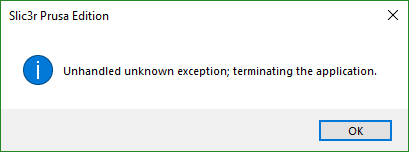
When downloading the .zip from the release page, unzipping the folder and placing it a desired location (e.g. \Documents\3D_Printing\Applications), the application will fail to load with the following error:
"Failed to load image from file "F:\Miles\Documents\resources\icons\sys_unlock.png"
To reproduce this:
- Download the Slic3rPE-1.42.0-alpha1+win64-full-201812231738.zip from https://github.com/prusa3d/Slic3r/releases/tag/version_1.42.0-alpha1?fbclid=IwAR3Kyvn17TtKGZ63MOc3kuUf_SeSSaOddNPMm59tkMv1NW85OHyKFiXHB-I
- Unzip the file from downloads folder.
- Copy the entire unzipped folder to a desired location outside of the downloads folder.
- Run the slic3r.exe file inside the folder.
- Observe the error.
When running the file in the downloads folder everything starts as normal, although no configs are auto imported from my existing Slic3r 1.41.2. I am unsure if this is a bug or the nature of where the executable is running from, but I will give it the benefit of the doubt.

 Tohaker
All 23 comments
I am having the same issue.
 Crash331
on 24 Dec 2018
Crash331
on 24 Dec 2018
is there anything special about your f: drive? Is it being mapped from
somewhere? Will slic3r run from another drive? Is your windows installation
somehow locked down? For example isnt it a company laptop?
On Mon, Dec 24, 2018, 16:59 Crash331 <[email protected] wrote:
I am having the same issue.
—
You are receiving this because you are subscribed to this thread.
Reply to this email directly, view it on GitHub
https://github.com/prusa3d/Slic3r/issues/1500#issuecomment-449749515,
or mute the thread
https://github.com/notifications/unsubscribe-auth/AFj5IzJofivaHPoRZgoGG7smWi23DJZVks5u8PnegaJpZM4ZgenE
.
 bubnikv
on 24 Dec 2018
bubnikv
on 24 Dec 2018
Same problem. When I put it in the C:\ root folder it works. If I put it anywhere else it thinks the Resources folder is like.. one folder above my actual Resources folder path.
(Resources folder is in "F:\Programy\slic3r 1.4.2\resources", it tries to find Resources folder in "F:\Programy\resources"

 Mavi222
on 24 Dec 2018
Mavi222
on 24 Dec 2018
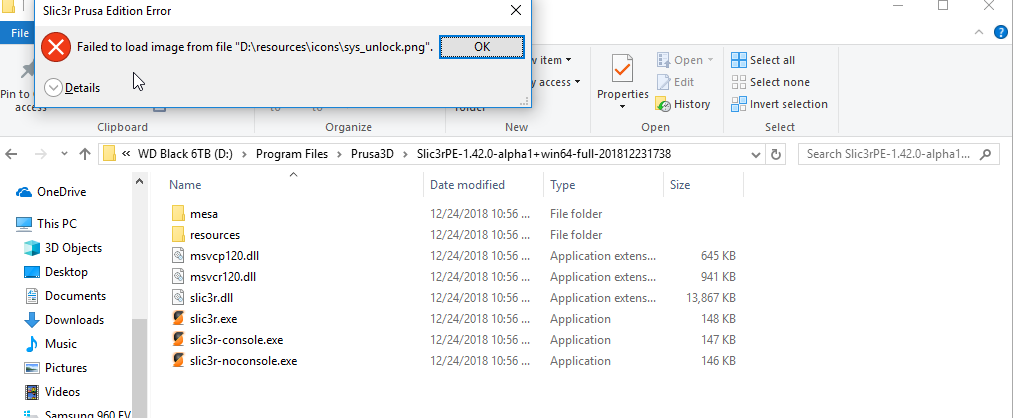
Nothing is special about mine. I tried to copy the contents of the zip file to D:\Program Files\Prusa3d\Slic3rPE-1.42.0-alpha1 and got the same error as Tohaker.
When I unzipped the contents directly to my Downloads folder, the alpha runs fine.
Crash331
on 24 Dec 2018
Crash331
on 24 Dec 2018
is there anything special about your f: drive? Is it being mapped from somewhere? Will slic3r run from another drive? Is your windows installation somehow locked down? For example isnt it a company laptop?
…
On Mon, Dec 24, 2018, 16:59 Crash331 @.* wrote: I am having the same issue. — You are receiving this because you are subscribed to this thread. Reply to this email directly, view it on GitHub <#1500 (comment)>, or mute the thread https://github.com/notifications/unsubscribe-auth/AFj5IzJofivaHPoRZgoGG7smWi23DJZVks5u8PnegaJpZM4ZgenE .
It's my own machine, and whilst the default Documents folder is mapped to F, so its default Downloads, where it runs from. Seems like a hardcoded file path but havent had the time to dive into the code myself.
Tohaker
on 24 Dec 2018
It also runs fine from "C:\Slic3rPE-1.42.0-alpha1"
It crashes from "C:\Program Files\Slic3rPE-1.42.0-alpha1"
edit: I think I found the issue. It fails from "C:\Slic3rPE 1.42.0-alpha1" where I changed the - to a space.
It fails on any directory with space.
Crash331
on 24 Dec 2018
The problem is in the space, yes. I just noticed that after a bit of testing. If the path to the executable has space, it totally ignores the full path and it fails to load.
edit: and I am missing all the default presets in this new version
Mavi222
on 24 Dec 2018
Interesting. Should just work from the exe directory. I'll have a go at building from source and see if I can get to the bottom of it (unless someone else beats me to it).
Tohaker
on 24 Dec 2018
edit: and I am missing all the default presets in this new version
I had to run with Wizard again and it loaded the filament and printer presets for me.
Crash331
on 24 Dec 2018
I had to run with Wizard again and it loaded the filament and printer presets for me.
Oh I totally forgot about the wizard. I thought it popped up automatically on the first start. I got all my presets back after running the wizard, thanks!
Mavi222
on 24 Dec 2018
Building from source seems a bit challenging seeing as they've removed Perl in this update. The instructions are very old too, may just have to wait until they release new instructions.
Tohaker
on 24 Dec 2018
Same issue. Moved everything to Users folder and it works now.
 varukasalt
on 24 Dec 2018
varukasalt
on 24 Dec 2018
I just verified the issue, a space in the installation path leads to a
crash.
On Mon, Dec 24, 2018 at 6:11 PM varukasalt notifications@github.com wrote:
Same issue. Moved everything to Users folder and it works now.
—
You are receiving this because you commented.
Reply to this email directly, view it on GitHub
https://github.com/prusa3d/Slic3r/issues/1500#issuecomment-449756049,
or mute the thread
https://github.com/notifications/unsubscribe-auth/AFj5I6rA6QPWfwQITU5QJb0j40b5Rg2kks5u8QqtgaJpZM4ZgenE
.
bubnikv
on 24 Dec 2018
1.42.0a1 will only launch when the program is copied to my desktop of Windows 10 (1803). If i move the program anywhere else on my C: or other drives is fails to open.
 OopAck
on 27 Dec 2018
OopAck
on 27 Dec 2018
Opening with the slic3r-console.exe executable seems to work.
 mgg4
on 28 Dec 2018
mgg4
on 28 Dec 2018
trying all option , read here , move on C; , desktop , copy paste....................not one work still same can't open slic3r !!
 PatB42
on 2 Jan 2019
PatB42
on 2 Jan 2019
We will release another alpha tomorrow.
bubnikv
on 3 Jan 2019
Fixed with 0d7e53badb4c62ff1a8638ca916109b524f52b6c
by adding some missing UTF8 to wxString path explicit conversions.
bubnikv
on 3 Jan 2019
Im having the same problem For Slic3rPE-1.42.0-beta1 And nothing works
 angelshce22
on 1 Apr 2019
angelshce22
on 1 Apr 2019
@angelshce22 what problem? What operating system? What happens?
bubnikv
on 2 Apr 2019
@bubnikv windows 8.1 , when trying to install the new version i see this error
https://gyazo.com/994fa00af1fd24b96aa1d55d840bce82
Was fixed by removing in roaming the folder of prusa
angelshce22
on 2 Apr 2019
it is always useful to us to get the content of the data directory for
inspection in such a case. Anyway, I am happy it works for you now.
On Tue, Apr 2, 2019, 21:25 angelshce22 notifications@github.com wrote:
@bubnikv https://github.com/bubnikv windows 8.1 , when trying to
install the new version i see this errorhttps://gyazo.com/994fa00af1fd24b96aa1d55d840bce82
Was fixed by removing in roaming the folder of prusa
—
You are receiving this because you were mentioned.
Reply to this email directly, view it on GitHub
https://github.com/prusa3d/Slic3r/issues/1500#issuecomment-479159251,
or mute the thread
https://github.com/notifications/unsubscribe-auth/AFj5I53ow-CXEgRsjNhR_con8RYiODyIks5vc66agaJpZM4ZgenE
.
bubnikv
on 3 Apr 2019
Related issues
 ManuGithubSteam
·
4Comments
ManuGithubSteam
·
4Comments
 Foxtrek64
·
4Comments
Foxtrek64
·
4Comments
 devilhunter84
·
4Comments
devilhunter84
·
4Comments
 Tirpitz93
·
3Comments
Tirpitz93
·
3Comments
 tkircher
·
3Comments
tkircher
·
3Comments
Most helpful comment
It also runs fine from "C:\Slic3rPE-1.42.0-alpha1"
It crashes from "C:\Program Files\Slic3rPE-1.42.0-alpha1"
edit: I think I found the issue. It fails from "C:\Slic3rPE 1.42.0-alpha1" where I changed the - to a space.
It fails on any directory with space.