Prusaslicer: Unwanted solid infill surface in the middle of part
Version
1.40.1+w64
Operating system type + version
W10 64bits
Behavior
Slic3r add solid unwanted infill in the print. The unsure vertical wall thickness is uncheck.
For exemple S3D on the left (what i want) and slic3r on the right. I tried also is Cura without problems.

Other one with a larger print

STL/Config (.ZIP) where problem occurs
 eowindel
All 34 comments
Version
1.42.0 alpha5 MacOS 10.13.6
Same problem occurring for me. It works fine with 2 or more perimeters but with a single perimeter I am getting a lot of unwanted solid infill added in between the infill.
With ensure vertical wall thickness enabled I am actually getting less of this solid infill noise then when enabled.
 Anima1000000
on 9 Feb 2019
Anima1000000
on 9 Feb 2019
please provide screenshots and a 3mf file as requested in the issue entry
form.
On Sat, Feb 9, 2019, 04:55 Anima1000000 <[email protected] wrote:
Version
1.42.0 alpha5 MacOS 10.13.6
Same problem occurring for me. It works fine with 2 or more perimeters but
with a single perimeter I am getting a lot of unwanted solid infill added
in between the infill.With ensure vertical wall thickness enabled I am actually getting less of
this solid infill noise then when enabled.—
You are receiving this because you are subscribed to this thread.
Reply to this email directly, view it on GitHub
https://github.com/prusa3d/Slic3r/issues/1054#issuecomment-462010712,
or mute the thread
https://github.com/notifications/unsubscribe-auth/AFj5I5ZAVp33SBrnMNyxYHa1O5eXvArAks5vLka2gaJpZM4VSNyW
.
 bubnikv
on 9 Feb 2019
bubnikv
on 9 Feb 2019
Thanks for looking into this. Notice that with 2 perimeters this issue doesn't occur.
 Anima1000000
on 9 Feb 2019
Anima1000000
on 9 Feb 2019
Notice that with 2 perimeters this issue doesn't occur.
Probably because the second perimeter remove the top surface. No top surface -> no solid surface below.
Note that any top surface is grown by 3mm in all direction.
 supermerill
on 12 Feb 2019
supermerill
on 12 Feb 2019
Hi Merill, have you had the chance to look at the file? These solid infills are throughout the entire object not just under the top layer. With two perimeters it doesn't remove the toplayer. Setting the top layers to 0 doesn't remove these solid infill artefacts. However disabling both top and bottom layers does fix it.
Any idea what might be causing this or is this infill intented for 1 perimeter? If so any chance to disable it?
Anima1000000
on 12 Feb 2019
supermerill
on 12 Feb 2019
I tried your build, it's has some really nice options. Would be nice to have a MacOS build aswell.
However I have the same problem there, I have tried all the options. I think it sees cavities inside the object as top and bottom surfaces, that must cause the unwanted infill.
Anima1000000
on 13 Feb 2019
Found a workaround by using infill modifiers.
Anima1000000
on 13 Feb 2019
Adding to this issue with another example. This causes a lot of time and material waste.
Version
PrusaSlicer-2.0.0+win64-201905201652
Operating system type + version
Windows 10 Pro 10.0.17134
3D printer brand / version + firmware version (if known)
Original Prusa i3 mk3
3.7.1-2266
Behavior
PrusaSlicer will put seemingly needless solid infill and top solid infill in the middle of prints. This causes significant increases in printing time and material usage (Cura prints the same model with the same speed settings in nearly half the time).
This is not a new feature request.
Attached is model, project, and config ini.
The problem is most evident starting at layer 74 on up. You will see the seemingly random parts of top solid infill (and some bridge infill). This project takes 6 hours 52 minutes in PrusaSlicer, but in Cura it takes less than 4 hours when using the same speed settings. The biggest difference is that Cura doesn't slice in all of the extra infill.

Project File (.3MF) where problem occurs
 renfes
on 27 May 2019
renfes
on 27 May 2019
Is this getting fixed? I see this rampantly in 2.1
 jltx1
on 2 Oct 2019
jltx1
on 2 Oct 2019
I found a fix, just turn off "Ensure vertical shell thickness" in the Print settings tab, under Layer and Perimeter
 ftheriachab
on 17 Nov 2019
ftheriachab
on 17 Nov 2019
@ftheriachab no, it's not. prusaslicer increase the area of solid infill to ensure it's going well over perimeters, and this setting isn't exposed. "Ensure vertical shell thickness" is an other thing that also add some solid area, but it's not on the same scale nor in the same areas.
supermerill
on 20 Nov 2019
Is there any update to this? There has to be someway to disable this "feature" other than limiting either top or bottom layers to 0. This is the only slicer I've seen do this and it's very annoying for certain prints.
 robschwieb
on 26 Dec 2019
robschwieb
on 26 Dec 2019
Same issue here. Very annoying
 Buzzz57
on 7 Feb 2020
Buzzz57
on 7 Feb 2020
I am also encountering this issue a lot! Would be very nice to have it fixed in the next update!
 djen-k
on 28 Feb 2020
djen-k
on 28 Feb 2020
I've been looking to move over from Simplify3D but the second model I sliced this issue popped up. I'm disappointed to see that google searches show that it seems to be a bug that's been around for years, has been reported numerous times and hasn't been addressed.
For the print I was testing, with equivalent settings on Simplify3D the print time is around 40 minutes, but using the current PrusaSlicer release (2.2.0), I'm looking at over an hour and almost 25% higher material usage.
The model is the well known "Aria the Dragon" at 50% scale, 15% infill, 3 top/bottom. Looks like this on the outside:

.... and this is the mess PrusaSlicer makes on the inside with unnecessary solid infill ...

Other than this, PrusaSlicer looks like the future, but this is currently a deal-breaker.
 bluesign2k
on 2 Apr 2020
bluesign2k
on 2 Apr 2020
Not sure if this will help all of your specific use cases, but if you decrease the number of top/bottom solid layers, you will have less of this, or none at all. I came to this thread with a similar issue, and doing that fixed mine, best of luck with yours!
 CodeCactus
on 8 Apr 2020
CodeCactus
on 8 Apr 2020
This is how I mainly use modifiers. I set the overall top/bottom layers to 0 or 1 and modify the top and bottom to the number I actually want. Ridiculous.
 haleypearse
on 13 Apr 2020
haleypearse
on 13 Apr 2020
Hi Guys,
Just recently notice this unwanted Solid infill in random Layer Height.
So i stated to research online to see if someone had this issue. Didnt find a solution.
Started to play with setting on Slic3r.
So I found the solution :)
I'm currently using PrusaSlicer 2.2.0
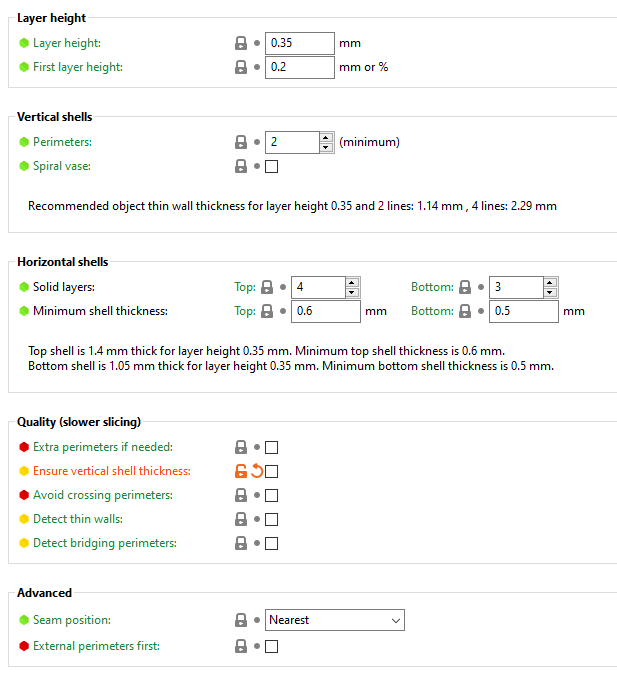
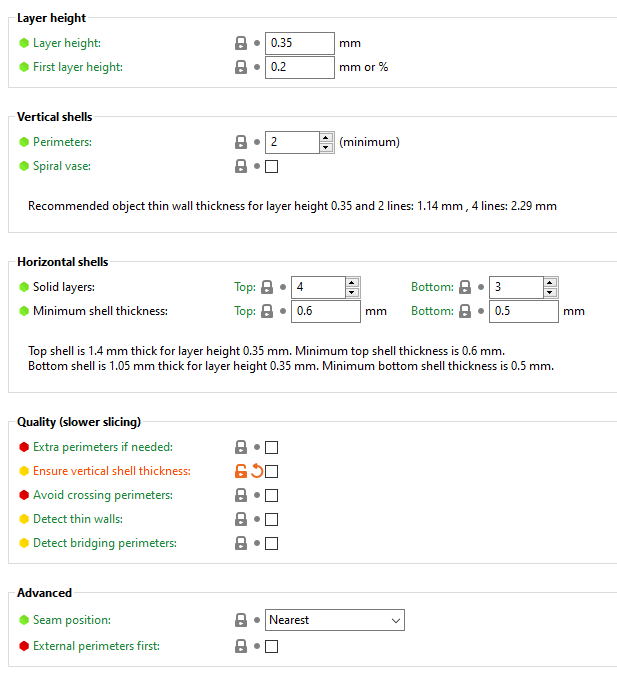
So here is a before & after
Layer & Perimeters setting before


Layer & Perimeters Settings After


Not sure why this worked.
The settings are for Horizontal Shells.
So the trick is: the Top & Bottom Solid layers need to match.
Hope this helps you guys.
Thank You
 MadMikey32
on 17 Apr 2020
MadMikey32
on 17 Apr 2020
Hi guys
Was struggling with this too, especially on small objects. Found a solution!
https://help.prusa3d.com/en/article/infill_42
The setting that forces this on small objects (and large ones with small surfaces) is Solid infill threshold area, set to 0 to disable.

 Jannes351
on 18 Apr 2020
Jannes351
on 18 Apr 2020
@Jannes351 Only just got the chance to look at this, but changing this value seems to have resolved my issue. Thanks! 👍
bluesign2k
on 2 May 2020
This option is disabled by default and it still generates those solid infills for even with it disabled. Setting top/bottom layers also seems to have no effect. Have tried everything now and still can't get rid of those solid infills. I noticed it gets much worse after lowering perimeters to 1.
This totally messes up my flex objects properties.
 nospoon
on 10 May 2020
nospoon
on 10 May 2020
It's crazy this bug has been around for years, and has such a big effect. I print at lower layer heights just to avoid it, or use modifier meshes in the middle of the part to lower top/bottom layers to 1 or 0 where there are no real top or bottom surfaces. The best reason not to use (prusa)slic3r (but (prusa)slic3r is still way better than the competition). I want to learn to code well enough to fix it.
haleypearse
on 11 May 2020
Same problem here, i´ve tried everything to get rid of it.
 Mat172
on 18 May 2020
Mat172
on 18 May 2020
I just noticed this problem with a print I'm doing.. 0% fill density, yet I get solid infill in the slicing:

 tommck
on 8 Oct 2020
tommck
on 8 Oct 2020
The most likely: That's because there isn't enough perimeters to have at least bottom_solid_layers at these spots, so it has to add more plastic.
supermerill
on 13 Oct 2020
That would be fine if it were adding more perimeters to fill it out. But instead, it's adding solid infill, which will always end up performing worse than perimeters of the same total volume.
Plus, while both ways have the same minimum amount of plastic that can be added (i.e. one line width of the nozzle), solid infill is rectilinear i.e. zig-zag, so all those turnaround points will add slightly more plastic than intended.
Also, you highlights a logic issue: you should not compare to number of layers, you need to compare thicknesses instead.
 VanessaE
on 13 Oct 2020
VanessaE
on 13 Oct 2020
but adding more perimeters means also adding a perimeter where it isn't needed, and never using infill as we are adding perimeter instead...
It's not easy.
imo, using a special infill pattern (kind of a concentric with gapfill) if the infill is "solid & inside" and lower than a threshold in width and area ; may be the desirable solution.
supermerill
on 13 Oct 2020
No. The solution is just to not add any extra plastic, because it's simply never wanted in practice. Put it back the way it used to be in the old days. It was better when it didn't try to overcompensate like this.
See also my arguments in https://github.com/supermerill/SuperSlicer/issues/253#issuecomment-678747992.
VanessaE
on 13 Oct 2020
Off-topic but since you mention it, is there any thought of enabling partial perimeters? It occurred to me that full loop perimeters are too great a limitation. For instance when you use a modifier mesh for a different number of perimeters, it creates a double-wide dividing down the middle of the part, which is in general so far from what you want that it's funny.
haleypearse
on 17 Oct 2020
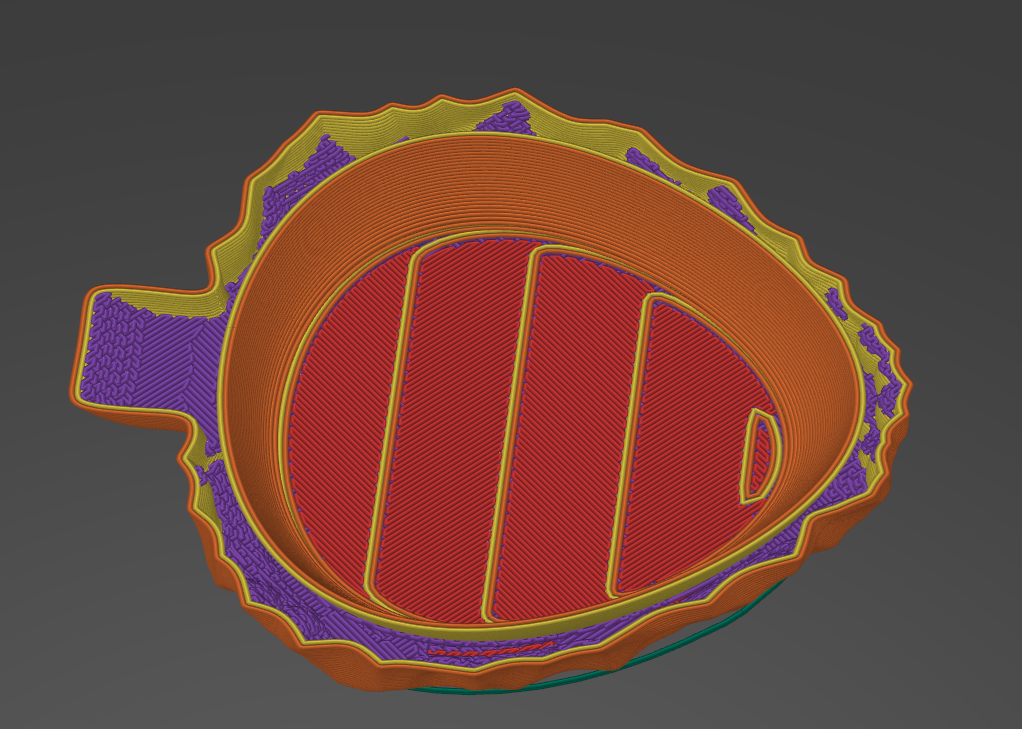
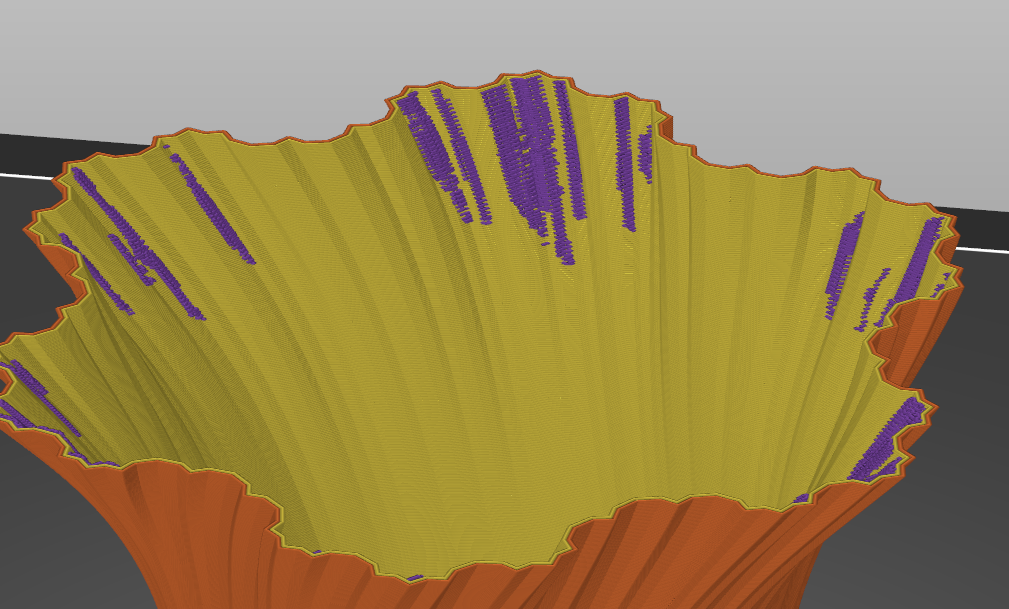
Anyone knows how to get rid of that unwanted goo in 2.3.0 alpha1. From walls i mean so i could just use layers, perhaps even increasing layers.
 fcore117
on 17 Oct 2020
fcore117
on 17 Oct 2020
Vase mode is only option that disables this but prevents adding more layer and if adding layer then this infill blobs are back.
Edit:
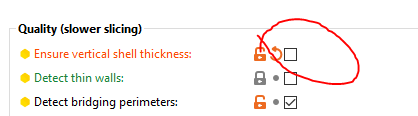
Not sure but this option seemed to solve blobbing up infill, anyone can confirm is there any issues?
fcore117
on 18 Oct 2020
Can everybody please stop propagating the following settings as a fix/workaround - they are clearly not (the only culprits) as can be read above.
Layers and perimeters
- Minimum shell thickness
- Extra perimeters if needed
- Detect thin walls
- Ensure vertical shell thickness
Infill
- Solid infill every (not mentioned yet, but I have tested it as well)
- Only infill where needed
- Solid infill threshold area
- Fill angle (not mentioned yet, but I have tested it as well)
It seems to me like a bug in some heuristics related to sloped perimeters that somehow is related to the number of perimeters (higher is better) and horizontal shells (lower is better). In my very limited testing I have found that increasing the number of perimeters from 1 to 3 reduces the estimated printing time from 23 to 19 minutes for a small, irregular object with many planar slopes). This is with all other settings at non-interfering/optimal values. Thus you can try mitigating by adding perimeters but this is clearly a bug/missing profile knob.
 stefanct
on 27 Oct 2020
stefanct
on 27 Oct 2020
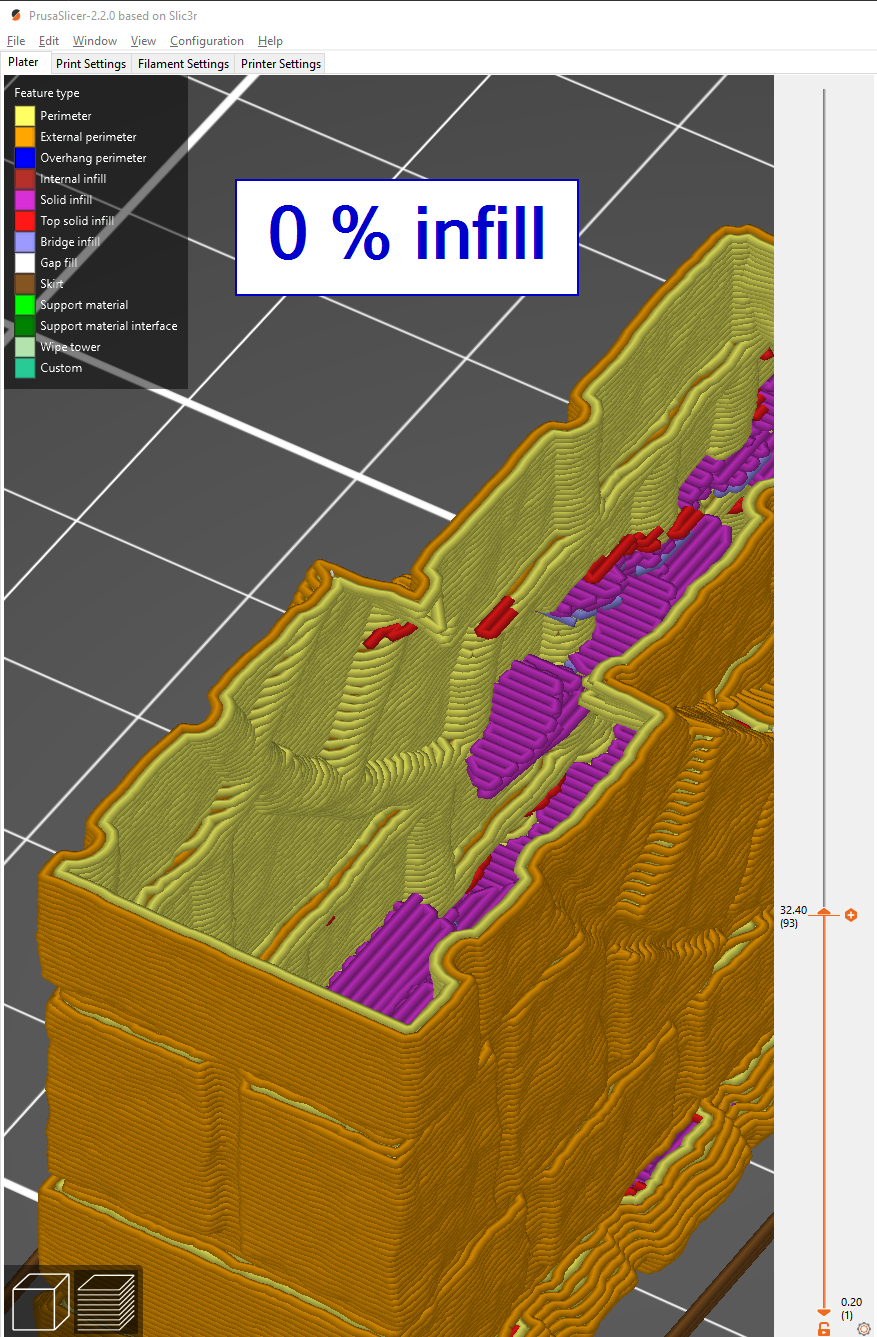
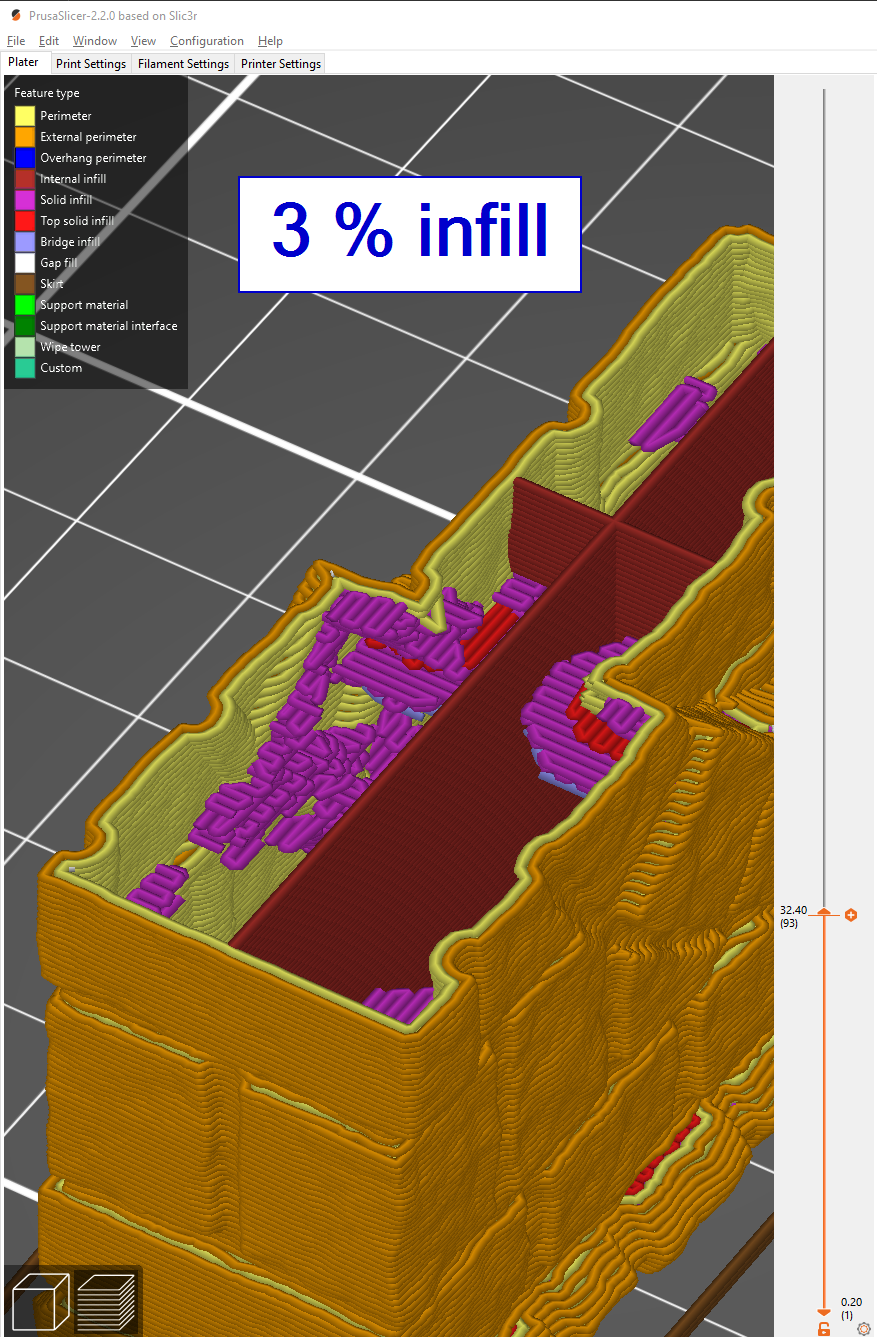
I'm so sick and tired of this bug. I just tried 2.30 alpha 3, and it looked to be even worse than 2.2 for my prints. None of the mentioned workarounds/fixes works for me.
The only thing that seems to lower the amount of wild appearing solid infill noddles is to set the infill to 0 %.
 Freijan
on 5 Nov 2020
Freijan
on 5 Nov 2020
Related issues
 RosieTheRabbit
·
60Comments
RosieTheRabbit
·
60Comments
 nebbian
·
41Comments
nebbian
·
41Comments
 faboaic
·
108Comments
faboaic
·
108Comments
 Itox001
·
35Comments
Itox001
·
35Comments
 hevilp
·
32Comments
hevilp
·
32Comments
Most helpful comment
This option is disabled by default and it still generates those solid infills for even with it disabled. Setting top/bottom layers also seems to have no effect. Have tried everything now and still can't get rid of those solid infills. I noticed it gets much worse after lowering perimeters to 1.
This totally messes up my flex objects properties.