Prusa-firmware: 3.2.0-RC2 - MK3 extruder skipping steps
Running the latest firmware I experience several issues with skipping of the extruder. Having attached my extruder visualizer you can clearly see and hear the extruder skipping. Running same filament profiles as with my MK3 on previous firmware as well as for my MK2. With this RC2 I need to raise the temperature for PLA with some 15 degrees to avoid the skipping. Have tested it with two different brands of PLA and both on the MK3 and on the MK2. MK2 prints fine with the lower temperature (208 degrees C) while the MK3 needs 220 degrees and even than occasionally skipping. Losening the idler tension screws on the MK3 also does not overcome this. Reverting back to the 3.1.3 firmware has resolved it.
 Petclaud
All 16 comments
I have gotten the step skipping with PLA, but it was not severe (even though any amount of skipping is unacceptable). I print primarily with PETG and do not get any step skipping with that. I believe it is a combination of PLA filament properties and the excessively high extruder motor current in 3.2.0
The temperature of the motor aperture during printing is 52C and the Bontech gears themselves get up to 45C
 JoePrints
on 29 Apr 2018
JoePrints
on 29 Apr 2018
See here
https://github.com/prusa3d/Prusa-Firmware/pull/654
Print hotter to put less strain on the motor and work with the lowered current, or increase current to the motor to force filament out colder. Can't have it both.
I suggest finding a middle ground, like M911 E32 + M912 E32, coupled with 10 degrees higher filament temperature.
 devilhunter84
on 29 Apr 2018
devilhunter84
on 29 Apr 2018
I appreciate the balance between power / current and temperature and that you can't have both, however updating all printer profiles might also not be such a good idea. And in addition; Prusa's cooling is already the bare minimum, so maybe increasing the temperature is not the way forward.
What is the reason anyway for Prusa to lower the motor currents compared to the initial FW's....?
Petclaud
on 30 Apr 2018
We will test it and propose a solution.
 MarekC3D
on 30 Apr 2018
MarekC3D
on 30 Apr 2018
Can you attach the problematic gcode?
 jindrichbenes
on 30 Apr 2018
jindrichbenes
on 30 Apr 2018
@Petclaud
We're working with some tight parameters here.
Before it was:
550-580mAh Current for the Motor -> Motor is stronger to push PLA through at 200 degrees -> motor gets hotter because of high current -> Motor gets hot ->Motor transfers heat over the Bondtech gears into the Filament above the Hotend -> Filament gets mushy and Bondtech gears grind into it -> Hard Clog.
Now it's
450mAh Current for the Motor therefore the motor is not strong enough to push PLA trough below 210 degrees. Now you get skips instead of filament grinds and clogs. (no hot bondtech gears that turn the filament into mush)
The cooling solution is weaker on the MK3 than on the MK2, based alone on the air outlet hole size.
That coupled with needing to print hotter to push PLA out to avoid clogs, and a weaker cooling solution means the MK3 has a narrower window for the print settings than the MK2.
devilhunter84
on 30 Apr 2018
Yes thx. I fully understand the balance between current / power and temperature. I was not aware though of the issue you describe of hot Bondtech gears and the resulting grinding. Personally I have not (yet?) experienced this.
So this is indeed a bit of a paradox situation; how to avoid all new filament profiles (or at least differences between MK2 and MK2.5/MK3) plus potential cooling issues / print quality degrading and high Bondtech gear temperature... Maybe a solution could be to direct some of the airflow from the Noctua nozzle cooling fan to the Bondtech gears...?
Attached the requested GCODE of one of the failing prints. Sliced with Slic3r 1.39.2-beta. Read that in this beta also the printing speeds have changed (cooling logic) so maybe this is also in play here.
Some photos:
At a certain z-height the skipping occurred and heavy under-extrusion started (PLA at 208 degrees C). I saw and heard the extruder skipping and canceled the print. The top piece of what was printed was so weak that it could easily be broken off:

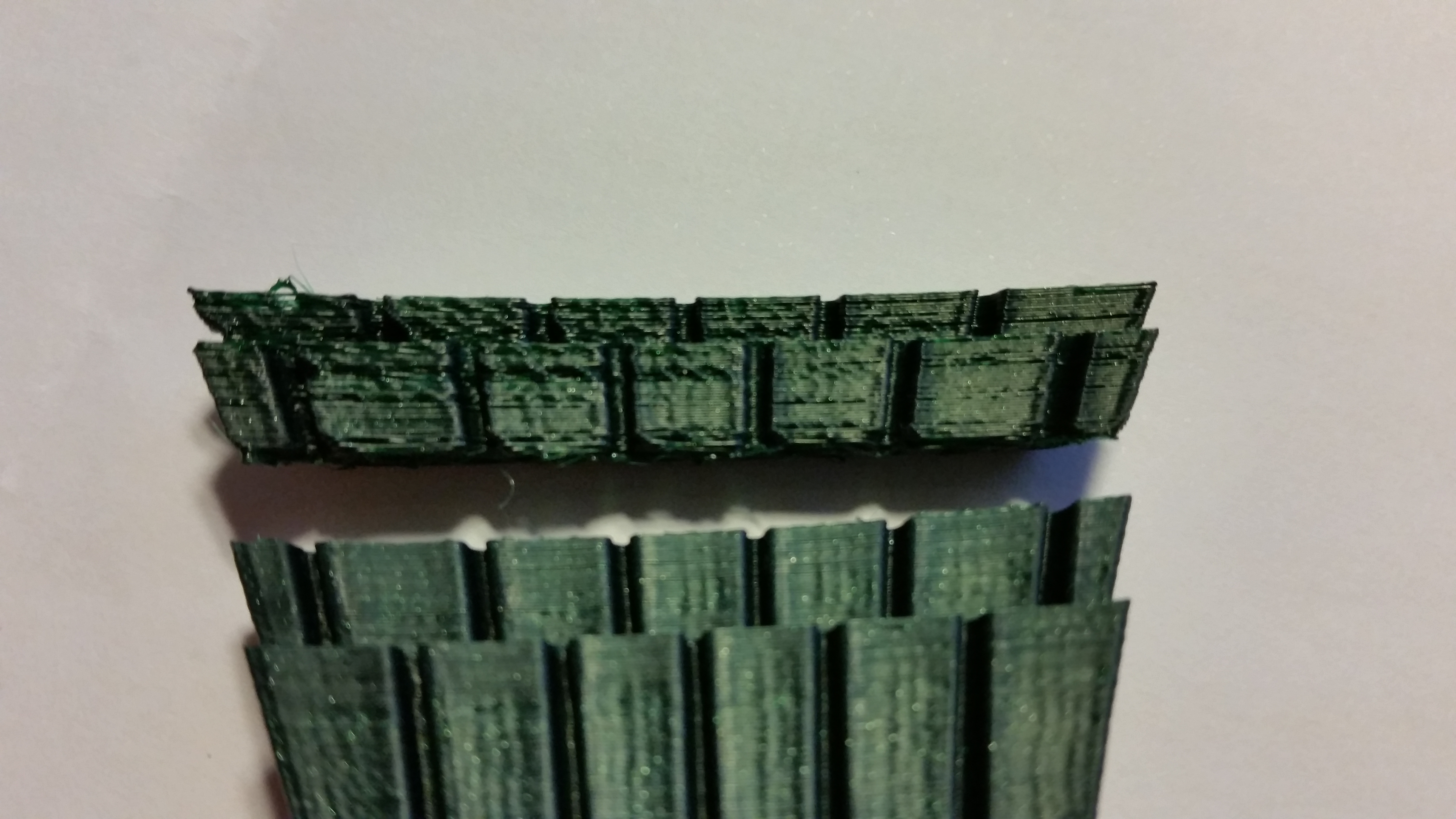
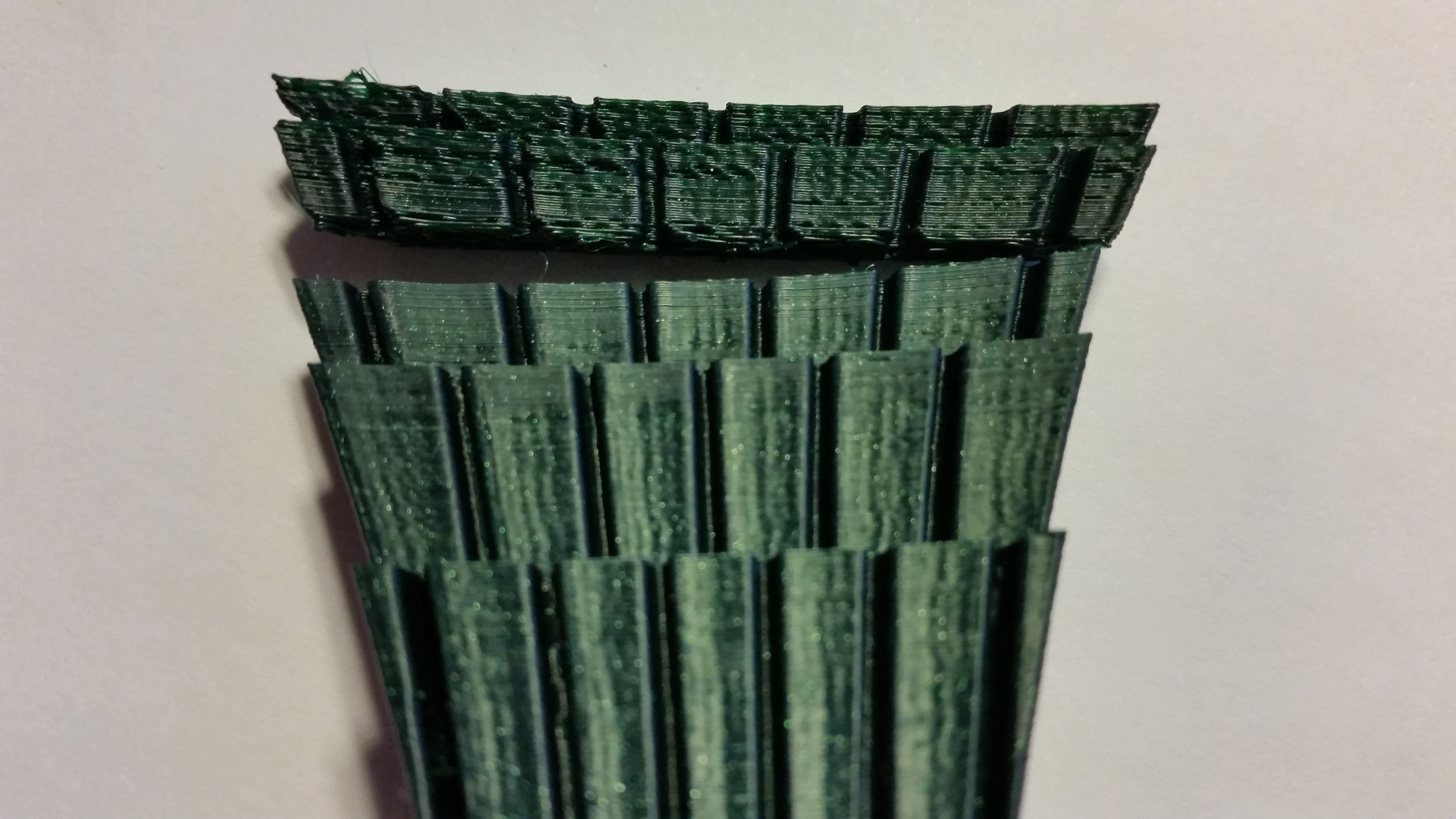
GCODE not attached but also here a model printed with a different color and brand filament. Also here under extrusion and the part basically could be easily separated. Skipping extruder, visible and audible.
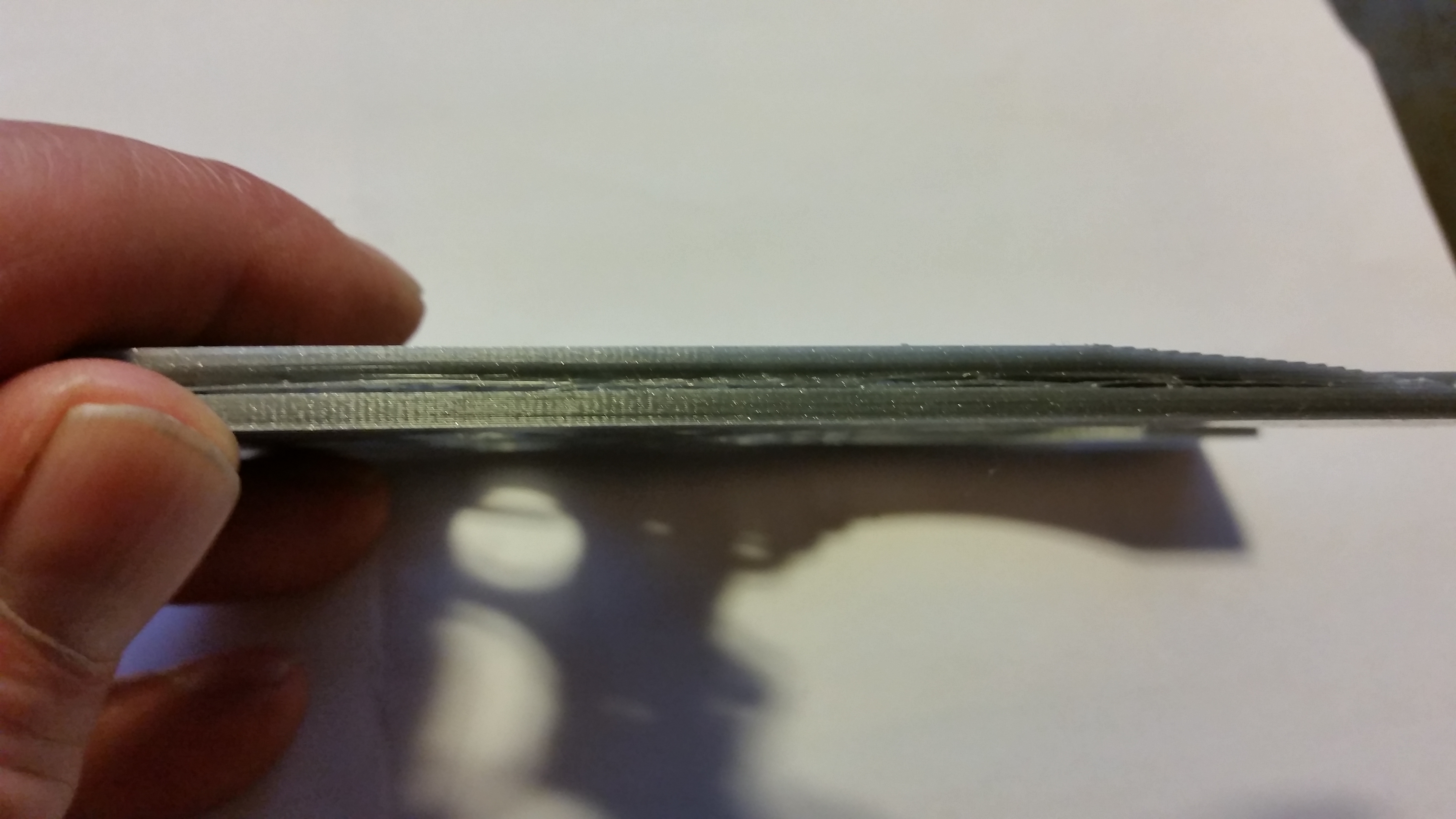

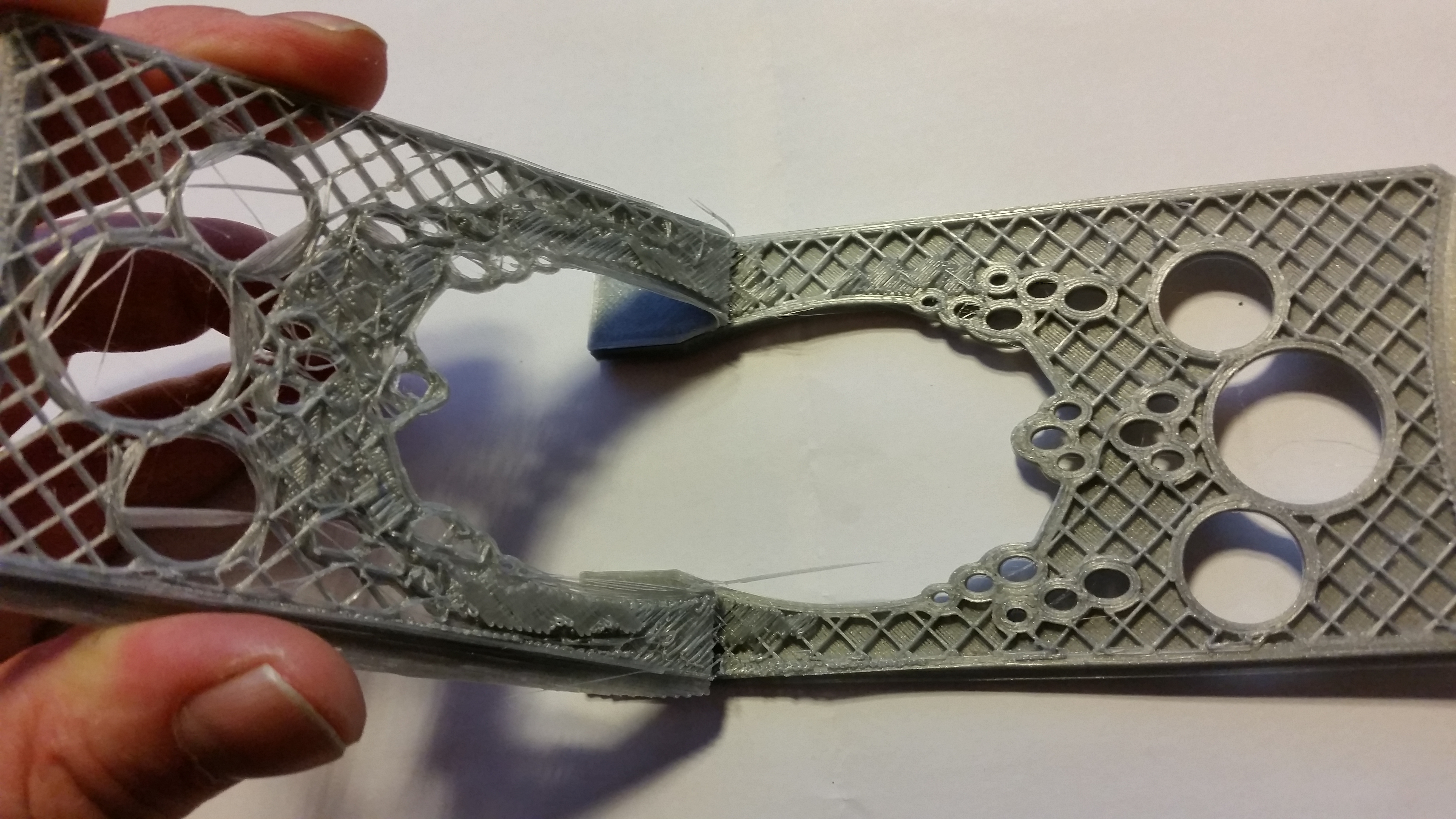
After this started to play around with the extrusion temperature and also at 215 degrees still occasionally a skipped step. Above 220 degress no problems anymore.
Great work Prusa team. Keep on fighting those challenges, it is really appreciated!
Petclaud
on 30 Apr 2018
I do NOT have this problem - but I did one thing during assembly different than the manual: I took a 2mm drill and drilled out the filament path in the extruder ABOVE the bond tech gears. Because if I had not done this, the circle where the filament needs to path through was not perfectly round: the wall was even rubbing on the filament.
So I would like to suggest to try it out - if your extruder is skipping steps - if the filament can enter to the bond tech gears with (nearly) ZERO friction.
I am currently printing a temperature tower: also with 195C and Prusa grey PLA nothing skips.
 stahlfabrik
on 30 Apr 2018
stahlfabrik
on 30 Apr 2018
@stahlfabrik: thx. But as you can read; I only got this once loaded the RC2 firmware. I understand the possibility of filiament guidance, but this is not the case. The filament path is clear and this is not the cause of skipping. It is clearly the adjustments in current/power to the extrusion motor.
Petclaud
on 5 May 2018
UPDATE: so I have returned back to the 3.1.3 firmware. However.... also now sometimes skipping steps with all sorts of filament (PLA, PETG, ABS). Hmmmm. Not as often as with the RC2 firmware, but still occasionally a skipped step. Increasing the temperature also did not work. I applied several cold-pulls and ran some cleaning filament. Although nothing unusual (at least not visible) got out of the extruder, it did solve the skipping problem running on 3.1.3 firmware! I have not tested the RC2 afterwards since I just want to wait for the final release.
So I am not so sure how to interpreted this . I have been running this printer since October 2017 without any clogged extruders or alike (I also have never had this on my MK2 which is running more than a year already). My current thinking is that the RC2 firmware increased the chance of clogging and due to that, somehow a partial blocking occurred in the extruder and by reverting back to 3.1.3. and through cleaning the issue is solved. It could also be that it was just a pure coincidence that when loading the RC2 firmware the partial clog was already there, that the reduction in current/power to the extruder emphasized the partial clogging effect and maybe clogged it a bit more and hence once reverting back to 3.1.3 the problem also surfaced then.
Petclaud
on 6 May 2018
Closed due to new FW
Petclaud
on 10 May 2018
Just wanted to say that a few days ago I've updated my firmware from 3.2.0-RC1 to 3.2.0 and started getting occasional skipping of the extruder motor, during certain parts of some prints. I've never tried 3.2.0-RC2, I went straight from 3.2.0-RC1 to 3.2.0 and I never had that issue before the update. Which means that the issue is still present on the latest version of the firmware.
I've noticed that the motor most often skips while printing relatively small areas of solid infill, which makes the print head to move very fast back and forth. It usually doesn't happen while printing relatively large flat areas, where the print head doesn't change direction that often. Not sure why that is the case, that's just what I have observed.
Edit:
Here is a video demonstrating the issue I am describing. Please re-open this issue, the problem still exists on 3.2.0. I haven't tested 3.2.1 yet but based on the changelog it shouldn't make any difference.
 magkopian
on 18 May 2018
magkopian
on 18 May 2018
My MK3 was printing fine for a month, then I updated to 3.2.0 and it immediately started skipping. Can't print at all now. 3.2.1 doesn't fix it. I tried overtensioning and undertensioning the extruder springs. I haven't tried different temperatures and I shouldn't have to given that the default firmware preheat temperatures don't work. PLA @ 215C
 polymetric
on 1 Jun 2018
polymetric
on 1 Jun 2018
I am currently running a modded version of 3.2.1(unchanged motor currents), and it seems to be ok so far- It successfully printed a chess set at 14hrs without any skipping (PLA).
I will also say that I upgraded the PTFE tube to Capricorn tubing in the extruder, and the small piece before the filament sensor
JoePrints
on 1 Jun 2018
@ironjoe13 Can you create a fork of this repo and push your changes to that? I gave up on trying to figure out where the current values are set in the firmware a while ago.
polymetric
on 1 Jun 2018
@polymetric1 You can find the .hex file in my fork inside variants file
The motor currents have not been changed from 3.2.1, but you're more than welcome to take it for a spin.
I did change the preheat menu, and filaments therein.
Also removed other languages since I only speak bad English
JoePrints
on 2 Jun 2018
Related issues
 brettvitaz
·
3Comments
brettvitaz
·
3Comments
 anilrobo90
·
3Comments
anilrobo90
·
3Comments
 ulab
·
3Comments
ulab
·
3Comments
 sarf2k4
·
3Comments
sarf2k4
·
3Comments
 austaquio32
·
3Comments
austaquio32
·
3Comments
Most helpful comment
@Petclaud
We're working with some tight parameters here.
Before it was:
550-580mAh Current for the Motor -> Motor is stronger to push PLA through at 200 degrees -> motor gets hotter because of high current -> Motor gets hot ->Motor transfers heat over the Bondtech gears into the Filament above the Hotend -> Filament gets mushy and Bondtech gears grind into it -> Hard Clog.
Now it's
450mAh Current for the Motor therefore the motor is not strong enough to push PLA trough below 210 degrees. Now you get skips instead of filament grinds and clogs. (no hot bondtech gears that turn the filament into mush)
The cooling solution is weaker on the MK3 than on the MK2, based alone on the air outlet hole size.
That coupled with needing to print hotter to push PLA out to avoid clogs, and a weaker cooling solution means the MK3 has a narrower window for the print settings than the MK2.