Prophet: Can't install fbprophet on Windows even with visual c++ installed
Hello,
Pystan is installed successfully but when I try to install fbprophet via pip, I get the following error:
(It says visual c++ is not installed but i installed it via Visual studio setup tool. I have visual studio installed on my computer as well. How can I confirm that visual c++ is installed? Since, I was able to install Pystan, doesn't it mean that visual c++ was installed?)
`Failed building wheel for fbprophet
Running setup.py clean for fbprophet
Failed to build fbprophet
Installing collected packages: fbprophet
Running setup.py install for fbprophet ... error
Complete output from command C:\WinPython\python-3.6.0.amd64\python.exe -u -c "import setuptools, tokenize;__file__='C:\Users\Bishal\AppData\Local\Temp\pip-install-rnffrql9\fbprophet\setup.py';f=getattr(tokenize, 'open', open)(__file__);code=f.read().replace('\r\n', '\n');f.close();exec(compile(code, __file__, 'exec'))" install --record C:\Users\Bishal\AppData\Local\Temp\pip-record-jinspdzq\install-record.txt --single-version-externally-managed --compile:
running install
running build
running build_py
creating build
creating build\lib
creating build\lib\fbprophet
creating build\lib\fbprophet\stan_models
INFO:pystan:COMPILING THE C++ CODE FOR MODEL anon_model_1988b9d517e3c16daf27a07f09e3de97 NOW.
error: Microsoft Visual C++ 14.0 is required. Get it with "Microsoft Visual C++ Build Tools": http://landinghub.visualstudio.com/visual-cpp-build-tools
----------------------------------------
Command "C:\WinPython\python-3.6.0.amd64\python.exe -u -c "import setuptools, tokenize;__file__='C:\Users\Name\AppData\Local\Temp\pip-install-rnffrql9\fbprophet\setup.py';f=getattr(tokenize, 'open', open)(__file__);code=f.read().replace('\r\n', '\n');f.close();exec(compile(code, __file__, 'exec'))" install --record C:\Users\Name\AppData\Local\Temp\pip-record-jinspdzq\install-record.txt --single-version-externally-managed --compile" failed with error code 1 in C:\Users\Name\AppData\Local\Temp\pip-install-rnffrql9\fbprophet\
C:\Users\Name>`
How can I get past this? It says
I really want to use this tool so any help would be really appreciated.
thanks
 precogtyrant
All 14 comments
It looks like pystan was installed but is not working correctly. Could you run this code in python to check if it is working:
import pystan
model_code = 'parameters {real y;} model {y ~ normal(0,1);}'
model = pystan.StanModel(model_code=model_code)  # this will take a minute
y = model.sampling(n_jobs=1).extract()['y']
y.mean()  # should be close to 0
If it isn't, then the instructions here describe how to set up MS Visual C++ properly: http://pystan.readthedocs.io/en/latest/windows.html
 bletham
on 10 May 2018
bletham
on 10 May 2018
@bletham i tried doing that but still gave me the error. Yes I already did as shown in that link but it doesn't work :(
However, I was able to install it on Ubuntu for Windows so that should work for me for now.
thanks
precogtyrant
on 11 May 2018
Hi, i used pyhton 3.6.5 in 32 bit in win 32, i intented install fbprophet, i verify have what installed requeriments, and i satisfy, but the moment, i want to run the command
python -m pip install fbprophet
i get a output with the next:
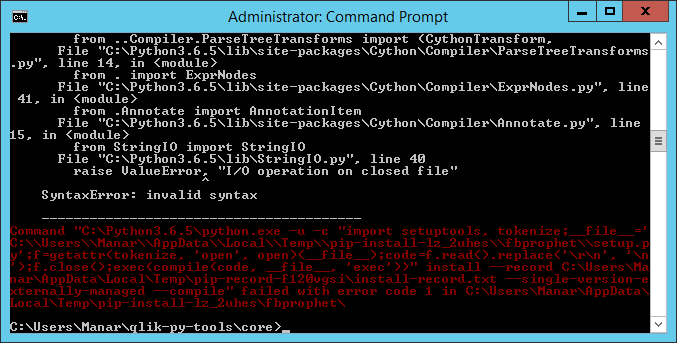
in a fast search, the problem is GCC(Ubuntu) but is not my case, other solutions proposed download prophet-master.zip, and i try download the prophet-master.zip, and i execute:
python setup.py install
in the path of the install python: C:/Pyhton, and i get the same output result.
tanks for help me.
 alvaroc127
on 21 May 2018
alvaroc127
on 21 May 2018
@alvaroc127 this is very strange - the source of the error is a SyntaxError coming from the StringIO package. The line causing the error in StringIO.py (raise ValueError, "I/O operation on closed file") is Python2 code. Python3 no longer uses the syntax raise ValueError, "string", instead it uses raise ValueError("string"). It is trying to run python2 code in python3 which is what causes the error.
This is happening outside of fbprophet. It seems that somehow you have python2 libraries mixed in with your python3 installation. Maybe try re-installing cython and stringIO and be sure they are python3 versions?
As a side-note, I have personally found it to be very challenging to get all of the dependencies of fbprophet (pystan in particular) working in Windows without using Anaconda, so I'd recommend that as the fastest way to get things working.
bletham
on 22 May 2018
@bletham thanks for answer me, i installed python2.7 and afther python 3.6.5 in the same folder and i rename it with python3.6.5, (now is clear), but other part, i download, miniconda for windows, update conda , and change the PATH of python to miniconda, "i now it more easy", but, in the moment of run:
pip install fbprophet
i get the next output:

validating that pystan is good installed:

and the finall output:

thanks for you help.
alvaroc127
on 22 May 2018
hi, searched a little, i find the next shape for install,
conda install -c conda-forge fbprophet
and the package is installed, but the moment of using fbprophet, python crash


alvaroc127
on 22 May 2018
hm I wonder if this last bit might be the same issue from #525 and #510. Can you see if it works in an anaconda notebook?
bletham
on 22 May 2018
@bletham thanks men for respond me, in the issue #510 , i try:
import pystan
model_code = 'parameters {real y;} model {y ~ normal(0,1);}'
model = pystan.StanModel(model_code=model_code)  # this will take a minute
y = model.sampling(n_jobs=1).extract()['y']
y.mean()  # should be close to 0
in the second sentence, the output is the next:
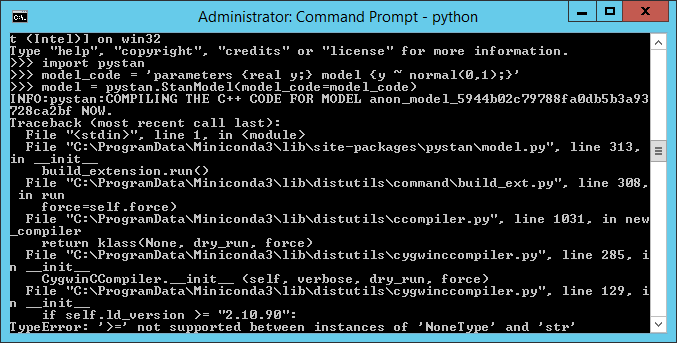
i do not use the anaconda notebook. Is it necesary?
alvaroc127
on 22 May 2018
Oh OK this is a different issue then. It looks like pystan is not working, seemingly due to an issue in the C++ compiler. Check the instructions here for getting pystan to work, and then fbprophet should work once it does: http://pystan.readthedocs.io/en/latest/windows.html
bletham
on 22 May 2018
O thanks @bletham , i working, i will publish the solution(as soon as I have it).
[EDIT]
after of read (http://pystan.readthedocs.io/en/latest/windows.html), i used the propused methologi for:
(http://pystan.readthedocs.io/en/latest/windows.html#setting-up-mingw-w64-on-windows), in these case, i create the env with conda, and download the packages.
finally this it part of the output when compile pystan the correct mode.

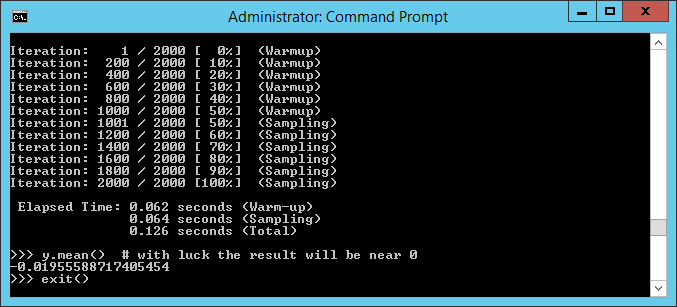
and output the:
pip install fbprophet

THANKS for you help.
alvaroc127
on 22 May 2018
Great, glad to hear it! I'll point to this issue in the future for people who have trouble with the C++ compiler.
bletham
on 25 May 2018
I've had the same problem. But it works after I follow this steps:
1) On Prompt install Ephem:
conda install -c anaconda ephem
2) Install Pystan:
conda install -c conda-forge pystan
3) Finally install Fbprophet
conda install -c conda-forge fbprophet
 luanaformiga
on 23 May 2019
luanaformiga
on 23 May 2019
Oh OK this is a different issue then. It looks like pystan is not working, seemingly due to an issue in the C++ compiler. Check the instructions here for getting pystan to work, and then fbprophet should work once it does: http://pystan.readthedocs.io/en/latest/windows.html
This worked! Thanks @bletham
 mashciku
on 7 Mar 2020
mashciku
on 7 Mar 2020
Great, glad to hear it! I'll point to this issue in the future for people who have trouble with the C++ compiler.
Thanks! This works for me also.
 Duttabhi
on 6 Apr 2020
Duttabhi
on 6 Apr 2020
Related issues
 MaynulIslam
·
19Comments
MaynulIslam
·
19Comments
 LakshmikanthanSrikanthan
·
28Comments
LakshmikanthanSrikanthan
·
28Comments
 gith77
·
130Comments
gith77
·
130Comments
 gkourogiorgas
·
32Comments
gkourogiorgas
·
32Comments
 CamDavidsonPilon
·
28Comments
CamDavidsonPilon
·
28Comments
Most helpful comment
I've had the same problem. But it works after I follow this steps:
1) On Prompt install Ephem:
conda install -c anaconda ephem
2) Install Pystan:
conda install -c conda-forge pystan
3) Finally install Fbprophet
conda install -c conda-forge fbprophet