Prophet: python: can't open file 'setup.py': [Errno 2] No such file or directory
There it says,when im trying to install Django.What should i try, to fix it? My os is linux
 MaynulIslam
All 19 comments
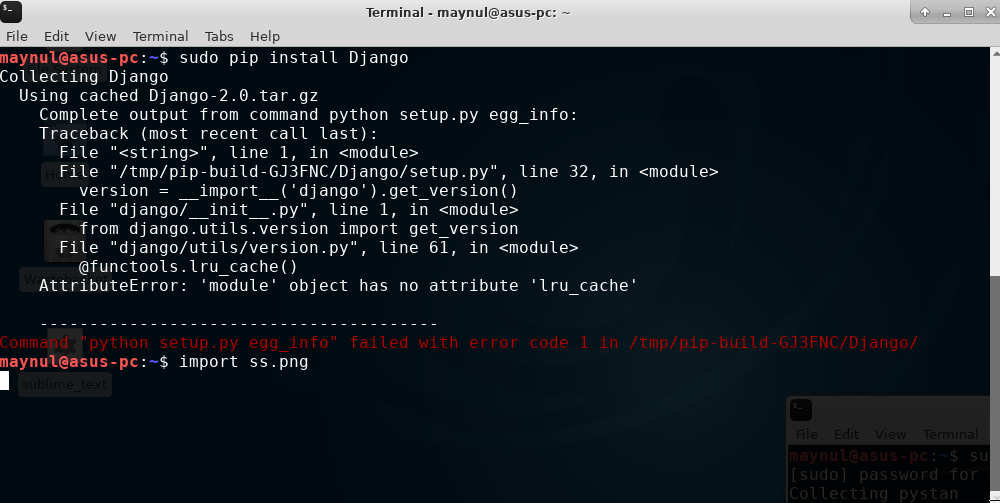
This means that your setuptools are out of date.
You can fix this by doing: pip install --upgrade setuptools
 Sanjay-B
on 19 Jan 2018
Sanjay-B
on 19 Jan 2018
Thanks @Sanjay-B and I hope that worked. I'm going to close the issue though since it isn't related to this package.
 bletham
on 23 Jan 2018
bletham
on 23 Jan 2018
Thanks @Sanjay-B
MaynulIslam
on 24 Jan 2018
Update didnt help:
/usr/bin/python3.5: can't open file '/home/j/Desktop/PycharmProjects/untitled/DjangoEcommerce/src/setup.py': [Errno 2] No such file or directory
Shold by setup.py be in /urs/ rather than in project files at /home?
 JanLechowskiTheFirst
on 10 Jun 2018
JanLechowskiTheFirst
on 10 Jun 2018
in terminal use the following commands:
if its hashed
then
 fide1
on 15 Jun 2018
fide1
on 15 Jun 2018
Tried different approaches to solve this issue but unsuccessfully.
Organic:/ organic$ sudo pip install --upgrade setuptools
Password:***
The directory '/Users/organic/Library/Caches/pip/http' or its parent directory is not owned by the current user and the cache has been disabled. Please check the permissions and owner of that directory. If executing pip with sudo, you may want sudo's -H flag.
The directory '/Users/organic/Library/Caches/pip' or its parent directory is not owned by the current user and caching wheels has been disabled. check the permissions and owner of that directory. If executing pip with sudo, you may want sudo's -H flag.
Requirement already up-to-date: setuptools in /Library/Python/2.7/site-packages (40.2.0)
Organic:~ organic$ sudo python setup.py
(null): can't open file 'setup.py': [Errno 2] No such file or directory
 organicnz
on 3 Sep 2018
organicnz
on 3 Sep 2018
What happens if you do the following?:
- cd to the folder where your fail2ban-0.11.0 ( maybe your fail2ban software has another version ) folder is available, Ex.: the fail2ban-0.11.0 folder are here: /home/Your Username/fail2ban-0.11.0 ->
- cd to folder: /home/Your Username/fail2ban-0.11.0 ( In console will appears like: Username@xyz:~/fail2ban-0.11.0 $
- try the following commands: " sudo python setup.py build " then -> " sudo python setup.py install " same Errno 2 message appears?
- If yes, copy the following commands and paste to console: " sudo apt-get install python-setuptools " then press Enter, after that ->" sudo python setup.py build " then press Enter, after that -> " sudo python setup.py install " if everything is good then it needs to be installed.
- Maybe now you will get another error message (at least for me appeared): I edited the /etc/fail2ban/jail.d file, put # in front of the enable word then saved the file, if python isn't installed, than ->" sudo apt-get install python3-pyinotify python3-systemd " . I hope it will help.
Maybe this also needed: chmod 777 fail2ban-0.11.0
 shuttingdown
on 4 Sep 2018
shuttingdown
on 4 Sep 2018
- I've installed that app.
Organic-2:~ organic$ brew install fail2ban
Updating Homebrew...
==> Auto-updated Homebrew!
Updated 2 taps (homebrew/core, homebrew/cask).
==> New Formulae
golang-migrate
==> Updated Formulae
citus                                              openrtsp

==> Downloading https://homebrew.bintray.com/bottles/fail2ban-0.10.3.1.mojave.bottle.tar.gz
==> Downloading from https://akamai.bintray.com/91/91a2bf679c865a054a60cc9b980b1c5649649686d7e99a95b
######################################################################## 100.0%
==> Pouring fail2ban-0.10.3.1.mojave.bottle.tar.gz
==> Caveats
Before using Fail2Ban for the first time you should edit the jail
configuration and enable the jails that you want to use, for instance
ssh-ipfw. Also, make sure that they point to the correct configuration
path. I.e. on Mountain Lion the sshd logfile should point to
/var/log/system.log.

  * /usr/local/etc/fail2ban/jail.conf

The Fail2Ban wiki has two pages with instructions for macOS Server that
describes how to set up the Jails for the standard macOS Server
services for the respective releases.

  10.4: https://www.fail2ban.org/wiki/index.php/HOWTO_Mac_OS_X_Server_(10.4)
  10.5: https://www.fail2ban.org/wiki/index.php/HOWTO_Mac_OS_X_Server_(10.5)

Please do not forget to update your configuration files.
They are in /usr/local/etc/fail2ban.

To have launchd start fail2ban now and restart at startup:
  sudo brew services start fail2ban
==> Summary
🍺  /usr/local/Cellar/fail2ban/0.10.3.1: 497 files, 3.2MB
- I could've run it and stop successfully.
Organic-2:~ organic$ sudo brew services start fail2ban
Service `fail2ban` already started, use `brew services restart fail2ban` to restart.
Stopping `fail2ban`... (might take a while)
==> Successfully stopped `fail2ban` (label: homebrew.mxcl.fail2ban)


md5-299b02f4415a3724120584a341366560


Organic-2:~ organic$ sudo python setup.py build
Password:
python: can't open file 'setup.py': [Errno 2] No such file or directory


md5-9d5054971686fe1ee5b8144fa4f68839


Organic-2:~ organic$ sudo python setup.py install
python: can't open file 'setup.py': [Errno 2] No such file or directory


md5-eb1e3b6c7cbb1ba40c70fcffd2ae5427


Best match: pyinotify 0.9.6
Processing pyinotify-0.9.6.tar.gz
Writing /tmp/easy_install-rt6zpgm0/pyinotify-0.9.6/setup.cfg
Running pyinotify-0.9.6/setup.py -q bdist_egg --dist-dir /tmp/easy_install-rt6zpgm0/pyinotify-0.9.6/egg-dist-tmp-0c7ik4t7
inotify is not available on macosx-10.9-x86_64
error: Setup script exited with
I'm using linux, and unfortunatelly I know nothing about Mac systems, but I don't think that linux commands won't work on that system :-/.
I think the problem right now is that the Python Setuptools isn't installed, or did you installed previously? If I think well, then nowadays the " ez_setup.py " is: " easy_install.py " ( in position 4 ) or another method: https://pip.pypa.io/en/stable/installing/ ( get-pip.py also installs setuptools [2] and wheel if they are not already. setuptools is required to install source distributions. )
Quote from: Lingchao Cao
"1) Download ez_setup.py module from: https://pypi.python.org/pypi/setuptools
2) Open a Terminal
3) cd to the directory where you put the 'ez_setup.py'
4) type 'python ez_setup.py' and run it.
5) You should have it then."
shuttingdown
on 4 Sep 2018
This command apt-get doesn't work on MacOS just in case.
What you quoted above from Lingchao Cao hasn't helped, but you can see that pip install setuptools has no issue with an installation so far. Just couldn't be able to change the folder from /Library/Frameworks/Python.framework/Versions/3.7/lib/python3.7/site-packages (40.2.0) to /anaconda3/lib/python3.7/site-packages.
Organic-2:~ organic$ pip install setuptools
Requirement already satisfied: setuptools in /anaconda3/lib/python3.6/site-packages (39.1.0)
Organic-2:~ organic$ pip install setuptools --upgrade
Collecting setuptools
  Using cached https://files.pythonhosted.org/packages/66/e8/570bb5ca88a8bcd2a1db9c6246bb66615750663ffaaeada95b04ffe74e12/setuptools-40.2.0-py2.py3-none-any.whl
tensorflow 1.10.1 has requirement setuptools<=39.1.0, but you'll have setuptools 40.2.0 which is incompatible.
Installing collected packages: setuptools
  Found existing installation: setuptools 39.1.0
    Uninstalling setuptools-39.1.0:
      Successfully uninstalled setuptools-39.1.0
Successfully installed setuptools-40.2.0
Organic-2:~ organic$ pip3 install setuptools --upgrade
Requirement already up-to-date: setuptools in /Library/Frameworks/Python.framework/Versions/3.7/lib/python3.7/site-packages (40.2.0)
Traceback (most recent call last):
File "ifmgr_cisco_xr.py", line 3, in
from ydk.services import NetconfService, Datastore
File "/usr/lib64/python2.7/site-packages/ydk/services/__init__.py", line 17, in
from .codec_service import CodecService
File "/usr/lib64/python2.7/site-packages/ydk/services/codec_service.py", line 21, in
from ydk.entity_utils import get_data_node_from_entity as _get_data_node_from_entity
File "/usr/lib64/python2.7/site-packages/ydk/entity_utils/__init__.py", line 17, in
from ydk.ext.entity_utils import get_data_node_from_entity
File "/usr/lib64/python2.7/site-packages/ydk/exthook.py", line 87, in load_module
raise ImportError('No module named %s' % fullname)
ImportError: No module named ydk.ext.entity_utils
getting this errorr while i am trying to print Hello World code .can someone kindly help me for resolving this ??
 kavyaSri5
on 30 Nov 2018
kavyaSri5
on 30 Nov 2018
(venv) admin22@mediacore:~$ sudo python setup.py install
python: can't open file 'setup.py': [Errno 2] No such file or directory
(venv) admin22@mediacore:~$ sudo python setup.py install
python: can't open file 'setup.py': [Errno 2] No such file or directory
(venv) admin22@mediacore:~$ pip install --upgrade setuptools
Requirement already up-to-date: setuptools in ./venv/lib/python3.5/site-packages (41.0.1)
i doing upgrade to setuptool put cant install setup.py
 areejabbas1
on 9 May 2019
areejabbas1
on 9 May 2019
(venv) admin22@mediacore:~$ sudo python setup.py install python: can't open file 'setup.py': [Errno 2] No such file or directory (venv) admin22@mediacore:~$ sudo python setup.py install
python: can't open file 'setup.py': [Errno 2] No such file or directory
(venv) admin22@mediacore:~$ pip install --upgrade setuptools
Requirement already up-to-date: setuptools in ./venv/lib/python3.5/site-packages (41.0.1)
i doing upgrade to setuptool put cant install setup.py
Same for me :(
 sarahab23
on 12 Jun 2019
sarahab23
on 12 Jun 2019
so how we can solve it?
On Wed, Jun 12, 2019 at 3:15 PM Sarah Abraham notifications@github.com
wrote:
(venv) admin22@mediacore:$ sudo python setup.py install python: can't
open file 'setup.py': [Errno 2] No such file or directory (venv)
admin22@mediacore:$ sudo python setup.py install
python: can't open file 'setup.py': [Errno 2] No such file or directory
(venv) admin22@mediacore:~$ pip install --upgrade setuptools
Requirement already up-to-date: setuptools in
./venv/lib/python3.5/site-packages (41.0.1)
i doing upgrade to setuptool put cant install setup.pySame for me :(
—
You are receiving this because you commented.
Reply to this email directly, view it on GitHub
https://github.com/facebook/prophet/issues/419?email_source=notifications&email_token=AKUI36S4CD2CBJISKLIBL4TP2DZGDA5CNFSM4EMDLTIKYY3PNVWWK3TUL52HS4DFVREXG43VMVBW63LNMVXHJKTDN5WW2ZLOORPWSZGODXQLZOI#issuecomment-501267641,
or mute the thread
https://github.com/notifications/unsubscribe-auth/AKUI36VTHC3Z5OYTF2KA76DP2DZGDANCNFSM4EMDLTIA
.
areejabbas1
on 13 Jun 2019
python: can't open file 'QRLJacker.py': [Errno 2] No such file or directory
plz solve me
 chaithanya121
on 18 Jun 2019
chaithanya121
on 18 Jun 2019
$ chmod +× hackinsta.py
chmod: hackinsta.py: No such file or directory
 Mumtaz22
on 21 Jun 2019
Mumtaz22
on 21 Jun 2019
i need help pls on this
C:UsersCCUICT3AppDataLocalProgramsPythonPython36python.exe: can't open file './setup.py': [Errno 2] No such file or directory
 Clarechioma
on 26 Apr 2020
Clarechioma
on 26 Apr 2020
C:UsersuserAppDataLocalProgramsPythonPython38python.exe: can't open file 'setup.py': [Errno 2] No such file or directory
same error plz help
 arnabtanu
on 17 Jun 2020
arnabtanu
on 17 Jun 2020
Tried different approaches to solve this issue but unsuccessfully.
Organic:/ organic$ sudo pip install --upgrade setuptools
Password:***
The directory '/Users/organic/Library/Caches/pip/http' or its parent directory is not owned by the current user and the cache has been disabled. Please check the permissions and owner of that directory. If executing pip with sudo, you may want sudo's -H flag.
The directory '/Users/organic/Library/Caches/pip' or its parent directory is not owned by the current user and caching wheels has been disabled. check the permissions and owner of that directory. If executing pip with sudo, you may want sudo's -H flag.
Requirement already up-to-date: setuptools in /Library/Python/2.7/site-packages (40.2.0)
``
Organic:~ organic$ sudo python setup.py
(null): can't open file 'setup.py': [Errno 2] No such file or directory
how did you get the solution?
 Dhairyapbt
on 30 Jul 2020
Dhairyapbt
on 30 Jul 2020
Related issues
 StuartGordonReid
·
27Comments
StuartGordonReid
·
27Comments
 l0vest0rm
·
20Comments
l0vest0rm
·
20Comments
 shil3754
·
31Comments
shil3754
·
31Comments
 Gautam12345
·
18Comments
Gautam12345
·
18Comments
 Garve
·
24Comments
Garve
·
24Comments
Most helpful comment
This means that your setuptools are out of date.
You can fix this by doing:
pip install --upgrade setuptools