Hi!
Version 0.7.1 of Prophet is unusable for me. Even if I use it in the most basic way, it constantly produces an error.
from fbprophet import Prophet
p = Prophet()
p.fit(df)
Error:
KeyError: 'metric_file'
Exception ignored in: 'stanfit4anon_model_f5236004a3fd5b8429270d00efcc0cf9_7332008770348935536._set_stanargs_from_dict'
KeyError: metric_fileProcess finished with exit code -1073741819 (0xC0000005)
OS: Windows 10
Python: 3.7
Thanks for help! 👍
Best regards
Robert
 Garve
Garve
All 24 comments
I met the same problem. After upgrading pandas to ver 1.0.4 and pystan to ver 2.19.1.1, it was solved. Hopefully it works for you as well.
 Meng-QQ
on 15 Sep 2020
Meng-QQ
on 15 Sep 2020
@Garve there were changes to the Stan code in v0.7.1, so I'm wondering if either there is a version in compatibility that we're unaware of or if maybe something went badly when compiling the new model. Could you give you versions of numpy, pandas, and pystan so I can try to replicate?
Upgrading pystan and re-installing fbprophet (to recompile the model) does sound like the right thing to try.
 bletham
on 15 Sep 2020
bletham
on 15 Sep 2020
Encountered the same error:
INFO:fbprophet:Disabling yearly seasonality. Run prophet with yearly_seasonality=True to override this.
INFO:fbprophet:Disabling daily seasonality. Run prophet with daily_seasonality=True to override this.
KeyError: 'metric_file'
Exception ignored in: 'stanfit4anon_model_f5236004a3fd5b8429270d00efcc0cf9_7332008770348935536._set_stanargs_from_dict'
KeyError: metric_file
fbprophetv0.7.1numpyv1.19.1pandasv1.1.2pystanv2.19.1.1Windows 1019041.508
 paleboot
on 16 Sep 2020
paleboot
on 16 Sep 2020
hm I've installed all those same versions and haven't run into the issue, so it's not as simple as that. Are you installing from conda forge? I did also make some changes to the conda forge build to get it to work in py38.
Could you also check pystan functionality generally?
import pystan
model_code = 'parameters {real y;} model {y ~ normal(0,1);}'
model = pystan.StanModel(model_code=model_code)  # this will take a minute
y = model.sampling(n_jobs=1).extract()['y']
y.mean()  # should be close to 0
hm I've installed all those same versions and haven't run into the issue, so it's not as simple as that. Are you installing from conda forge? I did also make some changes to the conda forge build to get it to work in py38.
Could you also check pystan functionality generally?
import pystan
model_code = 'parameters {real y;} model {y ~ normal(0,1);}'
model = pystan.StanModel(model_code=model_code)  # this will take a minute
y = model.sampling(n_jobs=1).extract()['y']
y.mean()  # should be close to 0
Yep, installed fbprophet from conda-forge, also, pystan works as expected
>>> y.mean()
0.040151032822627795
One thing I forgot to mention, ran all this on Python 3.7.4
paleboot
on 17 Sep 2020
I had a similar problem yesterday, after upgrading fbprophet to 0.7.1. I ended up creating a new conda environment. Installed fbprophetversion 0.6 and an earlier version of pystan (forget which one, maybe 2.19.0?), and ensured that was working. However, I noticed the effect of #1617 bug, so I downgraded pandas to 1.0.5. Things looked good,
Upgraded pystanto 2.19.1.1, upgraded fbrophet to 0.7.1, wrestled a lot with spyder/IPython. And _so far_ things appear outwardly to be working.
I should note all this is on Windows 10, python 3.6.12, and I used conda-forge channel for the latest pystan and fbprophet.
 amw5g
on 17 Sep 2020
amw5g
on 17 Sep 2020
I'm pretty confused as to what might be happening here. This is where the error is coming from:
https://github.com/stan-dev/pystan/blob/9349c4498b1dfeee6894a16525f426b7f041491c/pystan/stanfit4model.pyx#L260-L265
https://github.com/stan-dev/pystan/blob/9349c4498b1dfeee6894a16525f426b7f041491c/pystan/stanfit4model.pyx#L284
So, it's looking in the args for metric_file and not finding it.
metric_file is not an arg that we use in fbprophet. These are the args we use in fbprophet:
https://github.com/facebook/prophet/blob/77da5b8c06d05d478af510198c685d454342db1f/python/fbprophet/models.py#L237-L242
This is where pystan fills in default arguments for those that aren't specified. Since we don't specify metric_file, it should be getting set to a default here:
https://github.com/stan-dev/pystan/blob/f77b9f281d2de1697c5f8f9cbeb9c74f5400edc0/pystan/misc.py#L619
I don't know why this isn't happening, and especially why this is happening only when called from fbprophet and not when using pystan otherwise. Actually, could you try pystan with optimization instead of sampling? And also with parallel sampling?
import pystan
model_code = 'parameters {real y;} model {y ~ normal(0,1);}'
model = pystan.StanModel(model_code=model_code)  # this will take a minute
y = model.sampling(n_jobs=4).extract()['y']
y.mean()  # should be close to 0

res = model.optimizing()
print(res)  # should have `y` close to 0
EDIT: A simple re-installation of both pystan and fbprophet did the work for me. I suggest OP and any other who encounters the problem to do the same. Thanks!
paleboot
on 18 Sep 2020
I met the same problem. After upgrading pandas to ver 1.0.4 and pystan to ver 2.19.1.1, it was solved. Hopefully it works for you as well.
It works for me.
pip install pystan==2.19.1.1
 leoknuth
on 18 Sep 2020
leoknuth
on 18 Sep 2020
The same thing happened to me.My solution is to lower the version.
python: 3.8.0->3.7.9
pystan: 2.19.1.1->2.19.0.0
pandas: 1.1.1->1.0.4
fbprophet: 0.7.1->0.6.0
os: CentOS 7
 LimingSun
on 19 Sep 2020
LimingSun
on 19 Sep 2020
@LimingSun was the downgrade of fbprophet necessary or just pystan? If you keep pystan fixed and upgrade fbprophet to 0.7.1 does the error come back?
bletham
on 21 Sep 2020
I have the same issue. there is a core dump when calling fit() and kernel died.
 z7ye
on 21 Sep 2020
z7ye
on 21 Sep 2020
@LimingSun was the downgrade of fbprophet necessary or just pystan? If you keep pystan fixed and upgrade fbprophet to 0.7.1 does the error come back?
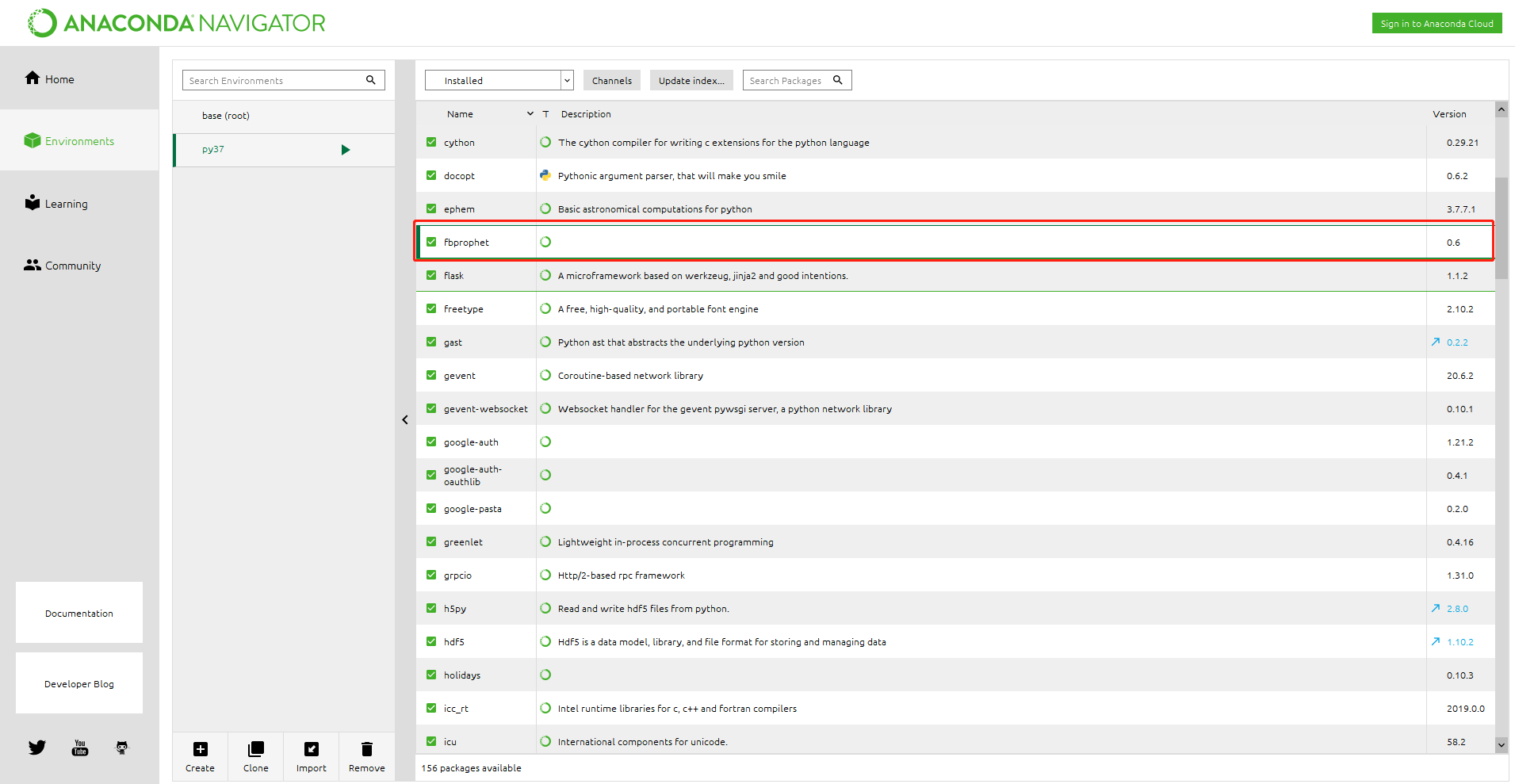
In my case, the fbprophet version must be lowered to 0.6.0. Otherwise, the other modules will get this error no matter which version they use. I use Anaconda to manage my execution environment and modules, which makes it easy to switch versions.
On windows10 and centOS7, I used Anaconda to set up the same environment, and the projects worked fine.
LimingSun
on 26 Sep 2020
@LimingSun was the downgrade of fbprophet necessary or just pystan? If you keep pystan fixed and upgrade fbprophet to 0.7.1 does the error come back?
In my case, the fbprophet version must be lowered to 0.6.0. Otherwise, the other modules will get this error no matter which version they use. I use Anaconda to manage my execution environment and modules, which makes it easy to switch versions.
On windows10 and centOS7, I used Anaconda to set up the same environment, and the projects worked fine.
Thank you! Downgrading to 0.6.0 worked for me! Spent hours trying to debug, Running it in the notebook gave me this error:
ValueError: The truth value of an array with more than one element is ambiguous. Use a.any() or a.all()
Then running it in pycharm gave me the error in this ticket.
 Kurry
on 27 Oct 2020
Kurry
on 27 Oct 2020
@Kurry the ValueError you report there looks a lot like #1694.
bletham
on 7 Nov 2020
I had a similar issue, with the pystan example running smoothly and giving results close to 0, but had problems with the fbprophet package, just as mentioned above on a Windows 10 machine, with pystan 2.19.0.0. Uninstalling fbprophet 0.7.1 and pip installing fbprophet 0.6.0 sorted it though. I was running the code in Pycharm.
Regarding the C++ aspect of things, I installed Visual Studio Community 2019 version and followed the instructions on the pystan page.
I hope this helps other users too.
 alex-rpd
on 12 Nov 2020
alex-rpd
on 12 Nov 2020
@alex-rpd I still haven't figured out what's happening here. There were changes in the Stan code, but not any changes (as far as I can tell) in how fbprophet interfaces with PyStan, so I'm rather confused as to why people are getting this error from deep inside the PyStan internals, and I have not run into it myself. My hypothesis now is that something is going wrong when compiling the model under 0.7.1, and so it is not overwriting the 0.6 model, and trying to load the 0.6 model in 0.7.1 produces an error because it's the wrong model. If you could help me understand some details here:
- When you installed 0.7.1 was it also through pip or was it through conda forge? It sounds like your successful install of 0.6.0 was through pip. If you pip uninstall that and then install 0.7.1 through pip does it say that it installed correctly or do you see errors?
- In your working 0.6.0 installation, could you check where the model is?
import pkg_resources
model_file = pkg_resources.resource_filename('fbprophet', 'stan_model/prophet_model.pkl')
print(model_file)
How many bytes is that file? Now, uninstall 0.6.0. Was that file deleted? Now install 0.7.1 and check where the model file is. Is it in the same place? How many bytes is it?
- Try to load the model file under each version of fbprophet:
import pickle
with open(model_file, 'rb') as f:
    stan_model = pickle.load(f)
What happens?
Any help in further diagnosing this would be helpful, because there is no reason I can think of that things would work in 0.6.0 but not in 0.7.1. Thanks!
bletham
on 12 Nov 2020
I had the same issue. Kernel kept dying, KeyError: 'metric_file' was stated issue. Downgrading to 0.6.0 worked for me.
 neongreen13
on 24 Nov 2020
neongreen13
on 24 Nov 2020
My solution is also to lower the version.
conda install pystan=2.19.0.0
conda install -c conda-forge fbprophet=0.6.0
 xddun
on 2 Dec 2020
xddun
on 2 Dec 2020
@alex-rpd I still haven't figured out what's happening here. There were changes in the Stan code, but not any changes (as far as I can tell) in how fbprophet interfaces with PyStan, so I'm rather confused as to why people are getting this error from deep inside the PyStan internals, and I have not run into it myself. My hypothesis now is that something is going wrong when compiling the model under 0.7.1, and so it is not overwriting the 0.6 model, and trying to load the 0.6 model in 0.7.1 produces an error because it's the wrong model. If you could help me understand some details here:
* When you installed 0.7.1 was it also through pip or was it through conda forge? It sounds like your successful install of 0.6.0 was through pip. If you pip uninstall that and then install 0.7.1 through pip does it say that it installed correctly or do you see errors?

* In your working 0.6.0 installation, could you check where the model is?
import pkg_resources model_file = pkg_resources.resource_filename('fbprophet', 'stan_model/prophet_model.pkl') print(model_file)How many bytes is that file? Now, uninstall 0.6.0. Was that file deleted? Now install 0.7.1 and check where the model file is. Is it in the same place? How many bytes is it?
* Try to load the model file under each version of fbprophet:import pickle with open(model_file, 'rb') as f: stan_model = pickle.load(f)What happens?
Any help in further diagnosing this would be helpful, because there is no reason I can think of that things would work in 0.6.0 but not in 0.7.1. Thanks!
Thanks for these suggestions, bletham. I had more problems unfortunately trying to install fresh on a computer that never had anything from python/conda before. Unfortunately I don't have the luxury of doing that many tests today, but happy to try as soon as I find some time (maybe over xmas?), but I sense there might be a conda and python dependency too, for instance there was no way I could get fbprophet 0.6 installed with python 3.8 and the latest anaconda. The pystan little script ran properly though. I managed to install fbprophet with an earlier version of conda and python 3.7.
Also, another intestering (funny choice of word) fact that I noticed was that there was absolutely no way I could get fbprophet to install in a virtualenv, independent of the version of vevn (tried with 16.x and with 20.x (latest). I will update if I get the chance to test your suggestions.
Regarding your 2 questions:
Everything was installed through pip, I only used conda for conda install libpython m2w64-toolchain -c msys2. I haven't tried uninstalling 0.6 for 0.7.1, I will update once I try it.
What do you refer to by the model in 0.6?
alex-rpd
on 2 Dec 2020
Same problem. The solution I found was to uninstall previous versions and install the ones in conda-forge:
conda remove pystan fbprophet
conda install --channel conda-forge pystan fbprophet
 jmlon
on 8 Dec 2020
jmlon
on 8 Dec 2020
Same problem. The solution I found was to uninstall previous versions and install the ones in conda-forge:
conda remove pystan fbprophet
conda install --channel conda-forge pystan fbprophet
Tried this solution, and it really worked for me!
 fanrenaz
on 14 Dec 2020
fanrenaz
on 14 Dec 2020
I had the same issue after installing the latest fbprophet with "conda install -c conda-forge fbprophet"
Used following commands to downgrade fbprophet to 0.6.0 as suggested by others and that worked.
conda remove pystan fbprophet
conda install pystan=2.19.0.0
conda install -c conda-forge fbprophet=0.6.0
 dpoonam
on 5 Jan 2021
dpoonam
on 5 Jan 2021
Same problem. The solution I found was to uninstall previous versions and install the ones in conda-forge:
conda remove pystan fbprophet
conda install --channel conda-forge pystan fbprophet
Tried this solution, and it really worked for me!
yes me too
 arobertsonithree
on 5 Jan 2021
arobertsonithree
on 5 Jan 2021
Related issues
 CamDavidsonPilon
·
28Comments
CamDavidsonPilon
·
28Comments
 vaibhavkaushal
·
20Comments
vaibhavkaushal
·
20Comments
 Gautam12345
·
18Comments
Gautam12345
·
18Comments
 pjebs
·
23Comments
pjebs
·
23Comments
 MaynulIslam
·
19Comments
MaynulIslam
·
19Comments
Most helpful comment
I met the same problem. After upgrading pandas to ver 1.0.4 and pystan to ver 2.19.1.1, it was solved. Hopefully it works for you as well.