Prophet: Command "python setup.py egg_info" failed with error code 1 in /tmp/pip-build-BqMhb7/matplotlib/
Hi
I try to install the package neuralpy in Python2.7 using this command in terminal
pip install neuralpy
And I got this error message
python setup.py egg_info" failed with error code 1 in /tmp/pip-build-BqMhb7/matplotlib/
Help me pleeeeeeeeeeeeease :+1:
 gith77
All 130 comments
Hi, following link solved my problem
https://github.com/GoogleCloudPlatform/google-cloud-python/issues/3884
You should try pip install --upgrade setuptools.
 tomrisberil
on 19 Jan 2018
tomrisberil
on 19 Jan 2018
sudo apt-get install python3.6-dev libmysqlclient-dev
 ghost
on 19 Jan 2018
ghost
on 19 Jan 2018
This means that your setuptools are out of date.
You can fix this by doing: pip install --upgrade setuptools
 Sanjay-B
on 19 Jan 2018
Sanjay-B
on 19 Jan 2018
I hope this was successful and thanks everyone for helping out, but I'm going to close this issue since it isn't related to this package.
 bletham
on 23 Jan 2018
bletham
on 23 Jan 2018
I had the same issue with django 2.0, so pip3 instead of pip, the problem may seem that using python 2.7 is impossible hence using python3 instead as typing pip3 install --upgrade setuptools then pip3 install neuralpy
hopefully this help
 gemini-15
on 26 Jan 2018
gemini-15
on 26 Jan 2018
I am having same issue but after running this command (pip3 install neuralpy) , i get the error message "Command "python setup.py egg_info" failed with error code 1 in /private/var/folders/y4/xznzf1fx6q53dqfh71_0lxfm0000gn/T/pip-build-2jgclo3u/neuralpy/"
 slowDee
on 27 Jan 2018
slowDee
on 27 Jan 2018
Did you try pip install —upgrade setuptools ?
Sanjay-B
on 27 Jan 2018
yes I did
slowDee
on 27 Jan 2018
ImportError: No module named _winreg
Command "python setup.py egg_info" failed with error code 1 in /tmp/pip-build-gGlnv2/pypiwin32/
i have this problem,is that because i use python2.7? i saw someone said the module '_wiinreg' named 'winreg' in python3.
 NICK-DUAN
on 9 Feb 2018
NICK-DUAN
on 9 Feb 2018
i failed work
 Mutegeki
on 12 Feb 2018
Mutegeki
on 12 Feb 2018
For all those people who are facing issues:
write the following
pip install --upgrade setuptools --user python
Using the --user python flag will resolve the error in --upgrade flag and then you can resolve the main error too!
 rpranshu
on 16 Feb 2018
rpranshu
on 16 Feb 2018
i tink matplotlib is not suported by python3 so try
sudo pip2 install neuralpy
 elgoub
on 19 Feb 2018
elgoub
on 19 Feb 2018
I was having a similar problem in Windows, and it was a permissions issue. Since you cannot sudo, the way I found around it was to find my Python folder, right-click then manually edit the permissions in Properties, or open a cmd as an Administrator. (That is a right-click option.)
 asignor
on 22 Feb 2018
asignor
on 22 Feb 2018
I'm having the same problem with install pymongo on ubuntu
 lancekrogers
on 19 Apr 2018
lancekrogers
on 19 Apr 2018
Same problem while attempting to install mysqlclient in a digital ocean droplet.
 brandonssmith
on 19 Apr 2018
brandonssmith
on 19 Apr 2018
pip install progressbar33 worked in my case
 quelibrio
on 26 Apr 2018
quelibrio
on 26 Apr 2018
For mac users, sudo pip install —upgrade setuptools is worked. Thank you @Sanjay-B
 ozkalt
on 9 Jun 2018
ozkalt
on 9 Jun 2018
I get this error:
Command "python setup.py egg_info" failed with error code 1 in /tmp/pip-build-3_mzp9vn/mysqlclient/
when I:
pip3 install flask-mysqldb
pip install —upgrade setuptools did not work for me.
ghost
on 12 Jun 2018
i get this error:
`Collecting mysqlclient
Using cached https://files.pythonhosted.org/packages/6f/86/bad31f1c1bb0cc99e88ca2adb7cb5c71f7a6540c1bb001480513de76a931/mysqlclient-1.3.12.tar.gz
Complete output from command python setup.py egg_info:
/bin/sh: 1: mysql_config: not found
Traceback (most recent call last):
File "
File "/tmp/pip-build-30vjp6u3/mysqlclient/setup.py", line 17, in
metadata, options = get_config()
File "/tmp/pip-build-30vjp6u3/mysqlclient/setup_posix.py", line 44, in get_config
libs = mysql_config("libs_r")
File "/tmp/pip-build-30vjp6u3/mysqlclient/setup_posix.py", line 26, in mysql_config
raise EnvironmentError("%s not found" % (mysql_config.path,))
OSError: mysql_config not found
----------------------------------------
Command "python setup.py egg_info" failed with error code 1 in /tmp/pip-build-30vjp6u3/mysqlclient/
`
ghost
on 13 Jun 2018
On debian these additional packages resolved same issue for me:
apt install libmysqlclient-dev python-mysqldb
seems almost same as @Khotso-t solution
I took it from here:
https://github.com/micheloosterhof/cowrie/blob/master/doc/sql/README.md
 valdekm
on 21 Jun 2018
valdekm
on 21 Jun 2018
Try this.It solved my problem
sudo apt-get install libpcap-dev libpq-dev
 fir0zsid
on 11 Jul 2018
fir0zsid
on 11 Jul 2018
You should try the following commends
First do this
sudo pip3 uninstall numpy
sudo pip3 uninstall scipy
Then
sudo apt-get install python3.5-dev libmysqlclient-dev
sudo apt-get install python3-numpy
It should works
 aalzooke
on 11 Jul 2018
aalzooke
on 11 Jul 2018
Hello, pip install --upgrade setuptools works for me!
 FilipeNMarques
on 20 Jul 2018
FilipeNMarques
on 20 Jul 2018
good
 miaoyaa
on 7 Aug 2018
miaoyaa
on 7 Aug 2018
Exception:
Traceback (most recent call last):
File "c:python27\lib\site-packages\pip_internal\basecommand.py", line 141, in main
status = self.run(options, args)
File "c:python27\lib\site-packages\pip_internal\commands\install.py", line 391, in run
wheel_cache.cleanup()
File "c:python27\lib\site-packages\pip_internal\utils\temp_dir.py", line 58, in __exit__
self.cleanup()
File "c:python27\lib\site-packages\pip_internal\utils\temp_dir.py", line 81, in cleanup
rmtree(self.path)
File "c:python27\lib\site-packages\pip_vendor\retrying.py", line 49, in wrapped_f
return Retrying(dargs, *dkw).call(f, args, *kw)
File "c:python27\lib\site-packages\pip_vendor\retrying.py", line 212, in call
raise attempt.get()
File "c:python27\lib\site-packages\pip_vendor\retrying.py", line 247, in get
six.reraise(self.value[0], self.value[1], self.value[2])
File "c:python27\lib\site-packages\pip_vendor\retrying.py", line 200, in call
attempt = Attempt(fn(args, *kwargs), attempt_number, False)
File "c:python27\lib\site-packages\pip_internal\utils\misc.py", line 111, in rmtree
onerror=rmtree_errorhandler)
File "c:python27\lib\shutil.py", line 261, in rmtree
rmtree(fullname, ignore_errors, onerror)
File "c:python27\lib\shutil.py", line 261, in rmtree
rmtree(fullname, ignore_errors, onerror)
File "c:python27\lib\shutil.py", line 266, in rmtree
onerror(os.remove, fullname, sys.exc_info())
File "c:python27\lib\site-packages\pip_internal\utils\misc.py", line 119, in rmtree_errorhandler
if os.stat(path).st_mode & stat.S_IREAD:
WindowsError: [Error 5] Access is denied: 'c:\users\proadmin\appdata\local\temp\pip-install-94pot8
\setuptools\setuptools\cli-32.exe'
i get this error ???
 azharisan
on 28 Aug 2018
azharisan
on 28 Aug 2018
Command "python setup.py egg_info" failed with error code 1 in /private/var/folders/08/n4ks_ytx2kggqpp88k9p23bw0000gn/T/pip-install-Ihs9Fg/aiohttp/
i've tried everything nothing is working for me im trying to do pip install discord.py nothing is working i'm quite desperate someone please help
 Frocolate
on 30 Aug 2018
Frocolate
on 30 Aug 2018
UPDATE
run the following commands to successfully install it!
pip install --no-cache-dir Package_Name
rpranshu
on 2 Sep 2018
@rpranshu
i did pip install --no-cache-dir discord.pyand tried it a few times but im still getting Command "python setup.py egg_info" failed with error code 1 in something something something?
can you please try to help
Thanks
Frocolate
on 2 Sep 2018
``
Collecting nltk==2.0.5 (from newspaper)
Downloading https://files.pythonhosted.org/packages/50/9e/39418026bf8013bbc2852c7aec3fb21e4339f6cd694934496d67a19b53b8/nltk-2.0.5.tar.gz (954kB)
100% |████████████████████████████████| 962kB 1.5MB/s
Complete output from command python setup.py egg_info:
Downloading http://pypi.python.org/packages/source/d/distribute/distribute-0.6.21.tar.gz
Traceback (most recent call last):
File "
File "/tmp/pip-install-VbNXDq/nltk/setup.py", line 23, in
distribute_setup.use_setuptools()
File "distribute_setup.py", line 145, in use_setuptools
return _do_download(version, download_base, to_dir, download_delay)
File "distribute_setup.py", line 124, in _do_download
to_dir, download_delay)
File "distribute_setup.py", line 193, in download_setuptools
src = urlopen(url)
File "/usr/lib/python2.7/urllib2.py", line 154, in urlopen
return opener.open(url, data, timeout)
File "/usr/lib/python2.7/urllib2.py", line 435, in open
response = meth(req, response)
File "/usr/lib/python2.7/urllib2.py", line 548, in http_response
'http', request, response, code, msg, hdrs)
File "/usr/lib/python2.7/urllib2.py", line 473, in error
return self._call_chain(args)
File "/usr/lib/python2.7/urllib2.py", line 407, in _call_chain
result = func(args)
File "/usr/lib/python2.7/urllib2.py", line 556, in http_error_default
raise HTTPError(req.get_full_url(), code, msg, hdrs, fp)
urllib2.HTTPError: HTTP Error 403: SSL is required
----------------------------------------
Command "python setup.py egg_info" failed with error code 1 in /tmp/pip-install-VbNXDq/nltk/
why I use pip instll newspaper ,it install nltk==2.0.5 (from newspaper) ,nor the lastest?
 YoungYangYoung
on 8 Sep 2018
YoungYangYoung
on 8 Sep 2018
brew install mysql
brew install mysqlclient
pip install neuralpy
 sirajalam049
on 9 Sep 2018
sirajalam049
on 9 Sep 2018
brew install myql
ERROR: unknown command "brew"
@sirajalam049
Frocolate
on 10 Sep 2018
pip brew install myql
ERROR: unknown command "brew"
i tried pip too nothing is working
Frocolate
on 10 Sep 2018
brew command is for mac users. Which OS are you using?
sirajalam049
on 11 Sep 2018
@sirajalam049 Thank you! It worked for me !
 keithyzk
on 11 Sep 2018
keithyzk
on 11 Sep 2018
++Edit: Solved == I discovered I was missing a pre-requisite (PyGame) and that there was a specific note regarding Windows and latest version of GASP. Sorry if this doen't help others, but check you have pre-requisites installed because this error doesn't make that clear
I am getting a similar error for Gasp 0.4.5 install on Win7.
Command "python setup.py egg_info" failed with error code 1 in C:\Users*\App
Data\Local\Temp\pip-install-q7skuluu\gasp\
Upgraded pip, wheel and setuptools:
Successfully installed pip-18.0 setuptools-40.2.0 wheel-0.31.1
I tried downgrading setuptools to 34.3.0 as mentioned by AlbertWigmore & MarSoft above using:
python -m pip install setuptools==34.3.0 --user
and I got:
Successfully installed appdirs-1.4.3 packaging-17.1 pyparsing-2.2.0 setuptools-3
4.3.0 six-1.11.0
I am using:
C:\Program Files (x86)\Python37-32\Scripts>pip install gasp --user
I have tried using pip3 and pip3.7, I have tried running cmd as admin and I have tried --user and --no-cache-dir with and without --user as well
Any thoughts appreciated, I am pretty new to coding, python, etc. so it might have to be in pretty simple terms :)
 Babylon-Jim
on 13 Sep 2018
Babylon-Jim
on 13 Sep 2018
@sirajalam049 Im Using Mac OS, I don't know whats wrong.
Frocolate
on 13 Sep 2018
@Frocolate , run the following command to install brew. And then follow my above instructions
/usr/bin/ruby -e "$(curl -fsSL https://raw.githubusercontent.com/Homebrew/install/master/install)"
sirajalam049
on 13 Sep 2018
brew install myql
Error: No available formula with the name "myql"
Error: No formulae found in taps
Not working at all
:-\
Frocolate
on 13 Sep 2018
@sirajalam049
Frocolate
on 13 Sep 2018
I am really very sorry, I have typed it wrong, it should be mysql NOT myql. I have edited my comment above. Try again
brew install mysql
brew install mysqliclient
pip install neuralpy
sirajalam049
on 13 Sep 2018
it works (brew install mysql) but after that it comes up with a bunch of errors :-\ @sirajalam049
Frocolate
on 13 Sep 2018
as in brew install mysqliclient
pip install neuralpy
dont work
Frocolate
on 13 Sep 2018
brew install mysqliclient
Error: No available formula with the name "mysqliclient"
==> Searching for a previously deleted formula (in the last month)...
Warning: homebrew/core is shallow clone. To get complete history run:
git -C "$(brew --repo homebrew/core)" fetch --unshallow
Error: No previously deleted formula found.
==> Searching for similarly named formulae...
Error: No similarly named formulae found.
==> Searching taps...
==> Searching taps on GitHub...
Error: No formulae found in taps.
Frocolate
on 14 Sep 2018
OK, now try mysqlclient rather than the mysqliclient
brew install mysqlclient
sirajalam049
on 14 Sep 2018
i've also done git -C "$(brew --repo homebrew/core)" fetch --unshallow @sirajalam049 but this comes up
git -C "$(brew --repo homebrew/core)" fetch --unshallow
remote: Counting objects: 518782, done.
remote: Compressing objects: 100% (189133/189133), done.
error: RPC failed; curl 56 LibreSSL SSL_read: SSL_ERROR_SYSCALL, errno 54
fatal: The remote end hung up unexpectedly
fatal: early EOF
fatal: index-pack failed
Frocolate
on 14 Sep 2018
brew install mysqlclient
Updating Homebrew...
Error: No available formula with the name "mysqlclient"
==> Searching for a previously deleted formula (in the last month)...
Warning: homebrew/core is shallow clone. To get complete history run:
git -C "$(brew --repo homebrew/core)" fetch --unshallow
Error: No previously deleted formula found.
==> Searching for similarly named formulae...
This similarly named formula was found:
mysql-client
To install it, run:
brew install mysql-client
==> Searching taps...
==> Searching taps on GitHub...
Error: No formulae found in taps.
Frocolate
on 14 Sep 2018
@sirajalam049
Frocolate
on 14 Sep 2018
Hi
I try to install the package neuralpy in Python2.7 using this command in terminalpip install neuralpy
And I got this error message
python setup.py egg_info" failed with error code 1 in / tmp/pip-build-BqMhb7/matplotlib/
Help me pleeeeeeeeeeeeease
I found that /tmp/pip-build-Cvn5GA/instagram-py/ is missing
Its not a folder on my pc
Can anyone help me with this issue
 leka45
on 17 Sep 2018
leka45
on 17 Sep 2018
sudo apt-get install libpcap-dev libpq-dev
Didn't work
I found that /tmp/pip-build-Cvn5GA/instagram-py/ is missing
Its not a folder on my pc
Can anyone help me with this issue
leka45
on 17 Sep 2018
@leka45 read up for what @sirajalam049 has posted some stuff might help
Frocolate
on 17 Sep 2018
on macos:
- url:
https://pypi.org/project/mysqlclient/
- modify the mysql_config ,like
vim /usr/local/bin/mysql_config
- then change 112 line,change:
libs="-L$pkglibdir"
libs="$libs -lmysqlclient -lssl -lcrypto"
- to
libs="-L$pkglibdir"
libs="$libs -lmysqlclient -lssl -lcrypto"
it's ok!
 yujintang
on 20 Sep 2018
yujintang
on 20 Sep 2018
Just try,
apt-get install libmysqlclient-dev
then run,
pip install mysqlclient
it will work!!
 j81k
on 21 Sep 2018
j81k
on 21 Sep 2018
yum install mysql mysql-devel mysql-lib
This solved the issue for me on Centos7, python3.6, within virtual environment
 jucatorul4
on 26 Sep 2018
jucatorul4
on 26 Sep 2018
@yujintang i dont understand what you mean by that.
Frocolate
on 26 Sep 2018
In order to connect to mysql from python (mine 3.7) (import mysql.connector), I used 'pip install mysql-connector-python'. Worked for me
 shreyashk09
on 2 Oct 2018
shreyashk09
on 2 Oct 2018
Try installing matplotlib through apt-get rather than pip.
 sairajab
on 12 Oct 2018
sairajab
on 12 Oct 2018
@Frocolate brew install mysql-client worked for me
 thamizhchelvan
on 30 Oct 2018
thamizhchelvan
on 30 Oct 2018
Hi I am facing the same problem while installing BaseMap in windows.

please tell me what the possible solution for this. I am in administrator mode
 devanshuShrivastava
on 2 Nov 2018
devanshuShrivastava
on 2 Nov 2018
try using this version of Python 2.7.15 it should solve most of the issue. since most of the frameworks support till Python 2.7.15 not Python 3.7. just make a try
 rsaravanan19
on 4 Nov 2018
rsaravanan19
on 4 Nov 2018
I just found the solution, I just needed to check the supporting versions for my pip after that I just used the supported .whl file and boom it started working.
thanks again for the reply @rsaravanan19
devanshuShrivastava
on 4 Nov 2018
try this pip --version and i guess you will get the pip version if i have understood your question
rsaravanan19
on 4 Nov 2018
python -m pip install --upgrade pip setuptools wheel
everything works!!
 mrjamescole
on 6 Nov 2018
mrjamescole
on 6 Nov 2018
Running setup.py install for greenlet ... error
Complete output from command c:\users\mocktime.com\appdata\local\programspythonpython37python.exe -u -c "import setuptools, tokenize;__file__='C:\Users\mocktime.com\AppData\Local\Temp\pip-install-x7rsvehg\greenlet\setup.py';f=getattr(tokenize, 'open', open)(__file__);code=f.read().replace('\r\n', '\n');f.close();exec(compile(code, __file__, 'exec'))" install --record C:\Users\mocktime.com\AppData\Local\Temp\pip-record-zrrmkkgb\install-record.txt --single-version-externally-managed --compile --home=C:\Users\mocktime.com\AppData\Local\Temp\pip-target-w7f41cqh:
running install
running build
running build_ext
building 'greenlet' extension
creating build
creating build\temp.win-amd64-3.7
creating build\temp.win-amd64-3.7\Release
C:\Program Files (x86)\Microsoft Visual Studio\2017\BuildTools\VC\Tools\MSVC\14.15.26726bin\HostX86\x64\cl.exe /c /nologo /Ox /W3 /GL /DNDEBUG /MD -Ic:\users\mocktime.com\appdata\local\programspythonpython37\include -Ic:\users\mocktime.com\appdata\local\programspythonpython37\include "-IC:\Program Files (x86)\Microsoft Visual Studio\2017\BuildTools\VC\Tools\MSVC\14.15.26726\include" "-IC:\Program Files (x86)\Windows Kits\10\include\10.0.17134.0\ucrt" "-IC:\Program Files (x86)\Windows Kits\10\include\10.0.17134.0\shared" "-IC:\Program Files (x86)\Windows Kits\10\include\10.0.17134.0\um" "-IC:\Program Files (x86)\Windows Kits\10\include\10.0.17134.0\winrt" "-IC:\Program Files (x86)\Windows Kits\10\include\10.0.17134.0\cppwinrt" /Tcgreenlet.c /Fobuild\temp.win-amd64-3.7\Release\greenlet.obj
greenlet.c
greenlet.c(463): error C2039: 'exc_type': is not a member of '_ts'
c:\users\mocktime.com\appdata\local\programspythonpython37\include\pystate.h(212): note: see declaration of '_ts'
greenlet.c(464): error C2039: 'exc_value': is not a member of '_ts'
c:\users\mocktime.com\appdata\local\programspythonpython37\include\pystate.h(212): note: see declaration of '_ts'
greenlet.c(465): error C2039: 'exc_traceback': is not a member of '_ts'
c:\users\mocktime.com\appdata\local\programspythonpython37\include\pystate.h(212): note: see declaration of '_ts'
greenlet.c(485): error C2039: 'exc_type': is not a member of '_ts'
c:\users\mocktime.com\appdata\local\programspythonpython37\include\pystate.h(212): note: see declaration of '_ts'
greenlet.c(487): error C2039: 'exc_value': is not a member of '_ts'
c:\users\mocktime.com\appdata\local\programspythonpython37\include\pystate.h(212): note: see declaration of '_ts'
greenlet.c(489): error C2039: 'exc_traceback': is not a member of '_ts'
c:\users\mocktime.com\appdata\local\programspythonpython37\include\pystate.h(212): note: see declaration of '_ts'
error: command 'C:\Program Files (x86)\Microsoft Visual Studio\2017\BuildTools\VC\Tools\MSVC\14.15.26726\bin\HostX86\x64\cl.exe' failed with exit status 2
----------------------------------------
Command "c:\users\mocktime.com\appdata\local\programspythonpython37python.exe -u -c "import setuptools, tokenize;__file__='C:\Users\mocktime.com\AppData\Local\Temp\pip-install-x7rsvehg\greenlet\setup.py';f=getattr(tokenize, 'open', open)(__file__);code=f.read().replace('\r\n', '\n');f.close();exec(compile(code, __file__, 'exec'))" install --record C:\Users\mocktime.com\AppData\Local\Temp\pip-record-zrrmkkgb\install-record.txt --single-version-externally-managed --compile --home=C:\Users\mocktime.com\AppData\Local\Temp\pip-target-w7f41cqh" failed with error code 1 in C:\Users\mocktime.com\AppData\Local\Temp\pip-install-x7rsvehg\greenlet\
C:\calibre-web-master>
 pktholia154
on 7 Nov 2018
pktholia154
on 7 Nov 2018
sudo apt-get install python3.6-dev libmysqlclient-dev
I love you
 renzorodrigues
on 10 Nov 2018
renzorodrigues
on 10 Nov 2018
Hi, following link solved my problem
googleapis/google-cloud-python#3884
You should try pip install --upgrade setuptools.
thanks @tomrisberil
 Ishaan28malik
on 13 Nov 2018
Ishaan28malik
on 13 Nov 2018
this command install pip and also clear the error
pip install --upgrade setuptools --user python
you can also use this command to upgrade to the latest version of pip
python -m pip install --upgrade pip
 oluwadamilola
on 19 Nov 2018
oluwadamilola
on 19 Nov 2018
Just try,
apt-get install libmysqlclient-dev
then run,
pip install mysqlclient
it will work!!
This worked for me, thanks :) - I also did pip install --upgrade setuptools --user python but I believe it was the libmysqlclient-dev that did the trick.
 sarso
on 20 Nov 2018
sarso
on 20 Nov 2018
This also happened to me when I use python 2.7 to install some package depending on matplotlib.
For me, install matplotlib first solved this.
pip install matplotlib==2.2
 Li-Shang
on 27 Nov 2018
Li-Shang
on 27 Nov 2018
Use the Pyenv will solve the problem. https://github.com/pyenv/pyenv
 zyfccc
on 18 Dec 2018
zyfccc
on 18 Dec 2018
In my case, I had the same problem. I customized the requirements file. There was an older version in there, although I had installed a newer version of matplotlib. After removing the version from the requirements.txt file, everything worked fine. I hope this could help someone.
 i-am-dejan
on 30 Dec 2018
i-am-dejan
on 30 Dec 2018
In my case, I had the same problem. I customized the requirements file. There was an older version in there, although I had installed a newer version of matplotlib. After removing the version from the requirements.txt file, everything worked fine. I hope this could help someone.
I am a starter facing this problem when installing matplotlib. All the other suggestions above do not work. Could you please explain your method in further detail? Thanks!
 SongminYu
on 30 Dec 2018
SongminYu
on 30 Dec 2018
sudo apt-get install python3.6-dev libmysqlclient-dev
Thanks @Khotso-t, it's worked for me.
I just run
$ sudo apt-get install libmysqlclient-dev
and then
(flask)$ pip install flask_mysqldb==0.2.0
SO:
Distributor ID: Ubuntu
Description: Ubuntu 16.04.5 LTS
Release: 16.04
Codename: xenial
venv:
Click==7.0
Flask==0.12.2
Flask-MySQLdb==0.2.0
itsdangerous==1.1.0
Jinja2==2.10
MarkupSafe==1.1.0
mysqlclient==1.3.14
pkg-resources==0.0.0
Werkzeug==0.14.1
 cleyrandal
on 31 Dec 2018
cleyrandal
on 31 Dec 2018
Just try,
apt-get install libmysqlclient-dev
then run,
pip install mysqlclient
it will work!!
Thanks man, solved my problem.
 iagoneres
on 12 Jan 2019
iagoneres
on 12 Jan 2019
Try the following
pip install --ignore-installed --no-cache-dir package-name
 PrakrutiChandak
on 23 Jan 2019
PrakrutiChandak
on 23 Jan 2019
you need these libraries to be installed >>
sudo apt-get install python3 python-dev python3-dev \
build-essential libssl-dev libffi-dev \
libxml2-dev libxslt1-dev zlib1g-dev \
python-pip
 z3by
on 29 Jan 2019
z3by
on 29 Jan 2019
python -m pip install --upgrade pip setuptools wheel
this suggestion breaks pip on Ubuntu 18.0.1LTS
 ah-simonkrix
on 5 Feb 2019
ah-simonkrix
on 5 Feb 2019
python -m pip install --upgrade pip setuptools wheel
this suggestion breaks pip on Ubuntu 18.0.1LTS
If you broke your pip3 like I did with this suggestion, fix with the following:
sudo python3 -m pip uninstall pip && sudo apt install python3-pip --reinstall
ghost
on 14 Feb 2019
Install python-mysql connector first and you are good to go.
 UgwakOCrosky
on 15 Feb 2019
UgwakOCrosky
on 15 Feb 2019
mySQLdb is a python interface for mysql, but it is not mysql itself. And apparently mySQLdb needs the command 'mysql_config', so you need to install that first.
Can you confirm that you did or did not install mysql itself, by running "mysql" from the shell? That should give you a response other than "mysql: command not found".
Which linux distribution are you using? Mysql is pre-packaged for most linux distributions. For example, for debian / ubuntu, installing mysql is as easy as
sudo apt-get install mysql-server
mysql-config is in a different package, which can be installed from (again, assuming debian / ubuntu):
sudo apt-get install libmysqlclient-dev
if you are using mariadb, the drop in replacement for mysql, then run
sudo apt-get install libmariadbclient-dev
 mirera
on 24 Feb 2019
mirera
on 24 Feb 2019
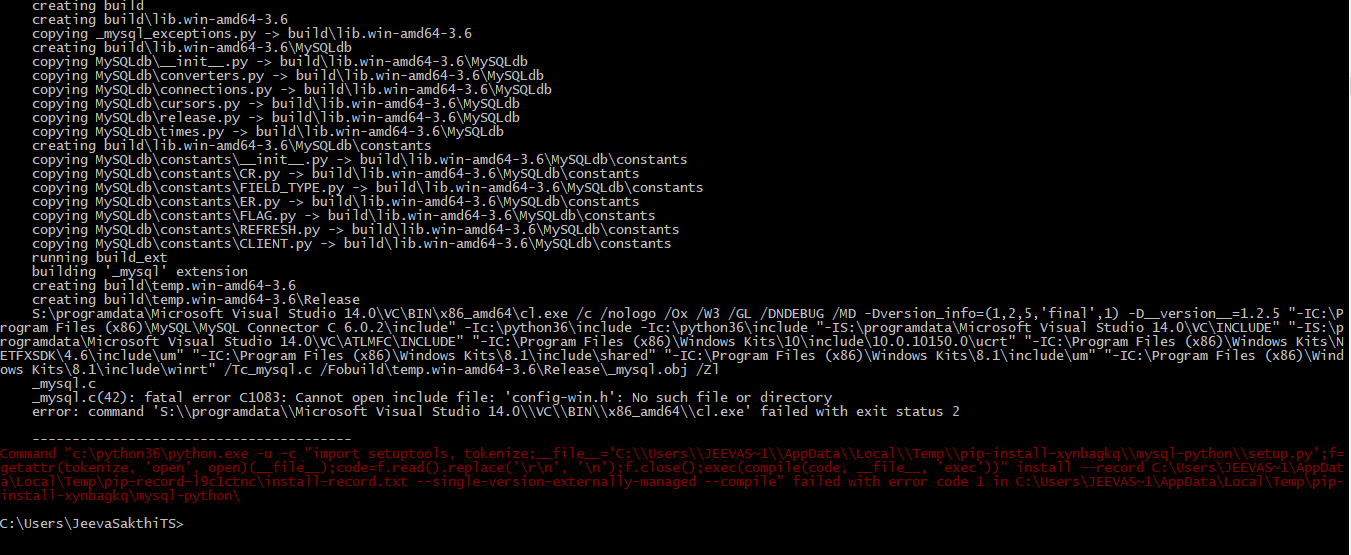
how do i solve this error help to solve
 jeevasakthits
on 27 Feb 2019
jeevasakthits
on 27 Feb 2019
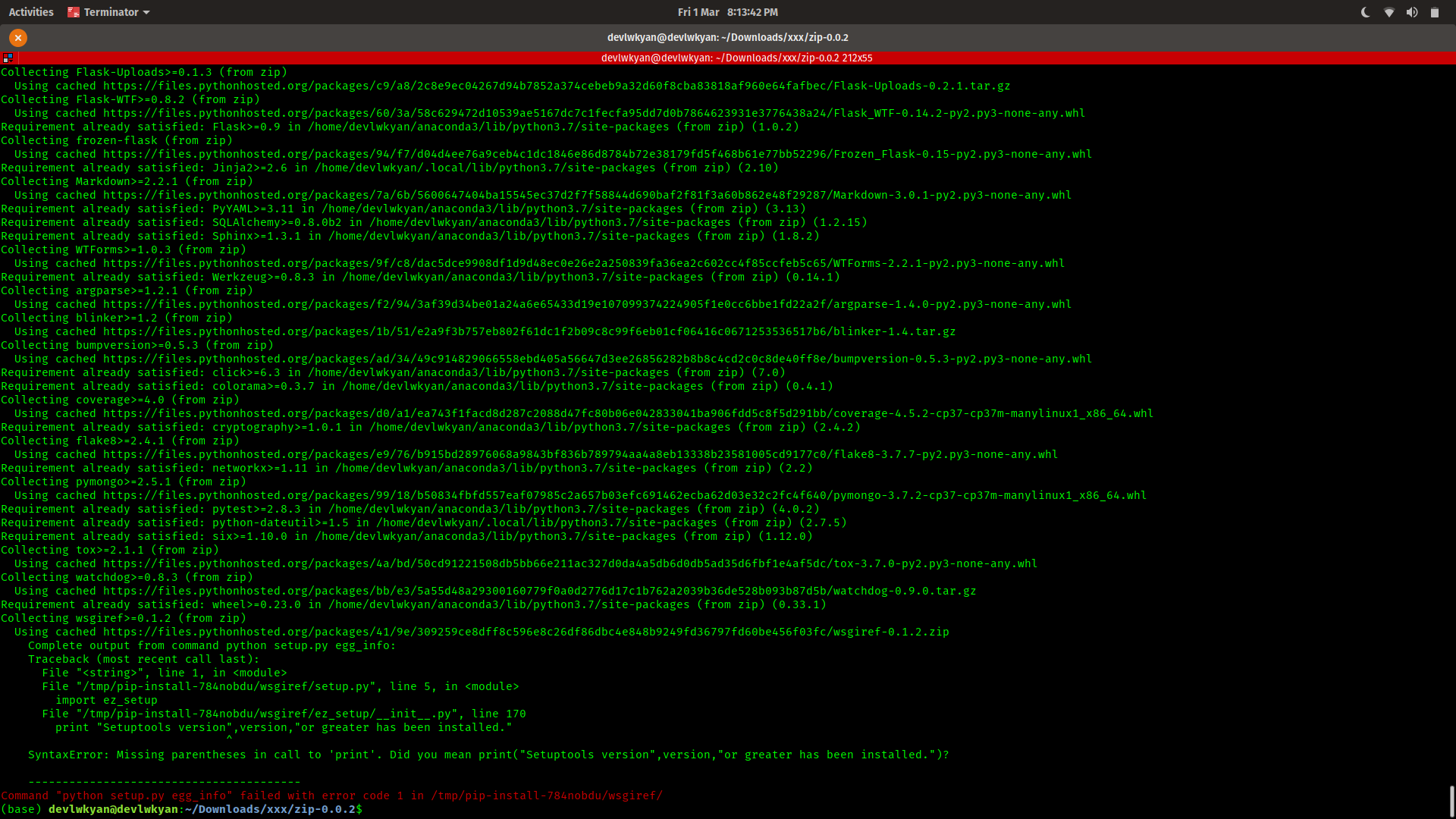
I have this issue every time I try installing zip. How can I fix it?
[I've already tried upgrading setuptools and pip, still doesn't work)
 devlwkyan
on 2 Mar 2019
devlwkyan
on 2 Mar 2019
for me, upgrading pip worked.
pip install --upgrade pip
then install the desired library.
 aliyilmazz
on 4 Mar 2019
aliyilmazz
on 4 Mar 2019
Upgraded pip still not working (I'm using pyhton 2.7.12 and pip 19.0.3 ).
 paablux
on 11 Mar 2019
paablux
on 11 Mar 2019
it`s amazing, so cool
 wangyapeng
on 14 Mar 2019
wangyapeng
on 14 Mar 2019
My problems was related to permissions. My setuptools was installed using sudo. The following helped
sudo pip uninstall setuptools
pip install setuptools
Then installation worked just fine
 jaakkomutikainen
on 25 Mar 2019
jaakkomutikainen
on 25 Mar 2019
None of the above solutions worked for me, until I found one of the solutions suggested here:
The command is simply as follows:
sudo apt-get install python3-setuptools
 thomasernste
on 26 Mar 2019
thomasernste
on 26 Mar 2019
@thomasernste solution was what made it work for me :)
 lucas0
on 26 Mar 2019
lucas0
on 26 Mar 2019
The issue I had was related to /bin/sh: 1: mysql_config: not found
To fix that on a Debian base system I ran sudo apt install libmariadbclient-dev-compat
Hope that can help others :)
 clintonm9
on 9 Apr 2019
clintonm9
on 9 Apr 2019
confusing thread with so many different answer/solution to the problem!
 vishalvisd
on 18 Apr 2019
vishalvisd
on 18 Apr 2019
Maybe you can try :
ubuntu: apt-get install -y libkrb5-dev krb5-doc
centos: yum install -y krb5-devel
 marksugar
on 24 Apr 2019
marksugar
on 24 Apr 2019
please help
'pip install git+git://github.com/gunthercox/chatterbot-corpus@master'
Command "python setup.py egg_info" failed with error code 1 in C:\Users\PRINZCHUKZ\AppData\Local\Temp\pip-req-build-jm4uoru6\
 PrinceChukz
on 24 Apr 2019
PrinceChukz
on 24 Apr 2019
Use pip3 instead of pip....It worked for me.
pip3 install neuralpy
 akashdoifode13
on 25 Apr 2019
akashdoifode13
on 25 Apr 2019
After all these steps.
you can tryout this : https://pypi.org/project/mysqlclient/
You guys can also check it out. as suggested by the mysqlclient git repo.
which mysql_config
/usr/local/bin/mysql_config
vim /usr/local/bin/mysql_config
go to 112 line number or find libs="$libs -l "
and replace it with this or comment the old one
libs="$libs -lmysqlclient -lssl -lcrypto"
Then tryout the
pip install mysqlclient
 baloda
on 26 Apr 2019
baloda
on 26 Apr 2019
For Centos (7), use
yum install mariadb-devel solves the problem.
To check which library contains this command? -> use yum provides mysql_config.
 jsrpy
on 20 May 2019
jsrpy
on 20 May 2019
sudo apt install libcurl4-openssl-dev libssl-dev
SOLVES THIS PROBLEM
 ccysfn
on 20 May 2019
ccysfn
on 20 May 2019
run
sudo python3 -m pip install --upgrade pip
sudo python3 -m pip install --upgrade setuptools
is consolved with me
 tower111
on 7 Jun 2019
tower111
on 7 Jun 2019
On debian these additional packages resolved same issue for me:
apt install libmysqlclient-dev python-mysqldbseems almost same as @Khotso-t solution
I took it from here:
https://github.com/micheloosterhof/cowrie/blob/master/doc/sql/README.md
That solved my problem!! Thank you very much!
 NetoSantiago
on 16 Jun 2019
NetoSantiago
on 16 Jun 2019
i have the same problem when i try install wirtualenvwrapper
ERROR: Complete output from command python setup.py egg_info:
    ERROR: Download error on https://pypi.org/simple/pbr/: [X509] no certificate or crl found (_ssl.c:3728) -- Some packages may not be found!
    Couldn't find index page for 'pbr' (maybe misspelled?)
    Download error on https://pypi.org/simple/: [X509] no certificate or crl found (_ssl.c:3728) -- Some packages may not be found!
    No local packages or working download links found for pbr
    Traceback (most recent call last):
      File "<string>", line 1, in <module>
      File "/tmp/pip-install-2s94zqvk/virtualenvwrapper/setup.py", line 7, in <module>
        pbr=True,
      File "/usr/local/lib/python3.6/dist-packages/setuptools/__init__.py", line 144, in setup
        _install_setup_requires(attrs)
      File "/usr/local/lib/python3.6/dist-packages/setuptools/__init__.py", line 139, in _install_setup_requires
        dist.fetch_build_eggs(dist.setup_requires)
      File "/usr/local/lib/python3.6/dist-packages/setuptools/dist.py", line 717, in fetch_build_eggs
        replace_conflicting=True,
      File "/usr/local/lib/python3.6/dist-packages/pkg_resources/__init__.py", line 782, in resolve
        replace_conflicting=replace_conflicting
      File "/usr/local/lib/python3.6/dist-packages/pkg_resources/__init__.py", line 1065, in best_match
        return self.obtain(req, installer)
      File "/usr/local/lib/python3.6/dist-packages/pkg_resources/__init__.py", line 1077, in obtain
        return installer(requirement)
      File "/usr/local/lib/python3.6/dist-packages/setuptools/dist.py", line 784, in fetch_build_egg
        return cmd.easy_install(req)
      File "/usr/local/lib/python3.6/dist-packages/setuptools/command/easy_install.py", line 673, in easy_install
        raise DistutilsError(msg)
    distutils.errors.DistutilsError: Could not find suitable distribution for Requirement.parse('pbr')
    ----------------------------------------
ERROR: Command "python setup.py egg_info" failed with error code 1 in /tmp/pip-install-2s94zqvk/virtualenvwrapper/
SYSTEM: WSL
root@LTKAZ-NM1002:/# lsb_release -a
No LSB modules are available.
Distributor ID: Ubuntu
Description:    Ubuntu 18.04.2 LTS
Release:        18.04
Codename:       bionic
root@LTKAZ-NM1002:/# pip -V
pip 19.1.1 from /usr/local/lib/python3.6/dist-packages/pip (python 3.6)


md5-20faf9f194e5824f69cbe2472051e70d


root@LTKAZ-NM1002:/# python -V
Python 3.6.8


md5-20faf9f194e5824f69cbe2472051e70d


root@LTKAZ-NM1002:/# sudo pip install setuptools
Requirement already satisfied: setuptools in /usr/local/lib/python3.6/dist-packages (41.0.1)
like you see last version of pip and setuptools. but i still have:
ERROR: Command "python setup.py egg_info" failed with error code 1 in /tmp/pip-install-2s94zqvk/virtualenvwrapper/
 bankauskas
on 19 Jun 2019
bankauskas
on 19 Jun 2019
Try this.It solved my problem
sudo apt-get install libpcap-dev libpq-dev
Thanks ..this solved it for me :)
 Amr-Elnemr
on 30 Jun 2019
Amr-Elnemr
on 30 Jun 2019
sudo apt-get install python3.6-dev libmysqlclient-dev
doesn't work for python 3.7.
ERROR: Could not find a version that satisfies the requirement python3.7.3-dev (from versions: none)
ERROR: No matching distribution found for python3.7.3-dev
 fareesa1
on 13 Jul 2019
fareesa1
on 13 Jul 2019
Try this.It solved my problem
sudo apt-get install libpcap-dev libpq-dev
solved my prooblem too
 kailas93
on 20 Jul 2019
kailas93
on 20 Jul 2019
In my case the error was due outdated pip version so I run pip3 install --upgrade pip and solved my problem
 Cicko
on 22 Jul 2019
Cicko
on 22 Jul 2019
I have a problem when installing pybloom.
Collecting pybloom
  Downloading https://files.pythonhosted.org/packages/1a/82/a1ad015bdc19bd7e10aa97070329b84b5e01c0c6b5de88df664a98413eed/pybloom-1.1.tar.gz
ERROR: Complete output from command python setup.py egg_info:
    ERROR: Traceback (most recent call last):
      File "<string>", line 1, in <module>
      File "/tmp/pip-install-oygjgi1z/pybloom/setup.py", line 2, in <module>
        from ez_setup import use_setuptools
      File "/tmp/pip-install-oygjgi1z/pybloom/ez_setup.py", line 98
        except pkg_resources.VersionConflict, e:
^
SyntaxError: invalid syntax
    ----------------------------------------
**ERROR: Command "python setup.py egg_info" failed with error code 1 in /tmp/pip-install-oygjgi1z/pybloom/**
Is there any way to solve?
 Minyanaing
on 23 Jul 2019
Minyanaing
on 23 Jul 2019
Ubuntu 18.04:
sudo pip3 install setuptools
 ThoreauHenry
on 6 Aug 2019
ThoreauHenry
on 6 Aug 2019
To install fbprophet on AWS Sagemaker Jupyter Notebook:
!conda install -c plotly plotly==3.10.0 --yes
!conda install -c conda-forge fbprophet --yes
from fbprophet import Prophet
Prophet()
 amintapan
on 29 Aug 2019
amintapan
on 29 Aug 2019
Use pip3 instead of pip....It worked for me.
pip3 install neuralpy
This worked for me in Ubuntu 16.04
 abhijithshaji
on 24 Sep 2019
abhijithshaji
on 24 Sep 2019
Salut les amis ce lien à marché chez moi
https://stackoverflow.com/questions/49862527/command-python-setup-py-egg-info-failed-with-error-code-1-in-tmp-pip-install
 Domtry
on 10 Oct 2019
Domtry
on 10 Oct 2019
for me, upgrading pip worked.
pip install --upgrade pipthen install the desired library.
thanks, brother, it works for me
 AbdelrahmanElsaid
on 18 Oct 2019
AbdelrahmanElsaid
on 18 Oct 2019
You are missing the devel packages. Please post the complete error.
 saurav955
on 23 Oct 2019
saurav955
on 23 Oct 2019
for all pip3 install setuptools might help
 mebsahle
on 29 Oct 2019
mebsahle
on 29 Oct 2019
The issue I had was related to
/bin/sh: 1: mysql_config: not foundTo fix that on a Debian base system I ran
sudo apt install libmariadbclient-dev-compatHope that can help others :)
This worked for me !!
Try this.
 KulvinderSingh26
on 23 Dec 2019
KulvinderSingh26
on 23 Dec 2019
In my case pip install --upgrade setuptools worked, and then i install spaCy.
Thank you
 nor5
on 23 Dec 2019
nor5
on 23 Dec 2019
Hi, following link solved my problem
googleapis/google-cloud-python#3884
You should try pip install --upgrade setuptools.
grateful, solved !!
 eduardokt-maker
on 8 Jan 2020
eduardokt-maker
on 8 Jan 2020
In my case i tried to install pattern and I did not have installed mysql-server, this commands worked for me.
sudo apt-get install mysql-server
sudo apt-get install libmysqlclient-dev
 SergioBravoSantos
on 6 Feb 2020
SergioBravoSantos
on 6 Feb 2020
sudo apt install libcurl4-openssl-dev libssl-dev
SOLVES THIS PROBLEM
worked for me! thanks
 canardaaydin
on 8 Feb 2020
canardaaydin
on 8 Feb 2020
for me, upgrading pip worked.
pip install --upgrade pip
then install the desired library.thanks, brother, it works for me
Worked for me too.
 dhsdshdhk
on 9 Feb 2020
dhsdshdhk
on 9 Feb 2020
sudo python -m pip install --upgrade --force pip
sudo pip install setuptools==33.1.1
 Wapiti08
on 14 Feb 2020
Wapiti08
on 14 Feb 2020
I tried several of the suggestions above - on my Debian 10 vbox the solution was as follows from terminal:
apt install libmariadb-dev-compat libmariadb-dev
Afterwards, I was able to run "pip install mysqlclient" without issue.
 clintlemons
on 3 Mar 2020
clintlemons
on 3 Mar 2020
You should try the following commends
First do thissudo pip3 uninstall numpy sudo pip3 uninstall scipyThen
sudo apt-get install python3.5-dev libmysqlclient-dev
sudo apt-get install python3-numpy
It should works
Thanks a lot! Worked for me. I tried to install numpy on RHEL with pip -- did not work. Then I did what you said but for python 2 (directly without pip) -- and OK now.
shell command: sudo yum install python2-numpy
 rashidskh
on 5 Apr 2020
rashidskh
on 5 Apr 2020
My error looked like this:
``` Complete output from command python setup.py egg_info:
Traceback (most recent call last):
File "
File "/tmp/pip-build-htcsrjjg/cynetworkx/setup.py", line 18, in
from Cython.Build import cythonize
ModuleNotFoundError: No module named 'Cython'
----------------------------------------
Command "python setup.py egg_info" failed with error code 1 in /tmp/pip-build-htcsrjjg/cynetworkx/
```
Can be fixed with pip install Cython.
 irazakharchenko
on 23 May 2020
irazakharchenko
on 23 May 2020
My error looked like this:
    Traceback (most recent call last):
      File "<string>", line 1, in <module>
      File "/tmp/pip-build-htcsrjjg/cynetworkx/setup.py", line 18, in <module>
        from Cython.Build import cythonize
    ModuleNotFoundError: No module named 'Cython'

    ----------------------------------------
Command "python setup.py egg_info" failed with error code 1 in /tmp/pip-build-htcsrjjg/cynetworkx/
Can be fixed with
pip install Cython.
Thank you, this worked for me
 jakesev
on 29 May 2020
jakesev
on 29 May 2020
run
sudo python3 -m pip install --upgrade pip
sudo python3 -m pip install --upgrade setuptools
is consolved with me
It helped in my case, thanks a lot man!
 Victor-Nikliaiev
on 5 Jun 2020
Victor-Nikliaiev
on 5 Jun 2020
In my case the error was due outdated pip version so I run
pip3 install --upgrade pipand solved my problem
thanks a lot , it worked in my case
 arbaleast
on 12 Aug 2020
arbaleast
on 12 Aug 2020
sudo apt-get install python3.6-dev libmysqlclient-dev
does this work pls neep it!!!!
 eyuelbuzz
on 15 Aug 2020
eyuelbuzz
on 15 Aug 2020
pip3 install --upgrade pip
pip install --upgrade pip
 rk39051
on 19 Aug 2020
rk39051
on 19 Aug 2020
Ubuntu 18:
Error:
Command "python setup.py egg_info" failed with error code 1 in /tmp/pip-build-21n4nz0j/grpcio/
Fix:
pip install --upgrade setuptools
pip install --upgrade pip
 connershoop
on 23 Sep 2020
connershoop
on 23 Sep 2020
Ubuntu 18:
Error:
Command "python setup.py egg_info" failed with error code 1 in /tmp/pip-build-21n4nz0j/grpcio/Fix:
pip install --upgrade setuptools
pip install --upgrade pip
Thank you, you're awesome.
 bgillcode
on 30 Sep 2020
bgillcode
on 30 Sep 2020
sudo python3 -m pip install -U pip
sudo python3 -m pip install -U setuptools
i use this solved it
 cotyyang
on 5 Nov 2020
cotyyang
on 5 Nov 2020
I tried most of the above-mentioned solutions but non of them worked. I resolved this after upgrading my pip using the below command.
pip3 install --upgrade pip
 zeeshan-sardar
on 27 Nov 2020
zeeshan-sardar
on 27 Nov 2020
python3 -m pip install jupyter
if you want to install jupyter.
 ShakeelAhmad-dev
on 6 Dec 2020
ShakeelAhmad-dev
on 6 Dec 2020
Related issues
 StuartGordonReid
·
27Comments
StuartGordonReid
·
27Comments
 triciascully
·
26Comments
triciascully
·
26Comments
 TheLeanAcademic
·
18Comments
TheLeanAcademic
·
18Comments
 jaredlander
·
26Comments
jaredlander
·
26Comments
 gkourogiorgas
·
32Comments
gkourogiorgas
·
32Comments
Most helpful comment
Hi, following link solved my problem
https://github.com/GoogleCloudPlatform/google-cloud-python/issues/3884
You should try pip install --upgrade setuptools.